
A directory listing describing a cancellation-letter and mailing-address service. The configured public GitHub repository returned 404 during source verification.
Repository stats unavailable
Developer Tools
A Model Context Protocol server that lets LLMs control iOS simulators through natural language commands.
MCP Server for iOS Simulator is cataloged as an MCP server attributed to inditextech. A Model Context Protocol server that lets LLMs control iOS simulators through natural language commands. It is categorized under developer tools. See the capability inspector for recorded interfaces and their independent review status; consult upstream documentation for the current interface.
Installation configuration is not reviewed. No executable setup is offered for this entry; inspect the source repository before proceeding.
Catalog license label: Apache-2.0. Check the source repository's current license and terms before using, modifying or distributing this software.
能力定义尚未审核。未核验的采集内容不会作为可信接口展示。
暂无可展示的已审核记录。这不表示上游不支持此能力。
暂无可展示的已审核记录。这不表示上游不支持此能力。
暂无可展示的已审核记录。这不表示上游不支持此能力。
Email delivery is not connected. This page does not collect email addresses or create subscriptions.
Browse the registry for current listings instead.
Reviews for MCP Server for iOS Simulator are not available yet
Review publishing and storage are not connected. This page does not collect or publish ratings or comments, including after sign-in.
Yes, the package can be used as a library, and importing deep component modules avoids starting the MCP server on import.
It requires macOS, Node.js v20.0.0 or higher, Homebrew, and Xcode with iOS simulators installed.
README.md · ea97e3fd893d · 采集于 2026-11-13 09:36:02 UTC
保留上游原文,不做 AI 改写。为安全起见过滤脚本、表单和不安全链接。
当前显示最后一次成功采集的文档快照,请以来源页面为准。
A Model Context Protocol (MCP) server that enables LLMs to interact with iOS simulators through natural language commands.
This MCP server provides a bridge between Large Language Models (LLMs) and iOS simulators, offering comprehensive control through natural language commands. Here's what it can do:
For detailed usage, see the Installation guide and Supported Commands sections. You can use this server either through direct MCP integration or as a standalone library.
Check out the Architecture section to understand how the components work together to enable natural language control of iOS simulators. For the full execution flow, component contracts, and the session model, see ARCHITECTURE.md. Guidance for agents and contributors working on this repository is in AGENTS.md.
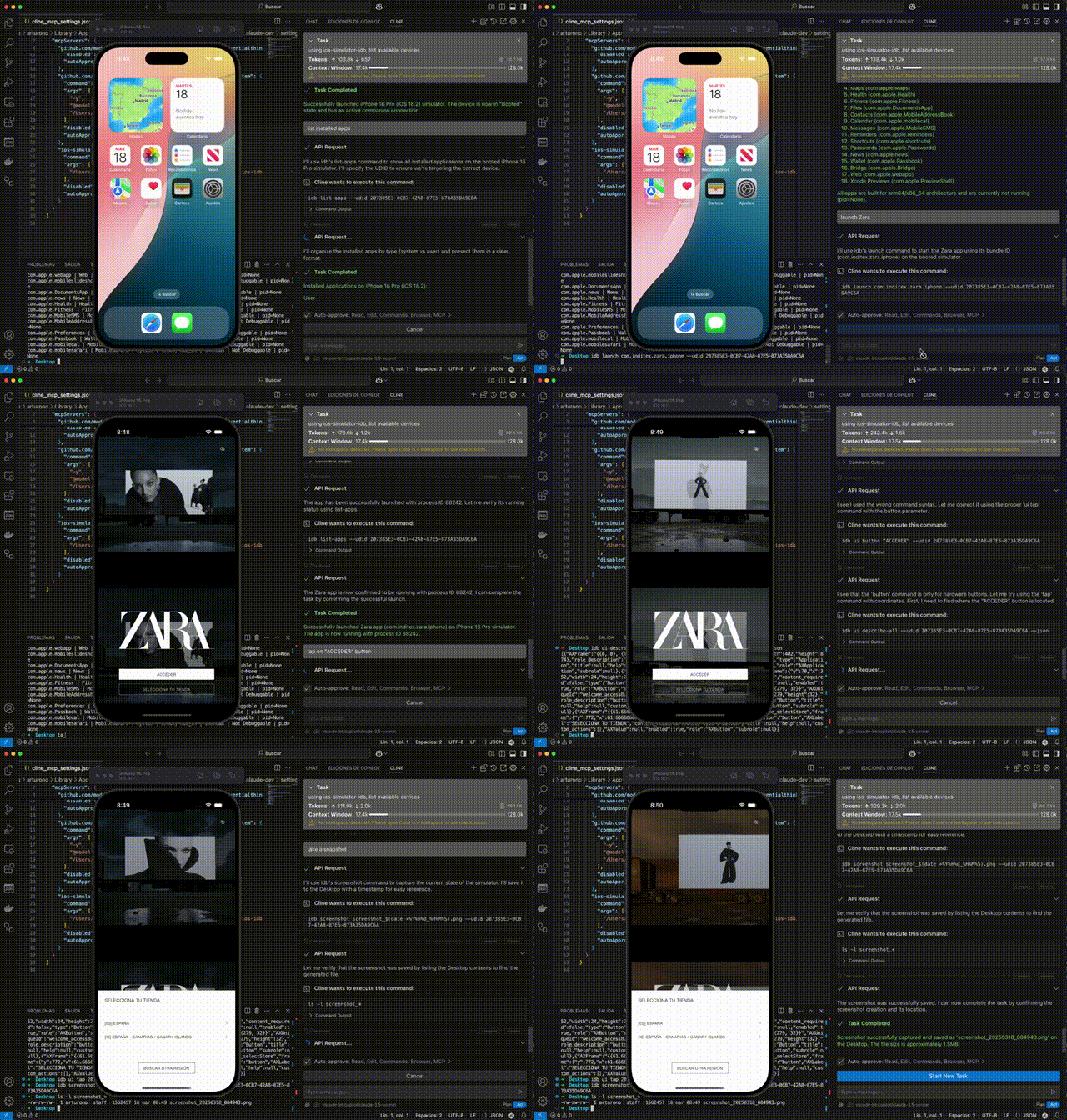
For detailed usage, see the Installation guide and Supported Commands sections. You can use this server either through direct MCP integration or as a standalone library.
Check out the Architecture section to understand how the components work together to enable natural language control of iOS simulators.
The easiest way to install this server is through Cline:
Add this mcp to cline https://github.com/InditexTech/mcp-server-simulator-ios-idb
Alternatively, you can install it manually:
# Clone the repository
git clone https://github.com/InditexTech/mcp-server-simulator-ios-idb.git
cd mcp-server-simulator-ios-idb

# Create and activate Python virtual environment
python3 -m venv venv
source venv/bin/activate  # On Unix/macOS

# Install dependencies
npm install

# Build the project
npm run build

# Start the project
npm start

# Run tests
npm test
The installation process will automatically:
Note: Make sure to keep the virtual environment activated while using the server. If you close your terminal and come back later, you'll need to reactivate the virtual environment with the source venv/bin/activate command before running npm start.
To use this server with Claude or other LLM assistants:
{
  "mcpServers": {
    "ios-simulator": {
      "command": "node",
      "args": ["/path/to/mcp-server-simulator-ios-idb/dist/index.js"],
      "env": {}
    }
  }
}
create a simulator session with iPhone 14
install app /path/to/my-app.ipa
launch app com.example.myapp
tap at 100, 200
take a screenshot
You can also use this package as a library in your own projects:
⚠️ Import side effects: importing the package entry point (
'mcp-server-simulator-ios-idb'/dist/index.js) runs the server startup code at module load: it overrides console output, creates alogs/directory, registersSIGINT/SIGTERM/exception handlers, and starts the MCP stdio server unconditionally. There is currently no opt-out. This applies to any import of the package root — named imports do not opt out of the bootstrap. To use the parser/orchestrator/manager without transport and signal side effects, import the compiled component modules by deep path as shown below (dist/...); note that importingdist/mcp/mcp-server.jsalso bootstraps the MCP server singleton, so avoid that path for library use. The package only declares"main"(noexportsmap), so deep paths resolve normally.
// Deep imports of compiled component modules: these do NOT trigger the
// package root startup (no MCP stdio server, no signal handlers).
import { MCPOrchestrator } from 'mcp-server-simulator-ios-idb/dist/orchestrator/MCPOrchestrator.js';
import { NLParser } from 'mcp-server-simulator-ios-idb/dist/parser/NLParser.js';
import { IDBManager } from 'mcp-server-simulator-ios-idb/dist/idb/IDBManager.js';

async function main() {
  // Compose the components (equivalent to createMCPServer internals)
  const idbManager = new IDBManager();
  const parser = new NLParser();
  const orchestrator = new MCPOrchestrator(parser, idbManager);

  // Process natural language commands

  // Create a simulator session
  const sessionResult = await orchestrator.processInstruction('create session');
  console.log(`Session created: ${sessionResult.data}`);

  // Interact with the simulator
  await orchestrator.processInstruction('tap at 100, 200');

  // Capture a screenshot
  const screenshotResult = await orchestrator.processInstruction('take screenshot');
  console.log(`Screenshot saved at: ${screenshotResult.data}`);
}

main().catch(console.error);
ℹ️ The MCP server itself (currently defined in
src/mcp/mcp-server.ts, not re-exported from the package entry point) is only meaningful when running the actual server process vianpm start/ an MCP client config; itscreateMCPServer()factory simply composes the same three components shown above.
You can also use the individual components directly via deep imports:
import { IDBManager } from 'mcp-server-simulator-ios-idb/dist/idb/IDBManager.js';

// Create instance and use it directly
const idbManager = new IDBManager();

const sessionId = await idbManager.createSimulatorSession({
  deviceName: 'iPhone 12',
  platformVersion: '15.0'
});

await idbManager.tap(sessionId, 100, 200);
mcp-server-simulator-ios-idb/
├── src/                      # Source code
│   ├── adapters/             # Adapter components
│   ├── idb/                  # IDB manager implementation
│   ├── mcp/                  # MCP server implementation
│   ├── orchestrator/         # Command orchestrator
│   ├── parser/              # Natural language parser
│   └── index.ts             # Main entry point
├── scripts/                 # Installation scripts
├── package.json            # Project configuration
└── tsconfig.json          # TypeScript configuration
The NLParser supports the following natural language commands:
| Command | Description | Example |
|---|---|---|
| Create session | Creates a new simulator session | "create session", "create simulator iPhone 12" |
| Terminate session | Terminates the current session | "terminate session", "close simulator" |
| List simulators | Lists available simulators | "list simulators", "show simulators" |
| List booted simulators | Lists running simulators | "list booted simulators", "show running simulators" |
| Boot simulator | Boots a simulator by UDID | "boot simulator 5A321B8F-4D85-4267-9F79-2F5C91D142C2" |
| Shutdown simulator | Shuts down a simulator | "shutdown simulator 5A321B8F-4D85-4267-9F79-2F5C91D142C2" |
| Focus simulator | Brings simulator window to front | "focus simulator", "bring simulator to front" |
| List simulator sessions | Lists active simulator sessions | "list simulator sessions", "show active sessions" |
| Command | Description | Example |
|---|---|---|
| Install app | Installs an app on the simulator | "install app /path/to/app.ipa" |
| Launch app | Launches an app on the simulator | "launch app com.example.app" |
| Terminate app | Terminates a running app | "terminate app com.example.app" |
| Uninstall app | Uninstalls an app | "uninstall app com.example.app" |
| List apps | Lists installed applications | "list apps", "show installed apps" |
| Check if app installed | Checks if an app is installed | "is app com.example.app installed" |
| Command | Description | Example |
|---|---|---|
| Tap | Taps at specific coordinates | "tap at 100, 200" |
| Swipe | Performs a swipe gesture | "swipe from 100, 200 to 300, 400" |
| Press button | Presses a device button | "press button HOME", "press button SIRI" |
| Input text | Types text | "input text Hello World" |
| Press key | Presses a key by code | "press key 4" |
| Press key sequence | Presses a sequence of keys | "press key sequence 4 5 6" |
| Command | Description | Example |
|---|---|---|
| Describe elements | Lists all accessibility elements (not implemented yet) | "describe all elements", "show accessibility elements" |
| Describe point | Describes element at coordinates (not implemented yet) | "describe point 100, 200", "what's at 150, 300" |
| Command | Description | Example |
|---|---|---|
| Take screenshot | Captures a screenshot | "take screenshot", "capture screen" |
| Record video | Records screen activity (not implemented yet) | "record video /path/output.mp4" |
| Stop recording | Stops video recording (not implemented yet) | "stop recording", "stop video recording" |
| Get logs | Retrieves system or app logs | "get logs", "get logs for com.example.app" |
| Command | Description | Example |
|---|---|---|
| Start debug | Starts a debug session (not implemented yet) | "debug app com.example.app", "start debug com.example.app" |
| Stop debug | Stops a debug session (not implemented yet) | "stop debug", "terminate debug session" |
| Debug status | Gets debug session status | "debug status", "show debug info" |
| Command | Description | Example |
|---|---|---|
| List crash logs | Lists available crash logs | "list crash logs", "show crash logs" |
| Show crash log | Shows content of a crash log | "show crash log crash_2023-01-01" |
| Delete crash logs | Deletes crash logs of an app, or all of them when asked explicitly | "delete crash logs for com.example.app", "delete all crash logs" |
| Command | Description | Example |
|---|---|---|
| Install dylib | Installs a dynamic library | "install dylib /path/to/library.dylib" |
| Open URL | Opens a URL in the simulator | "open url https://example.com" |
| Clear keychain | Clears the simulator's keychain | "clear keychain" |
| Set location | Sets the simulator's location | "set location 37.7749, -122.4194" |
| Add media | Adds media to the camera roll | "add media /path/to/image.jpg" |
| Approve permissions | Approves app permissions | "approve permissions com.example.app photos camera" |
| Update contacts | Updates contacts database | "update contacts /path/to/contacts.sqlite" |
The interface supports all commands available in the idb CLI tool, providing a comprehensive set of operations for iOS simulator automation.
The server consists of three main components:
These components are connected through adapters:
The complete execution flow (MCP stdio → orchestrator → parser/registry → adapters → IDBManager → idb / xcrun simctl), component contracts, the session model (activeSessionId vs sessionId → UDID), and a checklist for adding new commands are documented in ARCHITECTURE.md.
To use this server with the Model Context Protocol:
{
  "mcpServers": {
    "ios-simulator": {
      "command": "node",
      "args": ["/path/to/mcp-server-simulator-ios-idb/dist/index.js"],
      "env": {}
    }
  }
}
const result = await useMcpTool({
  serverName: "ios-simulator",
  toolName: "process-instruction",
  arguments: {
    instruction: "create simulator session"
  }
});
This project would not be possible without facebook/idb, which provides the underlying iOS simulator control capabilities. We extend our sincere gratitude to the Facebook/Meta team and all contributors to the idb project for creating and maintaining such a powerful and reliable tool.
This tool is available as open source under the terms of the Apache-2.0.
Claim this server with your GitHub account to request manual ownership verification.
Link to the catalog listing for MCP Server for iOS Simulator from your README. This badge does not certify ownership, compatibility or security.
[](https://awesome-mcp.com/servers/mcp-server-simulator-ios-idb)Public repository statistics could not be verified. Check the configured source address; unavailable counts are not zero.
来源、范围和时段分别列出;不相加,不代表安装人数、活跃用户或安全审核。
尚无已审核的包 / 镜像标识,暂不展示下载统计。
Alternative and complementary servers in the same category
A directory listing describing a cancellation-letter and mailing-address service. The configured public GitHub repository returned 404 during source verification.

A hosted MCP service for browsing and searching through Singapore mobile-network proxies.

A directory listing describing a Markdown-to-PDF service. The configured public GitHub repository returned 404 during source verification.