
A directory listing describing a cancellation-letter and mailing-address service. The configured public GitHub repository returned 404 during source verification.
Repository stats unavailable
Developer Tools
A collection of TypeScript MCP server implementations (stdio, SSE, Streamable HTTP) and corresponding clients, including an OAuth2 authorization example with a resource server.
MCP Demo TypeScript: Local, SSE, Streamable HTTP and Authorized MCP Servers is cataloged as an MCP server attributed to 0itsuki0. A collection of TypeScript MCP server implementations (stdio, SSE, Streamable HTTP) and corresponding clients, including an OAuth2 authorization example with a resource server. It is categorized under developer tools. See the capability inspector for recorded interfaces and their independent review status; consult upstream documentation for the current interface.
Installation configuration is not reviewed. No executable setup is offered for this entry; inspect the source repository before proceeding.
Catalog license label: Not specified. Check the source repository's current license and terms before using, modifying or distributing this software.
能力定义尚未审核。未核验的采集内容不会作为可信接口展示。
暂无可展示的已审核记录。这不表示上游不支持此能力。
暂无可展示的已审核记录。这不表示上游不支持此能力。
暂无可展示的已审核记录。这不表示上游不支持此能力。
Email delivery is not connected. This page does not collect email addresses or create subscriptions.
Browse the registry for current listings instead.
Reviews for MCP Demo TypeScript: Local, SSE, Streamable HTTP and Authorized MCP Servers are not available yet
Review publishing and storage are not connected. This page does not collect or publish ratings or comments, including after sign-in.
It exposes a create-mcp-server-app tool; running it creates a new MCP server project with sample code in the desktop folder.
It provides a protected resource metadata discovery endpoint and requires authorization to access features such as connections, messaging, and tools; JWT tokens are validated based on RFC9068.
README.md · 348f3e346a98 · 采集于 2026-11-13 11:33:27 UTC
保留上游原文,不做 AI 改写。为安全起见过滤脚本、表单和不安全链接。
当前显示最后一次成功采集的文档快照,请以来源页面为准。
For more details, please refer to my article:
An MCP server that exposes a create-mcp-server-app tool to MCP hosts.
By running this tool, either with Claude for Desktop or some other host, a new project for creating an MCP server with necessary set ups and sample code will be created in the desktop folder.
Sample Code will include the following.
npm install to install necessary dependencynpm run build to build the projectbuild/index.js will the server path to set up in the MCP host~/Library/Application Support/Claude/claude_desktop_config.json
{
    "mcpServers": {
        "create-mcp-app": {
            "command": "node",
            "args": [
                "/absolute-path-to/build/index.js"
            ]
        }
    }
}
An OpenAI-chatbot host that uses MCP clients to connect to MCP servers.
OPENAI_API_KEY in .env.server-config.json.{
"some-server-name-1": {
"command": "node",
"args": [
"/absolut-path-to-local-server-folder-1/build/index.js"
]
},
"some-server-name-2": {
"command": "uv",
"args": [
"--directory",
"/absolut-path-to-local-server-folder-2",
"run",
"main.py"
]
}
}
npm install to install necessary dependencynpm run build to build the projectnode build/index.jsAn MCP server that is able to connect to multiple client with SSEServerTransport.
npm install to install necessary dependency/connect, and that for messaging will be /messages.npm run build to build the projectnode build/index.js. This will start a localhost listenining to port 3000.An MCP client connect to remote server with SSEClientTransport.
npm install to install necessary dependencyhttp://localhost:3000/connect.npm run build to build the projectnode build/index.js.An MCP server that is able to connect to multiple client with StreamableHTTPServerTransport.
This server supports:
npm install to install necessary dependency/mcp.npm run build to build the projectnode build/index.js. This will start a localhost listenining to port 3000.An MCP client connect to remote server with SSEClientTransport.
Upon start, the client will
npm install to install necessary dependencyhttp://localhost:3000/mcp.npm run build to build the projectnode build/index.js.This demo is created conforming the new MCP Authorization specifciation where the Authorization Server and Resource server are seperated and the flow consists of four roles
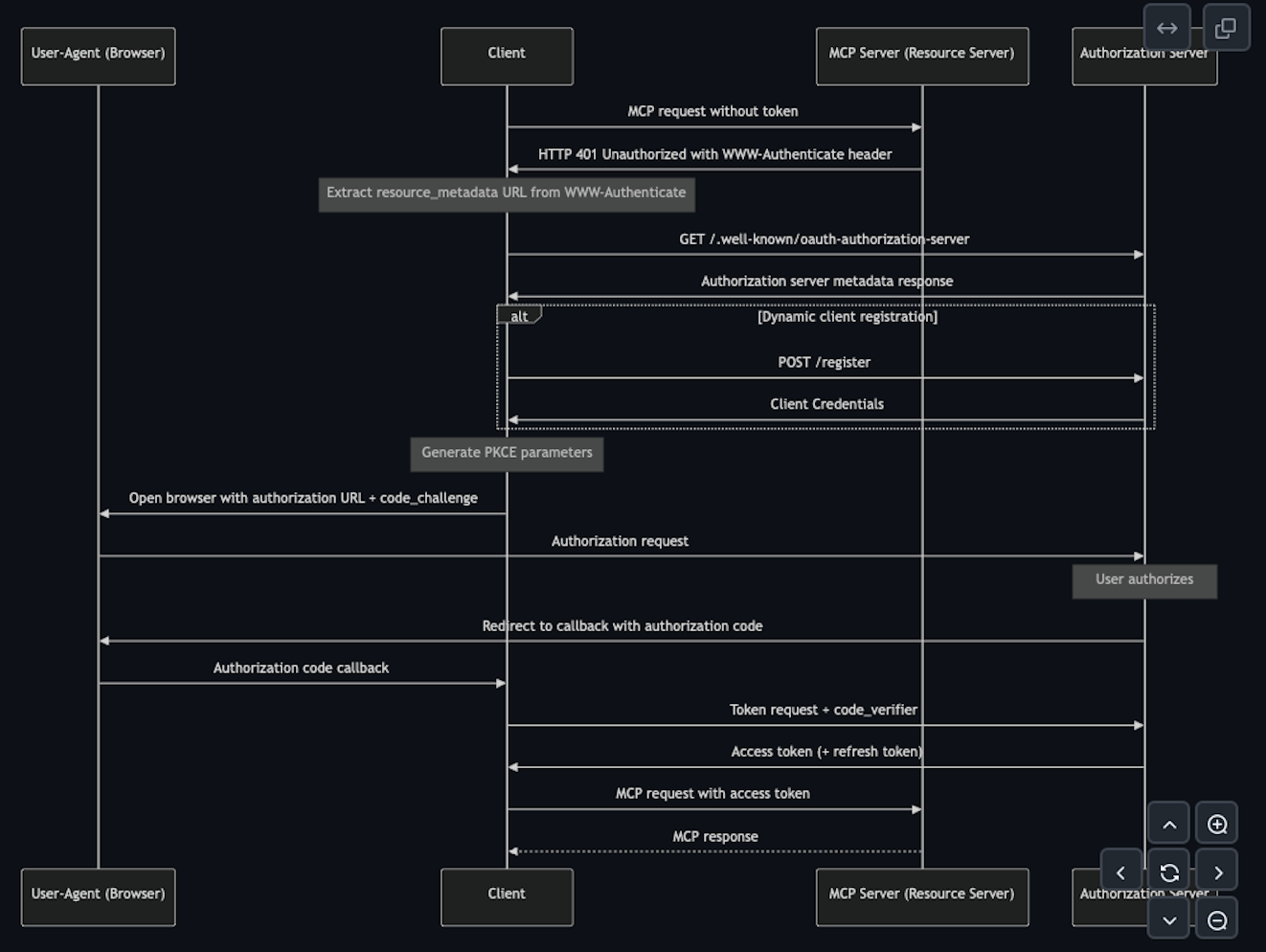
An OAuth2 authorization server with dynamic client registration implemented using the node-oauth/oauth2-server library.
NOTE: For simplification, instead of an actual database, runtime variables are used in the example to store code/token/user data.
Basic implementations for the following endpoints are provided conforming to the IETF specifications.
GET, shows a simple login form to collect user information that will POST to the same endpoint to start authorization flow./.well-known/oauth-authorization-server for Server Metadata discoveryredirect_uriA Remote MCP Resource Server using StreamableHTTPServerTransport.
/.well-known/oauth-protected-resource end point for Protected Resource Metadata discoveryThe access token required will be in the form of an JWT Token and the validation is performed by checking the signature, header, and payloads based on the specification(RFC9068).
Errors are handled based on Error Response specification using the WWW-Authenticate Response Header Field
An MCP client connect to remote server with StreamableHTTPClientTransport and providing an OAuthClientProvider to handle authorization as needed.
By using an OAuthClientProvider, the SDK will
OAuthClientProvider.tokens) if there is any or try to connect without specifying any authorization parameters.OAuthClientProvider is then used to start the authorization flow and an UnauthorizedError will be thrown from connect or the function we used to send messages.Internal authorization flow managed by OAuthClientProvider:
OAuthClientProvider.clientInformation to try to load any existing client id and secretOAuthClientProvider.saveClientInformation to save the registered client informationOAuthClientProvider.redirectToAuthorization with the authorization urltransport.finishAuth with the authorization code, exchange the code for access token.Upon start, the client will
UnauthorizedError and OAuthClientProvider.redirectToAuthorization called, start a local server to receive authorization call back and open the browser with the authorization urlStreamableHTTPClientTransport.finishAuth with the authorization code to have the SDK to exchange the code for an access token toFor those who want to manage authorization using other libraries, I have also included some sample code on how to perform the enitre authorization flow using openid-client.
Since the current Typescript SDK is not supporting the authorization flow from the newest authorization specification yet, I have forked the repository and added some changes.
PS: I have created a PR for it if anyone is being super nice and wants to give it a review!
To test out the examples in this demo
tsconfig, remove dist from exclude. Ie: "exclude": ["node_modules"]npm run buildChange the following as needed in .env.
CIPHER_KEYCIPHER_IVCIPHER_KEY_ENCODINGCIPHER_IV_ENCODINGACCESS_TOKEN_SIGN_ALGORITHMACCESS_TOKEN_SIGN_SECRETChange the following as needed in .
AUTHORIZATION_SERVER_PORTAUTHORIZATION_SERVER_HOSTNAMEAUTHORIZATION_SERVER_PROTOCOLOAUTH_ROUTER_ENDPOINTAUTHORIZE_ENDPOINTTOKEN_ENDPOINTOTHER_ERROR_ENDPOINTREVOCATION_ENDPOINTREGISTRATION_ENDPOINTAUTH_METHODSGRANT_TYPESMCP_SCOPERESPONSE_TYPESCODE_CHALLENGE_METHODSACCESS_TOKEN_LIFETIMEREFRESH_TOKEN_LIFETIMERESOURCE_SERVER_PORTRESOURCE_SERVER_PROTOCOLRESOURCE_SERVER_HOSTNAMEMCP_ENDPOINTCLIENT_SERVER_PORTCLIENT_SERVER_HOSTNAMECLIENT_SERVER_PROTOCOLCLIENT_SERVER_CALLBACK_PATHRun npm run dev to
Run npm run dev:as to
Run npm run dev:rs to
Run npm run dev:client to
Claim this server with your GitHub account to request manual ownership verification.
Link to the catalog listing for MCP Demo TypeScript: Local, SSE, Streamable HTTP and Authorized MCP Servers from your README. This badge does not certify ownership, compatibility or security.
[](https://awesome-mcp.com/servers/mcp-server-template-akoskm)GitHub API evidence checked 2026-11-13 13:11:32.351Z (UTC). Repository-level counts are shared by all components, not individual server installs. Open issues including pull requests: 0.
来源、范围和时段分别列出;不相加,不代表安装人数、活跃用户或安全审核。
尚无已审核的包 / 镜像标识,暂不展示下载统计。
Alternative and complementary servers in the same category
A directory listing describing a cancellation-letter and mailing-address service. The configured public GitHub repository returned 404 during source verification.

A hosted MCP service for browsing and searching through Singapore mobile-network proxies.

A directory listing describing a Markdown-to-PDF service. The configured public GitHub repository returned 404 during source verification.