
A stateless streamable HTTP MCP server for interacting with the official source of government spending data.
Repository stats unavailable
Finance & Analytics
An MCP server that retrieves real-time stock data, company information, and historical price data via the Yahoo Finance API, paired with a FastAPI web UI.
MCP server for Yahoo Finance stock data is cataloged as an MCP server attributed to quartermaine. An MCP server that retrieves real-time stock data, company information, and historical price data via the Yahoo Finance API, paired with a FastAPI web UI. It is categorized under finance crypto. See the capability inspector for recorded interfaces and their independent review status; consult upstream documentation for the current interface.
Installation configuration is not reviewed. No executable setup is offered for this entry; inspect the source repository before proceeding.
Catalog license label: MIT License. Check the source repository's current license and terms before using, modifying or distributing this software.
能力定义尚未审核。未核验的采集内容不会作为可信接口展示。
暂无可展示的已审核记录。这不表示上游不支持此能力。
暂无可展示的已审核记录。这不表示上游不支持此能力。
暂无可展示的已审核记录。这不表示上游不支持此能力。
Email delivery is not connected. This page does not collect email addresses or create subscriptions.
Browse the registry for current listings instead.
Reviews for MCP server for Yahoo Finance stock data are not available yet
Review publishing and storage are not connected. This page does not collect or publish ratings or comments, including after sign-in.
It is powered by Azure OpenAI.
Yes, the README describes integrating the server with GitHub Copilot in Visual Studio Code.
README.md · acedfe79ec2a · 采集于 2026-11-13 12:59:10 UTC
保留上游原文,不做 AI 改写。为安全起见过滤脚本、表单和不安全链接。
当前显示最后一次成功采集的文档快照,请以来源页面为准。
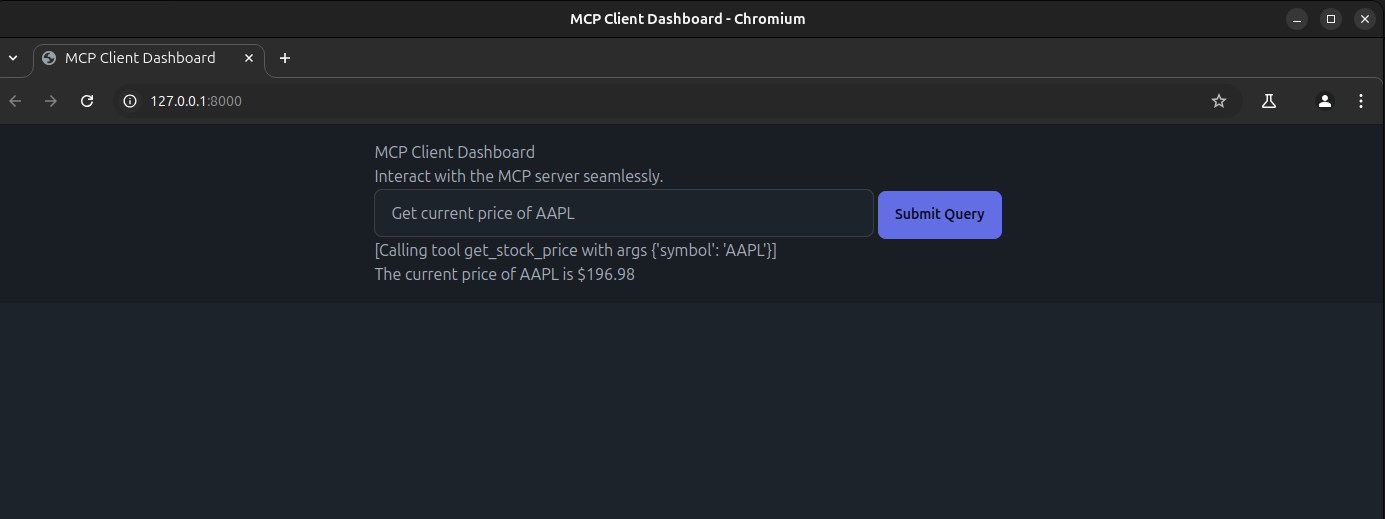
The MCP Yahoo Finance Server is a tool designed to fetch real-time stock data, company information, and historical price data using the Yahoo Finance API. It integrates with the Multi-Client Protocol (MCP) framework to provide seamless communication between clients and the server. The project also includes a web-based UI built using FastAPI and DaisyUI components , enabling users to interact with the server through an intuitive interface
Before proceeding, ensure you have cloned the repository:
git clone https://github.com/quartermaine/mcp-server-yahoo-finance.git
cd <repository-directory>
Before you begin, ensure you have the following tools installed:
Update your package list and install pipx:
sudo apt update
sudo apt install pipx
pipx ensurepath
Install uv using the official installation script:
wget -qO- https://astral.sh/uv/install.sh | sh
After running the above command, make sure to source the environment variables by running:
source $HOME/.local/bin/env
Create a new project directory:
mkdir mcp-client
cd mcp-client
Create a virtual environment using uv:
uv venv
Activate the virtual environment:
source .venv/bin/activate
Install required dependencies:
uv add fastapi jinja2 uvicorn mcp anthropic python-dotenv openai yfinance
To build and run the application using Docker, follow these steps:
Use the docker build command to create a Docker image. Replace <tag_name> with a name of your choice (e.g., mcp-finance):
docker build -t <tag_name> .
Example:
docker build -t mcp-finance .
Use the docker run command to start the container. Map port 8000 on your host machine to port 8000 in the container:
docker run -p 8000:8000 <tag_name>
Example:
docker run -p 8000:8000 mcp-finance
After running the container, navigate to the URL printed in the terminal logs (e.g., http://0.0.0.0:8000) to access the web-based
To run the Yahoo Finance MCP server, execute the following command in one terminal with the activated environment:
uv run yahoo_finance.py
In another terminal with the activated environment, start the FastAPI app (UI) using Uvicorn:
uvicorn main:app --reload
After running this command, Uvicorn will print a log message with the URL where the app is running, typically:
INFO: Uvicorn running on http://127.0.0.1:8000 (Press CTRL+C to quit)
Open the provided link (http://127.0.0.1:8000) in your browser to access the UI built with DaisyUI components
This project uses Azure OpenAI as the Language Model (LLM) provider. To configure the necessary parameters, follow these steps:
Create a .env File:
Copy the .env.example file to create a .env file:
cp .env.example .env
Set Azure OpenAI Parameters:
Open the .env file and set the following environment variables:
AZURE_OPEN_AI_API_VERSION=<your_api_version>
AZURE_OPEN_AI_ENDPOINT=<your_endpoint>
AZURE_OPEN_AI_API_KEY=<your_api_key>
AZURE_OPEN_AI_DEPLOYMENT_MODEL=<your_deployment_model>
Replace <your_api_version>, <your_endpoint>, <your_api_key>, and <your_deployment_model> with your actual Azure OpenAI credentials.
Verify the .env File:
Ensure the .env file is correctly formatted and contains all required parameters. Example:
AZURE_OPEN_AI_API_VERSION=2023-05-15
AZURE_OPEN_AI_ENDPOINT=https://<your-resource-name>.openai.azure.com/
AZURE_OPEN_AI_API_KEY=12345abcdef67890ghijklmnopqrstuvwxyz
AZURE_OPEN_AI_DEPLOYMENT_MODEL=gpt-4
Load Environment Variables:
The python-dotenv library automatically loads the .env file when running the server or client. Ensure the .env file is located in the root directory of your project.
To integrate the MCP Yahoo Finance Server with GitHub Copilot in Visual Studio Code, follow these steps:
Create a shell script named start-mcp.sh to activate the virtual environment and start the server. Add the following content to the file:
#!/bin/bash

# Navigate to the project directory
cd /<path_to>/mcp-server-yahoo-finance || { echo "Directory not found"; exit 1; }

# Activate the virtual environment
source .venv/bin/activate || { echo "Failed to activate virtual environment"; exit 1; }

# Run the server
uv run yahoo_finance.py || { echo "Failed to start server"; exit 1; }
Make the script executable:
chmod +x /<path_to>/start_mcp.sh
Create a .vscode/mcp.json file in the root of your project directory with the following content:
{
    "servers": {
        "my-mcp-server": {
            "type": "stdio",
            "command": "/<path_to>/start-mcp.sh",
            "args": []
        }
    }
}
This configuration tells VS Code to use the start-mcp.sh script to start the MCP server.
To add the the server to your copilot and use the tools in mcp server
see more in the official site
Query:
Query: Get current price of AAPL
Response:
The current price of AAPL is $202.52
Query:
Query: Get company information for AAPL
Response:
Company Name: Apple Inc.
Sector: Technology
Industry: Consumer Electronics
Country: United States
Market Cap: $2,700,000,000,000
Employees: 164,000
Website: https://www.apple.com
Query:
Query: Get historical data for AAPL from 2023-01-01 to 2023-01-31
Response:
Date: 2023-01-03
Open: $130.00
High: $132.00
Low: $129.50
Close: $131.75
Volume: 1,234,567

---
Date: 2023-01-04
Open: $131.75
High: $133.00
Low: $130.50
Close: $132.50
Volume: 1,123,456
Enhance Error Handling:
Add Support for Additional APIs:
Optimize Performance:
Documentation:
This project is licensed under the MIT License. See the LICENSE file for details.
Claim this server with your GitHub account to request manual ownership verification.
Link to the catalog listing for MCP server for Yahoo Finance stock data from your README. This badge does not certify ownership, compatibility or security.
[](https://awesome-mcp.com/servers/mcp-server-yahoo-finance-quartermaine)Public repository statistics could not be verified. Check the configured source address; unavailable counts are not zero.
来源、范围和时段分别列出;不相加,不代表安装人数、活跃用户或安全审核。
尚无已审核的包 / 镜像标识,暂不展示下载统计。
Alternative and complementary servers in the same category
A stateless streamable HTTP MCP server for interacting with the official source of government spending data.

A hosted, remote MCP server for Fortnox that lets AI assistants answer questions from a company's bookkeeping and propose changes for approval before writing them.

OptimistFi is a read-only remote MCP server that provides perpetual futures market data, perps prop firm rules and pricing, and US equity investment research.