
A directory listing describing a cancellation-letter and mailing-address service. The configured public GitHub repository returned 404 during source verification.
Repository stats unavailable
Developer Tools
An MCP server that loads TypeDoc-generated JSON documentation and lets AI agents explore TypeScript APIs through query endpoints.
MCP-Typescribe is cataloged as an MCP server attributed to yworks. An MCP server that loads TypeDoc-generated JSON documentation and lets AI agents explore TypeScript APIs through query endpoints. It is categorized under developer tools. See the capability inspector for recorded interfaces and their independent review status; consult upstream documentation for the current interface.
Installation configuration is not reviewed. No executable setup is offered for this entry; inspect the source repository before proceeding.
Catalog license label: MIT. Check the source repository's current license and terms before using, modifying or distributing this software.
能力定义尚未审核。未核验的采集内容不会作为可信接口展示。
暂无可展示的已审核记录。这不表示上游不支持此能力。
暂无可展示的已审核记录。这不表示上游不支持此能力。
暂无可展示的已审核记录。这不表示上游不支持此能力。
Email delivery is not connected. This page does not collect email addresses or create subscriptions.
Browse the registry for current listings instead.
Reviews for MCP-Typescribe are not available yet
Review publishing and storage are not connected. This page does not collect or publish ratings or comments, including after sign-in.
It loads TypeDoc-generated JSON documentation for querying.
The server provides a search_by_description tool that searches JSDoc comments.
The server provides a get_type_hierarchy tool that shows inheritance relationships.
README.md · 7b3385f46e47 · 采集于 2026-11-13 07:46:33 UTC
保留上游原文,不做 AI 改写。为安全起见过滤脚本、表单和不安全链接。
当前显示最后一次成功采集的文档快照,请以来源页面为准。
[!CAUTION] Public development is currently suspended as no active community formed. We are working on a follow-up project, specifically for the yFiles API. You can read more, here: yFiles MCP Server. yFiles developers can use the MCP to query API, development guides, source code snippets and recipes using those tools, instead. They work far better than the implementation in this repository.

Large Language Models (LLMs) have made incredible strides in code generation and developer productivity. However, they face a key limitation: they can only reliably use APIs and libraries they’ve seen during training. This creates a bottleneck for adopting new tools, SDKs, or internal APIs — LLMs simply don’t know how to use them effectively.
While tools can be given source code access (when interacting with APIs for which the sources are available) or access to documentation files (e.g. typescript type definition files), this doesn't scale well for large APIs. LLMs need a more efficient way to learn more about an API. Putting all the documentation into context for every request is inefficient, unfeasible, and leads to poor results.
Larger new or internal APIs remain "invisible" to LLMs.
Developers must manually guide LLMs or provide example usage.
Innovation is slowed by the lag between an API’s release and its widespread understanding by AI tools.
This project is an open-source implementation of the Model Context Protocol (MCP)—a protocol designed to provide LLMs with contextual, real-time access to information. In this case it's the API documentation, and particularly for now in this project TypeScript definitions.
Parse TypeScript (and other) definitions into a machine-readable format.
Serve this context dynamically to LLMs through tools like Claude, Cline, Cursor, or Windsurf and other custom interfaces.
Enable agentic behavior by letting LLMs query, plan, and adapt to unfamiliar APIs without retraining.
Plug-and-play API support for LLM-based coding assistants.
Faster onboarding for new or proprietary SDKs.
A step toward more autonomous, context-aware coding agents.
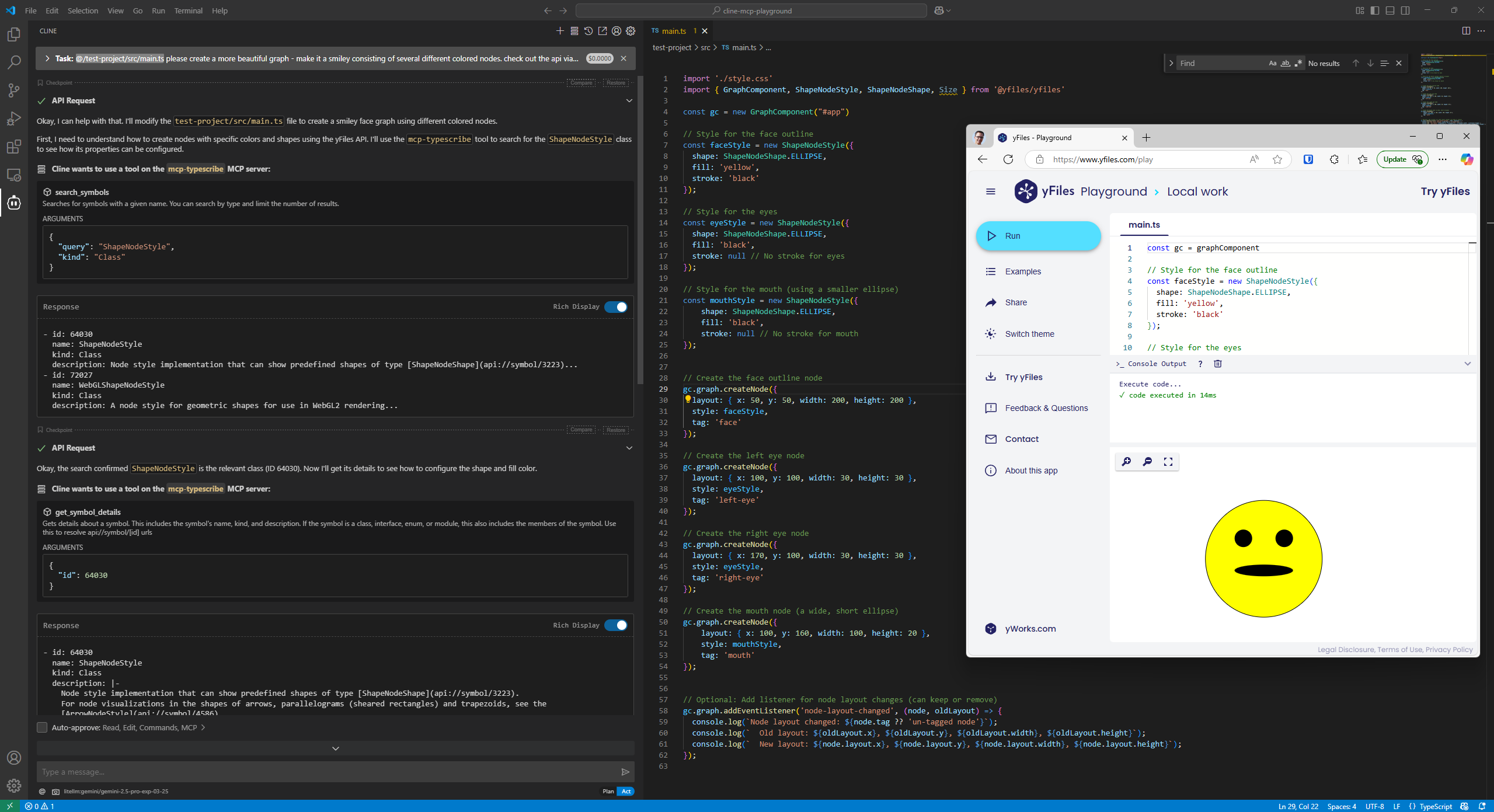
This project provides a way for AI agents to efficiently explore and understand unknown TypeScript APIs. It loads TypeDoc-generated JSON documentation and exposes it through a set of query endpoints that allow agents to search for symbols, get detailed information about specific parts of the API, and understand relationships between different components.
The server provides the following tools for querying the API:
search_symbols: Find symbols by name with optional filtering by kindget_symbol_details: Get detailed information about a specific symbollist_members: List methods and properties of a class or interfaceget_parameter_info: Get information about function parametersfind_implementations: Find implementations of interfaces or subclassessearch_by_return_type: Find functions returning a specific typesearch_by_description: Search in JSDoc commentsget_type_hierarchy: Show inheritance relationshipsfind_usages: Find where a type/function is usednpm install
Generate TypeDoc JSON for your TypeScript API:
npx typedoc --json docs/api.json --entryPointStrategy expand path/to/your/typescript/files
If you (only) have an existing.d.ts file, you can create an api json file like so:
Create a separate tsconfig.docs.json:
{
  "extends": "./tsconfig.json",
  "files": ["existing.d.ts"],
  "typedocOptions": {
    "entryPoints": ["existing.d.ts"],
    "json": "docs/api.json",
    "pretty": false
  }
}
Then do
npx typedoc --tsconfig tsconfig.docs.json
Build the project:
npm run build
Explore the MCP server:
npx @modelcontextprotocol/inspector node ./dist/mcp-server/cli.js run-server docs/api.json
Connect an AI agent to the server to query the API
E.g. with cline in VSCode, specify the following MCP server in cline_mcp_settings.json:
{
  "mcpServers": {
    "typescribe": {
      "command": "npx",
      "args": [
        "-y",
        "mcp-typescribe@latest",
        "run-server",
        "<PATH_TO_API_DOT_JSON>"
      ],
      "env": {}
    }
  }
}
Enable the server and likely auto-approve the various tools. Tell the agent to use the "typescribe" tool to learn about your API.
src/sample-api/: A sample TypeScript API for testing - it uses a weird German-like dialect for the API names to test that the LLM does not hallucinate the APIsrc/mcp-server/: The MCP server implementation
utils/: Utility functionsschemas/: JSON schemas for the MCP toolscore/: Core functionalityserver.ts: The MCP server implementationindex.ts: Entry point for the library exportscli.ts: the entry point for the CLI/binarytests/: Tests for the API functionalitynpm test
npm run build
MIT
Copyright 2025 yWorks GmbH - https://www.yworks.com
Claim this server with your GitHub account to request manual ownership verification.
Link to the catalog listing for MCP-Typescribe from your README. This badge does not certify ownership, compatibility or security.
[](https://awesome-mcp.com/servers/mcp-typescribe)Public repository statistics could not be verified. Check the configured source address; unavailable counts are not zero.
来源、范围和时段分别列出;不相加,不代表安装人数、活跃用户或安全审核。
尚无已审核的包 / 镜像标识,暂不展示下载统计。
Alternative and complementary servers in the same category
A directory listing describing a cancellation-letter and mailing-address service. The configured public GitHub repository returned 404 during source verification.

A hosted MCP service for browsing and searching through Singapore mobile-network proxies.

A directory listing describing a Markdown-to-PDF service. The configured public GitHub repository returned 404 during source verification.