
A modular FastMCP server for interacting with Microsoft Graph API, supporting advanced queries for users, sign-in logs, MFA status, and privileged users.
Repository stats unavailable
Security & Secrets
A self-hosted MCP server that exposes ZAP web security scanning through MCP over streamable HTTP, offering guided scanning, findings, and reports with operator guardrails.
MCP ZAP Server is cataloged as an MCP server attributed to dtkmn. A self-hosted MCP server that exposes ZAP web security scanning through MCP over streamable HTTP, offering guided scanning, findings, and reports with operator guardrails. It is categorized under auth security. See the capability inspector for recorded interfaces and their independent review status; consult upstream documentation for the current interface.
Installation configuration is not reviewed. No executable setup is offered for this entry; inspect the source repository before proceeding.
Catalog license label: Apache License 2.0. Check the source repository's current license and terms before using, modifying or distributing this software.
能力定义尚未审核。未核验的采集内容不会作为可信接口展示。
暂无可展示的已审核记录。这不表示上游不支持此能力。
暂无可展示的已审核记录。这不表示上游不支持此能力。
暂无可展示的已审核记录。这不表示上游不支持此能力。
Email delivery is not connected. This page does not collect email addresses or create subscriptions.
Browse the registry for current listings instead.
Reviews for MCP ZAP Server are not available yet
Review publishing and storage are not connected. This page does not collect or publish ratings or comments, including after sign-in.
Scans are requested explicitly; the packaged client uses the curated guided tools for scanning and queues active scan jobs, and the starter prompt instructs the agent not to run an active scan unless asked.
API key mode is the default, with an optional JWT mode supporting refresh and revocation.
README.md · 07e2bfc05c2f · 采集于 2026-11-13 13:38:28 UTC
保留上游原文,不做 AI 改写。为安全起见过滤脚本、表单和不安全链接。
当前显示最后一次成功采集的文档快照,请以来源页面为准。

Give AI agents a safe, self-hosted ZAP operator for guided web security scans, findings, reports, and production guardrails.



Note This project is not affiliated with or endorsed by the ZAP project. It is an independent implementation.
mcp-zap-server exposes ZAP through MCP over streamable HTTP so agentic tools can run operator-controlled security workflows without brittle glue scripts or unsafe scanner access.
Use it when you want:
Full documentation: danieltse.org/mcp-zap-server
An experimental headless Apple Silicon package bundles Java and ZAP for HTTP workflows. It is a maintainer-built local preview; public downloads are not available, and supplied previews are unsigned. The private ChatGPT connection guide explains Secure MCP Tunnel prerequisites and access to a local scanner.
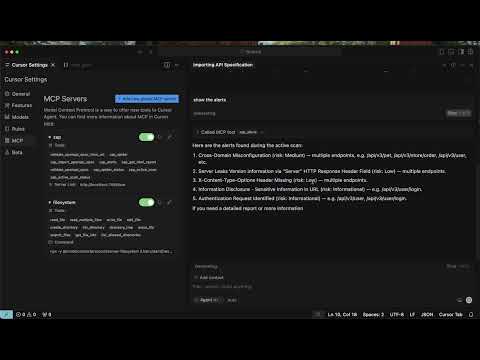
Watch the demo: browser demo or YouTube
Prerequisites:
docker compose) with --wait and --wait-timeout supportThis source selects image v0.17.1. Verify that the matching
GitHub release and Linux AMD64/ARM64
images are published before starting it. Until then, use the published v0.16.0
release or build local source through the contributor setup. Read the
0.17.1 upgrade guide before changing
an existing installation. Settings and selected versions are preserved; set
IMAGE_TAG in .env deliberately when upgrading.
Prefer to ask Codex to handle setup? Manually install the optional MCP ZAP Connect plugin, then ask it to check prerequisites, start the Docker stack, configure your private MCP connection and verify status. The skill can help install missing prerequisites with your approval, then recheck and continue setup. Scanning is a separate request. The commands below remain available without the plugin.
For Cursor Desktop Free, follow the guided Cursor setup. Use a local Agent chat with available Cursor allowance to set up the scanner, check status, then request a demo crawl and report separately.
Claude Code local preview uses the same scanner and setup skill in a local Claude Code session.
For Claude Desktop Free, follow the download, setup and first-scan guide.
The macOS MCPB preview adds agent-callable setup tools around the same Docker
scripts and reuses existing installations. Choose a
scanner release that includes
the Desktop .mcpb, matching guide and checksum files. If those assets are not
listed, use the local build instructions.
This extension is separate from the Claude Code plugin.
git clone https://github.com/dtkmn/mcp-zap-server.git
cd mcp-zap-server

./bin/bootstrap-local.sh --start
This creates missing settings, preserves existing keys and workspace data,
and starts a versioned release image. It reports ready after container health
and authenticated MCP checks pass. The packaged client uses * for the curated
guided tools; run scans only when requested. Existing settings retain their
permissions. See
quick-start permissions
for the default and optional per-client restrictions.
Use Self-Serve First Run for version selection, configuration, stopping/restarting, startup timeouts, and recovery. For source builds, use the contributor setup.
Connect your MCP client:
http://localhost:7456/mcpMCP_API_KEY from .env in the X-API-Key headerThe stack runs the MCP server, ZAP, and demo targets. Install and configure your preferred MCP client separately.
After connecting, try this first prompt:
Use the guided ZAP tools to crawl http://juice-shop:3000. Wait for the crawl
and passive analysis to finish, show a findings summary, generate an HTML
report, and read it back through MCP. Do not run an active scan.
Expect a completed crawl, a findings summary, and a report the client can
read. Use the container URL http://juice-shop:3000 for this scan; the host
preview http://localhost:3001 is for your browser. Finding counts vary;
a connection or scan error is not a clean result.
The default stack binds published ports to loopback. Review Quick Start Security before changing access or scan-target settings. Agent install notes cover setup permissions and standalone OCI use.
This source includes 0.17.1 MCP Registry metadata in
.mcp/server.json. Metadata in source does not publish a
registry version or image. Check the
MCP Registry
and use metadata from the same published version as the image you deploy.
The image includes the MCP server name expected by registry and catalog tooling.
The published 0.16.0 version and its immutable digest remain documented in the
0.16.0 release guide.
Docker Compose remains the easiest installation path because the MCP server is designed to operate with a ZAP sidecar and explicit auth keys. The OCI package metadata is for advanced standalone installs where ZAP is already running and reachable from the MCP container.
See the Client Spider guide for browser setup, authenticated guided crawling and reports.
The 0.17.1 release and upgrade guide
describes neutral recorded-findings responses, authoritative explicit target
denies, permission-aware next actions, and the local client setup options.
Publication of the tag, images, registry version and Desktop downloads must be
verified separately in GitHub Releases.
Use a version with verified published images until the matching distribution is available.
The v0.17.0 GitHub release is incomplete: its Desktop assets are absent and
its image-release workflow did not complete. See the upgrade guide for availability checks.
See the 0.16.0 release and upgrade guide for that release's behavior and requirements.
See the 0.15.0 release and upgrade guide for that release's behavior and requirements.
See the 0.14.0 release and upgrade guide for that release's behavior and requirements.
The release notes archive and changelog cover earlier versions. For changes to older MCP integrations, use Upgrading to Guided Tools. Verify the matching image and distribution in GitHub Releases before deployment.
The default posture is intentionally conservative:
api-key mode is the base runtime default.none mode is for explicit local dev/test only.profileId and targetUrl.For a first private AWS deployment without Kubernetes, use AWS EC2 with Docker Compose and its standalone example.
For Kubernetes, use the EKS infrastructure starter to create a dedicated evaluation cluster in an existing VPC, then deploy with the existing Helm chart. Follow the walkthrough for network configuration, JWT authentication, persistent storage and deployment checks.
Production and shared deployments should review:
flowchart LR
  Client["Your MCP Client"] -->|"MCP over Streamable HTTP"| MCP["MCP ZAP Server"]
  MCP -->|"ZAP API"| ZAP["ZAP"]
  ZAP -->|"scan"| Target["Authorized target app"]
  MCP -->|"reports / findings / history"| Evidence["Evidence + reports"]
For multi-replica queueing, durable Postgres state, claim recovery, and ingress affinity, use the operations docs instead of this README:
The extension API exposes selected contracts for policy, protection, evidence and metadata integrations:
mcp-zap-extension-api packages selected policy, protection, evidence, and
metadata contracts without gateway runtime internals.Extensions do not add runtime multi-engine support. Additional scanner engines require their own adapters and explicit capability boundaries.
Start here:
Scanning:
Operations:
mcp-zap-server is the Apache-2.0-licensed open-source core. It is intended to be useful on its own for self-hosted MCP and ZAP workflows.
Private or enterprise capabilities may be built as separate extensions around this core. Those extensions are not required to run the OSS project, and enterprise implementation code is not shipped in this repository.
The boundary is intentional:
If this project saves you time or becomes part of your security workflow, you can sponsor the maintainer to support ongoing maintenance.
Agentic Lab offers optional paid support for teams adopting the public core in production. Commercial support is separate from the Apache-2.0-licensed OSS distribution, and the public core should remain usable without private extensions or paid services.
Apache License 2.0. Copyright 2025-2026 Daniel Tse. See LICENSE.
Claim this server with your GitHub account to request manual ownership verification.
Link to the catalog listing for MCP ZAP Server from your README. This badge does not certify ownership, compatibility or security.
[](https://awesome-mcp.com/servers/mcp-zap-server)Public repository statistics could not be verified. Check the configured source address; unavailable counts are not zero.
来源、范围和时段分别列出;不相加,不代表安装人数、活跃用户或安全审核。
尚无已审核的包 / 镜像标识,暂不展示下载统计。
Alternative and complementary servers in the same category
A modular FastMCP server for interacting with Microsoft Graph API, supporting advanced queries for users, sign-in logs, MFA status, and privileged users.

A Model Context Protocol (MCP) server that provides programmatic access to Keycloak administration functionality.

An MCP server for LLM-driven penetration testing that wraps Kali tools and adds scope enforcement, engagement tracking, and structured output.