
A directory listing describing a cancellation-letter and mailing-address service. The configured public GitHub repository returned 404 during source verification.
Repository stats unavailable
Developer Tools
An MCP server for the ZenML API that provides tools to inspect and manage ZenML resources and trigger pipeline runs from snapshots.
ZenML MCP Server is cataloged as an MCP server attributed to zenml-io. An MCP server for the ZenML API that provides tools to inspect and manage ZenML resources and trigger pipeline runs from snapshots. It is categorized under developer tools. See the capability inspector for recorded interfaces and their independent review status; consult upstream documentation for the current interface.
Installation configuration is not reviewed. No executable setup is offered for this entry; inspect the source repository before proceeding.
Catalog license label: Not specified. Check the source repository's current license and terms before using, modifying or distributing this software.
能力定义尚未审核。未核验的采集内容不会作为可信接口展示。
暂无可展示的已审核记录。这不表示上游不支持此能力。
暂无可展示的已审核记录。这不表示上游不支持此能力。
暂无可展示的已审核记录。这不表示上游不支持此能力。
Email delivery is not connected. This page does not collect email addresses or create subscriptions.
Browse the registry for current listings instead.
Reviews for ZenML MCP Server are not available yet
Review publishing and storage are not connected. This page does not collect or publish ratings or comments, including after sign-in.
It exposes metadata about data artifacts, not the data itself.
Prompts and resources remain available in both profiles; among them are analysis prompts, bounded resource-schema endpoints, and `most_recent_runs`, which are MCP prompts or resources rather than tools.
README.md · a88e48260050 · 采集于 2026-11-13 07:55:26 UTC
保留上游原文,不做 AI 改写。为安全起见过滤脚本、表单和不安全链接。
当前显示最后一次成功采集的文档快照,请以来源页面为准。
This project implements a Model Context Protocol (MCP) server for interacting with the ZenML API.
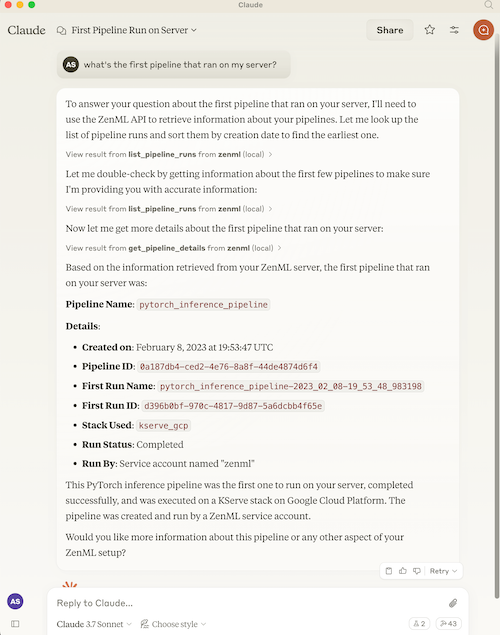
The Model Context Protocol (MCP) is an open protocol that standardizes how applications provide context to Large Language Models (LLMs). It acts like a "USB-C port for AI applications" - providing a standardized way to connect AI models to different data sources and tools.
MCP follows a client-server architecture where:
ZenML is an open-source platform for building and managing ML and AI pipelines. It provides a unified interface for managing data, models, and experiments.
For more information, see the ZenML website and our documentation.
The server provides MCP tools to access core read functionality from the ZenML server, providing a way to get live information about:
The server also allows you to trigger new pipeline runs using snapshots (preferred) or the deprecated template-based trigger parameter.
Note: We're continuously improving this integration based on user feedback. Please join our Slack community to share your experience and help us make it even better!
The default compact profile advertises 16 tools. Seven generic tools cover the
resource catalog, reads, ordinary mutations, and finite lifecycle actions:
| Tool | Purpose |
|---|---|
zenml_describe_resources | Discover supported resource types and bounded operation schemas |
zenml_list_resources | List one resource type with validated filters and pagination |
zenml_get_resource | Get one resource, with parent and project scope where required |
zenml_create_resource | Create a supported resource from a typed payload |
zenml_update_resource | Update one exact resource UUID |
zenml_delete_resource | Delete or archive one exact resource UUID |
zenml_action_resource | Run an allowlisted lifecycle or relation action without retries |
Nine focused tools remain because they provide diagnostics, active context, streamed logs or code, pipeline execution, or an interactive App:
diagnose_zenml_setupget_active_user and get_active_projecttrigger_pipelineget_step_logs, get_step_code, and get_deployment_logsopen_pipeline_run_dashboard and open_run_activity_chartget_step_logs returns at most 50,000 entries, oldest first, with a
possibly_truncated flag, plus a note saying which entries are missing and
why. Pass tail to get only the newest entries. On ZenML 0.97+ servers it
pages through the log store; on 0.96 it uses the older single-request endpoint.
Use ZENML_MCP_PROFILE=legacy when an existing client still depends on the old
entity-specific names such as list_pipeline_runs. This retains the
characterized tool-name and schema compatibility layer for ZenML 0.97.0. It
does not add support for older ZenML server versions. Use it only while
migrating: legacy response shapes may expose more operational metadata than the
compact tools, although the server omits credential-bearing configuration and
other sensitive fields from both profiles.
Registration and write access are independent:
| Profile | Policy | Advertised tools |
|---|---|---|
compact | read_write | 16 |
compact | read_only | 11 |
legacy | read_write | 57 |
legacy | read_only | 52 |
Set ZENML_MCP_WRITE_POLICY=read_only to remove all four generic mutation tools
and trigger_pipeline from MCP discovery and dispatch. Resource discovery also
omits create, update, delete, and action schemas. The older
ZENML_MCP_READ_ONLY=true setting remains accepted; invalid policy values fail
closed to read-only mode. An invalid ZENML_MCP_PROFILE stops startup with a
configuration error.
Version 2.0.0 requires MCP Python SDK 2.2.0 and ZenML 0.96.4. The compact
profile is the new default and is a breaking discovery change for clients that
call entity-specific tool names. Set ZENML_MCP_PROFILE=legacy while migrating
those clients, then move each call to the generic resource tools.
Mutation results distinguish completed, accepted, and unknown outcomes.
The server does not retry a mutation after it may have reached ZenML. For an
accepted or unknown result, follow the reconciliation instructions in the
response before deciding whether to call again. Use the named read when one is
available. Webhook creation and secret rotation can return a new signing secret
once; later reads omit it. Delete schemas state
whether an operation archives metadata, removes metadata, deprovisions a live
resource, or can delete stored artifact data.
The first 2.0 release covers ordinary operations for projects, stacks and
components, flavors, services, pipelines and runs, snapshots and templates,
deployments, artifacts and versions, models and versions, tags, connectors,
code repositories, webhooks, triggers, wait conditions, and hook invocations.
Users, schedules, service connector types, secrets, and resource requests have
the read-only coverage shown by zenml_describe_resources. It excludes ZenML
Cloud control-plane administration, Resource Manager administration, user and
credential administration, secret-value CRUD, connector login and verification,
raw webhook events, and aggregate debugging or lineage tools.
Start a generic workflow by discovering the precise schema, then calling it:
zenml_describe_resources(resource_type="pipeline_run", operation="list")
zenml_list_resources(
    resource_type="pipeline_run",
    filters={"status": "completed", "sort_by": "desc:created"},
    page=1,
    size=10,
)
Prompts and resources remain available in both profiles. The analysis prompts,
the bounded resource-schema endpoints, and most_recent_runs are MCP prompts or
resources rather than tools.
ZenML 0.97.0 retains run-template CRUD APIs. Snapshots are preferred for new
workflows. Pipeline convenience creation and the template-based trigger
parameter are deprecated. In the legacy profile, get_run_template and
list_run_templates remain available for existing clients.
The legacy tag input remains in list_run_templates for schema compatibility,
but ZenML 0.97.0 has no equivalent server-side filter. A non-null value is
rejected before the SDK call. Snapshot tag filtering remains available.
Why the change? Snapshots replaced run templates as ZenML's preferred runnable pipeline artifact. The 0.97.0 SDK still supports run-template CRUD, while new code should use snapshots.
| Legacy Pattern (Templates) | Compact Pattern (Snapshots) |
|---|---|
list_run_templates() | zenml_list_resources(resource_type="snapshot", filters={"runnable": true, "named_only": true}) |
get_run_template(name) | zenml_get_resource(resource_type="snapshot", resource_id=id) |
trigger_pipeline(template_id=...) | trigger_pipeline(snapshot_name_or_id=...) |
1. Discover project context:
   → get_active_project()

2. Find runnable snapshots:
   → zenml_list_resources(resource_type="snapshot", filters={"runnable": true, "named_only": true})

3. Trigger a run:
   → trigger_pipeline(snapshot_name_or_id="my-snapshot")

4. Check deployments:
   → zenml_list_resources(resource_type="deployment", filters={"status": "running"})
   → get_deployment_logs(name_id_or_prefix="my-deployment", tail=100)
To override parameters when triggering a runnable snapshot, pass a ZenML run configuration (the snapshot itself remains unchanged):
trigger_pipeline(
    snapshot_name_or_id="my-snapshot",
    run_configuration={
        "steps": {"train": {"parameters": {"learning_rate": 0.01}}},
        "enable_cache": False,
    },
)
For static snapshots, override step parameters as shown above. Top-level
run_configuration={"parameters": {...}} overrides pipeline function parameters
and is supported only for dynamic snapshots; ZenML rejects it for static snapshots.
Note: get_deployment_logs returns bounded output (default 100 lines, max 1000, capped at 100KB) and requires the appropriate deployer integration to be installed.
The easiest way to set up the ZenML MCP Server is through your ZenML dashboard's MCP Settings page.
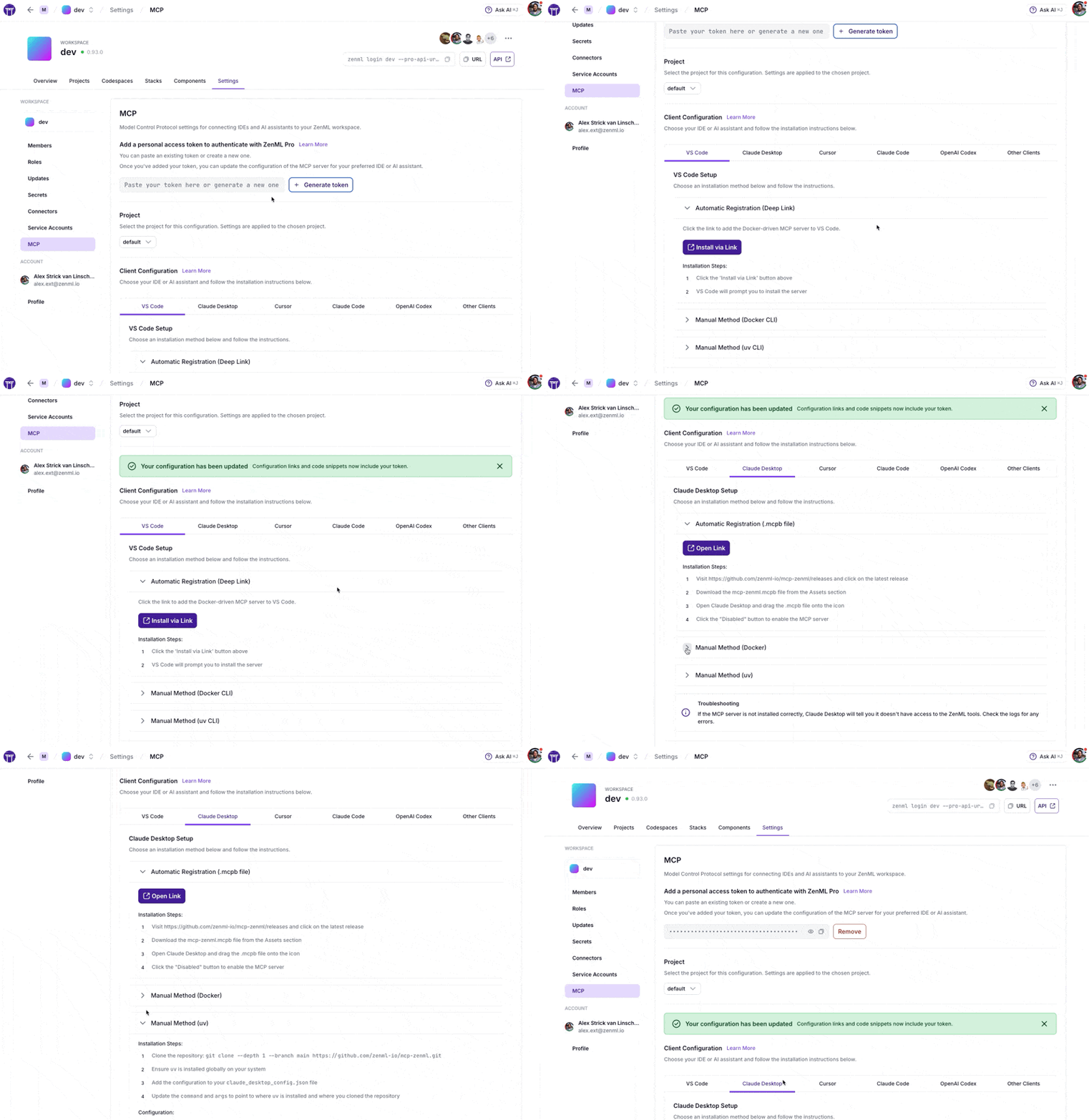
Navigate to Settings → MCP in your ZenML dashboard to get:
The MCP Settings page lets you generate a Personal Access Token (PAT) with a single click. The token is automatically included in all generated configuration snippets.
Prefer manual setup? See the detailed instructions below.
What are MCP Apps? MCP Apps are interactive HTML UIs that MCP servers can serve directly into AI clients. They render in sandboxed iframes and can call server tools bidirectionally. See the official announcement for full details.
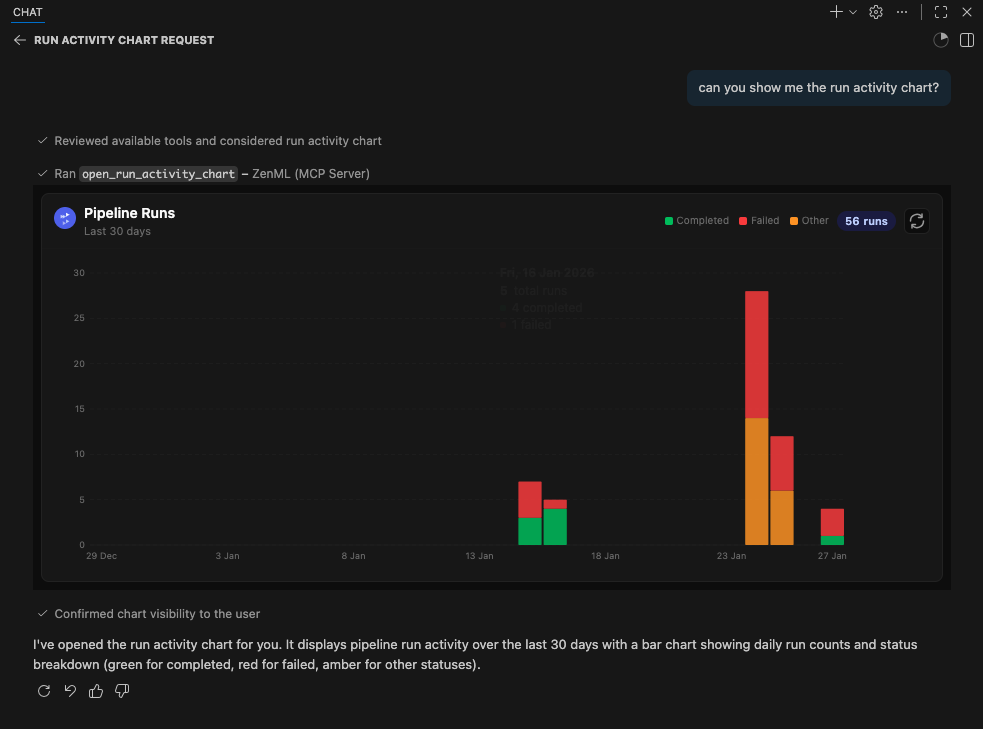
This server includes two experimental MCP Apps:
| App | Tool | Description |
|---|---|---|
| Pipeline Runs Dashboard | open_pipeline_run_dashboard | Interactive table of recent pipeline runs with status, step details, and logs |
| Run Activity Chart | open_run_activity_chart | Bar chart of pipeline run activity over the last 30 days with status breakdown |
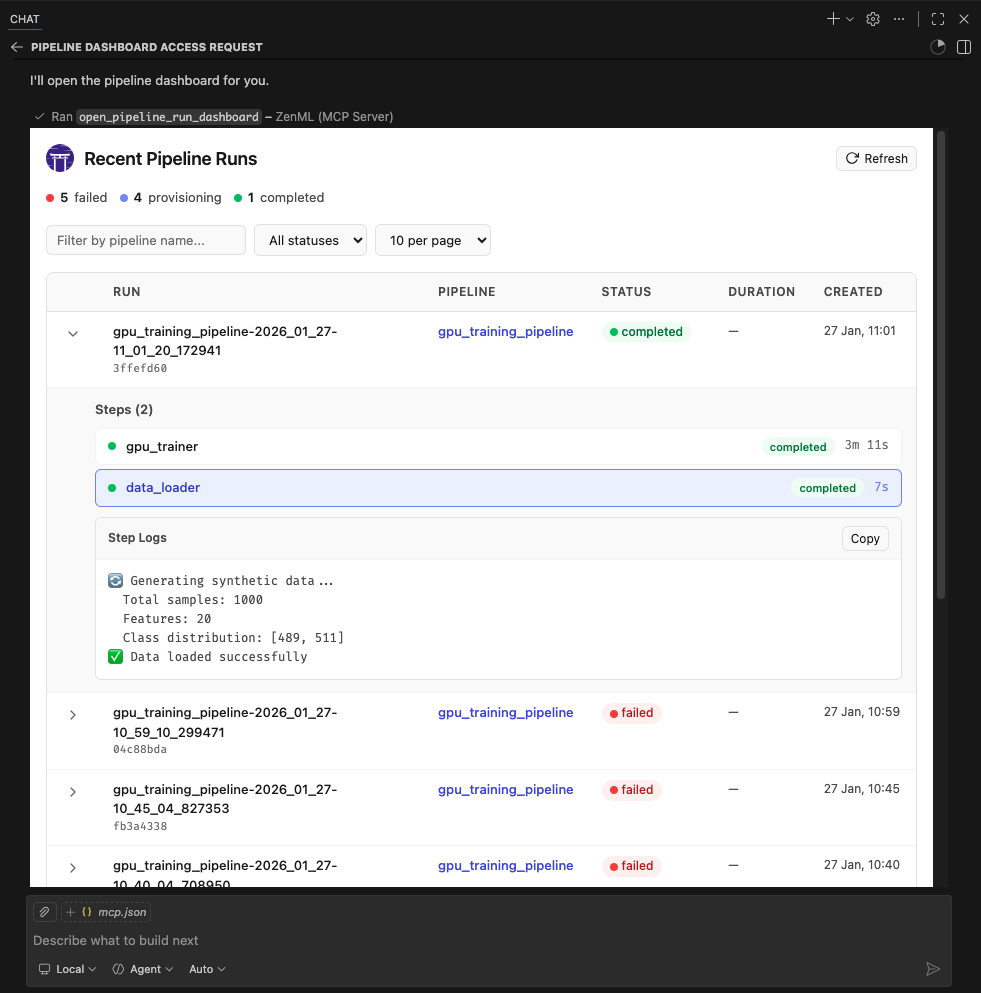
These apps are included as proof-of-concept examples. We welcome feedback and contributions for more MCP Apps. It is still early days for this new feature so we'll have to see how it evolves. We expect to support it more fully in the future.
MCP Apps require Streamable HTTP transport (not stdio). The following clients currently support MCP Apps:
Note: We were unable to test thoroughly with Claude Desktop or Claude.ai at the time of writing. If you encounter issues, please report them.
MCP Apps use Streamable HTTP. Keep the container port bound to loopback and put an authenticated reverse proxy or identity-aware access service in front of it before allowing remote access. Host and Origin validation protect against DNS rebinding; they do not authenticate callers.
1. Build and run the Docker container:
docker build -t mcp-zenml:apps .

docker run --rm -d --name mcp-zenml-apps -p 127.0.0.1:8001:8001 \
  -e ZENML_STORE_URL="https://your-zenml-server.example.com" \
  -e ZENML_STORE_API_KEY="your-api-key" \
  -e ZENML_MCP_PROFILE="compact" \
  -e ZENML_MCP_WRITE_POLICY="read_write" \
  -e ZENML_ACTIVE_PROJECT_ID="your-project-id" \
  mcp-zenml:apps --transport streamable-http --host 0.0.0.0 --port 8001 \
  --disable-dns-rebinding-protection
2. Configure authenticated remote access:
Create a named Cloudflare Tunnel, Tailscale Funnel with access controls, or an
equivalent authenticated reverse proxy. Point its private origin at
http://127.0.0.1:8001, require an identity or service credential for the
public hostname, and pass only authenticated requests to the origin. Configure
your MCP client to use the provider's supported OAuth flow or authorization
headers.
Before adding ZenML credentials to the container, verify that an unauthenticated request cannot reach MCP:
curl -i https://mcp.example.com/mcp
The response must be the access provider's 401, 403, or login redirect. A
JSON-RPC or MCP response means the perimeter is open and must be fixed first.
3. Connect your authenticated client:
{
	"servers": {
		"ZenML": {
			"url": "https://mcp.example.com/mcp",
			"type": "http"
		}
	},
	"inputs": []
}
Important notes:
ZENML_ACTIVE_PROJECT_ID is required — without it, pipeline run tools will
fail with "No project is currently set as active"--disable-dns-rebinding-protection is only appropriate when the authenticated
proxy validates the public host and the container port remains loopback-onlyZENML_MCP_WRITE_POLICY=read_only for inspection-only clientsThis project includes automated testing to ensure the MCP server remains functional:
uv run scripts/test_mcp_server.py server/zenml_server.pyThe automated tests verify:
diagnose_zenml_setup returns structured diagnostics even in constrained environmentsCredential-free CI covers every adapter through the MCP protocol. PR and release CI also start a fresh ZenML 0.97.0 OSS server on a loopback address and run persisted CRUD and same-name project-isolation receipts. The server uses a temporary configuration and database that are removed when the job exits; no repository environment, self-hosted runner, or ZenML credential is required.
ZenML's local OSS server disables authentication and its SQL store does not
support pipeline replay or external deployment infrastructure. Restricted
access and feature-enabled trigger, replay, deployment, wait-condition, and
resource-request receipts therefore remain separate opt-in gates. They require
ZENML_MCP_RESTRICTED_INTEGRATION=1 with
ZENML_MCP_RESTRICTED_API_KEY, or ZENML_MCP_ACTION_INTEGRATION=1 with the
exact disposable fixture UUIDs in ZENML_MCP_ACTION_FIXTURE, respectively. A
gated skip is not evidence that those capabilities passed. An operator can set
ZENML_MCP_REQUIRE_COMPLETE_INTEGRATION=1 to turn a missing opt-in gate into a
failure. Cloud infrastructure provisioning is never part of the default test
run.
For interactive debugging, use the MCP Inspector — a web-based tool that lets you test MCP tools in real-time:
# Using .env.local (recommended for development)
cp .env.local.example .env.local  # Then edit with your credentials
source .env.local && npx @modelcontextprotocol/inspector \
  -e ZENML_STORE_URL=$ZENML_STORE_URL \
  -e ZENML_STORE_API_KEY=$ZENML_STORE_API_KEY \
  -- uv run server/zenml_server.py
This opens a web UI with your credentials pre-filled — just click Connect and use the Tools tab to test any tool interactively.
See CLAUDE.md for more detailed debugging instructions.
The ZenML MCP Server collects anonymous usage analytics to help us improve the product.
We track:
We do NOT collect:
To disable analytics:
# Option 1
export ZENML_MCP_ANALYTICS_ENABLED=false

# Option 2
export ZENML_MCP_DISABLE_ANALYTICS=true
For debugging/testing (logs events to stderr instead of sending):
export ZENML_MCP_ANALYTICS_DEV=true
For Docker users: You can set ZENML_MCP_ANALYTICS_ID (must be a valid UUID) to maintain a consistent anonymous ID across container restarts. If you don't set it and the container filesystem can't persist the analytics ID file, the server falls back to a deterministic anonymous UUID derived from a hash of ZENML_STORE_URL (the URL itself is never sent as an event property).
Additional analytics options:
ZENML_MCP_ANALYTICS_SHUTDOWN_TIMEOUT_S — max time (seconds) to flush analytics synchronously during shutdown (default: 1.0)Note on shutdown tracking: Shutdown events are sent synchronously with a bounded timeout for best delivery reliability. However, if a container is killed with SIGKILL (e.g., docker kill), shutdown handlers cannot fire — this is a Docker/OS limitation, not a bug.
You can enable a lightweight startup diagnostic check:
# Print warnings but start normally
uv run server/zenml_server.py --startup-validation warn

# Exit non-zero if required setup is missing (useful in Docker/CI)
uv run server/zenml_server.py --startup-validation strict
You can also set this via environment variable: ZENML_MCP_STARTUP_VALIDATION=warn.
The diagnose_zenml_setup tool is also available as an MCP tool for runtime troubleshooting — it works even when the ZenML SDK is not installed or environment variables are missing.
You will need to have access to a deployed ZenML server. If you don't have one, you can sign up for a free trial at ZenML Pro and we'll manage the deployment for you.
Tip: Once you have a ZenML server, check out the MCP Settings page in your dashboard for the easiest setup experience.
Compatibility: The current version is tested against ZenML 0.97.0. If you are running an older ZenML version, please use an earlier release of this MCP server.
You will also (probably) need to have uv installed locally. For more information, see
the uv documentation.
We recommend installation via their installer script or via brew if using a
Mac. (Technically you don't need it, but it makes installation and setup easy.)
You will also need to clone this repository somewhere locally:
git clone https://github.com/zenml-io/mcp-zenml.git
The MCP config file is a JSON file that tells the MCP client how to connect to your MCP server. Different MCP clients will use or specify this differently. Two commonly-used MCP clients are Claude Desktop and Cursor, for which we provide installation instructions below.
You will need to specify your ZenML MCP server in the following format:
{
    "mcpServers": {
        "zenml": {
            "command": "/usr/local/bin/uv",
            "args": ["run", "path/to/server/zenml_server.py"],
            "env": {
                "LOGLEVEL": "WARNING",
                "NO_COLOR": "1",
                "ZENML_LOGGING_COLORS_DISABLED": "true",
                "ZENML_LOGGING_VERBOSITY": "WARN",
                "ZENML_ENABLE_RICH_TRACEBACK": "false",
                "ZENML_MCP_PROFILE": "compact",
                "ZENML_MCP_WRITE_POLICY": "read_write",
                "PYTHONUNBUFFERED": "1",
                "PYTHONIOENCODING": "UTF-8",
                "ZENML_STORE_URL": "https://your-zenml-server-goes-here.com",
                "ZENML_STORE_API_KEY": "your-api-key-here"
            }
        }
    }
}
When ZENML_STORE_API_KEY is supplied, the MCP server keeps its ZenML credentials in memory and does not read or update the credentials saved by zenml login. This applies to direct Python runs, MCPB extensions, and Docker. Connections without an API key can still use your saved terminal login. Restart the MCP server after changing its API key; a new chat alone may reuse the running server process.
There are four dummy values that you will need to replace:
uv (the path listed above is where it
would be on a Mac if you installed it via brew)zenml_server.py file (this is the file that will be run when
you connect to the MCP server). This file is located inside this repository at
the root. You will need to specify the exact full path to this file.https://d534d987a-zenml.cloudinfra.zenml.io.You are free to change the way you run the MCP server Python file, but using
uv will probably be the easiest option since it handles the environment and
dependency installation for you.
Quick alternative: Use the MCP Settings page in your ZenML dashboard (Settings → MCP) to get pre-configured installation instructions and deep links for Claude Desktop.
You will need to have the latest version of Claude Desktop installed.
You can simply open the Settings menu and drag the mcp-zenml.mcpb file from the
root of this repository onto the menu and it will guide you through the
installation and setup process. You'll need to add your ZenML server URL and API key.
Note: MCP bundles (.mcpb) replace the older Desktop Extensions (.dxt) format; existing .dxt files still work in Claude Desktop.
For a better experience with ZenML tool results, you can configure Claude to display the JSON responses in a more readable format. In Claude Desktop, go to Settings → Profile, and in the "What personal preferences should Claude consider in responses?" section, add something like the following (or use these exact words!):
When using zenml tools which return JSON strings and you're asked a question, you might want to consider using markdown tables to summarize the results or make them easier to view!
This will encourage Claude to format ZenML tool outputs as markdown tables, making the information much easier to read and understand.
Quick alternative: The MCP Settings page in your ZenML dashboard (Settings → MCP) can generate the exact
mcp.jsoncontent with your credentials pre-filled.
You will need to have Cursor installed.
Cursor works slightly differently to Claude Desktop in that you specify the config file on a per-repository basis. This means that if you want to use the ZenML MCP server in multiple repos, you will need to specify the config file in each of them.
To set it up for a single repository, you will need to:
.cursor folder in the root of your repositorymcp.json file with the content aboveIn our experience, sometimes it shows a red error indicator even though it is working. You can try it out by chatting in the Cursor chat window. It will let you know if is able to access the ZenML tools or not.
You can run the server as a Docker container. The process communicates over stdio, so it will wait for an MCP client connection. Pass your ZenML credentials via environment variables.
Pull the latest multi-arch image:
docker pull zenmldocker/mcp-zenml:latest
Versioned releases are tagged as X.Y.Z:
docker pull zenmldocker/mcp-zenml:2.0.0
Run with your ZenML credentials (stdio mode):
docker run -i --rm \
  -e ZENML_STORE_URL="https://your-zenml-server.example.com" \
  -e ZENML_STORE_API_KEY="your-api-key" \
  zenmldocker/mcp-zenml:latest
{
  "mcpServers": {
    "zenml": {
      "command": "docker",
      "args": [
        "run", "-i", "--rm",
        "-e", "ZENML_STORE_URL=https://...",
        "-e", "ZENML_STORE_API_KEY=ZENKEY_...",
        "-e", "ZENML_ACTIVE_PROJECT_ID=...",
        "-e", "ZENML_MCP_PROFILE=compact",
        "-e", "ZENML_MCP_WRITE_POLICY=read_write",
        "-e", "LOGLEVEL=WARNING",
        "-e", "NO_COLOR=1",
        "-e", "ZENML_LOGGING_COLORS_DISABLED=true",
        "-e", "ZENML_LOGGING_VERBOSITY=WARN",
        "-e", "ZENML_ENABLE_RICH_TRACEBACK=false",
        "-e", "PYTHONUNBUFFERED=1",
        "-e", "PYTHONIOENCODING=UTF-8",
        "zenmldocker/mcp-zenml:latest"
      ]
    }
  }
}
From the repository root:
docker build -t zenmldocker/mcp-zenml:local .
Run the locally built image:
docker run -i --rm \
  -e ZENML_STORE_URL="https://your-zenml-server.example.com" \
  -e ZENML_STORE_API_KEY="your-api-key" \
  zenmldocker/mcp-zenml:local
This project uses MCP Bundles (.mcpb) — the successor to Anthropic's Desktop Extensions (DXT). MCP Bundles package an entire MCP server (including dependencies) into a single file with user-friendly configuration.
Note on rename: MCP Bundles replace the older .dxt format. Claude Desktop remains backward‑compatible with existing .dxt files, but we now ship mcp-zenml.mcpb and recommend using it going forward.
The mcp-zenml.mcpb file in the repository root uses the MCPB 0.4 UV runtime.
The host installs the pinned Python dependencies for the current operating
system, so the same bundle works on macOS, Windows, and Linux without embedding
platform-specific native extensions. Installation needs network access the
first time UV resolves the bundled environment.
Bundle builds reuse the committed mcpb-uv.lock and resolve its Python
dependency graph in offline mode. The bundle's dependency list comes from
[project].dependencies in pyproject.toml. After changing that list, set
MCPB_REFRESH_LOCK=1 to re-resolve online while keeping every pin that still
fits; MCPB_REFRESH_LOCK=upgrade moves every pin to its newest version.
When you drag and drop the .mcpb file into Claude Desktop's settings, it automatically handles:
For more information, see Anthropic's announcement of Desktop Extensions (DXT) and related MCP bundle packaging guidance in their documentation: https://www.anthropic.com/engineering/desktop-extensions
This MCP server is published to the official Anthropic MCP Registry and is discoverable by compatible hosts. On each tagged release, our CI updates the registry entry via the registry’s mcp-publisher CLI using GitHub OIDC, so you can install or discover the ZenML MCP Server directly wherever the registry is supported (e.g., Claude Desktop’s Extensions catalog).
manifest.json and server.json..mcpb bundle (see above) or run the Docker image.Learn more about the registry here:
Claim this server with your GitHub account to request manual ownership verification.
Link to the catalog listing for ZenML MCP Server from your README. This badge does not certify ownership, compatibility or security.
[](https://awesome-mcp.com/servers/mcp-zenml)Public repository statistics could not be verified. Check the configured source address; unavailable counts are not zero.
来源、范围和时段分别列出;不相加,不代表安装人数、活跃用户或安全审核。
尚无已审核的包 / 镜像标识,暂不展示下载统计。
Alternative and complementary servers in the same category
A directory listing describing a cancellation-letter and mailing-address service. The configured public GitHub repository returned 404 during source verification.

A hosted MCP service for browsing and searching through Singapore mobile-network proxies.

A directory listing describing a Markdown-to-PDF service. The configured public GitHub repository returned 404 during source verification.