


A directory listing describing a cancellation-letter and mailing-address service. The configured public GitHub repository returned 404 during source verification.
Repository stats unavailable
Developer Tools
A Dart MCP server and Flutter package that let AI agents inspect and drive a running Flutter app and use custom tools registered at runtime.
flutter-mcp-toolkit is cataloged as an MCP server attributed to arenukvern. A Dart MCP server and Flutter package that let AI agents inspect and drive a running Flutter app and use custom tools registered at runtime. It is categorized under developer tools. See the capability inspector for recorded interfaces and their independent review status; consult upstream documentation for the current interface.
Installation configuration is not reviewed. No executable setup is offered for this entry; inspect the source repository before proceeding.
Catalog license label: MIT. Check the source repository's current license and terms before using, modifying or distributing this software.
能力定义尚未审核。未核验的采集内容不会作为可信接口展示。
暂无可展示的已审核记录。这不表示上游不支持此能力。
暂无可展示的已审核记录。这不表示上游不支持此能力。
暂无可展示的已审核记录。这不表示上游不支持此能力。
Email delivery is not connected. This page does not collect email addresses or create subscriptions.
Browse the registry for current listings instead.
Reviews for flutter-mcp-toolkit are not available yet
Review publishing and storage are not connected. This page does not collect or publish ratings or comments, including after sign-in.
No. Dump RPC methods such as dump_render_tree can produce huge token output and are disabled by default; they are enabled with the --dumps flag.
Use fmt_list_client_tools_and_resources to verify registration, and hot reload the Flutter app after adding new tools.
README.md · d1cb0b6c4b66 · 采集于 2026-11-13 09:36:25 UTC
保留上游原文,不做 AI 改写。为安全起见过滤脚本、表单和不安全链接。
当前显示最后一次成功采集的文档快照,请以来源页面为准。

Inspect and drive a running Flutter app from your AI assistant.










flutter-mcp-toolkit is a Dart MCP server + Flutter package for AI agents (Codex, Zed, Cursor, Intent, Claude Code, Cline, and more). Agents can inspect a running Flutter app, take semantic snapshots, tap widgets, type into forms, hot-reload, and read logs. Apps can also register their own MCP tools and resources at runtime via MCP Toolkit — all without leaving the conversation. The result is a closed feedback loop between agent and app.
And one step further: the toolkit is becoming a chain of declarative automation APIs — the same observe/act/verify vocabulary runs through interactive MCP (fmt_*), the CLI, programmatic Dart scenarios (flutter_mcp_harness), and declarative build+lifecycle runners like oka, all over the universal AutomationDriver contract. See The Automation Chain. (OpenAI describes this pattern as harness engineering.)
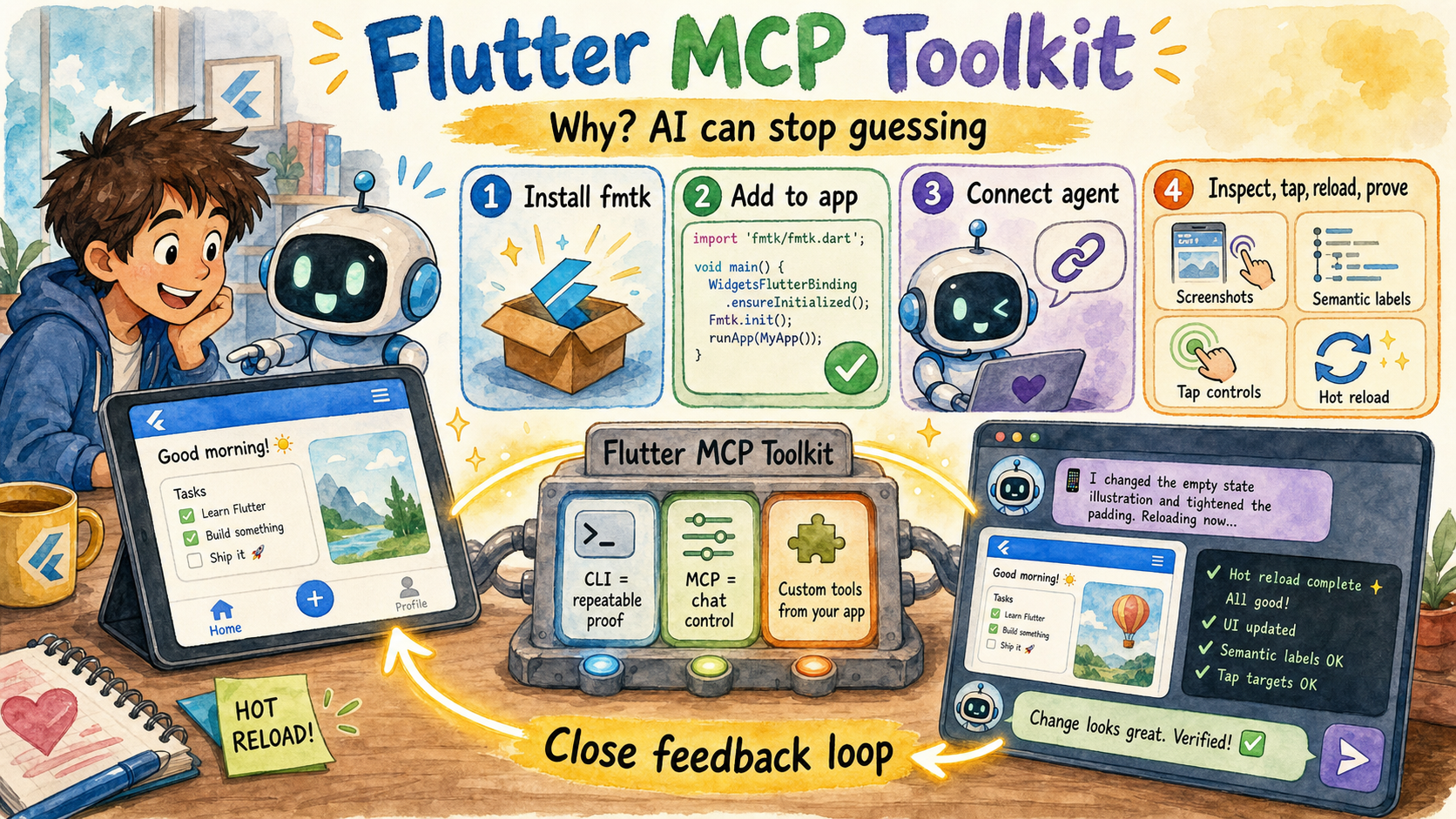
The picture's story: the toolkit gives an AI assistant a shared window and control loop into a running Flutter app, so it can inspect state, act like a user, hot reload, read proof, and use custom tools from your app instead of guessing.
# 1. Install the binary
curl -fsSL https://raw.githubusercontent.com/Arenukvern/mcp_flutter/main/install.sh | bash
# Installs flutter-mcp-toolkit plus the short fmtk alias for repeated CLI loops.

# 2. Add the toolkit to your Flutter app
cd my-flutter-app
flutter-mcp-toolkit codegen-init   # adds mcp_toolkit + emits main.dart snippet

# 3. Install skills for your AI agent
flutter-mcp-toolkit init claude-code   # or: cursor | codex | cline | agents-skills | all
# Alternative (skills only): npx skills add Arenukvern/mcp_flutter -a cursor -y

# 4. Run
flutter run --debug
That's it. Your AI agent can now inspect and drive the running app — and your app can expose custom MCP tools at runtime (see Dynamic Tools Registration below).
2026-10-02 — 6.0.0 released: the invoke tier (ADR-0017) — the app's intent registry is the single action source; the harness driver lists (driver.actions()) and invokes it (InvokeAction) with schema-validated args, IntentAutomationAction.custom routes hints, and any web surface (Jaspr, plain JS) composes via window.__mcpActions. flutter_mcp_harness 0.2.x on pub.dev; server 6.0.0 on the MCP registry.
2026-10-01 — The toolkit is becoming a chain of declarative automation APIs: universal AutomationDriver contracts (universal_automation_*), the programmatic flutter_mcp_harness package, and oka as the build+lifecycle runner. New: The Automation Chain guide + flutter-mcp-automation-chain skill.
2026-07-11 - v4 new Live Demos records: v4 semantic snapshot etc.. with Grok Build CLI, v4 with IntentCall power - WebMCP projection
2026-05-26 — v3.1.0: Platform-view capture routing, macOS/iOS Simulator host screenshots, web CDP tab capture (SCK → CDP → flutter_layer), and cross-platform showcase platform views.
| Platform | Command / link |
|---|---|
| Any agent (recommended) | flutter-mcp-toolkit init <agent> — see AI agent setup |
| Claude Code (git catalog) | /plugin marketplace add Arenukvern/mcp_flutter then install flutter-mcp-toolkit |
| Codex (git catalog) | codex plugin marketplace add Arenukvern/mcp_flutter |
| Cursor (local plugin) | flutter-mcp-toolkit init cursor |
| Skills only | npx skills add Arenukvern/mcp_flutter -a <agent> -y (add MCP via init or manual JSON) |
| MCP registries | Official MCP Registry — server io.github.Arenukvern/flutter-mcp-toolkit (OCI image: ghcr.io/arenukvern/flutter-mcp-toolkit), Smithery, MseeP |
The official registry serves an OCI image from GHCR. Point any MCP client at it:
{
  "mcpServers": {
    "flutter-mcp-toolkit": {
      "command": "docker",
      "args": [
        "run",
        "-i",
        "--rm",
        "--network=host",
        "ghcr.io/arenukvern/flutter-mcp-toolkit:6.0.0"
      ]
    }
  }
}
See Docker guide for flags, version pinning, and networking notes.
Maintainers submitting to official stores: marketplace submission runbook. Full matrix: marketplace distribution.
fmt_* MCP tools, binaries, client config keys, validate-runtime.bootstrapFlutter parameter removal, intentcall renames.MCPCallEntry removal, AgentCallEntry, platform codegen sync, fmt_migrate_agent_entries.intentcall_* dependency policy, consumer proof gates, and the boundary between mcp_flutter and upstream IntentCall architecture.| Package | Pub.dev | Role |
|---|---|---|
mcp_toolkit |  | Flutter app package for runtime MCP tools/resources and toolkit bootstrap. |
flutter_mcp_toolkit_core |   | Pure-Dart shared command/result/capability types. |
flutter_mcp_toolkit_capability_kernel |   | Capability kernel contracts for composable MCP units. |
flutter_mcp_toolkit_capability_core |   | Server-side fmt_* capability implementation. |
The server binary lives in mcp_server_dart and is shipped through GitHub
Release artifacts as flutter-mcp-toolkit, fmtk, and
flutter-mcp-toolkit-server; it is not a pub.dev package.
Different surfaces own different parts of the lifecycle, and all of them
drive the same ext.mcp.toolkit.* extensions through the universal
AutomationDriver
contract (universal_automation_* family):
| Tier | Surface | Best for |
|---|---|---|
| Interactive MCP | fmt_* tools | chat-driven debugging and verification |
| CLI | flutter-mcp-toolkit / fmtk | one-shot commands in scripts and CI |
| Programmatic Dart | packages/harness — flutter_mcp_harness on pub.dev | repeatable scenarios as checked-in code |
| Build + lifecycle | oka | declarative device builds, owned dev sessions |
Guide: The Automation Chain ·
skill: flutter-mcp-automation-chain.
The showcase/ folder holds examples that test the whole
stack end-to-end — a minimal instrumented Flutter app
(showcase/flutter_demo) and a static web page
(showcase/web_demo) — each driven live by a
checked-in composition root:
make drive-flutter   # instrumented tier: ToolkitDriver over the VM service
make drive-web       # browser tier: CdpDriver over CDP (headless Chrome)
packages/harness implements the shared contract for the Flutter tier
(ToolkitDriver),
so one observe/act/verify vocabulary covers Flutter apps, browsers, and
OS-native targets — the same pipeline composition style oka uses.
| Need | Start here |
|---|---|
| Contribute code or docs | CONTRIBUTING.md · Contribution guide |
| Add or credit contributors | Contributors guide · .all-contributorsrc |
| Report vulnerabilities | SECURITY.md |
| Validate local changes | steward probe --json --profile quick · make check-contracts |
| Maintain releases | Release train notes · flutter-mcp-toolkit-repo-maintainer |
| Install or update agent skills | AI agent setup · Marketplace distribution |
The default toolkit surface exposes 31 MCP tools under the fmt_* capability prefix across four categories (35 with the --dumps debug tools enabled):
See the flutter-mcp-toolkit-{guide,inspect,control,debug} skills for the full
reference (installed by flutter-mcp-toolkit init or npx skills add Arenukvern/mcp_flutter).
Install options: AI agent setup.
Flutter apps can register custom tools and resources at runtime. See how it
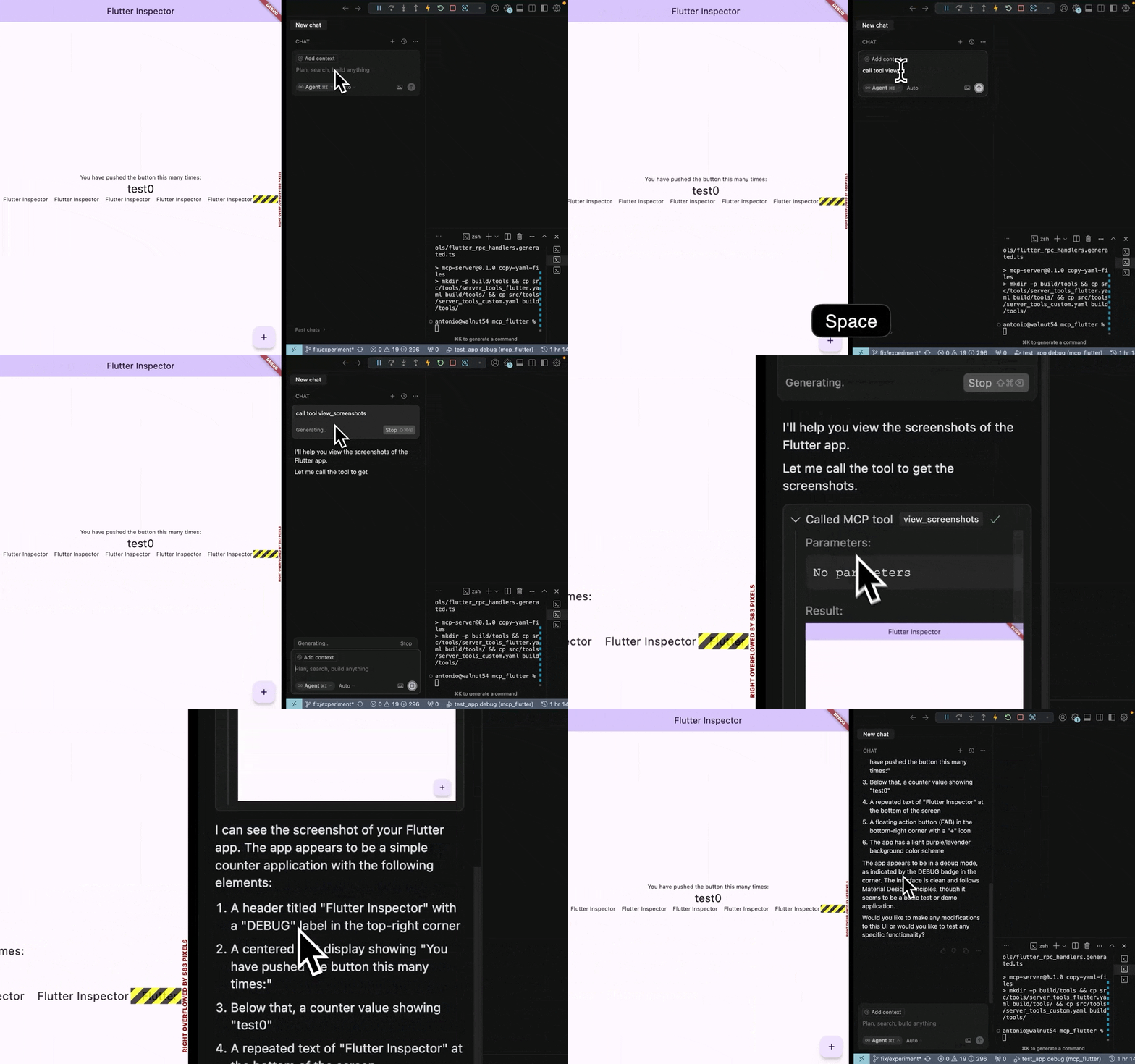
works in this short YouTube video.
The same arguments.connection targeting is supported by the CLI's exec,
batch, daemon command/execute, daemon watch/start, and snapshot step args.
[!NOTE] There is official MCP Server for Flutter from Flutter team which exposes Dart tooling. The main goal of this project is to bring power of MCP server tools by creating them in Flutter app, using dynamic MCP tools registration and close feedback loop for AI Agent. See how it works in short YouTube video. See Quick Start for more details. See original motivation behind the idea.
Dump RPC methods (like dump_render_tree) can produce huge token output and
are disabled by default. Enable with --dumps. See
mcp_server_dart README for the full flag surface.
Generally, since you use MCP server to connect to Flutter app in Debug Mode, it should be safe to use. However, I still recommend to review how it works in ARCHITECTURE.md, how it can be modified to improve security if needed.
This MCP server is verified by MseeP.ai.
Connection Issues
arguments.connection.uri and paste exact Flutter machine app.debugPort.wsUriconnection_selection_required, retry with arguments.connection.targetId using one URI from availableTargets (or set arguments.connection.uri directly)AI Tool Not Detecting Inspector
Dynamic Tools Not Appearing
mcp_toolkit package is properly initialized in your Flutter appMCPToolkitBinding.instance.addEntries()fmt_list_client_tools_and_resources to verify registrationThe Flutter MCP Server is registered with Smithery's registry, making it discoverable and usable by other AI tools through a standardized interface.
┌─────────────────┐     ┌───────────────────────┐     ┌─────────────────┐
│                 │     │  Flutter App with     │     │                 │
│  Flutter App    │<--->│  mcp_toolkit          │<--->│ flutter-mcp-    │
│  (Debug Mode)   │     │  (VM Svc. Extensions  │     │ toolkit-server  │
│                 │     │  + Dynamic Tools)     │     │                 │
└─────────────────┘     └───────────────────────┘     └─────────────────┘
Contributions are welcome! See CONTRIBUTING.md (maintainer releases, binary checksums) and the contribution guide. Pull requests and issues: GitHub.
Huge thanks to all contributors for making this project better!
This roster is maintained with all-contributors.
To add someone, update .all-contributorsrc and
regenerate the README table, or use the all-contributors bot/CLI from a PR.
More detail: docs/contributing/contributors.mdx.
MIT - Feel free to use in your projects!
Flutter and Dart are trademarks of Google LLC.
Claim this server with your GitHub account to request manual ownership verification.
Link to the catalog listing for flutter-mcp-toolkit from your README. This badge does not certify ownership, compatibility or security.
[](https://awesome-mcp.com/servers/mcp_flutter)Public repository statistics could not be verified. Check the configured source address; unavailable counts are not zero.
来源、范围和时段分别列出;不相加,不代表安装人数、活跃用户或安全审核。
尚无已审核的包 / 镜像标识,暂不展示下载统计。
Alternative and complementary servers in the same category
A directory listing describing a cancellation-letter and mailing-address service. The configured public GitHub repository returned 404 during source verification.

A hosted MCP service for browsing and searching through Singapore mobile-network proxies.

A directory listing describing a Markdown-to-PDF service. The configured public GitHub repository returned 404 during source verification.