
Oleafly is a live collaborative LaTeX, Typst and Markdown editor for research that offers a local MCP server and an oleafly mcp stdio command so outside AI clients can use its project tools.
Repository stats unavailable
Productivity & Ops
A Model Context Protocol server that integrates AI tools with JIRA, converting markdown to Atlassian Document Format and offering tools to create, update, and search issues.
MCP JIRA Server is cataloged as an MCP server attributed to codingthefuturewithai. A Model Context Protocol server that integrates AI tools with JIRA, converting markdown to Atlassian Document Format and offering tools to create, update, and search issues. It is categorized under productivity work. See the capability inspector for recorded interfaces and their independent review status; consult upstream documentation for the current interface.
Installation configuration is not reviewed. No executable setup is offered for this entry; inspect the source repository before proceeding.
Catalog license label: MIT License. Check the source repository's current license and terms before using, modifying or distributing this software.
能力定义尚未审核。未核验的采集内容不会作为可信接口展示。
暂无可展示的已审核记录。这不表示上游不支持此能力。
暂无可展示的已审核记录。这不表示上游不支持此能力。
暂无可展示的已审核记录。这不表示上游不支持此能力。
Email delivery is not connected. This page does not collect email addresses or create subscriptions.
Browse the registry for current listings instead.
Reviews for MCP JIRA Server are not available yet
Review publishing and storage are not connected. This page does not collect or publish ratings or comments, including after sign-in.
Yes, it supports multiple JIRA instances with site aliases configured in config.yaml.
Markdown descriptions are converted to Atlassian Document Format, supporting formatting like headers, code blocks, lists, and tables.
README.md · e7f69d4aa9c3 · 采集于 2026-11-13 11:56:18 UTC
保留上游原文,不做 AI 改写。为安全起见过滤脚本、表单和不安全链接。
当前显示最后一次成功采集的文档快照,请以来源页面为准。
A Model Context Protocol (MCP) server that provides seamless JIRA integration for AI tools. Create and manage JIRA issues with rich markdown formatting, automatic conversion to Atlassian Document Format (ADF), and flexible field management.
Copy and paste one of these prompts to your AI coding assistant:
For Setup Help:
Please help me set up the MCP JIRA Server for Claude Code.
Read the setup guide at: SETUP_ASSISTANT_PROMPT.md
For Usage Examples:
Show me how to use MCP JIRA Server effectively.
Read the usage guide at: USAGE_ASSISTANT_PROMPT.md
# Install UV if not already installed:
curl -LsSf https://astral.sh/uv/install.sh | sh

# Configure JIRA settings via web UI:
uvx --from ctf-mcp-jira ctf-mcp-jira-server --ui

# Add to Claude Code:
claude mcp add -t stdio mcp_jira "uvx" -- "--from" "ctf-mcp-jira" "ctf-mcp-jira-server"
Then restart Claude Code. See full instructions below.
This MCP server enables AI assistants to interact directly with JIRA instances through the JIRA REST API v3. It handles the complexity of markdown-to-ADF conversion, field mapping, and multi-site configuration, allowing AI tools to create well-formatted JIRA issues with minimal setup.
Key architectural components:
Rich Markdown Support: Convert markdown descriptions to properly formatted ADF with support for:
Flexible Field Management:
accountId for reliable assignment.additional_fields parameter supports labels, priority, due dates, and other custom fields.Multi-Site Configuration: Support for multiple JIRA instances with site aliases, configurable in config.yaml.
Comprehensive Error Handling: Detailed error messages and logging.
Transport Flexibility: Support for both stdio and SSE transport modes.
Use uvx to run MCP JIRA Server without persistent installation:
# Install UV if not already installed
# macOS/Linux:
curl -LsSf https://astral.sh/uv/install.sh | sh

# Windows (PowerShell):
powershell -c "irm https://astral.sh/uv/install.ps1 | iex"

# Configure JIRA settings via web UI:
uvx --from ctf-mcp-jira ctf-mcp-jira-server --ui

# This launches a web interface at http://localhost:8501 for configuration
Benefits of uvx:
Note: uvx downloads the package on first use and caches it. Subsequent runs are faster but still use a fresh environment.
# Clone the repository
git clone https://github.com/codingthefuturewithai/mcp_jira.git
cd mcp_jira

# Create and activate a virtual environment using UV
uv venv
source .venv/bin/activate  # On Windows: .venv\Scripts\activate

# Install in development mode
uv pip install -e .
Common Issues:
--ui-port 8502 (or another port) when launching the UIPlatform-Specific Issues:
brew install ca-certificatessudo apt-get install python3-devFor detailed troubleshooting, see the Confluence documentation.
The server requires a config.yaml file to connect to your JIRA instance(s). The server will attempt to load this file from the following locations, in order of precedence:
--config command-line argument.MCP_JIRA_CONFIG_PATH environment variable.~/.config/mcp_jira/config.yaml~/Library/Application Support/mcp_jira/config.yaml%APPDATA%\MCPJira\mcp_jira\config.yaml (Note: %APPDATA% usually resolves to C:\Users\<username>\AppData\Roaming)If the configuration file is not found at any of these locations, the server will automatically create the necessary directory (if it doesn't exist) and a template config.yaml file at the default OS-specific path. You will then need to edit this template with your actual JIRA site details.
Example of a filled-in config.yaml:
name: "My Company JIRA Integration"
log_level: "INFO" # Supported levels: DEBUG, INFO, WARNING, ERROR, CRITICAL

default_site_alias: "prod_jira"

sites:
  prod_jira:
    url: "https://mycompany.atlassian.net"
    email: "automation-user@mycompany.com"
    api_token: "abc123xyz789efg_your_token_here_jkl"
    cloud: true

  dev_jira:
    url: "https://dev-mycompany.atlassian.net"
    email: "dev-automation@mycompany.com"
    api_token: "another_token_for_dev_environment"
    cloud: true

# Optional: Advanced logging configuration (defaults are usually sufficient)
# log_file_path: "/var/log/custom_mcp_jira/activity.log" # Overrides default log file paths
# log_max_bytes: 20971520  # Max log file size in bytes (e.g., 20MB)
# log_backup_count: 10     # Number of backup log files to keep
mcp_jira_server_token).config.yaml file.This project includes a web-based configuration editor built with Streamlit to easily manage your config.yaml file.
config.yaml file used by the MCP server.Use the --ui flag with the MCP server command to launch the configuration interface:
# Using uvx (recommended - no installation required)
uvx --from ctf-mcp-jira ctf-mcp-jira-server --ui

# Or specify a custom port
uvx --from ctf-mcp-jira ctf-mcp-jira-server --ui --ui-port 8502
This will open your browser with the Streamlit configuration UI at http://localhost:8501 (or your specified port).
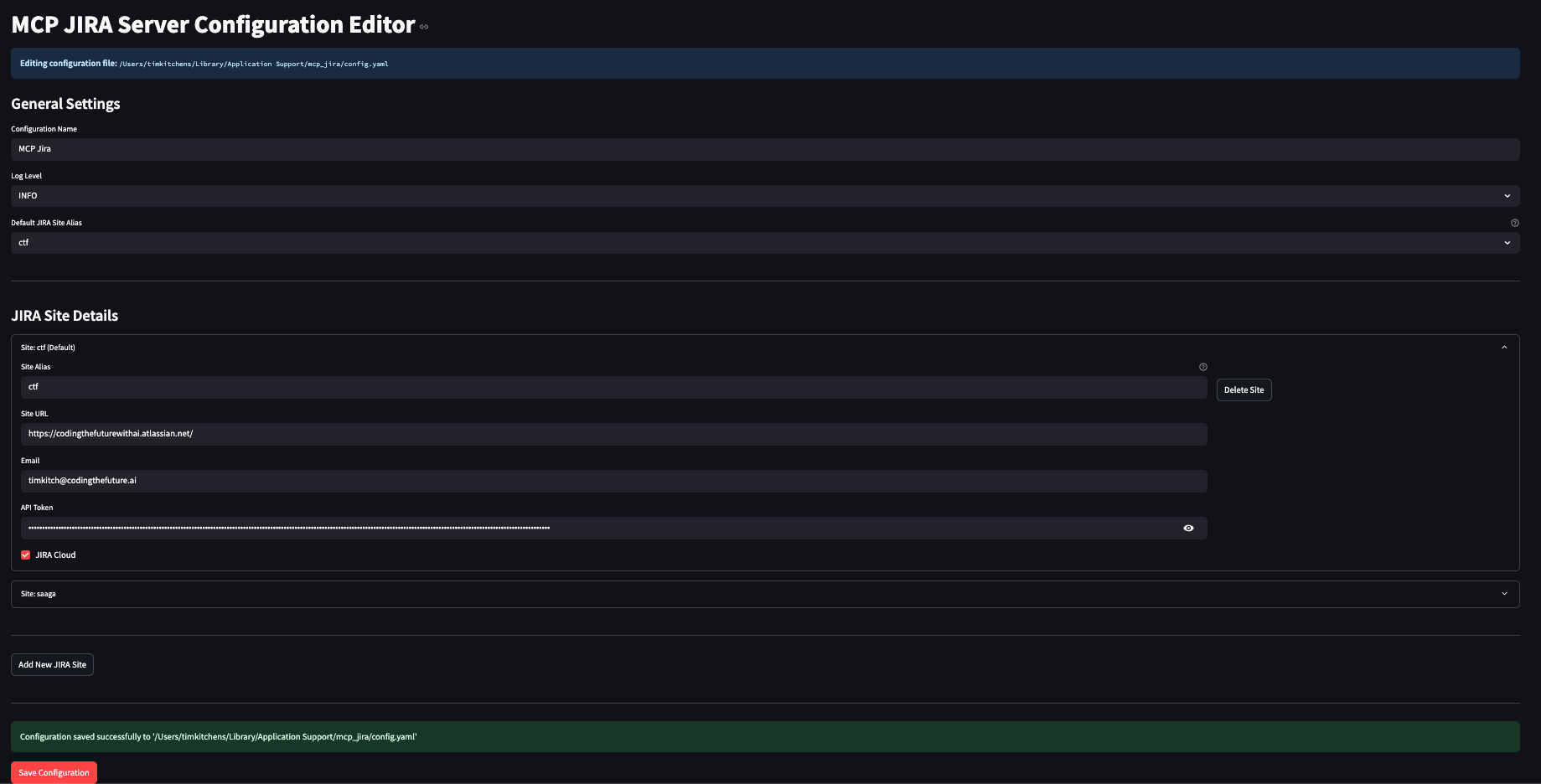
When using with Claude Code, the server is automatically started via the claude mcp add command shown in the quick setup. For manual testing or other uses:
# Run with stdio transport (default) using uvx
uvx --from ctf-mcp-jira ctf-mcp-jira-server

# Run with SSE transport
uvx --from ctf-mcp-jira ctf-mcp-jira-server --transport sse --port 3001

# Use custom configuration file
uvx --from ctf-mcp-jira ctf-mcp-jira-server --config /path/to/config.yaml

# Launch configuration UI
uvx --from ctf-mcp-jira ctf-mcp-jira-server --ui
Note: Using uvx ensures the server runs in a fresh, isolated environment each time, avoiding potential dependency conflicts.
This server exposes the following tools for interacting with JIRA:
Creates a new JIRA issue. You can specify the project, summary, a detailed description in markdown (which will be converted to JIRA's rich text format), issue type, assignee, and other custom fields.
Updates an existing JIRA issue. You can modify fields such as the summary, description (markdown supported), assignee, issue type, or other custom fields. Only the fields you provide will be changed.
Search for JIRA issues using JQL (JIRA Query Language) syntax. Specify a JQL query to find issues matching your criteria.
Parameters:
query (required): JQL query string to search for issuessite_alias (optional): Site alias for multi-site configurationsbasic_only (optional, default: False): Controls the level of detail returned
False (default): Returns comprehensive issue data including all standard fields, issue links, remote links, comments, and worklogsTrue: Returns only key, summary, and description for better performanceReturns:
Example queries:
project = MYPROJECTproject = MYPROJECT AND status = 'In Progress'assignee = currentUser() AND created >= -7dExample usage:
# Get basic issue information (faster)
search_jira_issues(query="project = ABC", basic_only=True)

# Get comprehensive issue details (default)
search_jira_issues(query="project = ABC AND updated >= -7d")
The server logs activity to both stderr and a rotating log file.
Log File Locations: Log files are stored in OS-specific locations by default:
~/Library/Logs/mcp_jira/mcp_jira.log/var/log/mcp_jira/mcp_jira.log~/.local/state/mcp_jira/mcp_jira.log%LOCALAPPDATA%\MCPJira\mcp_jira\Logs\mcp_jira.log (Note: %LOCALAPPDATA% usually resolves to C:\Users\<username>\AppData\Local)Configuration:
Logging behavior (level, file path, rotation settings) is configured via the config.yaml file. See the example config.yaml in the "Configuration" section for details on log_level, log_file_path, log_max_bytes, and log_backup_count.
The log level can also be overridden using the MCP_JIRA_LOG_LEVEL environment variable. If set, this environment variable takes precedence over the log_level in config.yaml.
# Example: Set log level to DEBUG for detailed API communication
MCP_JIRA_LOG_LEVEL=DEBUG mcp_jira-server
Valid log levels: DEBUG, INFO (default if not specified), WARNING, ERROR, CRITICAL.
See DEVELOPMENT.md for detailed development instructions, including:
Authentication Errors
Field Errors
additional_fields for custom or optional fieldsMarkdown Conversion Issues
Connection Issues
This project is licensed under the MIT License. See the LICENSE file for details.
Coding the Future with AI
Claim this server with your GitHub account to request manual ownership verification.
Link to the catalog listing for MCP JIRA Server from your README. This badge does not certify ownership, compatibility or security.
[](https://awesome-mcp.com/servers/mcp_jira)Public repository statistics could not be verified. Check the configured source address; unavailable counts are not zero.
来源、范围和时段分别列出;不相加,不代表安装人数、活跃用户或安全审核。
尚无已审核的包 / 镜像标识,暂不展示下载统计。
Alternative and complementary servers in the same category
Oleafly is a live collaborative LaTeX, Typst and Markdown editor for research that offers a local MCP server and an oleafly mcp stdio command so outside AI clients can use its project tools.
Buddy is an Android app that offers its phone tools through a local MCP server to Claude Code, Codex, OpenCode, Antigravity, and Grok sessions.

Tuqui is a hosted MCP server that connects Odoo with Claude and ChatGPT so users can ask about sales, stock, customers and overdue invoices in plain language.
