


MCP Kubernetes Server
A Kubernetes management MCP (Model Context Protocol) server that provides interfaces for getting information about Kubernetes clusters, performing operations, monitoring status, and analyzing resources.
Features
- Cluster Information: Get detailed information about Kubernetes resources (pods, deployments, services, etc.)
- Cluster Operations: Perform operations on Kubernetes resources (create, update, delete, scale, etc.)
- Monitoring: Monitor the status of Kubernetes clusters and resources
- Analysis: Analyze Kubernetes resources and provide recommendations
- Prompts: Includes prompts for common Kubernetes analysis tasks
Examples
Ex.1
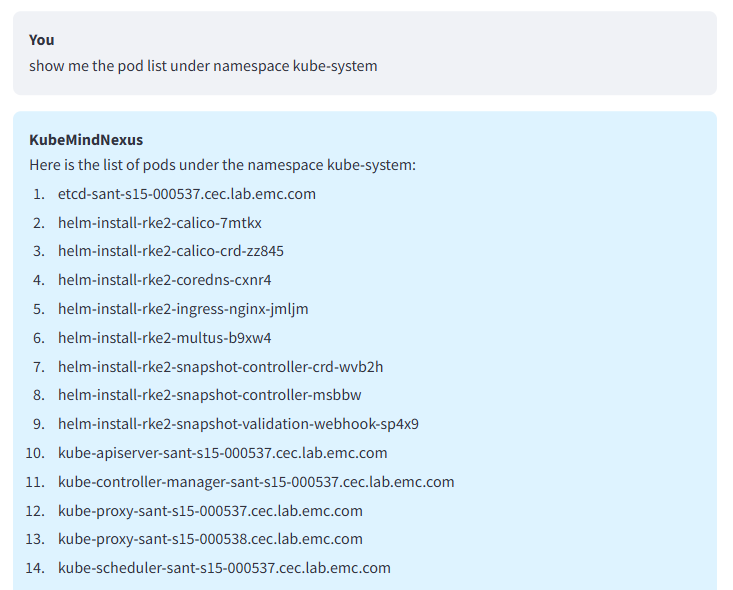
Ex.2
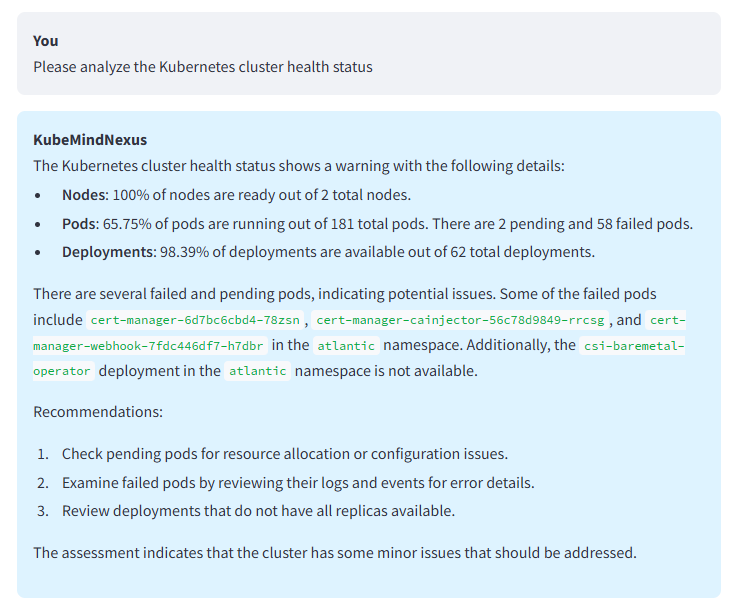
Ex.3
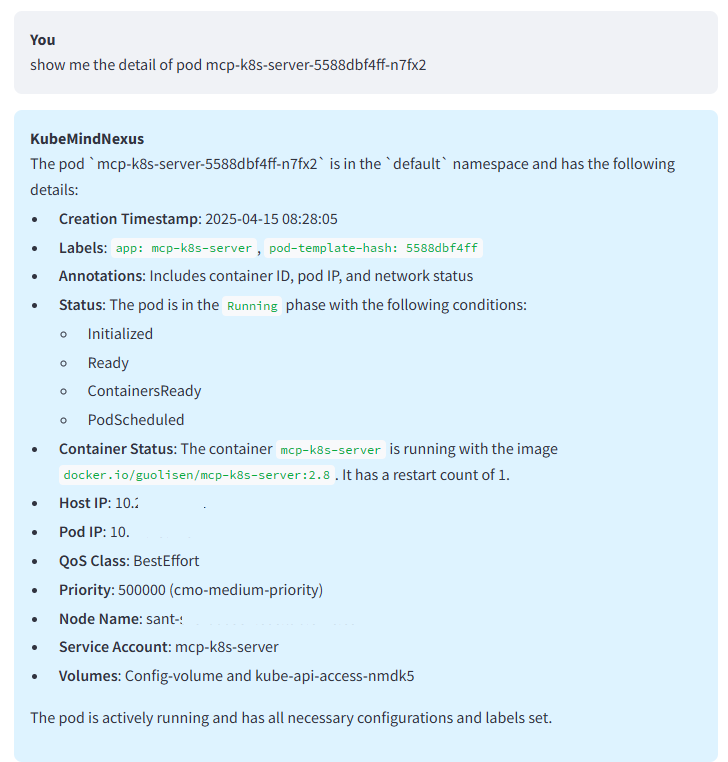
Installation
From Source
git clone https://github.com/yourusername/mcp-k8s-server.git
cd mcp-k8s-server
pip install -e .
Using pip
pip install mcp-k8s-server
Usage
Running Directly
# Run with default settings
mcp-k8s-server

# Specify transport type
mcp-k8s-server --transport sse

# Specify port for SSE transport
mcp-k8s-server --port 8000

# Specify config file
mcp-k8s-server --config /path/to/config.yaml
Using Docker
The Dockerfile uses the command and args pattern to run the server:
CMD ["python", "-m", "mcp_k8s_server.main", \
     "--transport", "sse", \
     "--port", "8000", \
     "--host", "0.0.0.0", \
     "--config", "/etc/rancher/rke2/rke2.yaml", \
     "--debug"]
To build and run the Docker container:
# Build the Docker image
docker build -t mcp-k8s-server .

# Run the Docker container
docker run -p 8000:8000 -v ~/.kube:/home/mcp/.kube mcp-k8s-server
Alternatively, you can use the provided script:
# Make the script executable
chmod +x docker-run.sh

# Run the script
./docker-run.sh
This script builds the Docker image and runs the container with the necessary volume mounts.
Deploying to Kubernetes
# Apply the Kubernetes manifests
kubectl apply -f k8s/
When deploying to Kubernetes, the server will automatically use the in-cluster configuration. The Kubernetes manifests in the k8s/ directory are set up to:
- Create a ServiceAccount with appropriate permissions
- Mount the service account token and certificate
- Configure the server with command-line arguments
You can customize the deployment by editing the manifests:
# k8s/deployment.yaml (example)
apiVersion: apps/v1
kind: Deployment
metadata:
  name: mcp-k8s-server
  # ...
spec:
  # ...
  template:
    # ...
    spec:
      serviceAccountName: mcp-k8s-server  # Uses the ServiceAccount defined in rbac.yaml
      containers:
      - name: mcp-k8s-server
        # ...
        command:
        - python
        - -m
        - mcp_k8s_server.main
        args:
        - --transport
        - sse
        - --port
        - "8000"
        - --host
        - "0.0.0.0"
        - --config
        - "/app/config/config.yaml"
        - --debug
This approach uses the command and args pattern to configure the server, which is a common pattern in Kubernetes. The command specifies the executable to run, and the args specify the command-line arguments to pass to the executable.
The KUBERNETES_SERVICE_HOST and KUBERNETES_SERVICE_PORT environment variables are automatically set by Kubernetes when the pod is created, so you don't need to specify them in your deployment manifest.
Configuration
The server can be configured using a YAML configuration file, environment variables, or command-line arguments.
In-Cluster Configuration
When running inside a Kubernetes cluster, the server automatically uses the in-cluster configuration. This relies on the following:
-
Environment variables:
KUBERNETES_SERVICE_HOST: Set by Kubernetes to the IP address of the Kubernetes API serverKUBERNETES_SERVICE_PORT: Set by Kubernetes to the port of the Kubernetes API server
-
Service account token and certificate:
/var/run/secrets/kubernetes.io/serviceaccount/token: Service account token/var/run/secrets/kubernetes.io/serviceaccount/ca.crt: CA certificate
These are automatically set by Kubernetes when running in a pod. If you're running the server outside a Kubernetes cluster but want to test the in-cluster configuration, you would need to manually set these environment variables and create the token and certificate files.
When running outside a cluster, the server falls back to using the kubeconfig file.
Testing In-Cluster Configuration Locally
If you want to test the in-cluster configuration locally (outside a Kubernetes cluster), you can manually set up the required environment variables and files:
-
Set the environment variables:
export KUBERNETES_SERVICE_HOST=<kubernetes-api-server-ip>
export KUBERNETES_SERVICE_PORT=<kubernetes-api-server-port>
You can get these values by running:
kubectl cluster-info
-
Create the service account token and certificate directories:
mkdir -p /var/run/secrets/kubernetes.io/serviceaccount/
-
Copy your Kubernetes certificate and create a token:
# Copy the CA certificate
kubectl config view --raw -o jsonpath='{.clusters[0].cluster.certificate-authority-data}' | base64 -d > /var/run/secrets/kubernetes.io/serviceaccount/ca.crt

# Create a token file (you can use a service account token or generate a temporary one)
echo "your-service-account-token" > /var/run/secrets/kubernetes.io/serviceaccount/token
Note that this approach requires root privileges to create files in /var/run/secrets/. Alternatively, you can modify the code to use different paths for testing purposes.
Configuration File
# config.yaml
server:
  name: mcp-k8s-server
  transport: both  # stdio, sse, or both
  port: 8000
  host: 0.0.0.0

kubernetes:
  config_path: ~/.kube/config
  context: default
  namespace: default
MCP Resources
The server provides access to Kubernetes resources through the Model Context Protocol (MCP). Resources are identified by URI patterns following the k8s:// protocol.
Resource URI Patterns
Resources are organized in a hierarchical structure:
k8s://resources - List of all available Kubernetes resourcesk8s://namespaces - List of all Kubernetes namespacesk8s:///{namespace} - Overview of all resources in a namespace
Namespaced Resources
Supported resource types:
podsdeploymentsservicespersistentvolumeclaimsevents
Cluster-Scoped Resources
Supported resource types:
nodespersistentvolumesnamespaces
The server provides the following MCP tools:
get_resources: Get a list of resources of a specific typeget_resource: Get detailed information about a specific resourceget_resource_status: Get the status of a specific resourceget_resource_events: Get events related to a specific resourceget_resource_logs: Get logs for a specific resource
Resource Operations
create_resource: Create a new resourceupdate_resource: Update an existing resourcedelete_resource: Delete a resourcescale_deployment: Scale a deploymentrestart_deployment: Restart a deploymentexecute_command: Execute a command in a pod
Monitoring
get_cluster_status: Get the overall status of the clusterget_node_status: Get the status of cluster nodesget_resource_metrics: Get metrics for a specific resourceget_cluster_metrics: Get metrics for the entire clustercheck_cluster_health: Perform a comprehensive health check of the cluster and get a detailed summary
License
MIT


