
A directory listing describing a cancellation-letter and mailing-address service. The configured public GitHub repository returned 404 during source verification.
Repository stats unavailable
Developer Tools
MCP Server.exe runs standard MCP services and adds composition of multiple MCP servers, tool chains, plugin-defined tools, and scheduled jobs.
Executable MCP server launcher and compositor is cataloged as an MCP server attributed to shadowcz007. MCP Server.exe runs standard MCP services and adds composition of multiple MCP servers, tool chains, plugin-defined tools, and scheduled jobs. It is categorized under developer tools. See the capability inspector for recorded interfaces and their independent review status; consult upstream documentation for the current interface.
Installation configuration is not reviewed. No executable setup is offered for this entry; inspect the source repository before proceeding.
Catalog license label: MIT. Check the source repository's current license and terms before using, modifying or distributing this software.
能力定义尚未审核。未核验的采集内容不会作为可信接口展示。
暂无可展示的已审核记录。这不表示上游不支持此能力。
暂无可展示的已审核记录。这不表示上游不支持此能力。
暂无可展示的已审核记录。这不表示上游不支持此能力。
Email delivery is not connected. This page does not collect email addresses or create subscriptions.
Browse the registry for current listings instead.
Reviews for Executable MCP server launcher and compositor are not available yet
Review publishing and storage are not connected. This page does not collect or publish ratings or comments, including after sign-in.
Yes, it watches the mcp-config and mcp-js files and restarts to apply changes.
It supports SSE and stdio transports, plus a WebSocket connection mode.
Yes, since v0.11.x it exports the McpRouterServer class for library use alongside the CLI.
README.md · ad5555bc0908 · 采集于 2026-11-13 09:32:35 UTC
保留上游原文,不做 AI 改写。为安全起见过滤脚本、表单和不安全链接。
当前显示最后一次成功采集的文档快照,请以来源页面为准。

小智 & Cursor 的 MCP 启动器 - MCP For Cursor&xiaozhi
MCP Server.exe 是一个强大的可执行服务器,它不仅能够运行标准的 MCP (Model Context Protocol) 服务,更提供了丰富的高级功能:
--mcp-config 与 --mcp-js 变更,自动重启生效MCP Server.exe is a powerful executable server that not only runs standard MCP (Model Context Protocol) services, but also provides rich advanced features:
# 推荐:通过 CLI 运行(无需本地构建)
npx mcp_exe --mcp-config ./examples/mcp.json

# 或运行打包后的可执行文件(Windows/macOS)
./executables/mcp_server-win-x64.exe --mcp-config ./examples/mcp.json
支持通过 WebSocket 连接到其他 MCP 服务,特别适合连接到 xiaozhi.me 等的接入。通过配置文件,可以轻松地将多个 MCP 服务接入到 xiaozhi.me。
Support connecting to other MCP services via WebSocket, especially suitable for connecting to WebSocket-enabled MCP services like xiaozhi.me. Through configuration files, you can easily integrate multiple MCP services with xiaozhi.me.
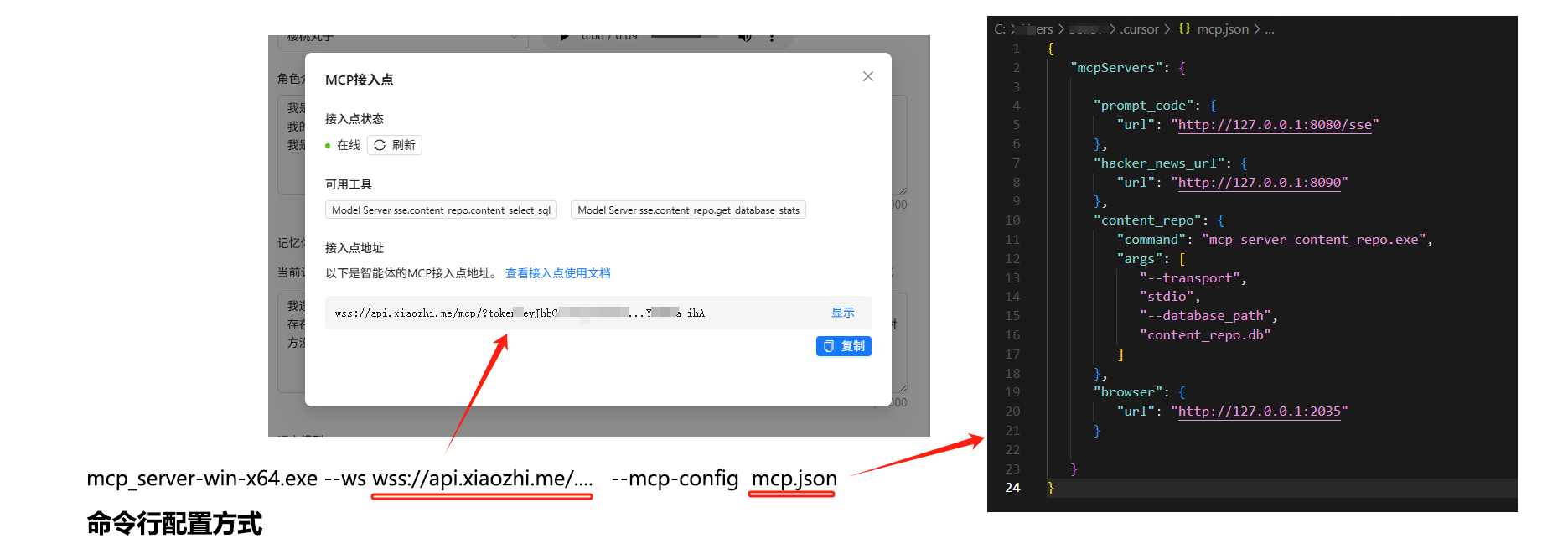
# 使用配置文件连接到 xiaozhi.me / Start in WebSocket mode
npx mcp_exe --ws wss://api.xiaozhi.me/mcp/?token=...xxx --mcp-config ./examples/mcp-sse.json
配置示例 | Configuration Example (mcp-sse.json):
{
    "mcpServers": {
        "Model Server sse": {
            "url": "http://127.0.0.1:3000"
        }
    },
    "serverInfo": {
        "serverName": "ws-client-mcp-server",
        "version": "1.0.0",
        "description": "WebSocket 客户端的 MCP 服务器实例",
        "author": "shadow"
    }
}
WebSocket 模式特性 | WebSocket Mode Features:
最简单的使用方式 - 双击运行,或使用 npx 即可启动一个标准的 MCP 服务。
The simplest way - double-click to run, or start via npx.
# 双击运行 mcp_server.exe,或通过命令行启动
./executables/mcp_server-win-x64.exe
# 或
npx mcp_exe
默认配置 | Default Configuration:
--port 修改)/ 建立会话,POST /sessions?sessionId=... 发送消息--mcp-config 与 --mcp-js使用与 Cursor 一致的 mcp.json 配置文件,通过配置文件组合多个 MCP 服务,支持同时使用 SSE 和 stdio 两种传输模式。这样可以根据不同的应用场景选择合适的传输方式,提高系统的灵活性和可扩展性。
Use the same mcp.json configuration file as Cursor to combine multiple MCP services, supporting both SSE and stdio transport modes simultaneously.
npx mcp_exe --mcp-config ./examples/mcp.json
配置示例 | Configuration Example (mcp.json):
{
  "mcpServers": {
    "Model Server sse": { "url": "http://127.0.0.1:9090" },
    "Model Server - stdio": { "command": "xxx", "args": ["--transport", "stdio"] }
  },
  "serverInfo": { "serverName": "dynamic-mcp-server" },
  "tools": [],
  "namespace": "."
}
tools: 允许的工具白名单(为空数组表示不过滤)namespace: 组合命名空间分隔符,默认 .(亦可使用 ::)支持将多个工具组合成工具链,实现复杂的自动化流程。工具链可以灵活配置数据流转和结果输出。
Support combining multiple tools into a tool chain to implement complex automation processes. Tool chains can flexibly configure data flow and result output.
npx mcp_exe --mcp-config ./examples/product-hunt/mcp-tools.json
配置示例 | Configuration Example(节选,自定义按需调整):
{
  "toolChains": [
    {
      "name": "product_hunt_news",
      "description": "get product hunt news",
      "steps": [
        { "toolName": "get_product_hunt_url", "args": {} },
        { "toolName": "load_product_hunt_js_code", "args": {} },
        { "toolName": "browser_navigate", "args": {}, "outputMapping": { "url": "content.0.text" }, "fromStep": 0 },
        { "toolName": "browser_execute_javascript", "args": {}, "outputMapping": { "code": "content.0.text" }, "fromStep": 1 },
        { "toolName": "browser_close", "args": {} }
      ],
      "output": { "steps": [3] }
    }
  ]
}
工具链特性 | Tool Chain Features:
outputMapping/fromStep)output.steps)通过 JavaScript 配置文件,灵活定义工具、资源和提示。
Flexibly define tools, resources, and prompts through JavaScript configuration files.
npx mcp_exe --mcp-js ./examples/custom-mcp-config.js
配置示例 | Configuration Example (custom-mcp-config.js):
module.exports = {
  // 推荐导出名:configureMcp(也兼容 mcpPlugin)
  configureMcp: function(server, ResourceTemplate, z) {
    server.tool('myTool', '自定义工具示例', { /* zod schema */ }, async (args) => ({ content: [{ type: 'text', text: 'ok' }] }))
    server.resource('custom-echo', new ResourceTemplate('custom-echo://{message}', { list: undefined }), async (uri, { message }) => ({ contents: [{ uri: uri.href, text: message }] }))
    server.prompt('custom-prompt', { /* zod */ }, ({ message }) => ({ messages: [{ role: 'user', content: { type: 'text', text: message } }] }))
  }
}
使用 --cronjob 定时执行工具。目前支持的操作:listTools、callTool。任务会在启动时立即执行一次,并按 schedule 周期执行,可通过桌面气泡/邮件/ntfy 推送结果。
# 示例:结合自定义工具与定时任务
npx mcp_exe --cronjob ./examples/cronjob.json --mcp-js ./examples/product-hunt/custom-mcp-config.js
配置示例 | Configuration Example(examples/cronjob.json):
{
  "tasks": [
    {
      "schedule": "*/30 * * * * *",
      "operations": [
        { "type": "callTool", "name": "get_product_hunt_url", "arguments": {} }
      ],
      "notify": [
        { "type": "desktop", "title": "任务执行结果", "icon": "" }
      ]
    }
  ]
}
通知支持 | Notifications:
to、subject 等)ntfy(需提供 url、topic、tags、priority)注意:定时任务直接调用已组合的工具(含远端 SSE/本地 stdio 工具),无需在任务中指定传输。
作为独立进程集成到任何应用程序中。
Integrate as a standalone process into any application.
// Node.js 示例 | Node.js Example
const { spawn } = require('child_process')

const mcpServer = spawn('./executables/mcp_server-win-x64.exe', [
  '--port', '3000',
  '--transport', 'stdio'
])

mcpServer.stdout.on('data', (data) => {
  // 处理 MCP 服务器的输出
})

mcpServer.stdin.write(JSON.stringify({
  // 发送请求到 MCP 服务器
}))
服务器支持以下命令行参数来自定义其行为:The server supports the following command line arguments:
| 参数 | 说明 | 默认值 |
|---|---|---|
--ws <url> | WebSocket 服务器地址,启用 WebSocket 连接模式 | 无 |
--mcp-js <路径> | MCP JavaScript 配置文件路径(支持 configureMcp 或 mcpPlugin) | 无 |
--mcp-config <路径/json字符串> | MCP JSON 配置文件路径或 JSON 字符串 | 无 |
--server-name <name> | 服务器名称 | mcp_server_exe |
| --port <端口> | 服务器监听端口 | 3000 |
| --transport <模式> | 传输模式,支持 sse 或 stdio(非 WS 模式下生效) | sse |
| --cronjob <路径/json> | 定时任务配置文件路径或 JSON 字符串 | 无 |
| --cursor-link | 启动后在 Cursor 中快捷接入(SSE 模式) | 关闭 |
| --log-level <level> | 日志级别:TRACE/DEBUG/INFO/WARN/ERROR/FATAL/OUTPUT | INFO |
| --version <version> --description <desc> --author <author> --license <license> --homepage <url> | 元信息 | - |
提示:若提供 --ws 则优先使用 WebSocket 模式;否则未显式指定时默认使用 sse。
服务器支持使用配置文件同时配置服务器参数和 MCP 功能:
module.exports = {
  // MCP 配置函数 | MCP configuration function
  configureMcp: function(server, ResourceTemplate, z) {
    // 配置资源和工具 | Configure resources and tools
  },
  // 可选:提供额外的 mcp 配置对象
  mcpConfig: { /* mcpServers/tools/toolChains/namespace */ }
}
--mcp-config 文件变更:自动重新解析并重启服务(含工具链/命名空间/工具白名单等)--mcp-js 文件变更:自动重新加载自定义 configureMcp/mcpPluginnpm install
yarn build # 或 npm run build
npm start
# 或开发模式(SSE):
npm run dev
# WebSocket 开发:
npm run dev-ws
# Cronjob 开发:
npm run dev-cronjob
# Windows 打包
npm run package-win

# macOS 打包(Intel/Apple Silicon)
npm run package-mac-intel
npm run package-mac-arm
打包后的可执行文件将生成在 executables 目录中。
--log-level 控制最小输出级别(默认 INFO)OUTPUT 级别用于原样输出供工具解析自 v0.11.x 起,提供稳定导出:McpRouterServer。
// CommonJS
const { McpRouterServer } = require('mcp_exe');

(async () => {
  const server = new McpRouterServer({ name: 'my-app' }, { transportType: 'sse', port: 3000 });
  await server.importMcpConfig(require('./mcp.json'), null);
  await server.start();
})();
// TypeScript / ESM
import { McpRouterServer } from 'mcp_exe';

const server = new McpRouterServer({ name: 'my-app' }, { transportType: 'stdio' });
await server.importMcpConfig(mcpJson, null);
await server.start();
dist/index.d.ts,通过 types/exports 自动暴露。bin/cli.js 提供,库与 CLI 可并行使用。MIT
Claim this server with your GitHub account to request manual ownership verification.
Link to the catalog listing for Executable MCP server launcher and compositor from your README. This badge does not certify ownership, compatibility or security.
[](https://awesome-mcp.com/servers/mcp_server_exe)Public repository statistics could not be verified. Check the configured source address; unavailable counts are not zero.
来源、范围和时段分别列出;不相加,不代表安装人数、活跃用户或安全审核。
尚无已审核的包 / 镜像标识,暂不展示下载统计。
Alternative and complementary servers in the same category
A directory listing describing a cancellation-letter and mailing-address service. The configured public GitHub repository returned 404 during source verification.

A hosted MCP service for browsing and searching through Singapore mobile-network proxies.

A directory listing describing a Markdown-to-PDF service. The configured public GitHub repository returned 404 during source verification.