

A directory listing describing a cancellation-letter and mailing-address service. The configured public GitHub repository returned 404 during source verification.
Repository stats unavailable
Developer Tools
An open-source Model Context Protocol server that lets AI agents list, subscribe to, publish on, and call ROS 2 topics, services, and actions on a live robot.
ROS2 MCP is cataloged as an MCP server attributed to wise-vision. An open-source Model Context Protocol server that lets AI agents list, subscribe to, publish on, and call ROS 2 topics, services, and actions on a live robot. It is categorized under developer tools. See the capability inspector for recorded interfaces and their independent review status; consult upstream documentation for the current interface.
Installation configuration is not reviewed. No executable setup is offered for this entry; inspect the source repository before proceeding.
Catalog license label: MPL-2.0. Check the source repository's current license and terms before using, modifying or distributing this software.
能力定义尚未审核。未核验的采集内容不会作为可信接口展示。
暂无可展示的已审核记录。这不表示上游不支持此能力。
暂无可展示的已审核记录。这不表示上游不支持此能力。
暂无可展示的已审核记录。这不表示上游不支持此能力。
Email delivery is not connected. This page does not collect email addresses or create subscriptions.
Browse the registry for current listings instead.
Reviews for ROS2 MCP are not available yet
Review publishing and storage are not connected. This page does not collect or publish ratings or comments, including after sign-in.
Yes, publishing, service calls, and action goals are available as tools, but they are marked as state-changing and are removed in read-only mode.
stdio is the default, with Streamable HTTP and SSE also supported.
ROS 2 Jazzy and Humble are supported; other distros and ROS 1 are not.
README.md · 4f287b046977 · 采集于 2026-11-13 09:07:46 UTC
保留上游原文,不做 AI 改写。为安全起见过滤脚本、表单和不安全链接。
当前显示最后一次成功采集的文档快照,请以来源页面为准。







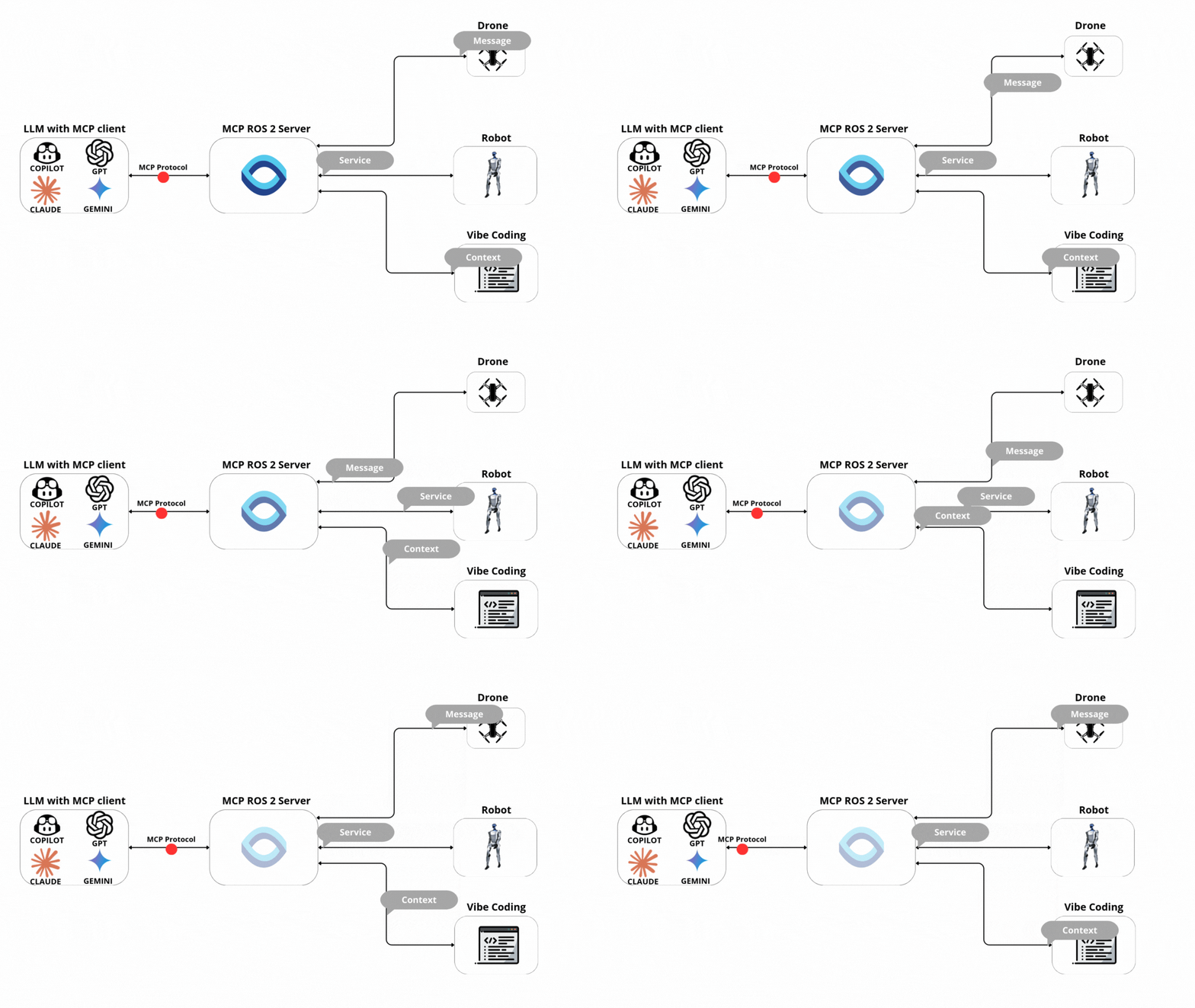
ROS2 MCP is an open-source (MPL-2.0) Model Context Protocol server that lets AI agents (Claude, Cursor, Codex and any other MCP client) list, subscribe to, publish on and call ROS 2 topics, services and actions on a live robot. It talks to ROS 2 directly through rclpy: no rosbridge, no changes to your robots. Transports: stdio (default), Streamable HTTP and SSE (deprecated by the MCP spec).
Every tool is free and open source. Commercial support is available if you want help putting it on a real machine.
You need Docker and an MCP client. ROS 2 itself does not have to be installed: the image contains it.
# Claude Code (use :humble for a ROS 2 Humble system). Read-only: the agent can look, not act.
claude mcp add ros2 -- docker run -i --rm -e ROS2_MCP_READONLY=1 wisevision/ros2_mcp:jazzy
Any other MCP client: run docker run -i --rm -e ROS2_MCP_READONLY=1 wisevision/ros2_mcp:jazzy as its stdio command. Then ask: "List the ROS 2 topics" and "Read three messages from /chatter".
No robot at hand? Start a demo publisher first:
docker run -d --name demo-robot ros:jazzy-ros-base bash -c \
  'source /opt/ros/jazzy/setup.bash && ros2 topic pub -r 2 /chatter std_msgs/msg/String "{data: hello from the robot}"'
Prefer uv? On a machine with ROS 2 installed and sourced (the server needs rclpy; use the Python that matches your distro, e.g. 3.12 on Jazzy):
source /opt/ros/jazzy/setup.bash
uvx --python /usr/bin/python3 --from git+https://github.com/wise-vision/ros2_mcp mcp_ros_2_server
Remove -e ROS2_MCP_READONLY=1 (or the --read-only flag) only when you want the agent to be able to move things; see Security. Client-specific setup (VS Code Copilot, Claude Desktop, Warp, Codex CLI, custom messages): installation guide. Docs: wisevision.tech/docs.
mcp/ros2in Docker's official MCP catalog (13,750 pulls at the time of writing) is built by Docker and lags our releases: it was last updated on 2026-02-04 and predates read-only mode.wisevision/ros2_mcpis built and pushed by this repository's CI and is the one the commands above use.
24 tools. ⚠ marks tools that can change robot state; read-only mode removes them. The complete, generated reference with input schemas is docs/generated/tools.md (a CI check keeps it in sync with the code).
| Area | Tools |
|---|---|
| Discover | ros2_topic_list, ros2_service_list, ros2_list_actions, ros2_interface_list, ros2_get_message_fields (field names and types of a message type) |
| Topics | ros2_topic_subscribe, ros2_subscribe_multiple_topics (images come back as PNG), ⚠ ros2_topic_publish, ⚠ ros2_publish_multiple_topics (set frequency and duration) |
| Services | ⚠ ros2_service_call |
| Actions | ⚠ ros2_send_action_goal (optionally waits for the result), ros2_action_request_result, ros2_action_subscribe_feedback, ros2_action_subscribe_status, ⚠ ros2_cancel_action_goal |
| Perception | ros2_get_map_as_image (nav_msgs/OccupancyGrid to PNG), ros2_get_pointcloud_as_bev (sensor_msgs/PointCloud2 to bird's-eye-view PNG) |
| History | ros2_get_messages_stored_in_influx_data_base (past messages from the WiseVision Data Black Box, an InfluxDB-based alternative to Rosbag2) |
| Viewer app | ros2_viewer_app, ros2_viewer_config, ros2_stream_start, ros2_stream_next, ros2_stream_next_image, ros2_stream_stop (interactive image / point cloud / plot viewer for MCP clients that support Apps; the stream tools also serve clients that cannot render it) |
Also included: four built-in prompts, automatic QoS selection for topics, nested message fields, and custom message types (source your package before starting; see the installation guide).
| Distro | Status |
|---|---|
| Jazzy Jalisco (Ubuntu 24.04, Python 3.12) | Supported. Tests run in CI on ros:jazzy-ros-base; Docker image wisevision/ros2_mcp:jazzy. |
| Humble Hawksbill (Ubuntu 22.04, Python 3.10) | Supported. Tests run in CI on ros:humble-ros-base; Docker image wisevision/ros2_mcp:humble. |
| Iron, Kilted, Rolling | Not tested and not shipped. It may work from source; we make no promise. Open an issue if you need one. |
ROS 1 is not supported (the server uses rclpy). Python 3.10 or newer.
Other open-source ROS MCP servers exist. They make different trade-offs; pick by what you need. Facts below were read from each project's README, pyproject.toml and GitHub page on 2026-10-14.
| ROS2 MCP (this repo) | robotmcp/ros-mcp-server | LCAS/ros2_mcp | |
|---|---|---|---|
| How it reaches ROS | rclpy, directly on the ROS 2 graph (runs where ROS 2 is sourced, or in the Docker image) | rosbridge WebSocket; the MCP server can run on a different machine from the robot | ROS 2 package built in your colcon workspace |
| ROS versions | ROS 2 Humble, Jazzy | ROS 1 and ROS 2 | ROS 2 Humble, Iron, Jazzy (per its README) |
| Install | Docker image wisevision/ros2_mcp, or uvx/uv from git | uvx ros-mcp (on PyPI) | git clone, rosdep, colcon build; Docker Compose with an SSE endpoint |
| Transports | stdio, Streamable HTTP, SSE | stdio, http, streamable-http (--transport) | SSE endpoint documented |
| Read-only mode | Yes: mutating tools are not registered, and a test enforces the classification | No such switch found in its code; tools carry the MCP readOnlyHint annotation | Its README lists observation features only |
| Publish / services / actions | Yes, including goal, result, feedback, status and cancel | Yes (topics, services and actions tools) | Not listed in its README |
| Nodes and parameters | No dedicated tools yet | Yes (node and parameter tools) | Node listing |
| Images and maps | Image topics as PNG, occupancy-grid map, point-cloud bird's-eye view | Image tool | Image retrieval for VLM analysis |
| License | MPL-2.0 | Apache-2.0 | Apache-2.0 |
| GitHub stars | 90 | 1,493 | 9 |
When to pick another one: you need ROS 1, node or parameter tools, or you want the MCP server off the robot with only rosbridge exposed there: use robotmcp/ros-mcp-server. We do not claim to be better on every axis. What we offer: native rclpy access (no bridge process between the agent and DDS), a read-only mode that fails closed (a tool is registered in that mode only if it was explicitly reviewed as read-only, and a test fails when a new tool is unclassified), images, maps and point clouds returned as PNGs, the complete action lifecycle (goal, result, feedback, status, cancel), and commercial support if you need it. Something here is wrong or out of date? Open an issue and we will fix it.
What users ask for that is not in ROS2 MCP today. No dates; open an issue or a Discussion to vote or to pay for one.
If you are an agent (or building one) using this server:
ros2_topic_list, ros2_service_list, ros2_list_actions and ros2_interface_list, then ros2_get_message_fields for the exact message type, before any publish, service call or action goal. Do not guess field names.ros2_topic_publish, ros2_service_call, ros2_send_action_goal are absent from list_tools, the operator started the server in read-only mode; do not try to work around it.ros2_cancel_action_goal in mind.docs/generated/tools.json (every tool and its input schema), server.json (MCP registry manifest), AGENTS.md (repo layout, how to build, test and add a tool), wisevision.tech/llms.txt.ROS2 MCP is free software under the MPL-2.0: you can use it in a commercial product without asking us. Nothing in this section changes that.
If you are putting it on a real robot or fleet and want more than the public issue tracker, WiseVision (the maintainers) can help with:
How to reach us: use the form at wisevision.tech/contact (choose ROS2 MCP on a real fleet) or write to hello@wisevision.tech. Tell us the problem first: what robot, what stack, what is blocking you. We scope and quote per project; there is no price list, so please contact us. Questions that other users could learn from belong in Discussions or issues.
Want to see it on real data first? The forklift rosbag demo replays a warehouse forklift recording and walks through three MCP calls in about ten minutes.
Follow the installation guide for step-by-step instructions:
An agent connected to a real robot can move it. Start the server in read-only mode to let the agent observe but not act:
ROS2_MCP_READONLY=1 uv run mcp_ros_2_server      # env var
uv run mcp_ros_2_server --read-only              # or CLI flag
docker run -i --rm -e ROS2_MCP_READONLY=1 mcp/ros2
In read-only mode the tools that change robot state are not registered at all: they do not appear in list_tools, and calling one returns an Unknown tool error. The hidden tools are:
ros2_topic_publish, ros2_publish_multiple_topics, ros2_service_call, ros2_send_action_goal, ros2_cancel_action_goal.
Read-only mode fails closed: only tools that were explicitly reviewed as read-only (listed in server/tool_safety.py) are registered, and a test fails if a new tool is added without being classified.
ros2_service_call is hidden because the server cannot know whether an arbitrary service has side effects.
stdio is the default and needs no network. To serve several clients, or a client on another machine, use Streamable HTTP, the transport the current MCP specification defines (the older sse transport is deprecated by the spec and kept only for existing clients).
uv run mcp_ros_2_server --transport streamable-http          # http://127.0.0.1:8123/mcp
claude mcp add --transport http ros2 http://127.0.0.1:8123/mcp   # Claude Code; other clients: use the URL
Docker (publish the port on loopback only):
docker run --rm -p 127.0.0.1:8123:8123 \
  -e ROS2_MCP_TRANSPORT=streamable-http -e ROS2_MCP_HOST=0.0.0.0 -e ROS2_MCP_READONLY=1 \
  wisevision/ros2_mcp:jazzy                                 # http://127.0.0.1:8123/mcp
ROS2_MCP_HOST=0.0.0.0 is needed inside the container (a loopback bind is unreachable through -p); the 127.0.0.1: in -p keeps it off your network. If the first tool call lists no topics, DDS discovery is not crossing the container boundary; on Linux --network host (then drop -p and ROS2_MCP_HOST) is the usual fix, but that depends on your DDS and network setup.
| Option | Env var | Default | |
|---|---|---|---|
--transport | ROS2_MCP_TRANSPORT | stdio | stdio, streamable-http, sse |
--host | ROS2_MCP_HOST | 127.0.0.1 | 0.0.0.0 inside a container |
--port | ROS2_MCP_PORT | 8123 | |
--allowed-host HOST[:PORT] | ROS2_MCP_ALLOWED_HOSTS | localhost only on a loopback bind | accepted Host headers (DNS-rebinding protection); repeatable / comma-separated; * matches any port |
--stateless, --json-response | off | no per-client session state; plain JSON instead of an event stream |
⚠️ There is no authentication. Anyone who can reach the port can use every tool, including publishing to topics. Keep it on loopback or a private network, put an authenticating reverse proxy in front of anything wider, and consider read-only mode. The server prints a warning when it binds to a non-loopback address.
If the first tool call returns an incomplete list of topics/services right after container start, DDS discovery may still be in progress. The server performs a one-time warm-up on the first tool call in container environments; tune it via:
MCP_ROS_DISCOVERY_STABLE_SEC (default: 1.0)MCP_ROS_DISCOVERY_TIMEOUT_SEC (default: 5.0)MCP_ROS_DISCOVERY_WARMUP=false to disableSubscribe to a ROS2 topic, collect messages for a specified duration, and provide statistical analysis of the collected data.
➡️ Can auto-detect topic if only one is available. Analyzes message rates, counts, and statistics on numeric fields.
Subscribe to one ROS2 topic and republish messages to another topic with optional transformations.
➡️ Supports identity relay, rate limiting, and change-based filtering.
Check if expected ROS2 topics and services are available and functioning correctly with optional publication rate monitoring.
➡️ Provides comprehensive health report with status indicators and recommendations.
Compare two ROS2 topics and report differences in their messages with detailed field-by-field analysis.
➡️ Useful for comparing raw sensor data with filtered/processed versions or verifying topic synchronization.
ROS2 MCP also has a prompts extension with additional prompts: see here
Note: To call a service with a custom (non-default) type, source the package that defines it before starting the server.
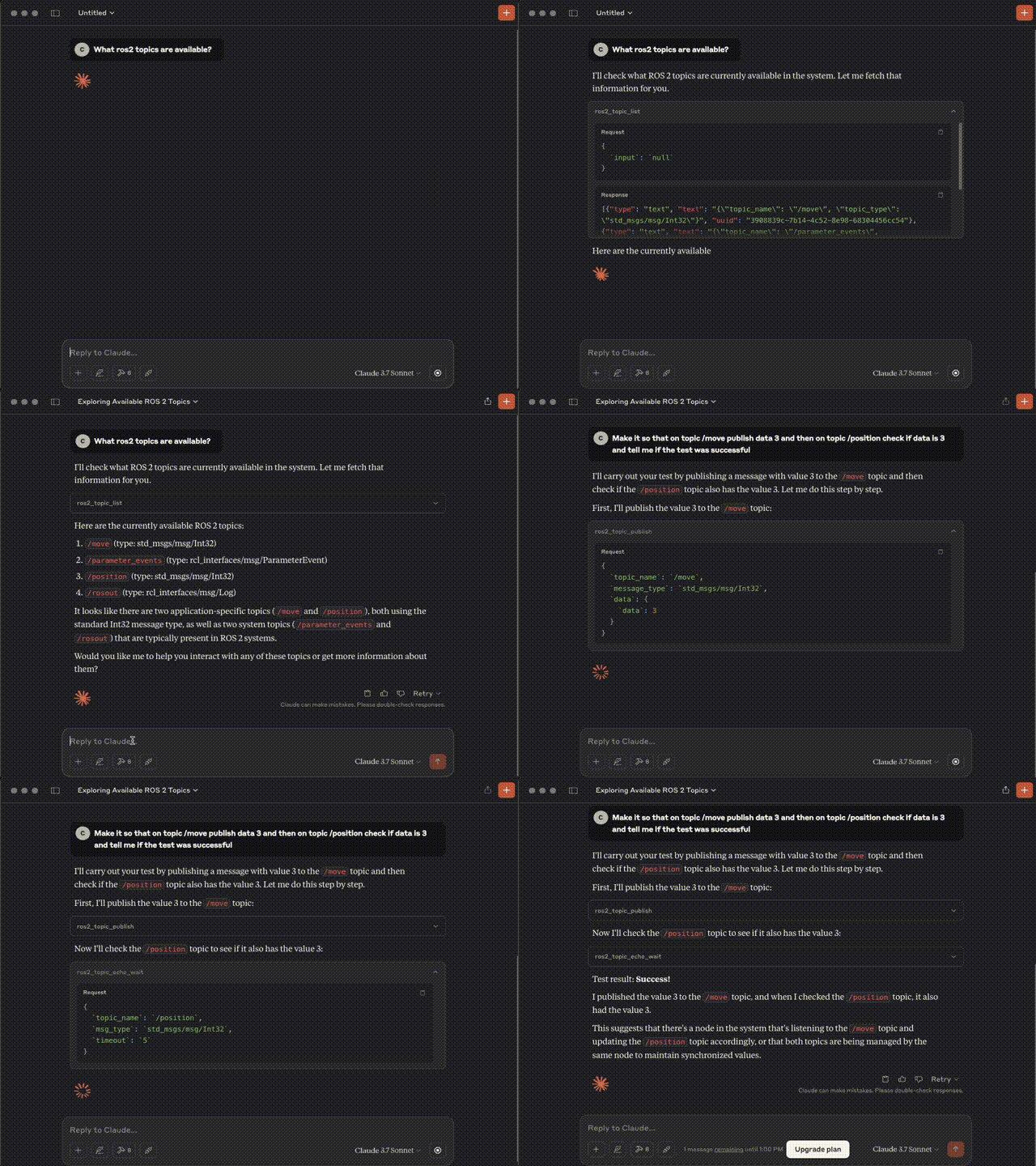
Want to try it in simulation? See the Gazebo drone demo.
Since MCP servers run over stdio, debugging can be challenging. For the best debugging experience, we strongly recommend using the MCP Inspector.
You can launch the MCP Inspector via npm with this command:
npx @modelcontextprotocol/inspector uv --directory /path/to/ros2_mcp run mcp_ros_2_server
Upon launching, the Inspector will display a URL that you can access in your browser to begin debugging.
Contributions are welcome. Check the open issues, open a pull request, or drop by our Discord to discuss ideas first. See AGENTS.md for dev setup and tests. By participating you agree to our Code of Conduct.
We built this server to make AI‑assisted ROS 2 development fast and reliable. Internally, we needed a simple way for agents to discover message types, publish/subscribe to topics, and call services—without boilerplate or flaky networking. That led to a few core design goals:
After dogfooding it, we open‑sourced the project (MPL-2.0) to help the broader ROS 2 community build faster with AI. It’s now useful not only for development, but also for controlling robots, running QoS experiments, and analyzing live data and robot/swarm state. The project is actively maintained—features and improvements ship regularly based on user feedback. If this project helps you, share your use case in Discussions!
Claim this server with your GitHub account to request manual ownership verification.
Link to the catalog listing for ROS2 MCP from your README. This badge does not certify ownership, compatibility or security.
[](https://awesome-mcp.com/servers/mcp_server_ros_2)Public repository statistics could not be verified. Check the configured source address; unavailable counts are not zero.
来源、范围和时段分别列出;不相加,不代表安装人数、活跃用户或安全审核。
尚无已审核的包 / 镜像标识,暂不展示下载统计。
Alternative and complementary servers in the same category
A directory listing describing a cancellation-letter and mailing-address service. The configured public GitHub repository returned 404 during source verification.

A hosted MCP service for browsing and searching through Singapore mobile-network proxies.

A directory listing describing a Markdown-to-PDF service. The configured public GitHub repository returned 404 during source verification.