
Store and retrieve entities, relations and observations in a persistent local knowledge graph.
create_entitiescreate_relationsadd_observations+6 more
92K
AI & Multi-Agent
A local-first, graph-aware long-term memory server for AI assistants, exposing MCP tools over SQLite with semantic search and a knowledge graph.
Memory Engine MCP is cataloged as an MCP server attributed to simoneb79. A local-first, graph-aware long-term memory server for AI assistants, exposing MCP tools over SQLite with semantic search and a knowledge graph. It is categorized under ai agents-models. See the capability inspector for recorded interfaces and their independent review status; consult upstream documentation for the current interface.
Installation configuration is not reviewed. No executable setup is offered for this entry; inspect the source repository before proceeding.
Catalog license label: MIT. Check the source repository's current license and terms before using, modifying or distributing this software.
能力定义尚未审核。未核验的采集内容不会作为可信接口展示。
暂无可展示的已审核记录。这不表示上游不支持此能力。
暂无可展示的已审核记录。这不表示上游不支持此能力。
暂无可展示的已审核记录。这不表示上游不支持此能力。
Email delivery is not connected. This page does not collect email addresses or create subscriptions.
Browse the registry for current listings instead.
Reviews for Memory Engine MCP are not available yet
Review publishing and storage are not connected. This page does not collect or publish ratings or comments, including after sign-in.
No. It is local-first with a SQLite database and optional local embeddings via Ollama; if Ollama is disabled, full-text recall still works.
Yes, optional API token auth is available; when enabled, MCP SSE requests must include a Bearer token and the server binds to 127.0.0.1 unless remote access is allowed.
README.md · 71711aecd6ca · 采集于 2026-11-13 13:24:44 UTC
保留上游原文,不做 AI 改写。为安全起见过滤脚本、表单和不安全链接。
当前显示最后一次成功采集的文档快照,请以来源页面为准。





Local-first, graph-aware long-term memory for AI assistants.
SQLite + semantic search + knowledge graph + MCP tools for agents that need continuity.
Works with Claude Desktop · Claude Code · Cursor · Cline · Windsurf · OpenClaw · any MCP client
Most MCP memory servers are either simple key-value stores or plain text search wrappers.
Memory Engine is different: it models memory as typed atoms connected by typed bonds, then retrieves context with a hybrid ranking pipeline that combines:
The goal is not just storage. The goal is a memory system that can recall, connect, decay, curate, and learn over time.
nomic-embed-text.AI assistant / MCP client
│
▼
FastMCP server — 35 tools
│
▼
Memory engine — hybrid ranking, graph recall, decay, learning
│
├── SQLite — atoms, bonds, FTS5, JSON metadata, versions
├── Ollama — optional local embeddings
├── Curator — conservative maintenance
└── Session watcher — OpenClaw SQLite + JSONL fallback
| Tool | Purpose |
|---|---|
remember | Create or update an atom |
recall | Smart hybrid recall with graph expansion |
working_set | Build a task-oriented context pack |
semantic_search | Pure semantic search |
get_atom | Read one atom with bonds |
list_atoms | Browse atoms by domain/type/status |
merge_atoms | Merge duplicate atoms |
export_atom | Export one atom as markdown |
| Tool | Purpose |
|---|---|
link / unlink | Create or remove typed bonds |
search_graph | Traverse the graph from one atom |
suggest_bonds | Suggest bonds for one atom |
suggest_bonds_all | Suggest or create bonds in bulk |
| Tool | Purpose |
|---|---|
curator_run | Conservative curation pass |
cognitive_status | Graph and memory health metrics |
learning_run | Detect contradictions, weak atoms, merge candidates, gaps |
ask_pending / answer_human | Human-in-the-loop clarification |
decay_run | Run decay cycle |
cleanup_sessions | Remove expired session atoms |
cleanup_duplicates | Remove duplicate session atoms |
reindex_embeddings | Rebuild embeddings |
| Tool | Purpose |
|---|---|
error_check | Check past failures before doing a task |
error_log | Record a mistake and the correction |
error_list | Browse unresolved/resolved errors |
preference_search | Search structured preferences |
| Tool | Purpose |
|---|---|
import_markdown | Import markdown notes into atoms |
memory_summary | 3-level summary: global → domain → detail |
stats | Database statistics |
version | Server version |
recall_session | Search one OpenClaw session |
session_summary | Summarize one OpenClaw session |
memory_contradict | Supersede an old atom with a newer contradictory one |
list_contradictions | List explicit contradiction/supersession records |
classify_memory_tier | Infer the 3-tier class (episodic/semantic/procedural) |
memory_impact | Impact analysis: what depends on this atom |
| Tool | Purpose |
|---|---|
backup_database | Create, list, verify, or clean up SQLite snapshots |
restore_database | Restore from a backup (with automatic safety backup) |
export_all | Export all memory data as portable JSON |
import_data | Import from JSON (merge or replace mode) |
Memory Engine includes an optional web UI for graph exploration, atom inspection, contradiction browsing, and impact analysis.
# In docker-compose.yml, add:
#   environment:
#     - MEM_UI_PORT=6000
#   expose:
#     - "6000"
Or run standalone:
python3 web_ui.py
# Open http://localhost:6000
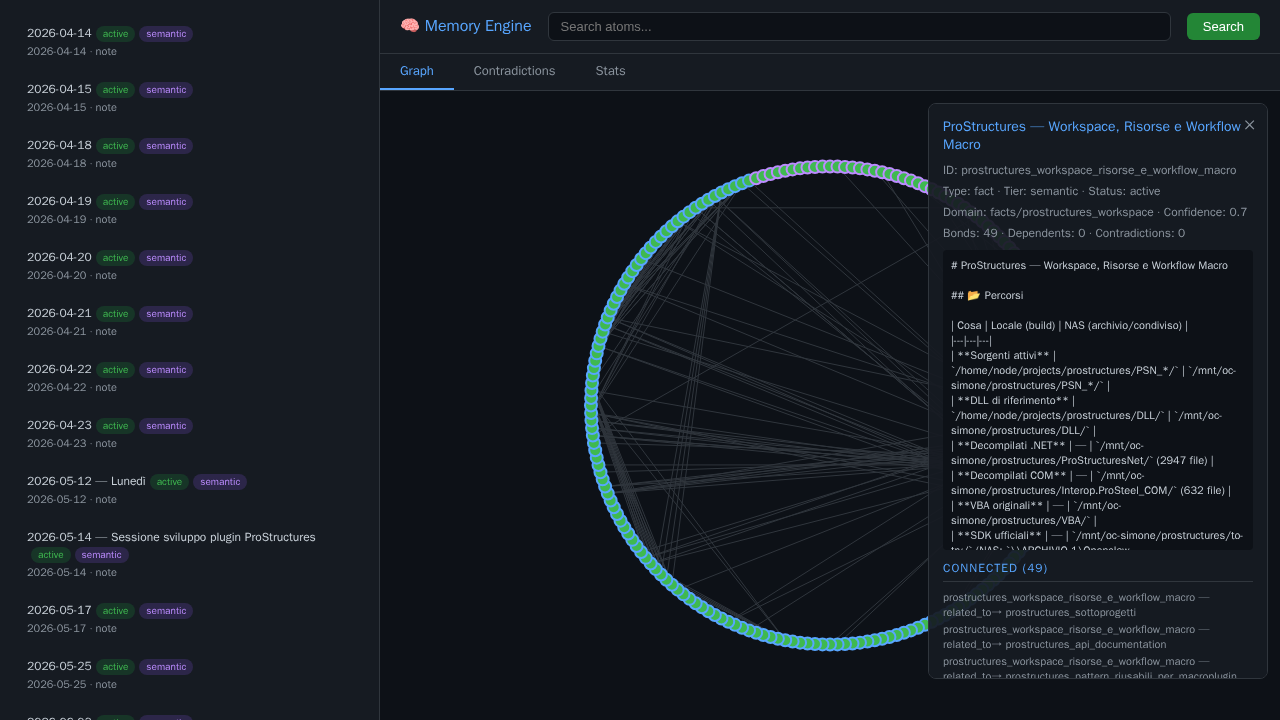
Web UI: interactive graph, atom details, contradiction browser, stats dashboard
# docker-compose.yml
services:
  memory-engine:
    image: ghcr.io/simoneb79/memory-engine-mcp:2.1.0
    ports:
      - "8085:8085"
    volumes:
      - memory-data:/data
    restart: unless-stopped

volumes:
  memory-data:
docker compose up -d
Pin the version. Use an explicit tag like
:1.7.0in production. Avoid:latest— it can change without notice.
git clone https://github.com/SimoneB79/memory-engine-mcp.git
cd memory-engine-mcp
cp docker-compose.yml docker-compose.local.yml
# Edit volume paths in docker-compose.local.yml if needed
docker compose -f docker-compose.local.yml up -d --build
Default endpoint:
http://localhost:8085/sse
Example MCP client config:
{
  "mcpServers": {
    "memory-engine": {
      "url": "http://localhost:8085/sse",
      "transport": "sse"
    }
  }
}
See docs/INSTALL.md for Docker, local Python, Claude Desktop, Cursor, and OpenClaw examples.
python -m venv .venv
source .venv/bin/activate
pip install -r requirements.txt
python server.py
Main configuration file: config.json
Important environment variables:
| Variable | Default | Purpose |
|---|---|---|
MEMORY_DB_PATH | /data/memory.db | SQLite database path |
MARKDOWN_SOURCE | /workspace/memory | Markdown directory for import |
MEMORY_HOST | 127.0.0.1 | Server bind address (secure default) |
MEMORY_PORT | 8085 | SSE port |
MEMORY_API_TOKEN | (none) | Optional API token for auth (see Security) |
OPENCLAW_AGENT_DB | (none) | Preferred per-agent OpenClaw SQLite DB (schema 17) |
OPENCLAW_SESSIONS_DIR | /sessions | Legacy JSONL fallback when no agent DB is configured |
SESSION_DIGEST_DIR | /data/session_digests | Optional session digest output |
For the SQLite mount, WAL/SHM handling, filtering, and security boundary, see OpenClaw transcript ingestion.
Semantic search requires Ollama reachable from the container or host. Default:
{
  "ollama": {
    "enabled": true,
    "host": "http://ollama:11434",
    "model": "nomic-embed-text"
  }
}
If you do not use Ollama, set ollama.enabled to false; FTS recall still works.
Atoms have:
titlebodytype: fact, decision, event, preference, log, procedure, note, etc.domain: project or topic namespaceconfidenceweighttagsBonds connect atoms with relation types:
is_a · part_of · depends_on · contradicts · refines · derived_from · detail_of · related_to
remember(
    title="Use PostgreSQL for analytics",
    body="SQLite is kept for local memory, PostgreSQL is used for multi-user analytics.",
    type="decision",
    domain="project:analytics",
    confidence=0.9,
    tags=["database", "architecture"]
)
recall(query="what database did we choose for analytics?", limit=5)
working_set(
    query="continue the analytics backend work",
    domain="project:analytics",
    limit=8,
    graph_depth=1
)
By default, Memory Engine runs in open mode (no auth) — safe for stdio or trusted local environments.
To enable API token auth:
// config.json
{
  "security": {
    "api_token": "your-secret-token",
    "allow_remote": false
  }
}
Or via environment variable:
MEMORY_API_TOKEN=your-secret-token
When auth is enabled:
Authorization: Bearer <token>?token=<token> or Bearer header127.0.0.1 unless allow_remote: trueSee CHANGELOG.md for the full list of security features.
This repository is prepared for MCP discovery:
io.github.simoneb79/memory-engine-mcpserver.jsonDockerfilemcp.jsonSee docs/PUBLISHING.md for the publication checklist.
MIT — see LICENSE.
Made with 🧠 by SimoneB79
Claim this server with your GitHub account to request manual ownership verification.
Link to the catalog listing for Memory Engine MCP from your README. This badge does not certify ownership, compatibility or security.
[](https://awesome-mcp.com/servers/memory-engine-mcp)Public repository statistics could not be verified. Check the configured source address; unavailable counts are not zero.
来源、范围和时段分别列出;不相加,不代表安装人数、活跃用户或安全审核。
尚无已审核的包 / 镜像标识,暂不展示下载统计。
Alternative and complementary servers in the same category
Store and retrieve entities, relations and observations in a persistent local knowledge graph.
Organize problem solving into revisable, branching thought steps through an MCP tool.

Query-aware context compression with an MCP plugin for coding agents, plus Python and HTTP interfaces for reducing the context sent to a language model.