
Oleafly is a live collaborative LaTeX, Typst and Markdown editor for research that offers a local MCP server and an oleafly mcp stdio command so outside AI clients can use its project tools.
Repository stats unavailable
Productivity & Ops
A Claude Code MCP plugin that audits the AI memory store with a four-dimension quality score and provides cleanup recommendations with a visual dashboard.
Memory Quality MCP is cataloged as an MCP server attributed to ladyiceberg. A Claude Code MCP plugin that audits the AI memory store with a four-dimension quality score and provides cleanup recommendations with a visual dashboard. It is categorized under productivity work. See the capability inspector for recorded interfaces and their independent review status; consult upstream documentation for the current interface.
Installation configuration is not reviewed. No executable setup is offered for this entry; inspect the source repository before proceeding.
Catalog license label: MIT. Check the source repository's current license and terms before using, modifying or distributing this software.
能力定义尚未审核。未核验的采集内容不会作为可信接口展示。
暂无可展示的已审核记录。这不表示上游不支持此能力。
暂无可展示的已审核记录。这不表示上游不支持此能力。
暂无可展示的已审核记录。这不表示上游不支持此能力。
Email delivery is not connected. This page does not collect email addresses or create subscriptions.
Browse the registry for current listings instead.
Reviews for Memory Quality MCP are not available yet
Review publishing and storage are not connected. This page does not collect or publish ratings or comments, including after sign-in.
Any OpenAI-compatible API, with built-in presets for OpenAI, Kimi, MiniMax, and Anthropic, plus custom providers via the MEMORY_QUALITY_BASE_URL environment variable.
Every operation shows a preview, requires explicit confirmation, and auto-backs up to a trash folder before deleting.
Scores are suggestions, not commands; the user makes the final call, and every deletion requires confirmation and is backed up.
README.md · 55a0ac463036 · 采集于 2026-11-13 11:37:02 UTC
保留上游原文,不做 AI 改写。为安全起见过滤脚本、表单和不安全链接。
当前显示最后一次成功采集的文档快照,请以来源页面为准。
A Claude Code MCP plugin that audits and cleans up your AI memory.
中文版 · Report a Bug · Request a Feature
Claude Code v2.1.59+ automatically saves memories from your conversations. Over time, your memory store accumulates:
This plugin audits your memory store with a 4-dimension quality score (Importance / Recency / Credibility / Accuracy) and gives you actionable cleanup recommendations — with a visual dashboard.
claude --version to check)Add to your Claude Code MCP config (~/.claude/settings.json or your project's .claude/settings.json):
{
  "mcpServers": {
    "memory-quality": {
      "command": "uvx",
      "args": ["memory-quality-mcp"],
      "env": {
        "OPENAI_API_KEY": "your-key-here"
      }
    }
  }
}
pip install memory-quality-mcp
Then in your MCP config:
{
  "mcpServers": {
    "memory-quality": {
      "command": "memory-quality-mcp",
      "env": {
        "MINIMAX_API_KEY": "your-key-here"
      }
    }
  }
}
Set one of these environment variables in the env field above:
| Provider | Env Variable | Default Model |
|---|---|---|
| OpenAI | OPENAI_API_KEY | gpt-4o-mini |
| Kimi | KIMI_API_KEY | moonshot-v1-8k |
| MiniMax | MINIMAX_API_KEY | MiniMax-M2.5 |
| Anthropic | ANTHROPIC_API_KEY | claude-haiku-4-5 |
The plugin auto-detects which provider to use based on whichever key is set.
For advanced config (custom model, thresholds), edit ~/.memory-quality-mcp/config.yaml — generated automatically on first run.
After setup, restart Claude Code and talk to it naturally:
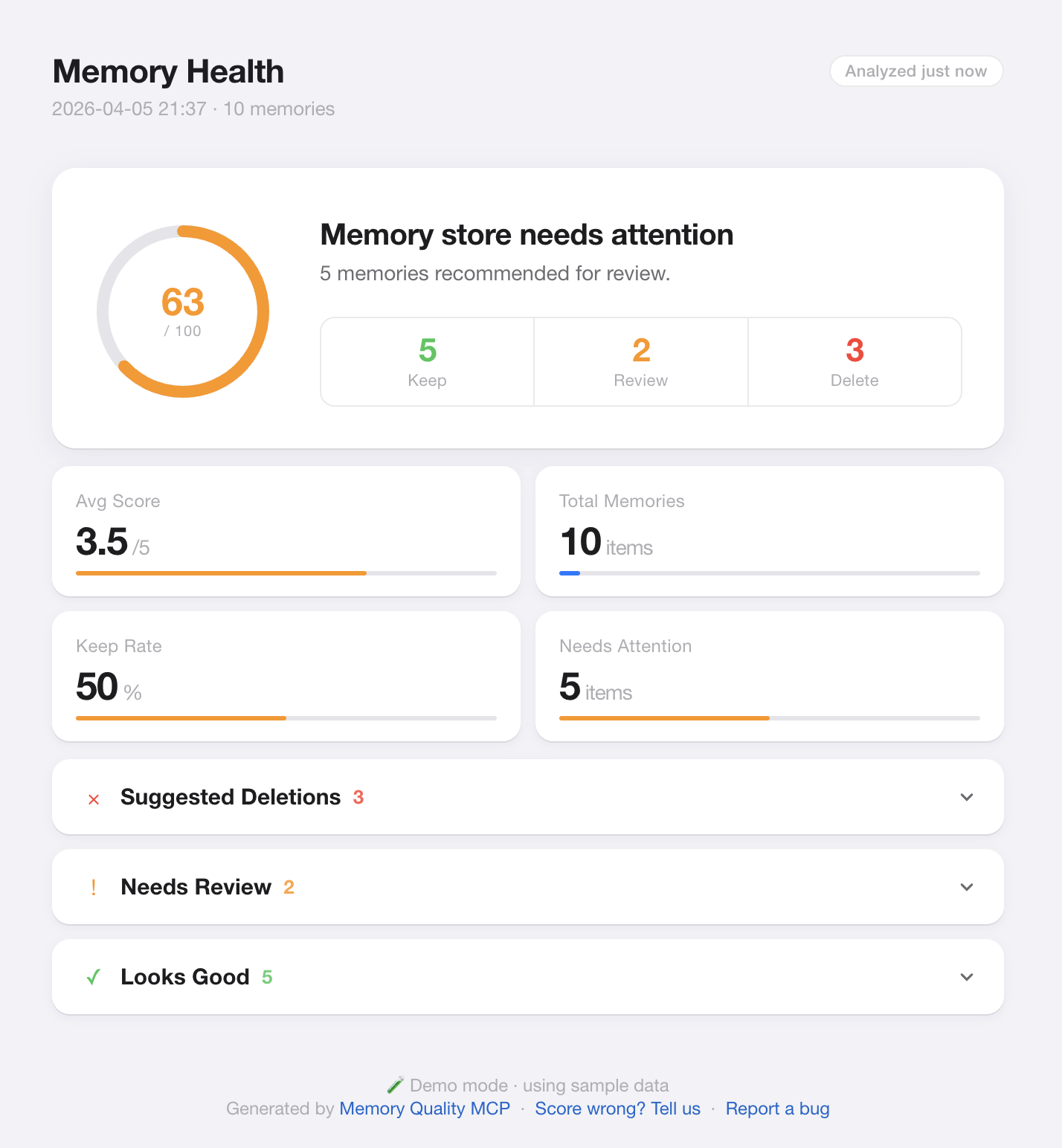
Open the memory dashboard in demo mode
Claude calls memory_dashboard(demo=True) → opens a browser page with example data so you can see what the tool does before running it on your real memories.
Check my memory store health
Returns: total memories across all projects, stale count, index usage, estimated LLM calls for a full report.
Run a detailed memory quality analysis
Scores every memory on 4 dimensions, detects conflicts, flags rule violations. Results are cached — cleanup and dashboard reuse them without calling the LLM again.
Cost estimate:
8–9 LLM calls for 50 memories ($0.01 with gpt-4o-mini)
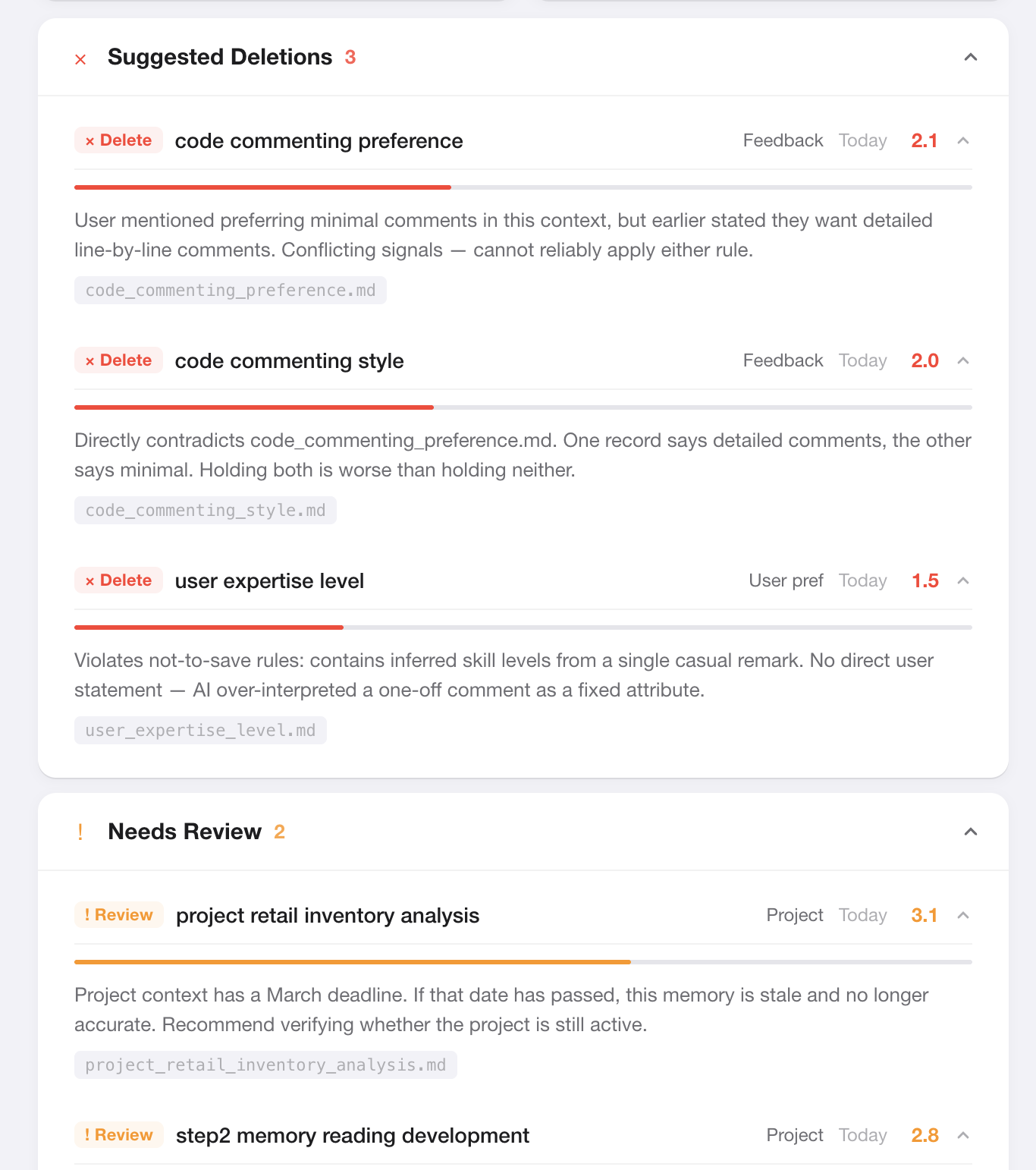
Open the memory health dashboard
Opens a local HTML page in your browser:
Clean up the memories marked for deletion
Claude previews with memory_cleanup(dry_run=True) first, then executes on confirmation.
Safety guarantees:
.trash/<timestamp>/ before deletingScore this memory: "User always codes late at night"
Analyze memories for ~/my-project only
| Dimension | Weight | What it measures |
|---|---|---|
| Importance | 40% | How useful is this for future conversations? |
| Recency | 25% | Is this information still accurate? |
| Credibility | 15% | Is there a clear source (user stated it explicitly)? |
| Accuracy | 20% | Did the AI record it faithfully, without over-interpreting? |
Score > 3.5 → Keep | 2.5–3.5 → Review | < 2.5 → Delete
You: Check my memory health

Claude: [memory_audit()]
        47 memories across 3 projects
        - Possibly stale: 8
        - Project memories past threshold: 3
        - MEMORY.md usage: 23% (46/200 lines)
        Estimated ~9 LLM calls for a full report.

You: Run the full analysis

Claude: [memory_report()]
        47 memories | 🗑 delete 8 | 🔄 review 5 | ✅ keep 34

        ⚡ 1 conflict found
        - 🔴 feedback_comments_a.md × feedback_comments_b.md
          One says "detailed comments", the other says "minimal comments"

        🗑 Suggested deletions (8)
        - project_q1_plan.md [project] · 120 days ago
          Score 1.5 · project memory past 90-day threshold

        Report cached — cleanup won't need to re-analyze

You: Open the dashboard

Claude: [memory_dashboard()]
        ✅ Dashboard opened in browser

You: Clean those up

Claude: [memory_cleanup(dry_run=True)]
        🔍 Preview (nothing deleted yet)
        8 memories will be removed: project_q1_plan.md ...

You: Confirm

Claude: [memory_cleanup(dry_run=False)]
        ✅ Cleaned up 8 memories
        Backup: ~/.claude/.../memory/.trash/20260405_143022/
        MEMORY.md index updated
Q: "No memory files found"
Requires Claude Code v2.1.59+. Check:
claude --version              # must be >= v2.1.59
ls ~/.claude/projects/        # should list your projects
If the version is new enough but no files exist yet, Claude hasn't decided anything is worth remembering yet. Keep using Claude Code normally — files will appear within a few sessions.
Want to see the tool in action first? Run memory_dashboard(demo=True).
Q: Are the scores accurate?
Scores are suggestions, not commands. You make the final call. Every deletion requires confirmation and is backed up. If you find consistent scoring errors, please open a Wrong Score issue — each report directly improves the model.
Q: Which LLMs are supported?
Any OpenAI-compatible API. Built-in presets: OpenAI, Kimi, MiniMax, Anthropic. Custom providers via MEMORY_QUALITY_BASE_URL environment variable.
Q: Will it delete something important?
No. Every operation: ① shows a preview ② requires explicit confirmation ③ auto-backs up to .trash/ before deleting.
Q: Where are my memory files?
ls ~/.claude/projects/*/memory/
Or type /memory inside Claude Code to browse and edit them directly.
Found a scoring error? Tell us — your feedback directly calibrates the model.
Bug or feature idea? Open an issue.
MIT
Claim this server with your GitHub account to request manual ownership verification.
Link to the catalog listing for Memory Quality MCP from your README. This badge does not certify ownership, compatibility or security.
[](https://awesome-mcp.com/servers/memory-quality-mcp)Public repository statistics could not be verified. Check the configured source address; unavailable counts are not zero.
来源、范围和时段分别列出;不相加,不代表安装人数、活跃用户或安全审核。
尚无已审核的包 / 镜像标识,暂不展示下载统计。
Alternative and complementary servers in the same category
Oleafly is a live collaborative LaTeX, Typst and Markdown editor for research that offers a local MCP server and an oleafly mcp stdio command so outside AI clients can use its project tools.
Buddy is an Android app that offers its phone tools through a local MCP server to Claude Code, Codex, OpenCode, Antigravity, and Grok sessions.

Tuqui is a hosted MCP server that connects Odoo with Claude and ChatGPT so users can ask about sales, stock, customers and overdue invoices in plain language.
