
A Rust CAD application with an MCP server for creating, inspecting and rendering drawings, either headlessly or through a connection to the desktop app.
8K
Media & Design
An MCP server that renders Mermaid diagrams in the browser with real-time live reload and supports saving diagrams in multiple formats and themes.
MCP server for rendering Mermaid diagrams with live reload is cataloged as an MCP server attributed to veelenga. An MCP server that renders Mermaid diagrams in the browser with real-time live reload and supports saving diagrams in multiple formats and themes. It is categorized under media design. See the capability inspector for recorded interfaces and their independent review status; consult upstream documentation for the current interface.
Installation configuration is not reviewed. No executable setup is offered for this entry; inspect the source repository before proceeding.
Catalog license label: MIT. Check the source repository's current license and terms before using, modifying or distributing this software.
能力定义尚未审核。未核验的采集内容不会作为可信接口展示。
暂无可展示的已审核记录。这不表示上游不支持此能力。
暂无可展示的已审核记录。这不表示上游不支持此能力。
暂无可展示的已审核记录。这不表示上游不支持此能力。
Email delivery is not connected. This page does not collect email addresses or create subscriptions.
Browse the registry for current listings instead.
Reviews for MCP server for rendering Mermaid diagrams with live reload are not available yet
Review publishing and storage are not connected. This page does not collect or publish ratings or comments, including after sign-in.
Live preview is available only for SVG; PNG and PDF are rendered without live reload.
Yes, multiple previews can be worked on simultaneously using preview_id.
README.md · 7e326719318e · 采集于 2026-11-13 09:26:44 UTC
保留上游原文,不做 AI 改写。为安全起见过滤脚本、表单和不安全链接。
当前显示最后一次成功采集的文档快照,请以来源页面为准。
MCP server for rendering Mermaid diagrams in Claude Code with live reload functionality and a built-in skill for expert guidance.
Automatically renders diagrams in your browser with real-time updates as you refine them. Perfect for iterative diagram development and documentation workflows.
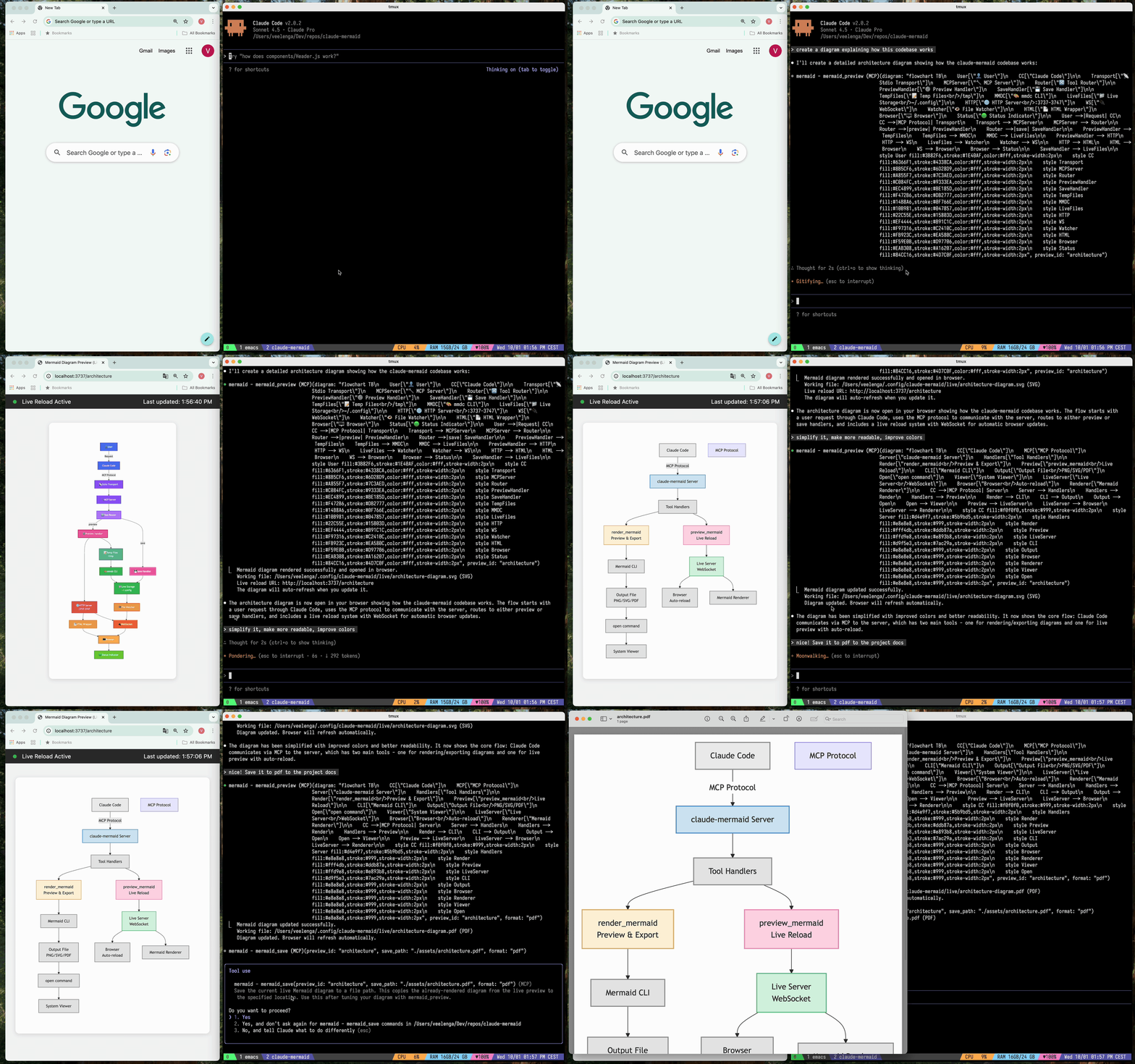
preview_id to work on multiple diagrams simultaneously~/.config/claude-mermaid/live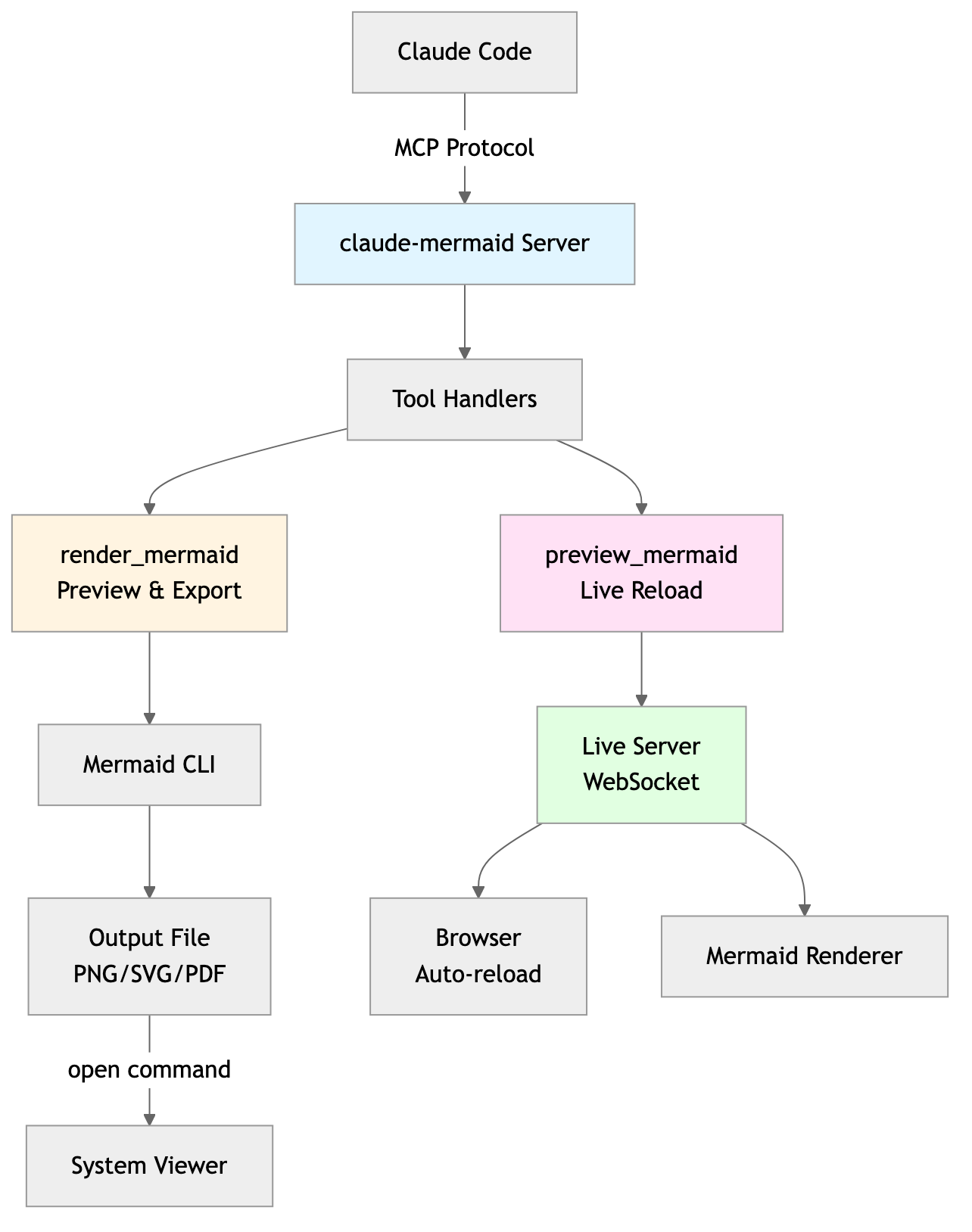
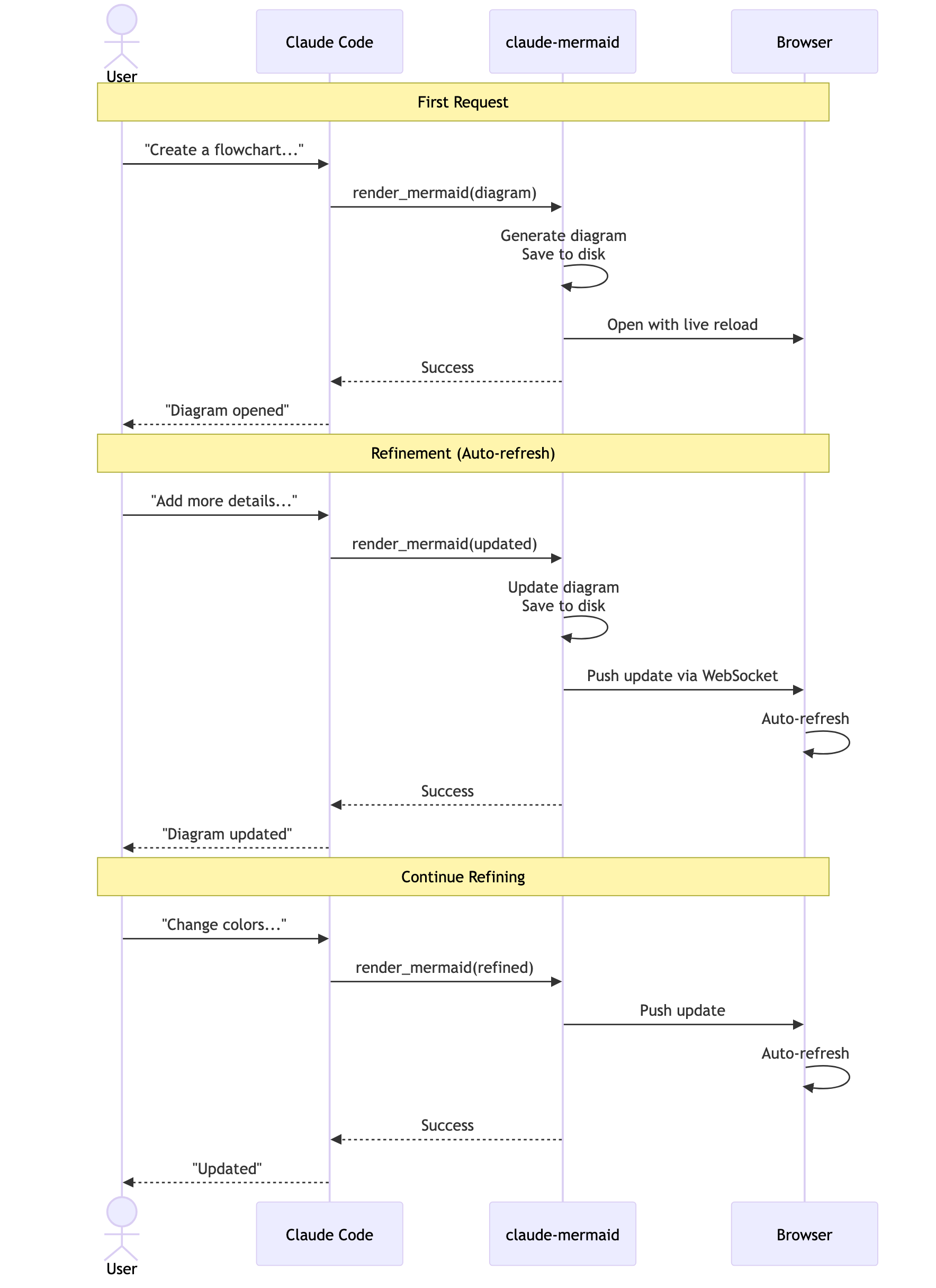
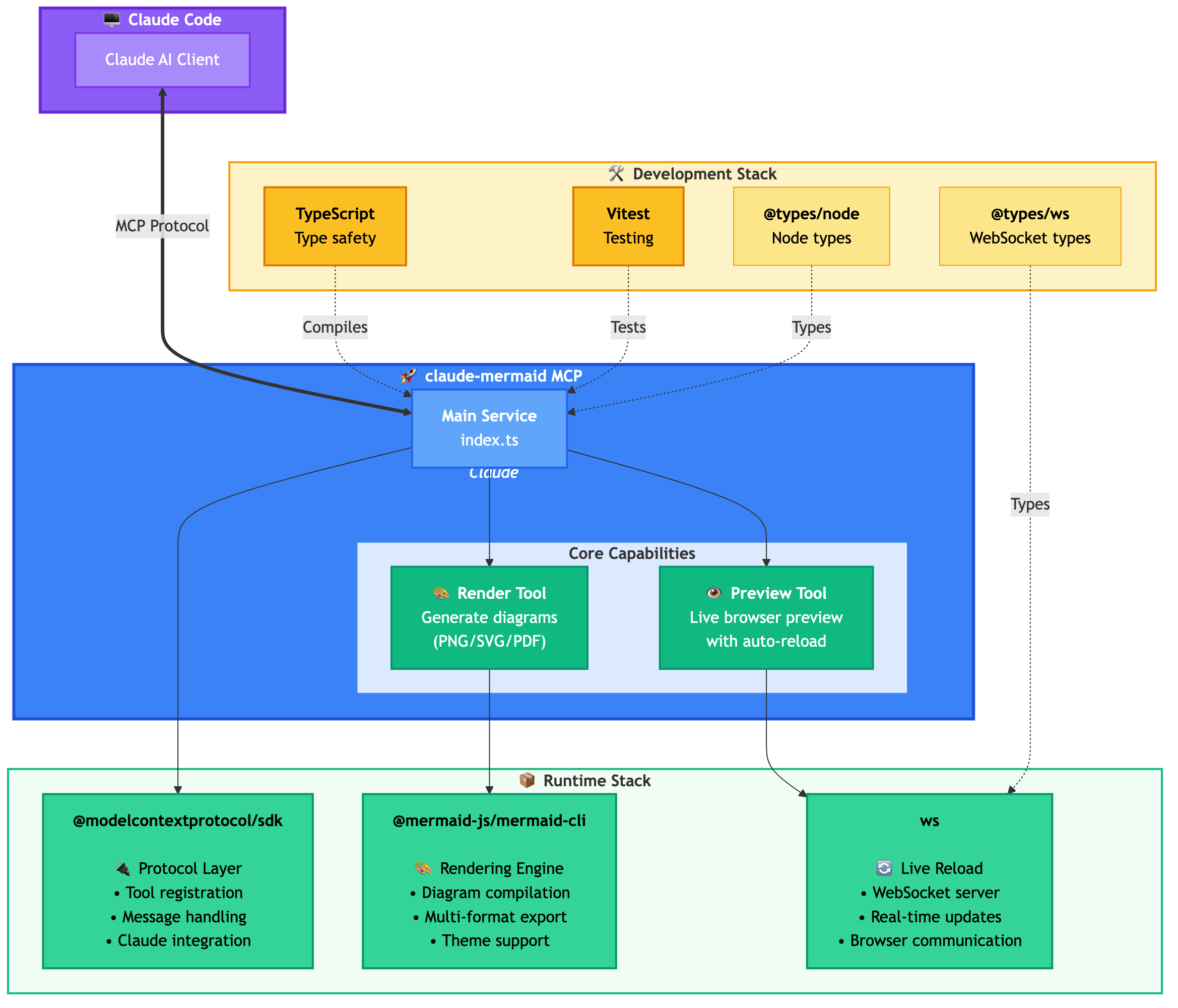
Plugin Install (Recommended)
In Claude Code, add the marketplace and install the plugin:
/plugin marketplace add veelenga/claude-mermaid
/plugin install claude-mermaid@claude-mermaid
Then restart Claude Code to activate the plugin.
From npm:
npm install -g claude-mermaid
From source:
git clone https://github.com/veelenga/claude-mermaid.git
cd claude-mermaid
npm install && npm run build && npm install -g .
Plugin install: The MCP server is configured automatically. Just verify:
/mcp
You should see mermaid in the MCP server list.
npm install: Configure the MCP server manually:
claude mcp add --scope user mermaid claude-mermaid
Then verify:
claude mcp list
You should see mermaid: claude-mermaid - ✓ Connected
While this server is optimized for Claude Code, it can work with any MCP-compatible client. Here's how to configure it for other popular tools:
Add to your Codex MCP settings file (~/.codex/mcp_settings.json):
{
  "mcpServers": {
    "mermaid": {
      "command": "claude-mermaid"
    }
  }
}
Or configure via Codex CLI:
codex mcp add mermaid claude-mermaid
Add to your Cursor MCP config file (.cursor/mcp.json or settings):
{
  "mcpServers": {
    "mermaid": {
      "command": "claude-mermaid"
    }
  }
}
Or use Cursor's settings UI:
claude-mermaidIf using the Cline extension for VSCode:
{
  "mcpServers": {
    "mermaid": {
      "command": "claude-mermaid"
    }
  }
}
Add to Windsurf's MCP configuration file:
{
  "mcpServers": {
    "mermaid": {
      "command": "claude-mermaid"
    }
  }
}
Configuration location varies by platform:
~/Library/Application Support/Windsurf/mcp.json~/.config/windsurf/mcp.json%APPDATA%\Windsurf\mcp.jsonAdd to Gemini CLI's MCP configuration file (~/.gemini/mcp.json):
{
  "mcpServers": {
    "mermaid": {
      "command": "claude-mermaid"
    }
  }
}
Or use the Gemini CLI to configure:
gemini config mcp add mermaid --command claude-mermaid
For any MCP-compatible client, use the standard configuration:
{
  "mcpServers": {
    "mermaid": {
      "command": "claude-mermaid"
    }
  }
}
The command claude-mermaid should be available in your PATH after installation.
Note: Some clients may require the full path to the executable:
which claude-mermaid (Unix/macOS) or where claude-mermaid (Windows)"command": "/path/to/claude-mermaid"Simply ask Claude Code to create Mermaid diagrams naturally. When installed as a plugin, the built-in mermaid-diagrams skill provides expert guidance, best practices, and automatic workflow management.
"Create a Mermaid diagram showing the user authentication flow"
"Draw a sequence diagram for the payment process"
"Generate a flowchart for the deployment pipeline"
With custom formatting:
"Create a dark theme architecture diagram with transparent background"
"Generate a forest theme flowchart and save to ./docs/flow.svg"
With specific output format:
"Create an ER diagram and save as PDF to ./docs/schema.pdf"
"Save the flowchart as PNG to ./docs/flow.png"
Note: Browser always shows SVG for live preview, while saving to your chosen format.
Iterative refinement:
"Create a class diagram for the User module"
// Browser opens with live preview
"Add the Address and Order classes with relationships"
// Diagram updates automatically in browser!
"Create a flowchart and save to ./docs/auth-flow.svg:

graph LR
    A[User Login] --> B{Valid Credentials?}
    B -->|Yes| C[Access Granted]
    B -->|No| D[Access Denied]
    C --> E[Dashboard]
    D --> F[Try Again]

    style A fill:#e1f5ff
    style C fill:#d4edda
    style D fill:#f8d7da
"
The diagram will be saved to ./docs/auth-flow.svg and opened in your browser with live reload enabled.
There are two tools exposed by the MCP server:
mermaid_preview — render and open a live previewdiagram (string, required) — Mermaid diagram codepreview_id (string, required) — Identifier for this preview session. Use different IDs for multiple concurrent diagrams (e.g., architecture, flow).format (string, default svg) — One of svg, png, pdf. Live preview is available only for svg.theme (string, default default) — One of default, forest, dark, neutral.background (string, default white) — Background color. Examples: transparent, white, #F0F0F0.size (number, default 800) — Maximum diagram width or height in pixels.width, height (number, deprecated) — Accepted for compatibility; the larger value is used as size.scale (number, default 2) — Scale factor for higher quality output.mermaid_save — save the current live diagram to a pathsave_path (string, required) — Destination path (e.g., ./docs/diagram.svg).preview_id (string, required) — Must match the preview_id used in mermaid_preview.format (string, default svg) — One of svg, png, pdf. If the live working file for this format doesn’t exist yet, it is rendered on demand before saving.http://localhost:3737/{preview_id}The live server uses ports 3737-3747 and automatically finds an available port.
svg format only; PNG/PDF are rendered without live reload.style directives inside sequenceDiagram.You can start the preview server without an AI agent using the --serve flag:
claude-mermaid --serve
This opens the diagram gallery in your browser with all previously rendered diagrams. Useful for browsing and exporting diagrams outside of a Claude Code session.
# Install dependencies
npm install

# Build the project
npm run build

# Run tests
npm test

# Watch mode for development
npm run dev

# Start the MCP server directly
npm start
Error: Cannot find package 'puppeteer':
This is a rare environment-specific issue. Try these solutions:
Install claude-mermaid globally:
npm install -g claude-mermaid
Reinstall the plugin in Claude Code:
/plugin uninstall claude-mermaid
/plugin install claude-mermaid@claude-mermaid
Server not connecting:
# Check if server is installed
claude-mermaid -v

# Reinstall if needed
npm install -g claude-mermaid

# Verify MCP configuration
claude mcp list
Permission denied error:
# Make sure the binary is executable
chmod +x $(which claude-mermaid)
Port already in use:
lsof -i :3737-3747Diagrams not rendering or live reload not working:
The server logs to ~/.config/claude-mermaid/logs/:
mcp.log - Tool requests and diagram renderingweb.log - HTTP/WebSocket connections and live reloadEnable debug logging in your MCP config:
{
  "mcpServers": {
    "mermaid": {
      "command": "claude-mermaid",
      "env": {
        "CLAUDE_MERMAID_LOG_LEVEL": "DEBUG"
      }
    }
  }
}
Then check the logs:
# View MCP operations
tail -f ~/.config/claude-mermaid/logs/mcp.log

# View WebSocket connections
tail -f ~/.config/claude-mermaid/logs/web.log
Available log levels: DEBUG, INFO (default), WARN, ERROR, OFF
Contributions are welcome! Please feel free to submit a Pull Request.
MIT - see LICENSE file for details
If you like this project, you might also be interested in
A hosted deployment is available on Fronteir AI.
Claim this server with your GitHub account to request manual ownership verification.
Link to the catalog listing for MCP server for rendering Mermaid diagrams with live reload from your README. This badge does not certify ownership, compatibility or security.
[](https://awesome-mcp.com/servers/mermaid)Public repository statistics could not be verified. Check the configured source address; unavailable counts are not zero.
来源、范围和时段分别列出;不相加,不代表安装人数、活跃用户或安全审核。
尚无已审核的包 / 镜像标识,暂不展示下载统计。
Alternative and complementary servers in the same category
A Rust CAD application with an MCP server for creating, inspecting and rendering drawings, either headlessly or through a connection to the desktop app.

Liquid Composer is a browser-based Liquid Glass icon design tool that offers a local MCP server for agent-driven icon workflows.

agent-media makes short drama series and other short vertical videos from Claude, ChatGPT or Codex through one MCP connection, with OAuth sign-in and no API keys.