
A stateless streamable HTTP MCP server for interacting with the official source of government spending data.
Repository stats unavailable
Finance & Analytics
An MCP server that bridges AI assistants to MetaTrader 5 so they can retrieve account and market data and execute trades via natural language.
MetaTrader MCP Server is cataloged as an MCP server attributed to ariadng. An MCP server that bridges AI assistants to MetaTrader 5 so they can retrieve account and market data and execute trades via natural language. It is categorized under finance crypto. See the capability inspector for recorded interfaces and their independent review status; consult upstream documentation for the current interface.
Installation configuration is not reviewed. No executable setup is offered for this entry; inspect the source repository before proceeding.
Catalog license label: MIT License. Check the source repository's current license and terms before using, modifying or distributing this software.
能力定义尚未审核。未核验的采集内容不会作为可信接口展示。
暂无可展示的已审核记录。这不表示上游不支持此能力。
暂无可展示的已审核记录。这不表示上游不支持此能力。
暂无可展示的已审核记录。这不表示上游不支持此能力。
Email delivery is not connected. This page does not collect email addresses or create subscriptions.
Browse the registry for current listings instead.
Reviews for MetaTrader MCP Server are not available yet
Review publishing and storage are not connected. This page does not collect or publish ratings or comments, including after sign-in.
Yes. The README describes running the MCP server on a Windows VPS where MT5 is installed and connecting to it remotely via SSE from Claude Desktop or Claude Code.
No. The README warns that the MCP protocol does not include authentication and recommends network restrictions or an authenticated proxy when exposing the SSE server.
README.md · bd2ff591e32c · 采集于 2026-11-13 09:38:15 UTC
保留上游原文,不做 AI 改写。为安全起见过滤脚本、表单和不安全链接。
当前显示最后一次成功采集的文档快照,请以来源页面为准。


Let AI assistants trade for you using natural language
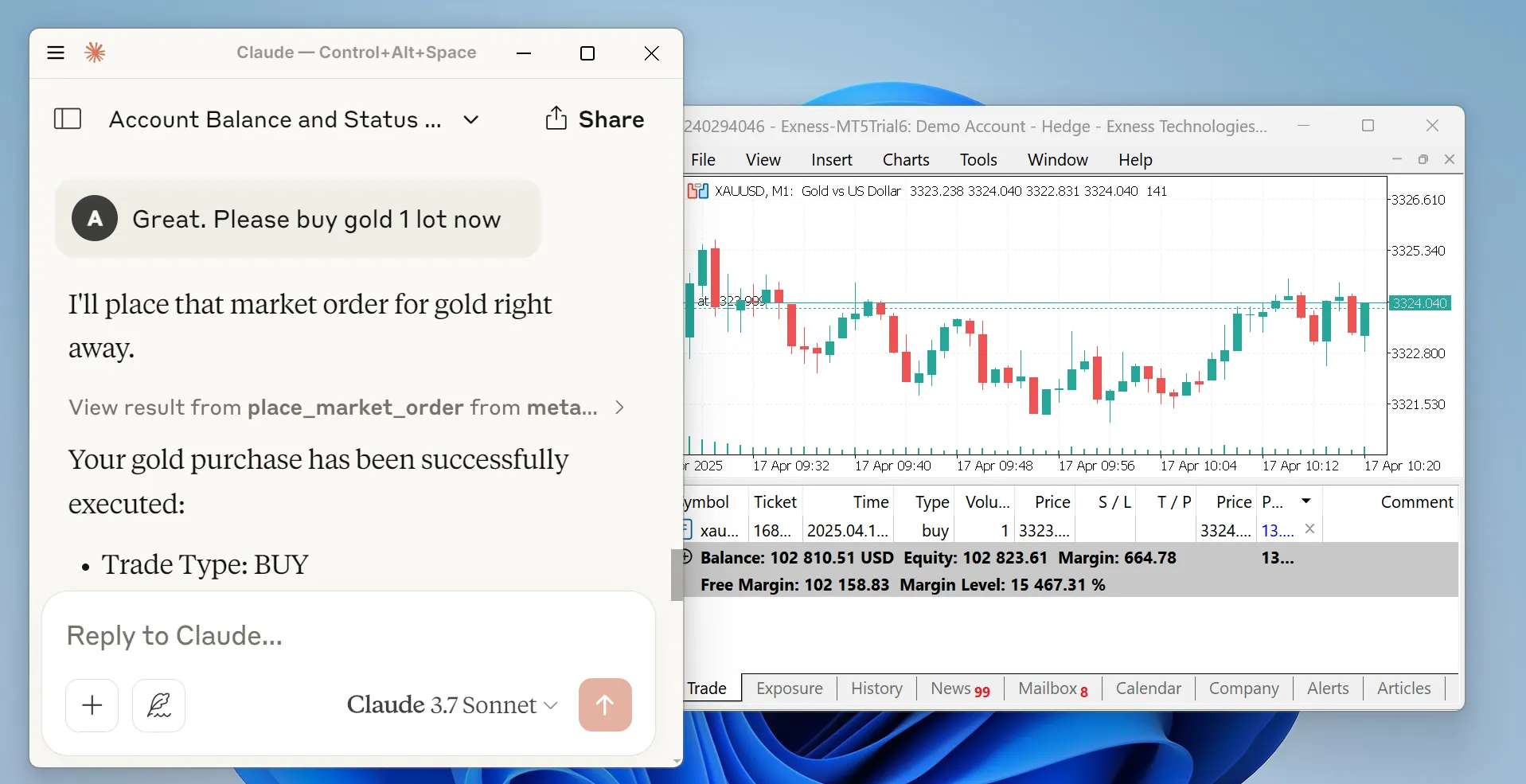
MetaTrader MCP Server is a bridge that connects AI assistants (like Claude, ChatGPT) to the MetaTrader 5 trading platform. Instead of clicking buttons, you can simply tell your AI assistant what to do:
"Show me my account balance" "Buy 0.01 lots of EUR/USD" "Close all profitable positions"
The AI understands your request and executes it on MetaTrader 5 automatically.
You → AI Assistant → MCP Server → MetaTrader 5 → Your Trades
Please read this carefully:
Trading financial instruments involves significant risk of loss. This software is provided as-is, and the developers accept no liability for any trading losses, gains, or consequences of using this software.
By using this software, you acknowledge that:
This is not financial advice. Always trade responsibly.
Before you begin, make sure you have:
Open your terminal or command prompt and run:
pip install metatrader-mcp-server
Tools → OptionsExpert Advisors tabAllow algorithmic tradingOKPick one based on how you want to use it:
Find your Claude Desktop config file:
%APPDATA%\Claude\claude_desktop_config.json~/Library/Application Support/Claude/claude_desktop_config.jsonOpen the file and add this configuration:
{
  "mcpServers": {
    "metatrader": {
      "command": "metatrader-mcp-server",
      "args": [
        "--login",     "YOUR_MT5_LOGIN",
        "--password",  "YOUR_MT5_PASSWORD",
        "--server",    "YOUR_MT5_SERVER",
        "--transport", "stdio"
      ]
    }
  }
}
Optional: Specify Custom MT5 Terminal Path
If your MT5 terminal is installed in a non-standard location, add the --path argument:
{
  "mcpServers": {
    "metatrader": {
      "command": "metatrader-mcp-server",
      "args": [
        "--login",     "YOUR_MT5_LOGIN",
        "--password",  "YOUR_MT5_PASSWORD",
        "--server",    "YOUR_MT5_SERVER",
        "--transport", "stdio",
        "--path",      "C:\\Program Files\\MetaTrader 5\\terminal64.exe"
      ]
    }
  }
}
Replace YOUR_MT5_LOGIN, YOUR_MT5_PASSWORD, and YOUR_MT5_SERVER with your actual credentials
Restart Claude Desktop
Start chatting! Try: "What's my account balance?"
metatrader-http-server --login YOUR_LOGIN --password YOUR_PASSWORD --server YOUR_SERVER --host 0.0.0.0 --port 8000
Optional: Specify Custom MT5 Terminal Path
If your MT5 terminal is installed in a non-standard location, add the --path argument:
metatrader-http-server --login YOUR_LOGIN --password YOUR_PASSWORD --server YOUR_SERVER --path "C:\Program Files\MetaTrader 5\terminal64.exe" --host 0.0.0.0 --port 8000
Open your browser to http://localhost:8000/docs to see the API documentation
In Open WebUI:
http://localhost:8000Now you can use trading tools in your Open WebUI chats!
Stream live tick data (bid, ask, spread, volume) over WebSocket for dashboards, bots, or monitoring:
metatrader-quote-server --login YOUR_LOGIN --password YOUR_PASSWORD --server YOUR_SERVER
Connect with any WebSocket client:
websocat ws://localhost:8765
You'll receive a connected message followed by continuous tick updates as JSON. See WebSocket Quote Server for full details.
Run the MCP server on a Windows VPS (where MT5 is installed) and connect to it remotely from Claude Desktop or Claude Code.
Server-side (on the Windows VPS):
metatrader-mcp-server --login YOUR_LOGIN --password YOUR_PASSWORD --server YOUR_SERVER
This starts the SSE server on 0.0.0.0:8080 by default. Customize with --host and --port:
metatrader-mcp-server --login YOUR_LOGIN --password YOUR_PASSWORD --server YOUR_SERVER --host 127.0.0.1 --port 9000
Client-side (Claude Desktop config on your local machine):
{
  "mcpServers": {
    "metatrader": {
      "url": "http://VPS_IP:8080/sse"
    }
  }
}
Replace VPS_IP with your server's IP address.
Security Warning: The MCP protocol does not include authentication. When exposing the SSE server over a network, use a firewall to restrict access by IP, or place it behind a reverse proxy with authentication, or use an SSH tunnel.
A pre-built Trading Terminal Assistant skill is included in the claude-skill/ directory. It provides Claude with structured knowledge about all 32 trading tools, output formatting, and MetaTrader 5 domain expertise.
Option 1: Symlink (recommended)
Create a symlink from the standard Claude Code skills directory to claude-skill/:
cd metatrader-mcp-server
mkdir -p .claude
ln -s ../claude-skill .claude/skills
The skill will be auto-discovered and available as /trading.
Option 2: Copy
Copy the skill files into the Claude Code skills directory:
cd metatrader-mcp-server
mkdir -p .claude/skills
cp -r claude-skill/trading .claude/skills/trading
For Claude Desktop, copy the skill to the global Claude skills directory:
# macOS
mkdir -p ~/Library/Application\ Support/Claude/skills
cp -r claude-skill/trading ~/Library/Application\ Support/Claude/skills/trading

# Windows
mkdir "%APPDATA%\Claude\skills"
xcopy /E claude-skill\trading "%APPDATA%\Claude\skills\trading\"
Once installed, invoke with /trading or just ask trading-related questions naturally:
/trading
> Show me my account dashboard
> Buy 0.1 lots of EURUSD with SL at 1.0800
> Close all profitable positions
> Show me GBPUSD H4 candles
The WebSocket Quote Server streams real-time tick data from MetaTrader 5 to any WebSocket client. It's ideal for live dashboards, algorithmic trading frontends, and real-time monitoring.
metatrader-quote-server --login YOUR_LOGIN --password YOUR_PASSWORD --server YOUR_SERVER
The server starts on ws://0.0.0.0:8765 by default.
metatrader-quote-server \
  --login YOUR_LOGIN \
  --password YOUR_PASSWORD \
  --server YOUR_SERVER \
  --host 127.0.0.1 \
  --port 9000 \
  --symbols "EURUSD,GBPUSD,XAUUSD" \
  --poll-interval 200
| Flag | Env Var | Default | Description |
|---|---|---|---|
--host | QUOTE_HOST | 0.0.0.0 | Host to bind |
--port | QUOTE_PORT | 8765 | Port to bind |
--symbols | QUOTE_SYMBOLS | XAUUSD,USOIL,GBPUSD,USDJPY,EURUSD,BTCUSD | Comma-separated symbols to stream |
--poll-interval | QUOTE_POLL_INTERVAL_MS | 100 | Tick polling interval in milliseconds |
CLI flags take precedence over environment variables, which take precedence over defaults.
On connect — server sends a connected message with the symbol list, followed by any cached ticks:
{"type": "connected", "symbols": ["XAUUSD", "EURUSD", "GBPUSD"], "poll_interval_ms": 100}
Tick updates — sent whenever bid, ask, or volume changes:
{"type": "tick", "symbol": "XAUUSD", "bid": 2345.67, "ask": 2345.89, "spread": 0.22, "volume": 1234, "time": "2026-03-14T10:30:45+00:00"}
Errors — sent if a symbol cannot be fetched:
{"type": "error", "symbol": "INVALID", "message": "Symbol not found or data unavailable"}
import asyncio
import json
from websockets.asyncio.client import connect

async def main():
    async with connect("ws://localhost:8765") as ws:
        async for message in ws:
            tick = json.loads(message)
            if tick["type"] == "tick":
                print(f"{tick['symbol']}: {tick['bid']}/{tick['ask']} (spread: {tick['spread']})")

asyncio.run(main())
Once configured, you can chat naturally:
Check Your Account:
You: "Show me my account information"
Claude: Returns balance, equity, margin, leverage, etc.
Get Market Data:
You: "What's the current price of EUR/USD?"
Claude: Shows bid, ask, and spread
Place a Trade:
You: "Buy 0.01 lots of GBP/USD with stop loss at 1.2500 and take profit at 1.2700"
Claude: Executes the trade and confirms
Manage Positions:
You: "Close all my losing positions"
Claude: Closes positions and reports results
Analyze History:
You: "Show me all my trades from last week for EUR/USD"
Claude: Returns trade history as a table
# Get account info
curl http://localhost:8000/api/v1/account/info

# Get current price
curl "http://localhost:8000/api/v1/market/price?symbol_name=EURUSD"

# Place a market order
curl -X POST http://localhost:8000/api/v1/order/market \
  -H "Content-Type: application/json" \
  -d '{
    "symbol": "EURUSD",
    "volume": 0.01,
    "type": "BUY",
    "stop_loss": 1.0990,
    "take_profit": 1.1010
  }'

# Get all open positions
curl http://localhost:8000/api/v1/positions

# Close a specific position
curl -X DELETE http://localhost:8000/api/v1/positions/12345
from metatrader_client import MT5Client

# Connect to MT5
config = {
    "login": 12345678,
    "password": "your_password",
    "server": "MetaQuotes-Demo"
}
client = MT5Client(config)
client.connect()

# Get account statistics
stats = client.account.get_trade_statistics()
print(f"Balance: ${stats['balance']}")
print(f"Equity: ${stats['equity']}")

# Get current price
price = client.market.get_symbol_price("EURUSD")
print(f"EUR/USD Bid: {price['bid']}, Ask: {price['ask']}")

# Place a market order
result = client.order.place_market_order(
    type="BUY",
    symbol="EURUSD",
    volume=0.01,
    stop_loss=1.0990,
    take_profit=1.1010
)
print(result['message'])

# Close all positions
client.order.close_all_positions()

# Disconnect
client.disconnect()
get_account_info - Get balance, equity, profit, margin level, leverage, currencyget_symbols - List all available trading symbolsget_symbol_price - Get current bid/ask price for a symbolget_candles_latest - Get recent price candles (OHLCV data)get_candles_by_date - Get historical candles for a date rangeget_symbol_info - Get detailed symbol informationplace_market_order - Execute instant BUY/SELL ordersplace_pending_order - Place limit/stop orders for future executionmodify_position - Update stop loss or take profitmodify_pending_order - Modify pending order parametersget_all_positions - View all open positionsget_positions_by_symbol - Filter positions by trading pairget_positions_by_id - Get specific position detailsclose_position - Close a specific positionclose_all_positions - Close all open positionsclose_all_positions_by_symbol - Close all positions for a symbolclose_all_profitable_positions - Close only winning tradesclose_all_losing_positions - Close only losing tradesget_all_pending_orders - List all pending ordersget_pending_orders_by_symbol - Filter pending orders by symbolcancel_pending_order - Cancel a specific pending ordercancel_all_pending_orders - Cancel all pending orderscancel_pending_orders_by_symbol - Cancel pending orders for a symbolget_deals - Get historical completed tradesget_orders - Get historical order recordsInstead of putting credentials in the command line, create a .env file:
LOGIN=12345678
PASSWORD=your_password
SERVER=MetaQuotes-Demo

# Optional: Specify custom MT5 terminal path (auto-detected if not provided)
# MT5_PATH=C:\Program Files\MetaTrader 5\terminal64.exe
Then start the server without arguments:
metatrader-http-server
The server will automatically load credentials from the .env file.
The MCP server supports multiple transport modes:
| Flag | Env Var | Default | Description |
|---|---|---|---|
--transport | MCP_TRANSPORT | sse | Transport type: sse, stdio, streamable-http |
--host | MCP_HOST | 0.0.0.0 | Host to bind (SSE/HTTP only) |
--port | MCP_PORT | 8080 | Port to bind (SSE/HTTP only) |
CLI flags take precedence over environment variables, which take precedence over defaults.
metatrader-http-server --host 127.0.0.1 --port 9000
The MT5 client supports additional configuration:
config = {
    "login": 12345678,
    "password": "your_password",
    "server": "MetaQuotes-Demo",
    "path": None,               # Path to MT5 terminal executable (default: auto-detect)
    "timeout": 60000,           # Connection timeout in milliseconds (default: 60000)
    "portable": False,          # Use portable mode (default: False)
    "max_retries": 3,           # Maximum connection retry attempts (default: 3)
    "backoff_factor": 1.5,      # Delay multiplier between retries (default: 1.5)
    "cooldown_time": 2.0,       # Seconds to wait between connections (default: 2.0)
    "debug": True               # Enable debug logging (default: False)
}
Configuration Options:
| Feature | Status |
|---|---|
| MetaTrader 5 Connection | ✅ Complete |
| Python Client Library | ✅ Complete |
| MCP Server | ✅ Complete |
| Claude Desktop Integration | ✅ Complete |
| HTTP/REST API Server | ✅ Complete |
| Open WebUI Integration | ✅ Complete |
| OpenAPI Documentation | ✅ Complete |
| PyPI Package | ✅ Published |
| SSE Transport Support | ✅ Complete |
| Google ADK Integration | 🚧 In Progress |
| WebSocket Quote Server | ✅ Complete |
| Docker Container | 📋 Planned |
# Clone the repository
git clone https://github.com/ariadng/metatrader-mcp-server.git
cd metatrader-mcp-server

# Install in development mode
pip install -e .

# Install development dependencies
pip install pytest python-dotenv

# Run tests
pytest tests/
metatrader-mcp-server/
├── src/
│   ├── metatrader_client/      # Core MT5 client library
│   │   ├── account/            # Account operations
│   │   ├── connection/         # Connection management
│   │   ├── history/            # Historical data
│   │   ├── market/             # Market data
│   │   ├── order/              # Order execution
│   │   └── types/              # Type definitions
│   ├── metatrader_mcp/         # MCP server implementation
│   ├── metatrader_openapi/     # HTTP/REST API server
│   └── metatrader_quote/       # WebSocket quote streamer
├── tests/                      # Test suite
├── docs/                       # Documentation
└── pyproject.toml             # Project configuration
Contributions are welcome! Here's how you can help:
git checkout -b feature/amazing-feature)pytest)git commit -m 'Add amazing feature')git push origin feature/amazing-feature)"Connection failed"
"Module not found"
pip install metatrader-mcp-server"Order execution failed"
This project is licensed under the MIT License - see the LICENSE file for details.
Claim this server with your GitHub account to request manual ownership verification.
Link to the catalog listing for MetaTrader MCP Server from your README. This badge does not certify ownership, compatibility or security.
[](https://awesome-mcp.com/servers/metatrader-mcp-server)Public repository statistics could not be verified. Check the configured source address; unavailable counts are not zero.
来源、范围和时段分别列出;不相加,不代表安装人数、活跃用户或安全审核。
尚无已审核的包 / 镜像标识,暂不展示下载统计。
Alternative and complementary servers in the same category
A stateless streamable HTTP MCP server for interacting with the official source of government spending data.

A hosted, remote MCP server for Fortnox that lets AI assistants answer questions from a company's bookkeeping and propose changes for approval before writing them.

OptimistFi is a read-only remote MCP server that provides perpetual futures market data, perps prop firm rules and pricing, and US equity investment research.