
Met Museum MCP Server
A Model Context Protocol (MCP) server that provides access to the Metropolitan Museum of Art Collection through natural language interactions. This server allows AI models to search The Met's art collection and retrieve artwork details (including images) via tool results.

Table of Contents
Hosted deployment
A hosted deployment is available on Fronteir AI.
Features
This server provides AI models the following tools to interact with the art collection of The Met:
1. List Departments (list-departments)
Lists all the valid departments at The Met
2. Search Museum Objects (search-museum-objects)
Search for various objects in The Met based on the inputs.
-
Inputs:
q (string): The search term e.g. sunflowershasImages (boolean, optional, default: false): Only search for objects with imagestitle (boolean, optional, default: false): Returns objects that match the query, specifically searching against the title field for objects.departmentId (number, optional): Returns objects that are a part of a specific department.page (number, optional, default: 1): 1-based page number for results.pageSize (number, optional, default: 24): Number of Object IDs per page (max 100).
-
Outputs:
Total objects found: 54
Page: 1/3
Object IDs: 436532, 789578, 436840, 438722,...
3. Get Museum Object (get-museum-object)
Get a specific object from The Met containing all open access data about that object, including its image (if the image is available under Open Access).
If there is an image and returnImage is true, it is returned as an image content block in the tool result (base64-encoded JPEG).
Use this tool when the user asks for deeper details on a specific artwork and you already have an objectId.
- Inputs:
objectId (number): The id of the object to retrievereturnImage (boolean, optional, default: true): Whether to include the object's image (if available) in the tool result
- Outputs:
Title: Self-Portrait with a Straw Hat (obverse: The Potato Peeler)
Artist: Vincent van Gogh
Artist Bio: Dutch, Zundert 1853–1890 Auvers-sur-Oise
Department: European Paintings
Credit Line: Bequest of Miss Adelaide Milton de Groot (1876-1967), 1967
Medium: Oil on canvas
Dimensions: 16 x 12 1/2 in. (40.6 x 31.8 cm)
Primary Image URL: https://images.metmuseum.org/CRDImages/ep/original/DT1502_cropped2.jpg
Tags: Men, Self-portraits
If returnImage is true
**base64 encoding of jpeg image**
4. Open Met Explorer App (open-met-explorer)
Launches an interactive MCP App (ui://met/explorer.html) that can search, filter, and inspect objects from within MCP clients that support Apps.
Recommended flow:
-
Use open-met-explorer to launch and browse live search results (pass q to start searching immediately).
-
After creating a curated list from current results, use get-museum-object only for items the user wants to explore in depth.
-
Inputs (all optional):
q (string): Initial search term.hasImages (boolean, default: true): Prefer objects with images.title (boolean, default: false): Search titles only.departmentId (number): Pre-select a department filter.
-
Output:
Opens the Met Explorer app in the client UI.
MCP Apps
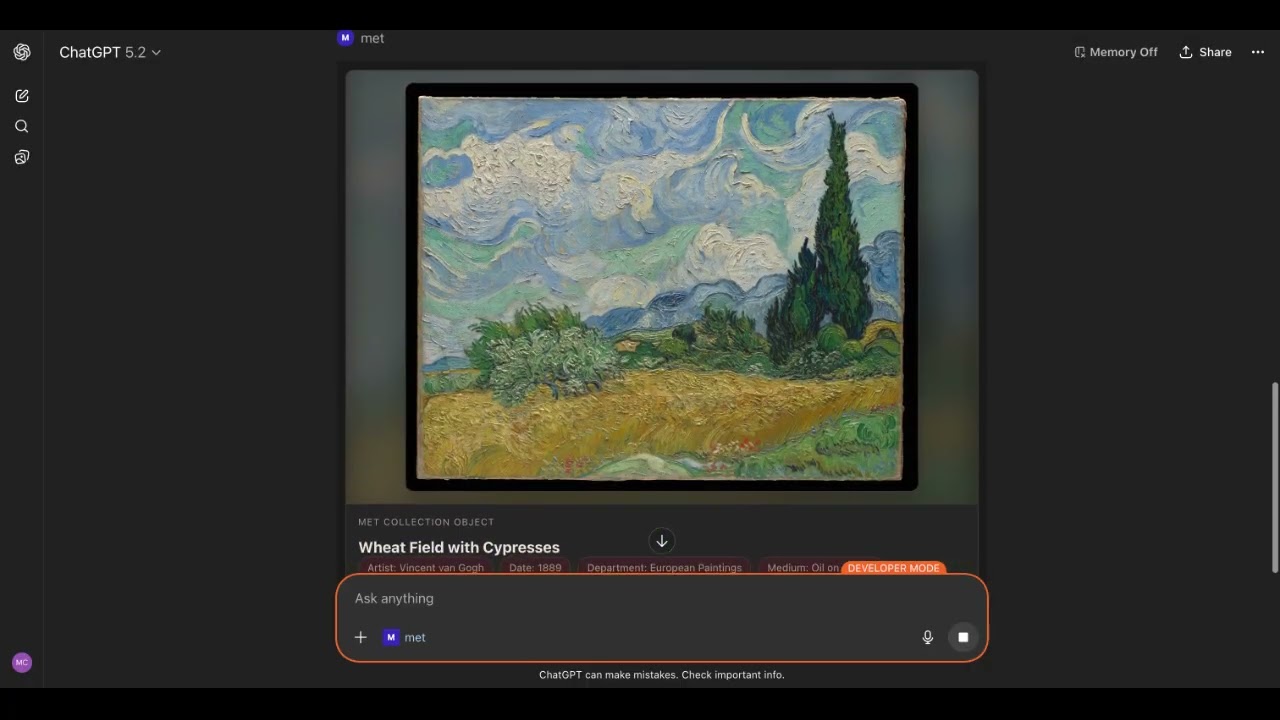
▶️ Click to watch the demo video
There are now MCP Apps in this MCP Server. There is a UI component for the Open Met Explorer App tool and the Get Museum Object tool.
Prerequisites
Quick Start
Run the server directly with npx — no install required:
npx -y metmuseum-mcp
This starts the server using stdio transport, which is what most MCP desktop clients expect.
For client-specific setup, see:
Configuration
The following environment variable applies to all transports:
Transports
This server supports two transports:
- Stdio transport (default): Used by MCP desktop clients (Claude Desktop, LibreChat MCP, etc.).
- Streamable HTTP transport: Run with
--http to expose an MCP endpoint at /mcp.
Streamable HTTP Transport
Run with npx (recommended for end users):
npx -y metmuseum-mcp --http
Or run from a local clone:
pnpm run build
node dist/index.js --http
The server listens on:
http://localhost:3001/mcp
You can control HTTP server behavior with environment variables:
Example:
HOST=127.0.0.1 PORT=8080 ALLOWED_HOSTS=localhost,127.0.0.1 npx -y metmuseum-mcp --http
Usage with ChatGPT
The following steps allow you to use Met Museum MCP with the web UI of ChatGPT
1. Enable Developer Mode in ChatGPT
Settings → Apps → Advanced settings → Developer mode
Additional instructions here
2. Run the Met Museum MCP Server with Streamable HTTP Transport
npx -y metmuseum-mcp --http
By default the server will be listening on
http://127.0.0.1:3001/mcp
3. Create a local tunnel to expose the MCP Server to ChatGPT
Sign up and configure ngrok, the free plan works.
ngrok http http://127.0.0.1:3001 --host-header=rewrite
Take note of the forwarding URL.
...
Forwarding                    https://john-joe-asdf.ngrok-free.dev -> http://localhost:3001
...
4. Add Met Museum MCP as a Connector to ChatGPT
Open ChatGPT Apps settings
Click Apps
Click Create Apps
Fill out the form using the URL from step 3 as the MCP Server URL, but add /mcp.
https://john-joe-asdf.ngrok-free.dev/mcp
For Authentication, select 'No Auth'
Tick the checkbox for 'I understand and want to continue'
Then click Create.
5. Using the Met Museum MCP Server
In the prompt input field you can use @name-of-server-from-step3 or
In the ChatGPT UI, click the '+' button, scroll to '...more', select the newly created Met app, and enter your query.
Usage with Claude Desktop
Via MCP Bundle (MCPB)
- Download the
mcpb file from the Releases
- Open it with Claude Desktop
or
Go to File -> Settings -> Extensions and drag the .mcpb file to the window to install it
Via npx
Add this to your claude_desktop_config.json:
{
  "mcpServers": {
    "met-museum": {
      "command": "npx",
      "args": [
        "-y",
        "metmuseum-mcp"
      ]
    }
  }
}
Usage with LibreChat
Add the following in your librechat.yaml
mcpServers:
  metmuseum:
    command: npx
    args:
      - -y
      - metmuseum-mcp
Example Queries
Here are some questions you can ask the AI model when this server is connected:
Can you help me explore the works of Vincent Van Gogh?
Can you help me explore the Met?
Can you show me a few paintings from the Asian Art department?
Can you find the painting titled "Corridor in the Asylum"?
Can you find any art that has "cat" in the title or features "cats"?
Development
This project uses pnpm for local development and CI.
corepack enable
pnpm install
pnpm run build
pnpm run check
For non-interactive shells/CI runners, use CI=true pnpm install --frozen-lockfile.
Contributing
Contributions are welcome! Please feel free to submit a Pull Request.
License
This MCP server is licensed under the MIT License. This means you are free to use, modify, and distribute the software, subject to the terms and conditions of the MIT License. For more details, please see the LICENSE file in the project repository.
Disclaimer
This library is not officially associated with The Metropolitan Museum of Art in New York. It is a third-party implementation of the The Metropolitan Museum of Art Collection API with a MCP Server.



