
A modular FastMCP server for interacting with Microsoft Graph API, supporting advanced queries for users, sign-in logs, MFA status, and privileged users.
Repository stats unavailable
Security & Secrets
A public preview remote MCP server that lets AI agents query Microsoft Entra data by converting natural-language requests into read-only Microsoft Graph API calls.
Microsoft MCP Server for Enterprise is cataloged as an MCP server attributed to microsoft. A public preview remote MCP server that lets AI agents query Microsoft Entra data by converting natural-language requests into read-only Microsoft Graph API calls. It is categorized under auth security. See the capability inspector for recorded interfaces and their independent review status; consult upstream documentation for the current interface.
Installation configuration is not reviewed. No executable setup is offered for this entry; inspect the source repository before proceeding.
Catalog license label: Not specified. Check the source repository's current license and terms before using, modifying or distributing this software.
能力定义尚未审核。未核验的采集内容不会作为可信接口展示。
暂无可展示的已审核记录。这不表示上游不支持此能力。
暂无可展示的已审核记录。这不表示上游不支持此能力。
暂无可展示的已审核记录。这不表示上游不支持此能力。
Email delivery is not connected. This page does not collect email addresses or create subscriptions.
Browse the registry for current listings instead.
Reviews for Microsoft MCP Server for Enterprise are not available yet
Review publishing and storage are not connected. This page does not collect or publish ratings or comments, including after sign-in.
No; the public preview supports read-only enterprise IT scenarios, and write operations are planned for a future release.
It supports delegated permissions only; access requires both the MCP client's granted scopes and the signed-in user's permissions and roles.
It does not require extra cost or a separate license, but you need appropriate licenses for the data accessed, such as Entra ID Governance or Entra ID P2 for PIM data.
README.md · 0f4cb1d77b78 · 采集于 2026-11-13 08:20:06 UTC
保留上游原文,不做 AI 改写。为安全起见过滤脚本、表单和不安全链接。
当前显示最后一次成功采集的文档快照,请以来源页面为准。
 Microsoft MCP Server for Enterprise
Built on the open Model Context Protocol, the public preview of Microsoft MCP Server for Enterprise lets AI agents access Microsoft Entra data by converting natural language queries into Microsoft Graph API calls. Developers and IT administrators use it to query Microsoft Entra data from their AI-powered workflows.
Full Documentation: Overview of Microsoft MCP Server for Enterprise
To set up the MCP Server for your tenant:
Provision the MCP Server. In Graph Explorer, send:
POST https://graph.microsoft.com/v1.0/servicePrincipals
Body: { "appId": "e8c77dc2-69b3-43f4-bc51-3213c9d915b4" }
Register a new app, representing the MCP Client.
Set the appropriate Redirect URI (also called Reply URL) depending on the client (see table below).
Redirect URI type matters in Microsoft Entra. If you add the URI under Web, Entra treats the app as a confidential client. Use that for apps that run on a server and can protect credentials (like Copilot Studio). At sign-in, Entra expects that app to authenticate with a
client_secretor a certificate-basedclient_assertion.
If you add the URI under Mobile and desktop applications or another public-client platform, Entra treats the app as a public client. Use that for desktop, CLI, or device apps that cannot keep a secret (like ChatGPT or Claude). These apps usually use the authorization code flow with PKCE instead of a client secret.
Associate the MCP permissions (MCP.<Microsoft_Graph_Scope>) between the MCP Server and the MCP Client
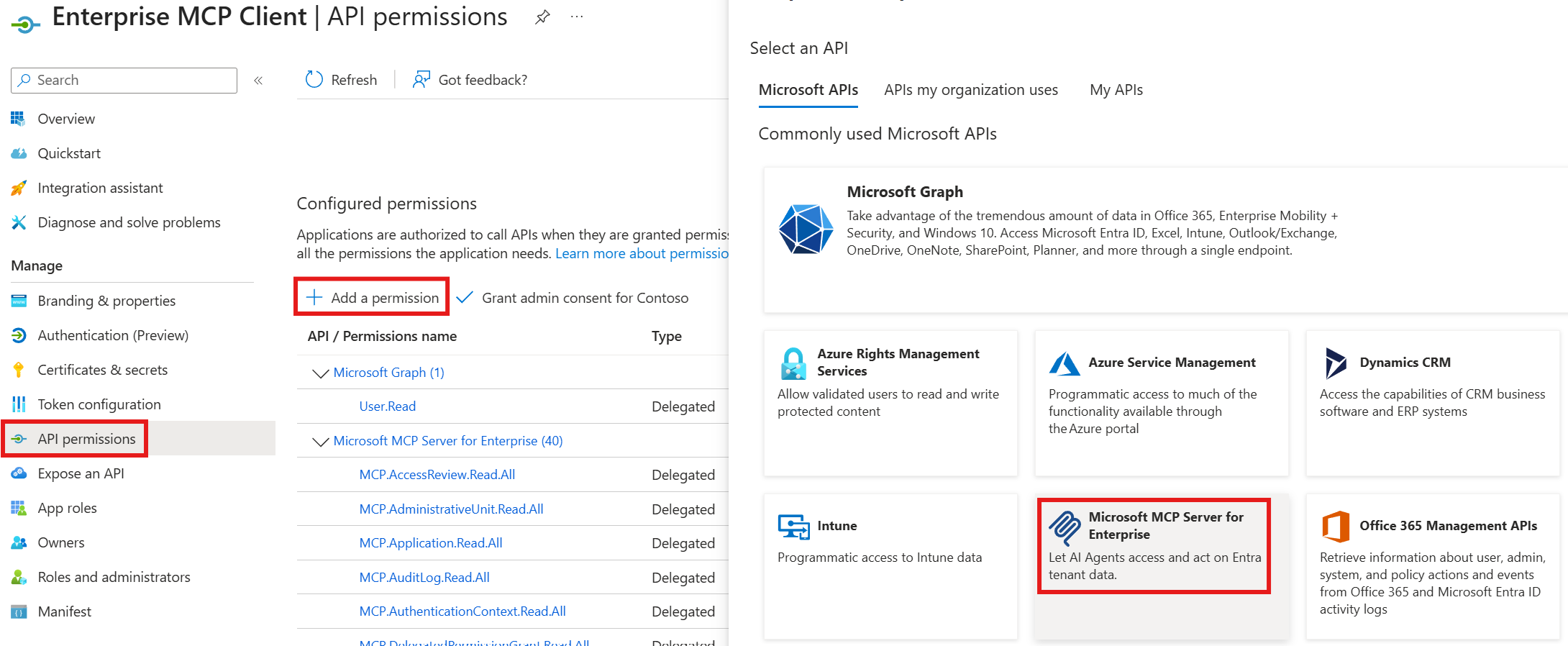
After provisioning the MCP Server in step 1, use Microsoft.Entra.Beta 1.3.0 or later and an appropriate administrator role to create a public client and grant the scopes you need. This example grants user read access. Set $redirectUri to http://localhost for VS Code or http://127.0.0.1:51001 for GitHub Copilot CLI:
Connect-Entra -Scopes 'Application.ReadWrite.All', 'DelegatedPermissionGrant.ReadWrite.All' -ErrorAction Stop
$redirectUri = 'http://localhost'
$app = New-EntraBetaApplication -DisplayName 'Enterprise MCP Client' `
    -SignInAudience 'AzureADMyOrg' `
    -PublicClient @{ RedirectUris = @($redirectUri) } -ErrorAction Stop
$app.AppId
Grant-EntraBetaMCPServerPermission -ApplicationId $app.AppId -Scopes 'MCP.User.Read.All' -ErrorAction Stop
Use the returned app ID in the VS Code or GitHub Copilot CLI custom client configuration. The grant cmdlet provisions the client service principal if needed.
The PowerShell setup uses Application.ReadWrite.All, DelegatedPermissionGrant.ReadWrite.All, and an appropriate Entra administrator role. The MCP Client doesn't need these setup permissions at runtime: you can revoke setup-only grants and release setup-only roles after provisioning. Managing consent later requires administrator authorization again.
| Property | Value | Notes |
|---|---|---|
| MCP Endpoint | https://mcp.svc.cloud.microsoft/enterprise | Configure in your agent or mcp.json |
| MCP Server App Id | e8c77dc2-69b3-43f4-bc51-3213c9d915b4 | Used for provisioning and telemetry |
| MCP Client App Id | <The one you registered in your tenant> | Required to configure your agent |
| App Redirect URI (Reply URL) | VS Code (custom client): http://localhostGitHub Copilot CLI (custom client): http://127.0.0.1:51001Claude Desktop: https://claude.ai/api/mcp/auth_callbackChatGPT: https://chatgpt.com/connector/oauth/<random_chars>Refer to ChatGPT config for the random chars Microsoft Foundry: https://<random_chars>.<region>.azurecontainerapps.io/rest/oauth2-credential/callbackRefer to Foundry config for random chars | Required on your app registration |
| Token URL | https://login.microsoftonline.com/organizations/oauth2/v2.0/token | Required in some agents config |
| Token endpoint auth method | client_secret_post | Required in some agents config |
| Auth URL | https://login.microsoftonline.com/organizations/oauth2/v2.0/authorize | Required in some agents config |
| Refresh URL | https://login.microsoftonline.com/organizations/oauth2/v2.0/token | Required in some agents config |
| Scopes | api://e8c77dc2-69b3-43f4-bc51-3213c9d915b4/.default | Required in some agents config |
VS Code's default client uses a pre-registered application with its own redirect URIs. To add an HTTP 127.0.0.1 URI to a custom app through the portal, use the application manifest.
This MCP Server uses Retrieval-Augmented Generation (RAG) and few-shot prompting to generate complete Microsoft Graph queries rather than exposing a separate tool per Graph operation.
It exposes three tools:
microsoft_graph_suggest_queries: Finds relevant Microsoft Graph API calls based on user intent.microsoft_graph_get: Executes read-only Microsoft Graph API calls, respecting User roles and MCP Client scopes.microsoft_graph_list_properties: Retrieves properties of specific Microsoft Graph entities to help the AI modelFor Public Preview, we support read-only enterprise IT scenarios in Microsoft Entra identity and directory operations (user, group, application, device management, and administrative actions).
The MCP Server handles queries such as:
The Microsoft MCP Server for Enterprise works with any MCP-compatible client that supports the latest standard.
⚠️ Notes:
- Dynamic Client Registration (DCR) is not supported, but we are working to support OAuth Client ID Metadata Documents (CIMD) in a future release.
- ChatGPT, Claude, and other 3P Agents require a custom client Id: register your own MCP Client application in your tenant, assign the required MCP.* scopes, and configure the redirect URIs accordingly.
These clients require a custom MCP Client application registered in your tenant. See Authorization and permissions to grant the required MCP.* scopes to your app.
Go to Settings, Apps, Create App, and fill the dialog:
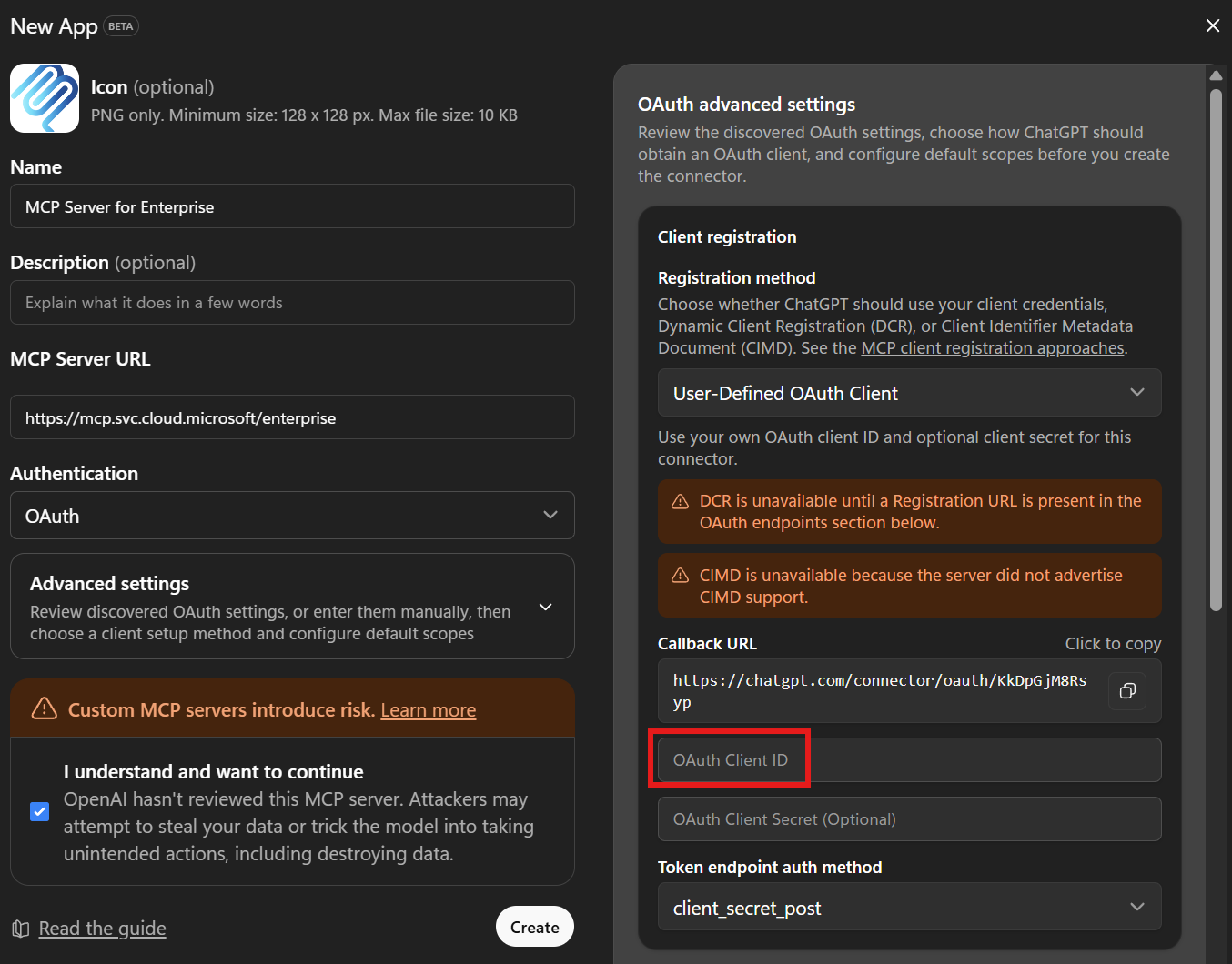
Put the App ID of the Registered app in the red box.
Go to Customize, Connectors, click "+", Add Custom Connector, and fill the dialog:
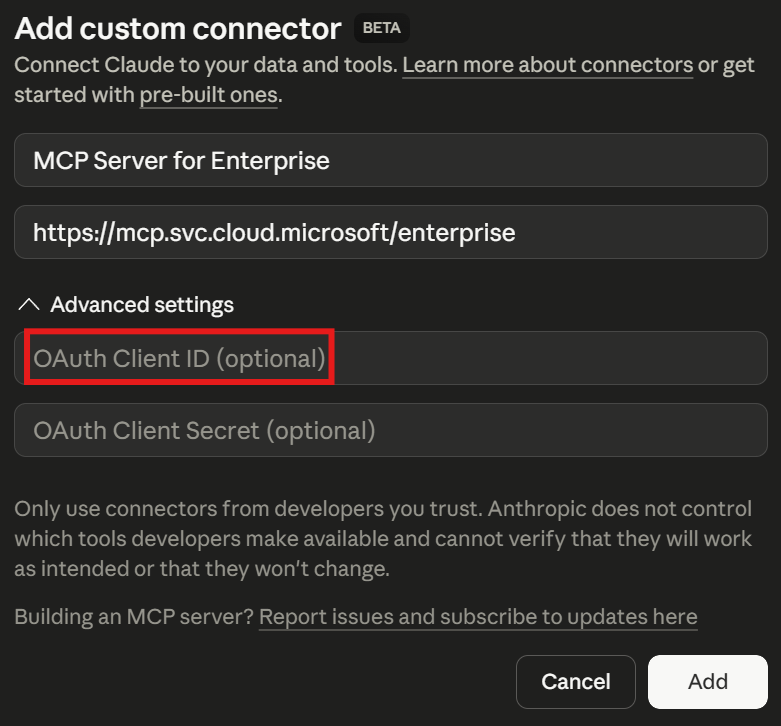
Put the App ID of the Registered app in the red box.
By default, Visual Studio Code and GitHub Copilot CLI use the same Visual Studio Code MCP Client app Id. Both can also use a custom client Id.
These steps provision the Visual Studio Code MCP Client application in your tenant and grant it the MCP permissions.
They're required when either client uses the default application Id. Skip them when using a custom client app instead.
Install Microsoft.Entra.Beta PowerShell module (version 1.0.13 or later, requires PowerShell 7):
Install-Module Microsoft.Entra.Beta -Force -AllowClobber
Connect Microsoft Entra ID to your tenant:
Connect-Entra -Scopes 'Application.ReadWrite.All', 'DelegatedPermissionGrant.ReadWrite.All'
Grant only the MCP scopes your scenarios require to the Visual Studio Code MCP Client app (also used by GitHub Copilot CLI with the default application Id). This example grants user read access:
Grant-EntraBetaMCPServerPermission -ApplicationName VisualStudioCode -Scopes 'MCP.User.Read.All'
Without -Scopes, the cmdlet grants all published scopes. Specifying -Scopes adds to existing grants; revoke unwanted scopes if you previously granted broader access.
Learn more about Grant-EntraBetaMCPServerPermission. For detailed installation help, see the installation instructions.
Microsoft.Entra.Beta is a setup dependency, not a runtime dependency. For a custom client, you can provision the server through Graph Explorer above and manage consent in the Entra admin center.
To avoid module conflicts without changing your installed modules, open a new PowerShell 7 session and save the module and its dependencies to a temporary directory:
$modulePath = Join-Path ([System.IO.Path]::GetTempPath()) ([System.IO.Path]::GetRandomFileName())
New-Item -ItemType Directory -Path $modulePath | Out-Null
$modulePath
$env:PSModulePath = $modulePath + [System.IO.Path]::PathSeparator + (Join-Path $PSHOME 'Modules')
Save-Module -Name Microsoft.Entra.Beta -Path $modulePath
Import-Module Microsoft.Entra.Beta
Run the connection and grant commands above in that session. Close the session when finished and delete the temporary directory shown by $modulePath.
If the Microsoft Graph PowerShell SDK modules conflict with Microsoft.Entra.Beta, run the following and retry from step 1:
Install-Module Uninstall-Graph
Uninstall-Graph -All
Option 1. Default (uses the Visual Studio Code app Id)
Error getting token from server metadata: Error: Cannot force new registration for a non-dynamic authentication provider., change "microsoft-authentication.implementation" from "msal" to "msal-no-broker" in your Settings:
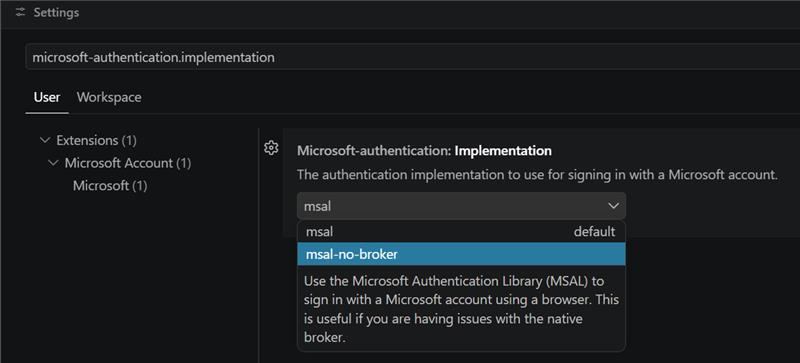
Option 2. Custom MCP Client app Id
Register a custom MCP Client app and grant the required MCP.* scopes. Set http://localhost as the redirect URI under Mobile and desktop applications. VS Code can use a dynamic port, which Entra ignores when matching localhost redirect URIs.
Add the server to your VS Code mcp.json, replacing the client ID:
{
  "servers": {
    "mcp-enterprise": {
      "type": "http",
      "url": "https://mcp.svc.cloud.microsoft/enterprise",
      "oauth": {
        "clientId": "<REGISTERED_APP_CLIENT_ID>"
      }
    }
  }
}
Start the server and sign in with an account from the provisioned tenant.
GitHub Copilot CLI can connect using either the default Visual Studio Code MCP Client app Id or a custom MCP Client app Id you register in your tenant.
Option 1. Default (uses the Visual Studio Code app Id)
Complete the Prerequisites above.
Add the MCP server to Copilot CLI. You can do this interactively with /mcp add:
/mcp add
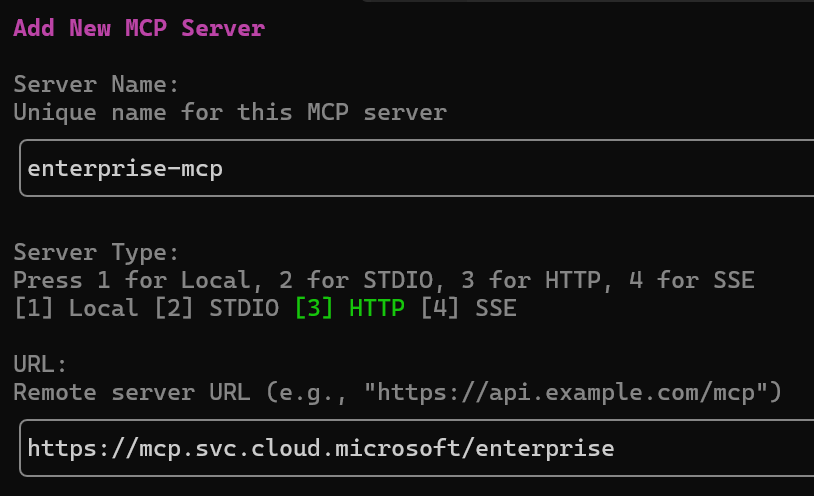
Option 2. Custom MCP Client app Id
Register your own MCP Client application in your tenant and grant it the required MCP.* scopes (see Authorization and permissions).
Set http://127.0.0.1:51001 as Redirect URI for "Mobile and desktop applications".
Specify your app Id via oauthClientId and oauthPublicClient to true in ~/.copilot/mcp-config.json:
"mcp-enterprise": {
      "type": "http",
      "url": "https://mcp.svc.cloud.microsoft/enterprise",
      "headers": {},
      "tools": [ "*" ],
      "oauthClientId": "<REGISTERED_APP_CLIENT_ID>",
      "oauthPublicClient": true
    }
In either case, sign in with your account from the provisioned tenant when prompted.
For more information, see the GitHub Copilot CLI documentation.
The MCP Server for Enterprise supports delegated permissions only. Access requires both the MCP Client's granted scopes and the signed-in user's permissions and roles. MCP consent doesn't grant access beyond that user's authorization.
Grant only the MCP.* scopes your use cases need. You can use a read-only configuration without granting write scopes. Add scopes as your needs change; consult the Microsoft Graph permissions reference for the corresponding Graph permissions.
Administrators can use per-user consent grants to limit access to selected users.
Use the following cmdlet to list the permissions provided by the MCP Server for Enterprise:
(Get-EntraBetaServicePrincipal -Property "PublishedPermissionScopes" -Filter "AppId eq 'e8c77dc2-69b3-43f4-bc51-3213c9d915b4'").PublishedPermissionScopes | Where-Object { $_.IsEnabled -eq $true -and $_.AdditionalProperties["isPrivate"] -ne $true } | Select-Object Value, AdminConsentDisplayName | Sort-Object
You can use your own app registration as the MCP Client. Use these cmdlets to manage its granted scopes:
Grant-EntraBetaMCPServerPermission -ApplicationId "<MCP_Client_Application_Id>" -Scopes "<Scope1>", "<Scope2>", "<...>"
Revoke-EntraBetaMCPServerPermission -ApplicationId "<MCP_Client_Application_Id>" -Scopes "<Scope1>", "<Scope2>", "<...>"
Learn more: Manage MCP Server for Enterprise permissions
The Microsoft MCP Server for Enterprise is available only in the public cloud (global service), with support for sovereign clouds planned for a future release.
We will continue expanding beyond the current Microsoft Entra scenarios, but M365 APIs will be covered by Agent 365.
Support for write operations is planned for a future release.
Please share suggestions or issues through our feedback form: Submit feedback.
microsoft_graph_get are also subject to Microsoft Graph Throttling limits.To monitor usage, enable Microsoft Graph activity logs in your tenant to record the Graph API calls made through the MCP server.
Filter for MCP Server usage:
Use the Application (Client ID) of the Microsoft MCP Server for Enterprise: e8c77dc2-69b3-43f4-bc51-3213c9d915b4.
The following Kusto query retrieves these logs:
MicrosoftGraphActivityLogs
| where TimeGenerated >= ago(30d)
| where AppId == "e8c77dc2-69b3-43f4-bc51-3213c9d915b4"
| project RequestId, ClientRequestId, TimeGenerated, UserId, RequestMethod, RequestUri, Scopes, ResponseStatusCode
Use Graph's RequestId and ClientRequestId with the timestamp, user, and request URI to trace API calls. Scopes lists permissions in the Graph access token, not the specific permission used to authorize each operation.
For documentation, troubleshooting, and feedback, refer to the official Microsoft Learn documentation and support channels.
All operations respect Microsoft Graph permissions and security policies. The MCP server uses standard Microsoft Graph telemetry and doesn't log request payloads. Review your AI client's data-handling and retention policies for prompts and returned data. Ensure compliance with your organizational, regulatory, and contractual requirements when integrating the MCP Server.
This software is provided "as is" without warranties or conditions of any kind, either express or implied. Microsoft isn't liable for any damages that result from use, misuse, or misconfiguration of this software.
Claim this server with your GitHub account to request manual ownership verification.
Link to the catalog listing for Microsoft MCP Server for Enterprise from your README. This badge does not certify ownership, compatibility or security.
[](https://awesome-mcp.com/servers/microsoft-enterprise)Public repository statistics could not be verified. Check the configured source address; unavailable counts are not zero.
来源、范围和时段分别列出;不相加,不代表安装人数、活跃用户或安全审核。
尚无已审核的包 / 镜像标识,暂不展示下载统计。
Alternative and complementary servers in the same category
A modular FastMCP server for interacting with Microsoft Graph API, supporting advanced queries for users, sign-in logs, MFA status, and privileged users.

A Model Context Protocol (MCP) server that provides programmatic access to Keycloak administration functionality.

An MCP server for LLM-driven penetration testing that wraps Kali tools and adds scope enforcement, engagement tracking, and structured output.