

A Rust CAD application with an MCP server for creating, inspecting and rendering drawings, either headlessly or through a connection to the desktop app.
8K
Media & Design
Mimic AI is a local MCP server that turns HTML into structured Figma layers using your published design system, with a Figma plugin enforcing tokens, components and auto-layout.
Open-source MCP server for building design-system-compliant Figma screens from HTML. is cataloged as an MCP server attributed to miapre. Mimic AI is a local MCP server that turns HTML into structured Figma layers using your published design system, with a Figma plugin enforcing tokens, components and auto-layout. It is categorized under media design. See the capability inspector for recorded interfaces and their independent review status; consult upstream documentation for the current interface.
Installation configuration is not reviewed. No executable setup is offered for this entry; inspect the source repository before proceeding.
Catalog license label: MIT. Check the source repository's current license and terms before using, modifying or distributing this software.
能力定义尚未审核。未核验的采集内容不会作为可信接口展示。
暂无可展示的已审核记录。这不表示上游不支持此能力。
暂无可展示的已审核记录。这不表示上游不支持此能力。
暂无可展示的已审核记录。这不表示上游不支持此能力。
Email delivery is not connected. This page does not collect email addresses or create subscriptions.
Browse the registry for current listings instead.
Reviews for Open-source MCP server for building design-system-compliant Figma screens from HTML. are not available yet
Review publishing and storage are not connected. This page does not collect or publish ratings or comments, including after sign-in.
Mimic is free and MIT-licensed; it requires your own Figma plan (Professional or above) and a read-only Figma personal access token.
No; everything runs locally and the only outbound call is to the Figma REST API for published component keys, with no telemetry.
Yes; it discovers components and variables from any library enabled in the Figma file, including community-published libraries.
README.md · 0bd61f09eb1c · 采集于 2026-11-13 10:22:09 UTC
保留上游原文,不做 AI 改写。为安全起见过滤脚本、表单和不安全链接。
当前显示最后一次成功采集的文档快照,请以来源页面为准。

Transforms HTML into Figma using only your design system, enforcing correct component usage and falling back safely when needed, while improving accuracy with every build.






Open-source MCP server. Runs entirely on your machine — no Mimic cloud, no third-party servers. The only network calls are to Figma's own API, with your own token.
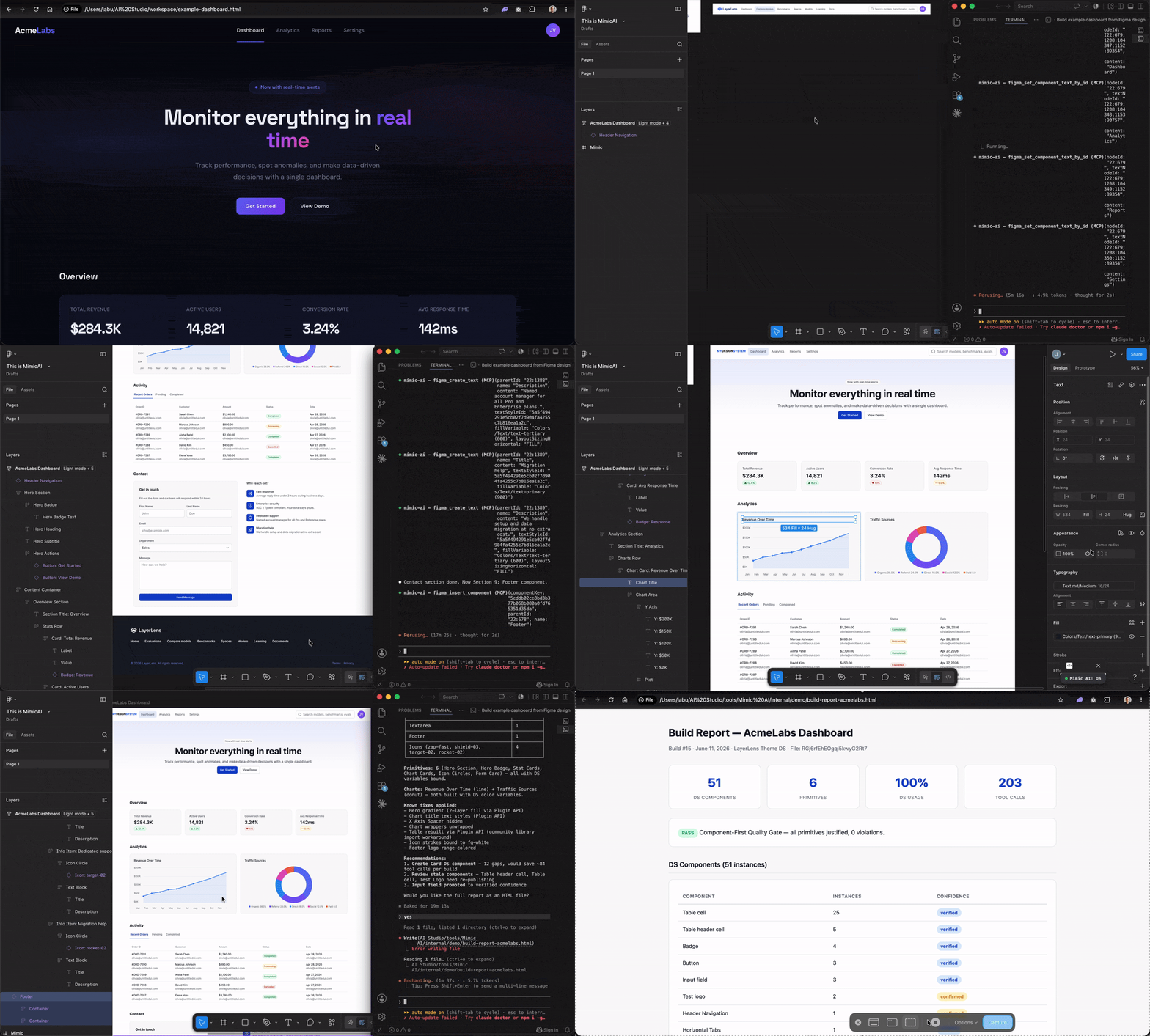
AI writing into Figma isn't the hard part anymore; several tools do it now. The differences show up in what happens when the AI reaches for something your design system doesn't have. A tool that steers an agent toward your components can still land on a raw hex value, a raw pixel size, or a font your system doesn't use, and general guidance for that category of tool is that the result may need manual review and cleanup before it's usable. Mimic enforces at write time, inside the Figma plugin itself, not just in the prompt.
What the gate blocks
If the DS genuinely has no equivalent, Mimic says so in the build report instead of quietly leaving a raw value in place.
What the learning accumulates
Nothing else accumulates this across builds. A hand-authored Figma Agent Skill is static text; it doesn't learn from what you correct.
What the report proves Every build ends in a compliance-audited report: components used and their keys, primitives built and why, which stored rules were checked and whether they held, and where the DS still has coverage gaps. It's built to be shown to a stakeholder, not just read by the person who ran the build.
You built a design system. Components, tokens, variables. Every decision intentional. Then someone needs a screen in Figma and starts from scratch. Hardcoded colors. Raw font sizes. Frames that break when you resize them. Your system sits right there in the library panel. Unused.
Mimic's output is the deliverable: real Figma layers with real component instances, variable bindings, and auto-layout. Nothing to convert. Nothing to swap. Hand it off.
The first build scans the design system. By the third, recurring components auto-verify. By the tenth, most decisions are instant. The knowledge compounds across every build.
| Build | What Mimic knows | What you experience |
|---|---|---|
| 1 | Nothing. Cold start. Scans your entire DS. | "It found my components and used them. Some primitives where my DS has gaps." |
| 5 | Core patterns verified. Common components cached. | "It remembered that I use Button/Primary for CTAs. It didn't ask about tabs this time." |
| 20 | Deep knowledge. Recipes for every common component. | "I point it at an HTML and get a DS-compliant Figma screen in minutes. It knows my system better than the new hire." |
| 50+ | Comprehensive DS audit data. Recurring gaps visible. | "The gap report says I've used status badges as primitives 31 times. I finally built the component. Mimic started using it immediately." |
Correct it once. Tell Mimic "That's not the right Badge, use Tag/Neutral." The mapping updates permanently. Every future build uses the correction without you having to repeat yourself.
Your DS evolves. Mimic keeps up. Component additions, removals, and variant changes are detected at the start of every build by comparing against what was cached last time — no manual re-sync. Deeper variable-level change detection (e.g. a renamed color token) is coming in a future release.
Every build is a DS review. After each build, Mimic generates a report: what components it used, what it built from primitives and why, what patterns it learned, and what your DS is missing. Recommendations come as questions, not commands: "Should your DS include a Status Badge? 4 elements across 3 builds were built as primitives."
Pick any starting point:
"Build a dashboard with three metric cards and an activity table"
"Here's the HTML from our staging environment, build it in Figma"
"Rebuild this Claude Design prototype with real components"
Mimic discovers the design system on your file, matches components and tokens, and builds structured Figma. Same rules, same output quality, regardless of how you start.
| Mimic | Claude Design | Figma Make | Framelink | html.to.design | |
|---|---|---|---|---|---|
| Output | Figma canvas (real layers) | HTML / React prototype | Interactive prototype | Read-only context | Figma canvas (paid) |
| Uses your components | Yes, real instances | No | Partial (Make Kits) | No (agent infers) | Partial |
| Variable bindings | Yes, every node | No | No (raw values) | No | No |
| Auto-layout | Every frame | N/A | N/A | N/A | Partial |
| Works with any library | Yes | No | Make Kits only | N/A | Limited |
| Learns across builds | Yes | No | No | No | No |
| DS gap detection | Yes, every build | No | No | No | No |
| Open source | Yes (MIT) | No | No | Yes (MIT) | No |
Claude Design is great for ideation. Figma Make is great for interactive prototyping. Framelink is great for giving AI context about your designs. Mimic is for when the output needs to be the actual Figma file you ship with.
Mimic works with any Figma library: your team's, a community kit, or a client's published system.
Requires: Node.js v20.6+ · the Figma desktop app (browser Figma isn't supported — download) · a Figma Professional plan or above (needed to publish and use team libraries).
One-line installer:
bash <(curl -fsSL https://raw.githubusercontent.com/miapre/mimic-ai/main/install.sh)
This clones the repo to ~/mimic-ai, runs npm install, prompts for your Figma personal access token, and offers to register mimic-ai in Claude Code's settings.json automatically.
Manual install:
git clone https://github.com/miapre/mimic-ai.git
cd mimic-ai
npm install
Then set FIGMA_TOKEN in your MCP client's server config (or in ~/.mimic-ai.json — see "Figma setup details" further down for how to generate the token), and point your client's mimic-ai entry at the cloned mcp.js ({ "command": "node", "args": ["/path/to/mimic-ai/mcp.js"] }).
Plugins > Development > Import plugin from manifest > select ~/mimic-ai/plugin/manifest.json
Figma: Plugins > Development > Mimic AI > Run
The bridge starts automatically when you make your first tool call. No separate process to manage.
Assets panel > Team library icon > toggle on. Once per file. Community libraries work out of the box.
"Build a settings page with three form fields and a save button."
One call discovers the entire DS (variables, styles, components), preloads everything, and advances to build-ready. No multi-step setup.
What it learns:
How it enforces:
Efficiency features:
Every build enforces 19 quality rules across 6 sequential phases.
Full specification: CLAUDE.md
| Design system type | What Mimic does |
|---|---|
| Team library (components + tokens) | Full usage: components, variables, text styles |
| Team library (components only) | Uses components, flags missing tokens, recommends adding them |
| Community libraries (public kits from Figma Community) | Full support including variable and component discovery |
Enforcement adapts to what the DS provides. A library with text styles but no color variables enforces text styles and accepts raw colors. The build report shows what's missing and what adding it would unlock.
Works with any MCP client. Optimized for Claude Code. Setup for Claude Code, Cursor, Codex CLI, and Gemini CLI (plus the general stdio-host case) is also in docs/HOSTS.md.
{
  "mcpServers": {
    "mimic-ai": {
      "command": "npx",
      "args": ["-y", "@miapre/mimic-ai"]
    }
  }
}
Add to .cursor/mcp.json:
{
  "mcpServers": {
    "mimic-ai": {
      "command": "npx",
      "args": ["-y", "@miapre/mimic-ai"]
    }
  }
}
Click the install badge above, or add to settings:
{
  "mcp": {
    "servers": {
      "mimic-ai": {
        "command": "npx",
        "args": ["-y", "@miapre/mimic-ai"]
        }
    }
  }
}
Windsurf: ~/.codeium/windsurf/mcp_config.json
JetBrains: Settings > Tools > AI Assistant > MCP Servers
{
  "mcpServers": {
    "mimic-ai": {
      "command": "npx",
      "args": ["-y", "@miapre/mimic-ai"]
    }
  }
}
All clients need the Figma plugin active. The bridge is embedded and starts automatically.
MCP Client (Claude Code, Cursor, VS Code)
    |
    | MCP Protocol (stdio)
    v
MCP Server (intelligence layer)
    - Tool registry, DS cache, knowledge store
    - Variable validation + suggestions before plugin
    - Circuit breaker (3 failures -> stop + report)
    - Chart geometry engine (Node.js)
    - Phase enforcement (6 sequential phases)
    |
    | Embedded WebSocket bridge (auto-starts)
    v
Figma Plugin (enforcement gate)
    - DS enforcement: rejects raw values when DS has tokens
    - Binding feedback: reports which bindings succeeded/failed
    - Thin handlers: mechanical operations only
    |
    v
Figma Plugin API > Canvas
Intelligence flows down. Binding feedback flows up. The MCP layer validates variable paths before reaching the plugin. The plugin reports exactly which DS bindings succeeded and which failed. Tool responses carry contextual hints so the LLM always knows what to do next.
A lean, consolidated surface (v3.0.0) — every tool carries MCP annotations (readOnlyHint, destructiveHint, idempotentHint) and the key workflow tools return structured output (outputSchema).
Status and learning: mimic_status, mimic_discover_ds, mimic_ai_knowledge_read, mimic_ai_knowledge_write, mimic_generate_build_report
DS setup: mimic_ds_assets (discover / preload / set_defaults), figma_list_ds (text styles / fill styles / variables), mimic_map_components
Build: figma_create_frame, figma_create_text, figma_create_shape (rectangle / ellipse), figma_create_svg, figma_insert_component, mimic_build_table, mimic_build_chart
Components: figma_component_text (single or batch overrides), figma_set_variant, figma_swap_main_component (swap / replace), figma_manage_slot (fill / reset)
Edit: figma_update_node (text, text_style, fill, layout, visibility, position, restyle, move, select, page), figma_variable_modes, figma_delete_node
Inspect and QA: figma_inspect (node, children, parent, text, pages, page, selection, variants, section), figma_validate_ds_compliance
Rendering and charts: mimic_pipeline_resolve, mimic_compute_chart
Desktop app required. Browser Figma won't work. Download
Personal Access Token. Figma > Profile > Settings > Security > Personal access tokens > Generate new token. Name: "Mimic AI", expiration: 90 days. Check five scopes: current_user:read, file_content:read, file_metadata:read, library_assets:read, library_content:read. All read-only. Mimic never writes to your library. Copy the token immediately.
Publish your DS. Components and tokens in a separate file, published as a team library. Re-publish after changes.
Professional plan or above. Free plan can't publish libraries.
No. Mimic is free and MIT-licensed. The only requirements are your own Figma plan (Professional or above, to publish and use team libraries) and a read-only Figma personal access token. Note that Figma's own official MCP server and Design Agent are usage-metered as part of Figma's paid plans; Mimic isn't, it's a separate open-source project with no usage limits of its own.
Not yet. Today, each machine builds its own knowledge store scoped per design system library. Knowledge export/import between teammates is planned but not shipped. The store format (ds-knowledge.json) is a shareable JSON file, so a manual copy already works if you want to seed a teammate's setup.
Five read-only scopes: current_user:read, file_content:read, file_metadata:read, library_assets:read, library_content:read. There is no write scope in that list, so Mimic cannot use this token to modify any Figma file. All writes happen through the Figma plugin's own editor session, not the REST API.
Yes. Mimic discovers components and variables from any library enabled in your Figma file, including community-published libraries.
No. Everything runs locally. The only outbound call is to the Figma REST API for published component keys (read-only). No telemetry, no tracking.
Any MCP client works. The 6-phase protocol and contextual tool hints are optimized for Claude Code. Cursor, VS Code, Windsurf, and JetBrains get the full toolset but may not follow the protocol as closely.
Screenshot tools capture pixels, not structure. The result is a flat image you can't iterate on. Mimic reads semantic HTML and produces structured, layered Figma with real components, variable bindings, and auto-layout.
Mimic detects component and variant changes at the start of every build by comparing against what was cached from your last session. New components surface automatically. Removed components fall back gracefully with an explanation in the build report. Variable-level changes (e.g. a renamed color token) aren't detected yet — that's coming in a future release.
Yes, but with limited enforcement. Without published components, Mimic builds with primitives and raw values. Without tokens, it accepts hardcoded colors. The build report shows exactly what's missing and what adding it would unlock.
Everything runs locally.
No design data leaves your machine. No telemetry. No tracking.
The only outbound call is to the Figma REST API for published component keys.
FIGMA_ACCESS_TOKEN. Use the full installer for team library support.Issues and PRs welcome. See the issue tracker and CONTRIBUTING.md for dev setup and PR expectations. Found a security issue? See SECURITY.md instead of opening a public issue.
MIT
Claim this server with your GitHub account to request manual ownership verification.
Link to the catalog listing for Open-source MCP server for building design-system-compliant Figma screens from HTML. from your README. This badge does not certify ownership, compatibility or security.
[](https://awesome-mcp.com/servers/mimic-ai)Public repository statistics could not be verified. Check the configured source address; unavailable counts are not zero.
来源、范围和时段分别列出;不相加,不代表安装人数、活跃用户或安全审核。
尚无已审核的包 / 镜像标识,暂不展示下载统计。
Alternative and complementary servers in the same category
A Rust CAD application with an MCP server for creating, inspecting and rendering drawings, either headlessly or through a connection to the desktop app.

Liquid Composer is a browser-based Liquid Glass icon design tool that offers a local MCP server for agent-driven icon workflows.

agent-media makes short drama series and other short vertical videos from Claude, ChatGPT or Codex through one MCP connection, with OAuth sign-in and no API keys.