

A directory listing describing a cancellation-letter and mailing-address service. The configured public GitHub repository returned 404 during source verification.
Repository stats unavailable
Developer Tools
An MCP server that takes Mermaid syntax from a coding agent and renders diagrams in a local web app.
Mindpilot MCP is cataloged as an MCP server attributed to abrinsmead. An MCP server that takes Mermaid syntax from a coding agent and renders diagrams in a local web app. It is categorized under developer tools. See the capability inspector for recorded interfaces and their independent review status; consult upstream documentation for the current interface.
Installation configuration is not reviewed. No executable setup is offered for this entry; inspect the source repository before proceeding.
Catalog license label: Not specified. Check the source repository's current license and terms before using, modifying or distributing this software.
能力定义尚未审核。未核验的采集内容不会作为可信接口展示。
暂无可展示的已审核记录。这不表示上游不支持此能力。
暂无可展示的已审核记录。这不表示上游不支持此能力。
暂无可展示的已审核记录。这不表示上游不支持此能力。
Email delivery is not connected. This page does not collect email addresses or create subscriptions.
Browse the registry for current listings instead.
Reviews for Mindpilot MCP are not available yet
Review publishing and storage are not connected. This page does not collect or publish ratings or comments, including after sign-in.
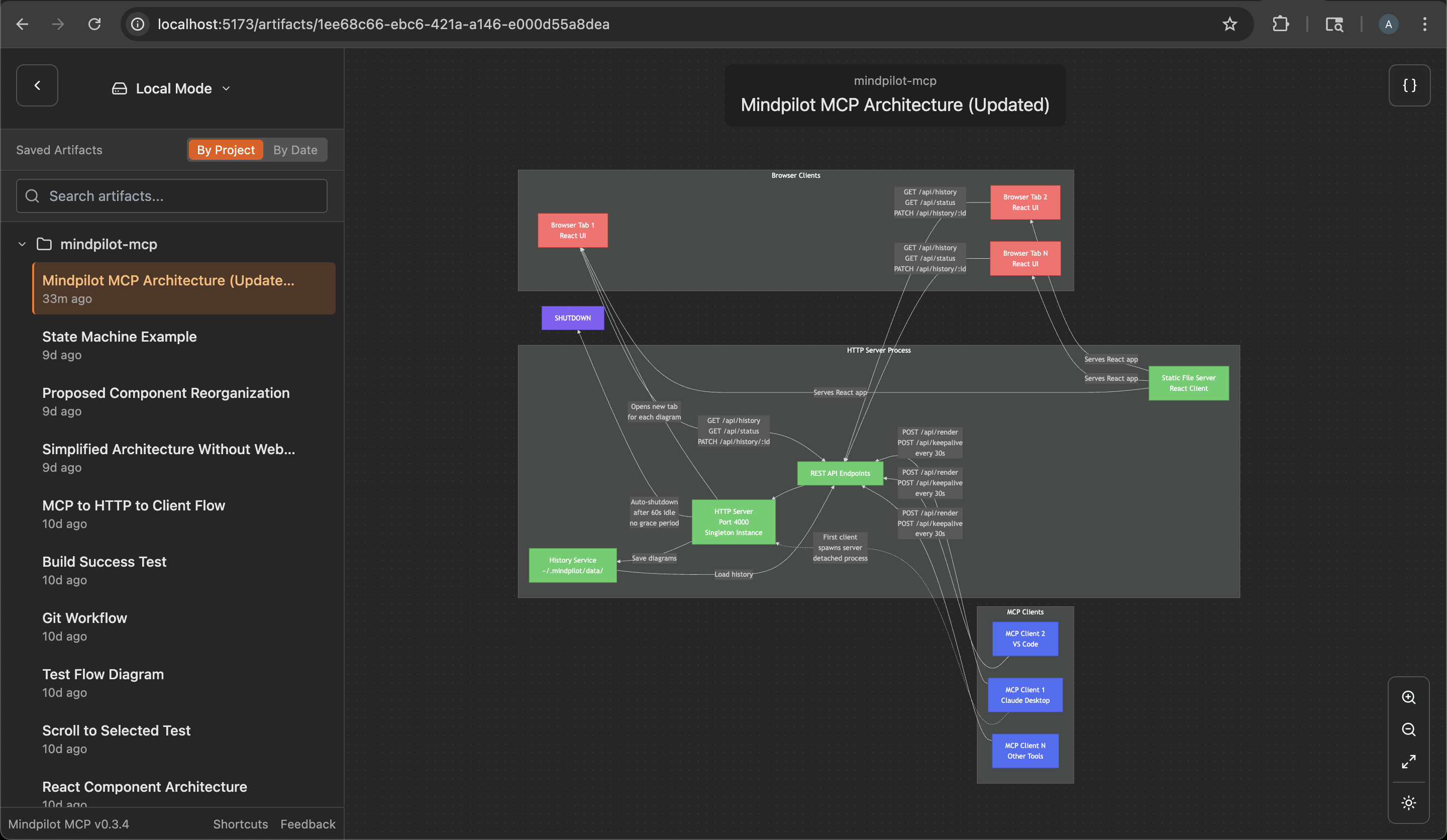
Yes; the first MCP client starts a shared web server, additional assistants connect to it, and all share the same diagram history and web interface.
No; diagrams are not sent to the cloud and stay between the user, the agent, and the agent's LLM provider(s).
By default diagrams are saved to ~/.mindpilot/data/, and a custom location can be set with the --data-path switch.
README.md · c74c5acf2343 · 采集于 2026-11-13 08:53:18 UTC
保留上游原文,不做 AI 改写。为安全起见过滤脚本、表单和不安全链接。
当前显示最后一次成功采集的文档快照,请以来源页面为准。


See through your agent's eyes. Visualize legacy code, inspect complex flows, understand everything.
[!TIP] Mindpilot is now available as a lightweight agent skill—no local MCP server needed. Ask your agent to diagram something and it builds a self-contained, interactive Mermaid viewer you can open in your browser or publish as a Claude artifact.
Install with:
npx skills add abrinsmead/skills/mermaid-viewer
Node.js v20.0.0 or higher.
claude mcp add mindpilot -- npx @mindpilot/mcp@latest
Under Settings > Cursor Settings > MCP > Click Add new global MCP server and configure mindpilot in the mcpServers object.
{
  "mcpServers": {
    "mindpilot": {
      "command": "npx",
      "args": ["@mindpilot/mcp@latest"]
    }
  }
}
Follow the instructions here for enabling MCPs in VS Code: https://code.visualstudio.com/docs/copilot/chat/mcp-servers
Go to Settings > Features > MCP, then click Edit in settings json
Then add mindpilot to your MCP configuration:
{
  "mcp": {
    "servers": {
      "mindpilot": {
        "type": "stdio",
        "command": "npx",
        "args": ["@mindpilot/mcp@latest"]
      }
    }
  }
}
Under Settings > Windsurf Settings > Manage Plugins, click view raw config and configure mindpilot in the mcpServers object:
{
  "mcpServers": {
    "mindpilot": {
      "command": "npx",
      "args": ["@mindpilot/mcp@latest"]
    }
  }
}
In the AI Thread panel click on the three dots ..., then click Add Custom Server...
In the Command to run MCPserver field enter npx @mindpilot/mcp@latest and click Add Server.
--port command line switch.~/.mindpilot/data/. You can specify a custom location using the --data-path command line switch.Mindpilot intelligently handles multiple AI assistants running simultaneously. When you have multiple Claude Desktop windows or IDE instances open:
This means you can work with multiple MCP hosts at once without port conflicts, and they'll all contribute to the same collection of diagrams.
Mindpilot MCP collects anonymous usage data to help us understand how the product is being used and improve the user experience.
If you prefer not to share anonymous usage data, you can disable analytics by adding the --disable-analytics flag to your MCP configuration:
Claude Code:
claude mcp add mindpilot -- npx @mindpilot/mcp@latest --disable-analytics
Other IDEs:
Add "--disable-analytics" to the args array in your configuration:
{
  "command": "npx",
  "args": ["@mindpilot/mcp@latest", "--disable-analytics"]
}
After configuring the MCP in your coding agent you can make requests like "create a diagram about x" and it should use the MCP server to render Mermaid diagrams for you in a browser connected to the MCP server.
You can optionally update your agent's rules file to give specific instructions about when to use mindpilot-mcp.
Frontier LLMs are well trained to generate valid Mermaid syntax. The MCP is designed to accept Mermaid syntax and render diagrams in a web app running on http://localhost:4000 (default port).
If you use port 4000 for another service you can configure the MCP to use a different port.
Claude Code example:
claude mcp add mindpilot -- npx @mindpilot/mcp@latest --port 5555
To save diagrams to a custom location (e.g., for syncing with cloud storage):
Claude Code example:
claude mcp add mindpilot -- npx @mindpilot/mcp@latest --data-path /path/to/custom/location
Other IDEs:
{
  "command": "npx",
  "args": ["@mindpilot/mcp@latest", "--data-path", "/path/to/custom/location"]
}
If you use asdf as a version manager and have trouble getting MCPs to work (not just mindpilot), you may need to set a "global" nodejs version from your home directory.
cd
asdf set nodejs x.x.x
Configure the MCP in your coding agent (using claude in this example)
claude mcp add mindpilot -- npx tsx <path to...>/src/server/server.ts
Run claude with the --debug flag if you need to see MCP errors
Start the development client (Vite) to get hot module reloading while developing.
npm run dev
Open the development client
localhost:5173
Claim this server with your GitHub account to request manual ownership verification.
Link to the catalog listing for Mindpilot MCP from your README. This badge does not certify ownership, compatibility or security.
[](https://awesome-mcp.com/servers/mindpilot-mermaid-diagrams)Public repository statistics could not be verified. Check the configured source address; unavailable counts are not zero.
来源、范围和时段分别列出;不相加,不代表安装人数、活跃用户或安全审核。
尚无已审核的包 / 镜像标识,暂不展示下载统计。
Alternative and complementary servers in the same category
A directory listing describing a cancellation-letter and mailing-address service. The configured public GitHub repository returned 404 during source verification.

A hosted MCP service for browsing and searching through Singapore mobile-network proxies.

A directory listing describing a Markdown-to-PDF service. The configured public GitHub repository returned 404 during source verification.