
A directory listing describing a cancellation-letter and mailing-address service. The configured public GitHub repository returned 404 during source verification.
Repository stats unavailable
Developer Tools
A local-first miniature paint registry that offers MCP servers for Claude Desktop and ChatGPT to search paints, manage owned inventory, and match colors.
minipainter is cataloged as an MCP server attributed to arturskowronski. A local-first miniature paint registry that offers MCP servers for Claude Desktop and ChatGPT to search paints, manage owned inventory, and match colors. It is categorized under developer tools. See the capability inspector for recorded interfaces and their independent review status; consult upstream documentation for the current interface.
Installation configuration is not reviewed. No executable setup is offered for this entry; inspect the source repository before proceeding.
Catalog license label: MIT. Check the source repository's current license and terms before using, modifying or distributing this software.
能力定义尚未审核。未核验的采集内容不会作为可信接口展示。
暂无可展示的已审核记录。这不表示上游不支持此能力。
暂无可展示的已审核记录。这不表示上游不支持此能力。
暂无可展示的已审核记录。这不表示上游不支持此能力。
Email delivery is not connected. This page does not collect email addresses or create subscriptions.
Browse the registry for current listings instead.
Reviews for minipainter are not available yet
Review publishing and storage are not connected. This page does not collect or publish ratings or comments, including after sign-in.
It can search paints, show paint details, list inventory, mark paints owned or unowned, and perform color and description matching.
The README states the /mcp endpoint currently has no authentication, while a bearer token protects the /inventory sync endpoint.
README.md · fe3fd9b34f93 · 采集于 2026-11-13 13:07:18 UTC
保留上游原文,不做 AI 改写。为安全起见过滤脚本、表单和不安全链接。
当前显示最后一次成功采集的文档快照,请以来源页面为准。
The paint bench, indexed.


Site: arturskowronski.github.io/minipainter
minipainter is a local-first paint registry for miniature-painting workflows. It exists for one practical reason: AI paint suggestions are much more useful when they understand the paints you actually own.
The project gives you:
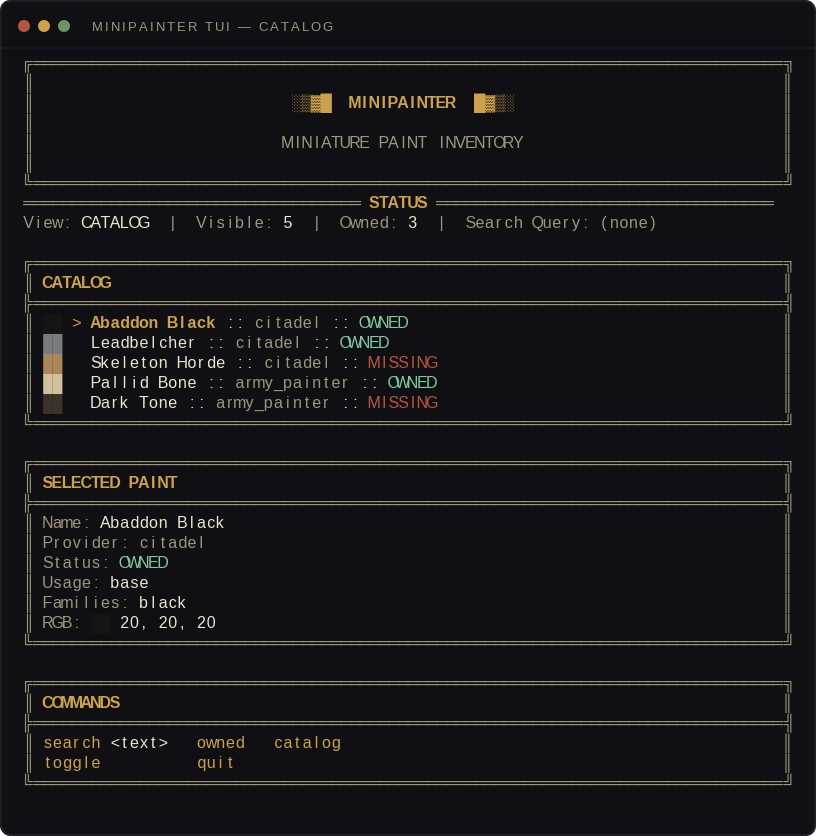
The ledger TUI is a real colored terminal app: a MINIPAINTER banner, gold section
frames, green OWNED / red MISSING status, and a truecolor swatch of every paint's own
RGB. Color turns on for a TTY and honors NO_COLOR.
Most paint advice workflows break at the same point: they recommend paints you do not have on hand.
minipainter is built to solve that exact problem:
The long-term goal is not “AI picks random colors for miniatures.” The goal is “AI reasons from your actual inventory first, then suggests stronger alternatives only when useful.”
Owned-first matching: lookups and recommendations can prioritize paints you already have.Catalog in repo, inventory in your home: paint records live in data/catalog/; what you own lives in ~/.minipainting/inventory.json and follows you across projects.RGB-aware search: approximate RGB values help with nearest-color matching.Colored TUI: terminal ledger with per-paint RGB swatches and OWNED/MISSING status.Agent-friendly CLI: deterministic command output for AI integration (Claude + ChatGPT MCP).Full-screen TUI with banner, catalog, detail panel, and command strip.
See: docs/assets/hero.txt
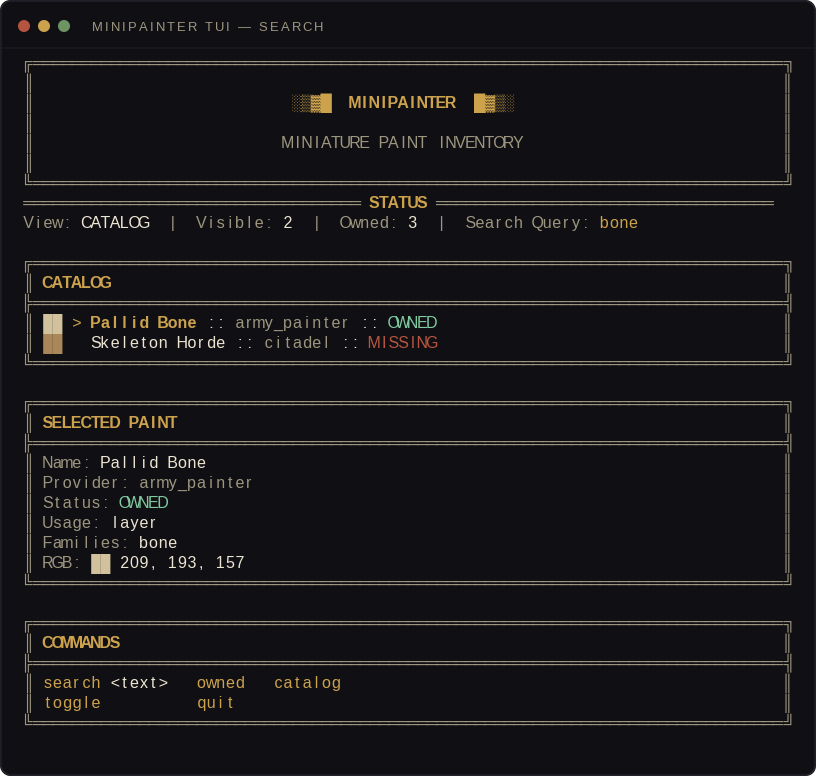
Filtered lookup for a semantic search like bone.
See: docs/assets/search.txt
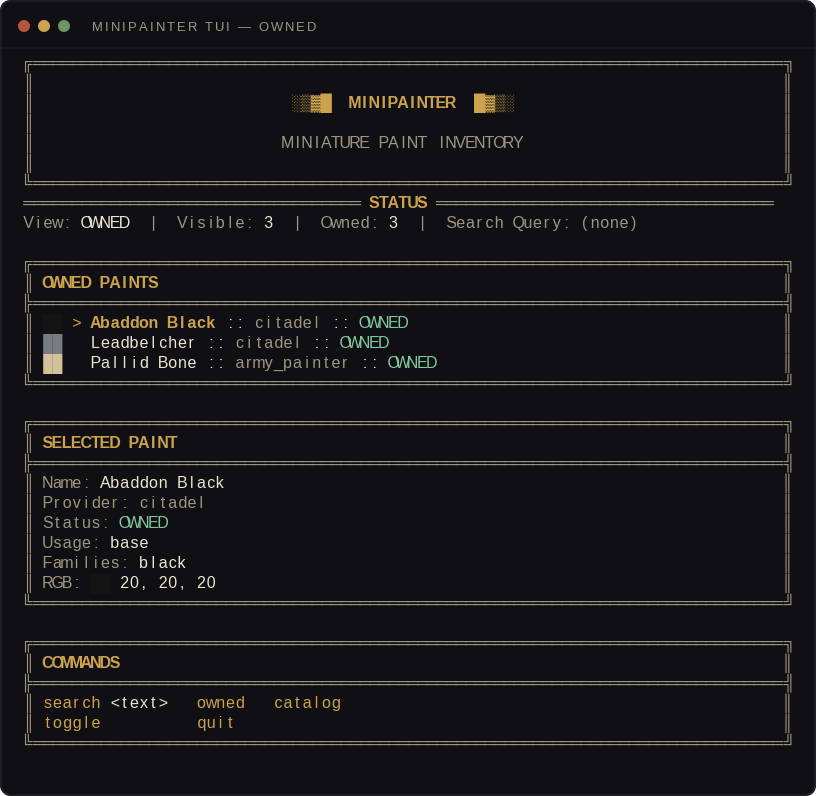
Inventory-only presentation focused on what is already bound to your collection.
See: docs/assets/owned.txt
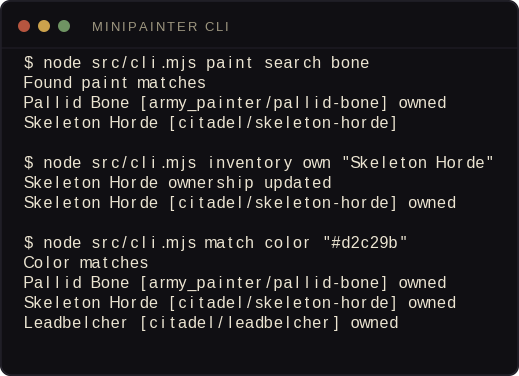
Representative command-line usage for search, ownership updates, and color matching.
See: docs/assets/cli.txt
The whole stack — MCP/HTTP server plus a Postgres that stores your inventory — starts with
one command. Inventory persists in a named volume, so it survives container restarts and
docker compose down / recreation (only down -v wipes it).
docker compose up --build # http://localhost:3000
GET /health — livenessGET /api/inventory — owned paints (from Postgres)POST /mcp — MCP for Claude Desktop · POST /mcp/v3 — MCP for ChatGPT (search/fetch)Storage is selected by DATABASE_URL: set it (as docker-compose.yml does) for Postgres,
leave it unset to use a local JSON inventory file (unchanged local behavior). See .env.example.
Any Docker + Postgres host works (Fly.io, Railway, a VPS…). For a one-click remote MCP
server with a managed database, the repo ships a Render Blueprint (render.yaml) that
provisions the web service and Postgres together and wires DATABASE_URL automatically:

The reference deployment warpaint-mcp.fly.dev runs on Fly.io with Fly Managed Postgres — see
docs/deploy-fly.md for the fly mpg attach + migration steps.
The fastest way — run it straight from npm with npx, no clone, no install:
npx minipainter paint search bone
npx minipainter match color "#d2c29b"
npx minipainter tui
Or install it globally to get the short mpaint command everywhere:
npm install -g minipainter
mpaint paint search bone
mpaint match color "#d2c29b"
The catalog is bundled, so search and matching work on first run with nothing to configure. Your inventory lives at ~/.minipainting/inventory.json, created automatically the first time you mark a paint owned (legacy ~/.warpaint/ is auto-migrated).
Requirements:
To hack on it, clone and run against the working tree:
git clone https://github.com/ArturSkowronski/minipainter.git
cd minipainter
npm install
node src/cli.mjs paint search bone
After that you have four usage modes:
Initialize the local inventory at ~/.minipainting/inventory.json:
node src/cli.mjs catalog sync
Search paints:
node src/cli.mjs paint search black
node src/cli.mjs paint search bone --json
Inspect one paint:
node src/cli.mjs paint show "Abaddon Black" --json
Mark paints as owned or missing:
node src/cli.mjs inventory own "Abaddon Black"
node src/cli.mjs inventory unown "Abaddon Black"
node src/cli.mjs inventory list
Run semantic or color matching:
node src/cli.mjs match describe bone
node src/cli.mjs match color "#d2c29b"
Launch the TUI:
node src/cli.mjs tui
Run the MCP server locally:
node src/mcp-server.mjs
Run the self-hosted HTTP server locally:
DATA_DIR=.minipainting-data node src/mcp-http-server.mjs
The TUI is centered around three presentation areas:
FORGE CATALOG: visible paints in the current scopeSELECTED PIGMENT: the currently highlighted paint with provider, families, usage, and RGBRITUAL COMMANDS: the command legend for the active sessionCurrent TUI commands:
search <text>ownedcatalogtogglequitRecommended use:
catalogsearch bone, search black, or similar queriesImplemented now:
Planned later:
data/catalog/ (Citadel and Army Painter, kept in version control)~/.minipainting/inventory.json — stores only owned paint ids in the form { "version": 1, "owned": ["citadel/abaddon-black", ...] }DATA_DIR (defaults to /data in Docker); inventory lives at <DATA_DIR>/inventory.json.minipainting/registry.json next to the inventory path is auto-migrated on first run.warpaint/ data directories are auto-renamed to .minipainting/ on first run (both home and project-local variants){ inventoryPath } or { cwd } (the latter resolves to <cwd>/.minipainting/inventory.json, which is what the test suite uses for isolation)node src/mcp-server.mjsnpm run mcpnpm run servernpm run generate:demo
minipainter now includes a local MCP server so Claude Desktop can use your paint registry directly.
Example local MCP config:
{
  "mcpServers": {
    "minipainter": {
      "command": "node",
      "args": ["/absolute/path/to/minipainter/src/mcp-server.mjs"]
    }
  }
}
After adding the server, Claude Desktop can call tools such as:
paint_searchpaint_showinventory_listinventory_mark_ownedinventory_mark_unownedmatch_colormatch_describeSuggested local flow:
node src/cli.mjs catalog syncFor Claude Code, fetch the skill straight from the site, no clone required. It ships with the
right guardrails baked in: JSON-only reads, product_format rules, failure handling.
# project-scoped
mkdir -p .claude/skills/minipainter
curl -fsSL https://arturskowronski.github.io/minipainter/SKILL.md \
  -o .claude/skills/minipainter/SKILL.md
Or save it to ~/.claude/skills/minipainter/SKILL.md to use it everywhere.
The Docker image runs a single HTTP server runtime designed for self-hosted use. Build it from the repo (no image is published to a registry yet):
docker build -t minipainter .
docker run -p 3000:3000 -v minipainting-data:/data minipainter
Or bring up the server together with Postgres in one step with docker compose up -d.
The server exposes:
GET /healthGET /api/paintsGET /api/paints/:paintGET /api/inventoryPUT /api/inventory/:paintDELETE /api/inventory/:paintPOST /api/match/colorPOST /api/match/describePOST /mcpOptional runtime configuration:
PORT — listen port, defaults to 3000DATA_DIR — persistent state directory, defaults to /data in DockerAUTH_TOKEN — protects /api/* and /mcp with Authorization: Bearer ...INVENTORY_SYNC_TOKEN — protects the legacy /inventory sync endpointFor Claude mobile or web, the stdio MCP server above is not reachable. Run
minipainter-mcp-http instead — a Streamable HTTP MCP transport exposing the
same tools, plus GET/POST /inventory for syncing the local inventory.
export INVENTORY_SYNC_TOKEN=$(openssl rand -hex 32)
export PORT=3000
export INVENTORY_PATH=$HOME/.minipainting/inventory.json
npm run mcp:http
Then in another shell:
curl -s http://localhost:3000/health
curl -s -X POST http://localhost:3000/mcp \
  -H "Content-Type: application/json" \
  -H "Accept: application/json, text/event-stream" \
  -d '{"jsonrpc":"2.0","id":1,"method":"tools/list"}'

# Sync endpoint (bearer-token protected)
curl -s -H "Authorization: Bearer $INVENTORY_SYNC_TOKEN" \
     http://localhost:3000/inventory
The repo ships a Dockerfile and fly.toml. Full recipe in
docs/deploy-fly.md. Short version:
fly launch --no-deploy --copy-config --name <your-app-name>
fly volumes create inventory_data --region <your-region> --size 1
fly secrets set INVENTORY_SYNC_TOKEN="$(openssl rand -hex 32)"
fly deploy
In Claude (mobile or web), add a custom connector:
https://<your-app-name>.fly.dev/mcpThe /mcp endpoint currently has no authentication — anyone with the URL can
call tools. Use the obscurity of the URL plus Fly's network controls for now;
add per-user auth before sharing the URL.
| Variable | Required | Purpose |
|---|---|---|
INVENTORY_SYNC_TOKEN | for /inventory | Bearer token protecting GET/POST /inventory; when unset, sync returns 503 |
INVENTORY_PATH | no | Path to inventory.json; default ~/.minipainting/inventory.json locally, /data/inventory.json in the Docker image |
INVENTORY_JSON | no | One-time seed JSON; only used when INVENTORY_PATH is absent on first boot |
WARPAINT_INVENTORY_JSON | no | Legacy alias of INVENTORY_JSON |
MCP_SERVER_NAME | no | Server name in MCP handshake + startup log; default paint-inventory |
PORT | no (default 3000) | TCP port to listen on |
/mcp has no authentication yet. The bearer token only protects /inventory.The MCP server is generic — only the CLI (mpaint) is branded. To run your
own instance:
Fork or clone the repo.
(Optional) rename your Fly app in fly.toml.
Create a Fly volume and set secrets:
fly volumes create inventory_data --size 1 --region <your-region>
fly secrets set INVENTORY_SYNC_TOKEN=$(openssl rand -hex 24)
# Optional one-time seed:
fly secrets set INVENTORY_JSON="$(cat ~/.minipainting/inventory.json)"
(Optional) name your MCP server (shown in the MCP handshake and startup logs):
fly secrets set MCP_SERVER_NAME=my-paints
Deploy:
fly deploy
Register the remote in your local CLI and sync:
mpaint sync add default \
  --url https://my-app.fly.dev \
  --token <token-from-step-3>
mpaint sync push
After this, your local inventory and the deployed MCP stay in sync via
mpaint sync push (upload local → remote) and mpaint sync pull --force
(overwrite local from remote).
MIT © Artur Skowronski
Claim this server with your GitHub account to request manual ownership verification.
Link to the catalog listing for minipainter from your README. This badge does not certify ownership, compatibility or security.
[](https://awesome-mcp.com/servers/minipainter)Public repository statistics could not be verified. Check the configured source address; unavailable counts are not zero.
来源、范围和时段分别列出;不相加,不代表安装人数、活跃用户或安全审核。
尚无已审核的包 / 镜像标识,暂不展示下载统计。
Alternative and complementary servers in the same category
A directory listing describing a cancellation-letter and mailing-address service. The configured public GitHub repository returned 404 during source verification.

A hosted MCP service for browsing and searching through Singapore mobile-network proxies.

A directory listing describing a Markdown-to-PDF service. The configured public GitHub repository returned 404 during source verification.