
This is a Model Context Protocol (MCP) server for interacting with AIStor object stores.
Repository stats unavailable
Databases & Storage
An MCP server that enables running SQL queries, inspecting schemas, executing stored procedures, and generating business insight memos against Microsoft SQL Server databases.
MCP server for Microsoft SQL Server is cataloged as an MCP server attributed to daobataotie. An MCP server that enables running SQL queries, inspecting schemas, executing stored procedures, and generating business insight memos against Microsoft SQL Server databases. It is categorized under databases storage. See the capability inspector for recorded interfaces and their independent review status; consult upstream documentation for the current interface.
Installation configuration is not reviewed. No executable setup is offered for this entry; inspect the source repository before proceeding.
Catalog license label: MIT License. Check the source repository's current license and terms before using, modifying or distributing this software.
能力定义尚未审核。未核验的采集内容不会作为可信接口展示。
暂无可展示的已审核记录。这不表示上游不支持此能力。
暂无可展示的已审核记录。这不表示上游不支持此能力。
暂无可展示的已审核记录。这不表示上游不支持此能力。
Email delivery is not connected. This page does not collect email addresses or create subscriptions.
Browse the registry for current listings instead.
Reviews for MCP server for Microsoft SQL Server are not available yet
Review publishing and storage are not connected. This page does not collect or publish ratings or comments, including after sign-in.
Yes. Setting readonly to true disables all write operations, including stored procedures, and hard-blocks writes regardless of client elicitation support.
Results are truncated at max_rows rows, and queries are aborted after query_timeout seconds.
No. The confirmation relies on the client implementing MCP Elicitation; clients without elicitation support skip the confirmation and execute writes directly.
README.md · 65943ba3e15a · 采集于 2026-11-13 09:44:19 UTC
保留上游原文,不做 AI 改写。为安全起见过滤脚本、表单和不安全链接。
当前显示最后一次成功采集的文档快照,请以来源页面为准。
MSSQL MCP Server, provides database interaction and business intelligence capabilities. This server enables running SQL queries, analyzing business data, and automatically generating business insight memos.
Refer to the official website's SQLite for modifications to adapt to MSSQL.
Built on the official MCP Python SDK (FastMCP), supporting the MCP 2025-06-18 specification: structured tool output (structuredContent), tool annotations, resource templates, and elicitation-based write confirmation.
Highlights:
database parameter, each connection with its own readonly / query_timeout / max_rows / confirm_writes settingsschema://{database}/{schema}/{table} serves table structures on demand without burning tool-schema tokens every turnread_query
max_rowswrite_query
create_table
list_tables
list_views
describe_table
list_databases
list_procedures
execute_procedure
append_insight
memo://insights — a living business-insights memo, updated in real time via append_insightschema://{schema}/{table} — table structure of the default database (JSON: columns / PK / identity / FKs / indexes)schema://{database}/{schema}/{table} — table structure of a named database connectionResource templates are fetched on demand: unlike tool schemas they are not resent to the LLM every turn, which keeps long conversations lean.
All SQL goes through static validation before execution:
read_query only accepts a single SELECT / WITH statement and rejects any write or EXEC keyword (blocks e.g. WITH c AS (...) DELETE FROM t)
write_query uses a whitelist (INSERT / UPDATE / DELETE / MERGE only); EXEC, DROP, TRUNCATE, ALTER are rejected
Multi-statement batches (separated by ;) are rejected
trusted_connection: true switches to Windows integrated auth (the connection string uses Trusted_Connection=yes, no username/password needed); false keeps the configured SQL account login
readonly: true disables all write operations, including stored procedures (they are black boxes that may write)
Stored procedure names are strictly validated as 1–3 dotted identifier parts before being embedded into {CALL ...}
Results are truncated at max_rows rows; queries are aborted after query_timeout seconds
With confirm_writes: true, all state-changing operations (write_query writes, create_table, execute_procedure) first ask the user for confirmation via MCP elicitation
⚠️ Important limitation: the confirmation relies on the client implementing the MCP Elicitation protocol. Clients without elicitation support (e.g. TraeWork / Cursor ...) skip the confirmation and execute writes directly — meaning
confirm_writes: trueprovides no protection on such clients (a skip warning is logged server-side). For reliable write protection on any client, usereadonly: trueinstead (hard-blocks all writes regardless of client capabilities)
Comments and string literals are stripped before validation, so they cannot be used to bypass checks
The database table is as follows. The column names are not standardized, and AI will match them on its own. Errors during SQL execution will self correct.

The following is the demo.
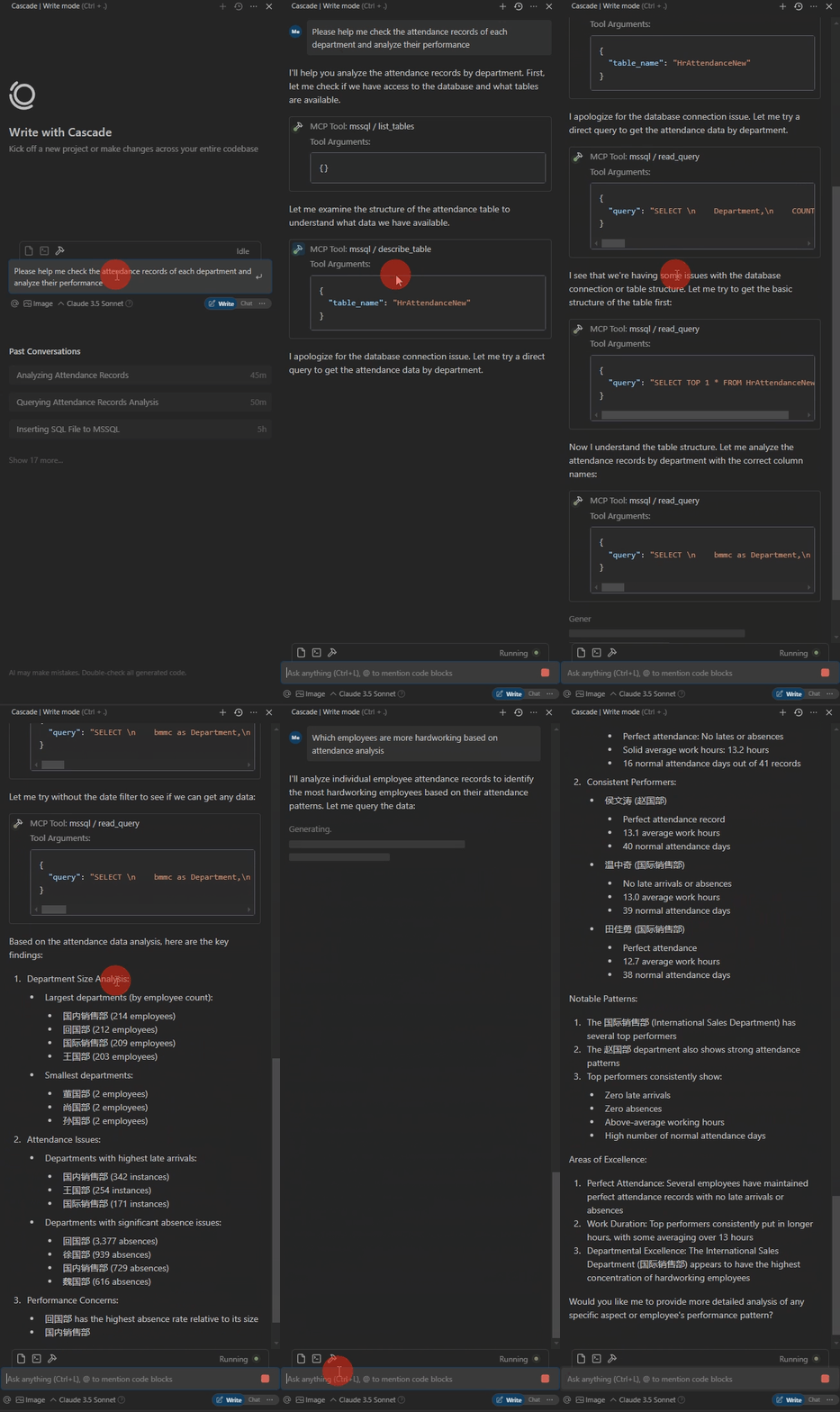
Python 3.10+Packages
ODBC Driver 17 / 18 for SQL ServerFrom source:
git clone <this repo>
CD /d ~/mssql-mcp
pip install -r requirements.txt
Or as a package (pip >= 21.3):
pip install .
Create config.json. Single-database format:
{
    "database": {
        "driver": "ODBC Driver 17 for SQL Server",
        "server": "server ip",
        "database": "db name",
        "username": "username",
        "password": "password",
        "trusted_connection": false,
        "readonly": false,
        "query_timeout": 30,
        "max_rows": 200,
        "confirm_writes": false
    },
    "server": {
        "name": "mssql-manager",
        "version": "0.2.0"
    }
}
Multi-database format (recommended — each connection has independent settings, e.g. prod stays read-only):
{
    "databases": {
        "default": { "server": "localhost", "database": "dev_db", "...": "..." },
        "prod":    { "server": "10.0.0.5", "database": "prod_db", "readonly": true, "...": "..." }
    },
    "default_database": "default",
    "server": { "name": "mssql-manager", "version": "0.2.0" }
}
Connection names and the default connection: the keys in databases are the connection names — the LLM passes one of them as the database parameter to switch connections. Keys are arbitrary (you do not have to call one of them default). default_database decides which connection is used when database is not passed, resolved in this order:
default_database: "xxx" is explicitly set, use the connection named xxxdefault exists, use itRecommended: explicitly set default_database and also keep a connection literally named default as a safety net — this way adding new connections (which may end up first in iteration order) won't silently change the default.
Config file lookup order: MSSQL_MCP_CONFIG env var → config.json next to server.py → config.json in the working directory.
Optional fields (per connection):
| Field | Default | Description |
|---|---|---|
readonly | false | Read-only mode: blocks all write operations (incl. procedures) |
query_timeout | 30 | Query timeout in seconds |
max_rows | 200 | Max rows per result set; extra rows are truncated |
confirm_writes | false | Ask for user confirmation (elicitation) before all state-changing operations (writes / CREATE TABLE / procedures); requires client Elicitation support — unsupported clients (e.g. TraeWork / Cursor) execute directly; for hard protection use readonly |
encrypt | (none) | ODBC encryption, for Driver 18 (true / false) |
trust_server_certificate | false | Trust self-signed certificates, useful with Driver 18 |
Environment variables:
| Variable | Default | Description |
|---|---|---|
MSSQL_MCP_CONFIG | (none) | Path to an alternative config file |
MSSQL_MCP_LOG_LEVEL | INFO | Log level (DEBUG / INFO / WARNING / ERROR) |
Mainstream stdio clients (Claude Desktop, Cursor, Windsurf, Cline, etc.) share the same mcpServers JSON format. Take Claude Desktop as an example — for other clients, add the same entry to their MCP config file:
# add to claude_desktop_config.json. Note:use your path
{
    "mcpServers": {
        "mssql": {
            "command": "python",
            "args": [
                # your path,e.g.:"C:\\mssql-mcp\\src\\server.py"
                "~/server.py"
            ]
        }
    }
}
If installed as a package, the command can simply be mssql-mcp (no args needed).
# Note:use your path
npx -y @modelcontextprotocol/inspector python C:\\mssql-mcp\\src\\server.py
pip install pytest
python -m pytest tests -q
tests/test_validation.py — SQL / procedure-name validation (no database needed)tests/test_config.py — config parsing: legacy single-db compatibility, multi-db, error cases (no database needed)tests/test_integration.py — end-to-end against the database in src/config.json (writes only touch dedicated mcp_upgrade_* test objects, cleaned up automatically)mssql-mcp
├── .git
├── .gitignore
├── LICENSE
├── README.md
├── README_en.md
├── README_zh.md
├── imgs
│ ├── table.png
│ └── demo.gif
├── pyproject.toml (packaging: src/ is installed as the mssql_mcp package)
├── requirements.txt
├── src
│ ├── __init__.py
│ ├── config.json (gitignored, local database config)
│ └── server.py
└── tests
├── test_validation.py
├── test_config.py
└── test_integration.py
MIT License
Claim this server with your GitHub account to request manual ownership verification.
Link to the catalog listing for MCP server for Microsoft SQL Server from your README. This badge does not certify ownership, compatibility or security.
[](https://awesome-mcp.com/servers/mssql-mcp)Public repository statistics could not be verified. Check the configured source address; unavailable counts are not zero.
来源、范围和时段分别列出;不相加,不代表安装人数、活跃用户或安全审核。
尚无已审核的包 / 镜像标识,暂不展示下载统计。
Alternative and complementary servers in the same category
This is a Model Context Protocol (MCP) server for interacting with AIStor object stores.

A Model Context Protocol server that lets AI assistants run SQL queries against AWS Athena databases and retrieve results.

A Model Context Protocol (MCP) server that exposes access to an InfluxDB v2 instance using the InfluxDB OSS API v2.