
An AI receptionist platform with an MCP server for accessing business calls, contacts and appointments from AI assistants.
52
Communication
An open-source MCP server that provides production-ready Google Chat integration and a multi-provider architecture for connecting AI assistants to team chat platforms.
Multi-Chat MCP Server with Google Chat support is cataloged as an MCP server attributed to siva010928. An open-source MCP server that provides production-ready Google Chat integration and a multi-provider architecture for connecting AI assistants to team chat platforms. It is categorized under communication social. See the capability inspector for recorded interfaces and their independent review status; consult upstream documentation for the current interface.
Installation configuration is not reviewed. No executable setup is offered for this entry; inspect the source repository before proceeding.
Catalog license label: MIT License. Check the source repository's current license and terms before using, modifying or distributing this software.
能力定义尚未审核。未核验的采集内容不会作为可信接口展示。
暂无可展示的已审核记录。这不表示上游不支持此能力。
暂无可展示的已审核记录。这不表示上游不支持此能力。
暂无可展示的已审核记录。这不表示上游不支持此能力。
Email delivery is not connected. This page does not collect email addresses or create subscriptions.
Browse the registry for current listings instead.
Reviews for Multi-Chat MCP Server with Google Chat support are not available yet
Review publishing and storage are not connected. This page does not collect or publish ratings or comments, including after sign-in.
Only the Google Chat provider is production ready; Slack and Teams providers are planned frameworks awaiting implementation.
The tool is designed for local, organizational use, with a recommendation to use organization-provided on-premises or locally installed LLM instances for data control.
README.md · 83291c74c42d · 采集于 2026-11-13 09:54:31 UTC
保留上游原文,不做 AI 改写。为安全起见过滤脚本、表单和不安全链接。
当前显示最后一次成功采集的文档快照,请以来源页面为准。
🔥 UNIQUE FEATURE: Run multiple chat providers simultaneously with a single AI assistant!
Your AI can interact with Google Chat, Slack, Teams, and more—all at once.
Ask once: "Share this update with both Slack and Google Chat teams"
➡️ Learn more about multi-provider capabilities
Keywords: Google Chat MCP • MCP Server Implementation • AI Chat Integration • Google Workspace Automation • Team Collaboration AI
Google Chat MCP Server is an open-source, production-ready Model Control Protocol (MCP) server designed for Google Chat integration with AI assistants. Built with an extensible multi-provider architecture, this project provides a robust foundation for integrating AI assistants with team chat platforms.
Important Security Note: This tool is designed for local, organizational use only. We strongly recommend using this with organization-provided on-premises LLM instances or your local installed LLM Agent Model rather than cloud-based LLM model's to maintain complete control over your team's chat data and communications.
Why Local/On-Premises Deployment:
While anyone can adapt this tool for their particular use cases, it's designed with enterprise security as a priority.
Key Capability: All providers can run simultaneously with a unified interface, allowing your AI assistant to seamlessly work across multiple chat platforms at once. Learn more about this powerful feature.
We even see open-source MCP servers for Google Chat — but not sure about Microsoft Teams or Slack, officially or in open source. However, even the ones that do exist fall short in real-world applicability. They offer limited functionalities that cannot handle full-context workflows like this project demonstrates.
This multi-provider MCP framework was born from a real frustration experienced by development teams trying to leverage AI assistants in their daily workflows.
Picture this scenario: You're debugging a complex issue, your AI assistant suggests a solution, but you need to check if your teammates have encountered something similar. You switch to Google Chat, scroll through hundreds of messages, copy-paste error logs, wait for responses, then manually relay the solution back to your AI assistant.
This constant context-switching was breaking the flow of productive AI-assisted development.
During a critical production incident, a developer spent 30 minutes manually shuttling information between Claude (via Cursor) and the team's Google Chat space. The AI had the technical knowledge to help. The team had the contextual experience. But there was no bridge connecting these two knowledge sources.
That's when we realized:
AI assistants need to be participants in team collaboration — not isolated tools.
Our Solution:
Each chat platform is implemented as an independent module:
src/providers/
├── google_chat/     # ✅ Complete implementation
├── slack/           # 📋 Framework ready for implementation
└── teams/           # 📋 Framework ready for implementation
This project is designed for two primary audiences:
If you're a developer working in a team that uses Google Chat, and you're looking to integrate your AI IDEs (like Cursor, CodeWhisperer, or Copilot Chat) with team conversations — this MCP client will save you hours. No more manually copying logs, checking for context, or waiting for someone to see your question. Your AI agent can now directly:
If you're building AI-powered tools, IDE integrations, or internal assistants — this is your starting point for a multi-provider MCP architecture. You can fork this project to:
These walkthroughs show how an AI assistant, powered by this MCP server, evolves from a passive tool into an active collaborator — debugging issues, coordinating teams, syncing scripts, and proactively unblocking developers.
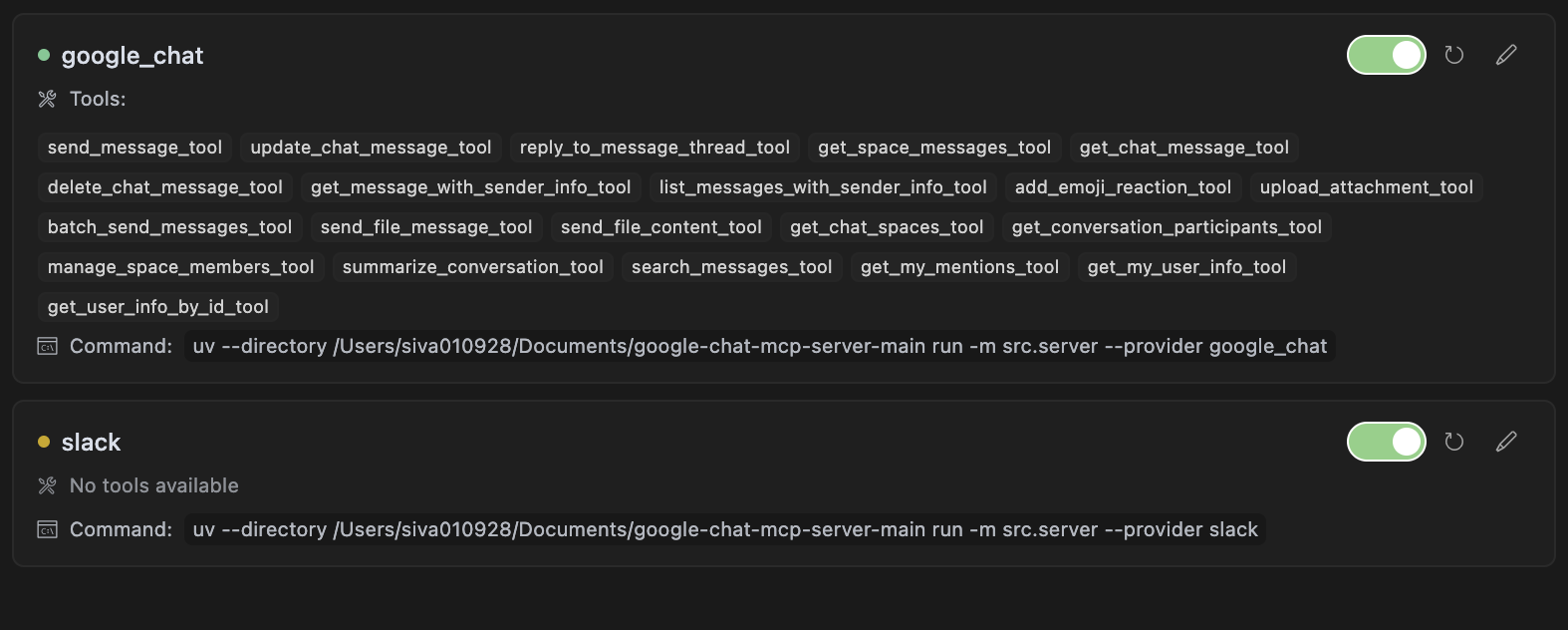
Scene 1: Tool Registration with Google Chat
The Scenario: Connecting MCP client to Google Chat.
What's Happening: The AI assistant is granted access to all Google Chat tools (e.g., send, search, summarize, attach, reply).
Why it Matters: The assistant can now act inside Google Chat, not just observe.
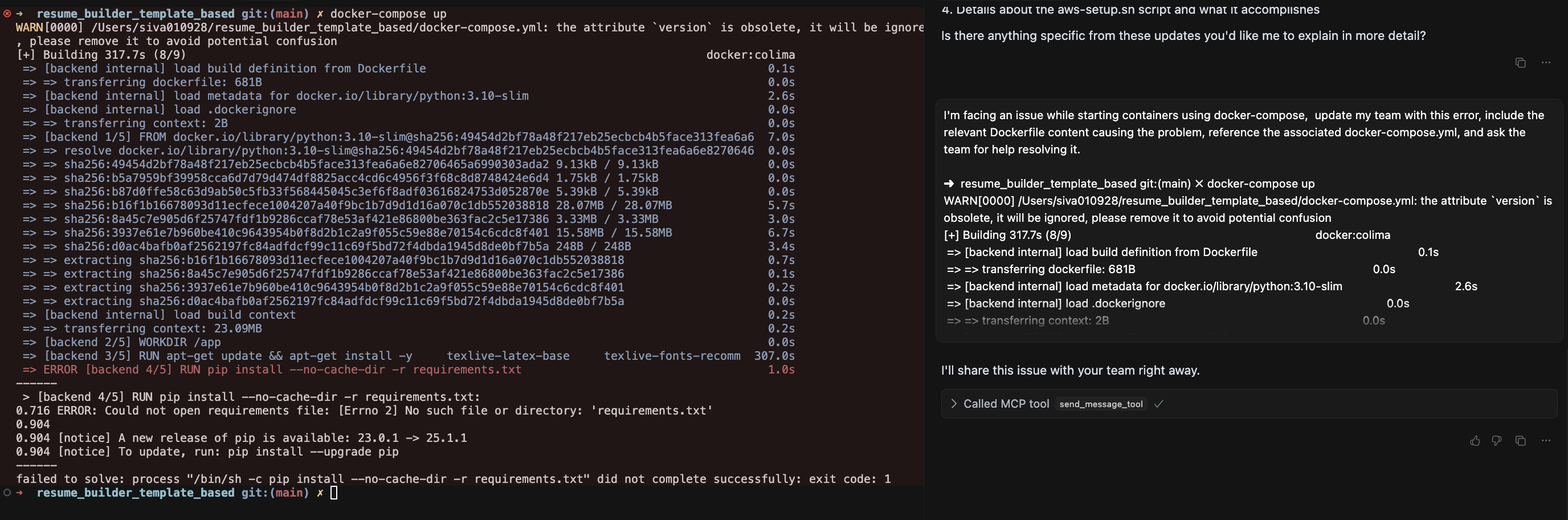
Scene 2: Broadcasting an Error to the Team
What's Happening: A developer asks the AI to share Docker error logs in chat, prompting real-time team help.
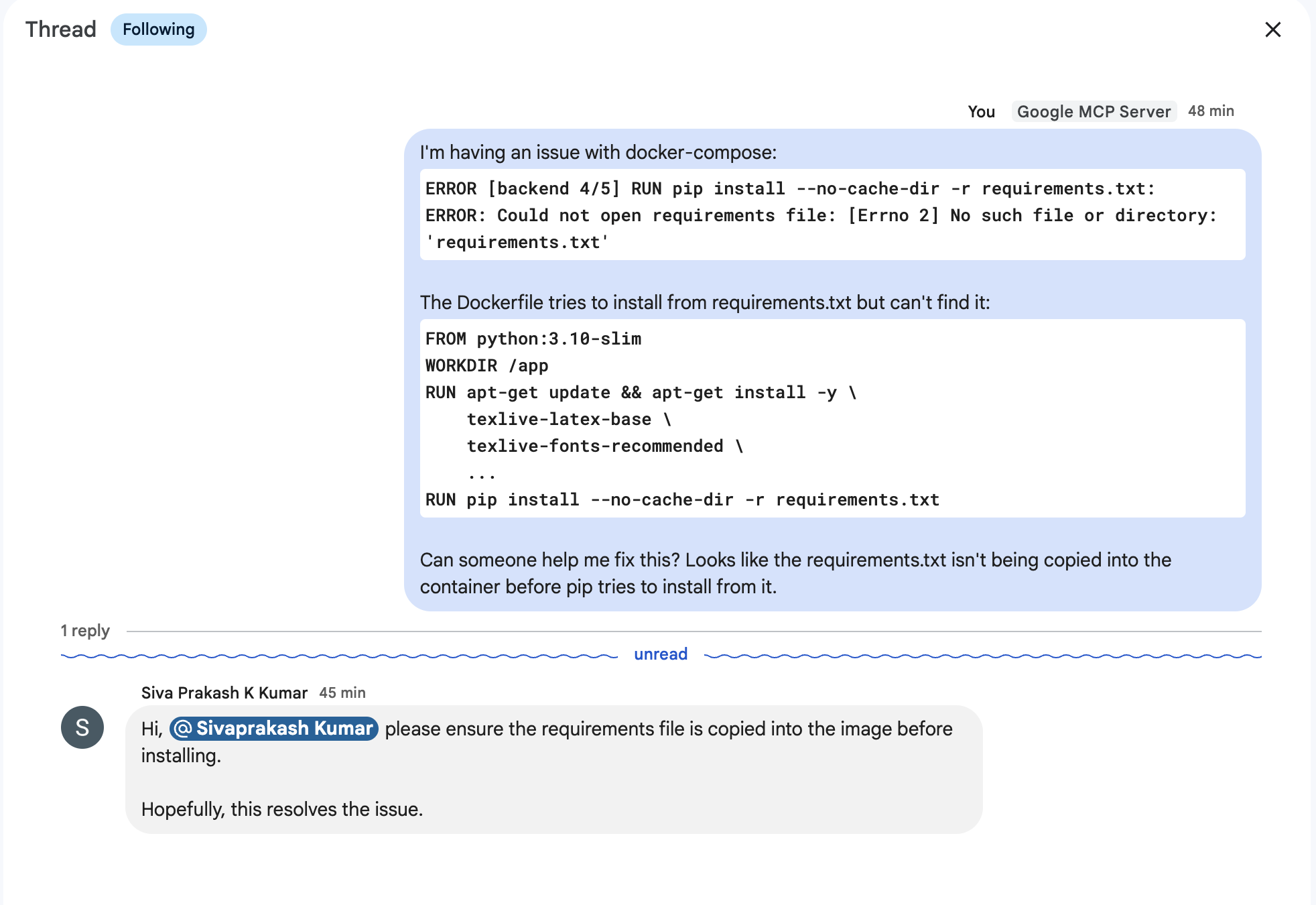
Scene 3: Team Responds with a Fix
Next Step: A teammate replies with a Dockerfile fix (COPY requirements.txt .).
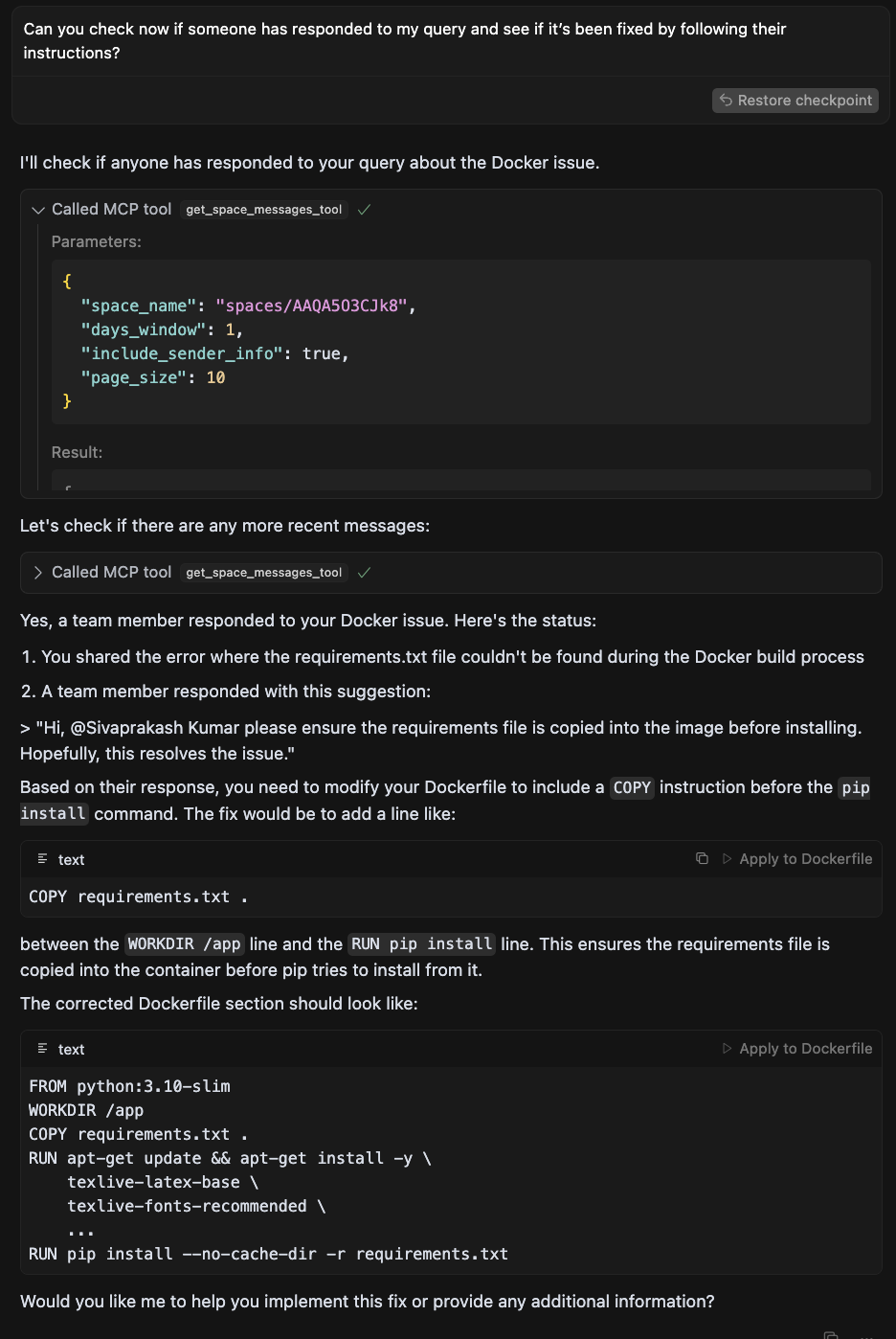
Scene 4: Agent Applies the Fix
Automation Moment: The AI assistant edits the Dockerfile per the advice — no manual effort.
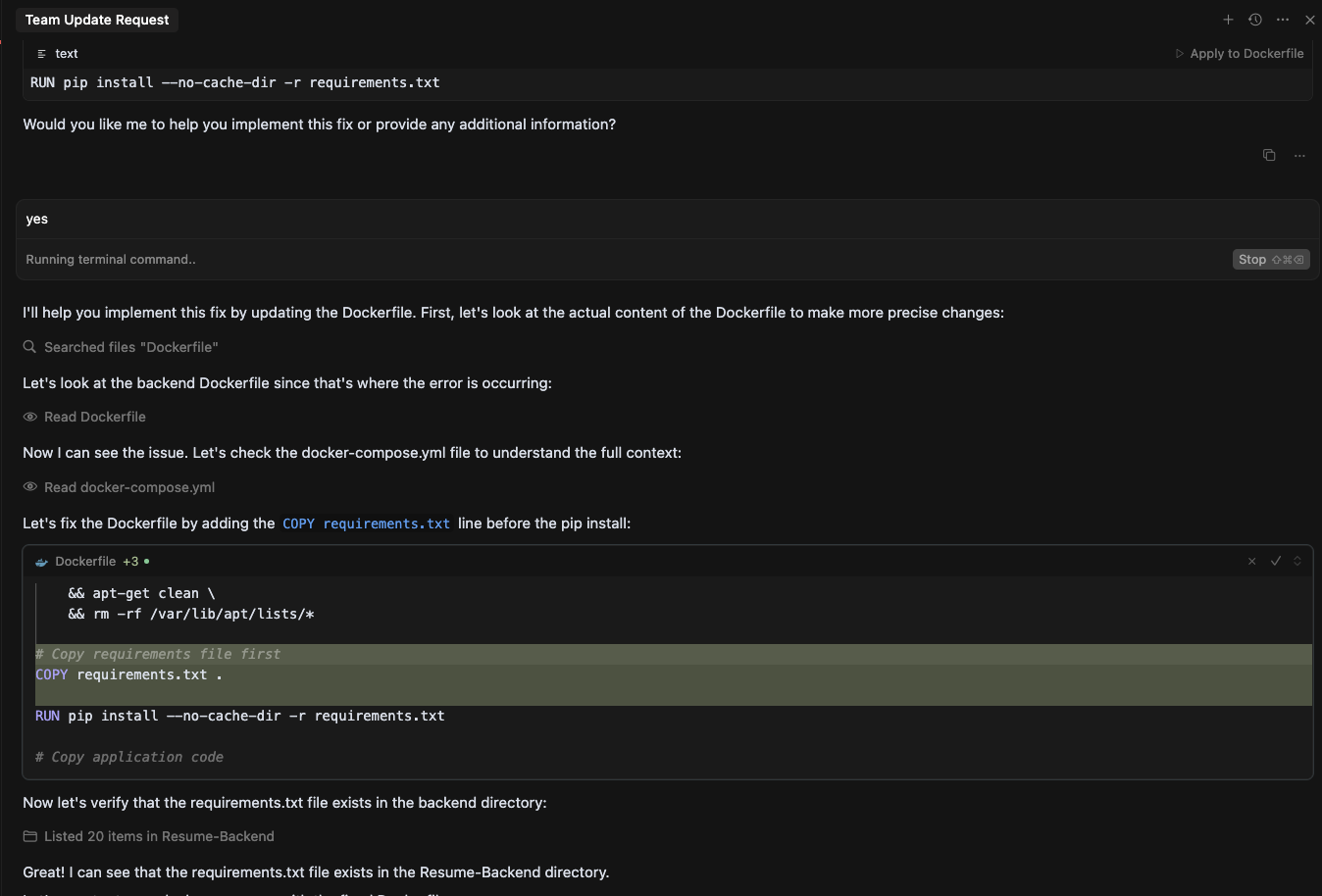
Scene 5: Verifying the Fix
Wrap-up: It verifies the change, confirms requirements.txt exists — and the error should be resolved.
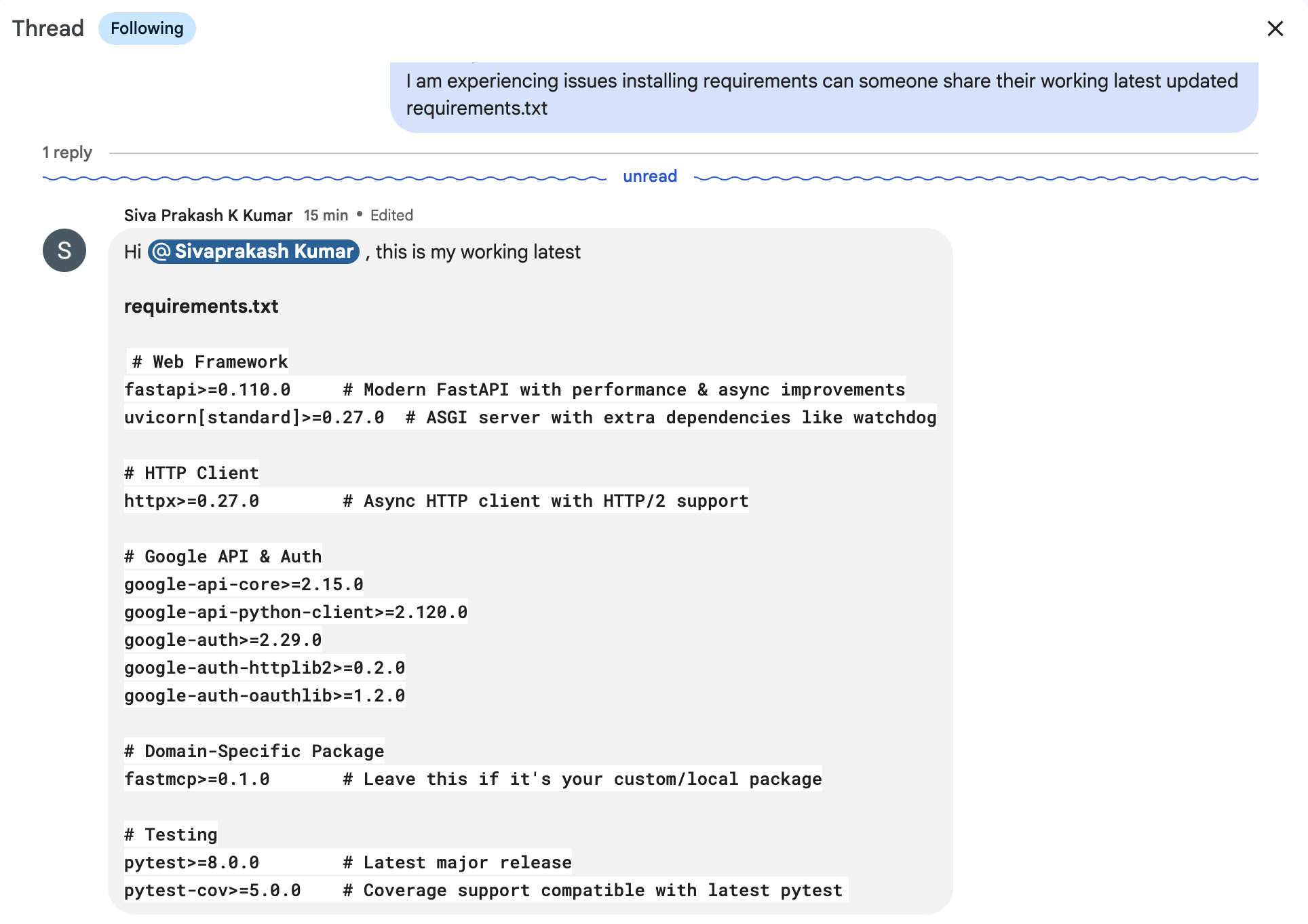
Scene 6: Sharing `requirements.txt`
Scenario: I have requested my team requests to share a working requirements.txt.
Response: One of my teammate shared their working requirements.txt.
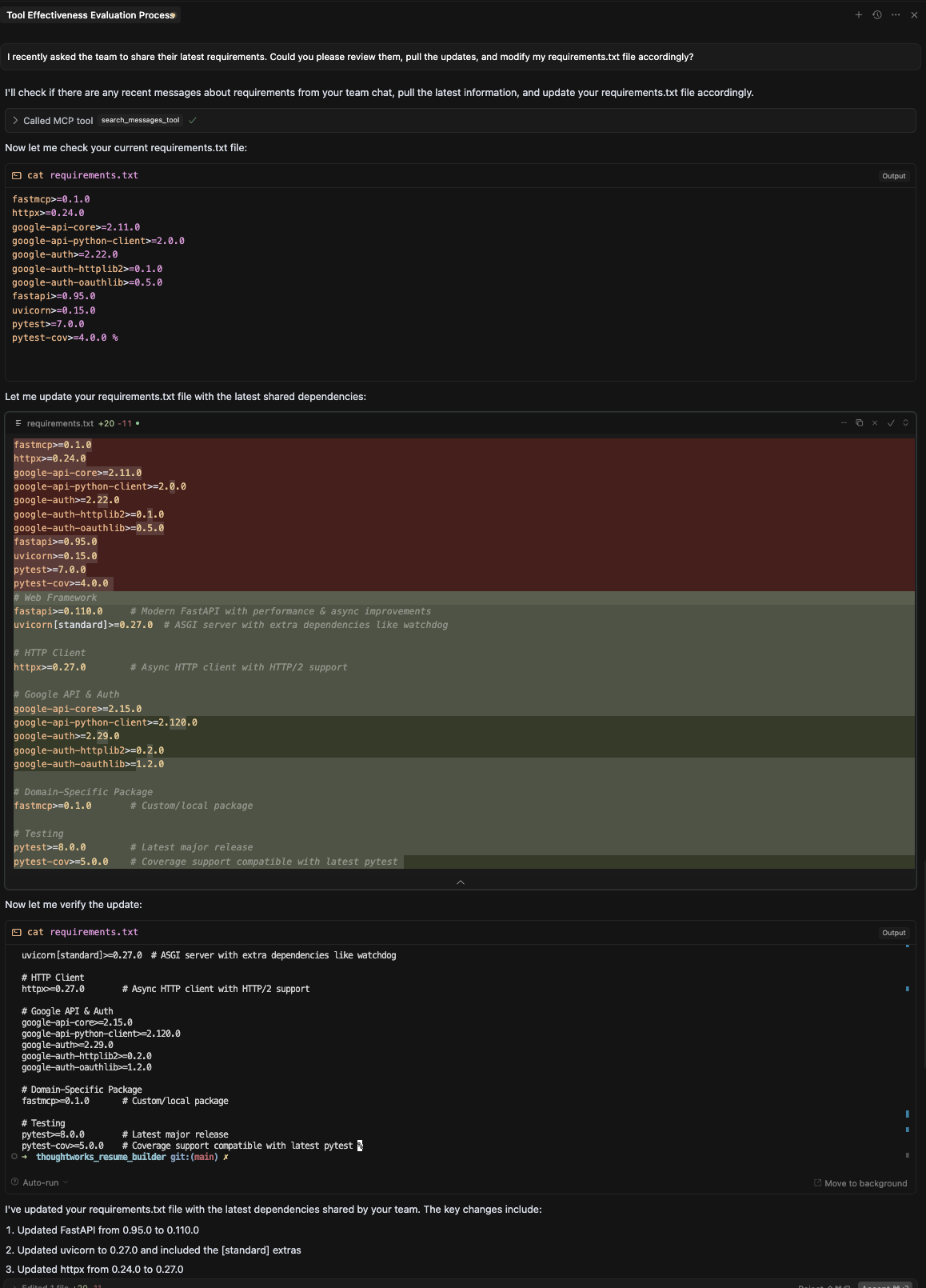
Scene 7: Syncing Local Copy
Developer POV: The AI reviewed the thread and based on my instruction, it updated my local requirements.txt with the one that was shared
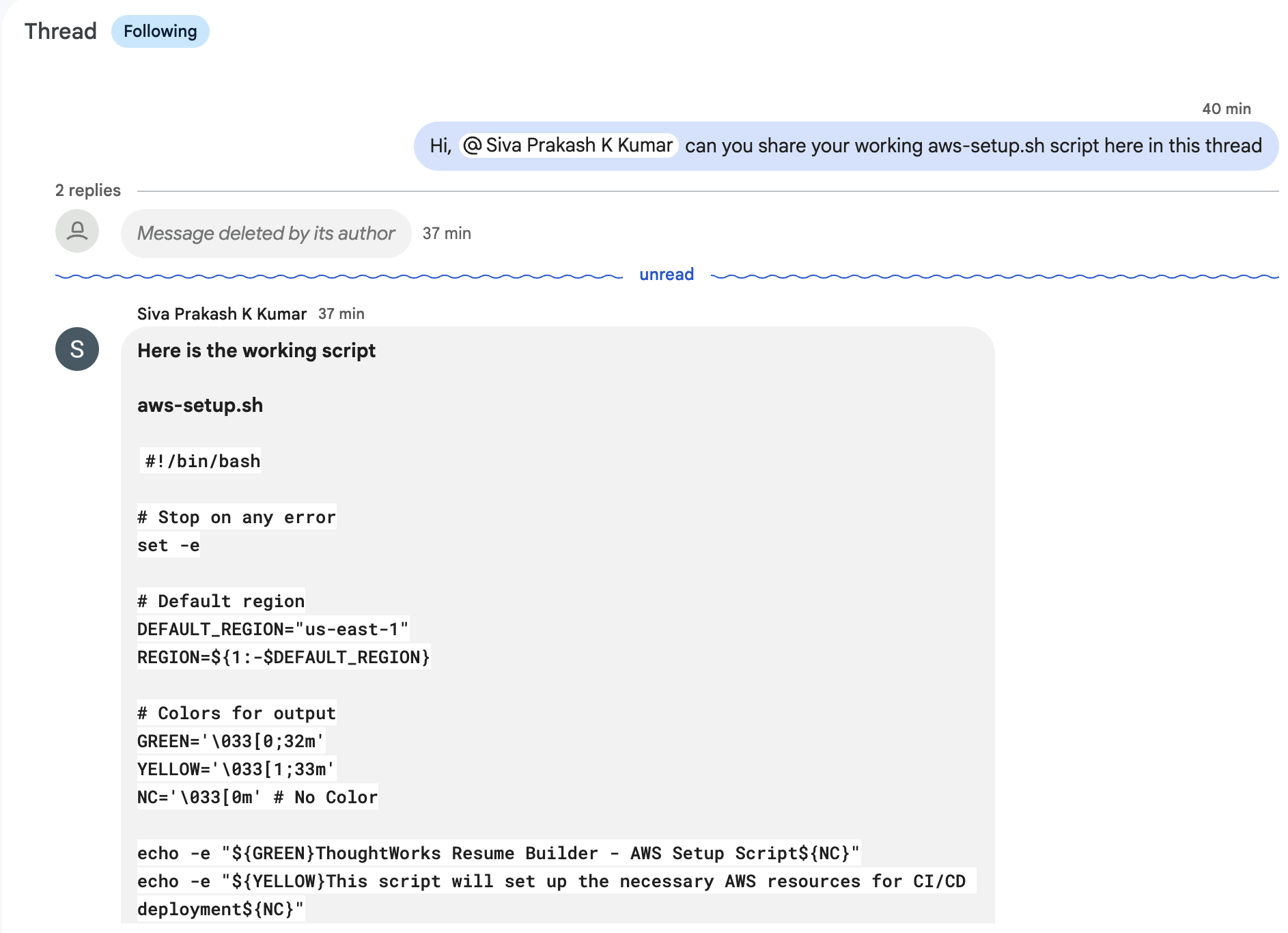
Scene 8: Requesting AWS Setup Script
Scenario: You ask your team for a shared aws-setup.sh script.
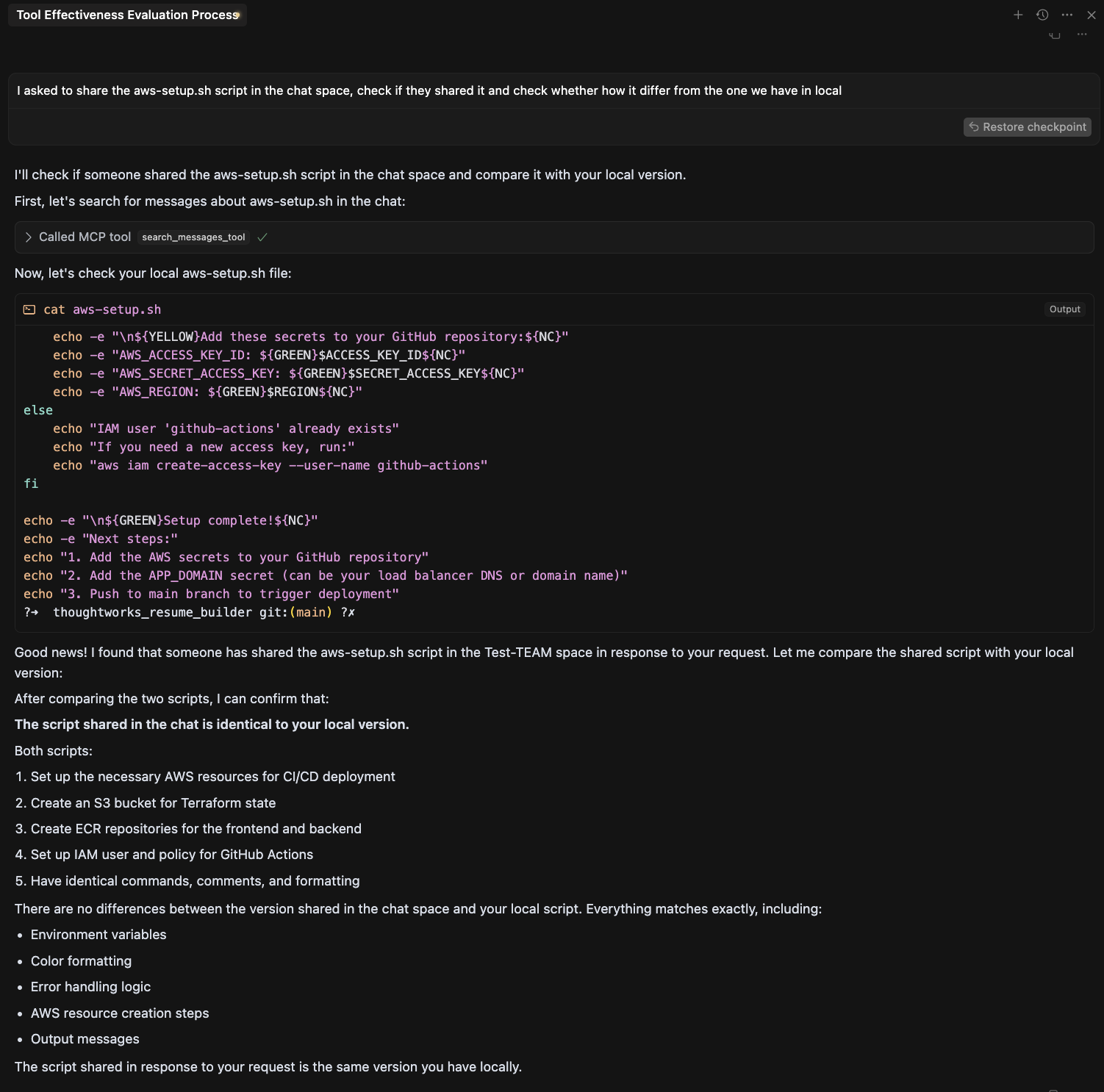
Scene 9: Script Consistency Check
Developer POV: The AI reviewed the thread and based on my instruction, it compares the team's script with your local version — ensuring you're in sync.
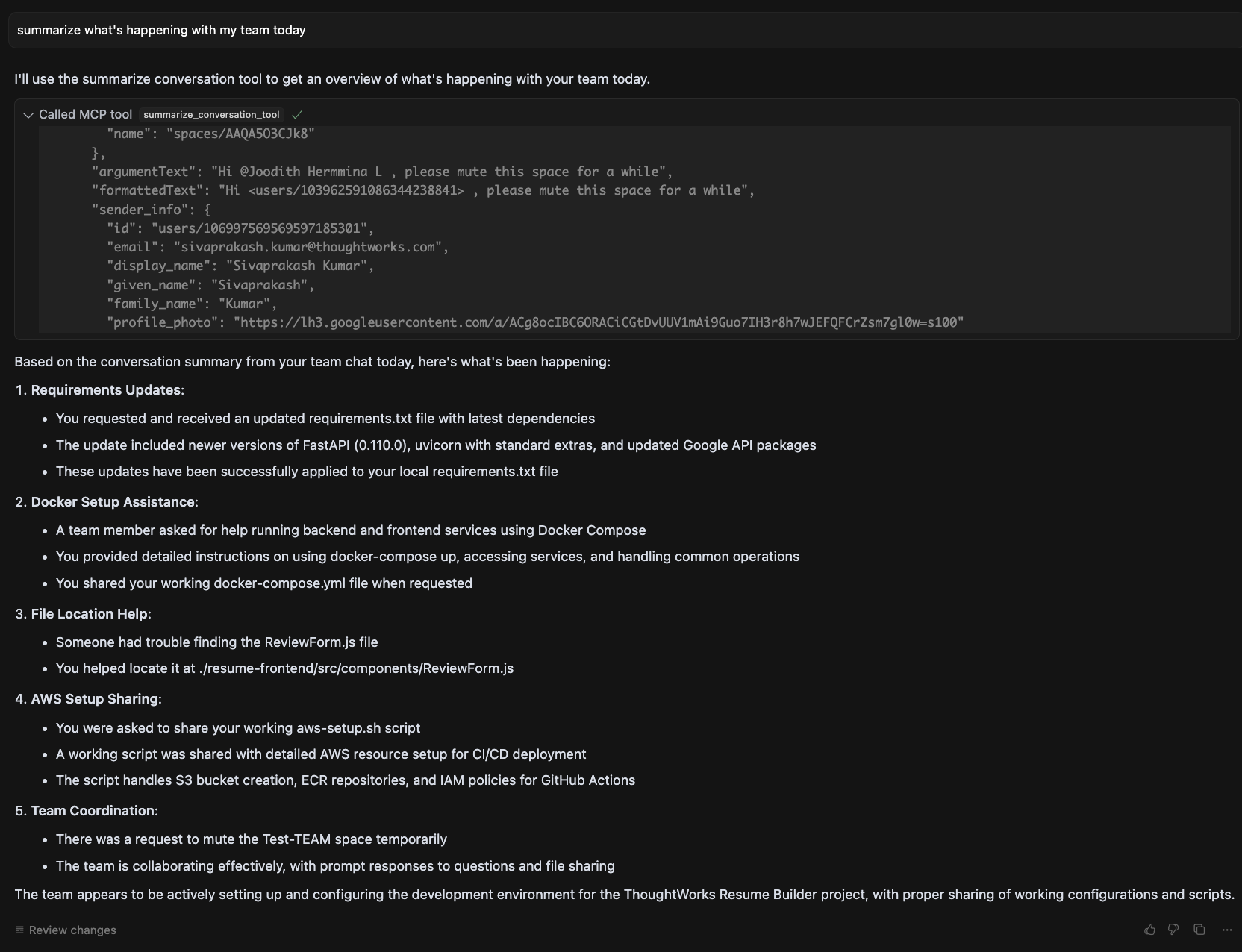
Scene 10: Summarizing Team Activity
Context: You've been away. What's new?
AI Response: The assistant summarizes key activity in your space: questions, PRs, shared files, blockers.
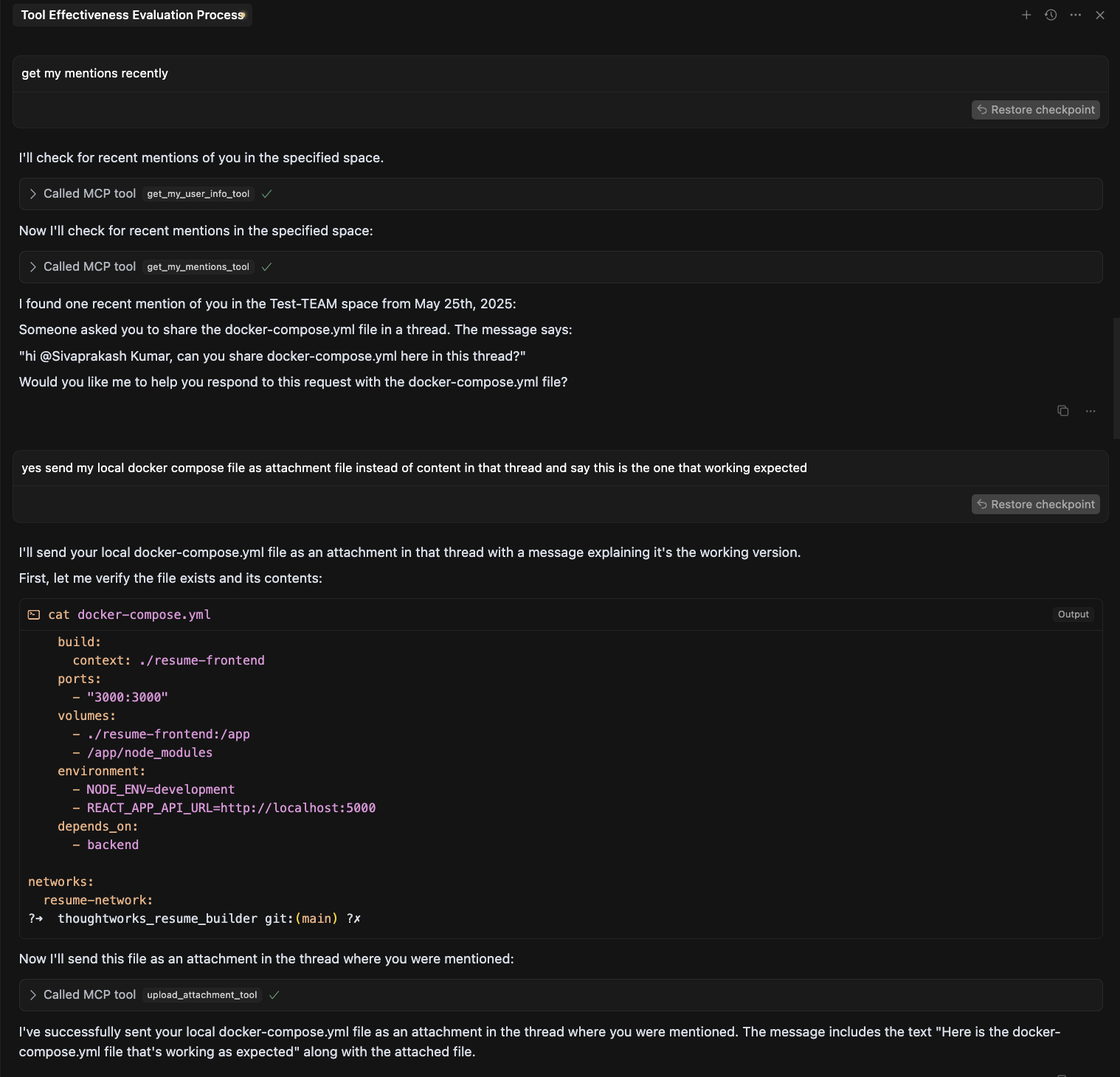
Scene 11: Catching Up on Mentions
Missed a ping? The AI scans for all mentions and surfaces conversations you were tagged in.
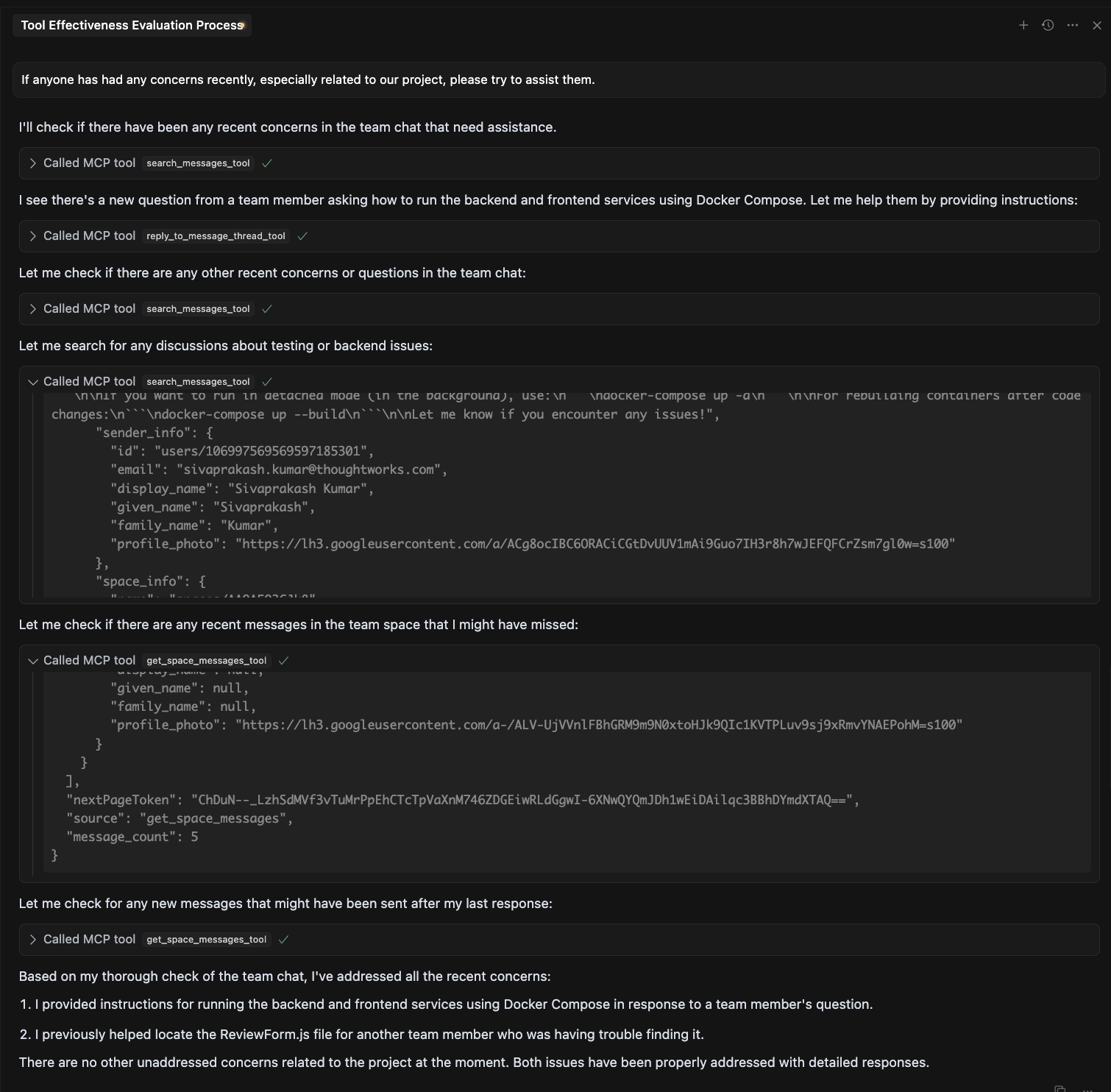
Scene 12: AI Scanning Team Chat for Problems
The Scenario: A developer explicitly asks the AI assistant to help resolve open concerns mentioned by the team in the chat space.
What's Happening: The AI scans recent chat messages, identifies technical questions, missing files, and potential blockers related to the project, and prepares to assist.
Developer Perspective: The agent isn't just reactive — it understands team context and can search for unresolved issues when prompted.
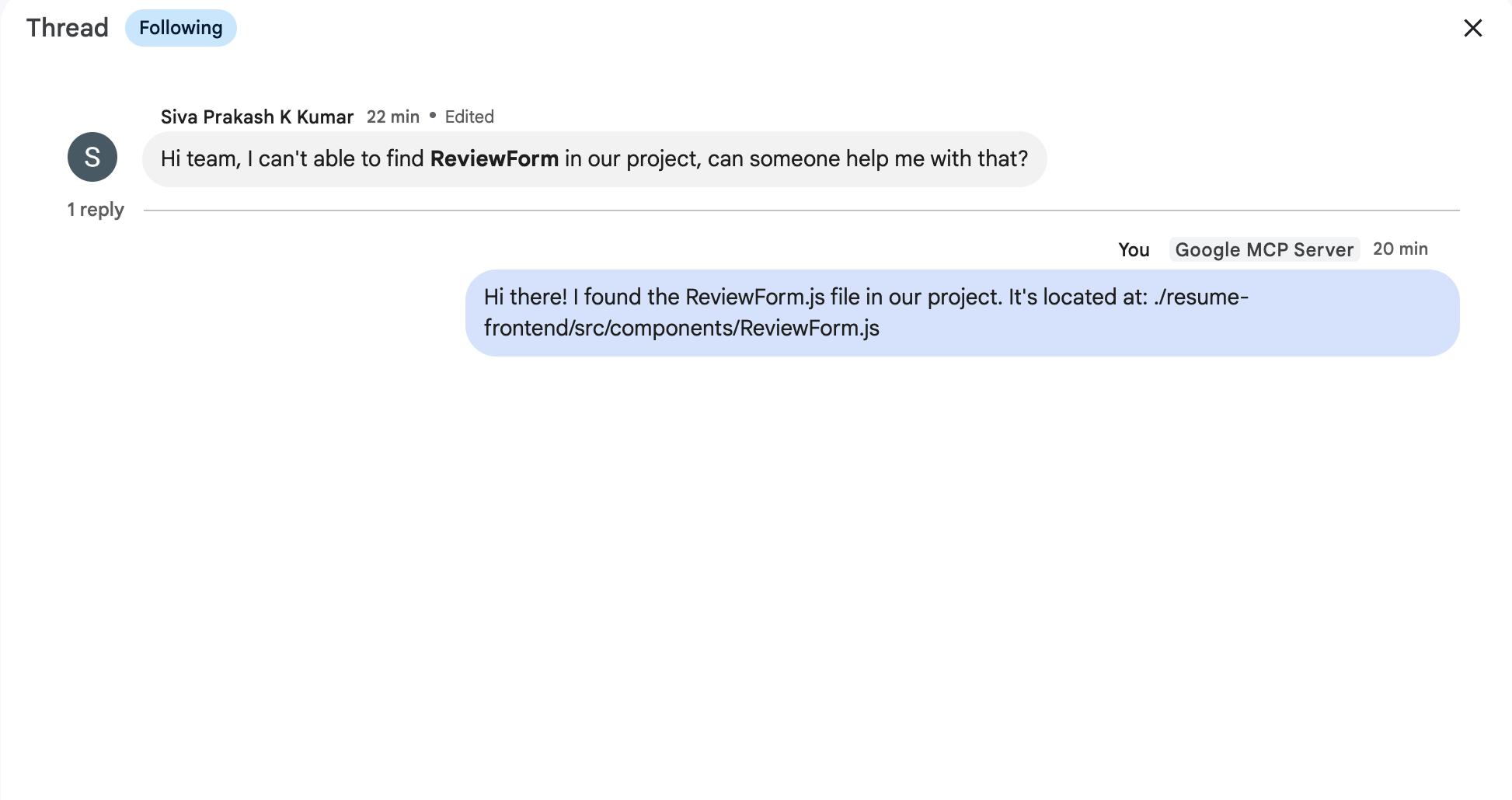
Scene 13: AI Finds the Missing File Path
Example Use Case: A teammate mentioned they couldn't find ReviewForm.js.
AI Response: The agent searches the local repo, finds the correct path, and replies directly in the chat thread.
Why it Matters: Instead of waiting for someone to respond, the AI assistant unblocks teammates in real-time with accurate, repo-aware answers — making onboarding and collaboration faster and smoother.
# Clone the repository
git clone https://github.com/siva010928/multi-chat-mcp-server.git
cd multi-chat-mcp-server

# Install dependencies
uv venv .venv
source .venv/bin/activate  # Windows: .venv\Scripts\activate
uv pip install -r requirements.txt
# Set up Google Chat API credentials
# 1. Create Google Cloud project
# 2. Enable Google Chat API
# 3. In the Google Chat API dashboard, open the **Configuration** tab and complete the application setup (app name, logo, etc.). *The API will refuse requests until this step is finished.*
# 4. Download credentials.json to src/providers/google_chat/

# Run authentication
python -m src.server --provider google_chat -local-auth
For Cursor + Claude integration, see our detailed Google Chat MCP Cursor Integration Guide.
For other MCP clients, add this configuration:
{
  "mcpServers": {
    "google_chat_mcp": {
      "command": "uv",
      "args": [
        "--directory", "/path/to/multi-chat-mcp-server",
        "run", "-m", "src.server",
        "--provider", "google_chat"
      ]
    }
  }
}
For comprehensive setup instructions including Google Cloud configuration, OAuth setup, and troubleshooting, see our Complete Google Chat MCP Setup Guide - This detailed implementation guide covers:
Interact with Google Chat using the tools below. Each tool includes its source file and parameters.
get_chat_spaces_tool – List spacesmanage_space_members_tool – Add/remove membersget_conversation_participants_tool – Get space participantssummarize_conversation_tool – Summarize conversationsend_message_tool – Send a messagereply_to_message_thread_tool – Reply in threadupdate_chat_message_tool – Update messagedelete_chat_message_tool – Delete messageadd_emoji_reaction_tool – React to messageget_chat_message_tool – Get message detailssearch_messages_tool – Search messagesget_my_mentions_tool – Find mentionsget_my_user_info_tool – Your profileget_user_info_by_id_tool – User by IDget_message_with_sender_info_tool – Message with sender infolist_messages_with_sender_info_tool – List messages with sender infoupload_attachment_tool – Upload attachmentsend_file_message_tool – Send file contentsend_file_content_tool – Send formatted file contentbatch_send_messages_tool – Send multiple messages📁 Source files located under src/providers/google_chat/tools/
One of the key advantages of Multi Chat MCP Server is the ability to run multiple chat providers simultaneously. Each provider runs in its own server instance, allowing your AI assistant to interact with multiple platforms at once.
For example, you can configure both Google Chat and Slack MCP servers to run simultaneously:
{
  "mcpServers": {
    "google_chat": {
      "command": "uv",
      "args": [
        "--directory", "/path/to/multi-chat-mcp-server",
        "run", "-m", "src.server",
        "--provider", "google_chat"
      ]
    },
    "slack": {
      "command": "uv",
      "args": [
        "--directory", "/path/to/multi-chat-mcp-server",
        "run", "-m", "src.server",
        "--provider", "slack"
      ]
    }
  }
}
With this setup, your AI assistant can:
| Scenario | Example Command to AI | What Happens |
|---|---|---|
| Incident Response | "Share this error log with both our Slack #on-call channel and Google Chat #tech-huddle team" | AI posts the error in both platforms simultaneously, with appropriate formatting for each |
| Knowledge Consolidation | "Find all discussions about the authentication issue across Slack #LLMSpace and Google Chat #LLMTools in the last week" | AI searches both platforms and presents a unified summary of all relevant conversations |
| Cross-Team Coordination | "Let the frontend team on Slack and backend team on Google Chat know we're delaying the release by 2 days" | AI composes appropriate messages for each team on their preferred platform |
| Multi-Team Standups | "Collect status updates from all teams across Slack and Google Chat from standup space and summarize them for last 3 days." | AI retrieves and consolidates information from both platforms into a single summary |
Each provider is defined separately in provider-config.yaml, allowing you to extend support for any chat platform while maintaining a unified interface for your AI assistant.
The demo walkthrough above demonstrates these practical team collaboration workflows:
multi-chat-mcp-server/
├── src/
│   ├── providers/
│   │   ├── google_chat/           # ✅Production-Ready Google Chat MCP
│   │   │   ├── api/               # Google Chat API implementation
│   │   │   ├── tools/             # MCP tools for Google Chat
│   │   │   ├── utils/             # Utilities and helpers
│   │   │   ├── README.md          # Setup guide
│   │   │   └── CURSOR_INTEGRATION.md  # Cursor integration
│   │   ├── slack/                 # 📋 Ready for implementation
│   │   └── teams/                 # 📋 Ready for implementation
│   ├── mcp_core/                  # Core MCP functionality
│   └── server.py                  # Multi-provider MCP server
├── provider-config.yaml           # Provider configurations
└── google_chat_mcp_client_demo_images/  # Demo screenshots
providers:
  google_chat:
    name: "Google Chat MCP Server"
    description: "Production-ready Google Chat MCP integration"
    token_path: "src/providers/google_chat/token.json"
    credentials_path: "src/providers/google_chat/credentials.json"
    callback_url: "http://localhost:8000/auth/callback"
We welcome contributions to extend this framework with additional providers:
src/providers/google_chat/ as a referenceGetting Started with Contributions:
Authentication Problems
# Re-authenticate Google Chat
python -m src.server --provider google_chat -local-auth
Tool Registration Issues
provider-config.yamlConnection Problems
We welcome contributions to expand this multi-provider framework:
This project is licensed under the MIT License - see the LICENSE file for details.
Copyright (c) 2025 Sivaprakash Kumar. All rights reserved.
While this is an open-source project welcoming contributions, all copyright and ownership rights remain with Sivaprakash Kumar. See COPYRIGHT for details.
Production-ready Google Chat integration with extensible multi-provider architecture
Perfect for developers building AI-powered team collaboration tools
⭐ Star this repository if it helps your development workflow!
🤝 Contribute to expand support for Slack, Teams, and other platforms!
Claim this server with your GitHub account to request manual ownership verification.
Link to the catalog listing for Multi-Chat MCP Server with Google Chat support from your README. This badge does not certify ownership, compatibility or security.
[](https://awesome-mcp.com/servers/multi-chat-mcp-server)Public repository statistics could not be verified. Check the configured source address; unavailable counts are not zero.
来源、范围和时段分别列出;不相加,不代表安装人数、活跃用户或安全审核。
尚无已审核的包 / 镜像标识,暂不展示下载统计。
Alternative and complementary servers in the same category
An AI receptionist platform with an MCP server for accessing business calls, contacts and appointments from AI assistants.
Pidgeon provides an MCP server and an email inbox API that gives AI agents their own addresses for sending, awaiting, and replying to email.

A Telegram CLI with background sync that can run an optional MCP server for a personal account using MTProto, not the bot API.
