
Store and retrieve entities, relations and observations in a persistent local knowledge graph.
create_entitiescreate_relationsadd_observations+6 more
92K
AI & Multi-Agent
An MCP server that connects AI assistants to NetLogo so they can create, run, and analyze agent-based simulation models through natural conversation.
NetLogo MCP server for AI-driven agent-based modeling is cataloged as an MCP server attributed to razee4315. An MCP server that connects AI assistants to NetLogo so they can create, run, and analyze agent-based simulation models through natural conversation. It is categorized under ai agents-models. See the capability inspector for recorded interfaces and their independent review status; consult upstream documentation for the current interface.
Installation configuration is not reviewed. No executable setup is offered for this entry; inspect the source repository before proceeding.
Catalog license label: MIT License. Check the source repository's current license and terms before using, modifying or distributing this software.
能力定义尚未审核。未核验的采集内容不会作为可信接口展示。
暂无可展示的已审核记录。这不表示上游不支持此能力。
暂无可展示的已审核记录。这不表示上游不支持此能力。
暂无可展示的已审核记录。这不表示上游不支持此能力。
Email delivery is not connected. This page does not collect email addresses or create subscriptions.
Browse the registry for current listings instead.
Reviews for NetLogo MCP server for AI-driven agent-based modeling are not available yet
Review publishing and storage are not connected. This page does not collect or publish ratings or comments, including after sign-in.
README.md · 14d9464a6df7 · 采集于 2026-11-13 11:37:44 UTC
保留上游原文,不做 AI 改写。为安全起见过滤脚本、表单和不安全链接。
当前显示最后一次成功采集的文档快照,请以来源页面为准。



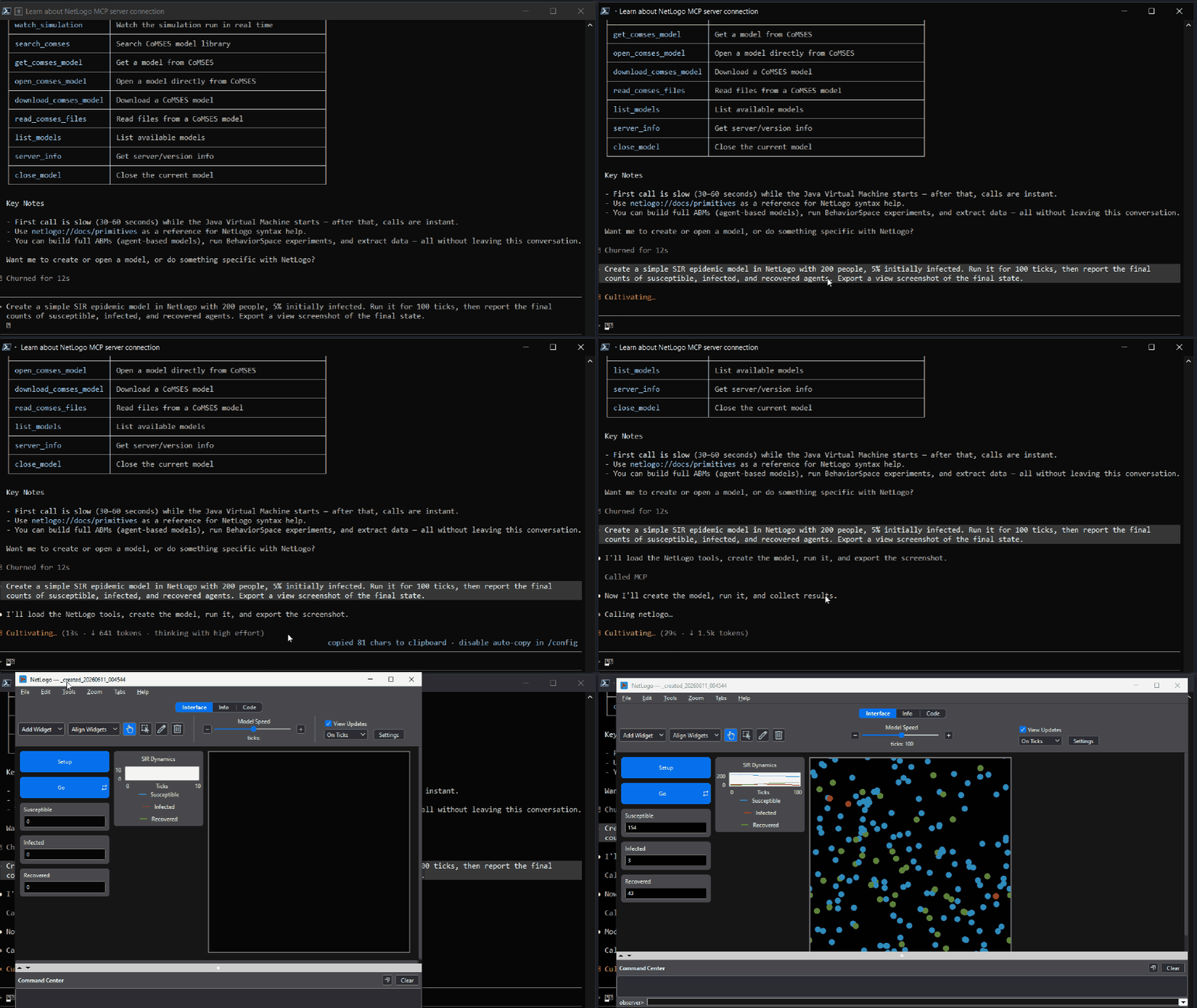
The first MCP (Model Context Protocol) server for NetLogo — enabling AI assistants to create, run, and analyze agent-based models through natural conversation.
Works with: Claude Code, Claude Desktop, Cursor, Windsurf, VS Code (Copilot), Cline, Continue, Roo Code, Zed, OpenCode, Codex — any tool that supports MCP.
As an AI student taking an Agent-Based Modeling course, I searched for an MCP server to control NetLogo — nothing existed. So I built one.
Instead of manually writing NetLogo code, clicking buttons, and tweaking sliders, you tell your AI assistant what you want in plain English:
"Create a predator-prey model with 100 sheep and 20 wolves. Run it for 500 ticks and show me the population dynamics."
The AI writes the code, runs the simulation, and shows you the results — all through conversation.
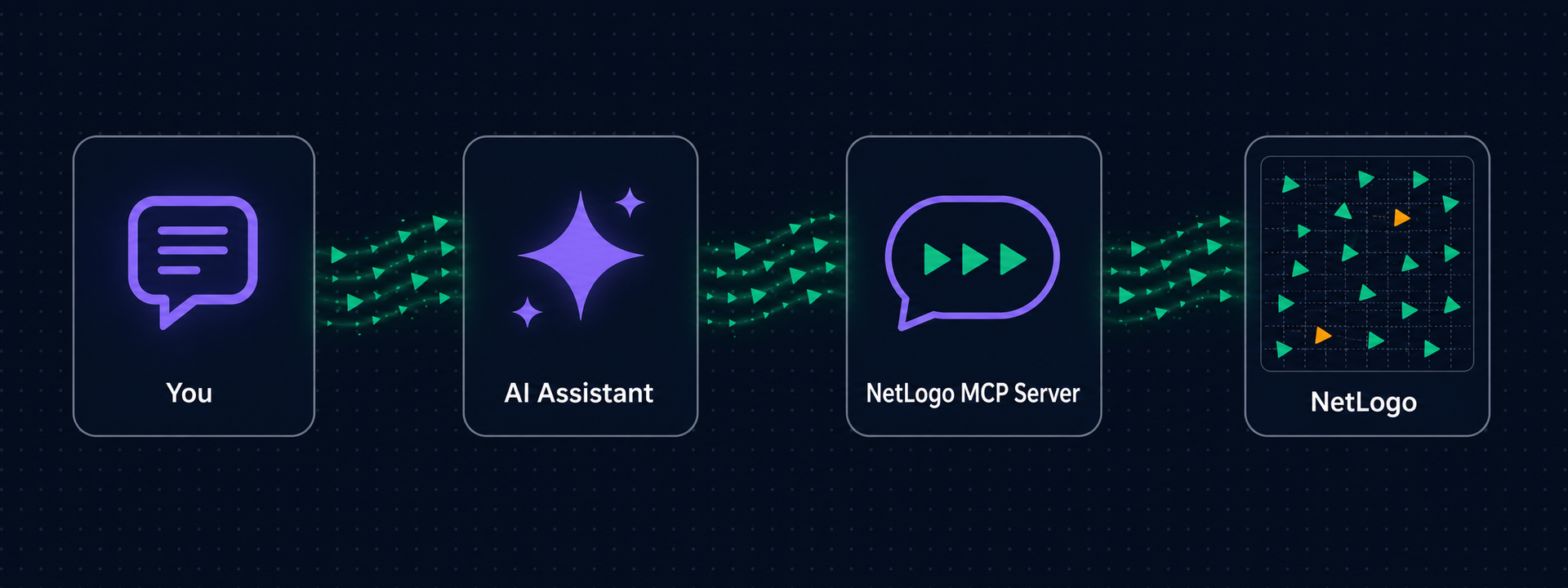
By default a real NetLogo window opens (on first use) so you can watch your simulations run live. Headless mode is available for CI or servers.
See docs/TOOLS.md for the full reference of all 25 tools, widget schema, and prompts.
| Requirement | Install via terminal? | How |
|---|---|---|
| Python 3.10+ | Yes | Windows: winget install Python.Python.3.12 · macOS: brew install python@3.12 · Linux: sudo apt install python3.12 |
| Java JDK 11+ | Yes | Windows: winget install EclipseAdoptium.Temurin.21.JDK · macOS: brew install --cask temurin · Linux: sudo apt install openjdk-21-jdk |
| NetLogo 7.0+ | No — manual | Download from ccl.northwestern.edu/netlogo |
Only NetLogo requires manual download. Everything else can be installed via terminal, and the Zero-Config Setup prompt below handles those automatically.
If you're using an AI coding tool, copy the prompt below into your chat. The AI will detect your OS, find your NetLogo and Java installations, clone the repo, install dependencies, configure your MCP client, and tell you how to use it.
Please set up the NetLogo MCP server for me end-to-end. Follow these steps carefully:

1. **Detect my environment**
   - Identify my OS (Windows / macOS / Linux).
   - Check Python version (need 3.10+). If missing, tell me to install it first and stop.
   - Check for Java JDK 11+ (not JRE). Look in common locations (JAVA_HOME env var, standard install dirs). If missing, tell me to install Adoptium Temurin JDK 11+ and stop.
   - Check for NetLogo 7.0+. Look in common locations:
     - Windows: `C:/Program Files/NetLogo*`
     - macOS: `/Applications/NetLogo*`
     - Linux: `/opt/netlogo*`, `~/netlogo*`
     If NetLogo isn't installed, tell me to download it from https://ccl.northwestern.edu/netlogo/download.shtml and stop.

2. **Install**
   - Run: `pip install netlogo-mcp`
   - Verify the `netlogo-mcp` command is now available on my PATH.

3. **Identify my MCP client**
   - Figure out which AI tool I'm using (Claude Code, Cursor, Windsurf, Cline, Continue, Roo Code, Zed, OpenCode, VS Code Copilot, Codex, or Claude Desktop).
   - If you're not sure, ask me.

4. **Configure the MCP client**
   - Locate (or create) the correct config file for my client (see
     https://github.com/Razee4315/NetLogo-MCP/blob/main/docs/CLIENTS.md
     for exact paths and schemas per client).
   - Add a `netlogo` server entry with:
     - `command`: `netlogo-mcp`
     - `env.NETLOGO_HOME`: the NetLogo path you detected
     - `env.JAVA_HOME`: the JDK path you detected
   - Use the exact JSON schema for my specific client (e.g. `"type": "stdio"` for Cursor, `"servers"` key for VS Code).
   - Preserve any existing config entries — merge, don't overwrite.
   - IMPORTANT: configure it for THIS project only (project-scope config file), not globally, unless I say otherwise — a global entry loads the server in every session.

5. **Tell me what to do next**
   - Tell me to fully restart my AI tool for the new MCP server to load.
   - Tell me the NetLogo window opens on the FIRST model tool call, and that call takes 30–60 seconds while the Java Virtual Machine starts. Tell me NOT to click stop during this wait.
   - Give me this exact test prompt to try after restart:

     > "Create a simple predator-prey model with wolves and sheep on a green landscape. Run setup, then run 100 ticks while tracking wolf and sheep counts. Export the view before and after so I can see how the world evolved."

   - Tell me where models and exports are saved (by default, the current working directory's `models/` and `exports/` folders) and that I can browse them with the `list_models` tool.

Do not skip any verification step. If something fails, stop and tell me exactly what failed and how to fix it.
pip install netlogo-mcp
Then add the server to your MCP client. For Claude Code, add to your project's .mcp.json:
{
  "mcpServers": {
    "netlogo": {
      "command": "netlogo-mcp",
      "args": [],
      "env": {
        "NETLOGO_HOME": "C:/Program Files/NetLogo 7.0.3",
        "JAVA_HOME": "C:/Program Files/Eclipse Adoptium/jdk-25.0.2.10-hotspot"
      }
    }
  }
}
Restart Claude Code and verify with /mcp.
Tip: prefer project-scope config (
.mcp.jsonin one project) over global config — a global entry loads the server in every session of every project.
Using Cursor, Windsurf, VS Code, Cline, Continue, Roo Code, Zed, OpenCode, Codex, or Claude Desktop? See docs/CLIENTS.md for exact config for all 11 clients. All configuration options (GUI/headless mode, directories, limits) are in docs/CONFIGURATION.md.
Developing or contributing? Clone the repo and install editable instead:
git clone https://github.com/Razee4315/NetLogo-MCP.git
cd NetLogo-MCP
pip install -e ".[dev]"
The image bakes in NetLogo (headless) with its bundled JRE — no host install needed:
docker build -t netlogo-mcp .
docker run -i --rm netlogo-mcp
MCP client config:
{
  "mcpServers": {
    "netlogo": {
      "command": "docker",
      "args": ["run", "-i", "--rm", "netlogo-mcp"]
    }
  }
}
Docker runs headless only (no GUI mode). Add -v ./exports:/data/exports to keep exported views and worlds on the host.
Once connected, try these prompts in any MCP client:
> Create a simple NetLogo model with 50 turtles doing a random walk.
  Run setup, simulate 100 ticks, and export the view.

> Open the Wolf Sheep Predation model and run a parameter sweep
  on initial-number-wolves from 10 to 100.

> Build a disease spread model with sliders for population size and
  infection chance.
The first model tool call takes 30-60 seconds while the JVM starts — the NetLogo window appears when it's ready. Don't click stop. Every call after that is instant.
| Problem | Solution |
|---|---|
NETLOGO_HOME is not set | Set the environment variable to your NetLogo install directory |
JAVA_HOME is not set | Set it to your JDK directory (not JRE) |
| JVM crashes on startup | Make sure JAVA_HOME points to JDK 11+, not an older version |
No model is loaded | Call open_model or create_model before using other tools |
| First model call hangs for 30-60s | Normal — JVM is warming up. Don't click stop. |
| NetLogo window opens when my AI client starts | You have NETLOGO_EAGER_START=true set, or an old version — by default the window only opens on first tool use |
| Server won't connect | Run netlogo-mcp manually in terminal to see error output |
If you use NetLogo MCP in research or teaching, please cite it — click "Cite this repository" in the GitHub sidebar, or see CITATION.cff.
Saqlain Abbas Email: saqlainrazee@gmail.com GitHub: @Razee4315 LinkedIn: @saqlainrazee
This project is licensed under the MIT License — free to use, modify, and distribute for any purpose.
Claim this server with your GitHub account to request manual ownership verification.
Link to the catalog listing for NetLogo MCP server for AI-driven agent-based modeling from your README. This badge does not certify ownership, compatibility or security.
[](https://awesome-mcp.com/servers/netlogo-mcp)Public repository statistics could not be verified. Check the configured source address; unavailable counts are not zero.
来源、范围和时段分别列出;不相加,不代表安装人数、活跃用户或安全审核。
尚无已审核的包 / 镜像标识,暂不展示下载统计。
Alternative and complementary servers in the same category
Store and retrieve entities, relations and observations in a persistent local knowledge graph.
Organize problem solving into revisable, branching thought steps through an MCP tool.

Query-aware context compression with an MCP plugin for coding agents, plus Python and HTTP interfaces for reducing the context sent to a language model.