
A directory listing describing a cancellation-letter and mailing-address service. The configured public GitHub repository returned 404 during source verification.
Repository stats unavailable
Developer Tools
A serial and SSH terminal for embedded developers whose built-in MCP server lets coding agents read and act on terminal tabs with user approval.
NeuroTerm with built-in Terminal Use MCP server is cataloged as an MCP server attributed to ecro. A serial and SSH terminal for embedded developers whose built-in MCP server lets coding agents read and act on terminal tabs with user approval. It is categorized under developer tools. See the capability inspector for recorded interfaces and their independent review status; consult upstream documentation for the current interface.
Installation configuration is not reviewed. No executable setup is offered for this entry; inspect the source repository before proceeding.
Catalog license label: Not specified. Check the source repository's current license and terms before using, modifying or distributing this software.
能力定义尚未审核。未核验的采集内容不会作为可信接口展示。
暂无可展示的已审核记录。这不表示上游不支持此能力。
暂无可展示的已审核记录。这不表示上游不支持此能力。
暂无可展示的已审核记录。这不表示上游不支持此能力。
Email delivery is not connected. This page does not collect email addresses or create subscriptions.
Browse the registry for current listings instead.
Reviews for NeuroTerm with built-in Terminal Use MCP server are not available yet
Review publishing and storage are not connected. This page does not collect or publish ratings or comments, including after sign-in.
Reading needs no approval, but running a command, typing or resetting the board shows an Allow or Deny request in the tab.
The agent can work in serial, SSH, WSL, Local and TCP tabs.
README.md · 028566c0a5b1 · 采集于 2026-11-13 14:15:04 UTC
保留上游原文,不做 AI 改写。为安全起见过滤脚本、表单和不安全链接。
当前显示最后一次成功采集的文档快照,请以来源页面为准。
The serial and SSH terminal your coding agent can use.
NeuroTerm is a free serial and SSH terminal for embedded developers on Windows and Linux. It opens serial (UART), SSH with an SFTP sidebar, WSL, local shell and TCP / RTT tabs, up to 20 sessions at once. Through Terminal Use, its built-in MCP server, Claude Code and Codex can read your serial and SSH consoles and type only when you allow.
Website · Download · Docs · Demo video · Report an issue
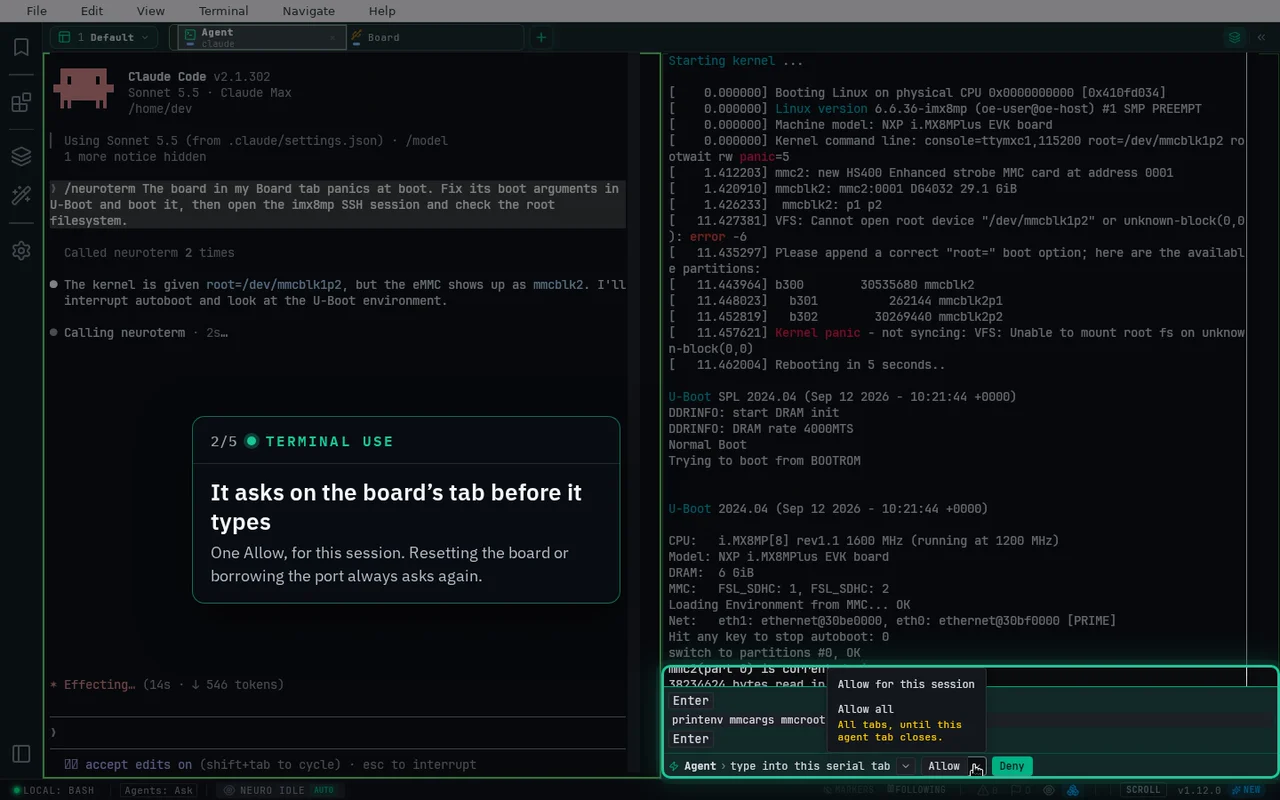
A coding agent that opens /dev/ttyUSB0 itself tends to hang: a serial port never closes, so a tool call that reads it never returns (see anthropics/claude-code#6237). In NeuroTerm the port stays open in a tab you can watch. The agent reads the boot log there, and before it runs a command, types or resets the board, the tab asks you. More: Claude Code and Codex on your serial port.
NeuroTerm registers its MCP server, named neuroterm, with Claude Code and Codex for you.
claude or codex in a NeuroTerm Local or WSL tab. On Windows, start Codex from a WSL tab.The agent can then work in your serial, SSH, WSL, Local and TCP tabs. Reading needs no approval. Running a command, typing or resetting the board shows a request in that tab first (Allow or Deny, 45 s), unless you allowed that agent for the session or turned on Allow automatically.
| Tool | What it does |
|---|---|
tabs | Lists your tabs and saved profiles; opens, splits, focuses or closes a tab (opening, splitting and closing need your Allow). |
terminal_run | Runs commands in a tab and returns each one's output and exit code (with your Allow). |
terminal_observe | Reads a tab's new output as plain text, with the errors, warnings and boot stages NeuroTerm marked. |
terminal_act | Types text and keys for REPLs, U-Boot, login prompts and full-screen programs (with your Allow). |
serial_port | Lists serial ports with their USB identity; borrows a serial tab's port for flashing, then gives it back (with your Allow). |
export_serial_log | Writes a serial tab's output (up to 1 MiB) to a file the agent can search. |
reset_serial_device | Resets the board through RTS, DTR or a break (with your Allow). |
plugin_* | Build, check, run and capture NeuroTerm plugins: plugin_tools, plugin_guide, plugin_scaffold, plugin_validate, plugin_apply, plugin_remove, plugin_logs, plugin_fork, plugin_capture. |
Full reference: Terminal Use (MCP) docs.
/dev/ttyUSB0 as /dev/ttyUSB1), the same tab reconnects.Windows 10/11 (.exe, .msi) and Linux (.deb, .rpm, .AppImage): see the latest release or neuroterm.dev/download. macOS is not supported yet.
These URLs always point at the latest release:
# Ubuntu / Debian
curl -L -o neuroterm.deb https://neuroterm.dev/dl/deb && sudo apt install ./neuroterm.deb

# Fedora / RHEL
curl -L -o neuroterm.rpm https://neuroterm.dev/dl/rpm && sudo dnf install ./neuroterm.rpm
# Windows (PowerShell)
Invoke-WebRequest https://neuroterm.dev/dl/exe -OutFile NeuroTerm-setup.exe; .\NeuroTerm-setup.exe
Also https://neuroterm.dev/dl/msi and https://neuroterm.dev/dl/appimage.
NeuroTerm is proprietary software, free for individuals at home or at work, with no usage limits. A company with more than 10 employees that rolls it out to its staff needs Commercial seats. See pricing and terms. This repository holds the release binaries; the source code is not published here. Report bugs and request features at Ecro/neuroterm-issues.
Claim this server with your GitHub account to request manual ownership verification.
Link to the catalog listing for NeuroTerm with built-in Terminal Use MCP server from your README. This badge does not certify ownership, compatibility or security.
[](https://awesome-mcp.com/servers/neuroterm-release)Public repository statistics could not be verified. Check the configured source address; unavailable counts are not zero.
来源、范围和时段分别列出;不相加,不代表安装人数、活跃用户或安全审核。
尚无已审核的包 / 镜像标识,暂不展示下载统计。
Alternative and complementary servers in the same category
A directory listing describing a cancellation-letter and mailing-address service. The configured public GitHub repository returned 404 during source verification.

A hosted MCP service for browsing and searching through Singapore mobile-network proxies.

A directory listing describing a Markdown-to-PDF service. The configured public GitHub repository returned 404 during source verification.