
A directory listing describing a cancellation-letter and mailing-address service. The configured public GitHub repository returned 404 during source verification.
Repository stats unavailable
Developer Tools
An MCP server that executes JavaScript in ephemeral Docker containers with on-the-fly npm dependency installation.
Node.js Sandbox MCP Server is cataloged as an MCP server attributed to alfonsograziano. An MCP server that executes JavaScript in ephemeral Docker containers with on-the-fly npm dependency installation. It is categorized under developer tools. See the capability inspector for recorded interfaces and their independent review status; consult upstream documentation for the current interface.
Installation configuration is not reviewed. No executable setup is offered for this entry; inspect the source repository before proceeding.
Catalog license label: MIT License. Check the source repository's current license and terms before using, modifying or distributing this software.
能力定义尚未审核。未核验的采集内容不会作为可信接口展示。
暂无可展示的已审核记录。这不表示上游不支持此能力。
暂无可展示的已审核记录。这不表示上游不支持此能力。
暂无可展示的已审核记录。这不表示上游不支持此能力。
Email delivery is not connected. This page does not collect email addresses or create subscriptions.
Browse the registry for current listings instead.
Reviews for Node.js Sandbox MCP Server are not available yet
Review publishing and storage are not connected. This page does not collect or publish ratings or comments, including after sign-in.
Yes, in the ephemeral tool; files saved in the current directory are returned automatically, with images as image content and other files as resource content.
It runs shell commands inside a running sandbox and returns the combined stdout of each command.
README.md · 60f3e52c239f · 采集于 2026-11-13 09:32:33 UTC
保留上游原文,不做 AI 改写。为安全起见过滤脚本、表单和不安全链接。
当前显示最后一次成功采集的文档快照,请以来源页面为准。
Node.js server implementing the Model Context Protocol (MCP) for running arbitrary JavaScript in ephemeral Docker containers with on‑the‑fly npm dependency installation.
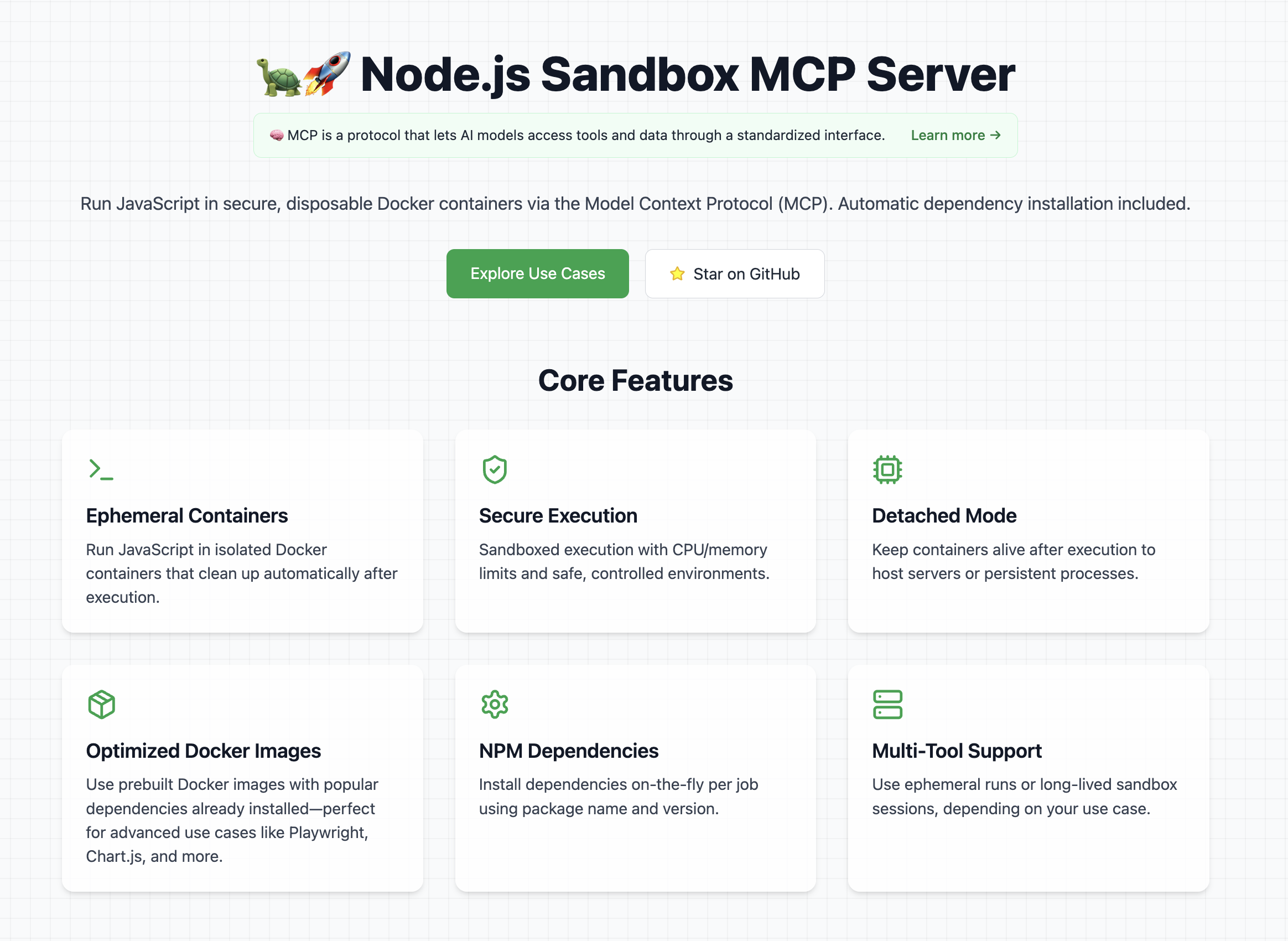
👉 Look at the official website
Note: Containers run with controlled CPU/memory limits.
If you want ideas for cool and powerful ways to use this library, check out the use cases section on the website It contains a curated list of prompts, examples, and creative experiments you can try with the Node.js Sandbox MCP Server.
To use this MCP server, Docker must be installed and running on your machine.
Tip: Pre-pull any Docker images you'll need to avoid delays during first execution.
Example recommended images:
In order to get started with this MCP server, first of all you need to connect it to a client (for example Claude Desktop).
Once it's running, you can test that it's fully working with a couple of test prompts:
Validate that the tool can run:
Create and run a JS script with a console.log("Hello World")
This should run a console.log and in the tool response you should be able to see Hello World.
Validate that you can install dependencies and save files
Create and run a JS script that generates a QR code for the URL `https://nodejs.org/en`, and save it as `qrcode.png` **Tip:** Use the `qrcode` package.
This should create a file in your mounted directory (for example the Desktop) called "qrcode.png"
Add this to your claude_desktop_config.json:
You can follow the Official Guide to install this MCP server
{
  "mcpServers": {
    "js-sandbox": {
      "command": "docker",
      "args": [
        "run",
        "-i",
        "--rm",
        "-v",
        "/var/run/docker.sock:/var/run/docker.sock",
        "-v",
        "$HOME/Desktop/sandbox-output:/root",
        "-e",
        "FILES_DIR=$HOME/Desktop/sandbox-output",
        "-e",
        "SANDBOX_MEMORY_LIMIT=512m", // optional
        "-e",
        "SANDBOX_CPU_LIMIT=0.75", // optional
        "mcp/node-code-sandbox"
      ]
    }
  }
}
or with NPX:
{
  "mcpServers": {
    "node-code-sandbox-mcp": {
      "type": "stdio",
      "command": "npx",
      "args": ["-y", "node-code-sandbox-mcp"],
      "env": {
        "FILES_DIR": "/Users/alfonsograziano/Desktop/node-sandbox",
        "SANDBOX_MEMORY_LIMIT": "512m", // optional
        "SANDBOX_CPU_LIMIT": "0.75" // optional
      }
    }
  }
}
Note: Ensure your working directory points to the built server, and Docker is installed/running.
Run the server in a container (mount Docker socket if needed), and pass through your desired host output directory as an env var:
# Build locally if necessary
# docker build -t mcp/node-code-sandbox .

docker run --rm -it \
  -v /var/run/docker.sock:/var/run/docker.sock \
  -v "$HOME/Desktop/sandbox-output":"/root" \
  -e FILES_DIR="$HOME/Desktop/sandbox-output" \
  -e SANDBOX_MEMORY_LIMIT="512m" \
  -e SANDBOX_CPU_LIMIT="0.5" \
  mcp/node-code-sandbox stdio
This bind-mounts your host folder into the container at the same absolute path and makes FILES_DIR available inside the MCP server.
docker run --rm -it \
  -v /var/run/docker.sock:/var/run/docker.sock \
  alfonsograziano/node-code-sandbox-mcp stdio
Quick install buttons (VS Code & Insiders):
Install js-sandbox-mcp (NPX) Install js-sandbox-mcp (Docker)
Manual configuration: Add to your VS Code settings.json or .vscode/mcp.json:
"mcp": {
    "servers": {
        "js-sandbox": {
            "command": "docker",
            "args": [
                "run",
                "-i",
                "--rm",
                "-v", "/var/run/docker.sock:/var/run/docker.sock",
                "-v", "$HOME/Desktop/sandbox-output:/root", // optional
                "-e", "FILES_DIR=$HOME/Desktop/sandbox-output",  // optional
                "-e", "SANDBOX_MEMORY_LIMIT=512m",
                "-e", "SANDBOX_CPU_LIMIT=1",
                "mcp/node-code-sandbox"
              ]
        }
    }
}
Run a one-off JS script in a brand-new disposable container.
Inputs:
image (string, optional): Docker image to use (default: node:lts-slim).code (string, required): JavaScript source to execute.dependencies (array of { name, version }, optional): NPM packages and versions to install (default: []).Behavior:
index.js and a minimal package.json.image content..txt, .json) are returned as resource content.Tip: To get files back, simply save them during your script execution.
Example Call:
{
  "name": "run_js_ephemeral",
  "arguments": {
    "image": "node:lts-slim",
    "code": "console.log('One-shot run!');",
    "dependencies": [{ "name": "lodash", "version": "^4.17.21" }],
  },
}
Example to save a file:
import fs from 'fs/promises';

await fs.writeFile('hello.txt', 'Hello world!');
console.log('Saved hello.txt');
This will return the console output and the hello.txt file.
Start a fresh sandbox container.
image (string, optional, default: node:lts-slim): Docker image for the sandboxport (number, optional): If set, maps this container port to the hostRun shell commands inside the running sandbox.
container_id (string): ID from sandbox_initializecommands (string[]): Array of shell commands to executeInstall npm dependencies and execute JavaScript code.
Input:
container_id (string): ID from sandbox_initializecode (string): JS source to run (ES modules supported)dependencies (array of { name, version }, optional, default: []): npm package names → semver versionslistenOnPort (number, optional): If set, leaves the process running and exposes this port to the host (Detached Mode)Behavior:
index.js and a minimal package.jsonnpm install --omit=dev --ignore-scripts --no-audit --loglevel=errornode index.js and captures stdout, or leaves process running in background if listenOnPort is setOutput: Script stdout or background execution notice
Terminate and remove the sandbox container.
container_id (string): ID from sandbox_initializeSearch for npm packages by a search term and get their name, description, and a README snippet.
Input:
searchTerm (string, required): The term to search for in npm packages. Should contain all relevant context. Use plus signs (+) to combine related terms (e.g., "react+components" for React component libraries).qualifiers (object, optional): Optional qualifiers to filter the search results:
author (string, optional): Filter by package author namemaintainer (string, optional): Filter by package maintainer namescope (string, optional): Filter by npm scope (e.g., "@vue" for Vue.js packages)keywords (string, optional): Filter by package keywordsnot (string, optional): Exclude packages matching this criteria (e.g., "insecure")is (string, optional): Include only packages matching this criteria (e.g., "unstable")boostExact (string, optional): Boost exact matches for this term in search resultsBehavior:
Output: JSON array containing package details with name, description, and README snippet
sandbox_initialize ➔ run_js ➔ sandbox_stop) are ideal when you want to:
run_js_ephemeral is perfect for:
Choose the workflow that best fits your use-case!
Compile and bundle:
npm install
npm run build
MIT License
Permission is hereby granted, free of charge, to any person obtaining a copy of this software and associated documentation files (the "Software"), to deal in the Software without restriction, including without limitation the rights to use, copy, modify, merge, publish, distribute, sublicense, and/or sell copies of the Software, and to permit persons to whom the Software is furnished to do so, subject to the following conditions:
The above copyright notice and this permission notice shall be included in all copies or substantial portions of the Software.
THE SOFTWARE IS PROVIDED "AS IS", WITHOUT WARRANTY OF ANY KIND, EXPRESS OR IMPLIED, INCLUDING BUT NOT LIMITED TO THE WARRANTIES OF MERCHANTABILITY, FITNESS FOR A PARTICULAR PURPOSE AND NONINFRINGEMENT. IN NO EVENT SHALL THE AUTHORS OR COPYRIGHT HOLDERS BE LIABLE FOR ANY CLAIM, DAMAGES OR OTHER LIABILITY, WHETHER IN AN ACTION OF CONTRACT, TORT OR OTHERWISE, ARISING FROM, OUT OF OR IN CONNECTION WITH THE SOFTWARE OR THE USE OR OTHER DEALINGS IN THE SOFTWARE.
Claim this server with your GitHub account to request manual ownership verification.
Link to the catalog listing for Node.js Sandbox MCP Server from your README. This badge does not certify ownership, compatibility or security.
[](https://awesome-mcp.com/servers/node-code-sandbox-mcp)Public repository statistics could not be verified. Check the configured source address; unavailable counts are not zero.
来源、范围和时段分别列出;不相加,不代表安装人数、活跃用户或安全审核。
尚无已审核的包 / 镜像标识,暂不展示下载统计。
Alternative and complementary servers in the same category
A directory listing describing a cancellation-letter and mailing-address service. The configured public GitHub repository returned 404 during source verification.

A hosted MCP service for browsing and searching through Singapore mobile-network proxies.

A directory listing describing a Markdown-to-PDF service. The configured public GitHub repository returned 404 during source verification.