
Oleafly is a live collaborative LaTeX, Typst and Markdown editor for research that offers a local MCP server and an oleafly mcp stdio command so outside AI clients can use its project tools.
Repository stats unavailable
Productivity & Ops
A CLI plus MCP server that lets external AI agents operate LINE WORKS messaging, calendar, drive, mail, tasks, boards, and contacts.
nworks: MCP server for LINE WORKS is cataloged as an MCP server attributed to yjcho9317. A CLI plus MCP server that lets external AI agents operate LINE WORKS messaging, calendar, drive, mail, tasks, boards, and contacts. It is categorized under productivity work. See the capability inspector for recorded interfaces and their independent review status; consult upstream documentation for the current interface.
Installation configuration is not reviewed. No executable setup is offered for this entry; inspect the source repository before proceeding.
Catalog license label: Apache-2.0. Check the source repository's current license and terms before using, modifying or distributing this software.
能力定义尚未审核。未核验的采集内容不会作为可信接口展示。
暂无可展示的已审核记录。这不表示上游不支持此能力。
暂无可展示的已审核记录。这不表示上游不支持此能力。
暂无可展示的已审核记录。这不表示上游不支持此能力。
Email delivery is not connected. This page does not collect email addresses or create subscriptions.
Browse the registry for current listings instead.
Reviews for nworks: MCP server for LINE WORKS are not available yet
Review publishing and storage are not connected. This page does not collect or publish ratings or comments, including after sign-in.
No, it is unofficial and community-maintained.
No, it is described as complementary to LINE WORKS' own in-product AI rather than a replacement.
README.md · 0dce1663bb50 · 采集于 2026-11-13 12:24:15 UTC
保留上游原文,不做 AI 改写。为安全起见过滤脚本、表单和不安全链接。
当前显示最后一次成功采集的文档快照,请以来源页面为准。




Featured in awesome-mcp-servers
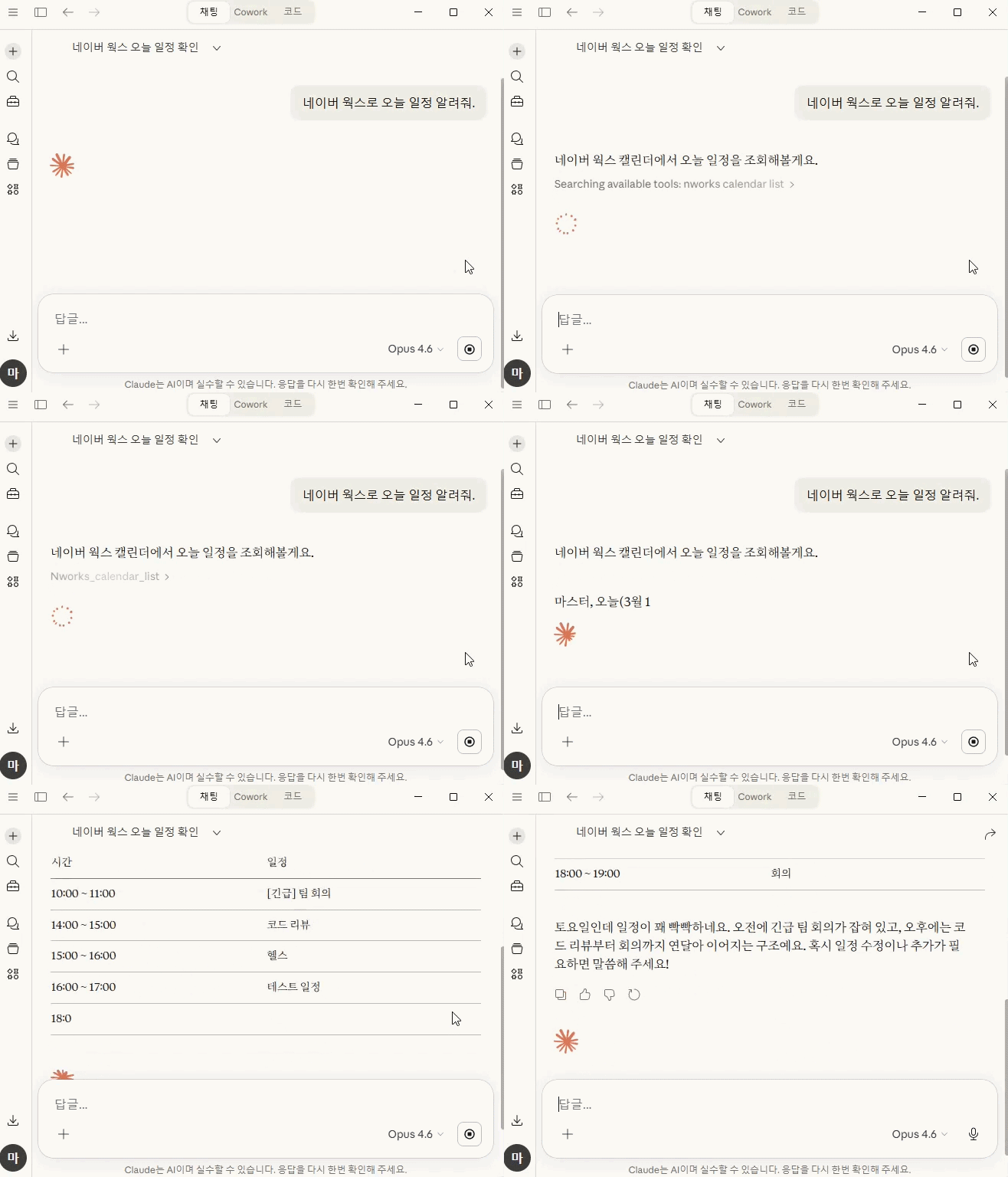
Full-featured MCP server for LINE WORKS (NAVER WORKS). CLI + MCP server — 36 tools covering messages, calendar, drive, mail, tasks, and boards.
nworks lets external AI agents (Claude, Cursor) and your terminal operate LINE WORKS from the outside — complementary to LINE WORKS' own in-product AI (AiStudio, WORKS AI), not a replacement. Unofficial and community-maintained; not affiliated with LINE WORKS / NAVER WORKS.
npm install -g nworks
nworks login --user
nworks calendar list
First time? You first need a Developer Console app (Client ID/Secret), a registered redirect URL, and — for bot messaging — admin approval. See the Onboarding & Admin Setup guide.
User: Show me today's schedule

Claude → nworks_calendar_list
  → 3 events: Standup (10:00), Lunch meeting (12:00), Code review (15:00)

User: Send a deploy complete message to the team channel

Claude → nworks_message_send
  { "channel": "C001", "text": "v1.2.0 deploy complete" }
  → Message sent

User: Check my unread emails and summarize them

Claude → nworks_mail_list (unread)
  → 3 unread emails
Claude → nworks_mail_read (each)
  → "3 unread: 1) Deploy approval from CTO, 2) Meeting invite for Friday, 3) Weekly report reminder"
npx nworks             # Run directly
npm install -g nworks  # Global install
# User OAuth (calendar, drive, mail, tasks, boards)
nworks login --user --scope "calendar calendar.read file file.read mail mail.read task task.read board board.read user.read"

# Bot messaging (Service Account)
nworks login

# Check auth status
nworks whoami

# Logout
nworks logout
nworks login --useronly requires CLIENT_ID + CLIENT_SECRET. Values already set via environment variables or existing config won't be asked again.
Developer Console: To use User OAuth, register
http://localhost:9876/callbackas a Redirect URL in the Developer Console.
Works with Claude Desktop, Cursor, and other MCP-compatible clients.
Login first:
nworks login --user --scope "calendar calendar.read file file.read mail mail.read task task.read board board.read user.read"
Then add to your MCP config (~/.config/claude/claude_desktop_config.json):
{
  "mcpServers": {
    "nworks": {
      "command": "nworks",
      "args": ["mcp"]
    }
  }
}
One login enables all 36 tools. No extra env setup needed.
Without CLI login, an AI agent can call
nworks_setup→nworks_login_userto authenticate via browser directly. Client Secret and Private Key path must be pre-configured via MCP configenvfield or system environment variables.
| Tool | Description | Auth |
|---|---|---|
| Setup / Auth | ||
nworks_setup | Configure API credentials (Client ID, etc.). Client Secret is set via env | — |
nworks_login_user | User OAuth browser login (all scopes included) | — |
nworks_logout | Delete credentials and tokens | — |
nworks_whoami | Check auth status | — |
nworks_doctor | Diagnose connection (auth, tokens, API health) | — |
| Messages | ||
nworks_message_send | Send message to user/channel | Service Account |
nworks_message_members | List channel members | Service Account |
nworks_directory_members | List organization members | Service Account |
| Calendar | ||
nworks_calendar_list | List calendar events | User OAuth (calendar.read) |
nworks_calendar_create | Create calendar event | User OAuth (calendar + calendar.read) |
nworks_calendar_update | Update calendar event | User OAuth (calendar + calendar.read) |
nworks_calendar_delete | Delete calendar event | User OAuth (calendar + calendar.read) |
| Drive | ||
nworks_drive_list | List drive files/folders | User OAuth (file.read) |
nworks_drive_upload | Upload file to drive | User OAuth (file) |
nworks_drive_download | Download file (saves locally if >5MB) | User OAuth (file.read) |
nworks_sharedrive_list | List shared drives | User OAuth (file.read) |
nworks_sharedrive_files | List files/folders in a shared drive | User OAuth (file.read) |
nworks_sharedrive_download | Download a shared drive file (saves locally if >5MB) | User OAuth (file.read) |
nworks_mail_send | Send mail | User OAuth (mail) |
nworks_mail_list | List mailbox | User OAuth (mail.read) |
nworks_mail_read | Read mail detail | User OAuth (mail.read) |
nworks_mail_download_attachment | Download a mail attachment (saves locally if >5MB) | User OAuth (mail.read) |
| Tasks | ||
nworks_task_list | List tasks | User OAuth (task.read) |
nworks_task_create | Create task | User OAuth (task + user.read) |
nworks_task_update | Update/complete task | User OAuth (task + user.read) |
nworks_task_delete | Delete task | User OAuth (task + user.read) |
| Boards | ||
nworks_board_list | List boards | User OAuth (board.read) |
nworks_board_posts | List board posts | User OAuth (board.read) |
nworks_board_read | Read board post detail | User OAuth (board.read) |
nworks_board_create | Create board post | User OAuth (board) |
| Contacts | ||
nworks_contact_list | List contacts | User OAuth (contact.read) |
nworks_contact_get | Get contact detail | User OAuth (contact.read) |
nworks_contact_create | Create contact | User OAuth (contact) |
nworks_contact_update | Update contact | User OAuth (contact) |
nworks_contact_delete | Delete contact | User OAuth (contact) |
nworks_contact_list_tags | List contact tags | User OAuth (contact.read) |
User: Schedule a meeting tomorrow at 2pm and notify the team channel

Claude → nworks_calendar_create
  { "summary": "Meeting", "start": "2026-03-15T14:00:00", "end": "2026-03-15T15:00:00" }
  → Event created

Claude → nworks_message_send
  { "channel": "C001", "text": "Meeting scheduled tomorrow at 14:00" }
  → Message sent

User: Check my unread emails and summarize them

Claude → nworks_mail_list (unread)
  → 3 unread emails
Claude → nworks_mail_read (each)
  → "3 unread: 1) Deploy approval from CTO, 2) Meeting invite for Friday, 3) Weekly report reminder"
All commands support
--jsonfor pipe/script/agent parsing.message send,mail send, anddrive uploadsupport--dry-runfor testing without sending.
# Send text to user
nworks message send --to <userId> --text "Hello"

# Send text to channel
nworks message send --channel <channelId> --text "Announcement"

# Button message
nworks message send --to <userId> --type button --text "PR review request" \
  --actions '[{"type":"message","label":"Approve","postback":"approve"}]'

# List message
nworks message send --to <userId> --type list --text "Today's tasks" \
  --elements '[{"title":"Code review","subtitle":"PR #382"}]'

# List channel members
nworks message members --channel <channelId>
nworks directory members # List organization members
# List today's events
nworks calendar list

# Specify date range
nworks calendar list --from "2026-03-14T00:00:00+09:00" --until "2026-03-14T23:59:59+09:00"

# Create event
nworks calendar create --title "Meeting" --start "2026-03-14T14:00+09:00" --end "2026-03-14T15:00+09:00"

# With location/description
nworks calendar create --title "Lunch" --start "2026-03-14T12:00+09:00" --end "2026-03-14T13:00+09:00" \
  --location "Conference Room" --description "Quarterly review"

# With attendees + notification
nworks calendar create --title "Team meeting" --start "2026-03-14T10:00+09:00" --end "2026-03-14T11:00+09:00" \
  --attendees "user1@example.com,user2@example.com" --notify

# Update event
nworks calendar update --id <eventId> --title "Updated title"

# Delete event
nworks calendar delete --id <eventId>
# List files/folders
nworks drive list

# Upload file
nworks drive upload --file ./report.pdf

# Upload to specific folder
nworks drive upload --file ./report.pdf --folder <folderId>

# Download file
nworks drive download --file-id <fileId>

# Specify output path/name
nworks drive download --file-id <fileId> --out ./downloads --name report.pdf

# List shared drives
nworks drive sharedrive-list

# List files in a shared drive (root)
nworks drive sharedrive-files --sharedrive <sharedriveId>

# List files in a shared drive folder
nworks drive sharedrive-files --sharedrive <sharedriveId> --folder <fileId>

# Download a shared drive file
nworks drive sharedrive-download --sharedrive <sharedriveId> --file-id <fileId>
# Send mail
nworks mail send --to "user@example.com" --subject "Subject" --body "Body"

# With CC/BCC
nworks mail send --to "user@example.com" --cc "cc@example.com" --subject "Subject" --body "Body"

# List inbox
nworks mail list

# Unread only
nworks mail list --unread

# Read mail detail
nworks mail read --id <mailId>

# Download a mail attachment
nworks mail download-attachment --id <mailId> --attachment-id <attachmentId>

# Specify output path/name
nworks mail download-attachment --id <mailId> --attachment-id <attachmentId> --out ./downloads --name invoice.pdf
# List tasks
nworks task list

# Incomplete only
nworks task list --status TODO

# Create task
nworks task create --title "Code review" --body "Review PR #382"

# With due date
nworks task create --title "Deploy" --due 2026-03-20

# Mark as done
nworks task update --id <taskId> --status done

# Delete task
nworks task delete --id <taskId>
# List boards
nworks board list

# List posts
nworks board posts --board <boardId>

# Read post detail
nworks board read --board <boardId> --post <postId>

# Create post
nworks board create --board <boardId> --title "Announcement" --body "Content"

# With notification + disable comments
nworks board create --board <boardId> --title "Notice" --body "Content" --notify --no-comment
# List contacts
nworks contact list

# Filter by tag
nworks contact list --tag <contactTagId>

# Get contact detail
nworks contact get --id <contactId>

# Create contact
nworks contact create --payload '{"contactName":{"lastName":"Kim","firstName":"Chulsoo"},"emails":[{"email":"chulsoo@example.com","primary":true}],"permission":{"accessibleRange":"MEMBER","isCoEditing":false,"accessibleMembers":[{"id":"<yourUserId>","type":"USER"}]}}'

# Update contact
nworks contact update --id <contactId> --payload '{"telephones":[{"type":"CELLPHONE","telephone":"010-1234-5678","primary":true}]}'

# Delete contact
nworks contact delete --id <contactId>

# List contact tags
nworks contact list-tags
contact createrequirescontactNameandpermission;permission.accessibleMembersmust list at least one member (usually yourself). Get your own user ID fromnworks whoami.
# Notify team channel after deployment in GitHub Actions
nworks message send --channel $CHANNEL_ID --text "v${VERSION} deployed"
# Send daily standup reminder to all members
for userId in $(nworks directory members --json | jq -r '.users[].userId'); do
  nworks message send --to "$userId" --text "Standup at 10:00 today"
done
Add the required scopes in the LINE WORKS Developer Console.
| Scope | Purpose | Auth | Required For |
|---|---|---|---|
bot | Bot messaging | Service Account | message send |
bot.read | Bot channel/member read | Service Account | message members |
calendar | Calendar write | User OAuth | calendar create/update/delete (requires calendar.read) |
calendar.read | Calendar read | User OAuth | calendar list, also needed for calendar write |
file | Drive read/write | User OAuth | drive list/upload/download |
file.read | Drive read-only | User OAuth | drive list/download |
mail | Mail read/write | User OAuth | mail send/list/read |
mail.read | Mail read-only | User OAuth | mail list/read |
task | Tasks read/write | User OAuth | task create/update/delete (requires user.read) |
task.read | Tasks read-only | User OAuth | task list |
user.read | User info read | Service Account / User OAuth | directory members, also needed for task write |
board | Boards read/write | User OAuth | board list/posts/read/create |
board.read | Boards read-only | User OAuth | board list/posts/read |
contact | Contacts read/write | User OAuth | contact create/update/delete (requires contact.read) |
contact.read | Contacts read-only | User OAuth | contact list/get/list-tags |
Presets are simpler than listing scopes:
nworks login --user --preset all       # default: full functionality in one login
nworks login --user --preset readonly  # read-only scopes
defaultis an alias ofall. Message sending uses the Service Account (bot), so it works regardless of preset. Re-login never narrows access — newly requested scopes are merged with the existing token, so switching presets only adds capability. For a hand-picked set use--scope "calendar calendar.read".
Set environment variables to use nworks without nworks login (useful for CI/agents).
# Required
NWORKS_CLIENT_ID=
NWORKS_CLIENT_SECRET=

# Bot messaging only (not needed for User OAuth)
NWORKS_SERVICE_ACCOUNT=
NWORKS_PRIVATE_KEY_PATH=
NWORKS_BOT_ID=

# Optional
NWORKS_DOMAIN_ID=
NWORKS_SCOPE=              # default: bot bot.read user.read
NWORKS_VERBOSE=1           # debug logging
Sensitive values (Client Secret, Private Key path) must be set via MCP config env field. Non-sensitive values like Client ID can be configured by the AI agent through the nworks_setup tool.
{
  "mcpServers": {
    "nworks": {
      "command": "npx",
      "args": ["-y", "nworks", "mcp"],
      "env": {
        "NWORKS_CLIENT_SECRET": "<Client Secret>",
        "NWORKS_PRIVATE_KEY_PATH": "<Private Key file absolute path (for Service Account)>"
      }
    }
  }
}
Apache-2.0
Claim this server with your GitHub account to request manual ownership verification.
Link to the catalog listing for nworks: MCP server for LINE WORKS from your README. This badge does not certify ownership, compatibility or security.
[](https://awesome-mcp.com/servers/nworks)Public repository statistics could not be verified. Check the configured source address; unavailable counts are not zero.
来源、范围和时段分别列出;不相加,不代表安装人数、活跃用户或安全审核。
尚无已审核的包 / 镜像标识,暂不展示下载统计。
Alternative and complementary servers in the same category
Oleafly is a live collaborative LaTeX, Typst and Markdown editor for research that offers a local MCP server and an oleafly mcp stdio command so outside AI clients can use its project tools.
Buddy is an Android app that offers its phone tools through a local MCP server to Claude Code, Codex, OpenCode, Antigravity, and Grok sessions.

Tuqui is a hosted MCP server that connects Odoo with Claude and ChatGPT so users can ask about sales, stock, customers and overdue invoices in plain language.
