
Oleafly is a live collaborative LaTeX, Typst and Markdown editor for research that offers a local MCP server and an oleafly mcp stdio command so outside AI clients can use its project tools.
Repository stats unavailable
Productivity & Ops
An MCP server that connects AI assistants to Odoo ERP, enabling natural language search, creation, update, and management of business records.
odoo-mcp-pro is cataloged as an MCP server attributed to pantalytics. An MCP server that connects AI assistants to Odoo ERP, enabling natural language search, creation, update, and management of business records. It is categorized under productivity work. See the capability inspector for recorded interfaces and their independent review status; consult upstream documentation for the current interface.
Installation configuration is not reviewed. No executable setup is offered for this entry; inspect the source repository before proceeding.
Catalog license label: Not specified. Check the source repository's current license and terms before using, modifying or distributing this software.
能力定义尚未审核。未核验的采集内容不会作为可信接口展示。
暂无可展示的已审核记录。这不表示上游不支持此能力。
暂无可展示的已审核记录。这不表示上游不支持此能力。
暂无可展示的已审核记录。这不表示上游不支持此能力。
Email delivery is not connected. This page does not collect email addresses or create subscriptions.
Browse the registry for current listings instead.
Reviews for odoo-mcp-pro are not available yet
Review publishing and storage are not connected. This page does not collect or publish ratings or comments, including after sign-in.
Odoo 14 through 20 are supported. The server automatically detects whether to use JSON/2 (Odoo 19+) or XML-RPC (14-18).
Your data stays in Odoo; the MCP server is a stateless proxy that does not store or cache business data. API keys are encrypted at rest with AES-128 (Fernet), and Odoo permissions apply.
Only if you self-host Odoo with multiple databases. Odoo.sh and Odoo Online do not need it because the hostname determines the database.
README.md · 698ce0b84acc · 采集于 2026-11-13 11:35:00 UTC
保留上游原文,不做 AI 改写。为安全起见过滤脚本、表单和不安全链接。
当前显示最后一次成功采集的文档快照,请以来源页面为准。


AI connector for Odoo ERP -- talk to your business data using natural language.
Search, create, update, and manage records -- just ask.



Skip the setup. The hosted version is up and running in 5 minutes -- with automatic updates, managed OAuth, and encrypted API keys. Start at pantalytics.com →
Odoo is powerful. AI is powerful. Together they're better.
odoo-mcp-pro is an AI connector for Odoo that uses MCP (Model Context Protocol) -- an open standard that lets AI assistants talk to external systems. It connects your AI assistant to your Odoo ERP, so you can use natural language as an interface to your business data. Not to replace Odoo's UI -- but to give you a second interface that's faster for many tasks. Works with Claude, ChatGPT, Cursor, Windsurf, and any other MCP-compatible AI tool.
"Show me all unpaid invoices over 5,000 EUR from Q4" -- your AI queries your Odoo instance directly and returns the results.
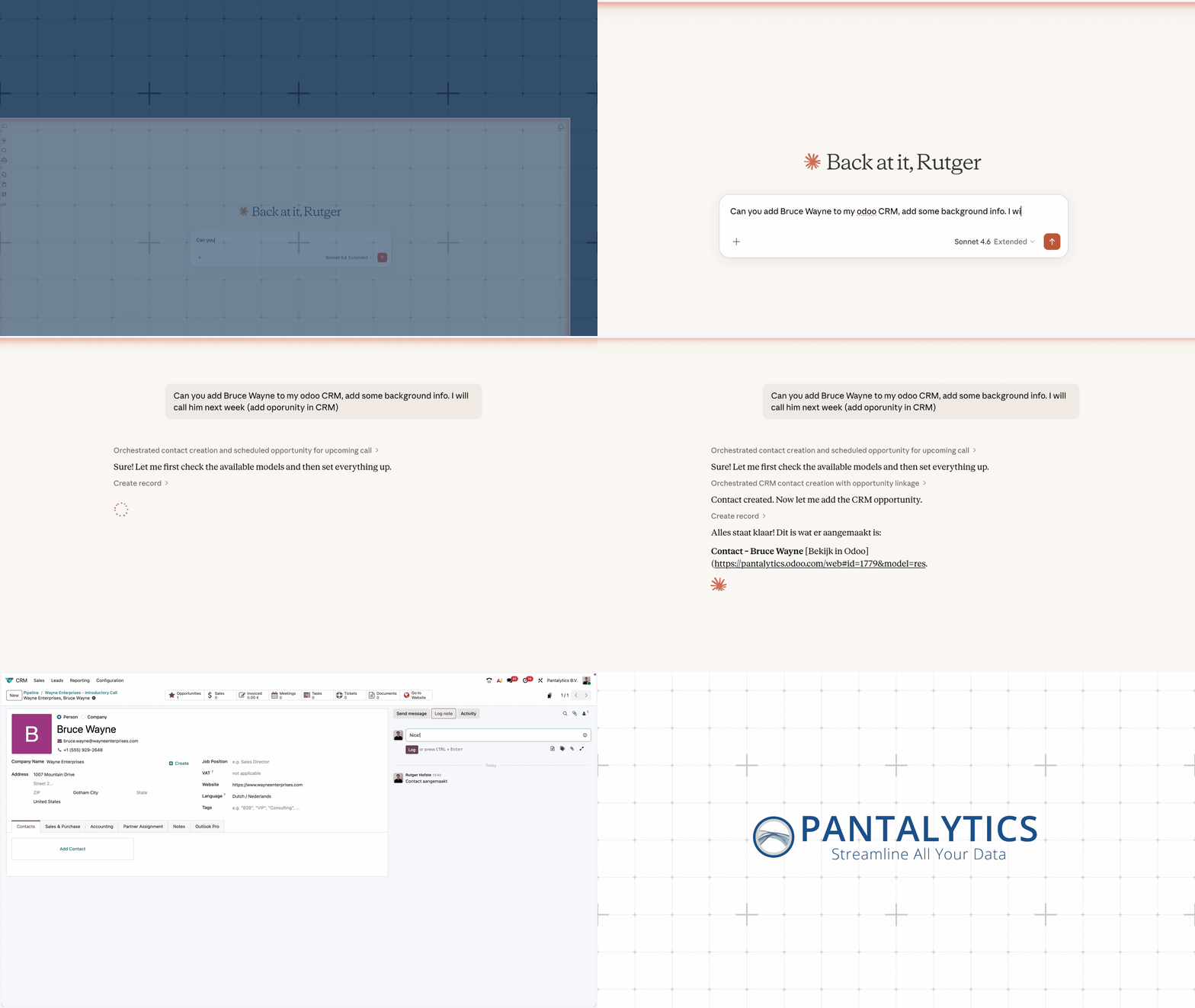
Use the interface that fits the task. Complex configuration? Use the Odoo UI. Quick data lookup, bulk questions, or creating records on the fly? Just ask your AI.
Works with any Odoo model -- sales, invoices, contacts, inventory, CRM, HR, you name it.
Want to try it now? Skip the setup -- the hosted version is connected to your Odoo in under 5 minutes. Start at pantalytics.com →
The fastest and safest way to get started. We run the server for you -- sign up, paste your Odoo URL + API key, done.
Your data stays in Odoo -- the server is a stateless proxy. API keys are encrypted at rest.
Run on your own machine. Single-tenant only: one Odoo instance, configured via env vars. Authentication is your Odoo API key -- no OAuth, no user management, no admin UI.
# Install
pip install "mcp-server-odoo @ git+https://github.com/pantalytics/odoo-mcp-pro.git"

# Run (stdio mode, for Claude Desktop / Claude Code)
ODOO_URL=https://mycompany.odoo.com ODOO_API_KEY=your_key python -m mcp_server_odoo

# Run (HTTP mode, for remote access from one trusted network)
ODOO_URL=https://mycompany.odoo.com ODOO_API_KEY=your_key \
  python -m mcp_server_odoo --transport streamable-http --host 0.0.0.0 --port 8000
HTTP mode has no built-in authentication -- expose it behind a reverse proxy or restrict at the network level.
Or add to your Claude Desktop claude_desktop_config.json:
{
  "mcpServers": {
    "odoo": {
      "command": "python",
      "args": ["-m", "mcp_server_odoo"],
      "env": {
        "ODOO_URL": "https://mycompany.odoo.com",
        "ODOO_API_KEY": "your_api_key_here"
      }
    }
  }
}
Need multi-tenant, per-user connections, OAuth, or an admin UI? That's SaaS territory. The hosted version is faster to set up, auto-updates, and handles security patches for you -- and costs less than the time you'd spend self-hosting. These features live in a separate commercial package that builds on top of this open-core server.
odoo-mcp-pro is an Odoo connector that implements MCP (Model Context Protocol) -- an open standard that lets AI assistants call external tools. It exposes the following tools that your AI can call based on your questions:
| Tool | What it does |
|---|---|
record_search | Search any model with domain filters, sorting, pagination |
record_get | Fetch a specific record by ID with smart field selection |
record_aggregate | Grouped totals computed in Odoo (read_group): sum, avg, count per product, month, etc. |
record_export | Compact CSV export of many records (Odoo's Export feature), with relation paths like order_id/partner_id/city |
model_list | Discover available Odoo models |
resource_template_list | Discover available resource URI templates |
record_create / records_create | Create one or multiple records |
record_update / records_update | Update one or multiple records |
record_delete / records_delete | Delete one or multiple records |
record_import | Idempotent upsert via external IDs (same as Odoo CSV import) |
server_info_get | Server version, connection status |
Supports Odoo 14-20 -- uses the JSON/2 API for Odoo 19+ and XML-RPC for older versions. The right protocol is selected automatically.
Prefer managed security? The hosted version handles patches, OAuth token rotation, and incident monitoring -- your data still stays in Odoo, we just run the proxy for you.
uv venv --python 3.10
source .venv/bin/activate
uv pip install -e ".[dev]"
pytest tests/ -q
ruff check . && ruff format .
See architecture.md for technical details and CLAUDE.md for coding conventions.
Contributions are welcome. Fork the repo, create a feature branch, run pytest tests/ and ruff check ., then open a PR.
Which Odoo versions are supported? Odoo 14-20. The server auto-detects whether to use JSON/2 (Odoo 19+) or XML-RPC (14-18). No configuration needed.
Does it work on my phone? Yes -- the hosted version works on Claude mobile (iOS/Android), Claude.ai in any browser, Claude Desktop, Claude Code, and ChatGPT. Local installs (STDIO) only work on the machine where they're installed.
Is my data safe? Your data stays in Odoo. The MCP server is a stateless proxy -- it doesn't store or cache business data. API keys are encrypted at rest with AES-128 (Fernet). Each user's Odoo permissions apply: you can only see and do what your Odoo role allows.
I get "Access denied" on all models This usually means your Odoo API key doesn't have the right permissions. Try:
/admin/setup; self-hosted: your ODOO_API_KEY env var)I get "Authentication required" or "invalid_token" (hosted version) This means the OAuth connection between your AI tool and the MCP server failed. Try disconnecting and reconnecting the MCP server in your AI tool's settings. Self-hosted installs don't use OAuth -- they authenticate with your Odoo API key directly.
Do I need to set ODOO_DB? Only if you self-host Odoo with multiple databases. Odoo.sh and Odoo Online don't need it -- the hostname determines the database.
Should I use hosted or self-hosted? Hosted, unless you have a strong reason not to. Hosted is running in 5 minutes, auto-updates with every Odoo release, and has managed OAuth + encrypted API keys. Self-hosting is single-tenant only (one Odoo instance, API key auth, no admin UI), and you're on the hook for patches and security. Start with hosted at pantalytics.com →
This project is dual-licensed:
SPDX-License-Identifier: MPL-2.0 header, and NOTICE lists them.For the Elastic-licensed parts, in plain terms:
The Elastic-licensed parts are source-available, not OSI-open-source. See LICENSE, LICENSE.MPL-2.0, and NOTICE for the full picture.
Want to offer AI-powered Odoo to your clients? Running your own hosted version of odoo-mcp-pro for clients is not permitted under the Elastic License 2.0. Instead, we run a Partner Program with a referral commission: you recommend odoo-mcp-pro to your end users, they sign up through your referral link, and you earn a recurring fee. No hosting or maintenance on your side.
Interested? Contact rutger@pantalytics.com for details.
odoo-mcp-pro is built and maintained by Pantalytics, an Odoo implementation partner based in Utrecht, Netherlands.
Originally forked from mcp-server-odoo by Andrey Ivanov. The files that came from that project remain under the Mozilla Public License 2.0; see NOTICE.
Odoo is a registered trademark of Odoo S.A. The MCP logo is used under the MIT License. This project is not affiliated with or endorsed by Odoo S.A. or Anthropic.
Claim this server with your GitHub account to request manual ownership verification.
Link to the catalog listing for odoo-mcp-pro from your README. This badge does not certify ownership, compatibility or security.
[](https://awesome-mcp.com/servers/odoo-mcp-pro)Public repository statistics could not be verified. Check the configured source address; unavailable counts are not zero.
来源、范围和时段分别列出;不相加,不代表安装人数、活跃用户或安全审核。
尚无已审核的包 / 镜像标识,暂不展示下载统计。
Alternative and complementary servers in the same category
Oleafly is a live collaborative LaTeX, Typst and Markdown editor for research that offers a local MCP server and an oleafly mcp stdio command so outside AI clients can use its project tools.
Buddy is an Android app that offers its phone tools through a local MCP server to Claude Code, Codex, OpenCode, Antigravity, and Grok sessions.

Tuqui is a hosted MCP server that connects Odoo with Claude and ChatGPT so users can ask about sales, stock, customers and overdue invoices in plain language.
