
A directory listing describing a cancellation-letter and mailing-address service. The configured public GitHub repository returned 404 during source verification.
Repository stats unavailable
Developer Tools
A test automation framework with an MCP interface that lets AI agents observe and interact with mobile, web, smart TV and Bluetooth device sessions.
Optics Framework is cataloged as an MCP server attributed to mozarkai. A test automation framework with an MCP interface that lets AI agents observe and interact with mobile, web, smart TV and Bluetooth device sessions. It is categorized under developer tools. See the capability inspector for recorded interfaces and their independent review status; consult upstream documentation for the current interface.
Installation configuration is not reviewed. No executable setup is offered for this entry; inspect the source repository before proceeding.
Catalog license label: Apache-2.0. Check the source repository's current license and terms before using, modifying or distributing this software.
能力定义尚未审核。未核验的采集内容不会作为可信接口展示。
暂无可展示的已审核记录。这不表示上游不支持此能力。
暂无可展示的已审核记录。这不表示上游不支持此能力。
暂无可展示的已审核记录。这不表示上游不支持此能力。
Email delivery is not connected. This page does not collect email addresses or create subscriptions.
Browse the registry for current listings instead.
Reviews for Optics Framework are not available yet
Review publishing and storage are not connected. This page does not collect or publish ratings or comments, including after sign-in.
The upstream README documents a default stdio MCP mode and an HTTP transport option. The required drivers, devices and dependencies depend on the automation target; consult the original setup guide.
No. The upstream README states that the MCP server and REST server run in separate processes and do not share sessions.
README.md · 931c35db8605 · 采集于 2026-11-13 02:11:36 UTC
保留上游原文,不做 AI 改写。为安全起见过滤脚本、表单和不安全链接。
当前显示最后一次成功采集的文档快照,请以来源页面为准。
Self-healing test automation for mobile, web, TV — and AI agents.
One keyword engine. Six ways to drive it: CSV/YAML files, a Python SDK, Robot Framework, a REST API, an interactive terminal, or an MCP server your AI agent talks to.





Documentation · Install · Getting Started · Keywords · Architecture
Most frameworks assume a UI element has one true locator, and a test breaks the moment that locator changes. Optics assumes an element has several plausible identities — its XPath, its visible text, what it looks like on screen — and tries all of them before giving up.
That idea runs through the whole framework: locators fall back, drivers fall back, element values fall back. Tests are data (CSV or YAML), so non-coders can write them, and the same keywords are reachable from Python, Robot Framework, HTTP, and MCP.
One line puts the optics CLI on your PATH:
curl -fsSL https://optics-framework.org/install | sh # macOS, Linux
irm https://optics-framework.org/install.ps1 | iex # Windows
It installs into its own virtual environment under ~/.optics, so nothing lands in your system Python. Then optics quickstart builds a project, checks your setup, and runs your first test.
Already managing your own environment? Optics needs Python 3.12+, and the core install ships no drivers, OCR, or LLM backends — you add only what you need:
python3 -m venv venv && source venv/bin/activate
pip install "optics-framework[appium,easyocr]"
Most extra names match the config.yaml source keys, so the word you install is usually the word you enable (exceptions: google-vision enables google_vision, and the bundles and mcp aren't config keys):
| Drivers | appium · selenium · playwright · ble |
| OCR | easyocr · pytesseract · google-vision |
| AI | gemini · openai · anthropic (natural-language mode + self-heal) · mcp (MCP server) |
| Bundles | mobile · web · vision · llm · all |
optics setup installs the drivers, OCR and LLM engines above (and the bundles) by name — pinned to your installed Optics version — and bare optics setup opens a TUI picker. optics quickstart goes one step further and offers the right extras for the platform you pick:
optics setup --list
optics setup --install appium easyocr
[!NOTE] The installer always includes the
mcpserver extra. With pip, add it yourself (it isn't an engine backendoptics setupmanages):pip install "optics-framework[mcp]".
[!IMPORTANT] Some extras need system tooling beyond the Python package. A driver extra installs only the Python client — mobile testing also needs the Appium server, a device/emulator, and platform tooling (Node.js, Android SDK/
adb, JDK).pytesseractneeds the Tesseract binary;playwrightneeds its browsers (playwright install). See the Installation guide.
[!WARNING] Conda is not supported for
easyocr+optics-frameworktogether (conflicting NumPy 1.x/2.x requirements). Use a standardvenv.
From a fresh install to a running test with one guided command:
pip install optics-framework
optics quickstart
optics quickstart asks what you want to automate, installs the matching engine, scaffolds the project, writes a platform-correct config.yaml, and runs an optics doctor check — then prints your next steps. Every prompt has a default, so pressing Enter throughout yields a runnable project.
Prefer to drive each step yourself?
optics init my_test_project --template contact
# point my_test_project/config.yaml at your device/app, start the Appium server, then:
optics dry_run my_test_project    # validate keywords, elements and module refs — no device (but the config's engines must be installed)
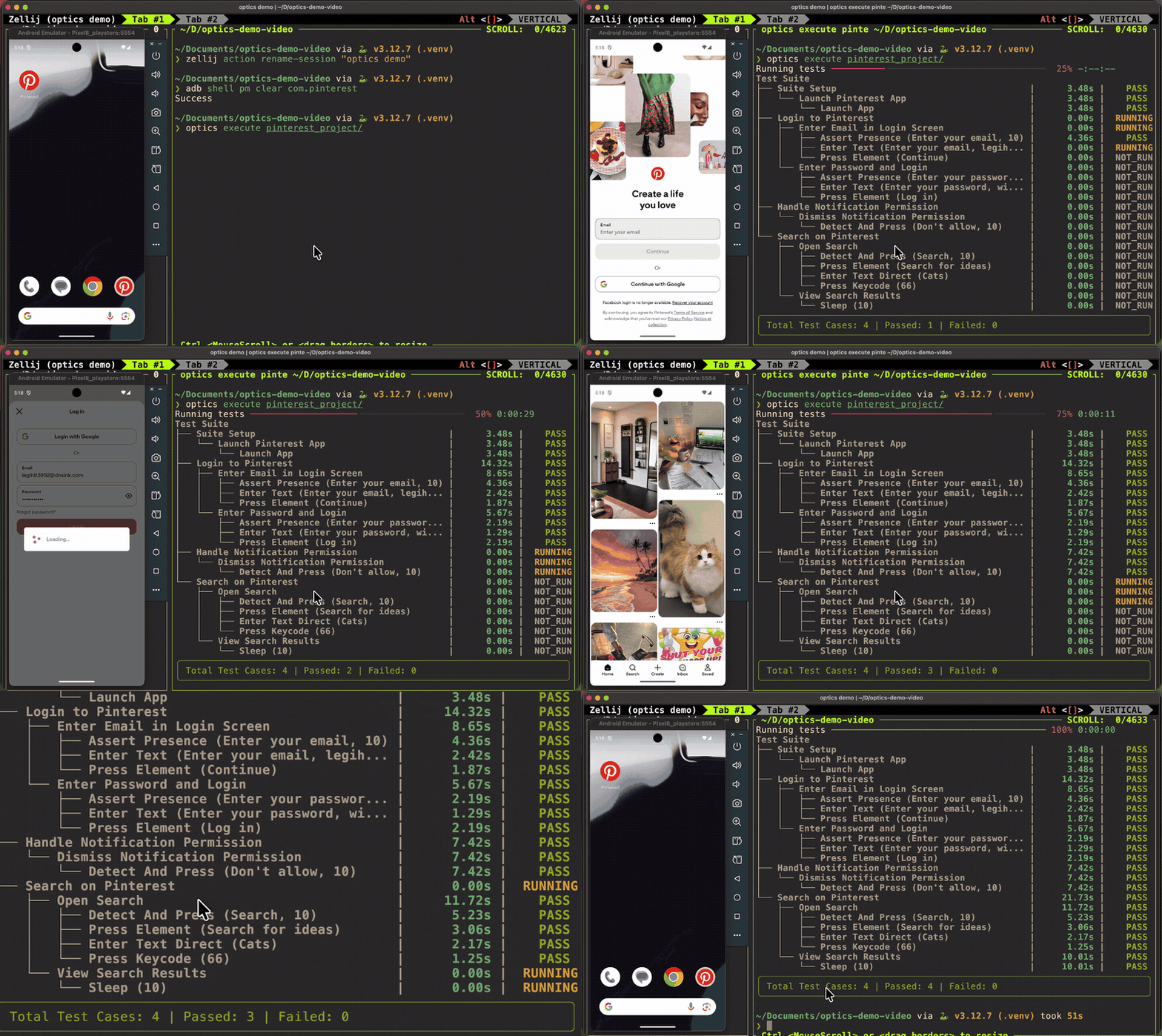
optics execute my_test_project
--template scaffolds a working project from a bundled sample. Each needs the matching extras installed (see Install); the headline [appium,easyocr] above covers the first three:
contact · calendar · youtube — Appium/Android, easyocr → [appium,easyocr]clock — Appium/Android, image templates + Tesseract OCR → [appium,pytesseract] (plus the Tesseract binary)gmail_web — Selenium → [selenium,easyocr]playwright — Playwright → [playwright] (then playwright install for the browsers)Omit --template for an empty scaffold with a commented starter config.yaml. Need only a config for an existing folder? optics configure <folder> writes one from a few questions, and optics doctor [folder] [--check] verifies engines, tooling, and project config.
A locator ladder, not a locator. Every element-based keyword walks a priority-ordered chain until one strategy succeeds:
| # | Strategy | How it finds the element |
|---|---|---|
| 1 | XPathStrategy | Native XPath query through the driver's accessibility tree |
| 2 | TextElementStrategy | Direct text / CSS / class lookup through the element source |
| 3 | TextDetectionStrategy | Screenshot → OCR (EasyOCR, Pytesseract, Google Vision, remote OCR) |
| 4 | ImageDetectionStrategy | Screenshot → template matching against a reference PNG |
| 5 | AI self-heal (opt-in) | All four failed → an LLM reads the screen and recovers |
Cheap strategies run first, so vision only costs you time when the tree can't help. Steps 1–4 are LocatorStrategy registrations; step 5 is a separate recovery layer, bounded to five turns and a six-keyword allowlist so it re-enters the ladder rather than tapping blind coordinates. Two more fallback axes sit alongside: multiple values per element name, and multiple enabled drivers or element sources, each tried in config order.
Beyond the ladder:
ble driver drives production devices as a Bluetooth HID mouse/keyboard where debugging and screenshots are blocked. Coordinate-only, so pair it with camera_screenshot and the vision strategies.optics mcp exposes every keyword as a typed MCP tool and device state as MCP resources.my_test_project/
├── config.yaml
├── test_cases/test_cases.csv
├── modules/modules.csv
└── test_data/
├── elements.csv
├── error_definitions.csv # optional
└── input_templates/*.png # optional, for image matching
Optics discovers these files by their content (CSV headers / YAML top-level keys), not their path — the folder names above are a convention, so elements.csv works equally under test_data/ or elements/ (the folder optics live's /save writes to).
test_data/elements.csv — names mapped to locators. Doubles as a general variable store; repeating a name builds a fallback list.
Element_Name,Element_ID
Add_Contact_Button,//android.widget.Button[@content-desc="Create contact"]
First_Name_element,//android.widget.EditText[@text="First name"]
Save_Button,Save
First_Name,John
A locator can be an XPath, text=…, css=…, a plain string, an image filename from input_templates/, or TEXT_ONLY:… to force a vision-based search.
modules/modules.csv — a reusable sequence of keywords; ${name} resolves against elements.csv.
module_name,module_step,param_1,param_2
Add Contact,Press Element,${Add_Contact_Button}
Add Contact,Enter Text,${First_Name_element},${First_Name}
Add Contact,Press Element,${Save_Button}
test_cases/test_cases.csv — modules sequenced into scenarios. A test case whose name contains suite + setup (or teardown) is hoisted to run around the whole suite.
test_case,test_step
Suite Setup,Launch Contact Application
Add Contact with Contact App,Add Contact
Add Contact with Contact App,Verify Contact is Added
| Surface | Command / import | Best for |
|---|---|---|
| CLI runner | optics execute <project> | CI suites written as CSV/YAML |
| Interactive TUI | optics live [project] | Building a test by doing it — recording is always on, Ctrl-N toggles natural-language mode |
| Python SDK | from optics_framework import Optics | Custom logic, embedding in existing suites |
| Robot Framework | Library optics_framework.optics.Optics | Teams already on Robot |
| REST API | optics serve | Remote/orchestrated execution, live workspace streaming over SSE |
| MCP server | optics mcp | Letting an AI agent drive a real device |
Every successful keyword is buffered as you work. To persist the buffer:
/save <test_case> <module_name>
That appends the recorded keywords to modules/modules.csv as <module_name>, adds a (<test_case>, <module_name>) row to test_cases/test_cases.csv, creates a header-only elements/elements.csv stub if none exists, and copies the session's screenshots to execution_output/<module_name>/. The buffer then clears, so the next actions become the next module. If either name already exists, re-run the identical /save to confirm the append.
Other commands: /device [id], /elements, /screenshot, /help, /quit. Full reference: Live Usage.
from optics_framework import Optics

optics = Optics()
optics.setup(
    driver_sources=[{"appium": {"enabled": True, "url": "http://localhost:4723"}}],
    elements_sources=[{"appium_find_element": {"enabled": True}}],
)

optics.launch_app(app_identifier="com.example.app")
optics.enter_text("username_field", "testuser")
optics.press_element("submit_button")
optics.validate_element("welcome_message")
optics.quit()
{ "mcpServers": { "optics": { "command": "optics", "args": ["mcp"] } } }
Then: start_session → observe (screenshot, optics://session/{id}/source) → act (press_element, enter_text, …) → terminate_session. For networked use: optics mcp --transport http --port 8090. Sessions are not shared with optics serve — each is its own process.
Every public method on the four API classes is automatically a keyword, on every surface above. CSV/YAML uses Title Case (Press Element → press_element).
| Category | Keywords |
|---|---|
| Actions | Press Element · Press By Percentage · Press By Coordinates · Detect And Press · Select Dropdown Option · Swipe · Swipe By Percentage · Swipe From Element · Swipe Until Element Appears · Scroll · Scroll From Element · Scroll Until Element Appears · Enter Text · Enter Text Direct · Enter Text Using Keyboard · Enter Number · Clear Element Text · Press Keycode · Get Text · Sleep · Execute Script |
| Verification | Assert Presence · Assert Visibility · Assert Equality · Validate Element · Validate Screen · Is Element · Get Interactive Elements · Get Screen Elements · Capture Screenshot · Capture Pagesource |
| App lifecycle | Launch App · Launch Other App · Start Appium Session · Get Driver Session Id · Close And Terminate App · Force Terminate App · Get App Version |
| Flow control | Run Loop · Condition · Read Data · Evaluate · Date Evaluate · Invoke API |
Run optics list for the live catalogue with signatures, or read the Keyword Usage guide for parameters and examples. Location keywords accept percentage-based Area-of-Interest bounds (aoi_x/y/width/height, 0–100) to scope a vision search to part of the screen.
[!NOTE]
Press CheckboxandPress Radio Buttonstill resolve but are deprecated aliases ofPress Element— usePress Elementdirectly.Add APIis available on theOpticsPython class only, not to the CSV/YAML runner; define APIs in anapi.yamland call them withInvoke APIinstead.
config.yamlEvery section is a priority-ordered list and every entry has an enabled flag. Enable a second driver and it becomes a fallback. Prefer not to hand-write it? optics configure <folder> writes one from a few questions, or optics quickstart builds the whole project including the config.
driver_sources:
  - appium:
      enabled: true
      url: "http://localhost:4723"
      capabilities:
        platformName: Android
        automationName: UiAutomator2
        deviceName: emulator-5554
        appPackage: com.google.android.contacts
        appActivity: com.android.contacts.activities.PeopleActivity

elements_sources:
  - appium_find_element: { enabled: true }
  - appium_page_source:  { enabled: true }
  - appium_screenshot:   { enabled: true }

text_detection:
  - easyocr: { enabled: true }

image_detection:
  - templatematch: { enabled: false }

log_level: INFO
| Layer | Available engines |
|---|---|
| Drivers | appium (Android, iOS, Android TV, Tizen, webOS) · selenium · playwright · ble |
| Element sources | appium_find_element · appium_page_source · appium_web · appium_screenshot · selenium_* · playwright_* · camera_screenshot |
| Text detection | easyocr · pytesseract · google_vision · remote_ocr |
| Image detection | templatematch · remote_oir |
| LLM | gemini · openai (and any OpenAI-compatible server) · anthropic |
The llm_models block powers both natural-language mode in optics live (Ctrl-N) and AI self-heal. Pick the engine that matches the account you already have, install its extra, and enable it:
| You have | Install | Enable |
|---|---|---|
| A Gemini API key, or Vertex AI | optics-framework[gemini] | gemini |
| An OpenAI key | optics-framework[openai] | openai with a model |
| An OpenRouter key (any hosted model) | optics-framework[openai] | openai with url: https://openrouter.ai/api/v1 |
| A local model (Ollama, vLLM, LM Studio) | optics-framework[openai] | openai with the server's url |
| A Claude key, or Claude on Bedrock / Vertex | optics-framework[anthropic] | anthropic with a model |
llm_models:
  - openai:
      enabled: true
      url: https://openrouter.ai/api/v1         # omit for OpenAI itself
      capabilities:
        model: anthropic/claude-sonnet-5-5
        api_key_env: OPENROUTER_API_KEY         # default OPENAI_API_KEY

ai_self_heal: true                              # opt into the LLM backstop; default false
Each engine reads its key from capabilities.api_key, else from the environment (GEMINI_API_KEY, OPENAI_API_KEY, ANTHROPIC_API_KEY). For openai and anthropic, api_key_env names the variable to read in place of that default. For direct Anthropic clients, if the named variable is unset, the SDK can fall back to ANTHROPIC_API_KEY. Anthropic on Bedrock or Vertex uses the platform credentials, not a key. Write api_key: ${MY_KEY} to keep the key out of a committed config.yaml; logs show **** in its place. If MY_KEY is not set, the run stops with E0501 before it starts, so set it first. Enable more than one entry and Optics falls back to the next when a call fails. A misconfigured LLM degrades to "no self-heal" rather than a hard failure.
Full reference: Configuration. Adding your own engine is a file drop plus an interface — see Extending the Framework.
An optics execute run writes to <project>/execution_output/:
junit_output.xml — written incrementally, so CI sees progress as it happenslogs.json — structured logs when json_log: truedetected_errors_<session_id>.json — on-screen error detectionDrop an error_definitions.csv into test_data/ and Optics scans visible text for crash dialogs, Session expired, network errors, and the like — no assertions required. Matches also land in the JUnit XML as a synthetic failing testcase, so CI fails a build on "the app crashed mid-test" the same way it fails a normal assertion. See Error Detection.
optics init        Scaffold a new project (positional NAME; --template, --path, --force, --git-init)
optics quickstart  Guided walkthrough: engines + project + config + doctor check
optics configure   Write/edit a project's config.yaml (guided prompts; --edit opens a TUI)
optics doctor      Diagnose engines, tooling and a project's config (--check for CI)
optics setup       Install engine backends (--list, --install); bare command opens a TUI
optics dry_run     Validate a project without touching a device
optics execute     Run a project (--runner test_runner|pytest; --include/--exclude test cases)
optics live        Interactive keyword session against a live target
optics generate    Emit pytest or Robot Framework code from a project
optics list        Print every discoverable keyword
optics serve       Start the REST API server (--host, --port, --workers)
optics mcp         Start the MCP server (--transport stdio|http)
optics completion  Install shell autocompletion
optics --version   Print the installed version
Details in the CLI guide.
Contributions welcome — bug reports, docs, and code are all first-class.
help wanted.The contribution guide covers development setup, step-by-step recipes (adding a keyword or engine backend), commit conventions, and the pull-request format reviewers expect. Tooling details live in the Developer Guide; behaviour expectations in our Code of Conduct.
git clone git@github.com:mozarkai/optics-framework.git
cd optics-framework
pipx install poetry
poetry install --with dev,test,docs

poetry run pytest                    # tests + coverage
poetry run ruff check --fix .        # lint
poetry run pre-commit run --all-files
poetry run mkdocs serve              # docs preview
Commits follow Conventional Commits, enforced by commitizen in the commit-msg hook.
Security issues follow SECURITY.md rather than public issues.
Apache 2.0 — see LICENSE.
Questions and bugs: GitHub Issues.
Claim this server with your GitHub account to request manual ownership verification.
Link to the catalog listing for Optics Framework from your README. This badge does not certify ownership, compatibility or security.
[](https://awesome-mcp.com/servers/optics-framework)GitHub API evidence checked 2026-11-13 05:11:59.556Z (UTC). Repository-level counts are shared by all components, not individual server installs. Open issues including pull requests: 69.
来源、范围和时段分别列出;不相加,不代表安装人数、活跃用户或安全审核。
尚无已审核的包 / 镜像标识,暂不展示下载统计。
Alternative and complementary servers in the same category
A directory listing describing a cancellation-letter and mailing-address service. The configured public GitHub repository returned 404 during source verification.

A hosted MCP service for browsing and searching through Singapore mobile-network proxies.

A directory listing describing a Markdown-to-PDF service. The configured public GitHub repository returned 404 during source verification.