
A directory listing describing a cancellation-letter and mailing-address service. The configured public GitHub repository returned 404 during source verification.
Repository stats unavailable
Developer Tools
An MCP server that imports OSS Autopilot's core functions to check a user's open GitHub pull requests, classify their status, and support drafting replies or preparing fixes.
OSS Autopilot MCP server is cataloged as an MCP server attributed to costajohnt. An MCP server that imports OSS Autopilot's core functions to check a user's open GitHub pull requests, classify their status, and support drafting replies or preparing fixes. It is categorized under developer tools. See the capability inspector for recorded interfaces and their independent review status; consult upstream documentation for the current interface.
Installation configuration is not reviewed. No executable setup is offered for this entry; inspect the source repository before proceeding.
Catalog license label: MIT. Check the source repository's current license and terms before using, modifying or distributing this software.
能力定义尚未审核。未核验的采集内容不会作为可信接口展示。
暂无可展示的已审核记录。这不表示上游不支持此能力。
暂无可展示的已审核记录。这不表示上游不支持此能力。
暂无可展示的已审核记录。这不表示上游不支持此能力。
Email delivery is not connected. This page does not collect email addresses or create subscriptions.
Browse the registry for current listings instead.
Reviews for OSS Autopilot MCP server are not available yet
Review publishing and storage are not connected. This page does not collect or publish ratings or comments, including after sign-in.
In interactive use, which includes MCP, approval is per action: approving one reply does not approve the next, and pushes or comments happen only after you approve.
Data stays in the local OSS Autopilot directory with restricted file permissions, and there is no telemetry.
It is GitHub only; GitLab, Bitbucket, and other forges are not supported.
README.md · e1d6742969d4 · 采集于 2026-11-13 11:50:00 UTC
保留上游原文,不做 AI 改写。为安全起见过滤脚本、表单和不安全链接。
当前显示最后一次成功采集的文档快照,请以来源页面为准。

Keep up with your open source pull requests. A Claude Code plugin, an MCP server, and a standalone CLI.





If you contribute to more than a couple of projects, PRs go stale without you noticing. A maintainer asks for a change, CI breaks after a rebase, a branch picks up a conflict, and you find out two weeks later.
OSS Autopilot checks every open PR you have on GitHub and sorts them into what needs you and what is waiting on someone else. For the ones that need you, it helps draft the reply, diagnose the CI failure, or rebase the branch. You approve each push and each comment before it goes out.
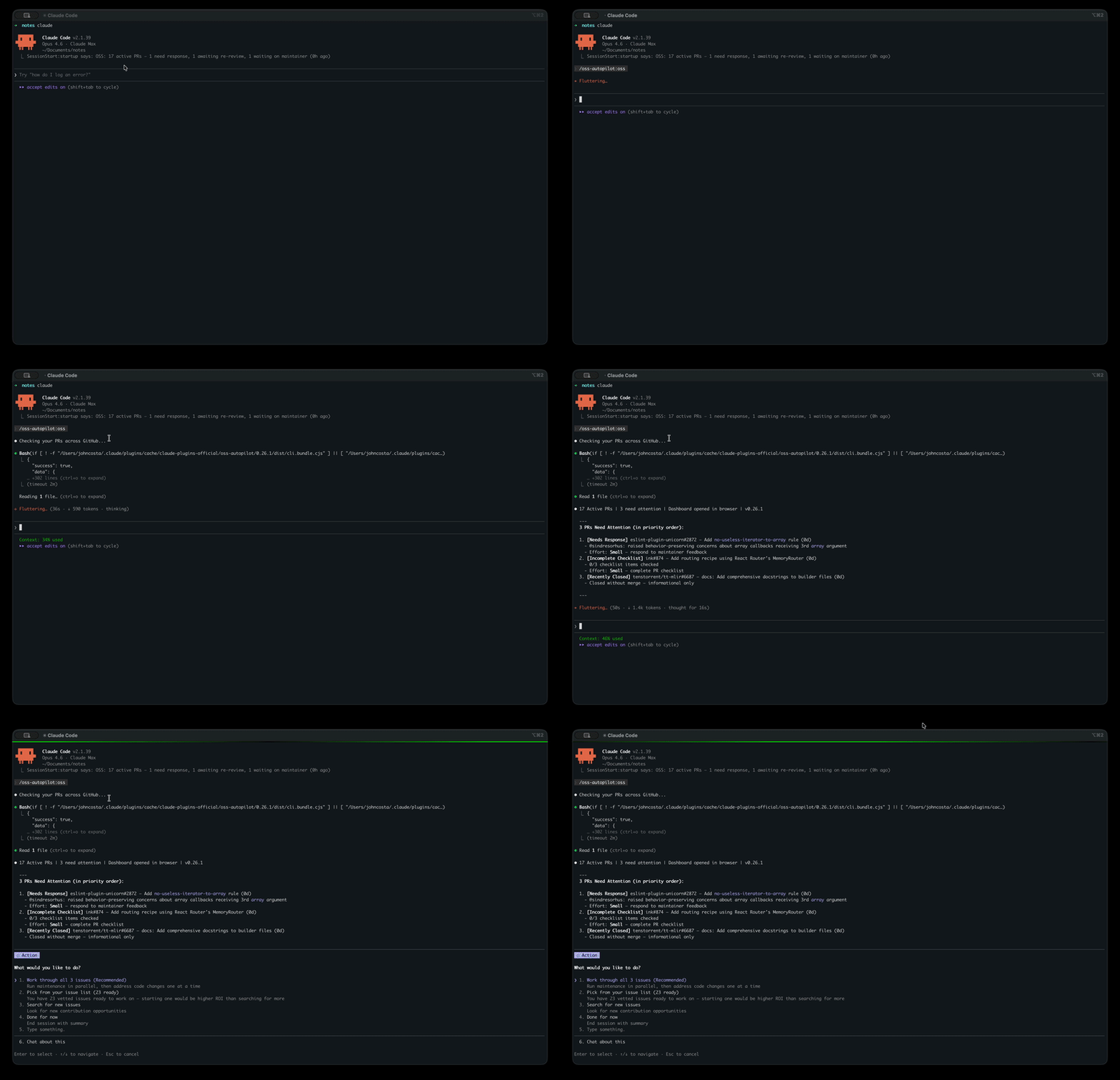
gh auth login), or a GITHUB_TOKEN in your environmentnpm and network access on first run (see below)CI runs on Ubuntu and macOS. Windows is untested.
/plugin marketplace add costajohnt/oss-autopilot
/plugin install oss-autopilot@oss-autopilot
Restart Claude Code, then:
/setup-oss
Setup asks for your GitHub username, the languages and labels you care about, and how many PRs you want open at once. After that, run /oss whenever you want to check in.
About the first run. The plugin ships as source. The first /setup-oss or /oss installs dependencies and builds the CLI inside the plugin directory, so it needs npm (or pnpm) and a network connection, and it takes longer than later runs. If the build fails, see Troubleshooting.
Save your GitHub username once:
npx @oss-autopilot/core@latest init <your-github-username>
Then add the server to your MCP client config:
{
  "mcpServers": {
    "oss-autopilot": {
      "command": "npx",
      "args": ["@oss-autopilot/mcp@latest"]
    }
  }
}
The MCP server exposes 35 tools, 6 resources, and 4 prompts. @latest means you get new releases automatically; pin a version (@oss-autopilot/mcp@5.7.4) if you would rather update on your own schedule.
npx @oss-autopilot/core@latest init <your-github-username>
npx @oss-autopilot/core@latest daily          # human-readable digest
npx @oss-autopilot/core@latest daily --json   # structured output
npx @oss-autopilot/core@latest doctor         # check token, state, rate limit

# or install it
npm install -g @oss-autopilot/core
oss-autopilot --help
Every command accepts --json and returns { success, data, error, timestamp }, so it is easy to script.
npm install @oss-autopilot/core
import { runDaily, runSearch } from '@oss-autopilot/core/commands';

const digest = await runDaily();
const issues = await runSearch({ maxResults: 10 });
API reference: jcosta.tech/oss-autopilot.

/oss.If you are new to this, set maxActivePRs to 3 to 5. A few PRs you respond to quickly do better than many you let sit.
The plugin adds 9 slash commands:
| Command | What it does |
|---|---|
/oss | Daily check: what needs attention, then an action menu |
/oss-search | Find issues to work on, matched to your languages and history |
/oss-overnight | Unattended run that prepares fix branches locally and writes a morning report |
/oss-dashboard | Open the local dashboard in your browser |
/oss-guidelines | View or edit what the tool has learned about each repo's review preferences |
/pr-ready | Pre-push loop: lint, tests, parallel review agents, fix, repeat until clean |
/plan-ready | The same review loop for an implementation plan, before you write code |
/setup-oss | Configure preferences |
/oss-help | Quick reference |
Commands: /oss, /oss-search, /oss-overnight, /oss-dashboard, /oss-guidelines, /pr-ready, /plan-ready, /setup-oss, /oss-help
The plugin also ships 8 specialized agents that Claude dispatches for you:
| Agent | Job |
|---|---|
pr-responder | Drafts replies to maintainer feedback |
pr-health-checker | Diagnoses CI failures, conflicts, stale reviews; rebases when needed |
pr-compliance-checker | Checks a PR against opensource.guide practices and the repo's own guidelines |
pre-commit-reviewer | Reviews your diff before you commit |
issue-scout | Searches for and vets issues |
repo-evaluator | Judges whether a repo is worth your time before you start |
contribution-strategist | Looks at your history and suggests where to focus |
overnight-preparer | Prepares one fix branch in a local worktree during /oss-overnight |
Agents exist only in the Claude Code plugin. MCP and CLI users get the same underlying data through tools and commands.
For a deeper pre-push review, install the optional pr-review-toolkit plugin from the Claude Code marketplace. /pr-ready uses its reviewers in parallel when present and falls back to the built-in pre-commit-reviewer when not.
/oss-search (or oss-autopilot search) looks for open issues that match your configured languages and labels, then vets each candidate: is it already claimed, is there a linked PR, does the repo merge outside contributions, how fast do maintainers respond. Search and vetting live in a separate package, oss-scout.
Two documents explain the scoring so you can see why a repo did or did not show up:
/oss-overnight runs the daily check unattended. For PRs with a CI failure, a conflict, or requested changes, it prepares a fix branch in a local git worktree and runs the project's tests. It writes a report to ~/.oss-autopilot/reports/, and your next /oss shows it so you can decide what ships.
To schedule it on macOS:
oss-autopilot overnight schedule --install --hour 2
--install writes a launchd plist to ~/Library/LaunchAgents/ and prints the launchctl bootstrap command that loads it. It does not load it for you. Without --install it only prints the plist. There is no built-in scheduler for Linux yet; commands/oss-overnight.md describes the invocation to put in a systemd timer.
Read this before scheduling it. The unattended run is started with an allowlist of tools and a deny list that blocks git push, gh pr comment, gh api, npm publish, and similar commands, and it cannot ask you questions. That stops a well-behaved model from writing to GitHub. It is not a sandbox: the run executes each project's test suite with your credentials available, the same as if you ran those tests yourself. If that is more trust than you want to give, run the job as a separate OS user with no push credentials. See commands/oss-overnight.md for the full threat model.
/oss-dashboard opens a local web UI at http://localhost:3000 with your PRs by status, contribution charts, and buttons to shelve or re-prioritize a PR. It binds to loopback only.
Without Claude Code, run it from the CLI (needs @oss-autopilot/core 3.28.1 or newer, and one daily run so there is data to show):
npx @oss-autopilot/core@latest daily
npx @oss-autopilot/core@latest dashboard serve
Settings live in ~/.oss-autopilot/state.json under config. Change them with /setup-oss, or from the CLI:
oss-autopilot config                     # show everything
oss-autopilot config maxActivePRs 5      # set one value
| Setting | Default | Description |
|---|---|---|
githubUsername | (detected) | Your GitHub username |
maxActivePRs | 10 | Open-PR count at which the tool suggests finishing before starting more |
maxOpenPRsColdRepo | 1 | While none of your PRs in a repo have merged, search leaves the repo out once you have this many open PRs there, and the PR workflow warns before pushing another (0 = off) |
maxOpenPRsPerRepo | 0 (off) | Same cap for every repo, including ones where your PRs have merged |
maxConcurrentImplementations | 2 | How many implementations may run in the background at once, across sessions and machines (0 = off). Two never share a checkout |
dormantDays | 30 | Days without activity before a PR is marked dormant |
minStars | 50 | Minimum repo stars to count in stats and charts |
languages | (chosen at setup) | Languages for issue search |
labels | (chosen at setup) | Issue labels for issue search |
squashByDefault | true | Squash commits before merge (true, false, or "ask") |
excludeRepos | [] | Repos to leave out of issue discovery. PRs already open there are still tracked; the pre-push repo-cap check warns before opening a new one |
excludeOrgs | [] | Orgs to leave out of everything (for example, your employer) |
avoidRepos | [] | Repos to rank lower in search without excluding them |
boostIssueTypes | [] | Issue label types to rank higher in search (for example bug) |
includeDocIssues | true | Include documentation issues in search |
complexIssues | off | warm relaxes issue vetting in repos where you already have a merged PR, so larger and maintainer-filed issues surface there |
autoExtractLearnings | true | After a PR merges, extract what the maintainers asked for into per-repo guidelines |
issueListPath | (none) | Path to your own curated issue list |
projectCategories | [] | Categories to prioritize (nonprofit, devtools, and so on) |
preferredOrgs | [] | Orgs to prioritize |
Stats and badges. oss-autopilot stats prints your merged-PR numbers; --markdown gives a shareable report and --badge gives shields.io endpoint JSON. For a live profile badge and SVG cards, see oss-widgets.
Sync across machines (optional). State can be stored in a secret GitHub gist instead of only on disk. See oss-autopilot state --help. A secret gist is unlisted, not access-controlled, so anyone with the URL can read it.
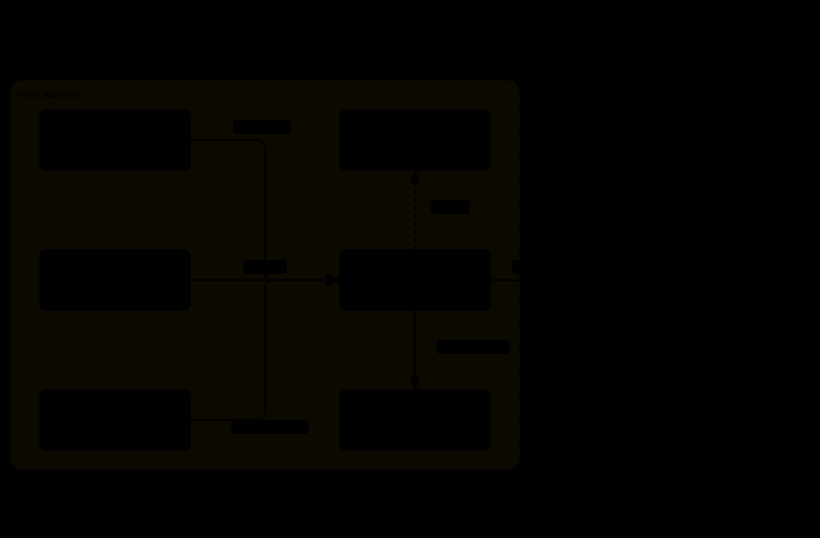
--json. The MCP server imports the same functions. The dashboard is served by the CLI. They share one state file.More detail: ARCHITECTURE.md. Security model and reporting: SECURITY.md.
Interactive (/oss, MCP, CLI) | Unattended (/oss-overnight) | |
|---|---|---|
| Read your PRs, issues, CI logs | Yes | Yes |
| Edit files in a local clone or worktree | When you pick an action | Yes, in a worktree it creates |
| Run a project's tests | When you pick an action | Yes |
| Push a branch | Only after you approve | Direct git push is blocked; the CLI's own overnight push-prep refuses |
| Post a comment, open or merge a PR | Only after you approve | Direct gh writes are blocked; the CLI's own post and claim refuse |
| Send data anywhere other than GitHub | No | No |
In interactive use, approval is per action. Approving one reply does not approve the next one.
All data stays in ~/.oss-autopilot/ (files are written 0600, the directory 0700). There is no telemetry.
Start here. It checks your token, the CLI bundle, the state file, and your rate limit:
npx @oss-autopilot/core@latest doctor
gh is missing or not logged in
brew install gh        # macOS; see https://cli.github.com for other platforms
gh auth login
The plugin's first-run build failed
find ~/.claude/plugins -name "oss-autopilot" -type d    # locate the plugin
cd <that path>/packages/core
npm install
npm run bundle
My PRs do not show up
/setup-oss and confirm the GitHub username.excludeRepos, excludeOrgs, and minStars.Updating
/plugin update oss-autopilotnpx ...@latest: nothing to doFound a bug? Open an issue with the output of doctor --json.
Bug fixes, new agents, CLI improvements, and documentation are all welcome. CONTRIBUTING.md has setup instructions.
git clone https://github.com/costajohnt/oss-autopilot.git
cd oss-autopilot
pnpm install
pnpm test
pnpm start -- daily --json      # run the CLI from source
claude --plugin-dir .           # load your checkout as the plugin
The diagrams in this README are generated from the JSON files in docs/diagrams/ with archify. Regenerate them with node docs/diagrams/export-svg.mjs.
Built and used daily by costajohnt. The contributions below were managed with it.
MIT
Claim this server with your GitHub account to request manual ownership verification.
Link to the catalog listing for OSS Autopilot MCP server from your README. This badge does not certify ownership, compatibility or security.
[](https://awesome-mcp.com/servers/oss-autopilot)Public repository statistics could not be verified. Check the configured source address; unavailable counts are not zero.
来源、范围和时段分别列出;不相加,不代表安装人数、活跃用户或安全审核。
尚无已审核的包 / 镜像标识,暂不展示下载统计。
Alternative and complementary servers in the same category
A directory listing describing a cancellation-letter and mailing-address service. The configured public GitHub repository returned 404 during source verification.

A hosted MCP service for browsing and searching through Singapore mobile-network proxies.

A directory listing describing a Markdown-to-PDF service. The configured public GitHub repository returned 404 during source verification.