


A directory listing describing a cancellation-letter and mailing-address service. The configured public GitHub repository returned 404 during source verification.
Repository stats unavailable
Developer Tools
A local, zero-config visual CVE dashboard for multi-language projects that also exposes a Model Context Protocol server for AI agents.
osv-ui is cataloged as an MCP server attributed to toan203. A local, zero-config visual CVE dashboard for multi-language projects that also exposes a Model Context Protocol server for AI agents. It is categorized under developer tools. See the capability inspector for recorded interfaces and their independent review status; consult upstream documentation for the current interface.
Installation configuration is not reviewed. No executable setup is offered for this entry; inspect the source repository before proceeding.
Catalog license label: MIT. Check the source repository's current license and terms before using, modifying or distributing this software.
能力定义尚未审核。未核验的采集内容不会作为可信接口展示。
暂无可展示的已审核记录。这不表示上游不支持此能力。
暂无可展示的已审核记录。这不表示上游不支持此能力。
暂无可展示的已审核记录。这不表示上游不支持此能力。
Email delivery is not connected. This page does not collect email addresses or create subscriptions.
Browse the registry for current listings instead.
Reviews for osv-ui are not available yet
Review publishing and storage are not connected. This page does not collect or publish ratings or comments, including after sign-in.
No. The project states it runs locally with no signup and no API key, and that OSV.dev lookups are free with no account or rate limit.
It supports npm/JS, Python, Go, Rust, Java/Maven, PHP/Composer, and Ruby/Bundler manifest files.
Yes, the offline flag skips OSV.dev lookup and parses manifests only.
README.md · 9fc424eb10d7 · 采集于 2026-11-13 13:37:44 UTC
保留上游原文,不做 AI 改写。为安全起见过滤脚本、表单和不安全链接。
当前显示最后一次成功采集的文档快照,请以来源页面为准。
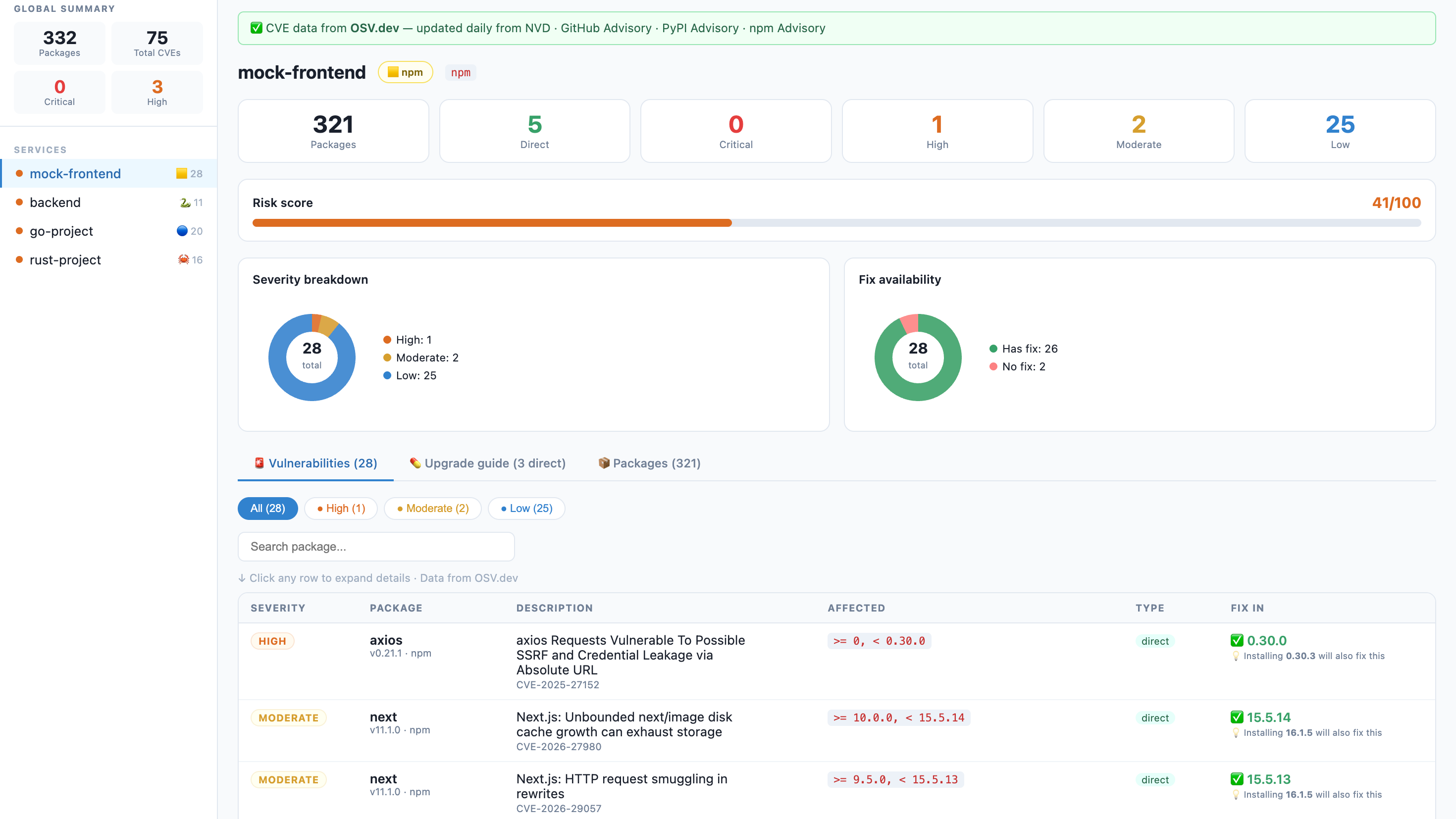
A beautiful, zero-config visual CVE dashboard for npm, Python, Go, Rust, Java, PHP, and Ruby projects.
One command. No signup. No API key. Runs 100% locally — your code never leaves your machine.





🇻🇳 Tiếng Việt · 🇺🇸 English · 🇨🇳 中文 · 🇯🇵 日本語
$ npm audit

# ... 300 lines of this ...
# moderate  Regular Expression Denial of Service in semver
# package   semver
# patched in >=7.5.2
# ...
# 12 vulnerabilities (3 moderate, 6 high, 3 critical)
Nobody reads that. Security gets ignored. Dependencies stay vulnerable.
npx osv-ui
→ Opens a dashboard. Every CVE, every fix, all your services. Done.
| 🌐 Multi-Ecosystem | Scans package-lock.json, pnpm-lock.yaml, yarn.lock, Pipfile.lock, poetry.lock, requirements.txt, go.sum, Cargo.lock, pom.xml, composer.lock, Gemfile.lock |
| 📡 Live CVE data | Powered by OSV.dev — updated daily from NVD, GitHub Advisory, PyPI Advisory. No API key. |
| 🏢 Multi-service | Scan your entire monorepo in one command — frontend, backend, workers, ML services |
| 💊 Fix guide | Dependabot-style upgrade table: current version → safe version + one-click copy command |
| 🔌 Built-in REST API | Power your own security dashboards with GET /api/data or CLI export flags |
| 🎯 Risk score | 0–100 per service so you know where to focus first |
| 🔍 CVE drill-down | Click any row — CVSS score, description, NVD link, GitHub Advisory link |
| 🌙 Dark Mode | Eye-friendly security audits, day or night |
Scan current directory:
npx osv-ui
Scan a monorepo (multiple services at once):
npx osv-ui ./frontend ./api ./worker ./ml-service
Auto-discover all services under the current directory:
npx osv-ui -d
Add to your package.json scripts:
{
  "scripts": {
    "audit:ui":  "npx osv-ui",
    "audit:all": "npx osv-ui ./frontend ./api ./worker"
  }
}
--discover, -d    Auto-find service dirs that contain a supported manifest
--port=2003       Use a custom port (default: 2003)
--json[=file]     Save report as JSON without opening browser (defaults to osv-report.json)
--html[=file]     Save report as HTML without opening browser (defaults to osv-report.html)
--cyclonedx[=file] Save CycloneDX SBOM JSON (defaults to osv-sbom.cdx.json)
--spdx[=file]     Save SPDX SBOM JSON (defaults to osv-sbom.spdx.json)
--baseline=file   Compare with a previous --json report
--markdown[=file] Save a Markdown PR/comment report (defaults to osv-report.md)
--fail-on=level   Exit non-zero for critical/high/moderate/low findings
--webhook-url=url POST matching findings to a webhook
--webhook-severity=level Webhook threshold (default: critical)
--watch           Keep dashboard running and re-scan when manifests change
--no-open         Don't auto-open the browser
--offline         Skip OSV.dev lookup — parse manifests only
-h, --help        Show help message
osv-ui is now a Model Context Protocol (MCP) server. This allows AI agents like Claude Desktop, Cursor, and Claude Code to:
Quick setup (npx):
{
  "mcpServers": {
    "osv-ui": {
      "command": "npx",
      "args": ["-y", "osv-ui-mcp"]
    }
  }
}
See the MCP Package README for detailed setup instructions.
osv-ui isn't just a dashboard; it's a security data engine.
Once the dashboard is running, you can pull the raw security data for your whole project:
# Get full JSON payload for all services
curl http://localhost:2003/api/data

# Use it in your custom scripts
curl -s http://localhost:2003/api/data | jq '.[0].vulns'
Generate machine-readable reports without opening the browser:
npx osv-ui -d --json=osv-report.json --markdown=osv-report.md --cyclonedx=sbom.cdx.json --spdx=sbom.spdx.json --no-open
Compare a PR scan against a baseline report and fail on newly introduced high+ findings:
npx osv-ui -d --json=current.json --baseline=main-osv-report.json --markdown=osv-pr.md --fail-on=high --no-open
Minimal GitHub Actions flow:
name: osv-ui
on: [pull_request]
jobs:
  scan:
    runs-on: ubuntu-latest
    steps:
      - uses: actions/checkout@v4
      - uses: actions/setup-node@v4
        with:
          node-version: 24
      - run: npx osv-ui -d --json=current.json --markdown=osv-pr.md --cyclonedx=sbom.cdx.json --fail-on=high --no-open
      - uses: actions/upload-artifact@v4
        if: always()
        with:
          name: osv-ui-report
          path: |
            current.json
            osv-pr.md
            sbom.cdx.json
Send new critical findings to a webhook:
npx osv-ui -d --baseline=main-osv-report.json --webhook-url="$SECURITY_WEBHOOK_URL" --webhook-severity=critical --json=current.json
| Ecosystem | Files |
|---|---|
| npm / JS | package-lock.json · pnpm-lock.yaml · yarn.lock |
| Python | requirements.txt · Pipfile.lock · poetry.lock · pyproject.toml · uv.lock |
| Go | go.sum |
| Rust | Cargo.lock |
| Java | pom.xml (Maven) |
| PHP | composer.json · composer.lock |
| Ruby | Gemfile · Gemfile.lock |
More ecosystems coming — see Roadmap.
Your project files
    │
    ├─ package-lock.json   ──┐
    ├─ Pipfile / poetry    ──┤──► parser ──► package list
    ├─ go.sum / Cargo.lock ──┘
                                    │
                                    ▼
                             OSV.dev batch API  (free, no key)
                                    │
                                    ▼
                             CVE matches + fix versions
                                    │
                                    ▼
                         Express server → browser dashboard
                              http://localhost:2003
CVE data comes from OSV.dev — a free, open database maintained by Google that aggregates:
Updated daily. No account. No rate limit. No vendor lock-in.
osv-ui and osv-scanner use the same OSV.dev data source. osv-ui adds the visual layer that osv-scanner lacks:
| osv-ui | npm audit | Snyk | Dependabot | |
|---|---|---|---|---|
| Visual dashboard | ✅ | ❌ terminal only | ✅ | ✅ |
| npm support | ✅ | ✅ | ✅ | ✅ |
| Python support | ✅ | ❌ | ✅ | ✅ |
| Multi-service in one view | ✅ | ❌ | ✅ paid | ✅ |
| No signup required | ✅ | ✅ | ❌ | ❌ |
| Works on GitLab Free | ✅ | ✅ | ❌ | ❌ |
| Self-hosted / local | ✅ | ✅ | ❌ | ❌ |
| Fix commands | ✅ | partial | ✅ | ✅ |
| Open source | ✅ | ✅ | ❌ | ❌ |
No Dependabot on GitLab Free? Add this to .gitlab-ci.yml:
audit:
  stage: test
  image: node:24-alpine
  script:
    - npm audit --json > /tmp/audit.json || true
    - |
      node -e "
        const r = require('/tmp/audit.json');
        const crit = Object.values(r.vulnerabilities || {})
          .filter(v => v.severity === 'critical').length;
        if (crit > 0) {
          console.error('BLOCKED: ' + crit + ' critical CVE(s). Run: npx osv-ui');
          process.exit(1);
        }
        console.log('OK: no critical vulnerabilities');
      "
  artifacts:
    paths: [/tmp/audit.json]
    when: always
--offlinenpm install first so package-lock.json existsAll contributions are welcome. If you want to work on something, open an issue first so we can coordinate.
go.sum / go.modCargo.lockpom.xmlcomposer.lockGemfile.lockThis project is built by the community. All skill levels welcome.
Good first issues:
# Clone and run locally
git clone https://github.com/toan203/osv-ui
cd osv-ui
npm install

# Run against your own project
node bin/cli.js /path/to/your/project

# Run against multiple services
node bin/cli.js ./frontend ./backend
Please read CONTRIBUTING.md for code style and PR process.
MIT — use it, fork it, embed it, build on it. Attribution appreciated but not required.
Did osv-ui catch a real CVE in your project?
A ⭐ helps other developers find this tool.
Claim this server with your GitHub account to request manual ownership verification.
Link to the catalog listing for osv-ui from your README. This badge does not certify ownership, compatibility or security.
[](https://awesome-mcp.com/servers/osv-ui)Public repository statistics could not be verified. Check the configured source address; unavailable counts are not zero.
来源、范围和时段分别列出;不相加,不代表安装人数、活跃用户或安全审核。
尚无已审核的包 / 镜像标识,暂不展示下载统计。
Alternative and complementary servers in the same category
A directory listing describing a cancellation-letter and mailing-address service. The configured public GitHub repository returned 404 during source verification.

A hosted MCP service for browsing and searching through Singapore mobile-network proxies.

A directory listing describing a Markdown-to-PDF service. The configured public GitHub repository returned 404 during source verification.