
PDF MCP Server

PDF MCP Server

pdf-mcp-server-sohaib-2•bysohaib-2

A FastMCP server that exposes PDF manipulation tools—merge, split, extract, encrypt, optimize, repair, and analyze PDFs—to Claude via the Model Context Protocol.

License: MIT License•Runtime: Awaiting documentation review•Category: file systems-docs

WHAT IT DOES

  • •Combines multiple PDF documents into one and splits a PDF into individual pages.
  • •Extracts specific page ranges from a PDF.
  • •Encrypts PDFs with AES-256 or basic password protection and removes password protection.
  • •Optimizes, repairs, and checks the integrity of PDFs, and reads metadata and internal structure.

BEST FOR

  • •Users who want to run PDF operations conversationally through Claude without manual tooling.
  • •Document workflows such as merging research papers or splitting and extracting manual sections.

ABOUT PDF-MCP-SERVER-SOHAIB-2

PDF MCP Server is cataloged as an MCP server attributed to sohaib-2. A FastMCP server that exposes PDF manipulation tools—merge, split, extract, encrypt, optimize, repair, and analyze PDFs—to Claude via the Model Context Protocol. It is categorized under file systems-docs. See the capability inspector for recorded interfaces and their independent review status; consult upstream documentation for the current interface.

HOW TO INSTALL

Installation configuration is not reviewed. No executable setup is offered for this entry; inspect the source repository before proceeding.

LICENSE

Catalog license label: MIT License. Check the source repository's current license and terms before using, modifying or distributing this software.

能力检查器

能力定义尚未审核。未核验的采集内容不会作为可信接口展示。

Tools (0)

暂无可展示的已审核记录。这不表示上游不支持此能力。

Resources (0)

暂无可展示的已审核记录。这不表示上游不支持此能力。

Prompts (0)

暂无可展示的已审核记录。这不表示上游不支持此能力。

NEWSLETTER - COMING LATER

Newsletter subscriptions are not open yet

Email delivery is not connected. This page does not collect email addresses or create subscriptions.

Browse the registry for current listings instead.

Community Reviews

Coming later

Reviews for PDF MCP Server are not available yet

Review publishing and storage are not connected. This page does not collect or publish ratings or comments, including after sign-in.

上游原版 README

在 GitHub 查看同一版本原文

README.md · fd2165d149bd · 采集于 2026-11-13 11:40:56 UTC

保留上游原文,不做 AI 改写。为安全起见过滤脚本、表单和不安全链接。

当前显示最后一次成功采集的文档快照,请以来源页面为准。

PDF MCP Server

GitHub stars GitHub issues GitHub license Python 3.8+

Transform PDF manipulation with AI-powered natural language commands through Claude integration

Comprehensive PDF toolkit that integrates seamlessly with Claude AI via MCP (Model Context Protocol). Perform complex PDF operations using simple conversational commands - merge, split, encrypt, optimize, and analyze PDFs effortlessly.
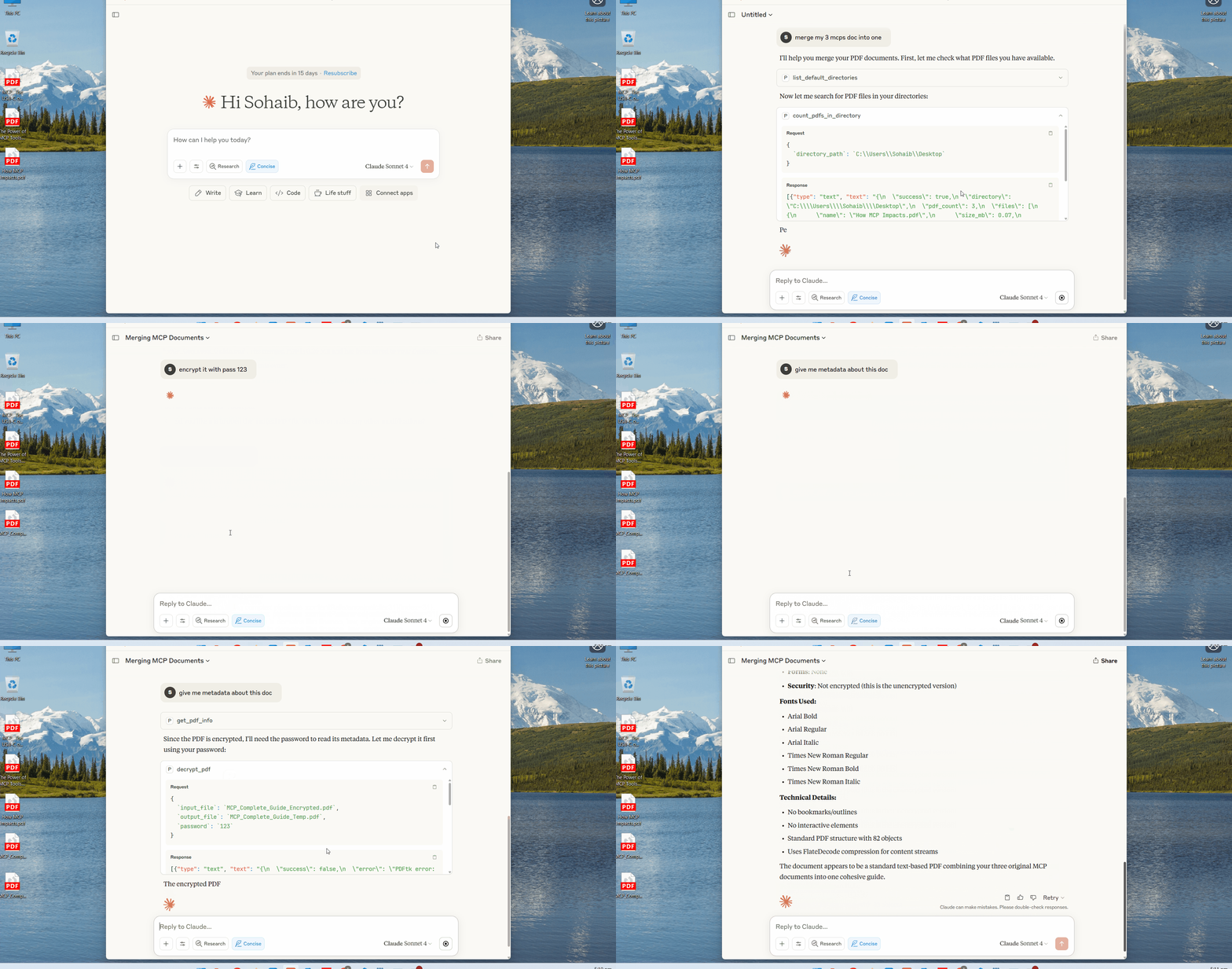
Demo

🚀 Quick Start

Clone & Setup

git clone https://github.com/Sohaib-2/pdf-mcp-server.git
cd pdf-mcp-server
python -m venv .venv
# Windows
.venv\Scripts\activate
# macOS/Linux  
source .venv/bin/activate

pip install -r requirements.txt

Option 2: Without Virtual Environment

pip install fastmcp requests pathlib

Install PDF Tools

PDFtk:

# Ubuntu/Debian
sudo apt-get install pdftk
# macOS
brew install pdftk-java
# Windows: Download from https://www.pdflabs.com/tools/pdftk-the-pdf-toolkit/

QPDF:

# Ubuntu/Debian
sudo apt-get install qpdf
# macOS
brew install qpdf
# Windows: Download from https://qpdf.sourceforge.io/

🔧 Claude Desktop Integration

  1. Locate Claude config file:

    • Windows: %APPDATA%\Claude\claude_desktop_config.json
    • macOS: ~/Library/Application Support/Claude/claude_desktop_config.json
  2. Add PDF MCP Server:

With Virtual Environment:

{
  "mcpServers": {
    "pdf-tools": {
      "command": "C:\\path\\to\\pdf-mcp-server\\.venv\\Scripts\\python.exe",
      "args": ["C:\\path\\to\\pdf-mcp-server\\server.py"]
    }
  }
}

Without Virtual Environment:

{
  "mcpServers": {
    "pdf-tools": {
      "command": "python",
      "args": ["C:\\path\\to\\pdf-mcp-server\\server.py"]
    }
  }
}

macOS/Linux with venv:

{
  "mcpServers": {
    "pdf-tools": {
      "command": "/path/to/pdf-mcp-server/.venv/bin/python",
      "args": ["/path/to/pdf-mcp-server/server.py"]
    }
  }
}
  1. Restart Claude Desktop

  2. Start using natural language:

    • "Merge these 3 PDFs into one document"
    • "Encrypt my report with password protection"
    • "Extract pages 1-10 from this manual"

📚 Complete Tool Reference

Core Operations

ToolDescriptionExample
merge_pdfsCombine multiple PDFsmerge_pdfs(['doc1.pdf', 'doc2.pdf'], 'combined.pdf')
split_pdfSplit into individual pagessplit_pdf('document.pdf', './pages/')
extract_pagesExtract specific page rangesextract_pages('book.pdf', '1-5,10,15-20', 'excerpt.pdf')
rotate_pagesRotate pages by degreesrotate_pages('scan.pdf', '90', 'rotated.pdf', '1-3')

Security & Encryption

ToolDescriptionExample
encrypt_pdfAES-256 encryptionencrypt_pdf('file.pdf', 'secure.pdf', 'password123')
encrypt_pdf_basicBasic password protectionencrypt_pdf_basic('doc.pdf', 'protected.pdf', 'pass', 'admin')
decrypt_pdfRemove password protectiondecrypt_pdf('locked.pdf', 'unlocked.pdf', 'password')

Optimization & Repair

ToolDescriptionExample
optimize_pdfCompress for web/emailoptimize_pdf('large.pdf', 'small.pdf', 'high')
repair_pdfFix corrupted PDFsrepair_pdf('broken.pdf', 'fixed.pdf')
check_pdf_integrityValidate PDF structurecheck_pdf_integrity('suspicious.pdf')

Information & Analysis

ToolDescriptionExample
get_pdf_infoDetailed metadata (JSON)get_pdf_info('document.pdf')
update_pdf_metadataModify title/author/etcupdate_pdf_metadata('file.pdf', 'updated.pdf', title='New Title')
inspect_pdf_structureInternal structure analysisinspect_pdf_structure('complex.pdf', detailed=True)
extract_pdf_attachmentsExtract embedded filesextract_pdf_attachments('portfolio.pdf', './attachments/')

File Management

ToolDescriptionExample
download_pdfDownload from URLdownload_pdf('https://example.com/file.pdf', 'local.pdf')
open_pdf_previewOpen with system vieweropen_pdf_preview('report.pdf', browser=False)
get_file_infoFile size/path detailsget_file_info('document.pdf')
configure_pdf_workspaceSet working directoryconfigure_pdf_workspace('/path/to/workspace')
count_pdfs_in_directoryList PDFs in foldercount_pdfs_in_directory('./pdf_folder/')

System Management

ToolDescriptionPurpose
get_server_statusCheck tool availabilityVerify PDFtk/QPDF installation
list_default_directoriesShow search pathsDebug file resolution issues
get_pdf_tools_helpComplete documentationIn-app help reference

💬 Natural Language Examples

Document Management:

  • "Combine all my research papers into one bibliography"
  • "Split this 100-page manual into chapters"
  • "Extract the executive summary from pages 2-4"

Security Operations:

  • "Encrypt this contract with military-grade protection"
  • "Remove password from this locked document"
  • "Add owner permissions to prevent editing"

File Optimization:

  • "Optimize all PDFs in my downloads folder"
  • "Fix this corrupted presentation file"

Advanced Analysis:

  • "Show me detailed metadata about this academic paper"
  • "Analyze the internal structure for security audit"

🗂️ File Path Handling

Flexible path resolution:

  • Absolute: C:\Documents\file.pdf
  • Relative: ../pdfs/document.pdf
  • Filename only: report.pdf (searches default directories)

Default search order:

  1. PDF_WORKSPACE environment variable
  2. ~/Documents/PDFs
  3. ~/Downloads
  4. ~/Desktop
  5. Current working directory

⚙️ Configuration

Custom workspace:

configure_pdf_workspace('/path/to/your/pdfs')

Check installation:

get_server_status()  # Verify PDFtk and QPDF availability

🛠️ Troubleshooting

Common issues:

ProblemSolution
PDFtk not foundInstall PDFtk and add to PATH
QPDF errorInstall QPDF via package manager
File not foundUse list_default_directories() to check search paths
Permission deniedRun with appropriate file permissions
Invalid PDFUse check_pdf_integrity() to validate file

Debug commands:

get_server_status()           # Check tool installation
list_default_directories()    # Verify search paths  
get_pdf_info('file.pdf')      # Validate PDF structure

🏗️ Architecture

pdf-mcp-server/
├── server.py              # FastMCP server with 16 tools
├── pdftk_tools.py         # PDFtk CLI wrapper
├── qpdf_tools.py          # QPDF CLI wrapper  
├── utils.py               # File utilities & path resolution
└── requirements.txt       # Python dependencies

Built with:

  • FastMCP - MCP server framework
  • PDFtk - PDF manipulation
  • QPDF - Advanced PDF processing

🤝 Contributing

  1. Fork the repository
  2. Create feature branch: git checkout -b feature/amazing-feature
  3. Commit changes: git commit -m 'Add amazing feature'
  4. Push to branch: git push origin feature/amazing-feature
  5. Open Pull Request

📄 License

This project is licensed under the MIT License

👨‍💻 Author

Sohaib-2 - GitHub

🌟 Acknowledgments


⭐ Star this repo if it helped you! | 🐛 Report issues | 💡 Request features

Install configuration

Are you the maintainer?

Claim this server with your GitHub account to request manual ownership verification.

README Embed Badge
Markdown

Link to the catalog listing for PDF MCP Server from your README. This badge does not certify ownership, compatibility or security.

[![MCP catalog listing](https://img.shields.io/badge/MCP-awesome--mcp-orange?style=flat-square)](https://awesome-mcp.com/servers/pdf-mcp-server-sohaib-2)

REPOSITORY STATS

GitHub StarsUnavailable
ForksUnavailable

Public repository statistics could not be verified. Check the configured source address; unavailable counts are not zero.

下载与拉取统计

来源、范围和时段分别列出;不相加,不代表安装人数、活跃用户或安全审核。

尚无已审核的包 / 镜像标识,暂不展示下载统计。

Related file systems-docs MCP Servers

Alternative and complementary servers in the same category

View all in file systems-docs →

A Model Context Protocol server for global law with read-only tools to find and read provisions by date, trace the law behind each word, search text and changes, and check cases or briefs against law in force.

Repository stats unavailable
Files & Documentation
LoreKeeper MCP server
lorekeeper-rpg-lorekeeper-com•lore-keeper

Hosted MCP server for tabletop RPG worlds that organizes messy notes and documents into a private store and lets MCP apps search lore, read documents, find characters, and optionally generate character or world pictures.

Repository stats unavailable
Files & Documentation

An MCP server that gives AI assistants scoped file system operations inside a project directory, with read-only reference projects plus git and GitHub tools.

Repository stats unavailable
Files & Documentation