
A directory listing describing a cancellation-letter and mailing-address service. The configured public GitHub repository returned 404 during source verification.
Repository stats unavailable
Developer Tools
An experimental MCP server that bridges Pega Infinity applications with GenAI agents and MCP-enabled tools through the Pega DX API.
Pega DX MCP Server is cataloged as an MCP server attributed to marco-looy. An experimental MCP server that bridges Pega Infinity applications with GenAI agents and MCP-enabled tools through the Pega DX API. It is categorized under developer tools. See the capability inspector for recorded interfaces and their independent review status; consult upstream documentation for the current interface.
Installation configuration is not reviewed. No executable setup is offered for this entry; inspect the source repository before proceeding.
Catalog license label: Apache License, Version 2.0. Check the source repository's current license and terms before using, modifying or distributing this software.
能力定义尚未审核。未核验的采集内容不会作为可信接口展示。
暂无可展示的已审核记录。这不表示上游不支持此能力。
暂无可展示的已审核记录。这不表示上游不支持此能力。
暂无可展示的已审核记录。这不表示上游不支持此能力。
Email delivery is not connected. This page does not collect email addresses or create subscriptions.
Browse the registry for current listings instead.
Reviews for Pega DX MCP Server are not available yet
Review publishing and storage are not connected. This page does not collect or publish ratings or comments, including after sign-in.
No. The server is described as experimental and not an official Pegasystems product, and the README advises against using it for production functionality.
It fully supports the Constellation DX API (V2) with 60+ tools, while Traditional DX API (V1) support is a work in progress with basic coverage for cases and case types.
Yes. Without environment credentials the server starts in session-only mode, requiring sessionCredentials to be provided with each tool call.
README.md · 678b64b4d3a5 · 采集于 2026-11-13 09:26:06 UTC
保留上游原文,不做 AI 改写。为安全起见过滤脚本、表单和不安全链接。
当前显示最后一次成功采集的文档快照,请以来源页面为准。




This package transforms Pega Infinity™ interactions into intuitive, conversational experiences through the Model Context Protocol. By bridging Pega DX API with natural language interfaces, it enables GenAI Agents, IDEs, and other MCP-enabled tools to interact with Pega Infinity™ applications using simple, human-readable commands.
The Pega DX MCP Server is an experimental project exploring the intersection of Model Context Protocol and Pega Infinity™ capabilities. This is not an official Pegasystems product and is not generally available. All commands, parameters, and other features are subject to change or deprecation at any time, with or without notice. Do not use this MCP server for production functionality. This experiment demonstrates the potential of natural language interfaces for Pega Infinity™ interactions. We welcome feedback and contributions to help shape the future of GenAI-powered business automation.
# Install from npm
npm install -g @marco-looy/pega-dx-mcp
Compatible with Claude Desktop, Claude Code, Cline, and many other MCP-enabled applications.
Use the claude mcp add-json command to add the server:
claude mcp add-json pega-dx-mcp '{"command":"npx","args": ["-y", "@marco-looy/pega-dx-mcp"],"env":{"PEGA_BASE_URL":"https://your-pega-instance.com","PEGA_CLIENT_ID":"your-client-id","PEGA_CLIENT_SECRET":"your-client-secret","PEGA_API_VERSION":"v2","PEGA_ASSIGNMENT_TOOLS":"true","PEGA_ATTACHMENT_TOOLS":"true","PEGA_CASE_TOOLS":"true","PEGA_CASETYPE_TOOLS":"true","PEGA_DATAVIEW_TOOLS":"true","PEGA_DOCUMENT_TOOLS":"true","PEGA_FOLLOWER_TOOLS":"true","PEGA_PARTICIPANT_TOOLS":"true","PEGA_RELATED_CASE_TOOLS":"true","PEGA_SERVICE_TOOLS":"true","PEGA_TAG_TOOLS":"true","LOG_LEVEL":"info"}}'
Or for development/local testing, navigate to this project directory and run:
claude mcp add-json pega-dx-mcp '{"command":"node","args": ["src/index.js"],"env":{"PEGA_BASE_URL":"https://your-pega-instance.com","PEGA_CLIENT_ID":"your-client-id","PEGA_CLIENT_SECRET":"your-client-secret","PEGA_API_VERSION":"v2","PEGA_ASSIGNMENT_TOOLS":"true","PEGA_ATTACHMENT_TOOLS":"true","PEGA_CASE_TOOLS":"true","PEGA_CASETYPE_TOOLS":"true","PEGA_DATAVIEW_TOOLS":"true","PEGA_DOCUMENT_TOOLS":"true","PEGA_FOLLOWER_TOOLS":"true","PEGA_PARTICIPANT_TOOLS":"true","PEGA_RELATED_CASE_TOOLS":"true","PEGA_SERVICE_TOOLS":"true","PEGA_TAG_TOOLS":"true","LOG_LEVEL":"info"}}'
Add to your MCP client's configuration file:
{
  "mcpServers": {
    "pega-dx-mcp": {
      "command": "npx",
      "args": ["-y", "@marco-looy/pega-dx-mcp"],
      "env": {
        "PEGA_BASE_URL": "https://your-pega-instance.com",
        "PEGA_CLIENT_ID": "your-client-id",
        "PEGA_CLIENT_SECRET": "your-client-secret",
        "PEGA_API_VERSION":"v2"
      }
    }
  }
}
For local:
{
  "mcpServers": {
    "pega-dx-mcp": {
      "command": "node",
      "args": ["src/index.js"],
      "env": {
        "PEGA_BASE_URL": "https://your-pega-instance.com",
        "PEGA_CLIENT_ID": "your-client-id",
        "PEGA_CLIENT_SECRET": "your-client-secret",
        "PEGA_API_VERSION":"v2"
      }
    }
  }
}
Configuration file locations:
claude mcp add-json command above or see configure MCP ServersTIP: Restart your MCP client and confirm the Pega DX MCP tools are available.
The Pega DX MCP Server bridges GenAI applications with Pega Infinity using the Model Context Protocol:
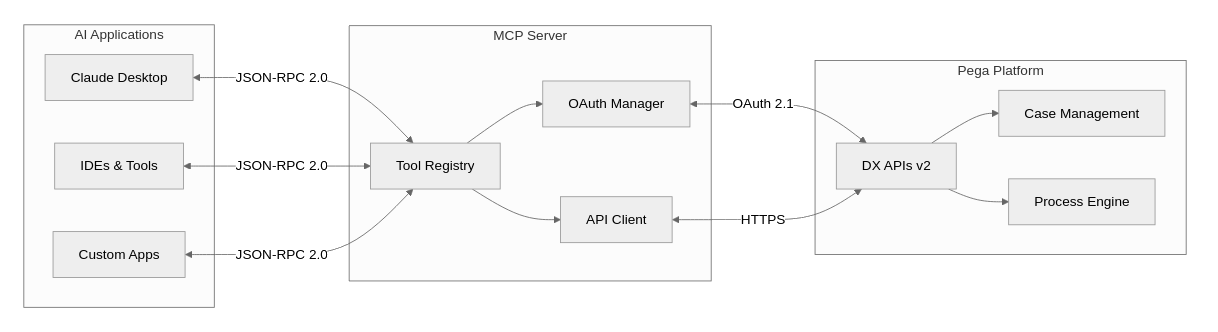
The Pega DX MCP Server provides 67 comprehensive tools organized into 11 functional categories. Each category can be enabled or disabled via environment variables for granular control.
Control which tool categories are loaded using environment variables in your MCP client configuration. All categories are enabled by default - set to "false" to disable:
Example - Only core case management tools enabled:
{
  "mcpServers": {
    "pega-dx-mcp": {
      "command": "npx",
      "args": ["-y", "@marco-looy/pega-dx-mcp"],
      "env": {
        "PEGA_BASE_URL": "https://your-pega-instance.com",
        "PEGA_CLIENT_ID": "your-client-id",
        "PEGA_CLIENT_SECRET": "your-client-secret",
        "PEGA_API_VERSION":"v2",
        "PEGA_SERVICE_TOOLS": "true",
        "PEGA_CASETYPE_TOOLS": "true",
        "PEGA_CASE_TOOLS": "true",
        "PEGA_ASSIGNMENT_TOOLS": "false",
        "PEGA_ATTACHMENT_TOOLS": "false",
        "PEGA_DATAVIEW_TOOLS": "false",
        "PEGA_DOCUMENT_TOOLS": "false",
        "PEGA_FOLLOWER_TOOLS": "false",
        "PEGA_PARTICIPANT_TOOLS": "false",
        "PEGA_RELATED_CASE_TOOLS": "false",
        "PEGA_TAG_TOOLS": "false"
      }
    }
  }
}
get_assignment - Get detailed assignment informationget_assignment_action - Get assignment action details and UI metadataget_next_assignment - Get next work assignment for userjump_to_step - Navigate to specific step in assignment flownavigate_assignment_previous - Navigate to previous step in assignmentperform_assignment_action - Execute assignment actionsrecalculate_assignment_fields - Recalculate assignment form fieldsrefresh_assignment_action - Refresh assignment action form datasave_assignment_action - Save assignment form data without executingadd_case_attachments - Attach files/URLs to casesdelete_attachment - Remove attachments from casesget_attachment - Retrieve attachment contentget_attachment_categories - List available attachment categoriesget_case_attachments - List all case attachmentsupdate_attachment - Update attachment metadataupload_attachment - Upload files as temporary attachmentsadd_optional_process - Add stage or case-wide optional processesbulk_cases_patch - Perform actions on multiple caseschange_to_next_stage - Navigate case to next stagechange_to_stage - Navigate case to specific stagecreate_case - Create new cases with contentdelete_case - Delete cases in create stageget_case - Retrieve detailed case informationget_case_action - Get case action details and metadataget_case_ancestors - Get case ancestor hierarchyget_case_descendants - Get case descendant hierarchyget_case_stages - List case stages and processesget_case_view - Get specific case view detailsget_case_view_calculated_fields - Calculate case view fieldsget_cases - Get all cases created by authenticated user (V1 EXCLUSIVE)perform_bulk_action - Execute bulk case operationsperform_case_action - Execute case-wide actionsrecalculate_case_action_fields - Recalculate case action fieldsrefresh_case_action - Refresh case action form datarelease_case_lock - Release pessimistic case locksupdate_case - Update case by modifying properties directly (V1 EXCLUSIVE)get_case_type_action - Get case type action metadataget_case_type_bulk_action - Get bulk action metadata for case typesget_case_types - List available case typesdelete_data_record - Delete data records from savable data pagesget_data_objects - List available data objectsget_data_view_count - Get data view result countsget_data_view_metadata - Get data view metadata and parametersget_list_data_view - Query list data views with filteringupdate_data_record_full - Fully update data recordsupdate_data_record_partial - Partially update data recordsget_document - Retrieve document content as base64remove_case_document - Remove documents linked to casesadd_case_followers - Add users as case followersdelete_case_follower - Remove case followersget_case_followers - List case followerscreate_case_participant - Add participants to casesdelete_participant - Remove case participantsget_case_participants - List all case participantsget_participant - Get specific participant detailsget_participant_role_details - Get participant role informationget_participant_roles - List available participant rolesupdate_participant - Update participant informationdelete_related_case - Remove case relationshipsget_related_cases - List related casesrelate_cases - Create case relationshipsauthenticate_pega - Authenticate with Pega Infinity using OAuth2diagnose_pega_config - Diagnose configuration and troubleshoot connection issuesping_pega_service - Test connectivity and system availabilityadd_case_tags - Add tags to casesdelete_case_tag - Remove specific case tagsget_case_tags - List case tagsNote: The following examples demonstrate envisioned capabilities and planned user experiences. These scenarios represent the experimental goals of this GenAI Innovation project and may not reflect current implementation status.
User: "Create a new insurance claim for policy #12345"
AI: I'll create a new insurance claim case. What type of claim is this?
User: "Auto accident claim"
AI: ✅ Created auto accident claim case INS-CLAIM-789
    Case ID: INS-CLAIM-789
    Policy: #12345
    Status: Open
    Next step: Provide accident details
User: "What's my next assignment?"
AI: You have 3 pending assignments:
    1. Review claim documentation (INS-CLAIM-789) - Due today
    2. Approve travel request (TRAVEL-456) - Due tomorrow
    3. Customer callback (SERVICE-123) - Due in 2 hours
User: "Let me work on the claim review"
AI: ✅ Opening claim documentation review for INS-CLAIM-789
    [Displays relevant case data and required actions]
# Pega Infinity Connection
PEGA_BASE_URL=https://your-pega-instance.com
PEGA_API_VERSION=v2  # Optional: v1 or v2 (defaults to v2)

# OAuth 2.1 Authentication
PEGA_CLIENT_ID=your-oauth-client-id
PEGA_CLIENT_SECRET=your-oauth-client-secret
Important Notes:
/prweb in PEGA_BASE_URL - it will be automatically appended. If present, it will be auto-cleaned with a warning.sessionCredentials with each tool call.For the full list of settings, see Environment Variables above.
Join us in this exciting GenAI Innovation experiment! As an experimental project exploring the future of natural language interfaces for enterprise platforms, we welcome community participation in shaping this innovation journey.
# Fork and clone the repository
git clone https://github.com/your-username/pega-dx-mcp.git
cd pega-dx-mcp

# Install dependencies
npm install

# Create a feature branch
git checkout -b feature/your-feature-name

# Make changes and test
npm test

# Submit pull request
Licensed under the Apache License, Version 2.0. See LICENSE for details.
Claim this server with your GitHub account to request manual ownership verification.
Link to the catalog listing for Pega DX MCP Server from your README. This badge does not certify ownership, compatibility or security.
[](https://awesome-mcp.com/servers/pega-dx-api)Public repository statistics could not be verified. Check the configured source address; unavailable counts are not zero.
来源、范围和时段分别列出;不相加,不代表安装人数、活跃用户或安全审核。
尚无已审核的包 / 镜像标识,暂不展示下载统计。
Alternative and complementary servers in the same category
A directory listing describing a cancellation-letter and mailing-address service. The configured public GitHub repository returned 404 during source verification.

A hosted MCP service for browsing and searching through Singapore mobile-network proxies.

A directory listing describing a Markdown-to-PDF service. The configured public GitHub repository returned 404 during source verification.