


This is a Model Context Protocol (MCP) server for interacting with AIStor object stores.
Repository stats unavailable
Databases & Storage
An MCP server that gives Claude, OpenWebUI, and other MCP clients read-only PostgreSQL observability through predefined monitoring queries for queries, locks, bloat, VACUUM, indexes, replication, WAL, and capacity.
MCP PostgreSQL Ops server is cataloged as an MCP server attributed to call518. An MCP server that gives Claude, OpenWebUI, and other MCP clients read-only PostgreSQL observability through predefined monitoring queries for queries, locks, bloat, VACUUM, indexes, replication, WAL, and capacity. It is categorized under databases storage. See the capability inspector for recorded interfaces and their independent review status; consult upstream documentation for the current interface.
Installation configuration is not reviewed. No executable setup is offered for this entry; inspect the source repository before proceeding.
Catalog license label: MIT License. Check the source repository's current license and terms before using, modifying or distributing this software.
能力定义尚未审核。未核验的采集内容不会作为可信接口展示。
暂无可展示的已审核记录。这不表示上游不支持此能力。
暂无可展示的已审核记录。这不表示上游不支持此能力。
暂无可展示的已审核记录。这不表示上游不支持此能力。
Email delivery is not connected. This page does not collect email addresses or create subscriptions.
Browse the registry for current listings instead.
Reviews for MCP PostgreSQL Ops server are not available yet
Review publishing and storage are not connected. This page does not collect or publish ratings or comments, including after sign-in.
No; core monitoring works without extensions, but pg_stat_statements and pg_stat_monitor add query analytics.
No, all tools are read-only and it runs only predefined queries rather than arbitrary SQL.
It supports stdio and streamable HTTP transports.
README.md · 75a3bc602f52 · 采集于 2026-11-13 08:48:54 UTC
保留上游原文,不做 AI 改写。为安全起见过滤脚本、表单和不安全链接。
当前显示最后一次成功采集的文档快照,请以来源页面为准。
Give Claude and other AI assistants read-only PostgreSQL observability for slow queries, locks, bloat, VACUUM, indexes, replication, WAL, and capacity.







MCP-PostgreSQL-Ops lets Claude, OpenWebUI, and other MCP clients inspect a PostgreSQL server through natural-language questions. It turns requests such as “Which tables need VACUUM now?” into predefined, read-only SQL queries and returns the evidence needed to diagnose the database.
pg_stat_statements and pg_stat_monitor add query analytics.uvx, or
connect OpenWebUI directly to the HTTP MCP server.For an AI-generated code walkthrough, use

Show the current active connections and blocked sessions
Which queries consume the most execution time?
Find bloated tables and explain what needs attention first
Which tables need VACUUM or autovacuum tuning?
Show unused or inefficient indexes
Check replication, WAL, checkpoints, and background processes
Summarize database size, growth, and I/O activity
Draw the relationships for the ecommerce schema
More requests to try: see Example Queries for requests by area (performance, health checks, capacity and VACUUM, structure, troubleshooting, multi-step workflows) and per-tool examples.
Core tools work with normal catalog access. Broader cross-database visibility depends on the PostgreSQL role; use a least-privilege monitoring account in production.
Example: slow-query evidence and recommendations
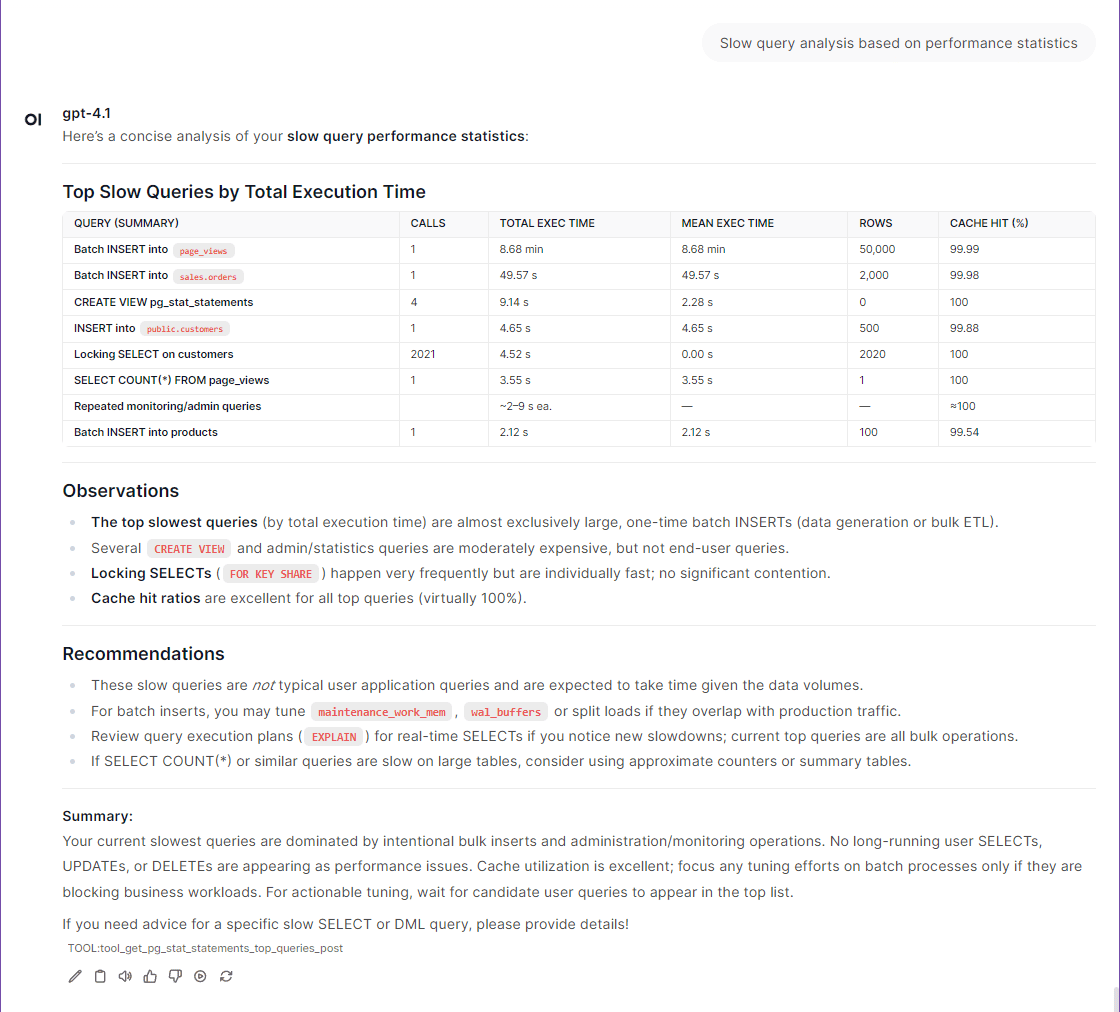
More examples are available in the screenshots and usage wiki.
Choose one path. If you already have PostgreSQL and Claude Desktop, Option A is the shortest. Option B provides a complete local demonstration with sample databases and OpenWebUI.
Requirements: Claude Desktop with extension support and a PostgreSQL server reachable from the computer running Claude Desktop.
mcp-postgresql-ops-<version>.mcpb.Show the current active PostgreSQL connections.The password field is marked sensitive and is stored by Claude Desktop. The
extension runs the server locally over stdio; it does not expose an HTTP
port.
Requirements: Git, Docker with the Compose plugin, and an OpenWebUI model provider whose model supports tool calling.
1. Configure
git clone https://github.com/call518/MCP-PostgreSQL-Ops.git
cd MCP-PostgreSQL-Ops
cp .env.example .env
cp mcp-config.json.http mcp-config.json.http.local
chmod 600 mcp-config.json.http.local
openssl rand -hex 32   # use the output as WEBUI_SECRET_KEY
vi .env                # set WEBUI_SECRET_KEY; adjust ports if needed
mcp-config.json.http.local is ignored by Git and is mounted only into MCPO.
If REMOTE_AUTH_ENABLE=true, replace <REMOTE_SECRET_KEY> in that local file
with the same secret configured in .env. Leave the tracked
mcp-config.json.http file as a credential-free template.
The default .env.example credentials are only for the included disposable
PostgreSQL demo. Do not reuse them for an existing or externally reachable
database.
2. Start
docker compose up -d
docker compose ps --all  # wait for mcp-server to be healthy and init to exit 0
This starts OpenWebUI at http://localhost:3003, the MCP server at
http://localhost:18003/mcp, optional MCPO/OpenAPI compatibility at
http://localhost:8003, and a disposable PostgreSQL demo environment. The
demo includes ecommerce, analytics, inventory, and HR data plus intentional
bloat and index patterns for realistic monitoring questions.
3. Connect OpenWebUI to the MCP server
Open http://localhost:3003, create the administrator account, and add a
model provider under Settings → Admin → Connections:
https://api.openai.com/v1, enter your OpenAI API key (Auth Bearer),
set API Type to Chat Completions, and save it.http://host.docker.internal:11434; ensure Ollama is reachable from
Docker and pull a tool-capable model.Confirm that the model appears in a new chat before continuing.
The Quick Start calls tools through Chat Completions with model reasoning
turned off, using this default already present in .env.example:
DEFAULT_MODEL_PARAMS={"reasoning_effort":"none"}
This value requires API Type: Chat Completions. With Responses,
OpenWebUI 0.13.0 still sends reasoning_effort, and every request fails with
Unsupported parameter: 'reasoning_effort'. If the open-webui-data volume
already exists, set the same value under Settings → Admin → Models → Model
Defaults → Model Parameters because its saved database value takes
precedence. To keep model reasoning through Responses instead, see
OpenAI reasoning models.
Under Settings → Admin → Tools → Integrations → External Tool Servers,
add a connection of type MCP (Streamable HTTP) with URL
http://mcp-server:8000/mcp and authentication None. This matches the
Quick Start default REMOTE_AUTH_ENABLE=false; enable and configure Bearer
authentication before exposing the server outside the local Docker host.
Under Settings → Admin → System → Interface → Chat, enable Tool
Search and Defer Built-in Tools, then set Deferral Threshold to 0.
This keeps the full PostgreSQL tool list within the model's tool limits.
In a new chat, enable the connection under Integrations → Tools and ask:
Use mcp-postgresql-ops to show tables that need VACUUM.
If setup or tool calls fail, see OpenWebUI Issues for existing-volume precedence, per-model and per-chat overrides, and provider compatibility notes.
MCPO is optional. OpenWebUI 0.13 connects to the MCP server directly and does not require the MCPO proxy. To expose the tools as an OpenAPI/Swagger service for a legacy client, use MCPO at
http://localhost:8003. The Compose file starts it so every project keeps the same deployment layout. To run without it, usedocker compose up -d mcp-server open-webui.
To connect the Docker stack to an existing PostgreSQL server instead, update
the POSTGRES_* values in .env and run:
docker compose -f docker-compose.custom-db.yml up -d
Claude Desktop ── stdio ───────────────┐
                                       │
OpenWebUI 0.13 ─ Streamable HTTP ──────┼─> MCP-PostgreSQL-Ops
                                       │      │
OpenAPI client ─ optional MCPO proxy ──┘      └─> read-only SQL ─> PostgreSQL
The MCP server is the required component. OpenWebUI can call it directly; MCPO is only an optional protocol adapter. The DeepWiki architecture provides a code-level walkthrough.
| Setup | Best for | Requirements |
|---|---|---|
| MCPB extension | Fastest Claude Desktop setup | Claude Desktop |
uvx --python 3.12 mcp-postgresql-ops | Explicit local configuration | uv |
| Docker Compose | OpenWebUI and HTTP MCP clients | Docker Compose |
| Source checkout | Development and customization | Git, uv |
All methods run the same server. Choose one; they are not cumulative.
Automatic Adaptation: All tools work transparently across supported versions - no configuration needed!
| Tool Name | Extensions Required | PG 12 | PG 13 | PG 14 | PG 15 | PG 16 | PG 17 | PG 18 | System Views/Tables Used |
|---|---|---|---|---|---|---|---|---|---|
get_server_info | ❌ None | ✅ | ✅ | ✅ | ✅ | ✅ | ✅ | ✅ | version(), pg_extension |
get_active_connections | ❌ None | ✅ | ✅ | ✅ | ✅ | ✅ | ✅ | ✅ | pg_stat_activity |
get_postgresql_config | ❌ None | ✅ | ✅ | ✅ | ✅ | ✅ | ✅ | ✅ | pg_settings |
get_database_list | ❌ None | ✅ | ✅ | ✅ | ✅ | ✅ | ✅ | ✅ | pg_database |
get_table_list | ❌ None | ✅ | ✅ | ✅ | ✅ | ✅ | ✅ | ✅ | information_schema.tables |
get_table_schema_info | ❌ None | ✅ | ✅ | ✅ | ✅ | ✅ | ✅ | ✅ | information_schema.*, pg_indexes, pg_constraint |
get_database_schema_info | ❌ None | ✅ | ✅ | ✅ | ✅ | ✅ | ✅ | ✅ | pg_namespace, pg_class, pg_proc |
get_table_relationships | ❌ None | ✅ | ✅ | ✅ | ✅ | ✅ | ✅ | ✅ | pg_constraint, information_schema.* |
get_user_list | ❌ None | ✅ | ✅ | ✅ | ✅ | ✅ | ✅ | ✅ | pg_user, pg_roles |
get_index_usage_stats | ❌ None | ✅ | ✅ | ✅ | ✅ | ✅ | ✅ | ✅ | pg_stat_user_indexes |
get_database_size_info | ❌ None | ✅ | ✅ | ✅ | ✅ | ✅ | ✅ | ✅ | pg_database_size() |
get_table_size_info | ❌ None | ✅ | ✅ | ✅ | ✅ | ✅ | ✅ | ✅ | pg_total_relation_size() |
get_vacuum_analyze_stats | ❌ None | ✅ | ✅ | ✅ | ✅ | ✅ | ✅ | ✅ Enhanced | pg_stat_user_tables |
get_current_database_info | ❌ None | ✅ | ✅ | ✅ | ✅ | ✅ | ✅ | ✅ | pg_database, current_database() |
get_table_bloat_analysis | ❌ None | ✅ | ✅ | ✅ | ✅ | ✅ | ✅ | ✅ | pg_stat_user_tables |
get_database_bloat_overview | ❌ None | ✅ | ✅ | ✅ | ✅ | ✅ | ✅ | ✅ | pg_stat_user_tables |
get_autovacuum_status | ❌ None | ✅ | ✅ | ✅ | ✅ | ✅ | ✅ | ✅ | pg_stat_user_tables |
get_autovacuum_activity | ❌ None | ✅ | ✅ | ✅ | ✅ | ✅ | ✅ | ✅ | pg_stat_user_tables |
get_running_vacuum_operations | ❌ None | ✅ | ✅ | ✅ | ✅ | ✅ | ✅ | ✅ | pg_stat_activity |
get_vacuum_effectiveness_analysis | ❌ None | ✅ | ✅ | ✅ | ✅ | ✅ | ✅ | ✅ | pg_stat_user_tables |
get_lock_monitoring | ❌ None | ✅ | ✅ | ✅ | ✅ | ✅ | ✅ | ✅ | pg_locks, pg_stat_activity |
get_wal_status | ❌ None | ✅ | ✅ | ✅ | ✅ | ✅ | ✅ | ✅ | pg_current_wal_lsn() |
get_database_stats | ❌ None | ✅ | ✅ | ✅ | ✅ | ✅ | ✅ | ✅ Enhanced | pg_stat_database |
get_table_io_stats | ❌ None | ✅ | ✅ | ✅ | ✅ | ✅ | ✅ | ✅ | pg_statio_user_tables |
get_index_io_stats | ❌ None | ✅ | ✅ | ✅ | ✅ | ✅ | ✅ | ✅ | pg_statio_user_indexes |
get_database_conflicts_stats | ❌ None | ✅ | ✅ | ✅ | ✅ | ✅ | ✅ | ✅ | pg_stat_database_conflicts |
| Tool Name | Extensions Required | PG 12 | PG 13 | PG 14 | PG 15 | PG 16 | PG 17 | PG 18 | Special Features |
|---|---|---|---|---|---|---|---|---|---|
get_io_stats | ❌ None | ✅ Basic | ✅ Basic | ✅ Basic | ✅ Basic | ✅ Enhanced | ✅ Enhanced | ✅ Enhanced | PG16+: pg_stat_io support; PG18+: byte columns |
get_bgwriter_stats | ❌ None | ✅ | ✅ | ✅ | ✅ | ✅ | ✅ Special | ✅ Enhanced | PG17: Separate checkpointer stats; PG18+: num_done, slru_written |
get_replication_status | ❌ None | ✅ Compatible | ✅ Enhanced | ✅ Enhanced | ✅ Enhanced | ✅ Enhanced | ✅ Enhanced | ✅ Enhanced | PG13+: wal_status, safe_wal_size; PG16+: enhanced WAL receiver; PG17+: invalidation_reason, inactive_since |
get_all_tables_stats | ❌ None | ✅ Compatible | ✅ Enhanced | ✅ Enhanced | ✅ Enhanced | ✅ Enhanced | ✅ Enhanced | ✅ Enhanced | PG13+: n_ins_since_vacuum tracking for vacuum maintenance optimization |
get_user_functions_stats | ⚙️ Config Required | ✅ | ✅ | ✅ | ✅ | ✅ | ✅ | ✅ | Requires track_functions=pl |
get_wait_events | ❌ None | ✅ Fallback | ✅ Fallback | ✅ Fallback | ✅ Fallback | ✅ Fallback | ✅ Native | ✅ Native | PG17+: pg_wait_events catalog; PG12-16: fallback to pg_stat_activity current waits |
get_wal_summarizer_status | ❌ None | ❌ | ❌ | ❌ | ❌ | ❌ | ✅ | ✅ | PG17+: WAL summarizer monitoring for incremental backups |
get_async_io_status | ❌ None | ❌ | ❌ | ❌ | ❌ | ❌ | ❌ | ✅ | PG18+: pg_aios async I/O subsystem monitoring |
get_per_backend_io_stats | ❌ None | ❌ | ❌ | ❌ | ❌ | ❌ | ❌ | ✅ | PG18+: Per-backend I/O and WAL statistics |
| Tool Name | Required Extension | PG 12 | PG 13 | PG 14 | PG 15 | PG 16 | PG 17 | PG 18 | Notes |
|---|---|---|---|---|---|---|---|---|---|
get_pg_stat_statements_top_queries | pg_stat_statements | ✅ Compatible | ✅ Enhanced | ✅ Enhanced | ✅ Enhanced | ✅ Enhanced | ✅ Enhanced | ✅ Enhanced | PG12: total_time → total_exec_time; PG13+: native total_exec_time; PG17+: stats_since |
get_pg_stat_monitor_recent_queries | pg_stat_monitor | ✅ Compatible | ✅ Enhanced | ✅ Enhanced | ✅ Enhanced | ✅ Enhanced | ✅ Enhanced | ✅ Enhanced | PG12: total_time → total_exec_time; PG13+: native total_exec_time |
pg_wait_events view: Native wait event catalog with descriptions (used by get_wait_events)get_wal_summarizer_status)invalidation_reason and inactive_since columns (used by get_replication_status)pg_stat_statements stats_since: Track when statistics were last reset (used by get_pg_stat_statements_top_queries)get_running_vacuum_operations)pg_aios view: Async I/O subsystem monitoring (used by get_async_io_status)get_per_backend_io_stats)total_vacuum_time, total_autovacuum_time, total_analyze_time, total_autoanalyze_time cumulative timing (used by get_vacuum_analyze_stats)pg_stat_io byte columns: read_bytes, write_bytes, extend_bytes (used by get_io_stats)parallel_workers_launched, parallel_workers_to_launch (used by get_database_stats)num_done, slru_written columns (used by get_bgwriter_stats)# Local stdio transport
uvx --python 3.12 mcp-postgresql-ops --type stdio
# Streamable HTTP transport
uvx --python 3.12 mcp-postgresql-ops \
--type streamable-http \
--host 127.0.0.1 \
--port 8000
git clone https://github.com/call518/MCP-PostgreSQL-Ops.git
cd MCP-PostgreSQL-Ops
uv sync
uv run mcp-postgresql-ops --help
The package is also available through pip install mcp-postgresql-ops.
(Optional) Run with Local Source:
{
  "mcpServers": {
    "mcp-postgresql-ops": {
      "command": "uv",
      "args": ["run", "python", "-m", "mcp_postgresql_ops"],
      "env": {
        "POSTGRES_HOST": "127.0.0.1",
        "POSTGRES_PORT": "15432",
        "POSTGRES_USER": "postgres",
        "POSTGRES_PASSWORD": "changeme",
        "POSTGRES_DB": "ecommerce"
      }
    }
  }
}
# Stdio mode
uvx --python 3.12 mcp-postgresql-ops \
  --type stdio

# HTTP mode
uvx --python 3.12 mcp-postgresql-ops \
  --type streamable-http \
  --host 127.0.0.1 \
  --port 8000 \
  --log-level DEBUG
{
  "mcpServers": {
    "Postgresql-A": {
      "command": "uvx",
      "args": ["--python", "3.12", "mcp-postgresql-ops"],
      "env": {
        "POSTGRES_HOST": "a.foo.com",
        "POSTGRES_PORT": "5432",
        "POSTGRES_USER": "postgres",
        "POSTGRES_PASSWORD": "postgres",
        "POSTGRES_DB": "postgres"
      }
    },
    "Postgresql-B": {
      "command": "uvx",
      "args": ["--python", "3.12", "mcp-postgresql-ops"],
      "env": {
        "POSTGRES_HOST": "b.bar.com",
        "POSTGRES_PORT": "5432",
        "POSTGRES_USER": "postgres",
        "POSTGRES_PASSWORD": "postgres",
        "POSTGRES_DB": "postgres"
      }
    }
  }
}
# Method 1: Module execution (for development, requires PYTHONPATH)
PYTHONPATH=/path/to/MCP-PostgreSQL-Ops/src
python -m mcp_postgresql_ops \
  --type stdio

# Method 2: Direct script (after uv installation in project directory)
uv run mcp-postgresql-ops \
  --type stdio

# Method 3: Installed package script (after pip/uv install)
mcp-postgresql-ops \
  --type stdio

# HTTP mode examples:
# Development mode
PYTHONPATH=/path/to/MCP-PostgreSQL-Ops/src
python -m mcp_postgresql_ops \
  --type streamable-http \
  --host 127.0.0.1 \
  --port 8000 \
  --log-level DEBUG

# Production mode (after installation)
mcp-postgresql-ops \
  --type streamable-http \
  --host 127.0.0.1 \
  --port 8000 \
  --log-level DEBUG
--type: Transport type (stdio or streamable-http) - Default: stdio--host: Host address for HTTP transport - Default: 127.0.0.1--port: Port number for HTTP transport - Default: 8000--auth-enable: Enable Bearer token authentication for streamable-http mode - Default: false--secret-key: Secret key for Bearer token authentication (required when auth enabled)--log-level: Logging level (DEBUG, INFO, WARNING, ERROR, CRITICAL) - Default: INFO| Variable | Description | Default | Project Default |
|---|---|---|---|
PYTHONPATH | Python module search path (only needed for development mode) | - | /app/src |
MCPO_CONFIG_FILE | Ignored local MCPO configuration mounted by Docker Compose | mcp-config.json.http.local | mcp-config.json.http.local |
MCP_LOG_LEVEL | Server logging verbosity (DEBUG, INFO, WARNING, ERROR) | INFO | INFO |
FASTMCP_TYPE | MCP transport protocol (stdio for CLI, streamable-http for web) | stdio | streamable-http |
FASTMCP_HOST | HTTP server bind address (0.0.0.0 for all interfaces) | 127.0.0.1 | 0.0.0.0 |
FASTMCP_PORT | HTTP server port for MCP communication | 8000 | 8000 |
REMOTE_AUTH_ENABLE | Enable Bearer token authentication for streamable-http mode (Default: false if undefined/null/empty) | false | false |
REMOTE_SECRET_KEY | Secret key for Bearer token authentication (required when auth enabled) | - | empty |
PGSQL_VERSION | PostgreSQL major version for Docker image selection | 16 | 16 |
PGDATA | PostgreSQL data directory inside Docker container (Do not modify) | /var/lib/postgresql/data | /data/db |
POSTGRES_HOST | PostgreSQL server hostname or IP address | 127.0.0.1 | host.docker.internal |
POSTGRES_PORT | PostgreSQL server port number | 5432 | 15432 |
POSTGRES_USER | PostgreSQL connection username (needs read permissions) | postgres | postgres |
POSTGRES_PASSWORD | PostgreSQL user password (supports special characters) | changeme | changeme |
POSTGRES_DB | Default database name for connections | testdb | ecommerce |
POSTGRES_MAX_CONNECTIONS | PostgreSQL max_connections configuration parameter | 200 | 200 |
DOCKER_BIND_ADDRESS | Host address for published Docker ports | 127.0.0.1 | 127.0.0.1 |
DOCKER_EXTERNAL_PORT_OPENWEBUI | Host port mapping for Open WebUI container | 8080 | 3003 |
DOCKER_EXTERNAL_PORT_MCP_SERVER | Host port mapping for MCP server container | 8080 | 18003 |
DOCKER_EXTERNAL_PORT_MCPO_PROXY | Host port mapping for MCPO proxy container | 8000 | 8003 |
DOCKER_INTERNAL_PORT_POSTGRESQL | PostgreSQL container internal port | 5432 | 5432 |
Note: POSTGRES_DB serves as the default target database for operations when no specific database is specified. In Docker environments, if set to a non-default name, this database will be automatically created during initial PostgreSQL startup.
Port Configuration: The built-in PostgreSQL container uses port mapping 15432:5432 where:
POSTGRES_PORT=15432: External port for host access and MCP server connectionsDOCKER_INTERNAL_PORT_POSTGRESQL=5432: Internal container port (PostgreSQL default)POSTGRES_PORT to match your server's actual portFor more details, see the ## Tool Compatibility Matrix
Note: Most MCP tools work without any PostgreSQL extensions. section below. Some advanced performance analysis tools require the following extensions:
-- Query performance statistics (required only for get_pg_stat_statements_top_queries)
CREATE EXTENSION IF NOT EXISTS pg_stat_statements;

-- Advanced monitoring (optional, used by get_pg_stat_monitor_recent_queries)
CREATE EXTENSION IF NOT EXISTS pg_stat_monitor;
Quick Setup: For new PostgreSQL installations, add to postgresql.conf:
shared_preload_libraries = 'pg_stat_statements'
Then restart PostgreSQL and run the CREATE EXTENSION commands above.
pg_stat_statements is required only for slow query analysis tools.pg_stat_monitor is optional and used for real-time query monitoring.⚠️ Statistics Collection Settings: Some MCP tools require specific PostgreSQL configuration parameters to collect statistics. Choose one of the following configuration methods:
Tools affected by these settings:
track_functions = pl or track_functions = alltrack_io_timing = ontrack_io_timing = onVerification: After applying any method, verify the settings:
SELECT name, setting, context FROM pg_settings WHERE name IN ('track_activities', 'track_counts', 'track_io_timing', 'track_functions') ORDER BY name;

       name       | setting |  context
------------------+---------+-----------
 track_activities | on      | superuser
 track_counts     | on      | superuser
 track_functions  | pl      | superuser
 track_io_timing  | on      | superuser
(4 rows)
Add the following to your postgresql.conf:
# Basic statistics collection (usually enabled by default)
track_activities = on
track_counts = on

# Required for function statistics tools
track_functions = pl    # Enables PL/pgSQL function statistics collection

# Optional but recommended for accurate I/O timing
track_io_timing = on    # Enables I/O timing statistics collection
Then restart PostgreSQL server.
For Docker or command-line PostgreSQL startup:
# Docker example
docker run -d \
  -e POSTGRES_PASSWORD=mypassword \
  postgres:17 \
  -c track_activities=on \
  -c track_counts=on \
  -c track_functions=pl \
  -c track_io_timing=on

# Direct postgres command
postgres -D /data \
  -c track_activities=on \
  -c track_counts=on \
  -c track_functions=pl \
  -c track_io_timing=on
For managed PostgreSQL services where you cannot modify postgresql.conf, use SQL commands to change settings dynamically:
-- Enable basic statistics collection (usually enabled by default)
ALTER SYSTEM SET track_activities = 'on';
ALTER SYSTEM SET track_counts = 'on';

-- Enable function statistics collection (requires superuser privileges)
ALTER SYSTEM SET track_functions = 'pl';

-- Enable I/O timing statistics (optional but recommended)
ALTER SYSTEM SET track_io_timing = 'on';

-- Reload configuration without restart (run separately)
SELECT pg_reload_conf();
Alternative for session-level testing:
-- Set for current session only (temporary)
SET track_activities = 'on';
SET track_counts = 'on';
SET track_functions = 'pl';
SET track_io_timing = 'on';
Note: When using command-line tools, run each SQL statement separately to avoid transaction block errors.
-- Verify preload setting
SHOW shared_preload_libraries;

-- Enable extension in target DB
CREATE EXTENSION IF NOT EXISTS pg_stat_statements;

-- Recommended visibility for monitoring
GRANT pg_read_all_stats TO <app_user>;
Requests are grouped first by task area, then by tool. Each tool runs read-only queries; results depend on the PostgreSQL version, installed extensions, and the connected role's privileges.
📈 Database Performance Analysis
🔧 Background Writer & Checkpoints
🔍 Server Health Check
📊 Performance Analysis
💾 Capacity Management
🗄️ Structure Analysis
📈 Advanced Monitoring
Connection Issues
Extension Problems
Performance Issues
Send these requests in order to run a routine review.
Regular Health Checks
Capacity Planning
Performance Optimization
database_name parameter must be specifiedb.p(id) instead of p(id)). A column in several foreign keys is shown in one COLUMN row, with its targets comma-separated in matching order (a.p, b.p / id, id). Per-partition FK clones that PostgreSQL creates for a partitioned referenced table are no longer listed.database_name parameter must be specifieddatabase_name parameter must be specifiedtable_name empty for database-wide relationship analysispg_constraint, so each FK column pair is listed once. Same-named FKs on other tables or schemas are no longer mixed in. Statistics and "Referenced N times" now count FK constraints instead of joined rows, and per-partition FK clones are not counted.track_functions = pl in postgresql.conftrack_io_timing = on for accurate timingtrack_io_timing = on for accurate timingread_bytes, write_bytes, extend_bytes) for precise I/O size trackingpg_stat_checkpointern_ins_since_vacuum) for optimal maintenance schedulingtotal_vacuum_time, total_autovacuum_time, total_analyze_time, total_autoanalyze_time) for maintenance duration trackingpg_wait_events catalog with full descriptionspg_stat_activity current waits grouped by typepg_get_wal_summarizer_state()pg_aios view for async I/O monitoringpg_stat_statements)
total_time → total_exec_time mapping; PG13+ uses native columnsstats_since (PG17+) and parallel_workers (PG18+)pg_stat_monitor)
total_time → total_exec_time mapping; PG13+ uses native columnsMulti-Database Analysis
Schema Analysis
Performance Deep Dive
Capacity Planning
Configuration Troubleshooting
💡 Pro Tip: All tools support multi-database operations using the database_name parameter. This allows PostgreSQL superusers to analyze and monitor multiple databases from a single MCP server instance.
.env fileget_server_info to check extension statusCREATE EXTENSION pg_stat_statements;
CREATE EXTENSION pg_stat_monitor;
Function tools with reasoning_effort are not supported for <model> in /v1/chat/completions: Some OpenAI reasoning models reject requests that
combine tool calling (required for MCP tools) with a reasoning_effort
value on the Chat Completions API.
Enabled by default: .env.example sets this OpenWebUI global default,
which applies reasoning_effort=none to every model:
DEFAULT_MODEL_PARAMS={"reasoning_effort":"none"}
OpenWebUI merges global default model params first, then per-model params, then per-chat params (later values win). If you still see the error, check:
.env created before this setting was added: Add the line above to
.env.open-webui-data volume: The value is stored in the
OpenWebUI database only on first startup, and the stored value takes
precedence afterward. Set it in the Admin UI instead: in Settings →
Admin → Models, open the default model settings and set Reasoning
Effort to none under Advanced Params.none
in Settings → Admin → Models → <model> → Advanced Params or in the
chat's Controls → Advanced Params.Note: The global default sends
reasoning_effortto every model. Models or providers that do not support this parameter may reject the request. In that case, remove the line from.envand set Reasoning Effort per model instead.
Unsupported parameter: 'reasoning_effort' ... moved to 'reasoning.effort': OpenWebUI 0.13.0 sent the Chat Completions parameter
reasoning_effort (even none) through an OpenAI connection with API
Type: Responses. Set API Type to Chat Completions under Settings
→ Admin → Connections → edit the OpenAI connection (Quick Start default),
or keep Responses and set Reasoning Effort to Default in every scope
as described in OpenAI reasoning models. Then
start a new chat.
For OpenAI reasoning models, the connection's API Type and the Reasoning Effort parameter must match. Set API Type under Settings → Admin → Connections → edit the OpenAI connection, and use one of these combinations:
| Setup | API Type | Reasoning Effort | Result |
|---|---|---|---|
| Quick Start default | Chat Completions | none (from DEFAULT_MODEL_PARAMS) | Tools work; model reasoning is off |
| Reasoning with tools | Responses | Default in every scope | Tools work; the model uses its default reasoning effort |
Other combinations fail with OpenWebUI 0.13.0:
reasoning_effort value, including none: OpenWebUI
sends the Chat Completions parameter reasoning_effort unchanged, and the
Responses API rejects it with Unsupported parameter: 'reasoning_effort'.none: the API
rejects the request with Function tools with reasoning_effort are not supported.To use model reasoning instead, set DEFAULT_MODEL_PARAMS={} before the first
start, set the connection's API Type to Responses, and leave
Reasoning Effort at Default under Settings → Admin → Models → Model
Defaults and Settings → Admin → Models → model → Advanced Params.
Remove any reasoning_effort or reasoning override from the chat's
Controls → Advanced Params and Settings → General → Advanced
Parameters, then start a new chat. OpenWebUI can merge parameters from these
scopes, so an old override can still make the request fail. If the
open-webui-data volume already exists, clear reasoning_effort under
Model Defaults in the administrator UI, because the saved database value
takes precedence over .env.
Models and providers without this constraint may keep their normal API type and reasoning settings.
"No data found" for function statistics: Check track_functions setting
SHOW track_functions; -- Should be 'pl' or 'all'
Quick fix for managed services (AWS RDS, etc.):
ALTER SYSTEM SET track_functions = 'pl';
SELECT pg_reload_conf();
Missing I/O timing data: Enable timing collection
SHOW track_io_timing; -- Should be 'on'
Quick fix:
ALTER SYSTEM SET track_io_timing = 'on';
SELECT pg_reload_conf();
Apply configuration changes:
postgresql.conf and restart serverALTER SYSTEM SET + SELECT pg_reload_conf()SET parameter = value for current sessionlimit parameters to reduce result sizeFor more details, see the ## Tool Compatibility Matrix
Run compatibility check first:
# "Use get_server_info to check version and available features"
Understanding feature availability:
If a tool shows "Not Available":
# Clone and setup for development
git clone https://github.com/call518/MCP-PostgreSQL-Ops.git
cd MCP-PostgreSQL-Ops
uv sync

# Test with MCP Inspector (loads .env automatically)
./run-mcp-inspector-local.sh

# Direct execution methods:
# 1. Using uv run (recommended for development)
uv run mcp-postgresql-ops --log-level DEBUG

# 2. Module execution (requires PYTHONPATH)
PYTHONPATH=src python -m mcp_postgresql_ops --log-level DEBUG

# 3. After installation
mcp-postgresql-ops --log-level DEBUG

# Test version compatibility (requires different PostgreSQL versions)
# Modify POSTGRES_HOST in .env to point to different versions
The following test suites are available:
| Suite | File | Requires Docker |
|---|---|---|
| Unit tests (version logic, tool schemas, generated SQL, release scripts) | every tests/test_*.py except test_tools_integration.py | No |
| Integration tests (all tools × PG 12–18) | tests/test_tools_integration.py | Yes |
uv run pytest automatically starts the Docker test containers (PG 12–18), waits for them to be fully initialized, runs all tests, then tears everything down.
# Run all tests (unit + integration) — Docker is managed automatically
uv run pytest -v

# Unit tests only (no Docker or PostgreSQL needed; same command as CI)
uv run pytest tests --ignore=tests/test_tools_integration.py -v

# Tool argument schema tests only (no Docker or PostgreSQL needed)
uv run pytest tests/test_tool_schema_null_defaults.py -v

# Integration tests only
uv run pytest tests/test_tools_integration.py -v
Note: Docker must be running for integration tests. The test stack uses ports 5412–5418 (PG 12–18).
The MCP server automatically adapts to PostgreSQL versions 12-18. To test across versions:
🤝 Got ideas? Found bugs? Want to add cool features?
We're always excited to welcome new contributors! Whether you're fixing a typo, adding a new monitoring tool, or improving documentation - every contribution makes this project better.
Ways to contribute:
Pro tip: The codebase is designed to be super friendly for adding new tools. Check out the existing @mcp.tool() functions in mcp_main.py.
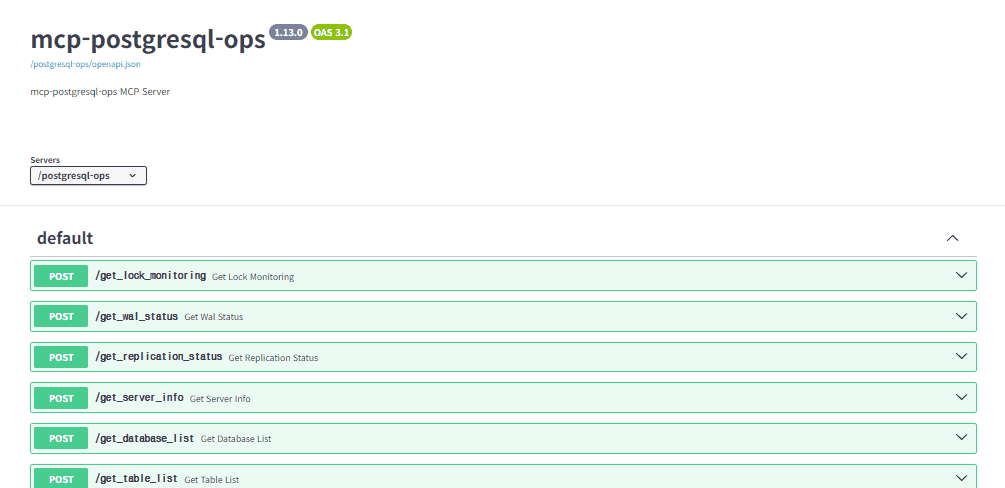
OpenWebUI 0.13 uses the MCP server directly; MCPO is not required for that
connection. The standard Compose deployment still starts MCPO to preserve the
same deployment layout across this project's sibling MCP repositories. Open
the MCPO Swagger endpoint, or
omit MCPO with docker compose up -d mcp-server open-webui.
MCPO reads the ignored file selected by MCPO_CONFIG_FILE. Create it from the
tracked template before starting Compose:
cp mcp-config.json.http mcp-config.json.http.local
chmod 600 mcp-config.json.http.local
When Bearer authentication is enabled, put the same REMOTE_SECRET_KEY in
.env and in the local file's Authorization header. Never place the secret
in the tracked template.
For streamable-http mode, this MCP server supports Bearer token authentication to secure remote access. This is especially important when running the server in production environments.
Default Policy:
REMOTE_AUTH_ENABLEdefaults tofalseif undefined, null, or empty. This ensures backward compatibility and prevents startup errors when the variable is not set.
Enable Authentication:
# In .env file
REMOTE_AUTH_ENABLE=true
REMOTE_SECRET_KEY=replace-with-a-strong-random-secret
Or via CLI:
# Module method
python -m mcp_postgresql_ops --type streamable-http --auth-enable \
  --secret-key replace-with-a-strong-random-secret

# Script method
mcp-postgresql-ops --type streamable-http --auth-enable \
  --secret-key replace-with-a-strong-random-secret
When authentication is enabled, MCP clients must include the Bearer token in the Authorization header:
{
  "mcpServers": {
    "mcp-postgresql-ops": {
      "type": "streamable-http",
      "url": "http://your-server:8000/mcp",
      "headers": {
        "Authorization": "Bearer replace-with-a-strong-random-secret"
      }
    }
  }
}
When authentication fails, the server returns:
This MCP server is designed for easy extensibility. Follow these 4 simple steps to add your own custom tools:
Add reusable data functions to src/mcp_postgresql_ops/functions.py:
async def get_your_custom_data(target_database: str = None, limit: int = 20) -> List[Dict[str, Any]]:
    """Your custom data retrieval function."""
    try:
        # Example implementation - adapt to your PostgreSQL needs
        query = """
        SELECT
            schemaname,
            tablename,
            attname as column_name,
            n_distinct,
            most_common_vals,
            most_common_freqs
        FROM pg_stats
        WHERE schemaname NOT IN ('information_schema', 'pg_catalog')
        ORDER BY schemaname, tablename, attname
        LIMIT $1
        """

        results = await execute_query(query, [limit], database=target_database)
        return results

    except Exception as e:
        logger.error(f"Failed to get custom data: {e}")
        raise
Add your tool function to src/mcp_postgresql_ops/mcp_main.py:
@mcp.tool()
async def get_your_custom_analysis(limit: int = 50, database_name: Optional[str] = None) -> str:
    """
    [Tool Purpose]: Brief description of what your tool does

    [Exact Functionality]:
    - Feature 1: Data aggregation and analysis
    - Feature 2: Database monitoring and insights
    - Feature 3: Performance metrics and reporting

    [Required Use Cases]:
    - When user asks "your specific analysis request"
    - Your PostgreSQL-specific monitoring needs

    Args:
        limit: Maximum results (1-100)
        database_name: Target database name (optional, uses default if not specified)

    Returns:
        Formatted analysis results
    """
    try:
        # Always validate input limits
        limit = max(1, min(limit, 100))

        # Get your custom data
        results = await get_your_custom_data(target_database=database_name, limit=limit)

        if not results:
            return "No data found for custom analysis."

        # Format and return results
        return format_table_data(results, f"Custom Analysis Results (Top {len(results)})")

    except Exception as e:
        logger.error(f"Failed to get custom analysis: {e}")
        return f"Error: {str(e)}"
Add your helper function to the imports section in src/mcp_postgresql_ops/mcp_main.py (around line 30):
from .functions import (
    execute_query,
    execute_single_query,
    format_table_data,
    format_bytes,
    format_duration,
    get_server_version,
    check_extension_exists,
    get_pg_stat_statements_data,
    get_pg_stat_monitor_data,
    sanitize_connection_info,
    get_current_database_name,
    POSTGRES_CONFIG,
    get_your_custom_data,  # Add your new function here
)
src/mcp_postgresql_ops/server_instructions.md only when a rule that spans several tools changes. Clients inject it into the model context, and Claude Code truncates it beyond 4,096 characters, so keep it short and do not repeat tool descriptions.# Local testing with MCP Inspector
./run-mcp-inspector-local.sh
# Or test with Docker stack
docker compose up -d
docker compose logs -f mcp-server
# Test with natural language queries:
# "Show me your custom analysis"
# "Get custom analysis for ecommerce database"
# "Analyze custom data with limit 25"
database_name parameter to target specific databaseslimit parameters with max(1, min(limit, 100))logger.error() for debugging while returning clean error messages to userscheck_extension_exists()For version-aware queries or extension-dependent features, see existing tools like get_pg_stat_statements_top_queries for reference patterns.
That's it! Your custom tool is ready to use with natural language queries through any MCP client.
Freely use, modify, and distribute under the MIT License.
Other MCP servers by the same author:
Claim this server with your GitHub account to request manual ownership verification.
Link to the catalog listing for MCP PostgreSQL Ops server from your README. This badge does not certify ownership, compatibility or security.
[](https://awesome-mcp.com/servers/postgresql-ops)Public repository statistics could not be verified. Check the configured source address; unavailable counts are not zero.
来源、范围和时段分别列出;不相加,不代表安装人数、活跃用户或安全审核。
尚无已审核的包 / 镜像标识,暂不展示下载统计。
Alternative and complementary servers in the same category
This is a Model Context Protocol (MCP) server for interacting with AIStor object stores.

A Model Context Protocol server that lets AI assistants run SQL queries against AWS Athena databases and retrieve results.

A Model Context Protocol (MCP) server that exposes access to an InfluxDB v2 instance using the InfluxDB OSS API v2.