
A directory listing describing a cancellation-letter and mailing-address service. The configured public GitHub repository returned 404 during source verification.
Repository stats unavailable
Developer Tools
A developer pronunciation dictionary and CLI with an MCP server that gives AI clients audio pronunciation answers rather than phonetic guesses.
say-it · Pronounce is cataloged as an MCP server attributed to anzy-renlab-ai. A developer pronunciation dictionary and CLI with an MCP server that gives AI clients audio pronunciation answers rather than phonetic guesses. It is categorized under developer tools. See the capability inspector for recorded interfaces and their independent review status; consult upstream documentation for the current interface.
Installation configuration is not reviewed. No executable setup is offered for this entry; inspect the source repository before proceeding.
Catalog license label: MIT. Check the source repository's current license and terms before using, modifying or distributing this software.
能力定义尚未审核。未核验的采集内容不会作为可信接口展示。
暂无可展示的已审核记录。这不表示上游不支持此能力。
暂无可展示的已审核记录。这不表示上游不支持此能力。
暂无可展示的已审核记录。这不表示上游不支持此能力。
Email delivery is not connected. This page does not collect email addresses or create subscriptions.
Browse the registry for current listings instead.
Reviews for say-it · Pronounce are not available yet
Review publishing and storage are not connected. This page does not collect or publish ratings or comments, including after sign-in.
It lets AI clients answer pronunciation questions with audio rather than a phonetic guess.
Yes, for contested words the CLI chains alternates after the primary with a spoken “or:”.
README.md · 360182b23770 · 采集于 2026-11-13 07:12:05 UTC
保留上游原文,不做 AI 改写。为安全起见过滤脚本、表单和不安全链接。
当前显示最后一次成功采集的文档快照,请以来源页面为准。
Stop saying "kub-cuttle". One Bash command pronounces 1,973 developer jargon names — most with a cited source.







🌐 pronounce.renlab.ai ·
🇨🇳 中文 ·
📖 Browse ·
🎯 Quiz ·
🎮 Dev Jargon 5 ·
🎤 Voice search ·
🔗 Correction short-links: pronounce.renlab.ai/say/<word> ·
🔌 MCP server
· ⚙️ GitHub Action
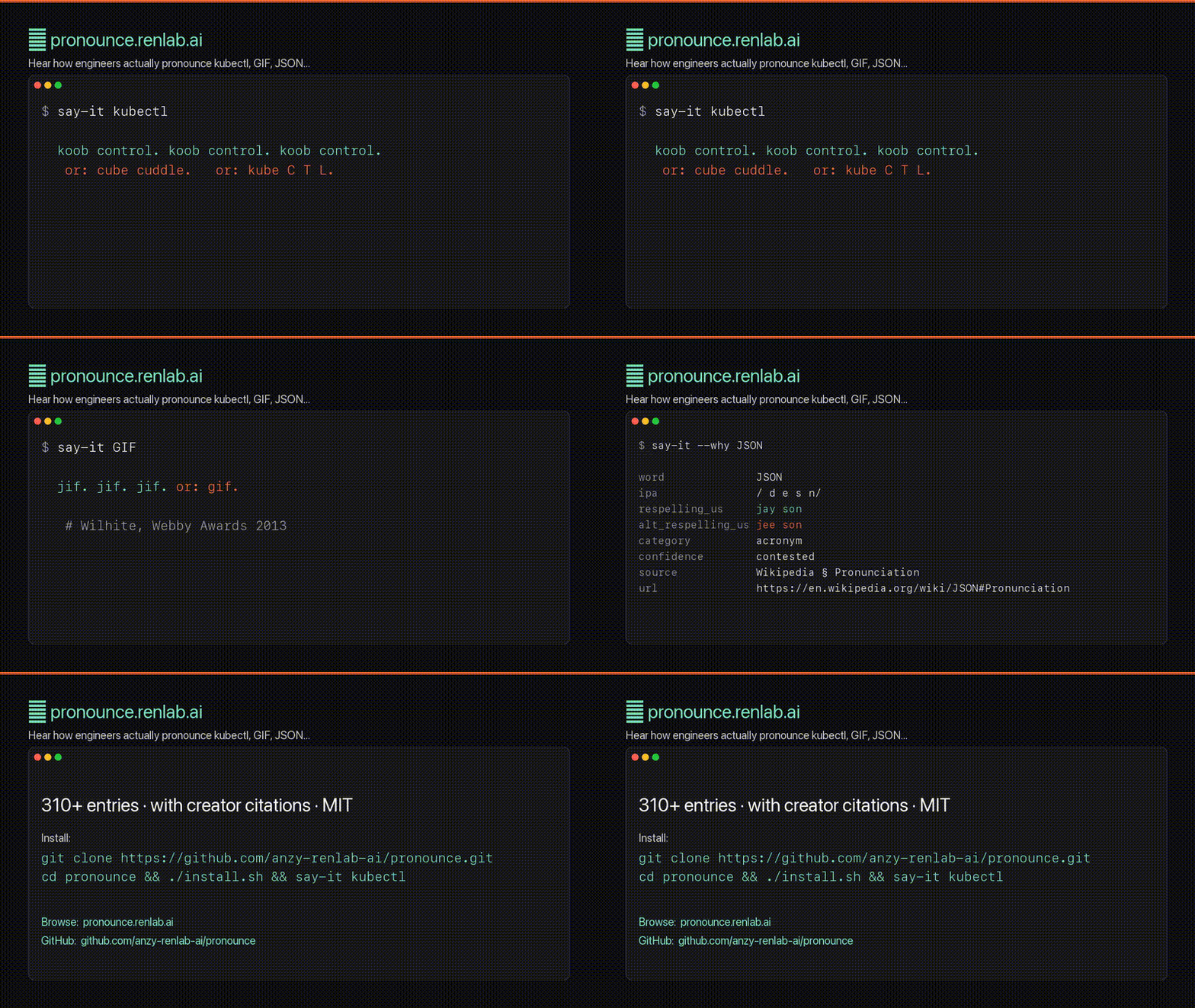
▶ Watch the 47-second promo (with voice) · 🎯 Try the quiz · 🎤 Voice search
curl -fsSL https://pronounce.renlab.ai/install.sh | bash   # one-liner, no clone
say-it kubectl
or the explicit way:
git clone https://github.com/anzy-renlab-ai/pronounce.git
cd pronounce && ./install.sh
say-it kubectl
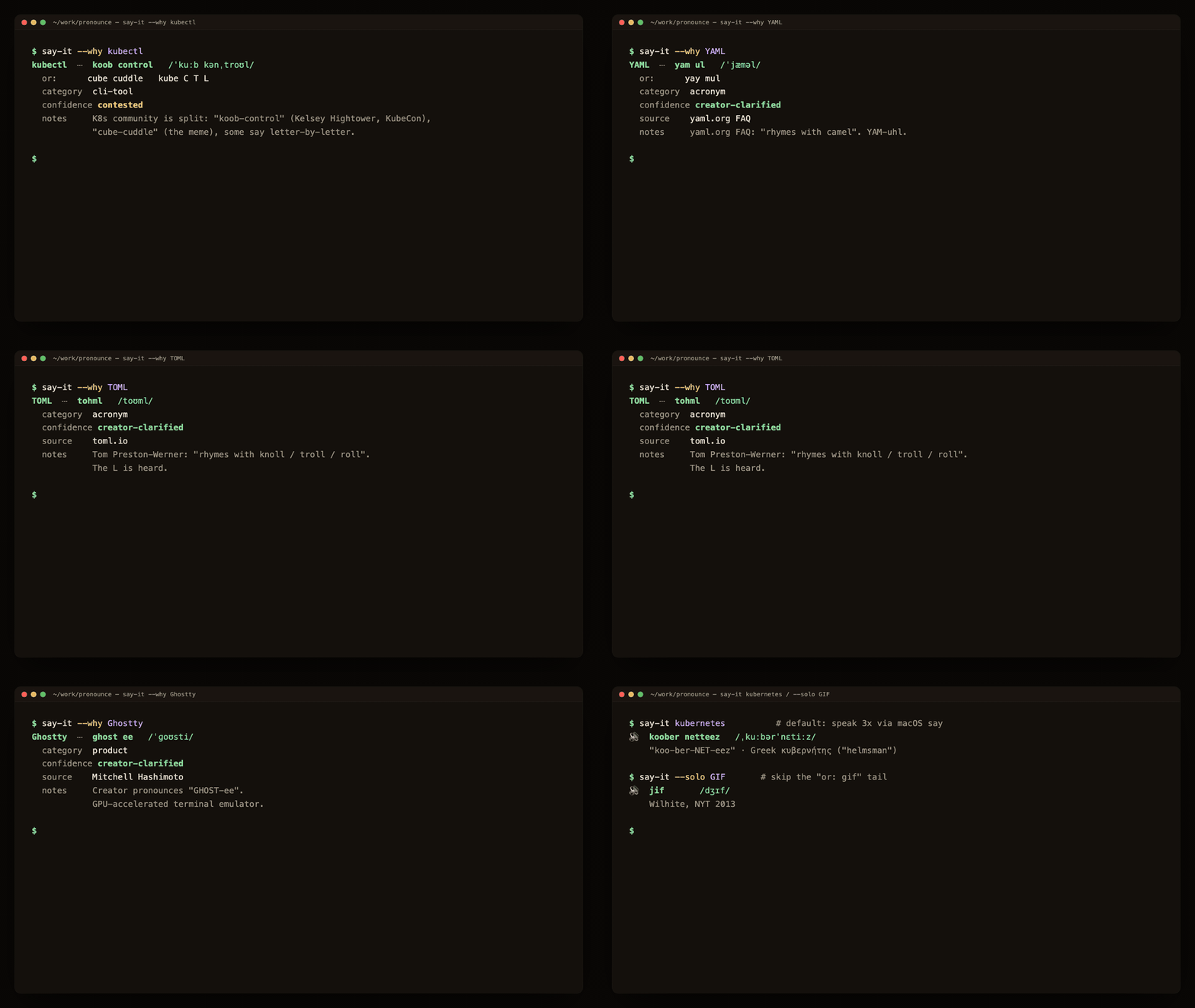
That's it. Now try say-it GIF, say-it nginx, say-it Pydantic, say-it --why JSON, or say-it quiz for a 10-question challenge. Linux users: install espeak-ng (sudo apt install espeak-ng) and the CLI just works. Windows: same CLI under WSL or git-bash + PowerShell. Or skip install and use the browser at pronounce.renlab.ai — where 49 word pages now link the 🎬 moment the creator says the name (Knuth on TeX, Lamport on LaTeX, Evan You on Vite, Stallman on GNU — example: Tcl).
⭐ If
say-it kubectlsaves you one cringey standup moment — star the repo. It nudges more devs to contribute their favorite mispronounced project name.
1,973 entries — 1,316 carry a citable source — 116 settled by the creator themselves, 181 the community still argues about. The famous ones:
| Word | It's… | …not | Settled by |
|---|---|---|---|
| GIF | "jif" | "ghif" (hard-G speech cue) | Steve Wilhite (creator), NYT 2013 |
| nginx | "engine X" | "n-jinx" | NGINX official |
| YAML | "yam-ul" | "yammel" | yaml.org |
| GNU | "guh-NEW" (hard g) | "noo" | GNU Project |
| LaTeX | "lay-tek" | "lay-teks" | Lamport / LaTeX project |
| TOML | rhymes with "knoll" | "tom-el" | Tom Preston-Werner (creator) |
| Tcl | "tickle" | "T-C-L" | John Ousterhout (creator) |
| awk | "auk" (like the bird) | "A-W-K" | Aho / Weinberger / Kernighan |
| Word | Camp A | Camp B |
|---|---|---|
| kubectl | "koob-control" | "cube-cuddle" |
| SQL | "sequel" | "S-Q-L" |
| JSON | "JAY-son" | "JEE-son" |
| GUI | "gooey" | "G-U-I" |
| JWT | "jot" (per RFC 7519) | "J-W-T" |
Every cell has IPA and audio; 1,316 also carry a citable source. Browse all 1,973 entries →
Disagree with one? That's the whole point — open a PR with your reading and a source. The argument is the dataset.
creator-clarified / community-consensus / contested), each with a citable URL where one exists (we'd rather leave it blank than fabricate one). Wilhite said GIF is "jif" at the 2013 Webby Awards. Crockford says JSON is "JAY-son" (RailsConf 2009). RFC 7519 says JWT is "jot". The dictionary cites them.--solo skips the tail once you've internalized it.say, Linux espeak-ng/espeak, or Windows PowerShell System.Speech. The repo also ships a Claude Code skill and an MCP server so your AI answers "how do you pronounce X?" with audio, not a phonetic guess.$ say-it --why JSON
word JSON
ipa /ˈdʒeɪsən/
respelling_us jay son
confidence contested
source Wikipedia § Pronunciation
url https://en.wikipedia.org/wiki/JSON#Pronunciation
Because Google gives you 47 Reddit arguments and a YouTube clip you have to unmute. IPA gives you /ˈkuːb kənˌtroʊl/ — a reference, not a teacher.
You don't need a phonetic transcription. You need to hear the word. Twice. Maybe three times. Done.
say-it ships a community-maintained dictionary of how engineers actually say the names that trip everyone up — and feeds the intended respelling to your OS's text-to-speech engine, so kubectl comes out as koob-control, not whatever your computer guessed from the letters.
After a spoken say-it <word> lookup, the CLI prints a one-line ★ nudge at most once per day (only when stdout is a terminal — kept out of pipes, redirects, and -q runs; if the cache dir is unwritable it repeats each run). Disable it with SAY_IT_NO_STAR=1.
Some pronunciations aren't opinions — the creators settled them. The dictionary cites every one:
| Word | Reading | Source |
|---|---|---|
GIF | "jif" (creator says so) | Steve Wilhite, Webby Awards 2013 |
JSON | "jay-son" | Douglas Crockford, RailsConf 2009 |
GNU | "g-noo" (hard G, one syllable) | GNU Project official |
Linux | "LIN-ux" (short i, schwa) | Linus Torvalds himself |
LaTeX | "lay-tek" (or "lah-tek") | Leslie Lamport, official |
Django | "JANG-go" (silent D) | Django FAQ |
Vue | "view" (one syllable) | Evan You, Vue docs |
Vite | "veet" (French for quick) | Vite docs |
Knative | "KAY-native" (the K is voiced) | Knative docs |
etcd | "et-cee-dee" (et-cetera-distributed) | etcd FAQ |
Run say-it --why <word> to see the citation when an entry has a source_url; unsourced entries are left blank rather than given a fabricated URL.
brew install anzy-renlab-ai/tap/say-it # Homebrew on macOS
Or the "Try it in 30 seconds" block above. ./install.sh drops:
~/.local/bin/say-it,~/.local/share/say-it/pronunciations.tsv,pronounce-word skill at ~/.claude/skills/pronounce-word/ so any "how do you say X?" prompt to your AI gets answered with audio instead of IPA,~/.agents/skills/ (Codex CLI) and ~/.kiro/skills/ (Kiro) when those dirs exist — it's the cross-tool Agent Skills standard.Make sure ~/.local/bin is on your $PATH. Linux also works — install espeak-ng (sudo apt install espeak-ng / brew install espeak-ng). Windows: WSL or git-bash + PowerShell. Or skip install entirely with the browser version at pronounce.renlab.ai.
say-it kubectl                    # primary × 3, then "or: <alt>" for each alternate
say-it --solo kubectl             # primary only — silence the "or:" tail
say-it --alt GIF                  # focus on the first alternate
say-it --alt 2 GUI                # focus on the Nth alternate (1-indexed)
say-it --all SQL                  # primary AND every alternate, each repeated
say-it --no-dict kubectl          # bypass the dictionary entirely
say-it --why JSON                 # show IPA, source URL, category, confidence
say-it list                       # every word in the dictionary
say-it search redis               # grep the dictionary (case-insensitive)

say-it -n 5 Pydantic              # 5 repetitions instead of 3
say-it -r 110 Knative             # slower (110 wpm; default is 130)
say-it -o /tmp/word.aiff Postgres # save to file instead of playing
say-it --list                     # all macOS voices
The default macOS voice is Samantha (General American); -v <voice> selects another macOS voice. Linux and Windows use their detected backend's English voice. The dictionary is GenAm-only, by design.
One step, inside a Claude Code session — installs the pronounce-word skill and the pronounce MCP server as a plugin:
/plugin install pronounce --marketplace anzy-renlab-ai/pronounce
Or install just the cross-tool Agent Skill (works in any Agent Skills host) with GitHub CLI:
gh skill install anzy-renlab-ai/pronounce pronounce-word
You:    kubectl 怎么读?
Claude: 🔊 (plays "koob-control" three times)
        /ˈkuːb kənˌtroʊl/ — "KOOB-control". Kelsey Hightower says it
        this way (KubeCon talk). "Cube-cuddle" is an alternate —
        try `say-it --alt kubectl` to hear it.
Once installed, the pronounce-word skill auto-triggers on:
X 怎么读 / X 怎么发音 / 读一下 Xhow do you pronounce X / pronounce X / how do you say XYour AI replies with sound, not just a phonetic guess. Skill file: skills/pronounce-word/SKILL.md.
Not on Claude? Same skill drops into Codex CLI (codex plugin marketplace add anzy-renlab-ai/pronounce) and Kiro (~/.kiro/skills/), and the MCP server covers Claude Desktop, Cursor, Continue, Zed, Cline & friends — full matrix in integrations/.
Five words a day, same five for everyone: pronounce.renlab.ai/daily — listen, pick the right respelling, share your emoji grid.
Point any MCP client at https://pronounce.renlab.ai/mcp (streamable HTTP):
claude mcp add --transport http pronounce https://pronounce.renlab.ai/mcp

Add a pronunciation glossary to every documentation pull request:
- uses: actions/checkout@v7.0.1
  with:
    fetch-depth: 0
- id: pronounce
  uses: anzy-renlab-ai/pronounce@v2.38.0
Pronounce Docs scans changed Markdown/MDX and writes a table containing each
matched term, its IPA, plain-English respelling, audio page, and creator or
official source where available. It runs locally from the repository snapshot:
no token, API key, telemetry, package install, or network request. See the
complete setup, inputs, and outputs.
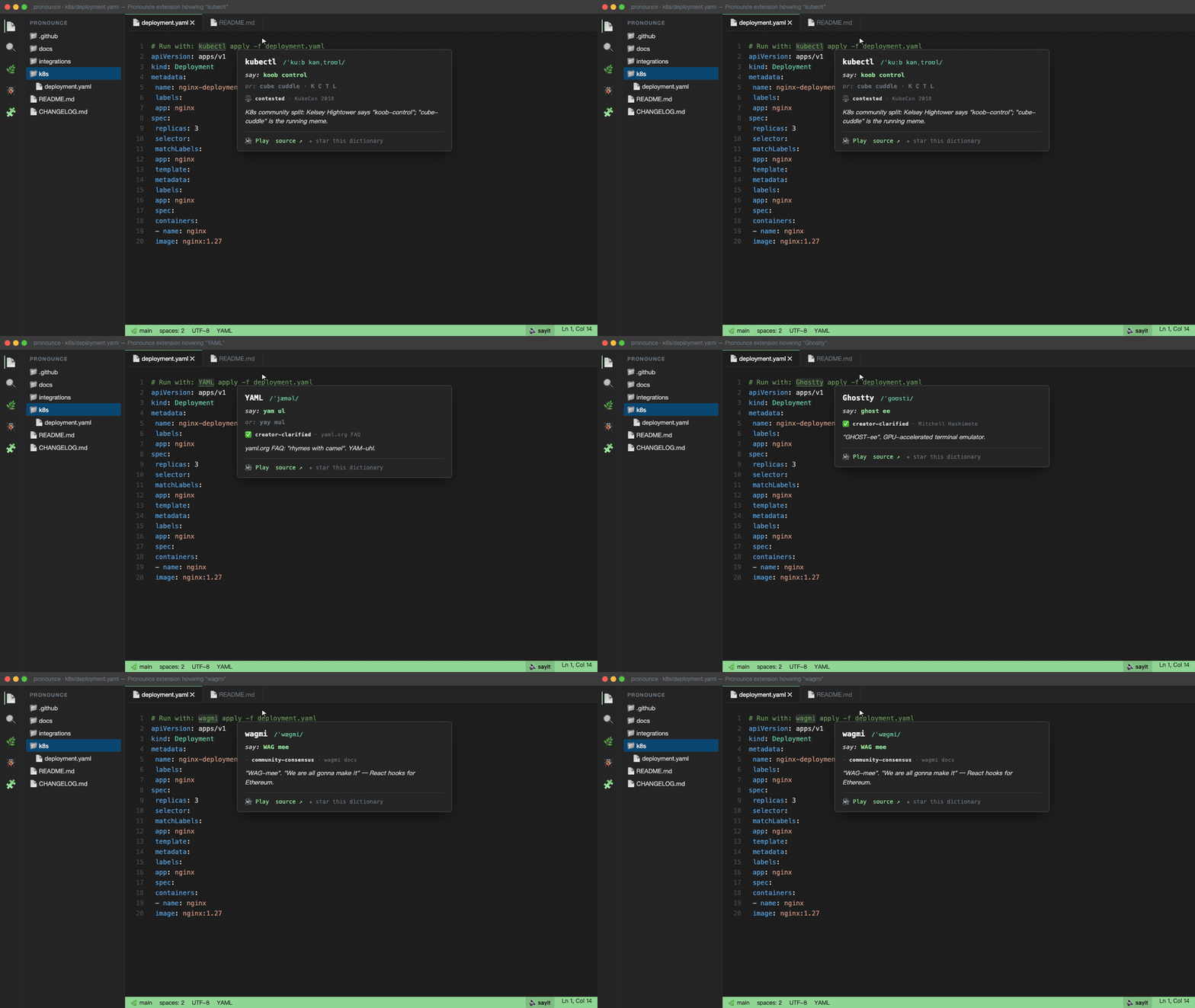
Hover over any tech word in any file — see the IPA, hear the pronunciation. Same 1,973-entry dictionary as the CLI, JSON-bundled at build (zero runtime parse cost).
# Cursor / VSCodium / Zed / Gitpod / Theia / code-server (Open VSX)
code --install-extension sayit.pronounce
# or the listing: https://open-vsx.org/extension/sayit/pronounce
Now live on Microsoft Marketplace too: ext install sayit.pronounce in VS Code. See marketplace listing.
kubectl, YAML, Ghostty, wagmi… → tooltip with IPA + 🔊 Play + ★ Star link.🔊 sayit — click to speak the current selection.Pronounce: Search dictionary… — fuzzy-find all 1,973 entries.Source: integrations/vscode/. Cross-platform as of v0.3 — macOS say, Linux espeak-ng, Windows PowerShell.
Click any tech word on any webpage → popup with IPA + audio. Same 1,973-entry dictionary. The extension speaks through Web Speech; pronounce.renlab.ai plays the committed MP3 corpus first and reserves Web Speech for fallback. Sideload only for now (not yet on Chrome Web Store).
Download pronounce-chrome-0.3.1.zip → unzip → chrome://extensions/ → Developer mode → Load unpacked.
Source: integrations/chrome/.
data/pronunciations.tsv is the single source of truth — tab-separated, 1,973 entries, covering:
kubectl, nginx, Kubernetes, helm, Istio, Envoy, Prometheus, Grafana, Terraform, Argo, Knative, etcd, containerd, runc, Podman, ...Django, Vue, Vite, Pydantic, Bun, Deno, Hugo, Hono, Caddy, Svelte, Astro, Pinia, ...PostgreSQL, Postgres, SQLite, MySQL, MongoDB, Cassandra, Redis, Ceph, ScyllaDB, ClickHouse, DuckDB, ...GIF, JSON, SQL, GUI, GNU, char, regex, sudo, tmux, chmod, WYSIWYG, ASCII, enum, NaN, SaaS, PaaS, ...Linux, Debian, Ubuntu, Arch, Nix, LaTeX, TeX, emacs, zsh, ...Each entry has 10 columns: word | ipa | respelling_us | alt_ipa | alt_respelling_us | source_url | source_label | category | confidence | notes. respelling_us is plain English-like input passed to the detected OS TTS backend, so the intended reading is spoken instead of asking the engine to guess from the project name.
Local override: drop a ~/.config/say-it/pronunciations.local.tsv and it takes precedence.
say.espeak-ng (preferred) or espeak.System.Speech from the same Bash CLI under Git Bash/MSYS2/Cygwin.--alt [N], --all, --solo, --why, --json, --md, --no-dict, list, search, quiz, repl, stream, doctor, export, benchmark, badge, cheatsheet, propose (draft a new dictionary row + prefilled contribution issue).See DESIGN.md for the architecture.
Two things we want most:
data/pronunciations.tsv. Required columns: word, ipa, respelling_us. Highly preferred: source_url (creator interview, conf talk, official FAQ — anything verifiable). Contested readings are welcome; put the rival in alt_* columns and we'll wire --alt through.say) is the gold standard; the Linux (espeak-ng) and Windows (PowerShell) backends ship but are best-effort — help us close the gap. See DESIGN.md §Backends.Keep it tiny. Keep it dep-free where possible. Keep the defaults opinionated (3 reps, GenAm, Samantha voice).
The dictionary is free and MIT. The single highest-leverage thing you can do is star the repo — it's the signal that pulls in more contributors, more PRs, more creator-clarified entries.
Optional, if it's saved you real standup pain:
Dollars cover hosting (Vercel/Cloudflare/Open VSX), domain renewals, MiniMax narration credits for promo videos, and time to track down creator citations for new entries.
Every entry, source upgrade, and skill fix counts. Open a PR — your face shows up here.
MIT — see LICENSE.
IPA is a reference. Audio is a teacher.
Claim this server with your GitHub account to request manual ownership verification.
Link to the catalog listing for say-it · Pronounce from your README. This badge does not certify ownership, compatibility or security.
[](https://awesome-mcp.com/servers/pronounce)Public repository statistics could not be verified. Check the configured source address; unavailable counts are not zero.
来源、范围和时段分别列出;不相加,不代表安装人数、活跃用户或安全审核。
尚无已审核的包 / 镜像标识,暂不展示下载统计。
Alternative and complementary servers in the same category
A directory listing describing a cancellation-letter and mailing-address service. The configured public GitHub repository returned 404 during source verification.

A hosted MCP service for browsing and searching through Singapore mobile-network proxies.

A directory listing describing a Markdown-to-PDF service. The configured public GitHub repository returned 404 during source verification.