
A directory listing describing a cancellation-letter and mailing-address service. The configured public GitHub repository returned 404 during source verification.
Repository stats unavailable
Developer Tools
PubShip runs on your own computer and lets your MCP client read Google Play releases, reviews and reports and prepare explicitly authorized changes using your own service account.
PubShip is a local stdio MCP server for Google Play developer workflows. is cataloged as an MCP server attributed to pubship. PubShip runs on your own computer and lets your MCP client read Google Play releases, reviews and reports and prepare explicitly authorized changes using your own service account. It is categorized under developer tools. See the capability inspector for recorded interfaces and their independent review status; consult upstream documentation for the current interface.
Installation configuration is not reviewed. No executable setup is offered for this entry; inspect the source repository before proceeding.
Catalog license label: AGPL-3.0-only. Check the source repository's current license and terms before using, modifying or distributing this software.
能力定义尚未审核。未核验的采集内容不会作为可信接口展示。
暂无可展示的已审核记录。这不表示上游不支持此能力。
暂无可展示的已审核记录。这不表示上游不支持此能力。
暂无可展示的已审核记录。这不表示上游不支持此能力。
Email delivery is not connected. This page does not collect email addresses or create subscriptions.
Browse the registry for current listings instead.
Reviews for PubShip is a local stdio MCP server for Google Play developer workflows. are not available yet
Review publishing and storage are not connected. This page does not collect or publish ratings or comments, including after sign-in.
No; the PubShip project does not run a hosted service and never receives your credentials.
Yes; pubship-server retains the HTTP implementation for infrastructure you control and requires an allowed-email allowlist.
No; reads are the default, and optional writes and sensitive reads require explicit configuration.
README.md · 25430e57c5a3 · 采集于 2026-11-13 12:26:49 UTC
保留上游原文,不做 AI 改写。为安全起见过滤脚本、表单和不安全链接。
当前显示最后一次成功采集的文档快照,请以来源页面为准。
Google Play developer workflows, from your own computer. Inspect releases, understand reviews and reports, and prepare explicitly authorized changes from your MCP client.




Use your own service account with permissions for your apps in Play Console. Keep its private JSON outside this repository. Grant only the permissions needed for your intended operations. Never paste credentials into an assistant conversation.
export GOOGLE_APPLICATION_CREDENTIALS=/absolute/private/path/service-account.json
export GOOGLE_PLAY_PACKAGES=com.example.app
uvx pubship
This starts the stdio server, which waits for an MCP client. For a credential-free installation check:
uvx pubship --check
The commands above install the published PyPI package. A source checkout may contain changes that are not yet published; after uv sync, use uv run pubship --check to check the local version.
claude mcp add --transport stdio pubship -- uvx pubship
Set the environment variables above in the shell launching your client. Restart the client after changing its environment.
codex mcp add pubship -- uvx pubship
Client manifests in this repository declare the local service-account key path and package names. See client setup for configuration and the Gemini CLI installation command. For agent-assisted installation, read llms-install.md. Provide only the key file path, never its contents.
Configure a stdio server with executable uvx, argument pubship, and your local environment. For clients that require explicit configuration:
{
  "mcpServers": {
    "pubship": {
      "command": "uvx",
      "args": ["pubship"],
      "env": {
        "GOOGLE_APPLICATION_CREDENTIALS": "/absolute/private/path/service-account.json",
        "GOOGLE_PLAY_PACKAGES": "com.example.app"
      }
    }
  }
}
Client configuration stays on your computer. Consult setup for alternate authentication modes, enabled APIs, reports and permission boundaries.
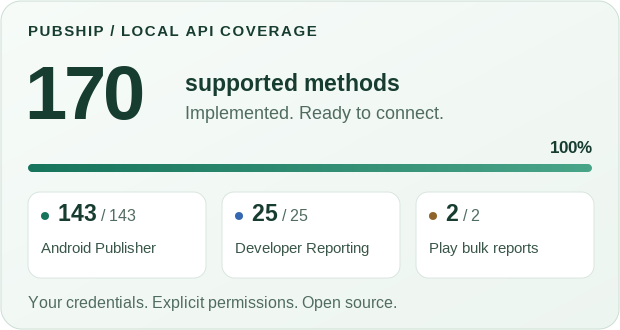
The pinned inventory contains 172 method definitions. 170 have implementations, one subscription-archive method is unsupported by Google, and voided-purchases access is deliberately disabled by project policy. Disabled operations cannot be called through local or self-host tools.
Reads are the default. Optional writes and sensitive reads require explicit configuration. Provider text is untrusted data. Missing data is not zero; a submitted change is not necessarily published. No operation count is a claim of live Google verification.
pubship-server retains the HTTP implementation for infrastructure you control. It refuses to start without PUBSHIP_SERVER_ALLOWED_EMAILS. Sign-in requires a signed Google ID token, a verified exact email match and nonce binding before any Google credentials are persisted. Removing an account from the allowlist invalidates its stored grants on next use. Legacy grants without verified identity must reconnect. Enrollment stays closed until the operator explicitly enables it.
There is no project-run Google-connected service. See the local-first decision and self-host setup.
PubShip 0.24.2 improves tool descriptions and approval hints, and checks the same definitions across source and packaged installs. See the changelog for earlier versions. Source versions can precede package publication.
Tool definition quality documents the TDQS 1.2 offline checks, reviewed heuristic findings and MCP contract regression coverage. Offline lint is not a model-scored grade.
env -u GOOGLE_APPLICATION_CREDENTIALS uv sync --frozen --all-extras --group browser --group tdqs
env -u GOOGLE_APPLICATION_CREDENTIALS uv run --frozen --all-extras --group browser --group tdqs pytest
env -u GOOGLE_APPLICATION_CREDENTIALS uv run ruff check .
env -u GOOGLE_APPLICATION_CREDENTIALS uv run ruff format --check .
env -u GOOGLE_APPLICATION_CREDENTIALS uv run python scripts/generate_catalog.py --check
env -u GOOGLE_APPLICATION_CREDENTIALS uv run python scripts/generate_verification.py --check
env -u GOOGLE_APPLICATION_CREDENTIALS uv run python scripts/distribution_metadata.py --check
env -u GOOGLE_APPLICATION_CREDENTIALS uv build
env -u GOOGLE_APPLICATION_CREDENTIALS uv run python scripts/check_artifacts.py
Tests use fake providers. Browser tests require installed Playwright engines; backup integration tests require age. Record unavailable platform checks honestly. See contribution policy, release process, and security reporting.
PubShip helps developers automate their own Google Play distribution work. It runs on your computer or on infrastructure you control, with your own Google credentials and Play Console permissions. The PubShip project does not run a hosted service and never receives your credentials. Use it only for apps and developer accounts that you or your organization own, and follow Google's Play Developer API Terms. Hosted PubShip instances run by others are not provided or endorsed by the PubShip project.
PubShip is an independent open-source project and is not affiliated with, endorsed by, or sponsored by Google. Google, Google Play and Android are trademarks of Google LLC.
PubShip is free software under the GNU Affero General Public License v3.0 only (AGPL-3.0-only). Copyright (C) 2026 Denys Vorobyov. For other license terms, contact legal@pubship.dev.
Claim this server with your GitHub account to request manual ownership verification.
Link to the catalog listing for PubShip is a local stdio MCP server for Google Play developer workflows. from your README. This badge does not certify ownership, compatibility or security.
[](https://awesome-mcp.com/servers/pubship)Public repository statistics could not be verified. Check the configured source address; unavailable counts are not zero.
来源、范围和时段分别列出;不相加,不代表安装人数、活跃用户或安全审核。
尚无已审核的包 / 镜像标识,暂不展示下载统计。
Alternative and complementary servers in the same category
A directory listing describing a cancellation-letter and mailing-address service. The configured public GitHub repository returned 404 during source verification.

A hosted MCP service for browsing and searching through Singapore mobile-network proxies.

A directory listing describing a Markdown-to-PDF service. The configured public GitHub repository returned 404 during source verification.