

A Model Context Protocol (MCP) server for controlling Chrome with debugging capabilities, userscript injection, and extension support.
Repository stats unavailable
Browser & Scraping
A local MCP server paired with a Chrome extension that lets an agent see and control the Chrome browser you already have open, using existing cookies and SSO sessions.
real-browser-mcp is cataloged as an MCP server attributed to ofershap. A local MCP server paired with a Chrome extension that lets an agent see and control the Chrome browser you already have open, using existing cookies and SSO sessions. It is categorized under browser automation. See the capability inspector for recorded interfaces and their independent review status; consult upstream documentation for the current interface.
Installation configuration is not reviewed. No executable setup is offered for this entry; inspect the source repository before proceeding.
Catalog license label: MIT. Check the source repository's current license and terms before using, modifying or distributing this software.
能力定义尚未审核。未核验的采集内容不会作为可信接口展示。
暂无可展示的已审核记录。这不表示上游不支持此能力。
暂无可展示的已审核记录。这不表示上游不支持此能力。
暂无可展示的已审核记录。这不表示上游不支持此能力。
Email delivery is not connected. This page does not collect email addresses or create subscriptions.
Browse the registry for current listings instead.
Reviews for real-browser-mcp are not available yet
Review publishing and storage are not connected. This page does not collect or publish ratings or comments, including after sign-in.
No. An agentic browser typically means the agent owns a new browser, whereas this connects an MCP agent to the Chrome you already have open, with the same profile, tabs and logins.
Yes. The MCP server alone cannot see or control Chrome, so the extension must be installed and connected before tools are called.
The MCP server and extension communicate over WebSocket on localhost, with no analytics, telemetry or cloud component.
README.md · 4ee4af5c8c02 · 采集于 2026-11-13 12:18:10 UTC
保留上游原文,不做 AI 改写。为安全起见过滤脚本、表单和不安全链接。
当前显示最后一次成功采集的文档快照,请以来源页面为准。

Agentic browsers give agents a new browser. Coding agents need yours.
MCP + Chrome extension for the Chrome you already have open:
cookies, SSO, staging sessions, the bug you already reproduced.











Everyone is building "agentic browsers." Most of them hand the agent a new browser: headless Chromium, a cloud VM, a clean profile with no cookies.
That is the wrong tool for the coding loop.
You ship a fix. The agent says "done, please verify." You already have Chrome open on staging, past SSO, on the exact page that breaks. The agent wrote the code. It could verify it there. It just cannot see that browser.
real-browser-mcp is the bridge: a local MCP server plus a Chrome extension over localhost WebSocket. Your agent talks MCP. Your real Chrome executes. Sessions stay on your machine.
This is not Playwright with a fresh profile. Not a hosted agent browser. Not CDP remote-debugging bolted onto your default Chrome profile (Chrome 136+ blocks that path for good security reasons).
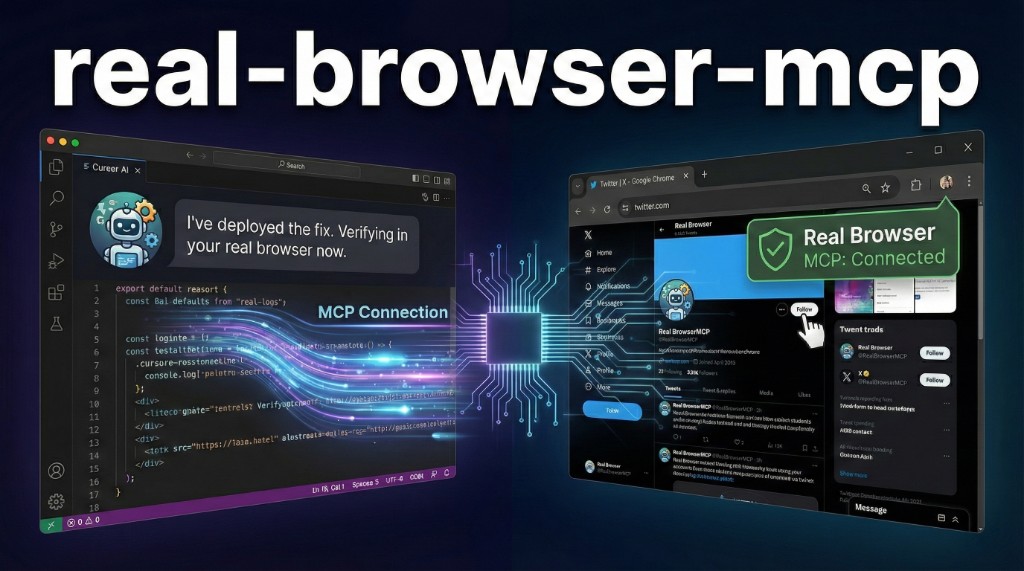
Two parts:
Cursor (one click):

Or add manually in Cursor Settings > MCP > "Add new MCP server":
{
  "mcpServers": {
    "real-browser": {
      "command": "npx",
      "args": ["-y", "real-browser-mcp"]
    }
  }
}
Claude Desktop: Edit ~/Library/Application Support/Claude/claude_desktop_config.json (macOS) or %APPDATA%\Claude\claude_desktop_config.json (Windows). Add the same JSON block.
Windsurf: Settings > MCP. Same config.
Any MCP-compatible client works.

Or load from source:
git clone https://github.com/ofershap/real-browser-mcp.git
chrome://extensions and enable Developer mode (toggle in the top right)extension/ folder from the cloned repoClick the Real Browser MCP icon in your toolbar.
Green dot = connected. Gray = waiting for server.
Done. Your agent can see your browser.
This repo ships as an Agent Plugins 1.0.0 package: root plugin.json, mcp.json, and skills/real-browser-control/ teach agents when to pick real Chrome over headless / cloud agentic browsers.
Claude Code .claude-plugin/ and agent-config/ remain for rules and marketplace flows. Agent Plugins is the cross-client layout (MCP + skill in one tree).
Cursor (local plugin): clone the repo, then copy or symlink it to ~/.cursor/plugins/local/real-browser-mcp and reload the window. You still need the Chrome extension connected. One-click MCP install below adds only the server unless you also install the local plugin folder.
Spec and tooling: agent-plugins.org.
| Stack | What the agent gets | Where it fails for coding agents |
|---|---|---|
| Playwright MCP / Puppeteer | New browser, clean state | No SSO cookies, no "the tab I already opened" |
| Cloud agentic browsers | Remote browser / VM | Separate login, not your IDE-local Chrome |
| Chrome DevTools MCP (CDP / autoConnect) | DevTools-oriented attach | Chrome 136+ refuses --remote-debugging-port on the default profile, so everyday logged-in Chrome is hard to attach without a throwaway profile |
| Real Browser MCP | Your Chrome via MV3 extension + localhost MCP | Not for CI parallel clean runs (use Playwright there) |
If you want repeatable automation in CI, use Playwright. If you want the agent inside the browser you already authenticated, use this.
| Real Browser MCP | Playwright MCP | Chrome DevTools MCP | Cloud agentic browser | |
|---|---|---|---|---|
| Browser | Your real Chrome | Launches new Chromium (usually) | Attach via CDP | Hosted / remote |
| Cookies / SSO already there | Yes | No (inject or replay) | Fragile on default profile after Chrome 136 | Separate session |
| Connection model | Extension ↔ localhost WebSocket | Playwright driver | Remote debugging / autoConnect | Vendor cloud |
| Best fit | Live verify in IDE | CI + repeatable runs | Performance / DevTools debugging | Unattended remote browse |
| Leaves your machine? | No control plane | Local (unless you add cloud) | Local | Yes |
The agent can use all 18 tools out of the box, but it works better when it knows when and how to chain them. A config file teaches the right workflow - snapshot first, then act, then verify.
Run one command:
npx real-browser-mcp --setup cursor
This installs:
~/.cursor/rules/real-browser-mcp.mdc - teaches the snapshot-first workflow, how to handle dropdowns, when to use screenshots vs snapshots~/.cursor/commands/check-browser.md - adds /check-browser to your Cursor chatAfter that, type /check-browser in any chat. Or just say "check the result in my browser" and the agent knows what to do.
npx real-browser-mcp --setup claude
Adds an AGENTS.md to your project root. Claude Code auto-discovers it.
See agent-config/ for manual installation or to customize the rules.
18 tools. Grouped by purpose.
See
| Tool | What it does |
|---|---|
browser_snapshot | Accessibility tree with element refs. Compact mode (default) returns only interactive elements |
browser_screenshot | Capture what's on screen |
browser_text | Extract raw text from page or element |
browser_find | Query elements by CSS selector |
Interact
| Tool | What it does |
|---|---|
browser_click | Click by ref or CSS selector |
browser_click_text | Click by visible text. Works through React portals and overlays |
browser_type | Type into inputs and contenteditable fields |
browser_press_key | Key combos (Enter, Escape, Ctrl+A) |
browser_scroll | Scroll pages and virtual containers |
browser_hover | Trigger tooltips and dropdowns |
browser_select | Pick from native <select> dropdowns |
browser_wait | Wait for elements to appear or disappear |
Navigate
| Tool | What it does |
|---|---|
browser_navigate | Go to a URL in the active tab |
browser_tabs | List, create, close, or focus tabs |
Debug
| Tool | What it does |
|---|---|
browser_console | Console output (log, warn, error) |
browser_network | XHR/fetch requests with status codes |
browser_evaluate | Run JavaScript via Chrome DevTools Protocol |
browser_handle_dialog | Handle alert/confirm/prompt dialogs |
| Env var | Default | What it does |
|---|---|---|
WS_PORT | 7225 | WebSocket port for extension connection |
Connection drops are handled automatically with exponential backoff (1s to 30s), ping/pong health checks every 10s, and per-tool timeouts (5s for clicks, 60s for navigation).
Run two server instances on different ports:
{
  "mcpServers": {
    "browser-work": {
      "command": "npx", "args": ["-y", "real-browser-mcp"]
    },
    "browser-personal": {
      "command": "npx", "args": ["-y", "real-browser-mcp"],
      "env": { "WS_PORT": "9333" }
    }
  }
}
Update the port in each extension popup to match.
Everything stays on your machine. The extension connects to the MCP server via WebSocket on localhost. No cloud, no proxy, nothing leaves your browser.
real-browser-mcp/
├── mcp-server/          MCP server (npm package, TypeScript)
│   └── src/tools/       One file per tool, registry pattern
├── extension/           Chrome extension (Manifest V3, plain JS)
│   ├── background.js    Service worker, WebSocket client, tool handlers
│   ├── content.js       Console capture
│   └── popup/           Connection status UI
├── agent-config/        Pre-built configs for Cursor + Claude Code
│   ├── cursor/          Rules and commands
│   ├── skills/          Browser automation skill
│   └── setup.mjs        One-command installer
└── tests/               Bridge + registry tests
Stack: TypeScript (strict) · MCP SDK · WebSocket · Chrome Extension Manifest V3 · Vitest
git clone https://github.com/ofershap/real-browser-mcp.git
cd real-browser-mcp
npm install
npm run build
npm test
| Command | What it does |
|---|---|
npm run build | Compile TypeScript |
npm run dev | Watch mode |
npm test | Run tests |
npm run typecheck | Type check without emitting |
npm run setup:cursor | Install Cursor rule + command |
No. An agentic browser usually means the agent owns a new browser (local headless or cloud). real-browser-mcp connects an MCP agent to your existing Chrome. Same profile, same tabs, same logins.
Yes. The MCP server alone cannot see or control Chrome. Install the Chrome extension, open the popup, and wait for a green connected state before calling tools.
Yes. The extension runs in your normal Chrome profile with cookies, sessions, and local storage. That is the point: verify against the session you already set up, including SSO you completed manually.
Those stacks are built around a browser the automation tool launches (great for CI and clean repeats). Real Browser MCP is built around the browser you already have open. Use Playwright when you need deterministic runs. Use this when you need live session state.
Chrome DevTools MCP is excellent for DevTools-style debugging and can attach via CDP / autoConnect. After Chrome 136, remote debugging on the default user profile is blocked, which is exactly the profile that holds your real logins. Real Browser MCP uses an extension bridge over localhost WebSocket instead of opening a debug port on that profile.
Cloud browsers are remote machines. You re-auth, you leave the local IDE loop, and session data sits on someone else's infra. This project keeps control on localhost: MCP server ↔ extension. Page content still enters your AI client when tools return it; there is just no vendor browser SaaS in the middle.
MCP-only (Cursor deeplink or mcp.json) registers the server and tools. The Agent Plugins package adds plugin.json and the real-browser-control skill so agents know when to prefer real Chrome over headless. Same npm server either way.
The server and extension talk over WebSocket on localhost only; nothing is sent to a cloud control plane. The agent can still click, type, and read whatever is visible in the connected tab, including logged-in apps. Use a dedicated profile or tab when testing untrusted sites, and do not point automation at tabs with sensitive data unless you accept that risk.
No. The MCP server and extension talk over WebSocket on localhost. Nothing leaves your machine. There is no analytics, no telemetry, and no cloud component. Privacy policy.
Any MCP-compatible client. Cursor, Claude Desktop, Claude Code, Windsurf, Cline, and anything else that speaks the MCP protocol.
Yes. Run two MCP server instances on different ports. See Configuration for the setup.
Bug reports, feature requests, and PRs welcome. Open an issue first for larger changes.

README built with README Builder
Claim this server with your GitHub account to request manual ownership verification.
Link to the catalog listing for real-browser-mcp from your README. This badge does not certify ownership, compatibility or security.
[](https://awesome-mcp.com/servers/real-browser-mcp)Public repository statistics could not be verified. Check the configured source address; unavailable counts are not zero.
来源、范围和时段分别列出;不相加,不代表安装人数、活跃用户或安全审核。
尚无已审核的包 / 镜像标识,暂不展示下载统计。
Alternative and complementary servers in the same category
A Model Context Protocol (MCP) server for controlling Chrome with debugging capabilities, userscript injection, and extension support.

An MCP server that lets AI assistants browse websites and extract content using optional CSS selectors.

An MCP server that reads pages, fills forms, takes screenshots, and hands the browser to a person for logins or CAPTCHAs.