
A Rust CAD application with an MCP server for creating, inspecting and rendering drawings, either headlessly or through a connection to the desktop app.
8K
Media & Design
An MCP server that connects Rhino 3D and Grasshopper to AI agents, letting assistants model geometry, inspect documents, and build Grasshopper definitions through chat.
RhinoMCP is cataloged as an MCP server attributed to jingcheng-chen. An MCP server that connects Rhino 3D and Grasshopper to AI agents, letting assistants model geometry, inspect documents, and build Grasshopper definitions through chat. It is categorized under media design. See the capability inspector for recorded interfaces and their independent review status; consult upstream documentation for the current interface.
Installation configuration is not reviewed. No executable setup is offered for this entry; inspect the source repository before proceeding.
Catalog license label: MIT. Check the source repository's current license and terms before using, modifying or distributing this software.
能力定义尚未审核。未核验的采集内容不会作为可信接口展示。
暂无可展示的已审核记录。这不表示上游不支持此能力。
暂无可展示的已审核记录。这不表示上游不支持此能力。
暂无可展示的已审核记录。这不表示上游不支持此能力。
Email delivery is not connected. This page does not collect email addresses or create subscriptions.
Browse the registry for current listings instead.
Reviews for RhinoMCP are not available yet
Review publishing and storage are not connected. This page does not collect or publish ratings or comments, including after sign-in.
Yes, a single plugin and config entry cover both Rhino and Grasshopper.
RhinoMCP targets Rhino 8 on Windows and macOS.
README.md · f95099aa689a · 采集于 2026-11-13 09:39:03 UTC
保留上游原文,不做 AI 改写。为安全起见过滤脚本、表单和不安全链接。
当前显示最后一次成功采集的文档快照,请以来源页面为准。

Control Rhino 3D and Grasshopper with AI, in plain language.
RhinoMCP connects Rhino to AI agents through the Model Context Protocol, so assistants like Claude and Cursor can model geometry, read your document, and build Grasshopper definitions for you, just by chatting.





Quick start · What it can do · Usage · Examples · Tool reference
English · 简体中文
For development of the autonomous improvement experiments, start with the continuation guide.
[!NOTE] RhinoMCP targets Rhino 8 on Windows and macOS.
|
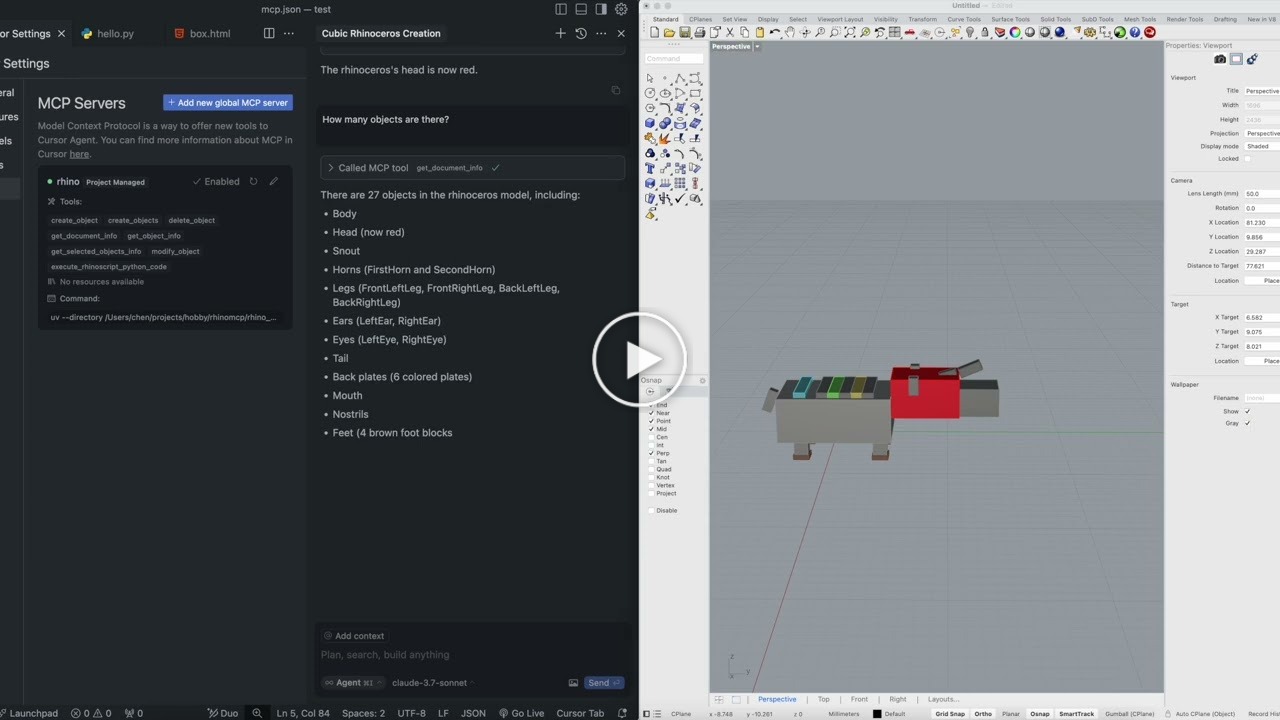
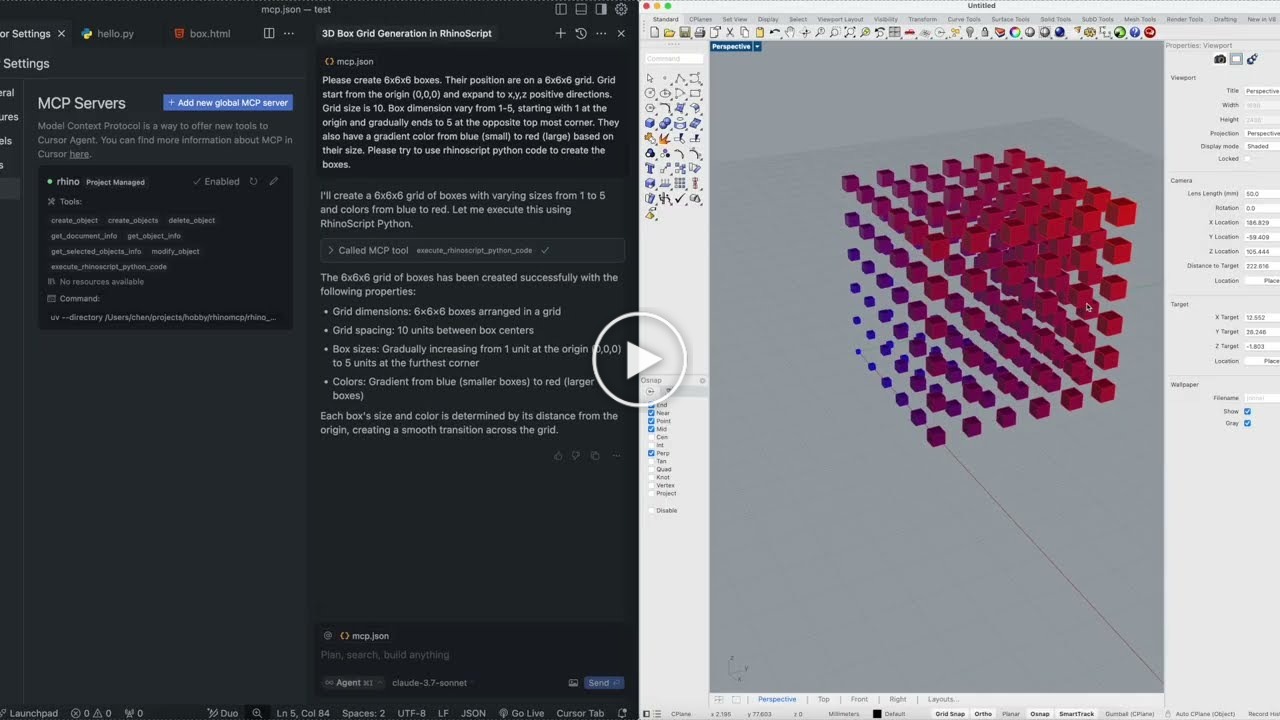
Two-way interaction: the AI both creates and reads geometry. |
Custom scripts: the AI writes and runs scripts inside Rhino. |
Prefer a walkthrough? Nate made a showcase and install tutorial on YouTube.
 Rhino
| Area | What the AI can do |
|---|---|
| Create geometry | Points, lines, polylines, circles, arcs, ellipses, curves, boxes, spheres, cones, cylinders, and surfaces, one at a time or in batches |
| Transform & edit | Move, rotate, scale, recolor, rename, and delete objects |
| Advanced modeling | Loft, extrude, sweep, offset, pipe; boolean union, difference, and intersection |
| Curve operations | Project, intersect, and split curves |
| Layers & attributes | Create, delete, and switch layers; read and write object attributes |
| Inspect & select | Document summaries, object info, and filtered selection (by name, color, or category, with AND / OR logic) |
| See the model | Capture the viewport so the AI gets visual feedback |
| Analyze | Measure length, area, volume, bounding boxes, and more |
| Go deeper | Run any Rhino command, execute RhinoScript-Python, or run RhinoCommon C#, with built-in RhinoScript docs lookup |
 Grasshopper
| Area | What the AI can do |
|---|---|
| Find components | Search the installed component library and inspect a component's inputs and outputs before placing it |
| Build canvases | Add, position, lay out, update, and delete components |
| Wire it up | Connect and disconnect parameters between components |
| Set & read values | Drive sliders, toggles, panels, and value lists; read structured data back out of outputs |
| Solve | Run the solution and surface runtime warnings and errors |
| Build in one shot | Construct and wire a whole graph, or mutate an existing one, in a single batched operation |
Three steps: install the Rhino plugin, connect your AI client, then start the bridge in Rhino.
In Rhino, open Tools → Package Manager, search for rhinomcp, and click Install. Restart Rhino.
If you use an agentic assistant (Codex, Claude Code, Cursor, Cline, and the like), paste this prompt:
Please install https://github.com/jingcheng-chen/rhinomcp as a local MCP server named `rhino`.
Codex, in one command:
codex mcp add rhino --env RHINO_MCP_HOST=127.0.0.1 -- uvx rhinomcp@latest
Claude Code, in one command:
claude mcp add rhino -- uvx rhinomcp@latest
ChatGPT: use Codex for the local setup above. ChatGPT apps/MCP connectors currently connect
to remote MCP servers, not local stdio commands like uvx rhinomcp. If you want to build a
ChatGPT app around RhinoMCP, use ChatGPT developer mode with a remote or tunneled MCP endpoint.
You can also manually edit the config yourself:
{
  "mcpServers": {
    "rhino": {
      "command": "uvx",
      "args": ["rhinomcp@latest"],
      "env": {
        "RHINO_MCP_HOST": "127.0.0.1"
      }
    }
  }
}
[!IMPORTANT] The launcher
uvxcomes from uv. If you don't have it yet: macOSbrew install uv· Windowspowershell -c "irm https://astral.sh/uv/install.ps1 | iex"Run only one RhinoMCP server at a time (Codex, Claude, Cursor, etc. — not several at once).
To clean up a stale rhinomcp process each time your client launches:
macOS / Linux
{
  "mcpServers": {
    "rhino": {
      "command": "sh",
      "args": ["-c", "killall rhinomcp 2>/dev/null; uvx rhinomcp@latest"]
    }
  }
}
Windows
{
  "mcpServers": {
    "rhino": {
      "command": "cmd",
      "args": ["/c", "taskkill /F /IM rhinomcp.exe 2>nul & uvx rhinomcp@latest"]
    }
  }
}
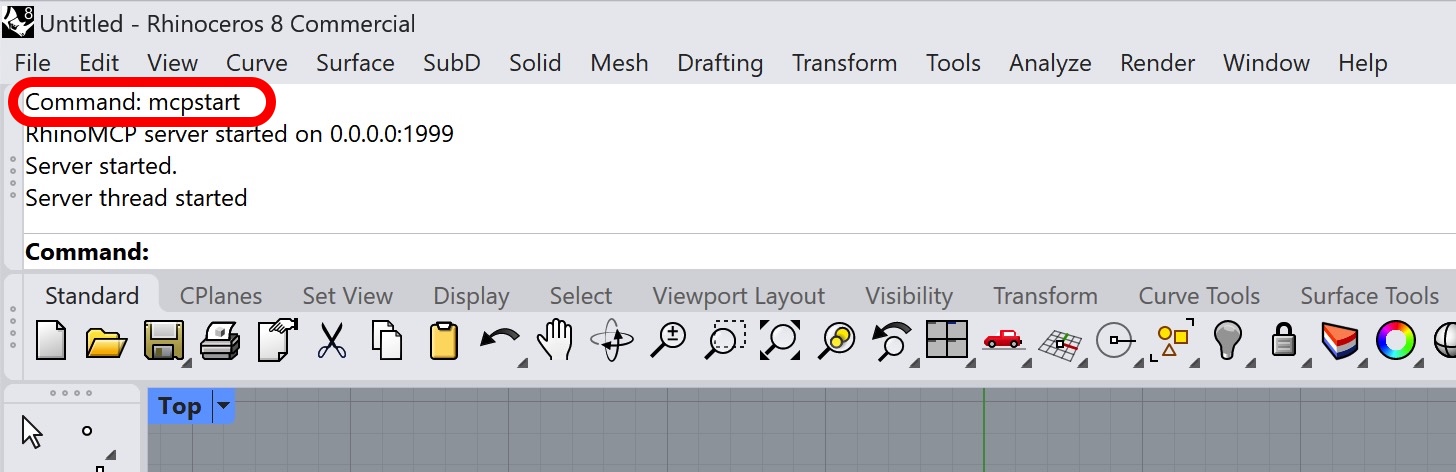
With Rhino open, type mcpstart in the command line. This starts the TCP bridge the server
connects to (mcpstop ends it). Run it once per Rhino session.
mcpstatus prints the port, the document and the connected clients. On Windows, mcpwindow opens
the tray window that lists every running Rhino (see "Several Rhino instances at once").
Each Rhino runs its own bridge on its own port. Without a port, mcpstart takes the first free one
from 1999 to 2008, so the first Rhino keeps 1999 and the next one gets 2000. To pin a port, use
-mcpstart Port=2000 (in a startup macro: _-mcpstart _Port=2000 _Enter), or start Rhino with the
RHINO_MCP_PORT environment variable set. The port appears in the command line, in mcpstatus
and, on Windows, at the start of the window title ([MCP:2000] Rhinoceros 8).
Give the MCP client one server entry per instance, differing only in RHINO_MCP_PORT:
{
  "mcpServers": {
    "rhino":   { "command": "uvx", "args": ["rhinomcp"], "env": { "RHINO_MCP_PORT": "1999" } },
    "rhino-2": { "command": "uvx", "args": ["rhinomcp"], "env": { "RHINO_MCP_PORT": "2000" } }
  }
}
If the port is taken, mcpstart says so and starts nothing rather than reaching the wrong Rhino.
On Windows, mcpstart also puts a RhinoMCP icon in the notification area. One icon serves every
Rhino: click it (or run mcpwindow) for a list of the running instances with their port, the MCP
entry that reaches each one (read from ~/.claude.json), the open Rhino and Grasshopper documents,
and the connected clients with their latest command. Clicking an instance brings that Rhino to the
front. Each Rhino writes its state to %LOCALAPPDATA%\RhinoMCP\instances; the icon goes away once
no Rhino runs a server.
RhinoMCP has three parts that update separately:
uvx rhinomcp@latest asks PyPI for the newest release every time your
client starts the server; plain uvx rhinomcp keeps the first version it downloaded. If you
work offline, install it once with uv tool install rhinomcp and run uv tool upgrade rhinomcp
when convenient..rhp into Rhino is not updated.The server reads the plugin's version when it connects and warns in its log when the two differ.
A tool that needs a newer plugin fails with an update instruction instead of silently doing
something else, and describe_capabilities reports both versions.
This repository is also a Claude Code plugin marketplace. The rhinomcp plugin adds three agents
(rhino-modeler, rhino-inspector and grasshopper-builder) and two commands: /scene
summarizes the open document and /snapshot [display mode] captures the viewport and reports what
it shows.
claude plugin marketplace add jingcheng-chen/rhinomcp
claude plugin install rhinomcp@rhinomcp
Inside a Claude Code session the same steps are /plugin marketplace add jingcheng-chen/rhinomcp
and /plugin install rhinomcp@rhinomcp. The plugin does not start the MCP server: configure it
as rhino as described in step 2 above, since the agents call tools named mcp__rhino__*.
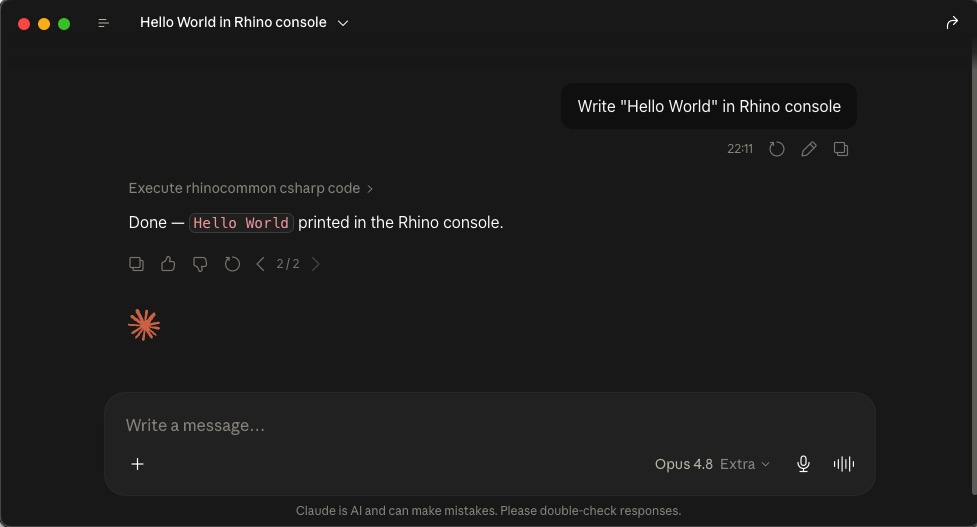
With the bridge running and your client connected, you'll see the RhinoMCP tools. From there, just chat: ask the assistant to model something, inspect your scene, or build a Grasshopper graph.
For Grasshopper, you only need Rhino open with mcpstart running. The assistant can open or create
the Grasshopper document itself, then build the definition. For example: "create a point attractor
pattern with cylinders that have different heights."
Create 6×6×6 boxes on a 10-unit grid from the origin, sizes ramping from 1 to 5, with a blue-to-red gradient color based on size. Use RhinoScript Python.
Make a Rhinoceros animal out of cubic blocks in cartoon colors. Then change its head to red, and rotate the selected object 90° around the Z axis.
Create a point attractor pattern in Grasshopper: a grid of cylinders whose heights change with their distance from an attractor point, with a slider to move the point.
| Tool | Purpose |
|---|---|
create_object / create_objects | Create one or many objects |
modify_object / modify_objects | Transform or edit one or many objects |
delete_object | Delete an object |
boolean_union / boolean_difference / boolean_intersection | Boolean operations |
loft / extrude_curve / sweep1 / offset_curve / pipe | Advanced surface and solid modeling |
project_curve / intersect_curves / split_curve | Curve operations |
analyze_objects | Measure length, area, volume, bounding boxes, and more |
select_objects | Select by ids, layer, type, hidden, locked, name, color, custom attributes; AND / OR |
get_objects | List by ids, layer, type, bbox or selection; hidden and locked switches; paged |
get_object_info / get_selected_objects_info | Query objects |
get_object_attributes / update_object_attributes | Read and write object attributes |
create_layer / delete_layer / get_or_set_current_layer | Layer management |
get_context | Bounded snapshot: units, layer, selection, camera |
get_document_summary | Overview of the current document |
capture_viewport | Image + metadata; display mode, camera, framing, JPEG |
set_camera | Set camera location, target, up, lens, projection |
zoom_to | Frame all, the selection, object ids or a layer |
run_command | Run any native Rhino command |
execute_rhinoscript_python_code | Execute RhinoScript-Python |
execute_rhinocommon_csharp_code | Execute RhinoCommon C# |
search_rhinoscript_functions / get_rhinoscript_docs / list_rhinoscript_modules / get_module_functions | RhinoScript API docs lookup |
get_commands | List available commands |
undo / redo | Undo and redo |
| Tool | Purpose |
|---|---|
gh_create_document / gh_get_document_info / gh_get_canvas_state | Document and canvas inspection |
gh_search_components / gh_batch_search_components | Search the component library |
gh_list_component_categories / gh_get_available_components | Browse installed components |
gh_get_component_type_info / gh_get_component_info | Inspect a component type or instance |
gh_list_components | List components on the canvas |
gh_add_component / gh_update_component / gh_delete_component | Add, update, or delete components |
gh_layout_components | Auto-lay-out the canvas |
gh_clear_canvas | Clear the canvas |
gh_connect_components / gh_disconnect_components | Wire or unwire parameters |
gh_set_parameter_value / gh_get_parameter_value | Drive inputs, read outputs |
gh_run_solution / gh_expire_solution | Solve or expire the solution |
gh_build_graph / gh_mutate_graph | Build or mutate a whole graph in one batched call |
gh_get_graph / gh_clear_graph | Inspect or clear objects by graph id |
AI client ──MCP (stdio)──► rhinomcp (Python) ──TCP 127.0.0.1:1999──► Rhino plugin ──► Rhino + Grasshopper
server/: a Python MCP server (official Python SDK 2.x) that exposes each tool and forwards it to Rhino.plugin/: a RhinoCommon C# plugin that runs a TCP listener inside Rhino and executes commands on the main thread. Start and stop it with the mcpstart / mcpstop Rhino commands.contracts/: JSON Schema definitions that keep the wire protocol between the two tiers in sync.IMPLEMENTATION.md has a deeper tour of the code.
The Python server and the Rhino plugin talk over an unauthenticated TCP loopback link
(127.0.0.1:1999). Tools such as run_command, execute_rhinoscript_python_code, and
execute_rhinocommon_csharp_code give the model an open execution surface inside Rhino. This is
fine for local agent use. Do not expose it beyond the loopback interface without adding
authentication.
| Variable | Default | Effect |
|---|---|---|
RHINO_MCP_HOST | 127.0.0.1 | Connect target. Refuses non-loopback hosts unless RHINO_MCP_ALLOW_REMOTE=1. |
RHINO_MCP_PORT | 1999 | TCP port. Also read by mcpstart in Rhino. |
RHINO_MCP_ENABLE_RUN_COMMAND | 1 | Set 0 to disable the run_command tool. |
RHINO_MCP_ENABLE_RHINOSCRIPT | 1 | Set 0 to disable RhinoScript-Python execution. |
RHINO_MCP_ENABLE_CSHARP | 1 | Set 0 to disable RhinoCommon C# execution. |
RHINO_MCP_VALIDATE | warn | Pre-flight schema validation: off / warn / strict. |
RHINO_MCP_TIMEOUT | 15.0 | Socket timeout in seconds. |
RHINO_MCP_DEBUG | 0 | Verbose logging. |
Python server (run from server/)
uv venv && uv pip install -e ".[dev]"   # set up
uv run pytest                            # run tests (no Rhino needed; uses a mock server)
uv run ruff check src/rhinomcp           # lint
uv run python ../contracts/test_schemas.py   # validate JSON schemas
uv build && uv publish                   # publish to PyPI
C# plugin
dotnet restore plugin/rhinomcp.sln
dotnet build plugin/rhinomcp.sln --configuration Release
To publish the plugin: build in Release, copy manifest.yml into bin/Release, then run
yak build and yak push rhinomcp_xxxx.yak.
Contributions are welcome. Feel free to open an issue or submit a pull request.
This is a third-party integration and is not made by McNeel. Built by Jingcheng Chen.
The Python package includes reusable guidance for transforms, planar regions,
organization, verification and recovery. Use get_modeling_guidance("overview"),
the asset_general_strategy MCP prompt, or the rhinomcp://guidance/{topic} resource.
Essential tool semantics stay in tool descriptions. No local experiment folder or
separate skill is needed. See packaged guidance
for available topics and release details.
Claim this server with your GitHub account to request manual ownership verification.
Link to the catalog listing for RhinoMCP from your README. This badge does not certify ownership, compatibility or security.
[](https://awesome-mcp.com/servers/rhinomcp)Public repository statistics could not be verified. Check the configured source address; unavailable counts are not zero.
来源、范围和时段分别列出;不相加,不代表安装人数、活跃用户或安全审核。
尚无已审核的包 / 镜像标识,暂不展示下载统计。
Alternative and complementary servers in the same category
A Rust CAD application with an MCP server for creating, inspecting and rendering drawings, either headlessly or through a connection to the desktop app.

Liquid Composer is a browser-based Liquid Glass icon design tool that offers a local MCP server for agent-driven icon workflows.

agent-media makes short drama series and other short vertical videos from Claude, ChatGPT or Codex through one MCP connection, with OAuth sign-in and no API keys.