
An AI receptionist platform with an MCP server for accessing business calls, contacts and appointments from AI assistants.
52
Communication
An MCP protocol server wrapping the RongCloud IM SDK to expose messaging tools for private and group chats, including text, image, history retrieval, and message recall.
RongCloud Native MCP server for IM messaging is cataloged as an MCP server attributed to rongcloud. An MCP protocol server wrapping the RongCloud IM SDK to expose messaging tools for private and group chats, including text, image, history retrieval, and message recall. It is categorized under communication social. See the capability inspector for recorded interfaces and their independent review status; consult upstream documentation for the current interface.
Installation configuration is not reviewed. No executable setup is offered for this entry; inspect the source repository before proceeding.
Catalog license label: Not specified. Check the source repository's current license and terms before using, modifying or distributing this software.
能力定义尚未审核。未核验的采集内容不会作为可信接口展示。
暂无可展示的已审核记录。这不表示上游不支持此能力。
暂无可展示的已审核记录。这不表示上游不支持此能力。
暂无可展示的已审核记录。这不表示上游不支持此能力。
Email delivery is not connected. This page does not collect email addresses or create subscriptions.
Browse the registry for current listings instead.
Reviews for RongCloud Native MCP server for IM messaging are not available yet
Review publishing and storage are not connected. This page does not collect or publish ratings or comments, including after sign-in.
The IM engine automatically initializes and connects on the first call to any message-related tool, and resources are cleaned up when the server disconnects.
README.md · 0de869eebd73 · 采集于 2026-11-13 12:03:54 UTC
保留上游原文,不做 AI 改写。为安全起见过滤脚本、表单和不安全链接。
当前显示最后一次成功采集的文档快照,请以来源页面为准。
基于 MCP 协议的融云 IM 服务(包装 Rust SDK)
pip install uv
UV 是一个用 Rust 编写的 Python 包安装和依赖管理工具,比传统工具(如 pip)有着更快、更高效的体验。它主要关注两个核心目标:
速度: UV 在包安装、依赖解析和虚拟环境创建等方面进行了优化,速度有显著的提升。 效率: UV 可以减少资源消耗,尤其是在大型项目中。
后续我们会用到 UVX 命令,它的作用是"如果本地没有,先下载。再运行",而且每次都是在单独的虚拟环境中,很适合大模型/Agent相关场景
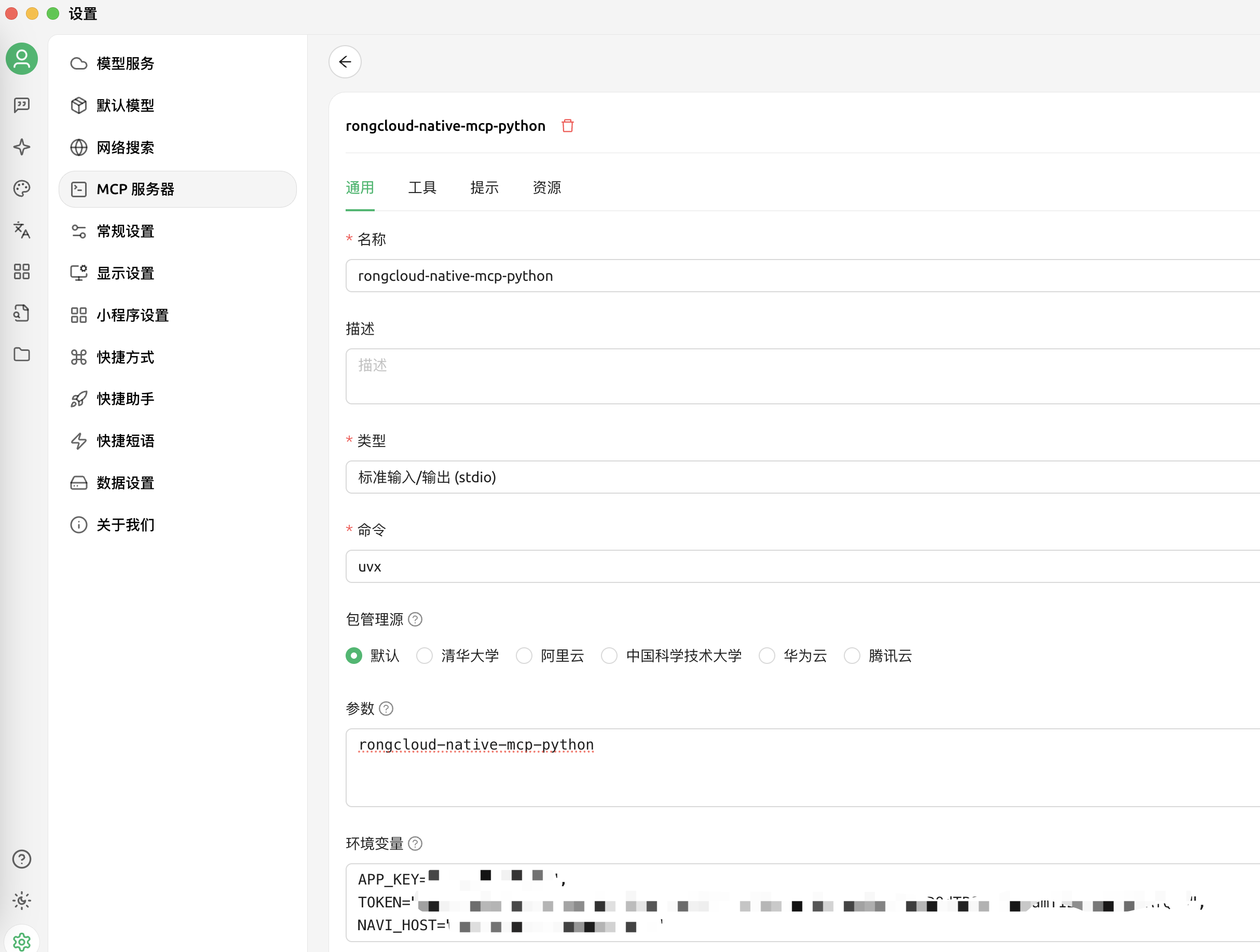
配置路径:Cursor -> 首选项 -> Cursor Settings -> MCP -> Add new global MCP server 配置内容:
{
  "mcpServers": {
    "rongcloud-native-mcp-python": {
      "name": "rongcloud-native-mcp-python",
      "type": "stdio",
      "command": "uvx",
      "args": [
        "rongcloud-native-mcp-python"
      ],
      "env": {
          "APP_KEY": "融云 App Key",
          "TOKEN": "应用 SDK Token (从 Server API 获取)",
          "AREA_CODE": "数据中心区域码(北京 = 1,新加坡 = 2,北美 = 3,新加坡B = 4,沙特 = 5),非公有云客户不设置",
          "NAVI_URL": "导航地址(非公有云客户)",
          "STATS_URL": "数据统计地址(非公有云客户)"
      }
    }
  }
}
APP_KEY: (必填)您的融云应用密钥TOKEN: (必填)应用 SDK 令牌,从服务器 API 获取AREA_CODE: (可选)数据中心区域代码:
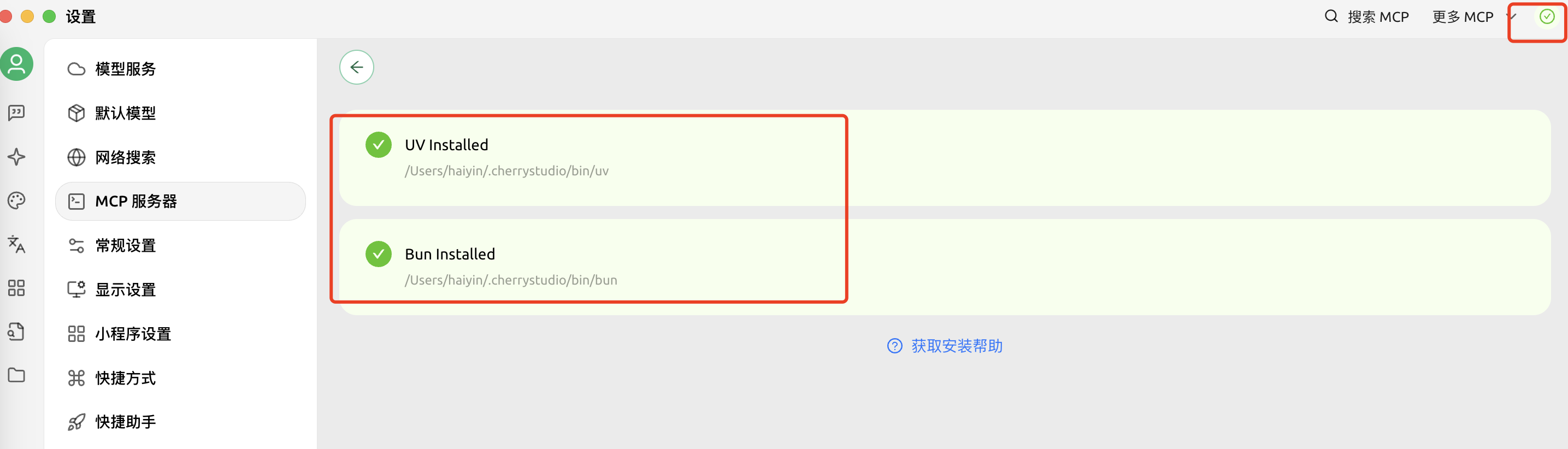
NAVI_URL: (可选)导航 URL,非公有云客户必填STATS_URL: (可选)统计 URL,非公有云客户必填先安装 UV 和 Bun(都需要安装),安装后重启 Cherry Studio。然后按照下图配置:
服务端通过 MCP 协议暴露以下工具:
send_private_text_messageuser_id (str, 默认""):消息接收者的用户IDcontent (str, 默认""):消息内容ext_content (dict, 默认{}):扩展内容字典,用于附加消息数据code 和 error 的字典code、message_id 和 message 的字典send_group_text_messagegroup_id (str, 默认""):群组IDcontent (str, 默认""):消息内容ext_content (dict, 默认{}):扩展内容字典,用于附加消息数据code 和 error 的字典code、message_id 和 message 的字典get_private_messagesuser_id (str, 默认""):用户IDorder_asc (bool, 默认False):是否按升序排列,默认为降序count (int, 默认10):获取的消息数量code 和 error 的字典code 和消息数组的字典get_group_messagesgroup_id (str, 默认""):群组IDorder_asc (bool, 默认False):是否按升序排列,默认为降序count (int, 默认10):获取的消息数量code 和 error 的字典code 和消息数组的字典send_private_image_messageuser_id (str, 默认""):消息接收者的用户IDthumbnail_base64 (str, 默认""):缩略图的base64编码image_uri (str, 默认""):图片URI地址ext_content (dict, 默认{}):扩展内容字典,用于附加消息数据code 和 error 的字典code、message_id 和 message 的字典send_group_image_messagegroup_id (str, 默认""):群组IDthumbnail_base64 (str, 默认""):图片缩略图的base64编码image_uri (str, 默认""):图片URI地址ext_content (dict, 默认{}):扩展内容字典,用于附加消息数据code 和 error 的字典code、message_id 和 message 的字典recall_messagemessage_dict (dict):完整的消息对象,包含message_id、conversation_type、target_id等字段code 和 error 的字典code 和 message 的字典注意:
A: 服务器列表中显示黄色小圆点,尝试先安装 UV 命令,重启 Cursor 后重新开启服务开关。
A: 确保 UV 和 Bun 安装成功,重启 Cherry Studio 后重新开启服务开关。
A: 确保环境变量(APP_KEY、TOKEN、NAVI_URL)正确设置,重启服务后重新调用工具。
如果遇到问题,请:
Claim this server with your GitHub account to request manual ownership verification.
Link to the catalog listing for RongCloud Native MCP server for IM messaging from your README. This badge does not certify ownership, compatibility or security.
[](https://awesome-mcp.com/servers/rongcloud-native-mcp-python)Public repository statistics could not be verified. Check the configured source address; unavailable counts are not zero.
来源、范围和时段分别列出;不相加,不代表安装人数、活跃用户或安全审核。
尚无已审核的包 / 镜像标识,暂不展示下载统计。
Alternative and complementary servers in the same category
An AI receptionist platform with an MCP server for accessing business calls, contacts and appointments from AI assistants.
Pidgeon provides an MCP server and an email inbox API that gives AI agents their own addresses for sending, awaiting, and replying to email.

A Telegram CLI with background sync that can run an optional MCP server for a personal account using MTProto, not the bot API.
