
A Rust CAD application with an MCP server for creating, inspecting and rendering drawings, either headlessly or through a connection to the desktop app.
8K
Media & Design
A skill and MCP server configuration that lets a coding agent write walkthrough guides and drive Screen Browser's hosted service to record narrated tutorial videos of a web app.
Screen Browser skill and MCP configuration is cataloged as an MCP server attributed to screenbrowser. A skill and MCP server configuration that lets a coding agent write walkthrough guides and drive Screen Browser's hosted service to record narrated tutorial videos of a web app. It is categorized under media design. See the capability inspector for recorded interfaces and their independent review status; consult upstream documentation for the current interface.
Installation configuration is not reviewed. No executable setup is offered for this entry; inspect the source repository before proceeding.
Catalog license label: MIT. Check the source repository's current license and terms before using, modifying or distributing this software.
能力定义尚未审核。未核验的采集内容不会作为可信接口展示。
暂无可展示的已审核记录。这不表示上游不支持此能力。
暂无可展示的已审核记录。这不表示上游不支持此能力。
暂无可展示的已审核记录。这不表示上游不支持此能力。
Email delivery is not connected. This page does not collect email addresses or create subscriptions.
Browse the registry for current listings instead.
Reviews for Screen Browser skill and MCP configuration are not available yet
Review publishing and storage are not connected. This page does not collect or publish ratings or comments, including after sign-in.
It needs a deployed URL, a demo user that signs in with email and password without OAuth, 2FA or captcha, the hosts the app talks to, and confirmation that recording is permitted.
No, the agent reads the repository locally to learn labels; only the guide text and run settings leave the machine.
README.md · 0fe325cca205 · 采集于 2026-11-13 12:25:49 UTC
保留上游原文,不做 AI 改写。为安全起见过滤脚本、表单和不安全链接。
当前显示最后一次成功采集的文档快照,请以来源页面为准。
Narrated demo and tutorial videos of your web app, from a guide or your coding agent.
Ask the agent that knows your codebase for a tutorial video of a feature. It writes the walkthrough in the words your buttons and fields use, Screen Browser records a real browser following it against your deployed app, narrates it, adds the on-screen effects, and the agent hands you the MP4 with a GIF, subtitles and chapters. When the app changes, edit a line and ask again.
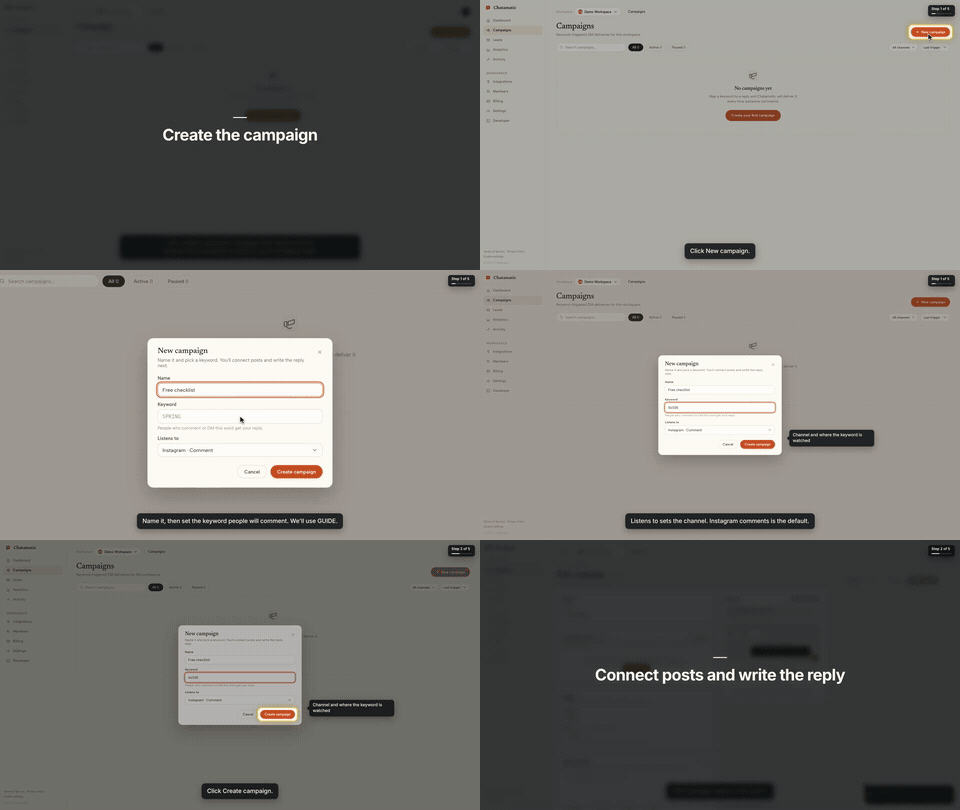
That is the first chapter of a 66-second video made from the request "make a tutorial video of creating a campaign". The whole session, from that sentence to the finished video with the exact prompt and every screen along the way, is in the Claude Code guide.
This repository gives your agent two things:
screenbrowser skill — how to read your codebase and write the two guides Screen Browser
needs (the login flow and the walkthrough), which effect fits which moment, how to check a guide
for free before recording, and how to review the video before handing it over.https://mcp.screenbrowser.com.Claude Code, Codex, Cursor or any MCP client can use it. Sign-in happens in the browser; there is no key to paste.
Add this repository as a plugin marketplace and install the plugin:
claude plugin marketplace add screenbrowser/skill
claude plugin install screenbrowser@screenbrowser
The first time the agent reaches for a Screen Browser tool, Claude Code opens your browser: sign in
to Screen Browser, approve the connection, and you are done. Nothing to copy. (If it does not
prompt, run /mcp and pick screenbrowser → Authenticate.)
Without the plugin system, register the server yourself and copy the skill:
claude mcp add --transport http screenbrowser https://mcp.screenbrowser.com
cp -r skills/screenbrowser ~/.claude/skills/
If your agent cannot open a browser to sign in, create a key under Settings → API keys in Screen Browser and pass it as a bearer token:
claude mcp add --transport http screenbrowser https://mcp.screenbrowser.com \
  --header "Authorization: Bearer <your API key>"
Any MCP client works the same way: Streamable HTTP at https://mcp.screenbrowser.com, OAuth 2.1 with
dynamic client registration for interactive sign-in, or Authorization: Bearer <key>.
The skill is a plain SKILL.md in the open Agent Skills format, and the server is standard MCP over
HTTP, so the same two pieces work outside Claude Code.
Cursor, VS Code, GitHub Copilot and other Agent Plugins clients — this repository is also an
Agent Plugins package (plugin.json, mcp.json, skills/), so
install it as a plugin from the repository URL and sign in when the client offers. Cursor without
the plugin: add the server to .cursor/mcp.json (or the global one in Cursor settings), click
Sign in next to it, and copy the skill into .cursor/skills/:
{
  "mcpServers": {
    "screenbrowser": { "url": "https://mcp.screenbrowser.com" }
  }
}
mkdir -p .cursor/skills && cp -r skills/screenbrowser .cursor/skills/
OpenAI Codex CLI — add the server to ~/.codex/config.toml, sign in once, and copy the skill
into Codex's skills folder:
[mcp_servers.screenbrowser]
url = "https://mcp.screenbrowser.com"
codex mcp login screenbrowser
mkdir -p ~/.codex/skills && cp -r skills/screenbrowser ~/.codex/skills/
Anything else (Gemini CLI, Windsurf, a custom agent) — register an HTTP MCP server with the URL
the way that tool documents it; a client that supports OAuth will sign you in, one that does not
takes the API key as an Authorization: Bearer header. Give the agent skills/screenbrowser/SKILL.md
as instructions (paste it, or point the tool's rules file at it). The MCP server itself also carries
the guide syntax as a resource and a write-tutorial-guide prompt, so a client with MCP prompts can
work without the skill file at all.
Videos can be recorded on the desktop or as a phone or tablet (device: iphone, android, ipad,
…), in a phone frame on a vertical 9:16 or widescreen 16:9 canvas or as the bare screen; one run is
one device.
Open your app's repository in Claude Code and ask:
Make a tutorial video of creating a campaign.
The agent will check credits, create the project (it will ask you for the deployed URL, a demo user, and the legal attestation), write the guides from your routes and templates, validate them, show them to you, start the run, and give you the video link a few minutes later.
The MCP server also ships a get_guide_instructions tool with the same writing rules, for clients
without this skill, a write-tutorial-guide prompt that walks any client through the same flow, and
two resources: screenbrowser://guide-syntax and screenbrowser://example-guides.
Everything the plugin does goes to one place: the Screen Browser MCP server at
https://mcp.screenbrowser.com, over HTTPS, signed in with your Screen Browser account. The
skill itself is instructions for the agent; it runs nothing on your machine and fetches nothing.
What the agent sends to Screen Browser when you ask for a video:
It never sends your source code. The agent reads your repository locally to learn the labels; only the guide text leaves the machine. Nothing is sent to any other service. What Screen Browser keeps, and for how long, is in the privacy policy.
Plans start at $49 a month, sized in minutes of finished video. Checking a guide before recording is free, and a run that fails is not charged. Videos are capped at five minutes. There is no free plan, but the first 100 accounts get 10 free minutes with no card. Current prices are on the pricing page.
plugin.json                        Agent Plugins manifest (Cursor, VS Code, Copilot, …)
mcp.json                           Agent Plugins MCP config (the URL; sign-in is OAuth)
.claude-plugin/plugin.json         Claude Code plugin manifest
.claude-plugin/marketplace.json    lets this repo act as its own Claude Code marketplace
.mcp.json                          Claude Code MCP server config
skills/screenbrowser/SKILL.md      the skill
skills/screenbrowser/references/   guide syntax reference, worked example
examples/chatamatic/               a real auth guide + main guide pair
Plain language, one step per line, naming things as they appear on screen. Screen Browser turns it into the script — the narration, the highlights, the pacing — and resolves each step against the live page:
Go to https://app.acme.test/campaigns
"Let's create a spring promotion."
Click "New campaign"
Type "Spring promo" into the Name field
Click "Save"
Confirm text "Campaign created" is visible
Ids and name= attributes are allowed when a step needs precision; class names generated by a build
tool are refused. The full reference, including the optional effect directives, is in
skills/screenbrowser/references/guide-syntax.md.
The skill carries everything an agent needs to write a guide and run a recording. For anything else — prerequisites, costs, limitations, the API — https://screenbrowser.com/llms.txt is a Markdown index of the public documentation, and https://screenbrowser.com/docs/agents/ is the reference for this integration.
Issues and ideas about the skill are welcome in this repository. Anything about your account or a particular recording: use the contact form at https://screenbrowser.com/contact/.
MIT. Screen Browser itself is a hosted service; this repository contains only the agent-facing skill, configuration and examples.
Claim this server with your GitHub account to request manual ownership verification.
Link to the catalog listing for Screen Browser skill and MCP configuration from your README. This badge does not certify ownership, compatibility or security.
[](https://awesome-mcp.com/servers/screen-browser)Public repository statistics could not be verified. Check the configured source address; unavailable counts are not zero.
来源、范围和时段分别列出;不相加,不代表安装人数、活跃用户或安全审核。
尚无已审核的包 / 镜像标识,暂不展示下载统计。
Alternative and complementary servers in the same category
A Rust CAD application with an MCP server for creating, inspecting and rendering drawings, either headlessly or through a connection to the desktop app.

Liquid Composer is a browser-based Liquid Glass icon design tool that offers a local MCP server for agent-driven icon workflows.

agent-media makes short drama series and other short vertical videos from Claude, ChatGPT or Codex through one MCP connection, with OAuth sign-in and no API keys.