secured-remote-mcp-server-on-aws
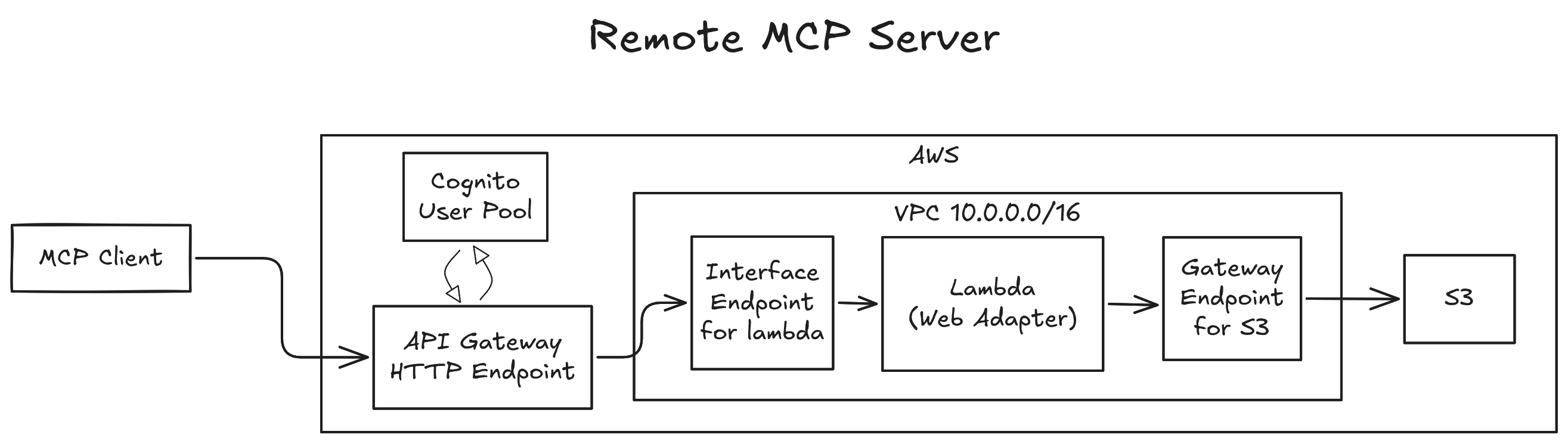
VPC内のプライベートなLambdaに配置されたMCP Serverを、OAuth認証付きAPI Gateway経由でセキュアに公開するリポジトリです
特徴:
- MCP Server (Streamble HTTP)をアクセス保護しながらパブリックにデプロイ可能
- エントリポイントとなるAPI Gatewayは、CognitoをAuthorizerとしてクライアント認証で保護
- Terraformによる宣言的な環境管理
- GitHub ActionsとHCP Terraformを活用した自動デプロイ
- Devcontainerによる統一された開発環境の共有
- Claude CodeとGithub Copilotの利用、AWS公式MCP Serverを利用した最新情報の追従
開発動機:
TerraformやMCPのキャッチアップを目的にポートフォリオとして開発を進めています
CloudTrailやWAFなどコストが高くなるリソースは一旦対象外としています
ディレクトリ構成
├── /.devcontainer                     # VS Code Dev Container設定
│   ├── api_connectivity_test.sh       # API接続テストスクリプト
│   ├── devcontainer.json
│   ├── dockerfile.devcontainer
│   ├── github_deployments_delete.sh   # GitHubデプロイメント削除スクリプト
│   └── init.sh                        # Devcontainer内AWS SSO Profile用意スクリプト
├── /.github
│   ├── /workflows
│   │   ├── pr-closed-deploy-develop.yml             # developブランチへのPRクローズ時デプロイ
│   │   ├── reusable-build-and-push.yml
│   │   ├── reusable-plan-and-deploy-with-tfc.yml    # HCP Terraform run
│   │   ├── reusable-update-lambda.yml                # Lambda更新処理
│   │   └── reusable-validate-environment-secrets.yml # 環境変数検証
│   └── copilot-instructions.md       # GitHub Copilotカスタム指示
├── /.vscode
│   ├── mcp.json                       # MCP Server接続設定
│   └── settings.json
├── /terraform
│   ├── /env                           # 環境別設定
│   │   ├── /dev                       # 開発環境
│   │   │   ├── /dummy                 # Lambda初期デプロイ時のダミー
│   │   │   ├── main.tf                # リソース定義
│   │   │   ├── dummy.tf               # ダミーZip作成用
│   │   │   ├── outputs.tf             # HCP Terraform上で出力
│   │   │   ├── terraform.tf           # バックエンド設定(HCP Terraform)
│   │   │   └── variables.tf           # 変数定義
│   │   └── /prod                      # 本番環境(同構成)
│   └── /modules                       # 再利用可能モジュール
│       ├── /api_gateway
│       ├── /cognito
│       ├── /lambda
│       ├── /lambda_layer
│       ├── /s3
│       ├── /vpc
│       ├── /vpc_endpoint_lambda
│       └── /vpc_endpoint_s3
├── /sam                               # AWS SAM実装(比較検証用)
│   ├── samconfig.toml
│   └── template.yaml
├── /src                               # MCP Serverアプリケーション
│   ├── main.py                        # FastMCP実装
│   ├── pyproject.toml                 # Python プロジェクト設定
│   ├── requirements.txt               # pip依存関係
│   ├── run.sh                         # 起動スクリプト
│   └── uv.lock
├── .auto.tfvars.sample                # HCP Terraform変数
├── .env.sample                        # 環境変数サンプル
├── .gitignore
├── .pre-commit-config.yaml
├── .terraform-version                 # Terraformバージョン(1.12.1)
├── architecture.png                   # アーキテクチャ図
├── bootstrap.tf                       # HCP Terraform & OIDC 初期設定
├── CLAUDE.md                          # Claude Code用プロジェクト指示
├── compose.yml                        # Devcontainer用Docker Compose設定
├── justfile                           # タスクランナー定義
└── README.md
環境構築
前提条件:
- Devcontainer実行可能環境(VSCode推奨)
- HCP Terraformアカウント(GitHubアカウント連携済み)
- AWS IAM Identity Centerユーザー
.env作成:
cp .env.sample .env
cp .auto.tfvars.sample .auto.tfvars
HCP Terraform bootstrap:
- 「TFE_TOKEN」は「https://app.terraform.io/app/settings/tokens」で発行
- 「TFE_ORGANIZATION」は「https://app.terraform.io/app/organizations/new」で作成
- HCP Terraformワークスペースの作成
# devcontainerに入って以下のコマンドを実行
/app$ terraform init
/app$ terraform plan
/app$ terraform apply

# 🛠️ bootstrap.tf`を使用してHCP Terraformに以下の構造が作成されます
YOUR_ORGANIZATION/
├── projects/
    └── secured-remote-mcp-server-on-aws/
        └── workspaces/
            ├── dev-secured-remote-mcp-server-on-aws
            └── prod-secured-remote-mcp-server-on-aws
使用方法
1. OAuthアクセストークンの取得
API Gatewayへのアクセスに必要なOAuthアクセストークンを取得します:
# devcontainer内

# トークンのみ取得(AWS Secrets Managerから認証情報を取得して生成)
# 特定のAWSプロファイルを使用してトークン取得
just get-token "my-api-secret" "profile-name"

# API接続テスト(トークン取得からAPI呼び出しまでの全体テスト)
just test-api "my-api-secret" "https://{apiエンドポイント名}.execute-api.ap-northeast-1.amazonaws.com/mcp/"
2. MCP Clientからの利用
取得したトークンを使用してMCP Clientを設定します。
例: VSCode拡張機能のGitHub Copilot Agentの設定例(mcp.json)
{
    "servers": {
        "aws-private-lambda-for-mcp": {
            "type": "http",
            "url":  "https://{apiエンドポイント名}.execute-api.ap-northeast-1.amazonaws.com/mcp/",
            "headers": {
                "Authorization": "Bearer {上記で取得したトークン}",
                "Accept": "application/json"
            }
        }
    }
}
特筆点
- API GatewayはServer-Sent Events (SSE) やHTTPストリーミングレスポンスに対応していないため、全結果をバッファリングして一括返却する必要がある
from fastmcp import FastMCP

mcp = FastMCP(
    "remote-mcp-server",
    stateless_http=True,
    json_response=True # 完全なJSONレスポンスを一度に返すために必須
)


