
A directory listing describing a cancellation-letter and mailing-address service. The configured public GitHub repository returned 404 during source verification.
Repository stats unavailable
Developer Tools
Serena is a toolkit that offers an MCP server exposing semantic code retrieval, editing, refactoring and debugging tools to coding agents, operating at the symbol level.
Serena, an MCP server providing IDE-like semantic coding tools is cataloged as an MCP server attributed to oraios. Serena is a toolkit that offers an MCP server exposing semantic code retrieval, editing, refactoring and debugging tools to coding agents, operating at the symbol level. It is categorized under developer tools. See the capability inspector for recorded interfaces and their independent review status; consult upstream documentation for the current interface.
Installation configuration is not reviewed. No executable setup is offered for this entry; inspect the source repository before proceeding.
Catalog license label: Not specified. Check the source repository's current license and terms before using, modifying or distributing this software.
能力定义尚未审核。未核验的采集内容不会作为可信接口展示。
暂无可展示的已审核记录。这不表示上游不支持此能力。
暂无可展示的已审核记录。这不表示上游不支持此能力。
暂无可展示的已审核记录。这不表示上游不支持此能力。
Email delivery is not connected. This page does not collect email addresses or create subscriptions.
Browse the registry for current listings instead.
Reviews for Serena, an MCP server providing IDE-like semantic coding tools are not available yet
Review publishing and storage are not connected. This page does not collect or publish ratings or comments, including after sign-in.
Yes. Serena provides the tools for coding workflows, but an LLM is required to orchestrate tool use and perform the actual work.
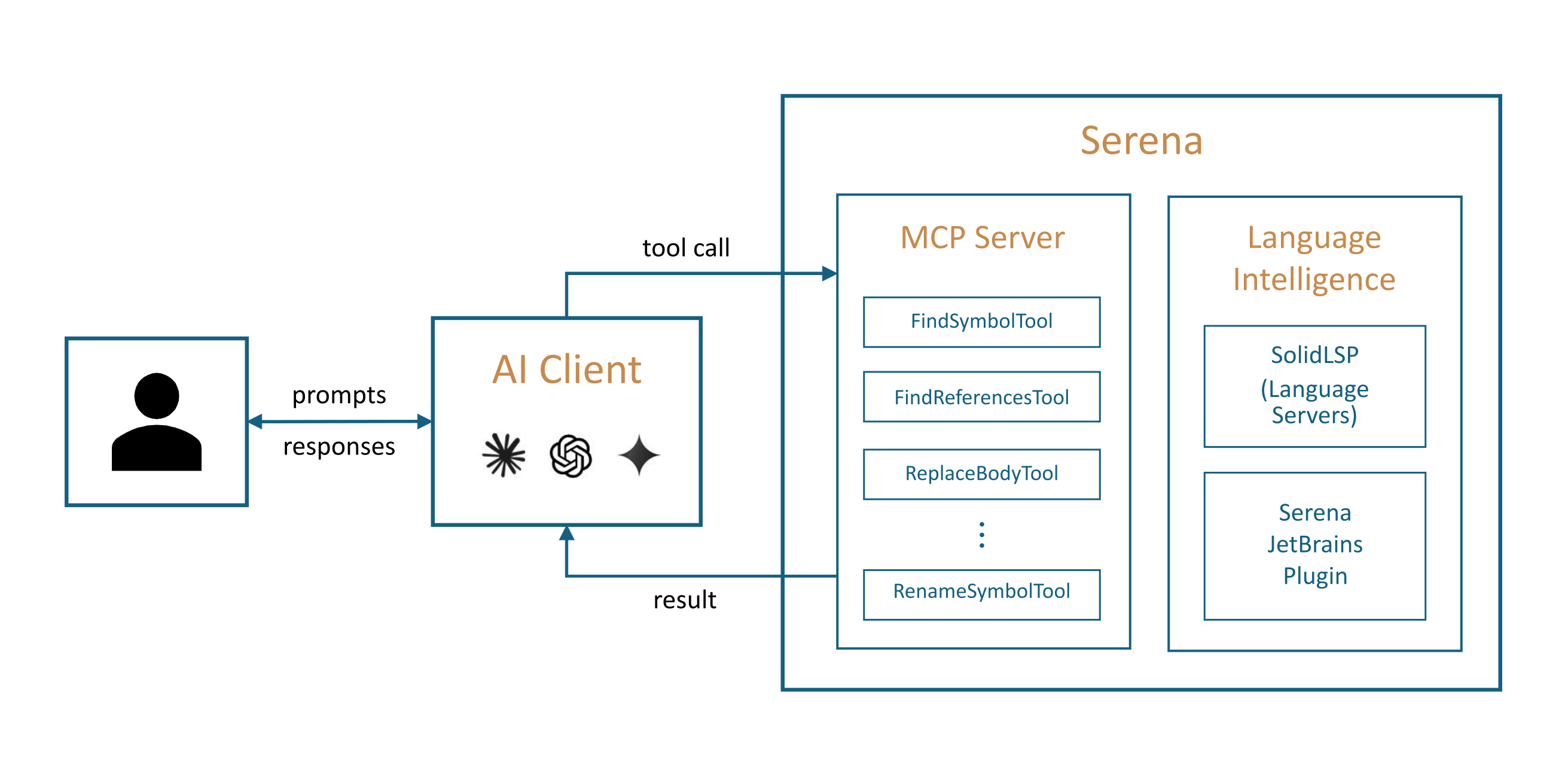
Serena uses language servers implementing LSP by default, or alternatively the paid Serena JetBrains Plugin.
Clients can launch the MCP server via a launch command, or it can be started in HTTP mode and the client given its URL.
README.md · 6e5c3776d4e6 · 采集于 2026-11-13 09:43:18 UTC
保留上游原文,不做 AI 改写。为安全起见过滤脚本、表单和不安全链接。
当前显示最后一次成功采集的文档快照,请以来源页面为准。




Serena's agent-first tool design involves robust high-level abstractions, distinguishing it from approaches that rely on low-level concepts like line numbers or primitive search patterns.
Practically, this means that your agent operates faster, more efficiently and more reliably, especially in larger and more complex codebases.
[!TIP] Serena v2 with the new REPL-based agent interface has been released.
Learn more about the new interface and how to configure it.

While it is humans who download and set up Serena, our end users are essentially AI agents. As the ones actually applying Serena's tools, they are in the best position to evaluate Serena.
We crafted an unbiased evaluation prompt that leads the agent to perform ~20 routine coding tasks, representative of everyday development work, in order to estimate the value added by Serena's tools when used alongside its own built-ins.
Here's a one-sentence summary of what the agents had to say:
Opus 4.6 (high) in Claude Code on a large Python codebase:
"Serena's IDE-backed semantic tools are the single most impactful addition to my toolkit – cross-file renames, moves, and reference lookups that would cost me 8–12 careful, error-prone steps collapse into one atomic call, and I would absolutely ask any developer I work with to set them up."
GPT 5.4 (high) in Codex CLI on a Java codebase:
"As a coding AI agent, I would ask my owner to add Serena because it gives me the missing IDE-level understanding of symbols, references, and refactorings, turning fragile text surgery into calmer, faster, more confident code changes where semantics matter."
GPT 5.4 (medium) in Copilot CLI on a large, multi-language monorepo:
"As a coding agent, I’d absolutely ask my owner to add Serena because it makes me noticeably sharper and calmer on real code – especially symbol-aware navigation, cross-file refactors, and monorepo dependency jumps – while I still lean on built-ins for tiny text edits and non-code work."
Different agents in different settings independently converge on the same verdict.
Give your agent the tools it has been asking for and add Serena MCP to your client!
See our documentation for the full methodology and much more detailed evaluation results, or run your own evaluation on a project of your choice.
Serena provides the necessary tools for coding workflows, but an LLM is required to do the actual work, orchestrating tool use.
Serena can extend the functionality of your existing AI client via the model context protocol (MCP). Most modern AI chat clients directly support MCP, including
:tv: See also: Introduction to Serena in 5 Minutes (YouTube)
To connect the Serena MCP server to your client, you either
See the Quick Start section below for information on how to get started.
Serena provides a set of versatile code querying and editing functionalities based on symbolic understanding of the code. Equipped with these capabilities, your agent discovers and edits code just like a seasoned developer making use of an IDE's capabilities would. Serena can efficiently find the right context and do the right thing even in very large and complex projects!
There are two alternative technologies powering these capabilities:
You can choose either of these backends depending on your preferences and requirements.
Serena incorporates a powerful abstraction layer for the integration of language servers that implement the language server protocol (LSP). The underlying language servers are typically open-source projects or at least freely available for use.
When using Serena's language server backend, we provide support for over 40 programming languages, including Ada / SPARK, AL, Angular, Ansible, Astro, Bash, BSL, C#, C/C++, Clojure, Crystal, CUE, Dart, Deno, Elixir, Elm, Erlang, Fortran, F#, GDScript, Gleam, GLSL, Go, GraphQL, Groovy, Haskell, Haxe, HLSL, HTML, Java, JavaScript, JSON, Julia, Kotlin, LaTeX, Lean 4, Lua, Luau, Markdown, MATLAB, mSL, Nextflow, Nix, OCaml, Pascal, Perl, PHP, PowerShell, Python, QML, R, Rego, Ruby, Rust, Scala, SCSS / Sass / CSS, Solidity, Svelte, Swift, SystemVerilog, Terraform, TOML, TypeScript, VB.NET, Vue, WGSL, Wolfram Language, YAML, and Zig.
The paid Serena JetBrains Plugin (free trial available) leverages the powerful code analysis capabilities of your JetBrains IDE. The plugin naturally supports all programming languages and frameworks that are supported by JetBrains IDEs, including IntelliJ IDEA, PyCharm, Android Studio, WebStorm, PhpStorm, RubyMine, GoLand, and potentially others (Rider and CLion are unsupported though).

See our documentation page for further details and instructions on how to apply the plugin.
Serena provides a wide range of tools for efficient code retrieval, editing and refactoring, as well as a memory system for long-lived agent workflows.
Given its large scope, Serena adapts to your needs by offering a multi-layered configuration system.
Serena's retrieval tools allow agents to explore codebases at the symbol level, understanding structure and relationships without reading entire files.
| Capability | Language Servers | JetBrains Plugin |
|---|---|---|
| find symbol | yes | yes |
| symbol overview (file outline) | yes | yes |
| find referencing symbols | yes | yes |
| search in project dependencies | -- | yes |
| type hierarchy | -- | yes |
| find declaration | yes* | yes |
| find implementations | yes** | yes |
| query external projects | yes | yes |
| diagnostics/inspections | yes | yes |
*: Will generally not work for declarations in external dependencies.
**: Only available for some languages, limited by the language server functionality.
Without precise refactoring tools, agents are forced to resort to unreliable and expensive search and replace operations.
| Capability | Language Servers | JetBrains Plugin |
|---|---|---|
| rename | yes (only symbols) | yes (symbols, files, directories) |
| move (symbol, file, directory) | -- | yes |
| inline | -- | yes |
| propagate deletions (remove unused code) | -- | yes |
Serena's symbolic editing tools are less error-prone and much more token-efficient than typical alternatives.
| Capability | Language Servers | JetBrains Plugin |
|---|---|---|
| replace symbol body | yes | yes |
| insert after symbol | yes | yes |
| insert before symbol | yes | yes |
| safe delete | yes | yes |
Exclusive to the JetBrains plugin, Serena supports a highly general debugging tool, which allows an agent to set breakpoints, inspect variables, evaluate expressions and control execution flow via a persistent REPL-style interface.
Beyond its semantic capabilities, Serena includes a set of basic utilities for completeness. When Serena is used inside an agentic harness such as Claude Code or Codex, these tools are typically disabled by default, since the surrounding harness already provides overlapping file, search, and shell capabilities.
search_for_pattern – flexible regex search across the codebasereplace_content – agent-optimised regex-based and literal text replacementlist_dir / find_file – directory listing and file searchread_file – read files or file chunksexecute_shell_command – run shell commands (e.g. builds, tests, linters)A memory system is elemental to long-lived agent workflows, especially when knowledge is to be shared across
sessions, users and projects.
Despite its simplicity, we received positive feedback from many users who tend to combine Serena's memory management system with their
agent's internal system (e.g., AGENTS.md files).
It can easily be disabled if you prefer to use something else.
Active tools, tool descriptions, prompts, language backend details and many other aspects of Serena can be flexibly configured on a per-case basis by simply adjusting a few lines of YAML. To achieve this, Serena offers multiple levels of (composable) configuration:
[!IMPORTANT] Do not install Serena via an MCP or plugin marketplace! They contain outdated and suboptimal installation commands.
Prerequisites. Serena is managed by uv, and installing uv is the only required prerequisite.
Install Serena. Serena is installed via uv as follows:
uv tool install -p 3.13 serena-agent
After successful installation, the command serena should be available in your shell.
[!NOTE] When using the language server backend, some additional dependencies may need to be installed to support certain languages; see the Language Support page for details.
Initialise Serena. To initialise Serena and verify that your setup works correctly, simply run:
serena init
By default, this will set up Serena to use the language server backend. To use the JetBrains backend instead, add the parameters -b JetBrains
(see the JetBrains Plugin documentation page for additional usage details).
Either way, you should receive a success message indicating that Serena has been initialised successfully.
Configuring Your Client. To connect Serena to your preferred MCP client, you typically need to configure a launch command in your client. Follow the link for specific instructions on how to set up Serena for Claude Code, Codex, Claude Desktop, MCP-enabled IDEs and other clients (such as local and web-based GUIs).
[!TIP] While getting started quickly is easy, Serena is a powerful toolkit with many configuration options. We highly recommend reading through the user guide to get the most out of Serena.
Specifically, we recommend to read about ...
Please refer to the user guide for detailed instructions on how to use Serena effectively.
A significant part of Serena, especially support for various languages, was contributed by the open source community. We are very grateful for the many contributors who made this possible and who played an important role in making Serena what it is today.
Serena is licensed per component: SolidLSP (src/solidlsp) under the MIT License,
the Serena application (everything else) under GPL-3.0-or-later.
Distributions combining both are as a whole subject to the GPL.
See LICENSE for the authoritative overview and the license documentation for the background. Contributions require acceptance of our CLA; see CONTRIBUTING.md.
Claim this server with your GitHub account to request manual ownership verification.
Link to the catalog listing for Serena, an MCP server providing IDE-like semantic coding tools from your README. This badge does not certify ownership, compatibility or security.
[](https://awesome-mcp.com/servers/serena)Public repository statistics could not be verified. Check the configured source address; unavailable counts are not zero.
来源、范围和时段分别列出;不相加,不代表安装人数、活跃用户或安全审核。
尚无已审核的包 / 镜像标识,暂不展示下载统计。
Alternative and complementary servers in the same category
A directory listing describing a cancellation-letter and mailing-address service. The configured public GitHub repository returned 404 during source verification.

A hosted MCP service for browsing and searching through Singapore mobile-network proxies.

A directory listing describing a Markdown-to-PDF service. The configured public GitHub repository returned 404 during source verification.