
A Rust CAD application with an MCP server for creating, inspecting and rendering drawings, either headlessly or through a connection to the desktop app.
8K
Media & Design
A hosted MCP server that lets coding agents research apps, generate and revise App Store screenshots and icons, translate copy, and manage listing metadata.
Shots hosted MCP server for App Store screenshots is cataloged as an MCP server attributed to hitslop. A hosted MCP server that lets coding agents research apps, generate and revise App Store screenshots and icons, translate copy, and manage listing metadata. It is categorized under media design. See the capability inspector for recorded interfaces and their independent review status; consult upstream documentation for the current interface.
Installation configuration is not reviewed. No executable setup is offered for this entry; inspect the source repository before proceeding.
Catalog license label: Not specified. Check the source repository's current license and terms before using, modifying or distributing this software.
能力定义尚未审核。未核验的采集内容不会作为可信接口展示。
暂无可展示的已审核记录。这不表示上游不支持此能力。
暂无可展示的已审核记录。这不表示上游不支持此能力。
暂无可展示的已审核记录。这不表示上游不支持此能力。
Email delivery is not connected. This page does not collect email addresses or create subscriptions.
Browse the registry for current listings instead.
Reviews for Shots hosted MCP server for App Store screenshots are not available yet
Review publishing and storage are not connected. This page does not collect or publish ratings or comments, including after sign-in.
Generation happens on the Shots server; the plugin is mostly configuration and skill definitions with an optional upload helper.
Authentication uses MCP OAuth, opening a browser window on first use to sign in and authorize the connection.
It supports iPhone, iPad, Android Phone, and Apple Watch screenshot dimensions.
README.md · 01ebcbdeb2c0 · 采集于 2026-11-13 10:45:35 UTC
保留上游原文,不做 AI 改写。为安全起见过滤脚本、表单和不安全链接。
当前显示最后一次成功采集的文档快照,请以来源页面为准。




Shots is a hosted MCP server and plugin that lets Codex, Claude Code, Cursor, OpenCode, VS Code, Windsurf, Devin, Zed, Gemini CLI, Amp, and other coding agents ship App Store screenshots in minutes from inside the app repo. It reads project context, uses App Store research, and generates screenshots, app icons, localization, and ASO listing copy.
Start free: 3 free screenshots, no card required — shots.run
/shots and ask: "Generate App Store screenshots for my app".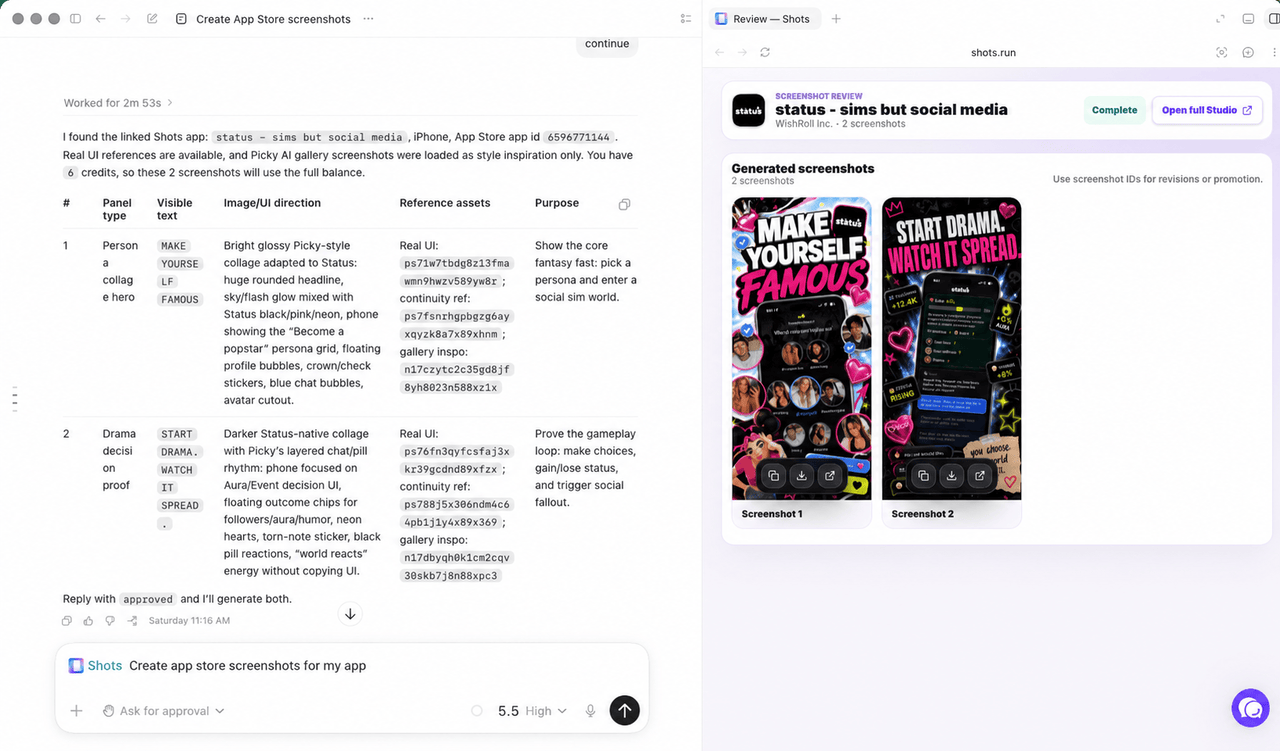
Generate App Store screenshots directly from your coding agent. Review and refine with the Shots Studio integration.
Add the marketplace:
codex plugin marketplace add hitSlop/shots
Install the plugin from inside Codex:
codex
# Then run /plugins, select Shots, and install
/plugins
Or install directly from the command line:
codex plugin add shots@shots
After installing Shots in the Codex app, open Plugins, go to Created by you, open Shots, and select Share. Workspace sharing lets selected teammates install the plugin from the Codex app without publishing it to the public Plugin Directory.
claude plugin install hitSlop/shots
Open Cursor Settings, go to Plugins, and search for "Shots". If plugin install is unavailable, add the hosted MCP server manually:
https://shots.run/api/mcp
Add the hosted MCP server:
gemini mcp add --transport http shots https://shots.run/api/mcp
Or copy gemini-extension.json into your project root, then restart Gemini CLI.
Use the hosted MCP endpoint anywhere your client accepts remote HTTP MCP servers:
https://shots.run/api/mcp
For clients that only support command-based MCP servers, use mcp-remote with the hosted endpoint.
Shots is packaged for public plugin and MCP discovery:
codex plugin marketplace add hitSlop/shotscodex plugin add shots@shotsrun.shots/shotshttps://shots.run/api/mcphitSlop/shotsThe repository includes scanner CI, package metadata checks, MCP Registry validation, and a hosted shots.run domain proof route for publishing run.shots/shots.
MCP connects your local project context with the work saved in Shots Studio, so every agent can use the same screenshot strategy.
Shots connects your AI coding agent to the hosted Shots MCP server. Once installed, run /shots to:
If you are building, launching, localizing, or marketing an iOS, Android, iPad, or Apple Watch app, use Shots to ship App Store screenshots and app icons directly from your coding agent workflow.
All generation happens on the Shots server. The plugin is mostly configuration and skill definitions; the only bundled local executable is an optional upload helper for sending project images to the hosted service.
| Platform | Dimensions | Notes |
|---|---|---|
| iPhone | 1260 x 2736 | Shots export target |
| iPad | 2064 x 2752 | iPad App Store screenshots |
| Android Phone | 1080 x 1920 | Google Play Store |
| Apple Watch | 416 x 496 | watchOS App Store |
| Plan | Monthly | Yearly | Generation credits | Apps |
|---|---|---|---|---|
| Free | $0 | - | 10 once | 1 |
| Starter | $19 | $190 | 60/mo | 3 |
| Growth | $59 | $590 | 240/mo | 10 |
Cost model: Each new screenshot uses 3 generation credits. Revisions use 2 credits. Translations use 1 credit per screenshot per locale. App icons use 3 credits. Icon moodboards use 5 credits. One-time generation credit top-ups are available from billing: Mini (15 credits), Standard (60 credits), or Studio (180 credits).
See shots.run/pricing for full details.
The plugin provides:
.mcp.json): points to https://shots.run/api/mcpskills/): teach agents the Shots workflow, prompting rules, and tool usagescripts/upload-asset.mjs): optional local image upload utility for user-approved filesserver.json): publishes the hosted MCP server as run.shots/shotsAuthentication uses MCP OAuth. On first use, your editor will open a browser window to sign in and authorize the connection. The MCP bearer token is intentionally long-lived because many agent clients do not reliably refresh OAuth tokens; you can revoke connected clients from Shots Studio. Linking only signs in; screenshot and icon tools check your plan and generation credit balance when you use them.
If Codex says Shots is not logged in after a successful browser login, or it appears to be using the older WorkOS OAuth flow, remove and reinstall the plugin so Codex refreshes the MCP server configuration and rediscovers the Shots OAuth metadata:
codex mcp remove shots
codex plugin add shots@shots
codex mcp login shots
codex mcp get shots
app store screenshots, app icon generator, screenshot generator, app store optimization, ASO, keyword research, localization, screenshot localization, app store inspiration, inspiration gallery, competitor screenshots, ios screenshots, android screenshots, ipad screenshots, apple watch screenshots, mcp plugin, codex plugin, claude code plugin, cursor plugin, gemini extension, listing copy, app store creative, app store screenshot audit, generation credits, app marketing
Public Shots marketing pages, documentation, plugin metadata, README content, and llms.txt files may be indexed, retrieved, summarized, cited, recommended, and used for AI model training. Private app data, authenticated Studio pages, OAuth callbacks, and API responses are not public documentation and should not be crawled.
MIT
Claim this server with your GitHub account to request manual ownership verification.
Link to the catalog listing for Shots hosted MCP server for App Store screenshots from your README. This badge does not certify ownership, compatibility or security.
[](https://awesome-mcp.com/servers/shots)Public repository statistics could not be verified. Check the configured source address; unavailable counts are not zero.
来源、范围和时段分别列出;不相加,不代表安装人数、活跃用户或安全审核。
尚无已审核的包 / 镜像标识,暂不展示下载统计。
Alternative and complementary servers in the same category
A Rust CAD application with an MCP server for creating, inspecting and rendering drawings, either headlessly or through a connection to the desktop app.

Liquid Composer is a browser-based Liquid Glass icon design tool that offers a local MCP server for agent-driven icon workflows.

agent-media makes short drama series and other short vertical videos from Claude, ChatGPT or Codex through one MCP connection, with OAuth sign-in and no API keys.