
A directory listing describing a cancellation-letter and mailing-address service. The configured public GitHub repository returned 404 during source verification.
Repository stats unavailable
Developer Tools
An open-source AI agent platform that provides an MCP server exposing browser control, workflow execution, and knowledge pack access to AI coding agents.
SideButton is cataloged as an MCP server attributed to sidebutton. An open-source AI agent platform that provides an MCP server exposing browser control, workflow execution, and knowledge pack access to AI coding agents. It is categorized under developer tools. See the capability inspector for recorded interfaces and their independent review status; consult upstream documentation for the current interface.
Installation configuration is not reviewed. No executable setup is offered for this entry; inspect the source repository before proceeding.
Catalog license label: Not specified. Check the source repository's current license and terms before using, modifying or distributing this software.
能力定义尚未审核。未核验的采集内容不会作为可信接口展示。
暂无可展示的已审核记录。这不表示上游不支持此能力。
暂无可展示的已审核记录。这不表示上游不支持此能力。
暂无可展示的已审核记录。这不表示上游不支持此能力。
Email delivery is not connected. This page does not collect email addresses or create subscriptions.
Browse the registry for current listings instead.
Reviews for SideButton are not available yet
Review publishing and storage are not connected. This page does not collect or publish ratings or comments, including after sign-in.
The MCP server supports stdio and SSE transports.
Yes, the same workflows are available via a REST API for remote triggering from webhooks, cron jobs, mobile apps, or other agents.
README.md · 1d215643daca · 采集于 2026-11-13 08:17:45 UTC
保留上游原文,不做 AI 改写。为安全起见过滤脚本、表单和不安全链接。
当前显示最后一次成功采集的文档快照,请以来源页面为准。
Open-source AI agent platform for agentic coding — MCP server, knowledge packs, and AI workflow automation.


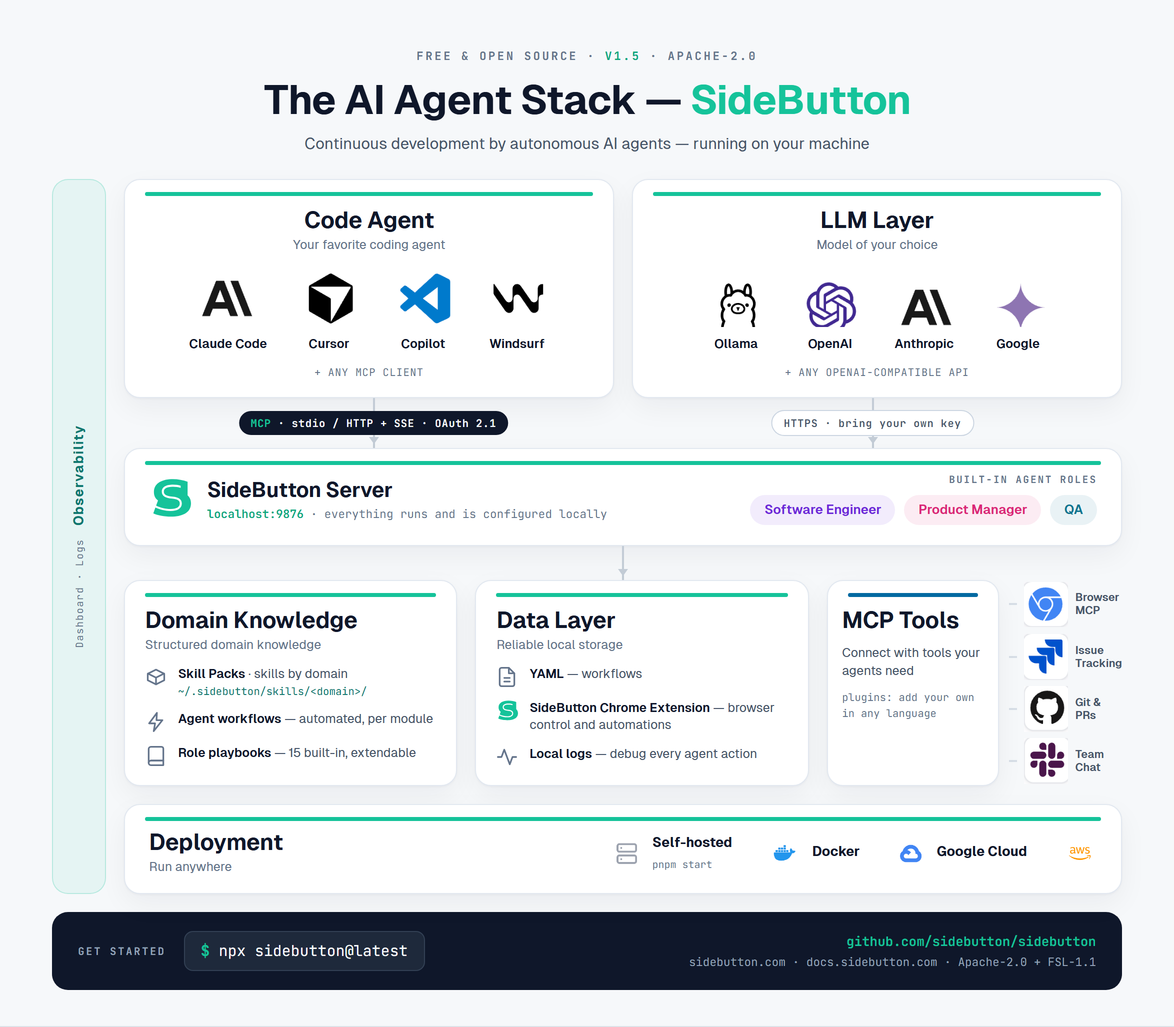
Run AI coding agents with agentic workflows, knowledge packs, and real browser control. Connect Claude Code, Codex, Cursor, ChatGPT, or any MCP client.
npx sidebutton@latest
# Dashboard at http://localhost:9876
| MCP Server | AI agent tools for browser control, workflow execution, and knowledge pack access. Stdio and SSE transports. |
| REST API | Trigger workflows remotely from webhooks, cron jobs, mobile apps, or other agents. |
| Workflow Engine | AI workflow automation with browser, git, issue-tracking, LLM, shell, and control-flow steps. Define agentic workflows in YAML. |
| Knowledge Packs | Installable domain knowledge — CSS selectors, data models, state machines. Role playbooks turn coding agents into an AI software engineer, QA, or PM. |
| Chrome Extension | Browser commands with real DOM access via WebSocket, not screenshots. Recording mode. |
| Dashboard | Svelte UI — workflow browser, run logs, skill pack manager, system status. |
# Install and start
npx sidebutton@latest

# Or from source
pnpm install && pnpm build && pnpm start

# Open http://localhost:9876
pnpm cli serve          # Start server with dashboard
pnpm cli serve --stdio  # Start with stdio transport (for Claude Desktop)
pnpm cli list           # List available workflows
pnpm cli status         # Check server status

# Skill pack management
pnpm cli registry add <path|url>   # Install skill packs from a registry
pnpm cli registry update [name]    # Update installed packs
pnpm cli registry remove <name>    # Uninstall packs and remove registry
pnpm cli search [query]            # Search available skill packs

# Creating skill packs
pnpm cli init [domain]             # Scaffold a new skill pack
pnpm cli validate [path]           # Validate pack structure
pnpm cli publish [source]          # Publish to a registry
SideButton is an open-source MCP server for AI coding agents. Agents connect to it directly for browser control, workflow automation, and domain knowledge.
Works with Claude Code, Codex, Cursor, Claude Desktop, VS Code, Windsurf, ChatGPT — any MCP client.
claude mcp add sidebutton --transport http http://localhost:9876/mcp
Persists to ~/.claude.json; add --scope project to write ./.mcp.json instead. Full guide: Claude Code SideButton MCP setup.
Add to ~/.codex/config.toml:
[mcp_servers.sidebutton]
command = "sidebutton"
args = ["serve", "--stdio"]
Full guide: OpenAI Codex SideButton MCP setup.
Add to ~/Library/Application Support/Claude/claude_desktop_config.json:
{
  "mcpServers": {
    "sidebutton": {
      "command": "npx",
      "args": ["sidebutton", "--stdio"]
    }
  }
}
Add to ~/.cursor/mcp.json:
{
  "mcpServers": {
    "sidebutton": {
      "url": "http://localhost:9876/mcp"
    }
  }
}
| Tool | Description |
|---|---|
run_workflow | Execute a workflow by ID |
get_run_log | Get execution log for a run |
list_workflows | List all available workflows |
get_workflow | Get workflow YAML definition |
list_run_logs | List recent workflow executions |
publish_artifact | Publish evidence (screenshots, reports) from a session |
get_browser_status | Check browser extension connection |
capture_page | Capture selectors from current page |
navigate | Navigate browser to URL |
snapshot | Get page accessibility snapshot |
click | Click an element |
type | Type text into an element |
press_key | Send keyboard keys |
scroll | Scroll the page |
extract | Extract text from element |
screenshot | Capture page screenshot (pass path to write a PNG file instead of returning image bytes) |
select_option | Select dropdown option |
fill | Fill input value (React-compatible) |
wait | Wait for element or delay |
exists | Check if element exists |
extract_all | Extract all matching elements |
extract_map | Extract structured data from repeated elements |
scroll_into_view | Scroll element into viewport |
hover | Hover over element |
inject_css | Inject CSS into the page (blur/hide elements before a screenshot) |
evaluate | Execute JavaScript in browser |
browser_batch | Run a sequence of browser actions in one call |
set_basic_auth | Set HTTP Basic Auth credentials for the connected tab |
clear_basic_auth | Clear stored HTTP Basic Auth credentials |
JSON endpoints for external integrations. The same workflows are available via MCP locally and via REST remotely.
# Run a workflow
curl -X POST http://localhost:9876/api/workflows/check_ticket/run \
  -H "Content-Type: application/json" \
  -d '{"params": {"ticket_id": "PROJ-123"}}'

# List workflows
curl http://localhost:9876/api/workflows

# Get run log
curl http://localhost:9876/api/runs/latest
Trigger workflows from webhooks, cron jobs, mobile apps, or other agents on different machines.
YAML-first orchestration for agentic workflows. Step types by family:
| Family | Steps |
|---|---|
browser.* | navigate, click, type, fill, extract, extractAll, extractMap, snapshot, screenshot, wait, exists, hover, key, scroll, scrollIntoView, select_option, injectCSS, injectJS |
git.* | createPR, getPR, listPRs, getIssue, listIssues |
issues.* | create, get, search, comment, attach, transition |
llm.* | classify, decide, generate |
control.* | if, foreach, retry, stop |
shell / terminal | shell.run, terminal.open, terminal.run |
data.* | first, get |
workflow.call | Call another workflow with parameters |
LLM steps work with Ollama (local), OpenAI, and Anthropic.
id: check_ticket_status
title: "Check Jira ticket and classify"
steps:
  - type: browser.navigate
    url: "https://your-org.atlassian.net/browse/{{ticket_id}}"
  - type: browser.extract
    selector: "[data-testid='status-field']"
    as: current_status
  - type: control.if
    condition: "{{current_status}} != 'Done'"
    then:
      - type: llm.classify
        prompt: "Should this ticket be closed? Context: {{current_status}}"
        classes: [close, keep_open]
        as: decision
Use {{variable}} syntax to reference extracted values or parameters:
steps:
  - type: browser.extract
    selector: ".username"
    as: user
  - type: shell.run
    cmd: "echo 'Hello, {{user}}!'"
Installable domain knowledge (skill packs) per web app or domain. Knowledge packs power AI code review, automated testing, and enterprise AI agent deployments.
Also referred to as skill packs in code and CLI commands.
sidebutton install github.com
sidebutton install atlassian.net
Open registry with published packs for popular web apps. Build and share packs for any domain.
Install the SideButton Chrome Extension from the Chrome Web Store.
After installing:
Svelte UI at http://localhost:9876:
SideButton handles multi-agent orchestration — from workflow execution to knowledge injection.
┌──────────────────────────────────────────────────────────────────────────┐
│                          @sidebutton/server                               │
│                                                                          │
│  ┌─────────────────────┐   ┌──────────────────────────────────────────┐  │
│  │  stdio Transport    │   │    Fastify HTTP + WebSocket (port 9876)  │  │
│  │  ─────────────────  │   │    ────────────────────────────────────  │  │
│  │  stdin → JSON-RPC   │   │  GET  /        → Dashboard (Svelte)      │  │
│  │  stdout ← JSON-RPC  │   │  GET  /ws      → Chrome Extension WS     │  │
│  │  (Claude Desktop)   │   │  POST /mcp     → MCP JSON-RPC (SSE)      │  │
│  └──────────┬──────────┘   │  GET  /api/*   → REST API                │  │
│             │              └──────────────────────┬───────────────────┘  │
│             │                                     │                      │
│             └──────────────────┬──────────────────┘                      │
│                                ▼                                         │
│  ┌────────────────────────────────────────────────────────────────────┐  │
│  │                       @sidebutton/core                              │  │
│  │                                                                     │  │
│  │  - Workflow types & parser (YAML)                                  │  │
│  │  - Step executors (YAML step types)                                │  │
│  │  - Variable interpolation                                          │  │
│  │  - Execution context & events                                      │  │
│  └────────────────────────────────────────────────────────────────────┘  │
└──────────────────────────────────────────────────────────────────────────┘
      ▲                ▲                      ▲                      ▲
      │ stdio          │ WebSocket            │ HTTP POST            │ REST
      ▼                ▼                      ▼                      ▼
┌──────────────┐ ┌─────────────────┐ ┌─────────────────┐ ┌───────────────────┐
│Claude Desktop│ │ Chrome Extension│ │   Claude Code   │ │   Mobile App      │
│ (MCP stdio)  │ │ (Browser Auto)  │ │   (MCP SSE)     │ │   (REST Client)   │
└──────────────┘ └─────────────────┘ └─────────────────┘ └───────────────────┘
sidebutton/
├── packages/
│   ├── core/              # @sidebutton/core — workflow engine
│   │   └── src/
│   │       ├── types.ts       # Workflow types
│   │       ├── parser.ts      # YAML loader
│   │       ├── executor.ts    # Workflow runner
│   │       └── steps/         # Step implementations
│   ├── server/            # @sidebutton/server — MCP + HTTP + CLI
│   │   ├── bin/               # CLI entry point
│   │   └── src/
│   │       ├── server.ts      # Fastify HTTP server
│   │       ├── stdio-mode.ts  # stdio transport entry point
│   │       ├── extension.ts   # WebSocket client
│   │       ├── mcp/           # MCP handlers
│   │       │   ├── handler.ts    # MCP JSON-RPC logic
│   │       │   ├── stdio.ts      # stdio transport adapter
│   │       │   └── tools.ts      # Tool definitions
│   │       └── cli.ts         # Commander CLI
│   └── dashboard/         # Svelte web UI
│       └── src/
│           ├── App.svelte
│           └── lib/
├── extension/             # Chrome extension
├── workflows/             # Public workflow library
├── actions/               # User-created workflows
├── skills/                # Installed skill packs
└── run_logs/              # Execution history
| Variable | Required For | Description |
|---|---|---|
OPENAI_API_KEY | llm.* steps | OpenAI API key for LLM workflows |
ANTHROPIC_API_KEY | llm.* steps | Anthropic API key (alternative) |
pnpm install       # Install dependencies
pnpm build         # Build all packages
pnpm start         # Start server
pnpm cli list      # List workflows
pnpm cli status    # Check status
pnpm dev              # Full dev mode (all packages)
pnpm dev:server       # Server with auto-restart on :9876
pnpm dev:dashboard    # Dashboard watch build
pnpm dev:core         # Core library watch build
SideButton is a general-purpose browser automation framework. When automating third-party platforms:
The authors do not endorse or encourage violations of third-party terms of service.
This project uses mixed licensing — see LICENSING.md:
Claim this server with your GitHub account to request manual ownership verification.
Link to the catalog listing for SideButton from your README. This badge does not certify ownership, compatibility or security.
[](https://awesome-mcp.com/servers/sidebutton)Public repository statistics could not be verified. Check the configured source address; unavailable counts are not zero.
来源、范围和时段分别列出;不相加,不代表安装人数、活跃用户或安全审核。
尚无已审核的包 / 镜像标识,暂不展示下载统计。
Alternative and complementary servers in the same category
A directory listing describing a cancellation-letter and mailing-address service. The configured public GitHub repository returned 404 during source verification.

A hosted MCP service for browsing and searching through Singapore mobile-network proxies.

A directory listing describing a Markdown-to-PDF service. The configured public GitHub repository returned 404 during source verification.