


An AI receptionist platform with an MCP server for accessing business calls, contacts and appointments from AI assistants.
52
Communication
A local MCP server that exposes Slack channels, DMs, threads, search, and workflow tools to an agent through the user's existing Chrome session, with no Slack app install.
Slack MCP server for stdio clients is cataloged as an MCP server attributed to jtalk22. A local MCP server that exposes Slack channels, DMs, threads, search, and workflow tools to an agent through the user's existing Chrome session, with no Slack app install. It is categorized under communication social. See the capability inspector for recorded interfaces and their independent review status; consult upstream documentation for the current interface.
Installation configuration is not reviewed. No executable setup is offered for this entry; inspect the source repository before proceeding.
Catalog license label: MIT. Check the source repository's current license and terms before using, modifying or distributing this software.
能力定义尚未审核。未核验的采集内容不会作为可信接口展示。
暂无可展示的已审核记录。这不表示上游不支持此能力。
暂无可展示的已审核记录。这不表示上游不支持此能力。
暂无可展示的已审核记录。这不表示上游不支持此能力。
Email delivery is not connected. This page does not collect email addresses or create subscriptions.
Browse the registry for current listings instead.
Reviews for Slack MCP server for stdio clients are not available yet
Review publishing and storage are not connected. This page does not collect or publish ratings or comments, including after sign-in.
It installs no Slack app, so it uses none of the workspace's app slots and requires no admin request; it relies on the existing browser session instead.
By default it includes four write-path tools for sending messages, adding or removing reactions, and marking conversations read, each carrying a destructive annotation; read-only mode withholds and refuses them.
No, the package runs locally on your machine and works without the hosted tier.
README.md · 2d294baba904 · 采集于 2026-11-13 11:25:52 UTC
保留上游原文,不做 AI 改写。为安全起见过滤脚本、表单和不安全链接。
当前显示最后一次成功采集的文档快照,请以来源页面为准。








Unreads, threads, and search — in your agent’s context, from the session you already have.
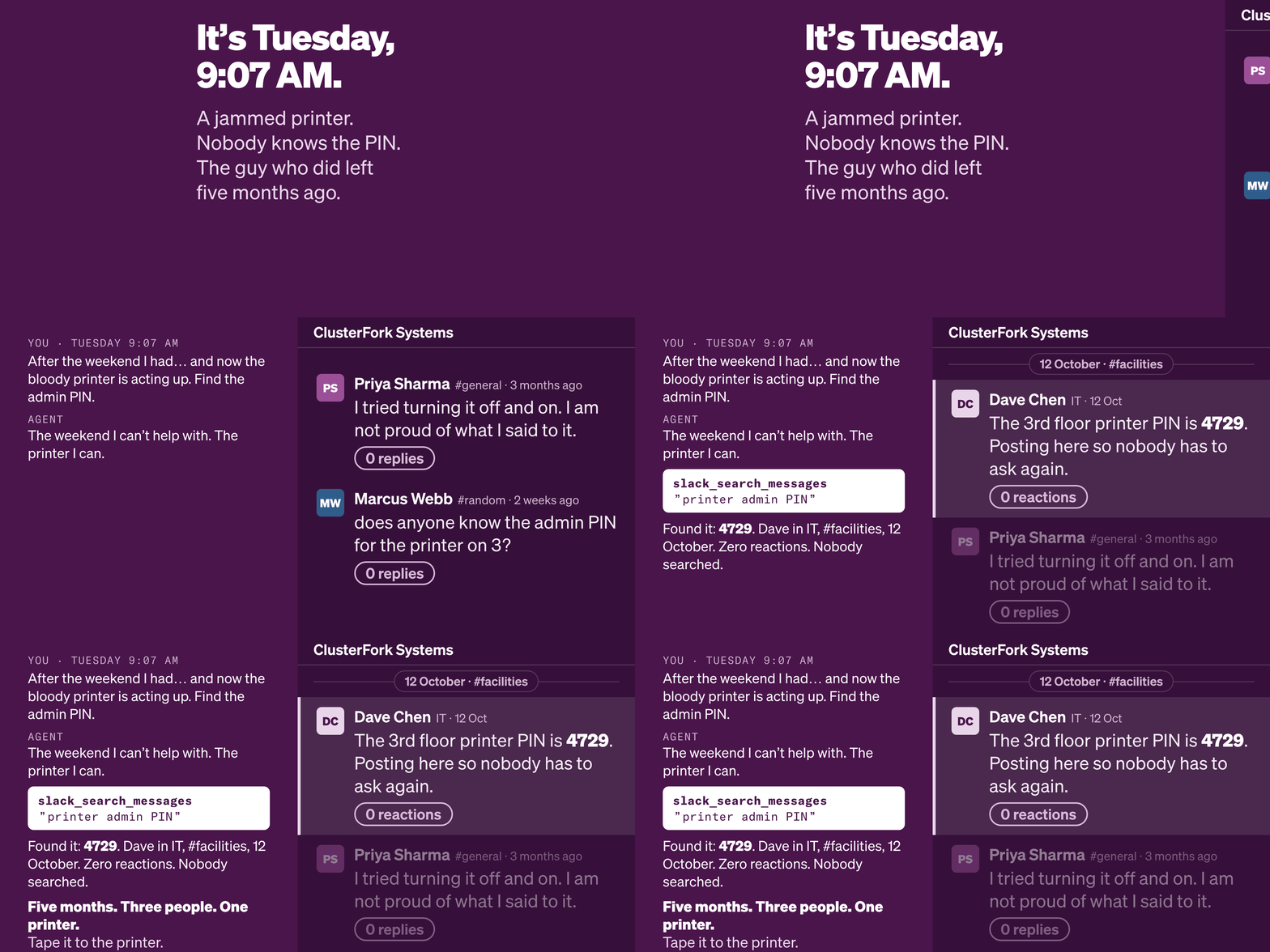
Set it up, then register it with your client.
npx -y @jtalk22/slack-mcp --setup
claude mcp add slack -- npx -y @jtalk22/slack-mcp
Check where your credentials are stored and how old they are, or run it read-only so your agent can read Slack but never post.
npx -y @jtalk22/slack-mcp --doctor --security
npx -y @jtalk22/slack-mcp --read-only
On Enterprise Grid, Slack can end a session it sees being automated. Use Slack's official MCP server there.
Claude Code Claude Desktop Cursor Copilot Windsurf Gemini CLI Codex CLI any stdio MCP client
What’s new in 5.1 · ▶ the whole morning in three minutes · interactive walkthrough · setup guide
Checked against Slack's published plans and pricing on 2026-10-07.
A free workspace keeps 90 days of message history, allows 10 app integrations, and gets only Slack's basic AI. The AI people actually want — AI search across the workspace, channel recaps, Slackbot acting as an agent, AI workflow generation — starts on Business+ at $15 per user per month on annual billing ($18 month to month). Pro, at $7.25, buys unlimited history and unlimited apps, not the advanced AI. So a ten-person free workspace that wants an AI it can ask about its own Slack is looking at $1,800 a year, and the cheaper upgrade does not get them there.
This package gives that workspace an agent over the same Slack for nothing, running on the AI subscription its people already pay for. Three things follow from how it works:
slack_get_full_conversation writes them out with their threads while they are still inside the window. It cannot retrieve anything already past the line; nothing can.The browser-session route is not a workaround to apologise for. For a workspace Slack's own AI does not serve, it is the only route there is.
Slack's official MCP server is an app your workspace admin approves and controls. Use it when your organisation wants a sanctioned integration. This server uses the browser session already in Chrome instead, so there is no app to install and no admin to ask, and it runs as a local command for any stdio MCP client. It acts as you, with exactly your access.
| Slack official MCP | Slack MCP Server — local | |
|---|---|---|
| Starting point | A Slack-managed remote integration | The Slack session already in Chrome |
| Workspace control | Governed by workspace integration settings | No Slack app or admin request for the local path |
| Transport | Streamable HTTP | Local stdio |
| Client surface | Slack's supported partner integrations | Any stdio MCP client |
| Authentication | OAuth | Existing browser session |
| Credential lifetime | Managed OAuth | Rotating session with health checks and refresh |
| Product surface | Broad Slack-native capabilities | 20 tools across read, act, and automate |
| Protocol | Slack-managed | MCP 2026-07-28 and every 2025 revision, from the same binary |
| Runtime | Slack-managed | MIT code on your machine |
Treat browser-session automation as an acceptable-use decision for you and your workspace. The server acts as your signed-in Slack identity and cannot read a channel you cannot read or act as another user. It does not evade server-side retention, DLP, compliance exports, or audit controls.
"No admin request" means there is no Slack app installation to approve. It does not mean workspace activity disappears from Slack's systems. If your policy requires a sanctioned integration, use Slack's official MCP server.
Node 22 or 24 recommended. Node 20+ is supported and CI-tested.
npx -y @jtalk22/slack-mcp --setup
Prefer a persistent CLI: npm install -g @jtalk22/slack-mcp then slack-mcp --setup.
Then:
--setup prints when it finishes.claude mcp add line it prints.slack_health_check.Per-client configuration keys are in the setup guide.
Use the same server command everywhere:
{
  "command": "npx",
  "args": ["-y", "@jtalk22/slack-mcp"]
}
On macOS, setup can extract from Chrome and persist the selected storage backend. On other platforms, provide SLACK_TOKEN and SLACK_COOKIE through the client's environment configuration. Docker, HTTP, and detailed client examples live in docs/SETUP.md and docs/DEPLOYMENT-MODES.md.
| Client | Configuration surface | Status |
|---|---|---|
| Claude Code | claude mcp add or ~/.claude.json | Documented |
| Claude Desktop | Desktop MCP configuration | Verified |
| Cursor | .cursor/mcp.json | Documented |
| GitHub Copilot | .vscode/mcp.json | Documented |
| Windsurf | ~/.codeium/windsurf/mcp_config.json | Documented |
| Gemini CLI | ~/.gemini/settings.json | Documented |
| Codex CLI | codex mcp add or ~/.codex/config.toml | Documented |
| Other clients | Any stdio MCP configuration | Protocol-compatible |
Read channels, DMs, threads and search; act with a reply, a reaction or a read-state change; run the catch-up and typed workflows locally. The surface is 20 tools today: 13 read-only operations, 4 write-path tools that each carry an MCP destructive annotation so clients can gate workspace writes, and 3 local workflow tools. One of the reads is slack_session_report, which reads nothing from Slack: it returns what this process has done, as counts. Every tool does its work here — reads Slack or local state — and none is a placeholder for something you would have to pay for. Four read tools accept include_rich_message_fields: true to surface attachments, blocks, files, reactions, and metadata—complete inputs and response contracts live in docs/API.md.
Speaks MCP 2026-07-28 and every 2025 revision from the same binary — era-negotiated over stdio, stateless per request over HTTP (no Mcp-Session-Id; GET/DELETE answer 405). The claim is a test, not a sentence: test/mcp-era.test.js drives the real SDK client at both eras against the real entry points.
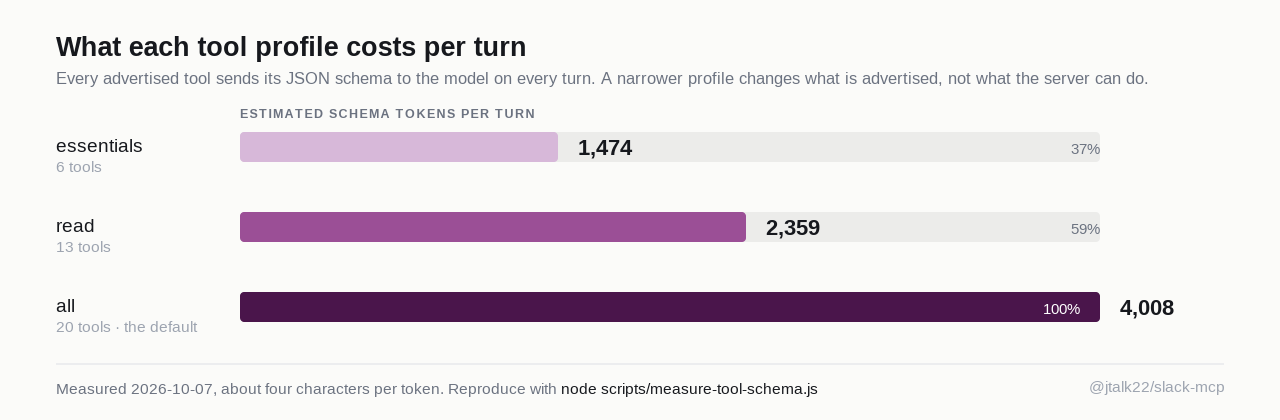
Advertising fewer tools. Every tool the server advertises sends its schema to the model on every turn, before you ask anything. SLACK_MCP_TOOLS=essentials advertises six (unread, history, search, thread, user lookup, send); SLACK_MCP_TOOLS=read the 13 read-only operations; --tools=slack_x,slack_y an explicit set. The default is all 20. Filtering changes what is advertised, not what is callable.
| Tool | Purpose |
|---|---|
slack_health_check | Verify credentials and workspace identity |
slack_token_status | Inspect credential age, health, cache, profile, and storage state |
slack_refresh_tokens | Refresh local credentials from the browser session on macOS—reads Slack, writes only local state |
slack_list_conversations | List channels and DMs |
slack_conversations_history | Read channel or DM history with optional rich fields |
slack_get_full_conversation | Export complete history and threads |
slack_search_messages | Search across the workspace |
slack_get_thread | Read all replies in a thread |
slack_users_info | Resolve a user |
slack_list_users | Page through large workspace directories |
slack_users_search | Search users by name, display name, or email |
slack_conversations_unreads | Prioritize conversations with unread messages |
| Tool | Purpose | MCP safety |
|---|---|---|
slack_send_message | Send to a channel or DM | destructive |
slack_add_reaction | Add an emoji reaction | destructive |
slack_remove_reaction | Remove an emoji reaction | destructive |
slack_conversations_mark | Mark a conversation read | destructive |
| Tool | Purpose |
|---|---|
slack_workflow_save | Save a typed workflow profile to ~/.slack-mcp-workflows.json |
slack_workflows | List saved workflow profiles |
slack_catch_me_up | Read a profile's channels since its cadence window and return structured catch-up evidence |
slack_refresh_tokens reads Slack and writes only local credential state.
Bind a workflow kind to channels, priority people, retention, and cadence. slack_catch_me_up then reads that scope locally and hands your agent the evidence: which threads went unanswered and for how long, what your priority people said or were pinned on, which conversations actually moved. It does the gathering; your agent writes the summary against the contract below.
There is no server-side model in that path, because there does not need to be one — the client calling this server is already a language model. Hosted adds what needs a server: running the same catch-up on a schedule while your laptop is shut.
npx -y @jtalk22/slack-mcp --apply-template oncall-handoff --channels C012345,C067890
| Workflow kind | Contract |
|---|---|
incident_room | {incident_summary, timeline, open_risks, owner_gaps, next_actions} |
exec_brief | {summary, decisions, risks, asks, action_items} |
support_inbox | {open_threads, ack_lag, owner_gaps, escalations, next_actions} |
product_launch_watch | {launch_signals, feedback_themes, blockers, metrics, next_actions} |
custom | {summary, highlights, open_questions, next_actions} |
Six editable templates ship in the package: oncall-handoff, support-triage, exec-monday, sprint-tracker, customer-feedback, and incident-room.
Three playbooks ship with the server, so an agent learns how to use these tools with nothing installed in the client.
slack-catch-up walks the agent through finding or creating the right workflow profile, running slack_catch_me_up, and citing the message behind every line. On a narrowed tool profile it builds the same answer from unreads, history and threads.slack-workflow-profiles covers choosing the kind, channels, priority people and cadence for a profile, or starting from a template.slack-send-safely keeps writes to what you ask for, explains a held send, and points to slack_session_report for what the session did.Clients get them through the MCP Skills extension (SEP-2640: skills/list, skills/get), as skill://<name>/SKILL.md resources, or as prompts of the same name. A playbook is offered only when its tools are, so a read-only server never offers the sending playbook and the essentials profile never offers profile setup.
Add your team's own with SLACK_MCP_SKILLS_DIR=/path/to/skills, a folder of playbook folders that each hold a SKILL.md. They are checked at startup and served beside the bundled ones. An invalid one, or one that reuses a bundled name, is skipped with a warning on stderr. SLACK_MCP_SKILLS=off turns playbooks off.
Every message this server returns becomes text in a model's context, next to your own instructions. Slack is a shared bus: a channel can hold Slack Connect participants from another workspace, guests, and apps relaying content from outside Slack entirely — and the same toolset that reads also writes. That adjacency is the risk worth naming.
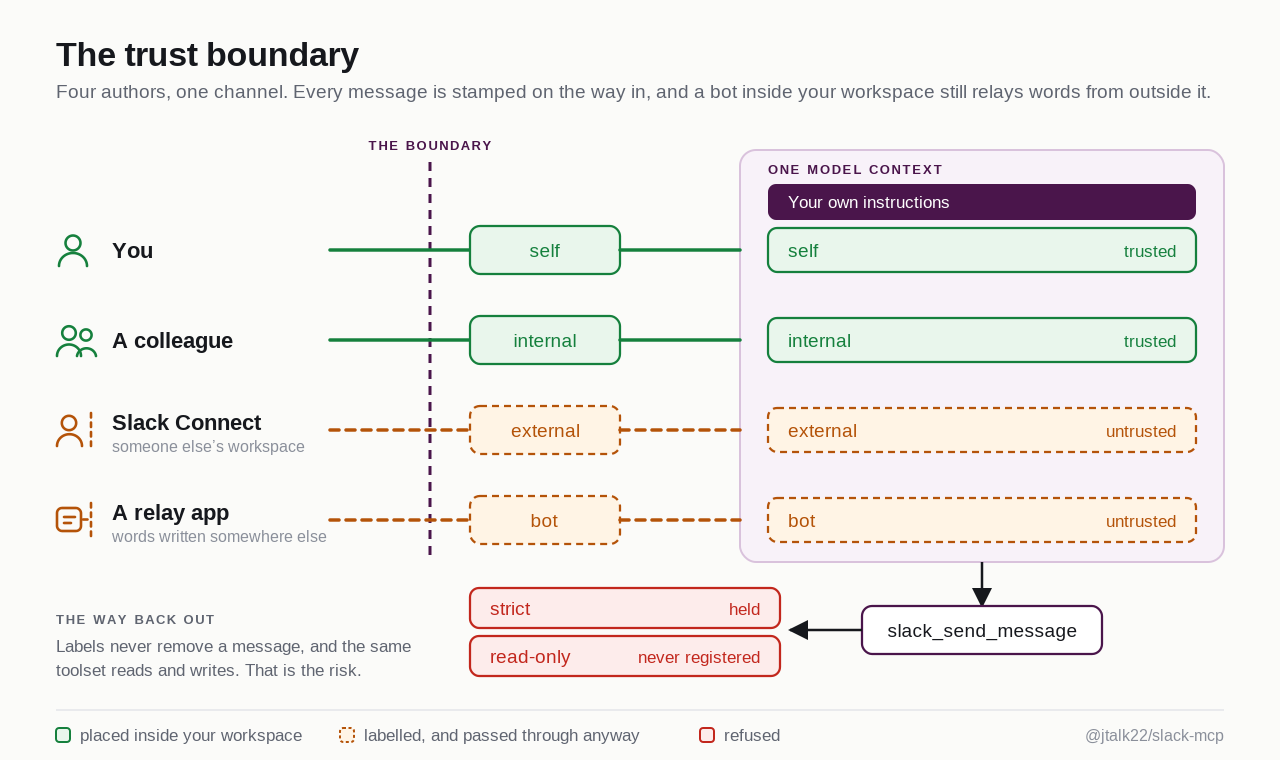
Each message carries origin (self, internal, external, bot, unknown) and author_trusted, derived from fields Slack already returns, so it costs no extra API call. bot outranks workspace membership, because an app inside your workspace routinely relays words written outside it. A batch containing outside authors carries an untrusted_content envelope naming the count.
It fails closed: an author this server cannot positively place inside your workspace is reported untrusted. The exception is a conversation Slack reports as not shared with any other workspace — one of those structurally cannot hold an outside author, so a colleague with no team id on their message is called internal rather than unknown. When that lookup fails, the label stays unknown.
SLACK_MCP_PROVENANCE=off|label|strict. label is the default and only adds keys. A per-call provenance argument may tighten the mode and never loosen it, because a caller asking for fewer labels may be repeating something it read.
A label is advice to the model reading it. It is unsigned, it can be stripped by anything downstream, and it raises the cost of an injected instruction without making one impossible.
strict mode additionally holds slack_send_message once the session has read outside-authored text. The hold is released by confirm_untrusted_context, which the caller sets — so it interrupts the send and puts it on the record, but it cannot prove a human approved it.
Two surfaces are still unlabelled, and knowing that is better than assuming otherwise: user display names, real names and titles from the user tools, and channel topics and purposes from slack_list_conversations, are attacker-settable free text that reaches the model without an origin stamp.
npx -y @jtalk22/slack-mcp --read-only # or SLACK_MCP_READ_ONLY=1
The four write-path tools are withheld from tools/list and refused at dispatch, because a client can call a name it was never offered. The filter is applied after the tool profile resolves, so no profile or custom tool list widens it back. An absent tool needs no trust in the model that would have called it.
slack_session_report returns what this process actually did: messages read, how many were outside-authored and by which origin, writes attempted, writes held. Counts only — no message text, no channel name, no user id. A label is a claim about one message; this is the claim about the session, and it is how you check afterwards whether outside text reached the model and whether anything tried to send on the back of it.
npm audit signatures
A clean result means the package you installed was built and signed by this repository's release workflow. Read the code before giving it your Slack session. Full policy: SECURITY.md.
Five parts sit under the tools: extraction from Chrome, credential storage, reads, writes, and typed workflow output. All of it is plain JavaScript in this repository.
--setup turns the Slack identity Chrome already holds into a local MCP server:
xoxc- token in Chrome's on-disk LevelDB;keychain_timeout, no_slack_cookie_row, cookie_decrypt_failed, and more—instead of returning one opaque error.Slack session credentials rotate. The server handles that with:
auto, keychain-only, and file storage backends;Read DMs and channels, search the workspace, export complete histories with threads, inspect unread state, and resolve users. Opt into blocks, attachments, files, reactions, metadata, and bot/app markers when text alone is not the real message.
Send a reply, add or remove a reaction, and mark a conversation read. Every write tool carries MCP's destructive annotation, so compatible clients ask before running it.
Save workflow profiles for incident rooms, executive briefs, support inboxes, launch watches, and your own. Profiles are local JSON; the hosted tier can deliver them as scheduled briefs.
The server checks these in order and uses the first it finds.
| Source | Where it comes from | |
|---|---|---|
| 1 | SLACK_TOKEN + SLACK_COOKIE | your client's environment configuration |
| 2 | Token file | written by --setup, chmod 600 |
| 3 | macOS Keychain | written by --setup |
| 4 | Chrome extraction | macOS only, run on demand |
Session credentials expire, and how long they last varies: one written on 2026-07-04 still worked on 2026-10-07. slack_token_status shows the age of yours. When Slack rejects it (invalid_auth, not_authed, token_expired, token_revoked, account_inactive or HTTP 401), run npx -y @jtalk22/slack-mcp --setup. On macOS, slack_refresh_tokens or --refresh-tokens refreshes without leaving your client, and the optional LaunchAgent in docs/SETUP.md keeps an idle install working.
Enterprise Grid. Grid runs aggressive session-anomaly detection. Browser-session automation can trip it, which flags the session and kills it, regardless of which tool drives the traffic. Outbound calls are paced by default to stay under burst thresholds (SLACK_MCP_MIN_REQUEST_INTERVAL_MS, default 350; SLACK_MCP_MAX_CONCURRENCY, default 3). Pacing lowers that risk; it does not remove it. On Grid, use Slack's official MCP server.
Credential extraction. --setup reads the newest xoxc- token from Chrome's on-disk LevelDB, snapshots the cookie SQLite database, retrieves Chrome Safe Storage from the macOS Keychain, and runs PBKDF2 + AES-128-CBC decryption locally. It writes the token file, Keychain entries, and non-secret metadata. It transmits nothing — the server talks to Slack and nowhere else.
This is the same access pattern credential stealers use. Chrome App-Bound Encryption exists to make this class of read harder, and infostealer families (Lumma, Vidar, Meduza) bypass it to lift live sessions. The mechanism here is comparable. What differs is that you run it, on your own machine, against your own session, and nothing leaves the host. The source is plain JavaScript in this repository; audit it before handing it a live session.
User cache. One cache exists: user-name lookups, populated on demand, 500 entries maximum, one-hour TTL. No message content, no channel history, and no persistent copy of the workspace is stored.
| Mode | Behavior |
|---|---|
auto | Token file plus Keychain backup |
keychain-only | Keychain only; verified writes and no plaintext credential file |
file | Owner-only token file; Keychain is never touched |
The selected backend is remembered in non-secret metadata and used by the server, CLI, and optional refresh job. An unrecognized mode fails at startup instead of silently downgrading storage.
{
  "mcpServers": {
    "slack-work": {
      "command": "npx",
      "args": ["-y", "@jtalk22/slack-mcp"],
      "env": { "SLACK_MCP_PROFILE": "work" }
    },
    "slack-personal": {
      "command": "npx",
      "args": ["-y", "@jtalk22/slack-mcp"],
      "env": { "SLACK_MCP_PROFILE": "personal" }
    }
  }
}
Each profile gets its own token file, Keychain entries, metadata, and lock. Add SLACK_MCP_CHROME_PROFILE when the workspaces live in different Chrome profiles.
The package runs on your machine, talks only to Slack, and is free under the MIT license. The hosted tier runs on a schedule instead, so the brief arrives while your laptop is closed:
The package works without the hosted tier.
Setup · API · Architecture · Compatibility · Deployment modes · Recipes · Troubleshooting · Roadmap
PRs are welcome. Read CONTRIBUTING.md and run node --check on touched JavaScript before submitting.
MIT — see LICENSE.
Not affiliated with Slack Technologies, Inc. This server uses browser-session credentials. Review your workspace's acceptable-use policy before running it.
Your Slack. Your agent. One command.
If this removes a Slack tab from your day, star the repository. Stars are how the next admin-blocked developer finds the local path.
Claim this server with your GitHub account to request manual ownership verification.
Link to the catalog listing for Slack MCP server for stdio clients from your README. This badge does not certify ownership, compatibility or security.
[](https://awesome-mcp.com/servers/slack-mcp-server-jtalk22)Public repository statistics could not be verified. Check the configured source address; unavailable counts are not zero.
来源、范围和时段分别列出;不相加,不代表安装人数、活跃用户或安全审核。
尚无已审核的包 / 镜像标识,暂不展示下载统计。
Alternative and complementary servers in the same category
An AI receptionist platform with an MCP server for accessing business calls, contacts and appointments from AI assistants.
Pidgeon provides an MCP server and an email inbox API that gives AI agents their own addresses for sending, awaiting, and replying to email.

A Telegram CLI with background sync that can run an optional MCP server for a personal account using MTProto, not the bot API.
