


Store and retrieve entities, relations and observations in a persistent local knowledge graph.
create_entitiescreate_relationsadd_observations+6 more
92K
AI & Multi-Agent
A Spring Boot and Spring AI sample where an MCP server exposes a booking tool that reserves accommodations in a city for a given date range.
Spring AI Booking MCP Server example is cataloged as an MCP server attributed to rogervinas. A Spring Boot and Spring AI sample where an MCP server exposes a booking tool that reserves accommodations in a city for a given date range. It is categorized under ai agents-models. See the capability inspector for recorded interfaces and their independent review status; consult upstream documentation for the current interface.
Installation configuration is not reviewed. No executable setup is offered for this entry; inspect the source repository before proceeding.
Catalog license label: Not specified. Check the source repository's current license and terms before using, modifying or distributing this software.
能力定义尚未审核。未核验的采集内容不会作为可信接口展示。
暂无可展示的已审核记录。这不表示上游不支持此能力。
暂无可展示的已审核记录。这不表示上游不支持此能力。
暂无可展示的已审核记录。这不表示上游不支持此能力。
Email delivery is not connected. This page does not collect email addresses or create subscriptions.
Browse the registry for current listings instead.
Reviews for Spring AI Booking MCP Server example are not available yet
Review publishing and storage are not connected. This page does not collect or publish ratings or comments, including after sign-in.
The MCP server is started from the mcp-server module via Gradle bootRun.
It makes a reservation for accommodation in a given city with check-in and check-out dates, delegating to a BookingService.
README.md · ec8fb53cd3a5 · 采集于 2026-11-13 10:22:26 UTC
保留上游原文,不做 AI 改写。为安全起见过滤脚本、表单和不安全链接。
当前显示最后一次成功采集的文档快照,请以来源页面为准。


In this example, inspired by Building Agents with AWS: Complete Tutorial, we will build a simple AI agent application using Spring AI, highlighting key features like:
This project is indexed and certified by MCP Review
The original example uses AWS Bedrock, but one of the great things about Spring AI is that with just a few config tweaks, the same code works with any other supported model. This project supports three profiles: Ollama (local), Google Gemini and AWS Bedrock.
The application features an AI agent that helps users book accommodations in tourist destinations.
Through MCP, the agent can use the following tools:
The Weather tool will be implemented locally using MCP, while the Booking tool will be provided by a remote MCP server. The current date is provided via the system prompt. Additional information about cities will be retrieved from a vector store using RAG.
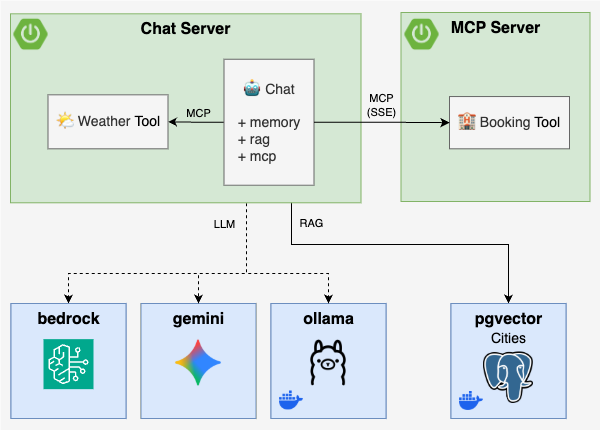
As is often the case with Spring Boot, implementing the MCP Server is pretty straightforward. Following the MCP Server Boot Starter guide, you just need to:
Add the spring-ai-starter-mcp-server-webflux or spring-ai-starter-mcp-server-webmvc dependency
Create an instance and annotate it with @Tool and @ToolParam:
@Service // or @Bean / @Component
class BookingTool(private val bookingService: BookingService) {
  @Tool(
    description = "make a reservation for accommodation for a given city and date",
  )
  fun book(
    @ToolParam(description = "the city to make the reservation for")
    city: String,
    @ToolParam(description = "the check-in date, when the reservation begins")
    checkinDate: LocalDate,
    @ToolParam(description = "the check-out date, when the reservation ends")
    checkoutDate: LocalDate
  ): String = bookingService.book(city, checkinDate, checkoutDate) // Delegate to a service
}
MethodToolCallbackProvider:@Configuration
class BookingToolConfiguration {
@Bean
fun bookingToolCallbackProvider(bookingTool: BookingTool) =
MethodToolCallbackProvider.builder()
.toolObjects(bookingTool)
.build()
}
The Chat Server is a Spring Boot application built with the following dependencies:
spring-boot-starter-web or -webflux - to expose a REST API for the chat interfacespring-ai-starter-mcp-client - to use MCPspring-ai-starter-vector-store-pgvector and spring-ai-advisors-vector-store - to enable RAG with PGVectorspring-ai-starter-model-ollama - to use Ollama modelsspring-ai-starter-model-google-genai and spring-ai-starter-model-google-genai-embedding - to use Google Gemini modelsspring-ai-starter-model-bedrock and spring-ai-starter-model-bedrock-converse - to use AWS Bedrock modelsLet's implement this step by step ...
Here's how the Weather Tool is implemented:
@Tool and @ToolParam:@Service // or @Bean / @Component
class WeatherTool(private val weatherService: WeatherService) {
@Tool(description = "get the weather for a given city and date")
fun getWeather(
@ToolParam(description = "the city to get the weather for")
city: String,
@ToolParam(description = "the date to get the weather for")
date: LocalDate
): String = weatherService.getWeather(city, date) // Delegate to a service
}
MethodToolCallbackProvider:@Configuration
class WeatherToolConfiguration {
@Bean
fun weatherToolCallbackProvider(weatherTool: WeatherTool) =
MethodToolCallbackProvider.builder()
.toolObjects(weatherTool)
.build()
}
To set up the Booking Tool as a remote MCP tool, we just need to configure the MCP client SSE connection in application.properties:
spring.ai.mcp.client.toolcallback.enabled=true
spring.ai.mcp.client.sse.connections.booking-tool.url=http://localhost:8081
You can find all the alternative configurations in MCP Client Boot Starter documentation.
We create the Chat Client using Spring AI's ChatClient.Builder, which is already autoconfigured via spring.ai configuration properties (we'll talk at that later in Configuration), and initialize it with a custom system prompt and the available MCP tools:
@Configuration
class ChatClientConfiguration {
  @Bean
  fun chatClient(
    builder: ChatClient.Builder,
    toolCallbackProviders: List<ToolCallbackProvider>
  ): ChatClient {
    return chatClientBuilder(builder, toolCallbackProviders).build()
  }

  private fun chatClientBuilder(
    builder: ChatClient.Builder,
    toolCallbackProviders: List<ToolCallbackProvider>
  ): ChatClient.Builder {
    val system = """
      You are an AI powered assistant to help people book accommodation in touristic cities around the world.
      If there is no information, then return a polite response suggesting you don't know.
      If the response involves a timestamp, be sure to convert it to something human-readable.
      Do not include any indication of what you're thinking.
      Use the tools available to you to answer the questions.
      Just give the answer.
      When booking accommodation for a weekend, assume check-in on Saturday and check-out on Monday.
      Current date: {currentDate}
      """.trimIndent()
    return builder
      .defaultSystem(system)
      .defaultToolCallbacks(*toolCallbackProviders.toTypedArray())
  }
}
The Chat Service exposes a single chat method that takes a chat ID and a user question. It calls the Chat Client with the user question along with a set of advisors to enrich the interaction:
logging.level.org.springframework.ai.chat.client.advisor is set to DEBUG)Additionally, the question and answer are logged to the console.
Here’s the implementation:
@Service // or @Bean / @Component
class ChatService(
  vectorStore: VectorStore,
  private val clock: Clock,
  private val chatClient: ChatClient
) {
  private val logger = LoggerFactory.getLogger(ChatService::class.java)
  private val questionAnswerAdvisor = QuestionAnswerAdvisor.builder(vectorStore).build()
  private val simpleLoggerAdvisor = SimpleLoggerAdvisor()
  private val chatMemoryAdvisor = MessageChatMemoryAdvisor.builder(
    MessageWindowChatMemory.builder()
      .chatMemoryRepository(InMemoryChatMemoryRepository())
      .build()
  ).build()

  fun chat(chatId: String, question: String): String {
    return chatClient
      .prompt()
      .system { it.param("currentDate", LocalDate.now(clock)) }
      .user(question)
      .advisors(questionAnswerAdvisor, chatMemoryAdvisor, simpleLoggerAdvisor)
      .advisors { a -> a.param(ChatMemory.CONVERSATION_ID, chatId) }
      .call()
      .content().apply {
        logger.info("Chat #$chatId question: $question")
        logger.info("Chat #$chatId answer: $this")
      }!!
  }
}
The Chat Controller exposes a simple REST POST endpoint that takes user input, calls the Chat Service, and returns the AI agent’s response:
@RestController
class ChatController(private val chatService: ChatService) {
  @PostMapping("/{chatId}/chat")
  fun chat(
    @PathVariable chatId: String,
    @RequestParam question: String
  ): String? {
    return chatService.chat(chatId, question)
  }
}
It's as simple as using Spring AI’s autoconfigured VectorStore and adding documents to it. This automatically invokes the embedding model to generate embeddings and store them in the vector store:
@Bean
fun vectorStoreInitializer(vectorStore: VectorStore) =
  ApplicationRunner {
    // TODO check if the vector store is empty ...
    // TODO load cities from a JSON file or any other source ...
    cities.forEach { city ->
      val document = Document(
        "name: ${city.name} " +
        "country: ${city.country} " +
        "description: ${city.description}"
      )
      vectorStore.add(listOf(document))
    }
  }
You can find the full version of vectorStoreInitializer in ChatServerApplication.kt.
We use application.properties instead of application.yml because YAML cannot have both spring.ai.model.embedding (scalar, used by Bedrock and Ollama) and spring.ai.model.embedding.text (nested, used by Gemini) at the same time. Maybe some day this will be solved, but anyway this is a PoC that supports multiple models — in a production application you'd likely use only one, so this wouldn't be an issue.
In this file, we define global configuration values:
8080.spring.application.name=chat-server
spring.datasource.url=jdbc:postgresql://localhost:5432/postgres
spring.datasource.username=postgres
spring.datasource.password=password
spring.datasource.driver-class-name=org.postgresql.Driver
spring.ai.model.chat=none
spring.ai.model.embedding=none
spring.ai.model.embedding.text=none
spring.ai.mcp.client.toolcallback.enabled=true
spring.ai.mcp.client.sse.connections.booking-tool.url=http://localhost:8081
server.port=8080
logging.level.org.springframework.ai.chat.client.advisor=INFO
The AI model is configured via Spring profiles. Each profile sets the chat model, embedding model, and vector store dimensions. The active profile must be specified at runtime using SPRING_PROFILES_ACTIVE.
In application-ollama.yml, we configure Spring AI to use Ollama models:
http://localhost:11434.pull-model-strategy: when_missing to only pull models if they are not available locally.spring:
ai:
model:
embedding: "ollama"
chat: "ollama"
ollama:
base-url: "http://localhost:11434"
init:
pull-model-strategy: "when_missing"
chat:
options:
model: "llama3.1:8b"
embedding:
options:
model: "nomic-embed-text"
vectorstore:
pgvector:
table-name: "vector_store_ollama"
dimensions: 768
initialize-schema: true
In application-gemini.yml, we configure Spring AI to use Google Gemini models:
GOOGLE_API_KEY environment variable.gemini-2.5-flash.gemini-embedding-001 with 768 dimensions.spring:
ai:
model:
chat: "google-genai"
embedding:
text: "google-genai"
google:
genai:
api-key: "${GOOGLE_API_KEY}"
chat:
options:
model: "gemini-2.5-flash"
temperature: 0.7
embedding:
api-key: "${GOOGLE_API_KEY}"
text:
options:
model: "gemini-embedding-001"
dimensions: 768
vectorstore:
pgvector:
table-name: "vector_store_gemini"
dimensions: 768
initialize-schema: true
In application-bedrock.yml, we configure Spring AI to use AWS Bedrock models:
spring:
  ai:
    model:
      embedding: "bedrock-cohere"
      chat: "bedrock-converse"
    bedrock:
      aws:
        access-key: "${AWS_ACCESS_KEY_ID}"
        secret-key: "${AWS_SECRET_ACCESS_KEY}"
        region: "${AWS_REGION:eu-central-1}"
      converse:
        chat:
          options:
            model: "${AWS_BEDROCK_CHAT_MODEL}"
            max-tokens: 2048
      cohere:
        embedding:
          model: "${AWS_BEDROCK_EMBEDDING_MODEL}"
    vectorstore:
      pgvector:
        table-name: "vector_store_bedrock"
        dimensions: 1024
        initialize-schema: true
To test the MCP Server, we will use a McpClient to call the book method of the Booking Tool, mocking the downstream BookingService:
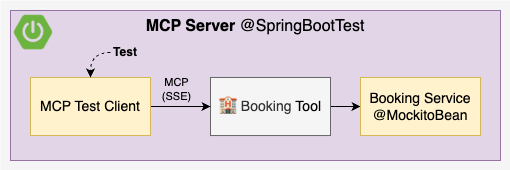
See the simplified test implementation below. For the complete implementation, including a test that verifies the list of available tools, refer to McpServerApplicationTest.kt.
@SpringBootTest(webEnvironment = RANDOM_PORT)
class McpServerApplicationTest {

  // 1. Inject the server port (it is random)
  @LocalServerPort
  val port: Int = 0

  // 2. Mock the BookingService instance
  @MockitoBean
  lateinit var bookingService: BookingService

  @Test
  fun `should book`() {
    // 3. Create a McpClient connected to the server
    val client = McpClient.sync(
      HttpClientSseClientTransport("http://localhost:$port")
    ).build()
    client.initialize()
    client.ping()

    // 4. Mock the bookingService using argument captors
    val bookResult = "Booking is done!"
    val cityCaptor = argumentCaptor<String>()
    val checkinDateCaptor = argumentCaptor<LocalDate>()
    val checkoutDateCaptor = argumentCaptor<LocalDate>()
    doReturn(bookResult)
      .whenever(bookingService)
      .book(
        cityCaptor.capture(),
        checkinDateCaptor.capture(),
        checkoutDateCaptor.capture()
      )

    // 5. Call the tool
    val city = "Barcelona"
    val checkinDate = LocalDate.parse("2025-04-15")
    val checkoutDate = LocalDate.parse("2025-04-18")
    val result = client.callTool(CallToolRequest(
      "book",
      mapOf(
        "city" to city,
        "checkinDate" to checkinDate.toEpochDay(),
        "checkoutDate" to checkoutDate.toEpochDay()
      )
    ))

    // 6. Verify the result
    assertThat(result.isError).isFalse()
    assertThat(result.content).singleElement()
      .isInstanceOfSatisfying(TextContent::class.java) {
        // TODO why is text double quoted?
        assertThat(it.text).isEqualTo("\"$bookResult\"")
      }

    // 7. Verify that the bookingService was called with
    // the correct parameters
    assertThat(cityCaptor.allValues).singleElement()
      .isEqualTo(city)
    assertThat(checkinDateCaptor.allValues).singleElement()
      .isEqualTo(checkinDate)
    assertThat(checkoutDateCaptor.allValues).singleElement()
      .isEqualTo(checkoutDate)

    // 8. Close the client
    client.close()
  }
}
To run the MCP Server tests:
cd mcp-server
./gradlew test
To test the Chat Server, we will:
gemini and disable the MCP client in application-test.yml (overridable via SPRING_PROFILES_ACTIVE).MockitoBean.@Primary @Bean to override the default Clock bean.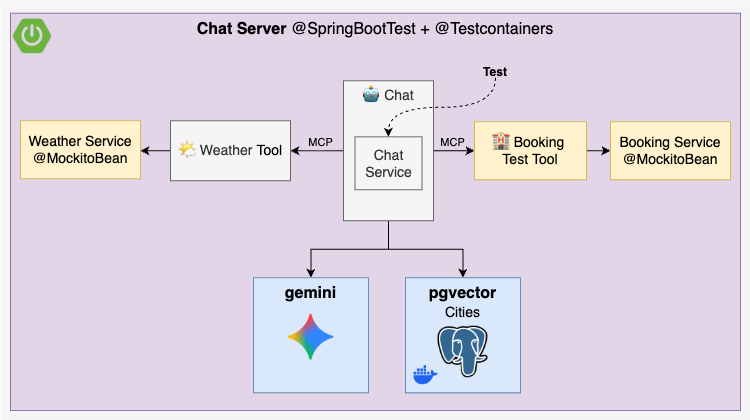
You might’ve noticed that the test doesn’t actually check the MCP client’s SSE connection as it is disabled. I tried spinning up an McpServer using McpServerAutoConfiguration, and it almost worked. The problem? The client tries to connect before the server is up, which causes the whole application to fail on startup. Maybe is just an ordering issue, and hopefully something that can be fixed in the future 🤞
Now for the interesting part, how do we test the AI agent’s response? This is where Evaluation Testing comes in:
One method to evaluate the response is to use the AI model itself for evaluation. Select the best AI model for the evaluation, which may not be the same model used to generate the response.
This aligns with the evaluation techniques described in Martin Fowler’s Evals GenAI pattern:
To keep things simple, we’ll go with self-evaluation 🤓
Each test will follow this structure:
@Test
fun `should do something`() {
  // 1. Mock downstream service(s)
  // Optionally use argument captors depending on how you plan
  // to verify parameters in step 5
  // Example for BookingService:
  doReturn("Your booking is done!")
    .whenever(bookingTestService).book(any(), any(), any())

  // 2. Call the chat service
  val chatId = UUID.randomUUID().toString()
  val chatResponse = chatService.chat(
    chatId,
    "Can you book accommodation for Barcelona from 2025-04-15 to 2025-04-18?"
  )

  // 3. Evaluate the response using the AI model
  val evaluationResult = TestEvaluator(chatClientBuilder) { evaluationRequest, userSpec ->
    userSpec.text(
      """
      Your task is to evaluate if the answer given by an AI agent to a human user matches the claim.
      Return YES if the answer matches the claim and NO if it does not.
      After returning YES or NO, explain why.
      Assume that today is ${LocalDate.now(clock)}.
      Answer: {answer}
      Claim: {claim}
      """.trimIndent()
    )
      .param("answer", evaluationRequest.responseContent)
      .param("claim", evaluationRequest.userText)
  }.evaluate(EvaluationRequest(
    "Accommodation has been booked Barcelona from 2025-04-15 to 2025-04-18",
    chatResponse
  ))

  // 4. Assert the evaluation result is successful, show feedback if not
  assertThat(evaluationResult.isPass).isTrue
    .withFailMessage { evaluationResult.feedback }

  // 5. If applicable, verify the parameters passed to the service
  // You can verify with argument captors or use the `verify` method as in the example below:
  verify(bookingTestService).book(
    eq("Barcelona"),
    eq(LocalDate.parse("2025-04-15")),
    eq(LocalDate.parse("2025-04-18"))
  )
}
See the full test implementation in ChatServerApplicationTest.kt.
Each evaluation uses a custom prompt tailored to the specific response being tested, and as you experiment, you'll notice some surprisingly quirky behavior. That’s why I ended up creating a custom TestEvaluator, based on Spring AI’s RelevancyEvaluator and FactCheckingEvaluator, which may not yet offer the level of customization you might want.
I had to adjust each prompt after running into odd results. For example, the evaluation model assuming it was still 2023 and refusing to believe the AI agent could predict weather for 2025. Or it mistaking "you" in the answer as referring to itself instead of the user. The weirdest? One evaluation just answered “NO” but the explanation said, “well, maybe I should have said YES” 🤣
For a production system, you'd definitely need a lot of prompt tuning and testing to get things right, for both the system and the evaluator, I suppose that’s part of the "fun" when working with GenAI.
By default, tests use the Gemini profile both locally and in CI (requires GOOGLE_API_KEY).
cd chat-server
./gradlew test
To test locally with Ollama (requires Ollama to be up, results may be flaky without adequate GPU hardware):
cd chat-server
SPRING_PROFILES_ACTIVE=ollama ./gradlew test
To test locally with Bedrock (requires AWS credentials):
cd chat-server
SPRING_PROFILES_ACTIVE=bedrock ./gradlew test
You can configure the application using environment variables or a system.properties file in the root directory. This file is ignored by Git and is loaded by both ./gradlew bootRun and tests.
Example system.properties:
# AWS Bedrock
AWS_ACCESS_KEY_ID=...
AWS_SECRET_ACCESS_KEY=...
AWS_REGION=eu-central-1
AWS_BEDROCK_CHAT_MODEL=...
AWS_BEDROCK_EMBEDDING_MODEL=...

# Google Gemini
GOOGLE_API_KEY=...
All profiles require PGVector for the RAG vector database:
cd chat-server
docker compose -f docker-compose-vectordb.yml up -d
To stop it:
cd chat-server
docker compose -f docker-compose-vectordb.yml down
To stop it and remove all volumes (removes all vector database data):
cd chat-server
docker compose -f docker-compose-vectordb.yml down -v
If you want to use local LLMs, you can run Ollama either via Docker Compose or as a native application (more info at ollama.com).
cd chat-server
docker compose -f docker-compose-ollama.yml up -d
To stop it:
cd chat-server
docker compose -f docker-compose-ollama.yml down
cd mcp-server
./gradlew bootRun
Ollama (requires Ollama and vector database):
cd chat-server
SPRING_PROFILES_ACTIVE=ollama ./gradlew bootRun
Gemini (requires vector database and GOOGLE_API_KEY):
cd chat-server
SPRING_PROFILES_ACTIVE=gemini ./gradlew bootRun
Bedrock (requires vector database and AWS credentials):
cd chat-server
SPRING_PROFILES_ACTIVE=bedrock ./gradlew bootRun
A simple chat UI is available at http://localhost:8080/chat.html (disclaimer: this UI was entirely AI-generated as frontend is not the goal of this PoC).
You can also explore the API endpoints at http://localhost:8080/swagger-ui.html.
To use any of the other AI models supported by Spring AI, follow these steps:
application-<model>.yml fileSPRING_PROFILES_ACTIVE=<model>Happy GenAI coding! 💙
Claim this server with your GitHub account to request manual ownership verification.
Link to the catalog listing for Spring AI Booking MCP Server example from your README. This badge does not certify ownership, compatibility or security.
[](https://awesome-mcp.com/servers/spring-boot-ai)Public repository statistics could not be verified. Check the configured source address; unavailable counts are not zero.
来源、范围和时段分别列出;不相加,不代表安装人数、活跃用户或安全审核。
尚无已审核的包 / 镜像标识,暂不展示下载统计。
Alternative and complementary servers in the same category
Store and retrieve entities, relations and observations in a persistent local knowledge graph.
Organize problem solving into revisable, branching thought steps through an MCP tool.

Query-aware context compression with an MCP plugin for coding agents, plus Python and HTTP interfaces for reducing the context sent to a language model.