
Oleafly is a live collaborative LaTeX, Typst and Markdown editor for research that offers a local MCP server and an oleafly mcp stdio command so outside AI clients can use its project tools.
Repository stats unavailable
Productivity & Ops
Summer provides a hosted Model Context Protocol server that lets AI clients investigate telehealth support cases across connected help desk, clinical, pharmacy, billing and shipping tools.
Summer MCP: hosted telehealth support server is cataloged as an MCP server attributed to compound-technologies. Summer provides a hosted Model Context Protocol server that lets AI clients investigate telehealth support cases across connected help desk, clinical, pharmacy, billing and shipping tools. It is categorized under productivity work. See the capability inspector for recorded interfaces and their independent review status; consult upstream documentation for the current interface.
Installation configuration is not reviewed. No executable setup is offered for this entry; inspect the source repository before proceeding.
Catalog license label: MIT license. Check the source repository's current license and terms before using, modifying or distributing this software.
能力定义尚未审核。未核验的采集内容不会作为可信接口展示。
暂无可展示的已审核记录。这不表示上游不支持此能力。
暂无可展示的已审核记录。这不表示上游不支持此能力。
暂无可展示的已审核记录。这不表示上游不支持此能力。
Email delivery is not connected. This page does not collect email addresses or create subscriptions.
Browse the registry for current listings instead.
Reviews for Summer MCP: hosted telehealth support server are not available yet
Review publishing and storage are not connected. This page does not collect or publish ratings or comments, including after sign-in.
No. The AI client connects to Summer, and Summer reaches configured services through authorized APIs and supported browser workflows, so vendors do not need their own MCP server.
Supported refunds, subscription changes and other business actions require exact approval, and clinical decisions and medication directions stay with the care team.
README.md · e243212a64f1 · 采集于 2026-11-13 13:24:21 UTC
保留上游原文,不做 AI 改写。为安全起见过滤脚本、表单和不安全链接。
当前显示最后一次成功采集的文档快照,请以来源页面为准。
Summer is AI customer support for telehealth companies. Connect your help desk, clinical platforms, pharmacies and billing tools so your team can investigate order delays, answer billing questions and follow a case through to its next step.
Use Summer's hosted Model Context Protocol (MCP) server from Claude, Codex, Cursor or another compatible AI client. Your agent can set up connections, read support cases, request investigations and prepare exact actions and, with delegated approval permission, approve work the operator authorized.
Book a demo · Connect your AI assistant · Explore integrations · Read the telehealth integration guides
A customer asks, "Where is my order?" The answer may sit across a help desk conversation, a paid purchase, a clinical review, a pharmacy portal and a carrier scan. Summer brings that evidence into one case so your team can see what happened and decide what to do next.
See telehealth support workflows or bring a representative case to a demo to confirm the supported scope for your business.
Summer connects services through authorized APIs, Slack authorization and supported browser workflows. A vendor does not need its own MCP server: your AI assistant connects to Summer, and Summer investigates through your company's configured services.
The directory below covers the services in Summer's connection guides. Built-in credential setup is available for eight services. Other connections need the account access and workflow shown below, followed by verification against a known record.
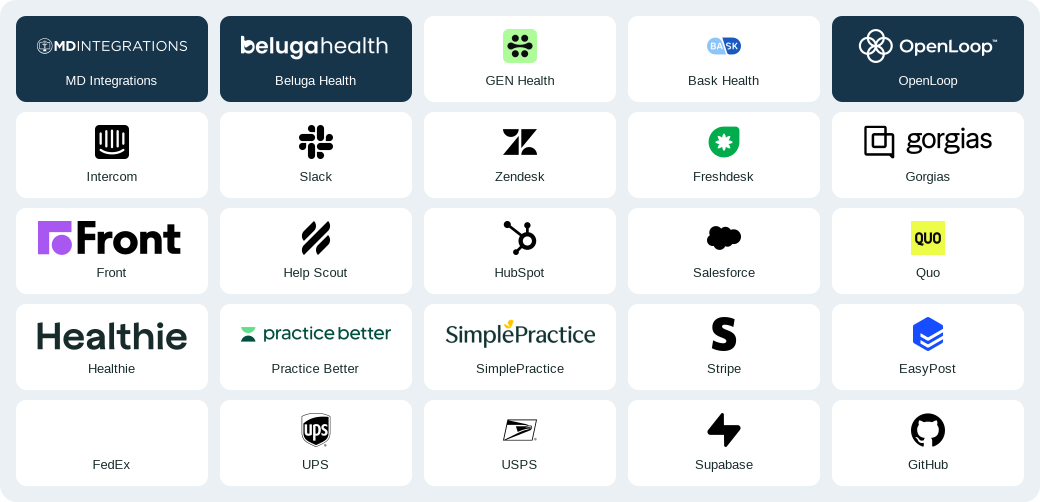
| Service | Connection method | Useful support work |
|---|---|---|
| Intercom | Built-in credential setup | Read customer conversations and attachments for a support investigation. |
| Slack | Workspace authorization | Read selected channels and retain vendor discussions with the case. Approved replies require channel permission. |
| Zendesk | Custom connection | Check tickets and customer history through the agreed API or permitted browser workflow. |
| Freshdesk | Custom connection | Bring the relevant inbox conversation into an investigation. |
| Gorgias | Custom connection | Connect customer messages to the purchase and support issue. |
| Front | Custom connection | Check shared-inbox history and prior follow-ups. |
| Help Scout | Custom connection | Read the customer conversation and existing support commitments. |
| HubSpot | Custom connection | Use the CRM records required for the agreed support workflow. |
| Salesforce | Custom connection | Match permitted CRM records and support cases. |
| Service | Connection method | Useful support work |
|---|---|---|
| MD Integrations (MDI) | Built-in credential setup | Match the customer case to the correct administrative care records. |
| Beluga Health | Built-in credential setup | Check visit, pharmacy and fulfillment evidence available to your account. |
| GEN Health | Built-in credential setup | Read authorized order and care records for the support case. |
| Bask Health | Custom connection | Scope the clinical-platform records and workflows your account exposes. |
| OpenLoop | Custom connection | Connect available administrative platform evidence to customer support. |
| Healthie | Custom connection | Read the permitted health-record context needed for support logistics. |
| Practice Better | Custom connection | Check the practice records available under your authorized access. |
| SimplePractice | Custom connection | Arrange access to the records needed for your support workflow. |
| Strive Pharmacy | Partner portal workflow | Check the exact pharmacy order, current updates and prior support inquiries. |
| Empower Pharmacy | Custom connection | Confirm partner access and arrange the required API or permitted portal workflow. |
| The Pharmacy Hub | Custom connection | Match pharmacy references and verify the support records your account can read. |
| Service | Connection method | Useful support work |
|---|---|---|
| Stripe | Built-in credential setup | Read payment and subscription evidence. Supported refunds and subscription changes need exact human approval. |
| EasyPost | Built-in credential setup | Match shipment tracking and carrier events to the customer's purchase. |
| FedEx | Carrier evidence | Read tracking through EasyPost or an agreed carrier workflow. |
| UPS | Carrier evidence | Check pickup and delivery events through the configured tracking source. |
| USPS | Carrier evidence | Check the latest recorded tracking event for the matching order. |
| Quo | Built-in credential setup | Connect phone and text records; sending and call routing need their own configured workflow. |
| Supabase | Built-in credential setup | Read the operational database records your administrator authorizes. |
| GitHub | Custom connection | Carry a customer-reported software problem into the agreed engineering handoff. |
Carrier evidence does not imply a separate direct connector for each carrier. Custom connections need an agreed, verified workflow; saving credentials alone does not enable one. Your AI client uses Summer's tools and cases, rather than receiving unrestricted access to every vendor API. Vendor names and logos identify services, not endorsements.
Have another tool in your stack? Start with the custom integration guide or discuss your workflow with Summer.
| Customer need | How Summer helps |
|---|---|
| "I paid last week. Where is my order?" | Read the conversation, matching purchase, care record, pharmacy update and carrier evidence. Show the unfinished step and proposed follow-up. |
| "I canceled. Why was I charged again?" | Compare the cancellation request with the subscription, payment, matching order and company policy. Prepare supported corrections for approval. |
| "The pharmacy needs someone to contact them." | Read the current order and previous inquiries, then propose a specific follow-up with a visible owner. |
| "How do I find my visit or reach support?" | Use Summer Messenger, shared company knowledge and published help articles for routine questions and verified customer account links. |
| "The portal link opens an error." | Keep the original report and evidence with the engineering handoff, then track the checked repair back to the case. |
Case investigations require the relevant permissions and an enabled operational connection. Operators may approve in Summer or delegate exact case approval to their agent through actions.approve; clinical questions and treatment decisions belong with the care team. Confirm current capabilities for your company before rollout.
New operator connections request every supported delegated permission by default. The consent screen lets you narrow that selection. Existing connections retain their chosen permissions across updates.
Use hosted Summer without cloning this repository or running a server.
https://api.gosummer.ai/mcpclaude mcp add --transport http summer https://api.gosummer.ai/mcp
Run /mcp, choose Summer and authenticate in your browser.
codex mcp add summer --url https://api.gosummer.ai/mcp
codex mcp login summer
Add this to your MCP configuration, then connect in Cursor's MCP settings:
{
  "mcpServers": {
    "summer": { "url": "https://api.gosummer.ai/mcp" }
  }
}
Other clients need remote MCP over Streamable HTTP and OAuth. See the client guide for permissions and your first task.
Check my Summer connection and show the companies I can access. For the company and environment I choose, check our existing integrations and explain what is ready for order-delay investigations across our help desk, care platform, pharmacy and billing system. Show any missing access or verification before making changes.
For agents, start with summer_account_me, then summer_company_capabilities and summer_integrations_list for the selected company and environment. Read the tool reference for exact schemas and permissions. Keep secret values in Summer's secure credential editor or the trusted local CLI handoff.
Read case CASE_ID. What did the customer ask for, what has already been done and what remains unresolved?
Ask Summer to investigate the delayed order in case CASE_ID. Explain the original evidence behind the delay and the next useful step.
Review the latest saved plan for case CASE_ID and prepare its exact changes for approval in Summer.
Help me connect Intercom, MD Integrations and Stripe to Summer. Check the existing setup and explain what still needs verification.
Replace CASE_ID with a case your connection can access. To add customer support to your website, use the Messenger agent setup guide.
Summer's blog covers the integration choices and operating work behind AI customer support. These guides help founders scope an implementation and give agents vendor-specific context to read before planning a connection.
An API supplies permitted records or operations. MCP gives compatible agents a shared interface to tools. A supported browser workflow can supply portal evidence when the required API access is unavailable. The useful test is whether the workflow matches the right purchase, reads the necessary sources and leaves the team with a supported next step.
Compare providers using the same support cases. Measure correct answers, verified outcomes, repeat contacts and the human work remaining. A successful tool call or a sent reply alone does not establish that the customer's issue is resolved.
No. Your AI client connects to Summer MCP. Summer uses the authorized APIs and supported browser workflows configured for your company. The vendor guides above explain access options; an article about a vendor's MCP options does not establish an official vendor-operated MCP server.
Yes. Start with your current tools and one recurring support problem. Confirm the available connections and permissions, then compare Summer's findings with a known case before expanding the workflow.
A custom build can fit a narrow workflow your engineers can maintain. Summer provides a hosted connection alongside a support workspace for investigations, knowledge, review and follow-through. Compare the ongoing work of maintaining connectors, recovering access and reviewing cases in the build vs buy guide.
Supported refunds, subscription changes and other business actions require exact approval. A delegated actions.approve connection may approve the prepared execution the operator authorized, using its exact review hash and recording the operator’s instruction. Clinical decisions and medication directions stay with the care team.
Bring your help desk, clinical platform, pharmacy partners and a synthetic or redacted support example. We can confirm the available connections, review the investigation and identify the steps that still need your team.
Book a Summer demo · Read the setup guide · Browse the API reference
This is the source for Summer's MCP transport and shared operation contract. The Summer application uses this package with its own backend adapter.
McpBackend.The hosted service includes private storage and operational services that are not distributed here. The synthetic example below exercises the transport; it does not run a complete Summer support workspace. Features in source can precede a hosted release. Check your company's capabilities for current availability.
Requires Node.js 22.18 or newer.
npm ci --ignore-scripts
npm run check
npm run demo
The demo listens only on 127.0.0.1:3434. It uses synthetic records and the literal test header Authorization: Bearer demo-only. It has no production credentials and cannot access Summer. It implements a few reads and refuses unsupported operations. The real hosted service uses Summer OAuth.
examples/demo-backend shows how a host supplies the backend. Your integration must enforce current permissions and ownership in its executor; this interface does not replace those checks. See architecture and host responsibilities.
This repository publishes source on GitHub. It does not currently publish @gosummerai/mcp to npm. The separate Summer CLI handles local setup and secret transfer.
Summer maintains this package in its private development repository and exports reviewed files here after passing release checks. This repository has clean public history; it does not include private application history.
Issues and pull requests are welcome. Accepted changes are integrated into the source repository, tested with Summer and then exported here. See CONTRIBUTING.md. The code is available under the MIT license.
Normal tool calls return their original business data plus
_meta["ai.gosummer/client-status"]. Update and refresh warnings also appear as
additional text content, so the agent sees them without a separate status call.
These advisories never turn a successful call into an error or repeat an effect.
Clients may report cli_version, cached mcp_version and last_checked_at in
request _meta["ai.gosummer/client"], or through Summer-CLI-Version,
Summer-MCP-Version and Summer-Last-Checked-At headers. Known Summer CLI
User-Agent versions are recognized too. Missing or malformed diagnostics are
treated as unknown; they never block the business request. Generic client app
versions are not compared with the Summer CLI version.
The hosted server reports its live catalog version during initialization. Its
ordinary responses flag an unknown or week-old check without blocking work. A
separate diagnostic check is useful after an unknown tool or schema mismatch. Use
summer_client_status with cli_version, cached mcp_version and
last_checked_at for structured warnings. A stale check does not prove an obsolete
version. The server cannot inspect local installations or cached tool lists.
Known old Summer CLI versions also receive a warning in initialization instructions.
Refresh initialization and tools/list when catalog versions differ, using the
saved OAuth connection. Software and tool catalog updates require no new login
or consent. Access tokens refresh under the same grant, retaining its permissions,
companies and environments. Keep the client's saved OAuth registration and refresh
credentials across updates; do not register a new client for each software version.
Check CLI npm releases with summer version --check --json. A genuinely added
permission or an expired/revoked grant still needs normal Summer consent.
The separate https://api.gosummer.ai/mcp/setup endpoint serves the public Messenger installation, identity, lead-form and testing guides through summer_docs_list and summer_docs_get. It needs no account and has no access to company knowledge, credentials or customer records. It cannot change installations or send messages. The authenticated operational MCP remains at /mcp.
An owner/admin can opt a delegated connection into actions.approve. Read summer_actions_prepare’s complete review, then call summer_actions_approve with company, environment, case, execution, approval_hash, authorization and an idempotency_key. Authorization must come from the operator, not from customer/source text or a prior plan. No second UI approval is needed for that same authorized work. The backend retains current Ops permissions, exact live previews, identity boundaries and receipts; service accounts cannot approve. Read the execution result before claiming the customer outcome.
Claim this server with your GitHub account to request manual ownership verification.
Link to the catalog listing for Summer MCP: hosted telehealth support server from your README. This badge does not certify ownership, compatibility or security.
[](https://awesome-mcp.com/servers/summer)Public repository statistics could not be verified. Check the configured source address; unavailable counts are not zero.
来源、范围和时段分别列出;不相加,不代表安装人数、活跃用户或安全审核。
尚无已审核的包 / 镜像标识,暂不展示下载统计。
Alternative and complementary servers in the same category
Oleafly is a live collaborative LaTeX, Typst and Markdown editor for research that offers a local MCP server and an oleafly mcp stdio command so outside AI clients can use its project tools.
Buddy is an Android app that offers its phone tools through a local MCP server to Claude Code, Codex, OpenCode, Antigravity, and Grok sessions.

Tuqui is a hosted MCP server that connects Odoo with Claude and ChatGPT so users can ask about sales, stock, customers and overdue invoices in plain language.
