
A directory listing describing a cancellation-letter and mailing-address service. The configured public GitHub repository returned 404 during source verification.
Repository stats unavailable
Developer Tools
A local stdio MCP server that indexes shell history into SQLite FTS5 and lets MCP clients search past commands.
terminal-history-mcp is cataloged as an MCP server attributed to hasanjahidul. A local stdio MCP server that indexes shell history into SQLite FTS5 and lets MCP clients search past commands. It is categorized under developer tools. See the capability inspector for recorded interfaces and their independent review status; consult upstream documentation for the current interface.
Installation configuration is not reviewed. No executable setup is offered for this entry; inspect the source repository before proceeding.
Catalog license label: MIT. Check the source repository's current license and terms before using, modifying or distributing this software.
能力定义尚未审核。未核验的采集内容不会作为可信接口展示。
暂无可展示的已审核记录。这不表示上游不支持此能力。
暂无可展示的已审核记录。这不表示上游不支持此能力。
暂无可展示的已审核记录。这不表示上游不支持此能力。
Email delivery is not connected. This page does not collect email addresses or create subscriptions.
Browse the registry for current listings instead.
Reviews for terminal-history-mcp are not available yet
Review publishing and storage are not connected. This page does not collect or publish ratings or comments, including after sign-in.
No by default; everything is local in a database under the user's home directory, unless optional semantic search is pointed at a non-localhost endpoint with opt-in.
ask_history retrieves top entries and passes them to a configured chat model, requiring citations checked against the retrieved ids.
README.md · b1fb4a43ba9b · 采集于 2026-11-13 11:38:32 UTC
保留上游原文,不做 AI 改写。为安全起见过滤脚本、表单和不安全链接。
当前显示最后一次成功采集的文档快照,请以来源页面为准。




Search your shell history (zsh / bash / fish) from Claude Code, Cline, Cursor, Zed, or any MCP client. Local-only. SQLite FTS5. Secret-redacted before storage.
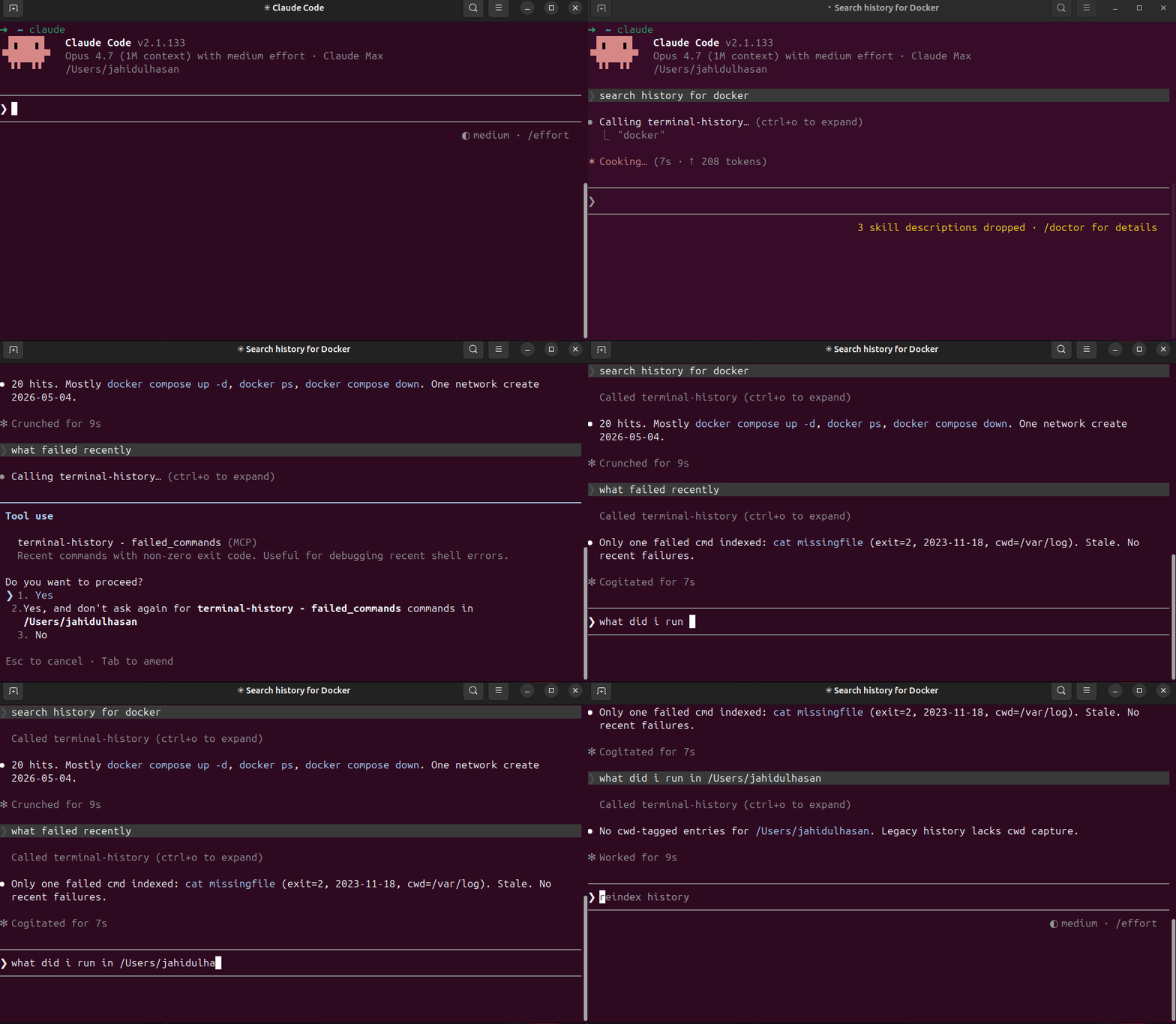
/etc/nginx?"kubectl apply."npm install -g terminal-history-mcp
terminal-history-mcp index # one-time backfill from existing history
(Or run from a clone: git clone … && npm install && npm run build && npm link.)
claude mcp add --scope user terminal-history -- terminal-history-mcp
claude mcp list
Anywhere that takes a stdio MCP server config:
{
  "mcpServers": {
    "terminal-history": {
      "command": "terminal-history-mcp"
    }
  }
}
Use this MCP server instantly with no local installation:
npx -y mcpize connect @HasanJahidul/terminal-history --client claude
Or connect at: https://mcpize.com/mcp/terminal-history
By default zsh/bash history files store only the command. To unlock recent_in_dir and failed_commands, install the shell hook:
terminal-history-mcp install-hook zsh    # or bash, or fish
exec $SHELL                              # reload
The hook appends pipe-delimited lines to ~/.terminal-history-mcp/extended.log. Reindex picks them up.
To inspect the snippet first:
terminal-history-mcp print-hook zsh
To remove:
terminal-history-mcp uninstall-hook zsh
| Tool | What it does |
|---|---|
search_history(query, limit, mode) | FTS5 keyword + prefix match across all history. Optional mode: keyword (default), semantic, hybrid — see Semantic search |
recent_in_dir(cwd, limit) | Last N commands in a working dir (needs hook) |
failed_commands(since_ts_ms, limit) | Commands with non-zero exit (needs hook) |
command_chains(query, window_ms, limit) | For each match, list commands within ±5 min |
reindex | Re-parse history files + extended log |
reindex_embeddings(limit) | Build the vector index for semantic/hybrid search (needs an embedding endpoint) |
ask_history(question, k) | Answer a question from your history, citing entries as [id:N] (needs a chat model) |
Keyword search finds commands by the words in them. Semantic search finds them by meaning: "how did I free up docker disk space" finds docker system prune -af even though the query never says "prune". It uses embeddings from a model running on your machine. It is opt-in: search_history stays keyword-only unless you pass mode.
brew install ollama            # or https://ollama.com/download
ollama serve                   # skip if the Ollama app is already running
ollama pull nomic-embed-text   # embedding model (~274 MB)
ollama pull qwen2.5:7b         # optional: chat model for ask_history answers (~4.7 GB)
Then, after terminal-history-mcp index, call the reindex_embeddings tool from your MCP client. Each call embeds up to 2000 distinct commands (identical commands share one vector), newest first; call it again until remaining is 0, and again after new history is indexed.
| Env var | Default | Purpose |
|---|---|---|
TERMINAL_HISTORY_LLM_BASE_URL | http://localhost:11434/v1 | Any OpenAI-compatible endpoint (Ollama, LM Studio, llama.cpp server, vLLM, OpenAI) |
TERMINAL_HISTORY_EMBED_MODEL | nomic-embed-text | Embedding model. Changing it re-embeds everything on the next reindex_embeddings |
TERMINAL_HISTORY_CHAT_MODEL | unset | Chat model for ask_history. Unset: ask_history returns the retrieved entries only |
TERMINAL_HISTORY_LLM_API_KEY | unset | Sent as a Bearer token, for hosted endpoints |
TERMINAL_HISTORY_ALLOW_REMOTE_LLM | unset | Must be exactly 1 to allow a non-localhost base URL |
Pass them through your MCP client, e.g.
claude mcp add --scope user terminal-history -e TERMINAL_HISTORY_CHAT_MODEL=qwen2.5:7b -- terminal-history-mcp
{ "mcpServers": { "terminal-history": { "command": "terminal-history-mcp",
  "env": { "TERMINAL_HISTORY_CHAT_MODEL": "qwen2.5:7b" } } } }
TERMINAL_HISTORY_ALLOW_REMOTE_LLM=1.ask_history also sends the retrieved entries' timestamps, working directories and exit codes to the chat model.~/.terminal-history-mcp/history.db, table command_embeddings).mode | How it ranks | If embeddings are unavailable |
|---|---|---|
keyword (default) | FTS5 bm25, exactly the previous behaviour | n/a, never calls the endpoint |
semantic | Cosine similarity between the query embedding and each command's embedding | Returns an error saying why |
hybrid | Top 50 keyword + top 50 semantic, fused with Reciprocal Rank Fusion (k=60); one row per distinct command | Falls back to keyword results and says so (fallback_reason) |
"Unavailable" means the endpoint is unreachable, reindex_embeddings has not run for the current model, or the guardrail refused the endpoint.
ask_history(question, k=8) retrieves the top k entries with hybrid search and gives them to the chat model as delimited, untrusted data (never as instructions). The model is told to answer only from them and cite entries as [id:N], or reply exactly No relevant history found.. Cited ids are checked against what was retrieved; anything else is reported in invalid_citation_ids. Without TERMINAL_HISTORY_CHAT_MODEL it returns the retrieved entries only.
Measured with npm run eval on a synthetic, author-written fixture (200 commands, 25 queries), nomic-embed-text via Ollama, Apple M4:
| mode | recall@5 | MRR@10 |
|---|---|---|
| keyword | 0.680 | 0.516 |
| semantic | 0.680 | 0.587 |
| hybrid | 0.720 | 0.583 |
Vector search is an exact brute-force scan: 23 ms median at 10k distinct commands, 237 ms at 100k. Numbers, caveats and design reasoning are in docs/adr/0001-semantic-search.md.
Everything is local. The DB lives at ~/.terminal-history-mcp/history.db. Nothing is uploaded unless you point the optional semantic search at a non-localhost endpoint and opt in (see Semantic search → Privacy).
Secrets are scrubbed before insert. Detected patterns:
ghp_*, gho_*, …)sk-*)xox[baprs]-*)AKIA…)Authorization: Bearer/Basic <value>X-*-Token: …, X-*-Key: …, X-*-Secret: … headersTOKEN / KEY / SECRET / PASSWORD / API_KEY--token=…, --api-key …, -k …https://user:pass@hosteyJ.*.*)If you find a leak, please open an issue. To wipe and re-index after upgrading patterns:
rm ~/.terminal-history-mcp/history.db*
terminal-history-mcp index
git clone https://github.com/hasanjahidul/terminal-history-mcp
cd terminal-history-mcp
npm install
npm run build
npm test        # offline: unit + JSON-RPC e2e (fake embedding/chat endpoint on 127.0.0.1)
npm run eval    # retrieval quality + vector-search latency; needs Ollama for the quality part
MIT — see LICENSE.
Claim this server with your GitHub account to request manual ownership verification.
Link to the catalog listing for terminal-history-mcp from your README. This badge does not certify ownership, compatibility or security.
[](https://awesome-mcp.com/servers/terminal-history-mcp)Public repository statistics could not be verified. Check the configured source address; unavailable counts are not zero.
来源、范围和时段分别列出;不相加,不代表安装人数、活跃用户或安全审核。
尚无已审核的包 / 镜像标识,暂不展示下载统计。
Alternative and complementary servers in the same category
A directory listing describing a cancellation-letter and mailing-address service. The configured public GitHub repository returned 404 during source verification.

A hosted MCP service for browsing and searching through Singapore mobile-network proxies.

A directory listing describing a Markdown-to-PDF service. The configured public GitHub repository returned 404 during source verification.