Transport for London MCP Server
⚠️ Important Disclaimer: This is not an official Transport for London (TfL) MCP server. This is an independent project that uses the publicly available TfL Unified API to provide transport data. It is not affiliated with, endorsed by, or officially supported by Transport for London.
A Model Context Protocol (MCP) server providing real-time Transport for London data, including line status, journey planning, and disruption information. This server is deployed on Cloudflare Workers and can be used with any MCP-compatible client like Claude Desktop.
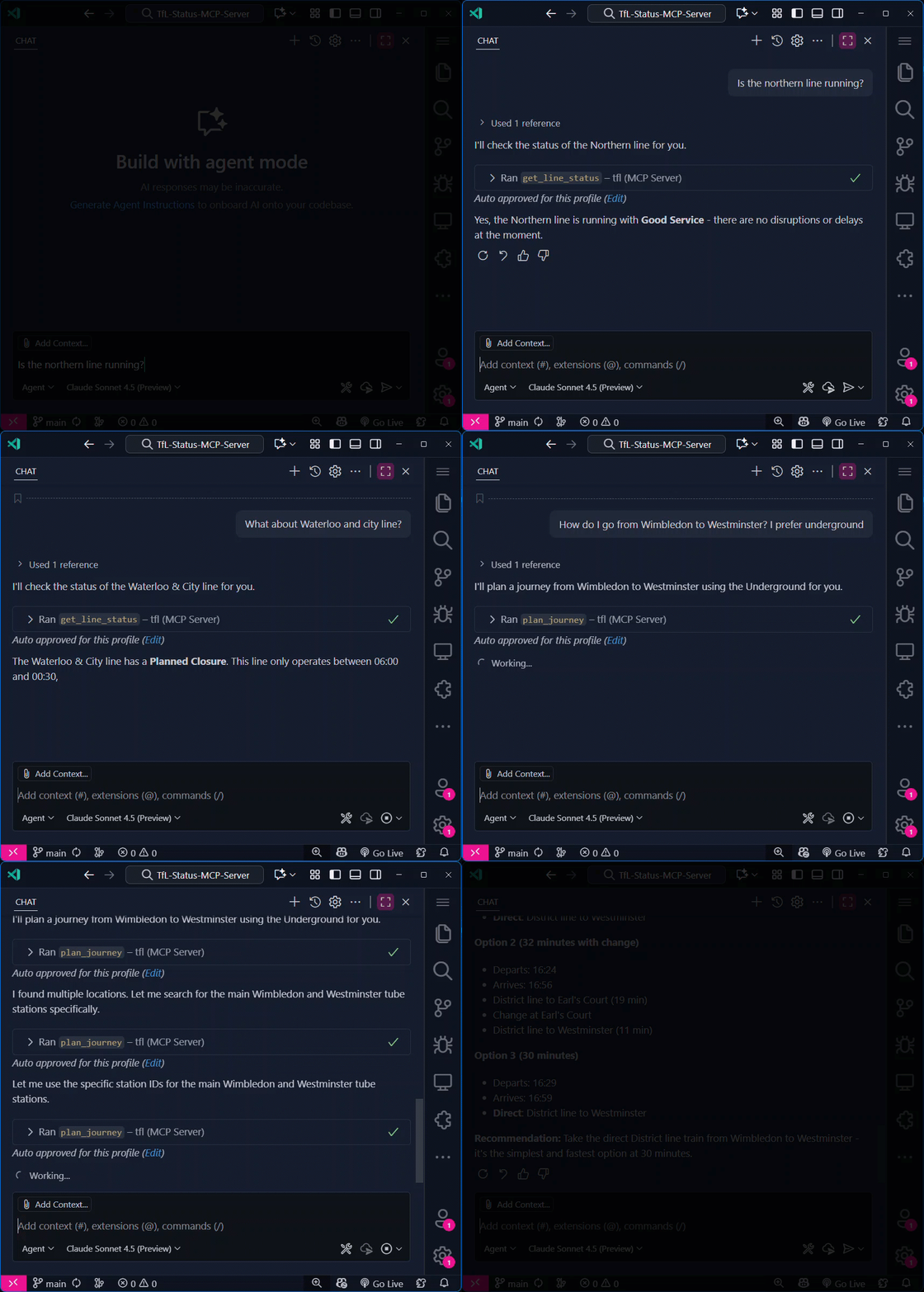
Demo
With MCP-UI Support
Experience interactive visual cards and UI components with MCP-UI compatible clients (shown here using nanobot.ai):
Without MCP-UI
For clients without MCP-UI support, the server returns JSON data:
Features
This MCP server provides the following tools:
🎯 show_line_status_selector (NEW!)
Display an interactive selector with buttons for all TfL lines. This uses MCP-UI's externalUrl feature to load an interactive HTML interface in your MCP client.
- Parameters: None
- Output:
- An interactive UI with clickable buttons for all available TfL lines (Victoria, Central, Northern, Piccadilly, Jubilee, Bakerloo, Circle, District, Hammersmith & City, Metropolitan, Waterloo & City, Elizabeth, DLR, Overground, and Tram)
- Each button is styled with the official line color
- Clicking a button automatically calls
get_line_status for that line
- Perfect for quickly checking status across multiple lines
Use Case Example:
Ask "Show me the line status selector" or "Show status" to get an interactive view of all lines. Click any line button to instantly check its current status.
🚇 get_line_status
Get the current status of a specific TfL transport line with beautiful visual cards (MCP-UI support).
- Parameters:
lineId: The line ID to query (e.g., 'central', 'piccadilly', 'northern', 'victoria')
- Output: Returns both JSON data and a visual UI card with TfL branding, line colors, and status badges
MCP-UI Visual Responses
When used with MCP-UI compatible clients (like Claude Desktop with MCP-UI support), the server returns beautiful visual cards:
Good Service:

Severe Delays:

Minor Delays:

The visual cards feature:
- Official TfL roundel logo with dynamic line colors
- Status badges (green for good service, red for severe delays, amber for minor delays)
- Clean, professional design with TfL branding
- Fully backward compatible - non-MCP-UI clients receive JSON data
🗺️ plan_journey
Plan journeys between two locations in London.
- Parameters:
from: Starting location (postcode, address, or station name)to: Destination location (postcode, address, or station name)modes (optional): Transport modes to use (e.g., 'tube,bus,walking')time (optional): Journey time in HH:MM format or 'now'timeIs (optional): 'Departing' or 'Arriving'date (optional): Journey date in YYYYMMDD formatwalkingSpeed (optional): 'Slow', 'Average', or 'Fast'cyclePreference (optional): Cycling preference optionsoptimize (optional): 'Time', 'LeastInterchange', or 'LeastWalking'maxTransferMinutes (optional): Maximum transfer time in minutesmaxWalkingMinutes (optional): Maximum walking time in minutes
Getting Started
Try It Now (No Deployment Required)
Want to test the server before deploying your own? You can use the public demo instance!
For Claude Desktop:
- Open Claude Desktop Settings > Developer > Edit Config
- Add this configuration:
{
  "mcpServers": {
    "tfl": {
      "command": "npx",
      "args": [
        "mcp-remote",
        "https://london-transport-mcp.anoopt.workers.dev/mcp"
      ]
    }
  }
}
- Restart Claude Desktop
- Start asking questions about London transport!
For VS Code (GitHub Copilot):
- Open VS Code Settings > Extensions > GitHub Copilot > MCP Servers
- Add this configuration:
{
  "servers": {
    "tfl": {
      "type": "http",
      "url": "https://london-transport-mcp.anoopt.workers.dev/mcp"
    }
  }
}
- Start the MCP server
- Start using TfL tools in Copilot Chat!
Quick Deploy

Click the button above to deploy this MCP server to your Cloudflare Workers account with one click!
Manual Deployment
- Clone this repository
- Install dependencies:
npm install
- Deploy to Cloudflare Workers:
npm run deploy
Your MCP server will be deployed to a URL like: london-transport-mcp.<your-account>.workers.dev
Authentication (Optional)
This server supports optional TfL API key authentication. While the TfL API works without authentication, using an API key provides higher rate limits and better performance.
Without API Key:
The server will work with TfL's public API limits (subject to rate limiting).
With API Key (Recommended):
- Get a free API key from TfL API Portal
- Pass the API key in the
X-API-Key header when connecting to the server
Connect to Claude Desktop
To connect to your MCP server from Claude Desktop, update your Claude Desktop configuration:
- Go to Claude Desktop Settings > Developer > Edit Config
- Add one of the following configurations:
Using mcp-remote
With API Key:
{
  "mcpServers": {
    "tfl": {
      "command": "npx",
      "args": [
        "mcp-remote",
        "https://london-transport-mcp.<your-account>.workers.dev/mcp",
        "--header",
        "X-API-Key: YOUR_TFL_API_KEY"
      ]
    }
  }
}
Without API Key:
{
  "mcpServers": {
    "tfl": {
      "command": "npx",
      "args": [
        "mcp-remote",
        "https://london-transport-mcp.<your-account>.workers.dev/mcp"
      ]
    }
  }
}
Note: For local development, replace the URL with http://localhost:8787/mcp
Connect to Cloudflare AI Playground
You can also connect to your MCP server from the Cloudflare AI Playground:
- Go to https://playground.ai.cloudflare.com/
- Enter your deployed MCP server URL with the
/mcp endpoint
- Add the
X-API-Key header with your TfL API key
- Start using the TfL tools directly from the playground!
Local Development
For local development:
npm run dev
This will start the server locally at http://localhost:8787
API Key (Optional)
This server supports optional TfL API key authentication for higher rate limits. The API key is not required but recommended for production use.
To use without an API Key:
Simply omit the X-API-Key header when connecting. The TfL API will apply standard rate limits.
To use with an API Key:
- Visit the TfL API Portal
- Register for a free account
- Create a new application to get your API key
- Pass the key in the
X-API-Key header when connecting
Examples
Once connected, you can ask Claude things like:
- "Show me the line status selector" or "Show status" - displays an interactive UI with all TfL lines
- "Is the Northern line running ok?"
- "What's the status of the Victoria line?"
- "Plan a journey from King's Cross to Heathrow Airport"
- "How do I get from Oxford Circus to Canary Wharf?"
- "What's the fastest route from Wimbledon to Liverpool Street?"
Tech Stack
- Runtime: Cloudflare Workers
- Framework: Hono.js
- MCP SDK: @modelcontextprotocol/sdk
- Language: TypeScript
- API: Transport for London Unified API
Contributing
Contributions are welcome! Please feel free to submit a Pull Request.
License
This project is open source and available under the MIT License.



