A Model Context Protocol server built on Huawei Cloud services that enables AI assistants to operate Huawei Cloud resources within conversational workflows, supporting ECS, OBS, GaussDB, and other cloud products.

A Model Context Protocol server that connects AI agents to a ThingsBoard IoT platform for querying devices, managing entities, analyzing telemetry, and automating operations.
ThingsBoard MCP Server is cataloged as an MCP server attributed to thingsboard. A Model Context Protocol server that connects AI agents to a ThingsBoard IoT platform for querying devices, managing entities, analyzing telemetry, and automating operations. It is categorized under cloud devops. See the capability inspector for recorded interfaces and their independent review status; consult upstream documentation for the current interface.

Installation configuration is not reviewed. No executable setup is offered for this entry; inspect the source repository before proceeding.
Catalog license label: Apache License 2.0. Check the source repository's current license and terms before using, modifying or distributing this software.
能力定义尚未审核。未核验的采集内容不会作为可信接口展示。
暂无可展示的已审核记录。这不表示上游不支持此能力。
Email delivery is not connected. This page does not collect email addresses or create subscriptions.
Browse the registry for current listings instead.
Reviews for ThingsBoard MCP Server are not available yet

Review publishing and storage are not connected. This page does not collect or publish ratings or comments, including after sign-in.
It supports STDIO, the default for clients that launch the server as a subprocess, and SSE for clients that connect over HTTP.
Yes, tool groups can be disabled individually through environment variables, which is useful for clients with limited context.
README.md · e2cf79bd8265 · 采集于 2026-11-13 11:40:47 UTC
保留上游原文,不做 AI 改写。为安全起见过滤脚本、表单和不安全链接。
当前显示最后一次成功采集的文档快照,请以来源页面为准。
Connect AI agents to your ThingsBoard IoT platform via Model Context Protocol (MCP). Query devices, manage entities, analyze telemetry, and automate operations — all through natural language.
Works with Claude Desktop, Cursor, VS Code Copilot, Claude Code, and any MCP-compatible client.
You need a ThingsBoard instance (Cloud, EU Cloud, self-hosted CE/PE, or Edge) and an API key (ThingsBoard 4.3+) or username/password.
Add to your claude_desktop_config.json:
{
"mcpServers": {
"thingsboard": {
"command": "docker",
"args": ["run", "-i", "--rm", "-e", "THINGSBOARD_URL", "-e", "THINGSBOARD_API_KEY", "thingsboard/mcp"],
"env": {
"THINGSBOARD_URL": "https://thingsboard.cloud",
"THINGSBOARD_API_KEY": "YOUR_API_KEY"
}
}
}
}
Add to ~/.cursor/mcp.json (global) or .cursor/mcp.json (project):
{
"mcpServers": {
"thingsboard": {
"command": "docker",
"args": ["run", "-i", "--rm", "-e", "THINGSBOARD_URL", "-e", "THINGSBOARD_API_KEY", "thingsboard/mcp"],
"env": {
"THINGSBOARD_URL": "https://thingsboard.cloud",
"THINGSBOARD_API_KEY": "YOUR_API_KEY"
}
}
}
}
Add to your VS Code settings.json or .vscode/mcp.json:
{
"mcp": {
"servers": {
"thingsboard": {
"command": "docker",
"args": ["run", "-i", "--rm", "-e", "THINGSBOARD_URL", "-e", "THINGSBOARD_API_KEY", "thingsboard/mcp"],
"env": {
"THINGSBOARD_URL": "https://thingsboard.cloud",
"THINGSBOARD_API_KEY": "YOUR_API_KEY"
}
}
}
}
}
claude mcp add thingsboard \
-e THINGSBOARD_URL=https://thingsboard.cloud \
-e THINGSBOARD_API_KEY=YOUR_API_KEY \
-- docker run -i --rm -e THINGSBOARD_URL -e THINGSBOARD_API_KEY thingsboard/mcp
Start the server:
docker run --rm -p 8000:8000 \
-e THINGSBOARD_URL=https://thingsboard.cloud \
-e THINGSBOARD_API_KEY=YOUR_API_KEY \
-e SPRING_AI_MCP_SERVER_STDIO=false \
-e SPRING_WEB_APPLICATION_TYPE=servlet \
thingsboard/mcp
Then point your MCP client to http://localhost:8000/sse.
Legacy auth: If your ThingsBoard version is older than 4.3, use
THINGSBOARD_USERNAMEandTHINGSBOARD_PASSWORDinstead ofTHINGSBOARD_API_KEY.
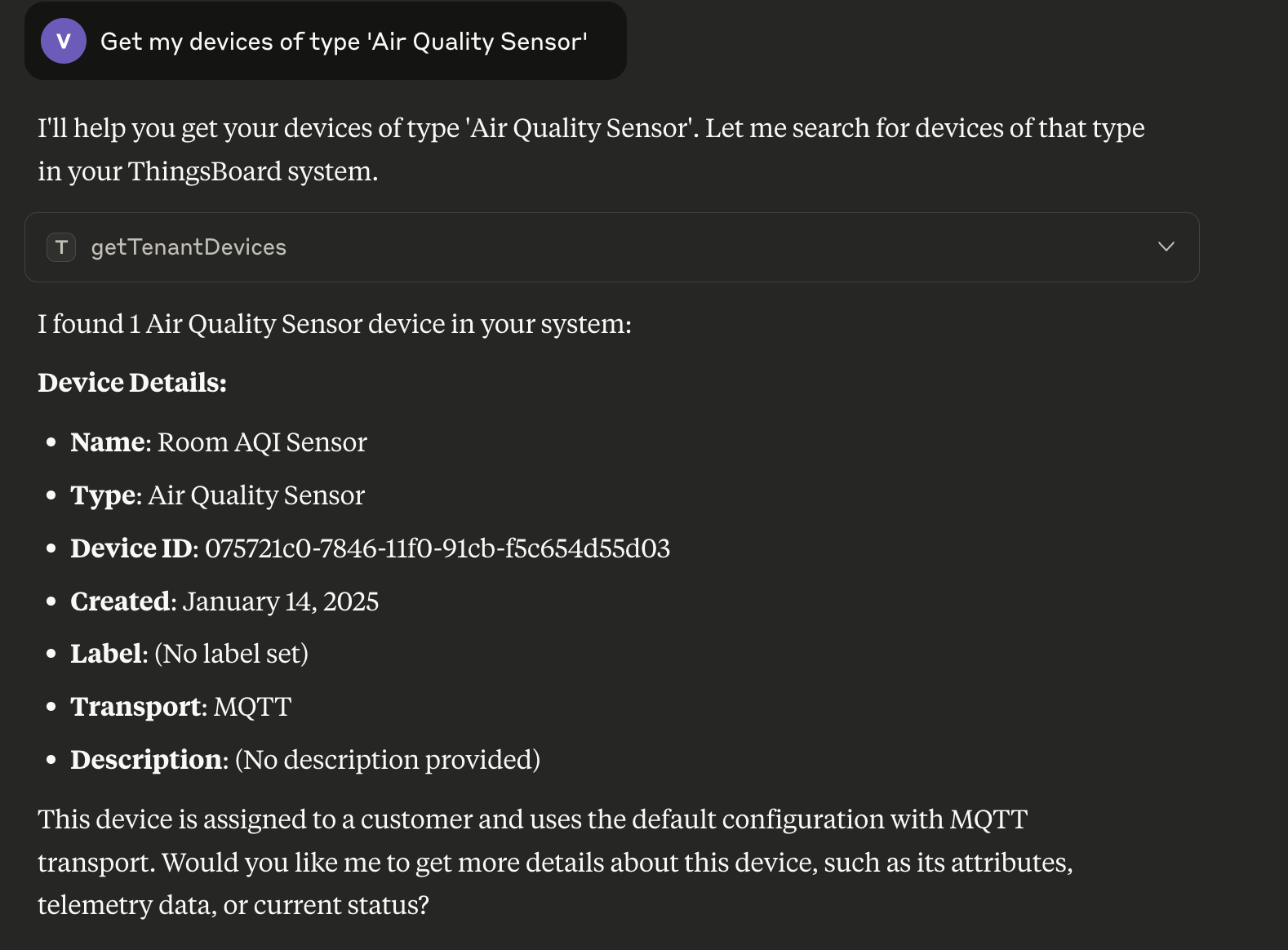
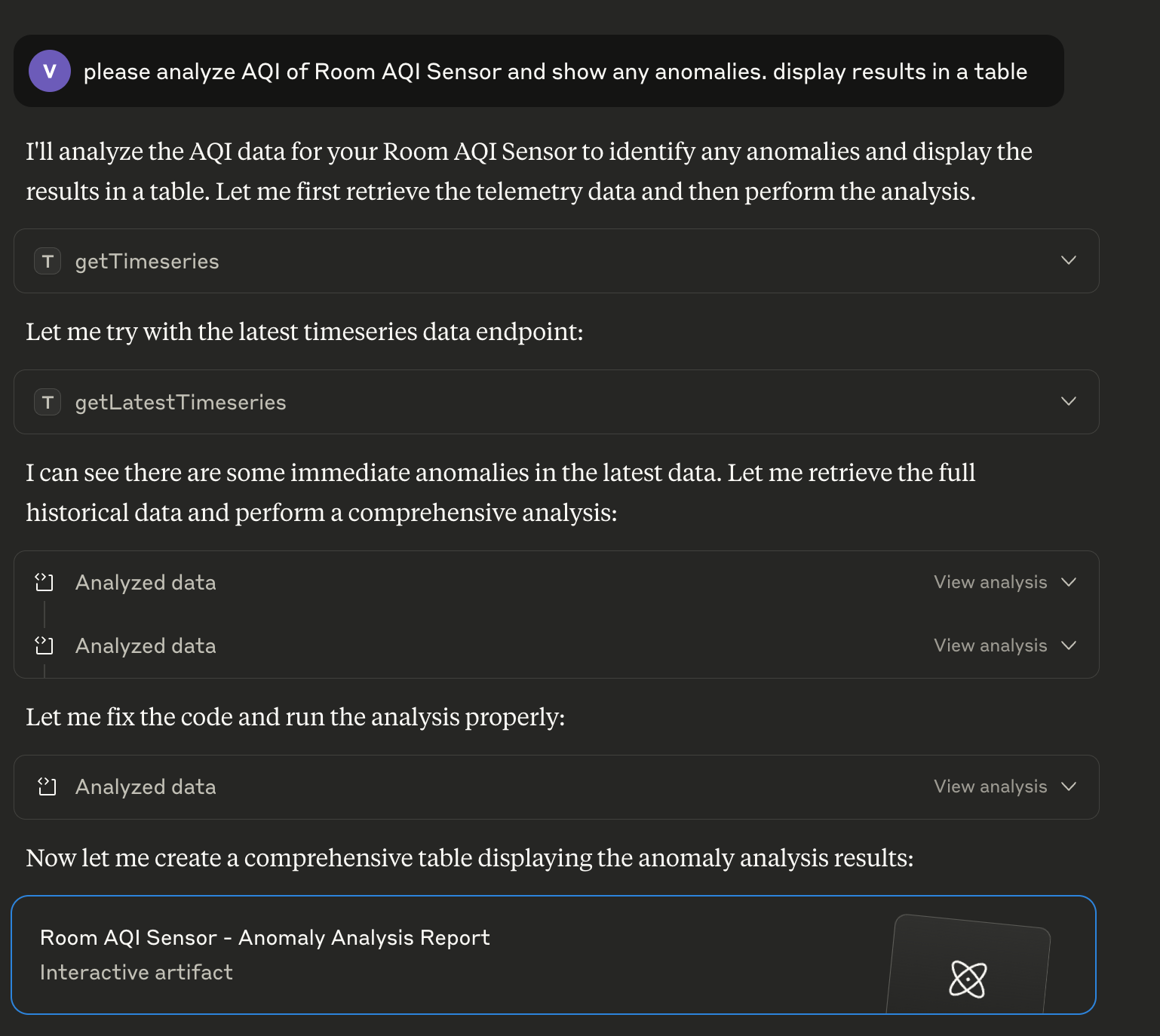
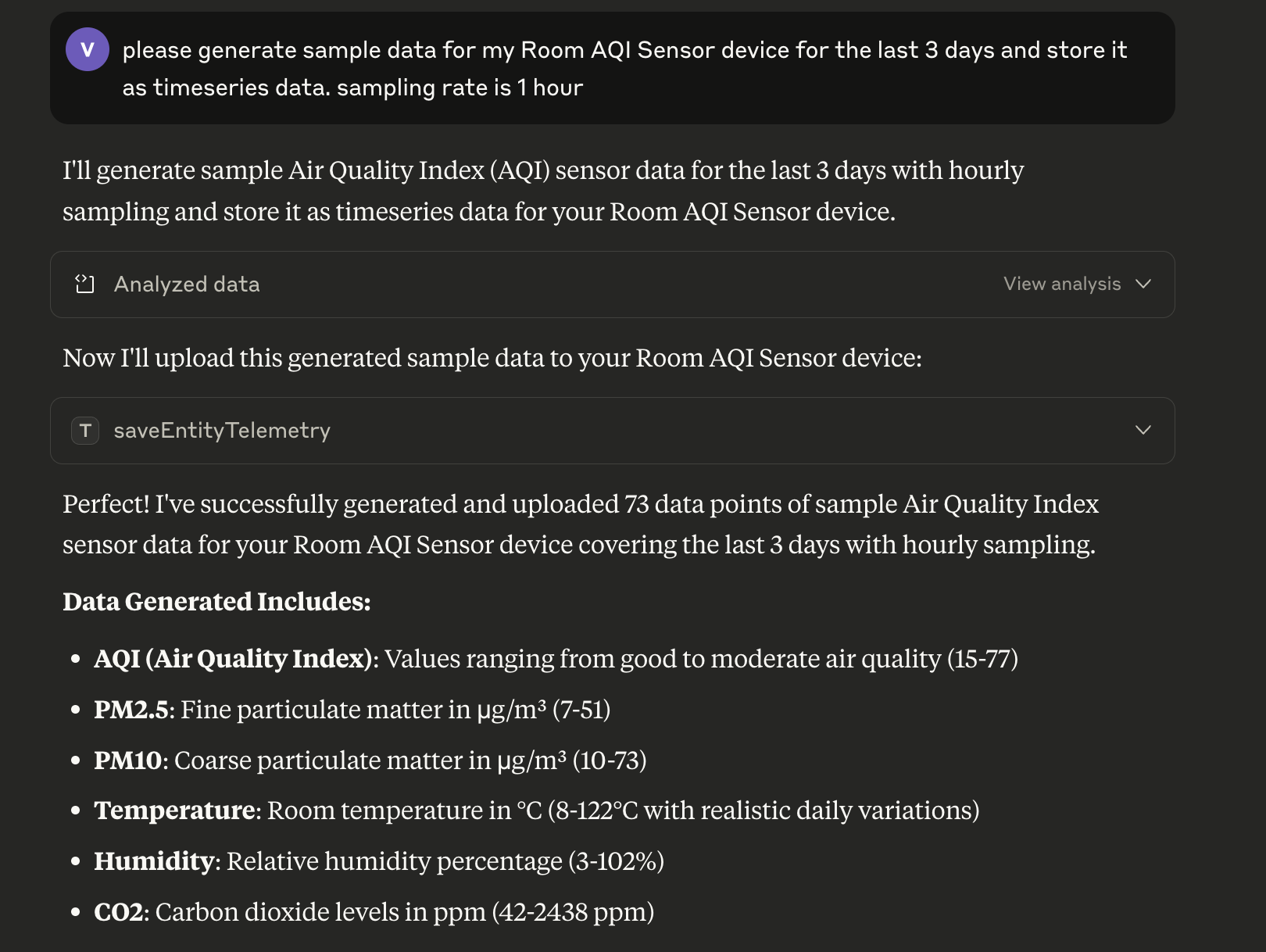
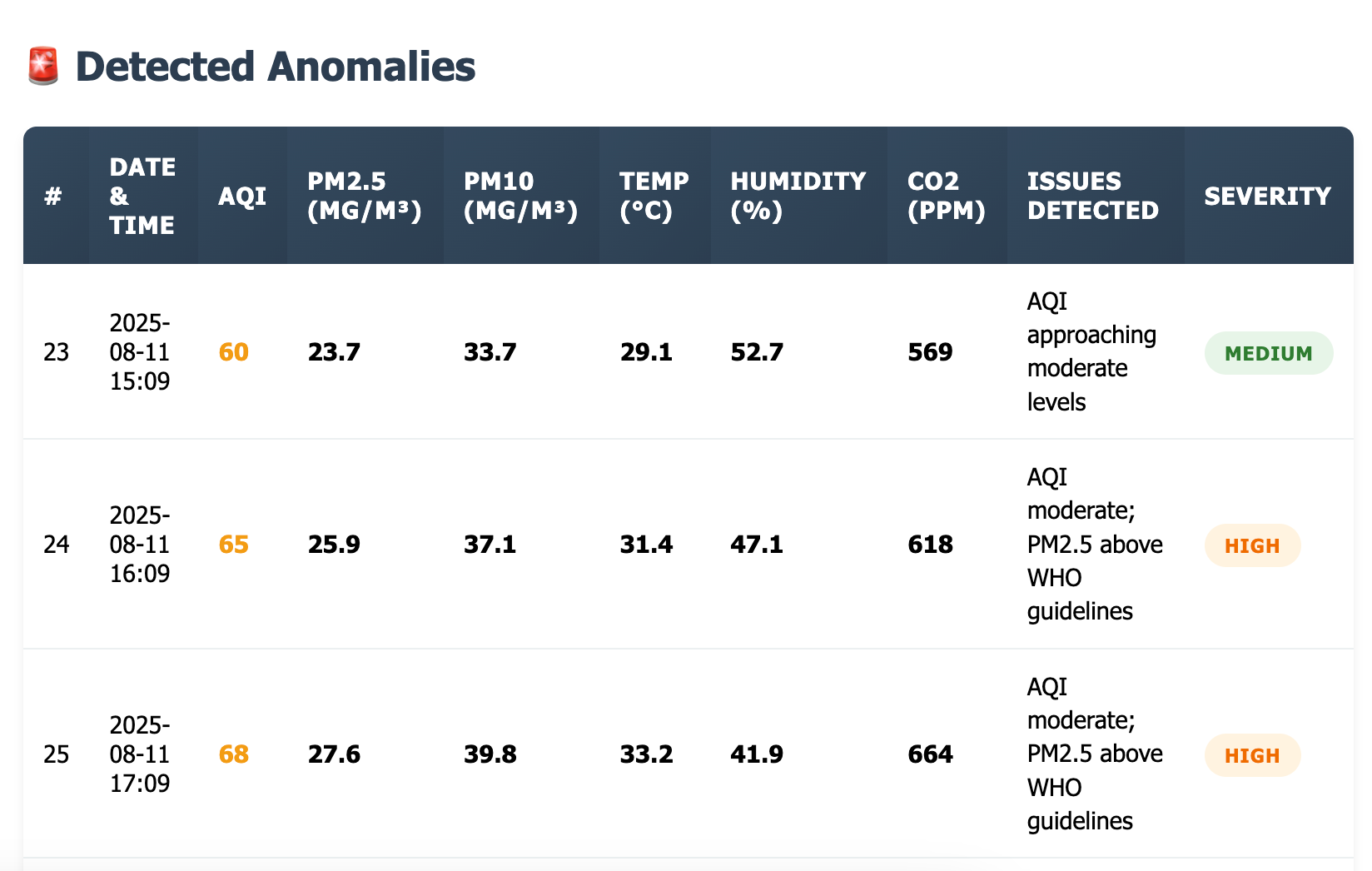
Ask questions in natural language and get structured results from your ThingsBoard instance:
| Query devices and entities | Analyze time-series data |
![]() | ![]() |
| Generate and save telemetry | Get anomaly analysis |
![]() | ![]() |
120+ tools across 10 tool groups:
docker pull thingsboard/mcp
The Docker image supports two transport modes:
See Quick Start for usage examples.
wget https://github.com/thingsboard/mcp-server/releases/download/v2.1.0/thingsboard-mcp-server-2.1.0.jar
Run with:
# STDIO mode
java -jar thingsboard-mcp-server-2.1.0.jar
# SSE mode
java -Dspring.ai.mcp.server.stdio=false -Dspring.main.web-application-type=servlet -jar thingsboard-mcp-server-2.1.0.jar
If you're using the JAR file instead of Docker, use this in your claude_desktop_config.json:
{
"mcpServers": {
"thingsboard": {
"command": "java",
"args": ["-jar", "/absolute/path/to/thingsboard-mcp-server-2.1.0.jar"],
"env": {
"THINGSBOARD_URL": "https://thingsboard.cloud",
"THINGSBOARD_API_KEY": "YOUR_API_KEY"
}
}
}
}
Requires Java 17+ and Maven 3.6+.
git clone https://github.com/thingsboard/mcp-server.git
cd mcp-server
mvn clean install -DskipTests
java -jar target/thingsboard-mcp-server-2.1.0.jar
| Variable | Description | Default |
|---|---|---|
THINGSBOARD_URL | Base URL of your ThingsBoard instance | required |
THINGSBOARD_API_KEY | API key for authentication (recommended for 4.3+) | |
THINGSBOARD_USERNAME | Username for authentication (legacy) | |
THINGSBOARD_PASSWORD | Password for authentication (legacy) | |
THINGSBOARD_LOGIN_INTERVAL_SECONDS | Session refresh interval | 1800 |
HTTP_BIND_ADDRESS | HTTP bind address (SSE mode) | 127.0.0.1 |
HTTP_BIND_PORT | HTTP port (SSE mode) | 8000 |
SPRING_AI_MCP_SERVER_STDIO | Enable STDIO transport | true |
SPRING_WEB_APPLICATION_TYPE | none for STDIO, servlet for SSE | none |
SPRING_AI_MCP_SERVER_SSE_ENDPOINT | SSE endpoint path | /sse |
SPRING_AI_MCP_SERVER_SSE_MESSAGE_ENDPOINT | SSE message endpoint path | /mcp/message |
| Variable | Description | Default |
|---|---|---|
THINGSBOARD_CONNECTION_MAX_RETRIES | Max connection retry attempts | 3 |
THINGSBOARD_CONNECTION_RETRY_DELAY_SECONDS | Delay between retries | 5 |
THINGSBOARD_CONNECTION_CONNECT_TIMEOUT_SECONDS | HTTP connect timeout | 10 |
THINGSBOARD_CONNECTION_READ_TIMEOUT_SECONDS | HTTP read timeout | 60 |
LOG_LEVEL_APP | Application log level | info |
LOG_LEVEL_TOOLS | Tool execution log level | info |
LOG_LEVEL_TOOL_RESPONSE | Tool response log level | info |
LOGGING_PATTERN_CONSOLE | Logback console pattern | %d{yyyy-MM-dd HH:mm:ss} | %-5level | %logger{1} | %msg%n |
LOGGING_CONSOLE_TARGET | Log output target | System.err |
The server exposes 120+ tools which may exceed context limits for some clients. Disable groups you don't need:
| Variable | Group | Tools | Default |
|---|---|---|---|
THINGSBOARD_TOOLS_EDQ | Entity Data Query + Guides | 40 | true |
THINGSBOARD_TOOLS_TELEMETRY | Telemetry & Attributes | 11 | true |
THINGSBOARD_TOOLS_DEVICE | Devices | 11 | true |
THINGSBOARD_TOOLS_ASSET | Assets | 8 | true |
THINGSBOARD_TOOLS_ALARM | Alarms | 9 | true |
THINGSBOARD_TOOLS_OTA | OTA Packages | 11 | true |
THINGSBOARD_TOOLS_RELATION | Relations | 8 | true |
THINGSBOARD_TOOLS_CUSTOMER | Customers | 7 | true |
THINGSBOARD_TOOLS_USER | Users | 9 | true |
THINGSBOARD_TOOLS_GROUP | Entity Groups (PE only) | 10 | true |
Example — reduce to ~50 tools for clients with limited context:
{
"env": {
"THINGSBOARD_TOOLS_EDQ": "false",
"THINGSBOARD_TOOLS_OTA": "false",
"THINGSBOARD_TOOLS_GROUP": "false",
"THINGSBOARD_TOOLS_USER": "false"
}
}
| Tool | Description |
|---|---|
createOrUpsertDevice | Create or update a device by name. Primary tool for most device tasks. |
saveDevice | Create or update the device object from raw JSON. Advanced tool. |
deleteDevice | Delete the device by id. |
getDeviceById | Fetch the Device object based on the provided Device Id. |
getDeviceCredentialsByDeviceId | Get device credentials by device id. |
getTenantDevices | Returns a page of devices owned by tenant. |
getTenantDevice | Get tenant device by name. |
getCustomerDevices | Returns a page of devices assigned to customer. |
getUserDevices (PE) | Returns a page of devices available for the current user. |
getDevicesByIds | Get devices by ids. |
getDevicesByEntityGroupId (PE) | Returns a page of devices in a specified entity group. |
| Tool | Description |
|---|---|
saveAsset | Create or update the asset object. |
deleteAsset | Delete the asset by id. |
getAssetById | Get the Asset object by id. |
getTenantAssets | Returns a page of assets owned by tenant. |
getTenantAsset | Get tenant asset by name. |
getCustomerAssets | Returns a page of assets assigned to customer. |
getUserAssets (PE) | Returns a page of assets available for the current user. |
getAssetsByEntityGroupId (PE) | Returns a page of assets in a specified entity group. |
| Tool | Description |
|---|---|
saveCustomer | Create or update the customer object. |
deleteCustomer | Delete the customer by id. |
getCustomerById | Get the Customer object by id. |
getCustomers | Returns a page of customers owned by tenant. |
getTenantCustomer | Get customer by title. |
getUserCustomers (PE) | Returns a page of customers available for the user. |
getCustomersByEntityGroupId (PE) | Returns a page of customers in a specified entity group. |
| Tool | Description |
|---|---|
saveUser | Create or update the user object. |
deleteUser | Delete the user by id. |
getUserById | Fetch the User object by id. |
getUsers | Returns a page of users owned by tenant or customer. |
getTenantAdmins | Returns a page of tenant administrator users. |
getCustomerUsers | Returns a page of users assigned to a customer. |
getAllCustomerUsers (PE) | Returns a page of all customer users for the current tenant. |
getUsersForAssign | Returns users that can be assigned to an alarm. |
getUsersByEntityGroupId (PE) | Returns a page of users in a specified entity group. |
| Tool | Description |
|---|---|
saveAlarm | Create or update the alarm object. |
deleteAlarm | Delete the alarm by id. |
ackAlarm | Acknowledge the alarm. |
clearAlarm | Clear the alarm. |
getAlarmInfoById | Get alarm info by id (includes originator name). |
getAlarms | Get a page of alarms for the selected entity. |
getAllAlarms | Get a page of alarms for the current user owner. |
getHighestAlarmSeverity | Get highest alarm severity by originator. |
getAlarmTypes | Get unique alarm types. |
| Tool | Description |
|---|---|
saveOtaPackageInfo | Create or update OTA package info. |
saveOtaPackageData | Upload OTA package binary from a file path. |
downloadOtaPackage | Download OTA package binary to a local file path. |
getOtaPackageInfoById | Get OTA package info by id. |
getOtaPackageById | Get OTA package by id. |
getOtaPackages | Get OTA packages (paged). |
getOtaPackagesByDeviceProfile | Get OTA packages by device profile and type. |
assignOtaPackageToDevice | Assign or clear OTA package for a device. |
assignOtaPackageToDeviceProfile | Assign or clear OTA package for a device profile. |
countByDeviceProfileAndEmptyOtaPackage | Count devices without assigned OTA package. |
deleteOtaPackage | Delete OTA package by id. |
| Tool | Description |
|---|---|
saveRelation | Create or update a relation. |
deleteRelation | Delete a relation between two entities. |
deleteRelations | Delete all relations for an entity. |
getRelation | Get a relation between two entities. |
findInfoByFrom | Find relations from an entity (includes entity names). |
findByFromWithRelationType | Find relations from an entity filtered by type. |
findInfoByTo | Find relations to an entity (includes entity names). |
findByToWithRelationType | Find relations to an entity filtered by type. |
| Tool | Description |
|---|---|
getAttributeKeys | Get all attribute keys for an entity. |
getAttributeKeysByScope | Get attribute keys by scope. |
getAttributes | Get attributes for an entity. |
getAttributesByScope | Get attributes by scope. |
getTimeseriesKeys | Get all time-series keys for an entity. |
getLatestTimeseries | Get latest time-series values. |
getTimeseries | Get time-series data for a time range. |
saveDeviceAttributes | Save device attributes. |
saveEntityAttributesV2 | Save entity attributes. |
saveEntityTelemetry | Save entity telemetry data. |
saveEntityTelemetryWithTTL | Save entity telemetry with TTL. |
| Tool | Description |
|---|---|
saveEntityGroup | Create or update an entity group. |
deleteEntityGroup | Delete an entity group by id. |
getEntityGroupById | Get entity group by id. |
getEntityGroupsByType | Get entity groups by entity type. |
getEntityGroupByOwnerAndNameAndType | Get entity group by owner, type, and name. |
getEntityGroupsByOwnerAndType | Get entity groups by owner and type. |
getEntityGroupsForEntity | Get groups containing a specified entity. |
getEntityGroupsByIds | Get entity groups by ids. |
addEntitiesToEntityGroup | Add entities to a group. |
removeEntitiesFromEntityGroup | Remove entities from a group. |
Complex filtered queries across all entity types. Supports entity fields, attributes, and latest telemetry with key filters.
| Tool | Description |
|---|---|
findEntityDataBySingleEntityFilter | Find data for one entity by ID. |
findEntityDataByEntityGroupFilter (PE) | Find data by entity group. |
findEntityDataByEntityListFilter | Find data for a list of entity IDs. |
findEntityDataByEntityNameFilter | Find data by name prefix. |
findEntityDataByEntityTypeFilter | Find data by entity type. |
findEntityDataByEntityGroupListFilter (PE) | Find data for multiple groups. |
findEntityDataByEntityGroupNameFilter (PE) | Find data for groups by name prefix. |
findEntityDataByEntitiesGroupNameFilter (PE) | Find data for entities in a named group. |
findEntityDataByStateEntityOwnerFilter | Find data for entity owner. |
findEntityDataByAssetTypeFilter | Find assets by type. |
findEntityDataByDeviceTypeFilter | Find devices by type. |
findEntityDataByEdgeTypeFilter | Find edges by type. |
findEntityDataByEntityViewTypeFilter | Find entity views by type. |
findEntityDataByRelationsQueryFilter | Find related entities. |
findEntityDataByAssetSearchQueryFilter | Find related assets. |
findEntityDataByDeviceSearchQueryFilter | Find related devices. |
findEntityDataByEntityViewSearchQueryFilter | Find related entity views. |
findEntityDataByApiUsageStateFilter | Find API usage data. |
findEntityDataByEdgeQueryFilter | Find related edges. |
Count entities matching filters. Same filter types as Entity Data Query.
| Tool | Description |
|---|---|
countBySingleEntityFilter | Count by single entity ID. |
countByEntityGroupFilter (PE) | Count by entity group. |
countByEntityListFilter | Count by entity ID list. |
countByEntityNameFilter | Count by name prefix. |
countByEntityTypeFilter | Count by entity type. |
countByEntityGroupListFilter (PE) | Count by multiple groups. |
countByEntityGroupNameFilter (PE) | Count by group name prefix. |
countByEntitiesGroupNameFilter (PE) | Count entities in a named group. |
countByAssetTypeFilter | Count assets by type. |
countByDeviceTypeFilter | Count devices by type. |
countByEdgeTypeFilter | Count edges by type. |
countByEntityViewTypeFilter | Count entity views by type. |
countByApiUsageStateFilter | Count API usage rows. |
countByRelationsQueryFilter | Count related entities. |
countByAssetSearchQueryFilter | Count related assets. |
countByDeviceSearchQueryFilter | Count related devices. |
countByEntityViewSearchQueryFilter | Count related entity views. |
countByEdgeQueryFilter | Count related edges. |
Documentation tools that help LLMs construct correct queries.
| Tool | Description |
|---|---|
getEdqGuide | Get documentation for creating Entity Data Queries. |
getEdqCountGuide | Get documentation for creating Entity Count Queries. |
getKeyFiltersGuide | Get documentation for creating key filters. |
This project is licensed under the Apache License 2.0 — see the LICENSE file for details.
Claim this server with your GitHub account to request manual ownership verification.
Link to the catalog listing for ThingsBoard MCP Server from your README. This badge does not certify ownership, compatibility or security.
[](https://awesome-mcp.com/servers/thingsboard-mcp)Public repository statistics could not be verified. Check the configured source address; unavailable counts are not zero.
来源、范围和时段分别列出;不相加,不代表安装人数、活跃用户或安全审核。
尚无已审核的包 / 镜像标识,暂不展示下载统计。
Alternative and complementary servers in the same category

A Model Context Protocol server built on Huawei Cloud services that enables AI assistants to operate Huawei Cloud resources within conversational workflows, supporting ECS, OBS, GaussDB, and other cloud products.

An MCP server that exposes the Coolify v4.3.1 REST API so AI clients can manage applications, databases, services, servers, deployments, and more.

A deprecated Model Context Protocol server for interacting with Kong Konnect APIs, enabling AI assistants to query and analyze Kong Gateway configurations, traffic, and analytics.