Toggl Track MCP Server

Toggl Track MCP Server

toggl-track-mcp•byvontell

A Model Context Protocol server for integrating Toggl Track time tracking with Claude and other MCP clients.

License: Not specified•Runtime: Awaiting documentation review•Category: productivity work

WHAT IT DOES

  • •Retrieves projects, workspaces, and detailed time entries with optional date range and project filters.
  • •Starts and stops timers and reports the currently running timer with elapsed time.
  • •Produces aggregated time summaries by project with percentages and totals.
  • •Creates and retrieves project tasks with optional time estimates and searches time entries by description.

BEST FOR

  • •Reviewing time entries and project time summaries over a date range.
  • •Starting and stopping timers through an MCP client.
  • •Creating and reviewing project tasks with time estimates.

ABOUT TOGGL-TRACK-MCP

Toggl Track MCP Server is cataloged as an MCP server attributed to vontell. A Model Context Protocol server for integrating Toggl Track time tracking with Claude and other MCP clients. It is categorized under productivity work. See the capability inspector for recorded interfaces and their independent review status; consult upstream documentation for the current interface.

HOW TO INSTALL

Installation configuration is not reviewed. No executable setup is offered for this entry; inspect the source repository before proceeding.

LICENSE

Catalog license label: Not specified. Check the source repository's current license and terms before using, modifying or distributing this software.

能力检查器

能力定义尚未审核。未核验的采集内容不会作为可信接口展示。

Tools (0)

暂无可展示的已审核记录。这不表示上游不支持此能力。

Resources (0)

暂无可展示的已审核记录。这不表示上游不支持此能力。

Prompts (0)

暂无可展示的已审核记录。这不表示上游不支持此能力。

NEWSLETTER - COMING LATER

Newsletter subscriptions are not open yet

Email delivery is not connected. This page does not collect email addresses or create subscriptions.

Browse the registry for current listings instead.

Community Reviews

Coming later

Reviews for Toggl Track MCP Server are not available yet

Review publishing and storage are not connected. This page does not collect or publish ratings or comments, including after sign-in.

FREQUENTLY ASKED QUESTIONS

How does the server authenticate with Toggl Track?

It uses Toggl Track API token authentication, provided via the TOGGL_API_TOKEN environment variable.

上游原版 README

在 GitHub 查看同一版本原文

README.md · 8a97d7ccb549 · 采集于 2026-11-13 12:22:53 UTC

保留上游原文,不做 AI 改写。为安全起见过滤脚本、表单和不安全链接。

当前显示最后一次成功采集的文档快照,请以来源页面为准。

Toggl Track MCP Server

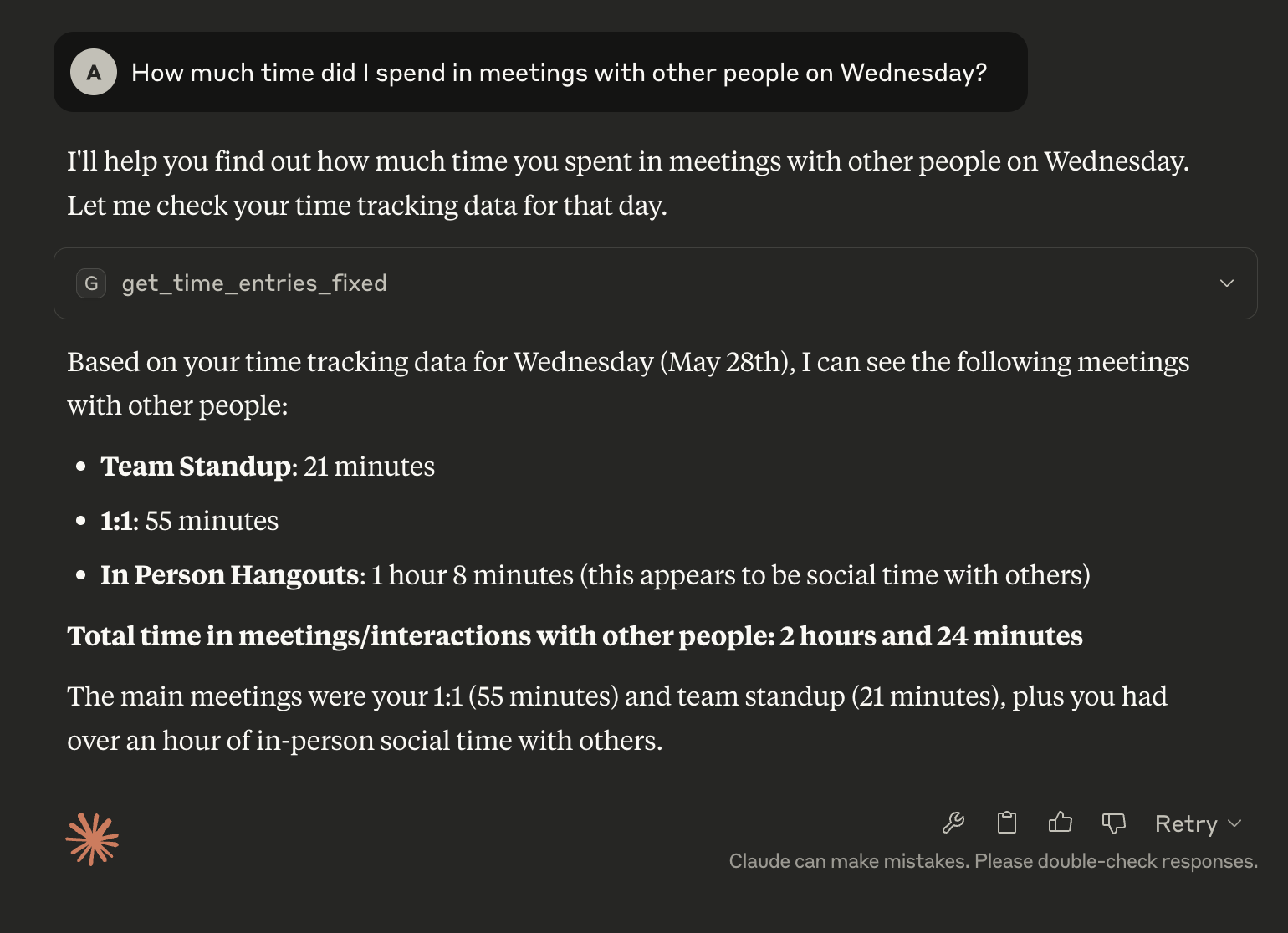
A Model Context Protocol (MCP) server for Toggl Track time tracking integration. This server allows Claude and other MCP clients to interact with your Toggl Track account to manage projects and time entries.

This server is 100% written by Claude Code, except for BUILD_APP.md, which I wrote to guide the creation of the server This has not be extensively tested (honestly, I've barely read the code!) so improvements can definitely be made.

Claude Code

Features

  • Get Projects: Retrieve all projects from your Toggl Track account
  • Get Workspaces: List all workspaces associated with your account
  • Get Time Entries: Detailed time entries with filtering by date range and project
  • Time Summary: Aggregated time reports by project with percentages
  • Current Timer: Check what's currently running and elapsed time
  • Timer Control: Start new timers and stop current running timers
  • Task Management: Create and retrieve project tasks with time estimates
  • Search Entries: Find time entries by description text
  • Smart Prompts: Pre-built conversation starters for common time tracking queries
  • Secure API token authentication
  • Formatted, readable output for LLM consumption

Quick Start

1. Get Your Toggl Track API Token

  1. Go to your Toggl Track profile settings
  2. Copy your API token from the "API Token" section
  3. Keep this token handy for the configuration step

2. Build the Docker Image

Clone this repository and build the Docker image:

git clone git@github.com:vontell/toggl-track-mcp.git
cd toggl-track-mcp
docker build -t toggl-track-mcp .

3. Configure Claude Desktop

Add the server to your Claude Desktop configuration file:

Location: ~/Library/Application Support/Claude/claude_desktop_config.json (macOS)

{
  "mcpServers": {
    "Toggl Track": {
      "command": "docker",
      "args": [
        "run",
        "-i",
        "--rm",
        "-e",
        "TOGGL_API_TOKEN",
        "toggl-track-mcp"
      ],
      "env": {
        "TOGGL_API_TOKEN": "your_api_token_here"
      }
    }
  }
}

Important: Replace "your_api_token_here" with your actual Toggl Track API token.

4. Restart Claude Desktop

After updating the configuration, restart Claude Desktop to load the new MCP server.

5. Verify Installation

Once restarted, you should be able to ask Claude questions like:

  • "What projects do I have in Toggl Track?"
  • "Start a timer for 'Code review'"
  • "What's my current timer status?"

Development Setup

For development and testing:

Local Development

Create a virtual environment:

python -m venv .venv
source .venv/bin/activate  # On Windows: venv\Scripts\activate

Install dependencies:

pip install -r requirements.txt

Set your API token:

export TOGGL_API_TOKEN="your_api_token_here"

Testing with MCP Inspector

mcp dev server.py

This opens the MCP Inspector for interactive testing.

Available Tools

get_projects

Retrieves all projects from your Toggl Track account with details including:

  • Project name
  • Workspace ID
  • Associated client
  • Color coding
  • Privacy settings

get_workspaces

Lists all workspaces associated with your Toggl Track account with:

  • Workspace name
  • Workspace ID

get_time_entries

Get detailed time entries with optional filtering:

  • start_date: Filter by start date (YYYY-MM-DD format, defaults to 7 days ago)
  • end_date: Filter by end date (YYYY-MM-DD format, defaults to today)
  • project_name: Filter by specific project name
  • Shows entries grouped by date with descriptions, durations, and daily totals

get_time_summary

Get aggregated time summary by project:

  • start_date: Start date for summary (defaults to 7 days ago)
  • end_date: End date for summary (defaults to today)
  • project_name: Focus on specific project (optional)
  • Shows total hours by project with percentages and grand total

get_current_timer

Check currently running timer:

  • Shows active project and description
  • Displays elapsed time and start time
  • Returns "No timer running" if nothing is active

start_timer

Start a new timer:

  • description: Description for the time entry (required)
  • project_name: Name of project to assign timer to (optional)
  • Automatically uses your primary workspace
  • Returns confirmation with timer details

stop_current_timer

Stop the currently running timer:

  • Stops any active timer
  • Shows final duration and time period
  • Returns "No timer running" if nothing is active

search_time_entries

Search time entries by description:

  • query: Text to search for in descriptions (required)
  • start_date: Start date for search range (optional, defaults to 30 days ago)
  • end_date: End date for search range (optional, defaults to today)
  • Case-insensitive search with total time calculation

get_project_tasks

Get all tasks for a specific project:

  • project_name: Name of the project to get tasks for (required)
  • Shows task names, IDs, status (active/inactive), and estimated time
  • Returns helpful error if project not found

create_project_task

Create a new task for a project:

  • project_name: Name of the project to create the task in (required)
  • task_name: Name of the new task (required)
  • estimated_hours: Estimated hours for the task (optional)
  • Returns confirmation with task ID and details

get_all_tasks

Get all tasks across all projects:

  • Shows tasks organized by project and workspace
  • Displays task names, IDs, status, and estimated time
  • Returns total count of tasks found
  • Skips projects without task access gracefully

Example Prompts

The server includes pre-built prompts for common scenarios:

Time Tracking & Analysis

  • detailed_time_report: Get detailed breakdown of time entries
  • time_summary_report: Get aggregated time summary by project
  • productivity_analysis: Analyze work patterns and productivity
  • current_status_check: Check current timer and today's activity
  • project_deep_dive: In-depth analysis of specific project work
  • search_by_description: Search time entries by description text

Timer Control

  • quick_start_timer: Start a timer with description and optional project
  • stop_and_start_new: Stop current timer and start a new one
  • timer_status_and_control: Check status and get timer control options
  • work_session_timer: Start a focused work session with break reminders

Task Management

  • view_project_tasks: View all tasks for a specific project
  • create_new_task: Create a new task with optional time estimates
  • task_planning_session: Plan and organize tasks for a project
  • project_task_overview: Get overview of tasks across all projects
  • list_all_tasks: List all tasks across all projects with details

Example Usage

Once installed in Claude Desktop, you can ask:

Project & Workspace Queries

  • "What projects do I have in Toggl Track?"
  • "Show me my Toggl workspaces"
  • "List all my time tracking projects"

Time Entry Analysis

  • "Show me my time entries for the last week"
  • "What did I work on yesterday?"
  • "Give me a time summary for project X"
  • "How much time did I spend on each project this month?"
  • "Search my time entries for 'meeting' this week"

Timer Control

  • "What's my current timer status?"
  • "Start a timer for 'Code review' on project ABC"
  • "Stop my current timer"
  • "Start a timer for 'Planning session'"

Task Management

  • "Show me all tasks for project XYZ"
  • "Create a new task called 'Database migration' for project ABC"
  • "Create a task with 4 hours estimated time"
  • "Help me plan tasks for my current project"
  • "List all tasks across all my projects"

API Reference

This server uses the Toggl Track API v9. Key endpoints used:

  • GET /api/v9/me/projects - Get user projects
  • GET /api/v9/workspaces - Get user workspaces
  • GET /api/v9/me/time_entries - Get time entries
  • GET /api/v9/me/time_entries/current - Get current running timer
  • POST /api/v9/workspaces/{id}/time_entries - Start new timer
  • PATCH /api/v9/workspaces/{id}/time_entries/{id}/stop - Stop timer
  • GET /api/v9/workspaces/{id}/projects/{id}/tasks - Get project tasks
  • POST /api/v9/workspaces/{id}/projects/{id}/tasks - Create new task

Development

Project Structure

toggl-track-mcp/
├── server.py              # Main MCP server implementation
├── requirements.txt       # Python dependencies
├── .env.example          # Environment variable template
└── README.md             # This file

Adding New Features

To extend this server with additional Toggl Track functionality:

  1. Add new methods to the TogglClient class
  2. Create new @mcp.tool() decorated functions
  3. Handle authentication and error cases
  4. Update this README with the new capabilities

Authentication

This server uses Toggl Track's API token authentication method. The token should be provided via the TOGGL_API_TOKEN environment variable.

Security Note: Never commit your API token to version control. Always use environment variables or secure configuration management.

Error Handling

The server includes comprehensive error handling for:

  • Missing API token configuration
  • Network connectivity issues
  • API authentication failures
  • Malformed API responses

Rate Limiting

Toggl Track API has rate limiting (approximately 1 request per second). The server respects these limits and provides appropriate error messages if limits are exceeded.

Contributing

Feel free to submit issues and enhancement requests!

License

This project is open source and available under standard terms.

Install configuration

Are you the maintainer?

Claim this server with your GitHub account to request manual ownership verification.

README Embed Badge
Markdown

Link to the catalog listing for Toggl Track MCP Server from your README. This badge does not certify ownership, compatibility or security.

[![MCP catalog listing](https://img.shields.io/badge/MCP-awesome--mcp-orange?style=flat-square)](https://awesome-mcp.com/servers/toggl-track-mcp)

REPOSITORY STATS

GitHub StarsUnavailable
ForksUnavailable

Public repository statistics could not be verified. Check the configured source address; unavailable counts are not zero.

下载与拉取统计

来源、范围和时段分别列出;不相加,不代表安装人数、活跃用户或安全审核。

尚无已审核的包 / 镜像标识,暂不展示下载统计。

Related productivity work MCP Servers

Alternative and complementary servers in the same category

View all in productivity work →
Tuqui hosted MCP server for Odoo
tuqui-odoo-mcp-for-claude-chatgpt•tuqui-ai

Tuqui is a hosted MCP server that connects Odoo with Claude and ChatGPT so users can ask about sales, stock, customers and overdue invoices in plain language.

Repository stats unavailable
Productivity & Ops